❌

Lees weergave

v11.6.0

⚠️ Potential Breaking Changes

  • @directus/api
    • Fixed filter hook altered payload not passed to action hook on create (#24812 by @ComfortablyCoding)
    • GraphQL primary key field types have changed from String to ID (#24757 by @Nitwel)

✨ New Features & Improvements

  • @directus/app
    • Added Visual Editor Beta (#24758 by @formfcw)
    • After creating a new content version, it will become the current selected version (#24606 by @robluton)
    • Added Version support to field rules. This allows conditional rules based on an item's version (#24646 by @robluton)
  • @directus/api
  • @directus/env
    • Added QUERYSTRING_MAX_PARSE_DEPTH configuration variable (#24833 by @Nitwel)
  • @directus/system-data
  • @directus/types
  • @directus/sdk

πŸ› Bug Fixes & Optimizations

πŸ“¦ Published Versions

  • @directus/app@13.8.0
  • @directus/api@26.0.0
  • @directus/components@1.0.3
  • @directus/composables@11.1.9
  • @directus/constants@13.0.1
  • create-directus-extension@11.0.12
  • create-directus-project@12.0.1
  • @directus/env@5.0.3
  • @directus/errors@2.0.1
  • @directus/extensions@3.0.4
  • @directus/extensions-registry@3.0.4
  • @directus/extensions-sdk@13.0.4
  • @directus/format-title@12.0.1
  • @directus/memory@3.0.3
  • @directus/pressure@3.0.3
  • @directus/random@2.0.1
  • @directus/release-notes-generator@2.0.1
  • @directus/schema@13.0.1
  • @directus/storage-driver-azure@12.0.3
  • @directus/storage-driver-cloudinary@12.0.3
  • @directus/storage-driver-gcs@12.0.3
  • @directus/storage-driver-s3@12.0.3
  • @directus/storage-driver-supabase@3.0.3
  • @directus/system-data@3.1.0
  • @directus/themes@1.0.10
  • @directus/types@13.1.0
  • @directus/utils@13.0.3
  • @directus/validation@2.0.3
  • @directus/sdk@19.1.0

  •  

Paint.NET 5.1.7 is now available

This is a hotfix for brush rendering to not occasionally have segments that are drawn twice.

The 5.1.6 update was a hotfix for a memory leak, and also updated the bundled JPEG XL plugin to fix a crash on ARM64.

The 5.1.5 update added JPEG XL (*.jxl) support, improved quantization color quality, updated AVIF loading to better handle mapping HDR images to SDR, and fixed some bugs.

Get the Update

There are two releases of Paint.NET:

  • Microsoft Store release (recommended)
    • You can purchase it here. This helps fund development and is an alternative or supplement to sending in a donation. In addition, updates happen automatically in the background when you’re not using the app.
    • If you already have it installed, the update should happen automatically once Microsoft certifies the update, usually within the next day or so. To get the update immediately (once it’s certified), you can follow the instructions listed here.
  • Classic Desktop release
    • Download the installer from the website. This is the recommended download if you don’t have Paint.NET installed. It can also be used to update the app.
    • If you already have it installed, you should be offered the update automatically within the next few days, but you can also get it immediately by going to βš™ Settings -> Updates -> Check Now.
    • Offline Installers and Portable ZIPs are available over on GitHub.

Change Log

Changes since 5.1.6:

  • Fixed a bug in the UI system that was causing the brush tools to occasionally process pointer input events twice.
  • Updated the bundled JpegXLFileType plugin to v1.1.3 (thanks @null54!).

Changes since 5.1.5:

  • Fixed a memory leak when flattening an image and then undoing that change.
  • Updated the bundled JpegXLFileType plugin to v1.1.2 to fix a crash on ARM64 (thanks @null54!).

Changes since 5.1.4:

  • New: JPEG XL (*.jxl) images are now supported by way of bundling @null54β€˜s JpegXLFileType plugin
  • Fixed the Levels adjustment not honoring the active selection.
  • Fixed some more mouse cursor issues when completing certain actions with certain tools.
  • Fixed some keyboard shortcuts in the Adjustments menu not working reliably.
  • Fixed most cases of tooltips blinking on/off when drawn near the bottom of the screen (thanks @toe_head2001!).
  • Fixed some new high-DPI scaling issues in toolbar dropdowns.
  • Improved quantization quality for Effects->Color-Quantize and when saving an image at 8-bit depth and below. This was done by merging octree node colors in linear gamma space.
  • Fixed some incorrect background text color rendering in the status bar.
  • Updated the bundled AvifFileType plugin to v3.12.1, which improves conversion from HDR images utilizing the Rec. 2020 PQ color space (thanks @null54).
  • Updated the bundled WebpFileType plugin to v1.5.0 (thanks @null54!).

  •  

MediaInfo 25.03

+ Italian translation update
+ Windows shell extension: Handle .url files, thanks to cjee21
+ Windows shell extension: Option for separate instance, thanks to cjee21
+ I2218, TTML: detect IMSC Rosetta
+ MXF: support of HDR Vivid Metadata
+ AVS3 Video: support for AVS3 Video according to T/AI 109.2
+ MP4: Display of operating system and hardware e.g. Android or iOS
+ MP4: Handle loci and @xyz metadata
+ MP4: Handle more metadata
+ DAT: recording date & misc
+ 3D Audio: Enable graph also on Linux
x macOS GUI: Fix HTML background color on macOS 11 and earlier
x macOS GUI: Update macOS app icon to match new UI guidelines
x iOS: prevent crash when receiving invalid event
x iOS: Update iOS icon to match new UI guidelines
x iOS: Open from media gallery
x iOS: Prevent out-of-memory when parsing large file
x Android: Fix square adaptive icon
x Android: Update AppIcon
x Qt GUI: several improvements for matching the current windows version, thanks to cjee21
x I1042, Windows GUI: Fix menubar/toolbar visibility
x I2199, MP4: fix moov meta support
x I2213, MXF: better handling of bad LinkedTrackID in descriptors
x I2191, PAC: fix crash with some W16 blocs
x I2223, DVD-Video: fix crash
x AVC: fix GOP computing sometimes half of actual GOP
x AC3: Fix wrong read of mixlevel
x MPEG-4: Handle correctly mett track format
x Fix alignment of text output for CJK languages
  •  

Proxmox VE is an NVIDIA vGPU supported hypervisor

VIENNA, Austria – March 19, 2025 – Enterprise software developer Proxmox Server Solutions announced today that its open-source virtualization management platform, Proxmox Virtual Environment (Proxmox VE), is the newest addition to the NVIDIA vGPU supported hypervisors. Starting with NVIDIA vGPU 18, this enables GPU virtualization across the Proxmox hypervisor, enhancing compatibility and performance for users operating in this environment. Enterprises using Proxmox VE can now take advantage of NVIDIA vGPU to run graphics-intensive and AI development workloads in virtualized environments. This partnership marks another step in a series of recent efforts to empower enterprise customers with enhanced features, official support, and continued open access.

Sharing a GPU across virtual machines (VMs) on virtualization platforms like Proxmox VE offers enterprises significant cost and efficiency benefits, reducing idle time through resource sharing, and improves scalability, allowing multiple GPU-accelerated tasks to run on the same hardware. Proxmox and NVIDIA work together to enable seamless integration and support between their solutions.

"Deploying NVIDIA vGPU software on Proxmox VE is seamless. The integration makes it easy to verify the performance needed to support various compute-intensive workloads and manage GPU utilization efficiently. Now we can quickly adjust resources to ensure an optimal user experience.” says Daire Byrne, Global Head of Systems at DNEG, an award-winning creative studio.

Availability

Technical enterprise support for NVIDIA vGPU software on Proxmox VE is available requiring a Proxmox subscription level of Basic, Standard, or Premium as well as an NVIDIA vGPU entitlement.

For optimal performance in production workloads, enterprise-grade hardware is recommended. To verify hardware compatibility, consult the NVIDIA Qualified System Catalog for detailed information. A comprehensive guide on configuring NVIDIA's Virtual GPU (vGPU) technology within the Proxmox Virtual Environment hypervisor is available from Proxmox at: NVIDIA vGPU on Proxmox VE

###

About Proxmox Virtual Environment
Proxmox Virtual Environment (Proxmox VE) is the leading open-source platform for all-inclusive enterprise virtualization. With the central web interface, you can easily run VMs and containers, manage software-defined storage and networking functionality, high-availability clustering, and multiple integrated out-of-the-box tools like backup/restore, live migration, replication, and the firewall. Enterprises use the powerful yet easy-to-manage, all-in-one solution to meet the core requirements of today’s modern data centers. Proxmox VE allows them to remain adaptable for future growth, thanks to its flexible, modular and open architecture.

About Proxmox Server Solutions
Proxmox provides powerful and user-friendly open-source server software. Enterprises of all sizes and industries use Proxmox solutions to deploy efficient and simplified IT infrastructures, minimize total cost of ownership, and avoid vendor lock-in. Proxmox also offers commercial support, training services, and an extensive partner ecosystem to ensure business continuity for its customers. Proxmox Server Solutions GmbH was established in 2005 and is headquartered in Vienna, Austria.

Contact:Β Daniela HΓ€sler / Dominik Bohn, Proxmox Server Solutions GmbH

  •  

Bitfocus Companion v3.5.3

πŸ“¦ Downloads available at

πŸ’΅ Donate to the project at

Companion v3.5.3 - Release Notes

🐞 BUG FIXES

  • fix emulator keymap for clickers #3328
  • add pincode layout for SDS #3330
  • fix web buttons irregular column count causing some buttons to not work #3303
  • fix \r\n drawing with extra space #3315

🐞 MODULE FIXES

  • cedar-dns8d
  • colorlight-processor
  • focusrite-mp8r
  • generic-osc
  • generic-swp02
  • imimot-mitti
  • interspace-mastercuev7
  • renewedvision-propresenter-api
  • stagetec-rcp
  • studiocoast-vmix
  • twitch-api

Full Changelog: v3.5.2...v3.5.3

  •  

NVIDIA Driver 572.83

Release Highlights:
Although GeForce Game Ready Drivers and NVIDIA Studio Drivers can be installed on supported notebook GPUs, the original equipment manufacturer (OEM) provides certified drivers for your specific notebook on their website. NVIDIA recommends that you check with your notebook OEM for recommended software updates for your notebook.

Game Ready for Half-Life 2 RTX Demo and inZOI

This new Game Ready Driver supports the new GeForce RTX 5070 Ti GPU and provides the best gaming experience for the latest new games supporting DLSS 4 technology including the Half-Life 2 RTX Demo and Warhammer 40,000: Darktide. Further support for titles leveraging DLSS technology includes Assassin's Creed Shadows, The Last of Us Part II Remastered, and the enhanced update for Control. In addition, this driver supports inZOI which features the first integration of NVIDIA ACE technology.

Gaming Technology
  • Adds support for GeForce RTX 5090, 5080, and 5070 Ti notebooks

Fixed Gaming Bugs
  • N/A

Fixed General Bugs
  • [GeForce RTX 5080/5090] Graphics cards may not run at full speeds on system reboot when overclocked [5088034]
  • [GeForce RTX 50 series] GeForce RTX 50 series GPUs crashes with black screen [5120886]
  • Some NVIDIA Control Panel / NVIDIA App settings changes immediately get reset or give error [5160516]
  • PC may bugcheck IRQL NOT LESS OR EQUAL 0xa during gameplay with HDR enabled [5091576]
  • [VRED 2026] Optix compile error with R570 branch drivers [5122360]
  • [Derivative TouchDesigner ] Application stability issues [4606316]


Learn more in our Game Ready Driver article here.

Game Ready Driver

  •  

elementary OS 8.0.1 Available Now

It’s been a little over 100 days since elementary OS 8 was released, and we’re proud to announce another round of updates, including a fresh new download. We’ve been hard at work this winter addressing issues that you reported and we’ve added a couple new creature comforts along the way. This bug fix release also includes the latest Ubuntu LTS Hardware Enablement Kernel, so it’s worth checking out if you downloaded OS 8.0 and it disagreed with your hardware.

AppCenter

We now properly use dark mode brand colors and dark mode screenshots thanks to Italo. Plus, when developers provide screenshots for multiple desktop environments, we now prefer the ones intended for our desktop environment, Pantheon. We support the new <Developer> Appstream tag, thanks to Juan. And we now support the contribute URL type.

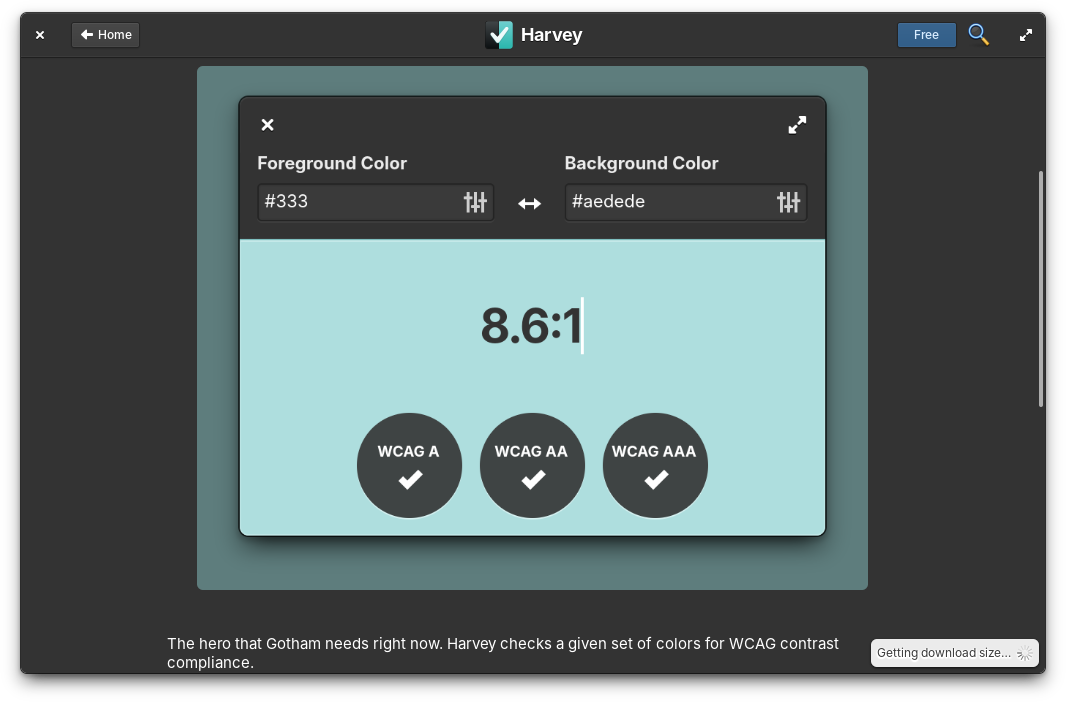
Harvey on AppCenter

AppCenter now shows dark mode screenshots when available

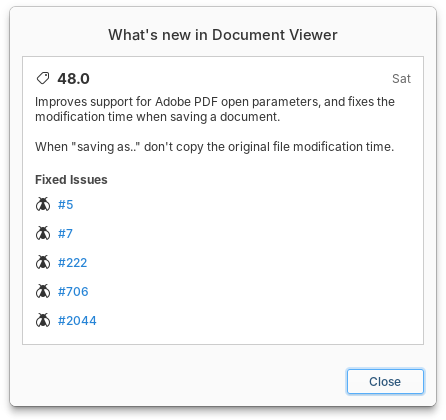
Italo also fixed some issues with release notes overflowing out of their container, and we slightly redesigned the release notes window in the Updates page. He also addressed a few other issues in the Updates page that could occur while things were being updated or refreshed and made sure AppCenter recovers gracefully when its cache is emptied.

Releases notes on AppCenter

Release notes dialogs have been slightly redesigned

Search is also much faster thanks to Leonhard. And for developers, Ryo fixed loading your local metadata for testing with the --load-local terminal option.

Files & Terminal

Jeremy fixed another half-dozen reported issues in Files, including an issue that prevented entering file paths in search mode, an issue that prevented scrolling after deleting files, and an issue where files would disappear when dropped on an unmounted drive. The New file submenu now respects the hierarchy of folders in Templates. We now also respect the admin:// uri protocol for opening a path as an administrator, and Files is now styled correctly when run as administrator.

He also fixed an issue where Terminal tabs took multiple clicks to focus, and an issue where keyboard shortcuts stopped working for tabs that had been dragged into their own new window. Plus, file paths and names are also now properly quoted when drag-and-dropped from Files into Terminal.

System Settings

System Settings now allows configuring its notifications in System Settings β†’ Notications. So you can turn off bubbles if you don’t want to receive notifications about updates, for example. We’ll also no longer automatically download updates when on metered connections and send a notification instead, thanks to Leonhard. Plus we no longer check for updates in Demo Mode.

System Settings β†’ System

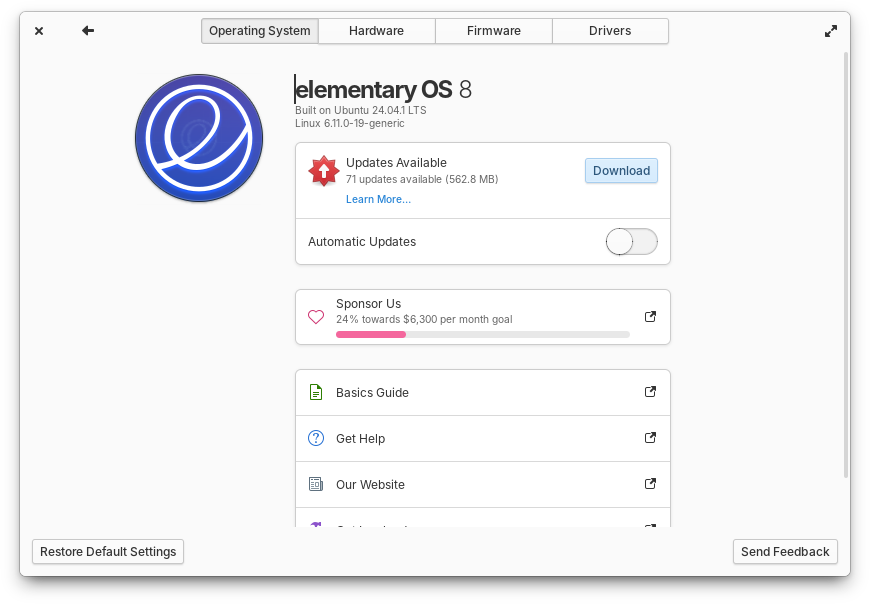
Updates now show their download size and you can see progress towards our monthly sponsorship goal

In System, Vishal made sure we show how large an update will be before downloading it and that we skip held-back packagesβ€”such as phased or staged updatesβ€”when preparing the updates bundle so that it will more reliably succeed. Alain added a progress bar while downloading. And Ryo made sure the last refresh time is more accurate when no updates are available. Alain also added a new progress bar that represents how close we are to meeting our monthly sponsorship goal.

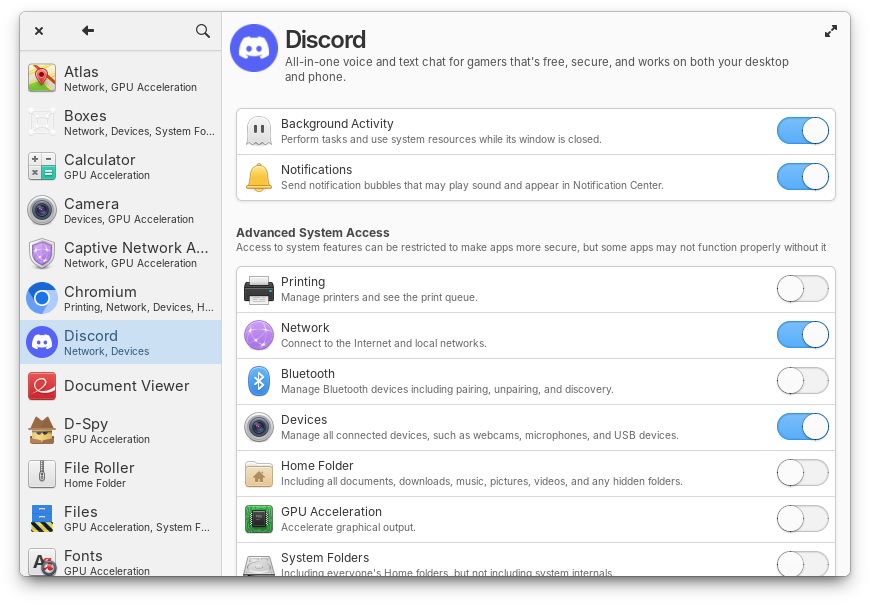
In Applications, you can now disallow notifications access. This is especially useful for apps which use the notifications portal, but don’t properly report their notification usage and can’t be controlled in the Notifications settings page.

System Settings β†’ Applications

Reign in apps that don’t appear in Notifications settings

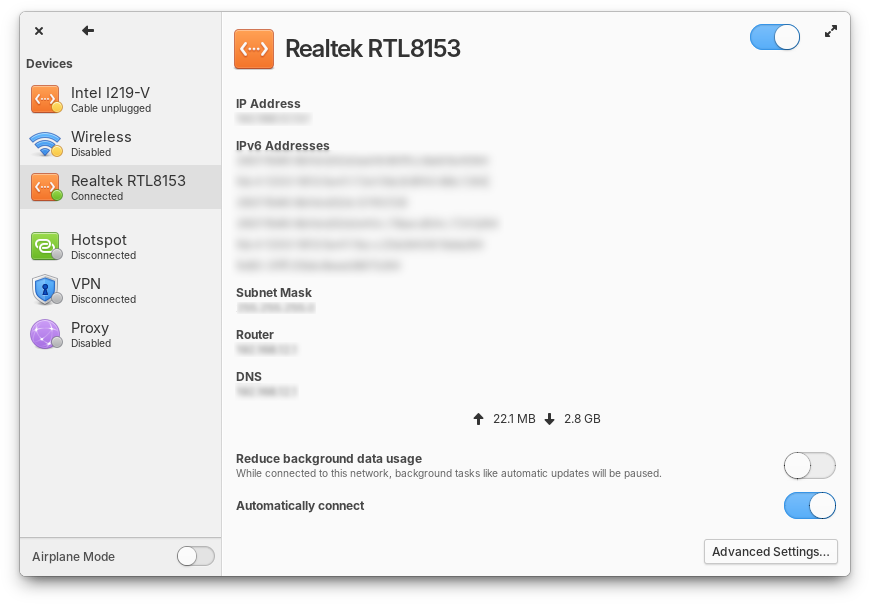
In Network there are two new settings: whether a network should be automatically connected to when available and whether to reduce background data usage when connected to that network.

System Settings β†’ Network

Disable autoconnect or mark a network as metered

We also updated the pointer icons in Mouse & Touchpad settings and the checkmarks in Locale settings will now respect your chosen accent color. Plus settings pages with sidebars now remember the width you adjusted them to, thanks to Alain.

Installation & Onboarding

David fixed a crash with certain partitioning schemes in the Installer’s custom install view. And the Encryption step was redesigned to fit on a single page, solving an issue with confusing navigation. Plus, onboarding will now always stay centered on the screen, even when resized.

Panel & Quick Settings

Ilya fixed an issue with the panel height when using the Classic session and HiDPI displays. The app context menu in the Applications menu now shows a β€œKeep in Dock” checkbox, just like in the Dock thanks to Stella. In the Power menu, we now show the device model if available, and avoid erroneously showing an empty battery icon thanks to Alain. In the Sound menu, Dmitry fixed loading album art from certain apps like Google Chrome, and we fixed an issue where player icons could become too large.

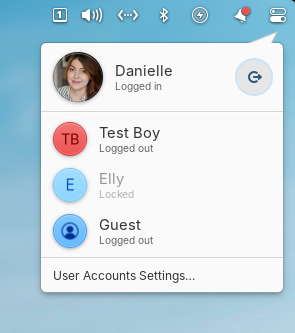
Accounts in Quick Settings

See who else is logged in and quickly switch accounts from Quick Settings

In Quick settings, Leonhard fixed an issue with performing updates while shutting down. And Alain added a new page where you can see which other people are logged in and quickly switch between accounts.

Dock

Leo added a bit more spacing between launchers and their running indicators, and fixed an issue where larger icons could be clipped at the peak of their bounce animation. Apps who don’t notify on startup will no longer bounce in the dock indefinitely, thanks to Leonhard. We fixed an issue where the dock would still receive click events while hidden in the Classic session. Plus the dock now has an opaque style when β€œPanel Translucency” is turned off in System Settings β†’ Desktop β†’ Dock & Panel.

Window Manager

We have another huge release of our window manager thanks to Leonhard and Leo. This release fixes five potential crashes, over a dozen reported issues, fixes related to both the Classic and Secure sessions, issues related to HiDPI, and more, plus performance improvements. It’s worth reading the full release notes on GitHub if you have been waiting for the fix for a specific issue.

And More

OS 8.0.1 includes the latest long-term support Hardware Enablement stack from Ubuntu, including Linux 6.11. This brings improved performance for AMD processors, support for Intel β€œLunar Lake” processors, and filesystem performance improvements in some cases. Plus support for certain webcams, USB network devices, joysticks, and more.

Leo fixed an issue where connecting Bluetooth devices could cause the Lock Screen to freeze. You can now close the captive network assistant with the keyboard shortcut Ctrl + Q, thanks to StanisΕ‚aw. And Alain fixed copying screenshots to the clipboard.

We fixed an issue where wired network connections could fail to connect due to a change in Ubuntu. We’re pursuing this issue upstream and working on a way to ship the fix as an update, but for now fixing this issue requires either manual intervention through Terminal or a reinstall.

We also now pre-install an AppArmor profile that fixes a number of Flatpak-related issues like not being to install certain runtime updates or apps not launching in the guest session or Demo mode. Special thanks to Uncle Tallest for investigating this issue and helping folks in our Discord who ran into it.

And of course this release comes with a ton of translation updates! Special thanks to our hard-working internationalization community and especially Ryo who fixed a number of issues with things that couldn’t be localized properly in the previous release.


Get elementary OS 8.0.1

elementary OS 8.0.1 is available as a pay-what-you-can purchase at elementary.io today. Localized direct downloads and a torrent magnet link are provided.

Sponsors have been able to download OS 8.0.1 release candidates since last week, so if getting things before anyone else is important to you, consider sponsoring us on GitHub

πŸ’Ύ

  •  

Firefox 136.0.2

Fixed

  • Fixed a bug where "Cookies and site data" and "Temporary cached files and pages" were unexpectedly enabled after updating to Firefox 136 for users with "History" and/or "Site settings" set to clear on shutdown in previous versions. (Bug 1952564)

    Affected users already on Firefox 136 can disable these settings in "Privacy & Security".

  • Fixed an issue where the Primary Password prompt appeared in unexpected situations. (Bug 1946121)

  • Fixed visibility issues with radio buttons on dark backgrounds. (Bug 1951930)

  • Fixed high CPU usage on Windows when the screen was locked or the laptop lid was closed. (Bug 1924932)

Web Platform

  • Disabled support for the CookieStore API due to compatibility concerns. The API will be enabled later once the compatibility issues have been addressed.

  •  

BookStack v25.02.1

Links

Full List of Changes

This release contains the following fixes and changes:

  • Added ipv6 database host address support. (#5464)
  • Updated translations with latest Crowdin changes. (#5505)
  • Updated revisions list to hide changes link for oldest revision. (#5454)
  • Updated system CLI:
    • Added new download-vendor command.
    • Updated restore command to take environment variables into account. (#5489)
    • Updated backup command to use mariadb-dump where available. (#5373)
    • Updated update command to check, warn and exit early if the CLI is making changes to itself. (#5335)
    • Updated MySQL handling to use option files to pass details to CLI executions.
    • Updated MySQL handling to consider common xampp directory.
  • Updated PHP dependencies.

  •  

FreshRSS 1.26.1

This is a bugfix release for 1.26.0, addressing some regressions πŸ›

A few highlights ✨:

  • Fix regression with cURL HTTP headers breaking conditional HTTP requests
  • Fix regression with saving states of user queries
  • Fix regression with dynamic OPML

This release has been made by @Alkarex, @FromTheMoon85, @marienfressinaud, @math-GH
and newcomers @abackstrom, @BryanButlerGit, @culbrethj, @EricDiao, @Karvel, @ViPeR5000

Full changelog:

  • Features
    • Add cURL version to page about system information #7409
  • Bug fixing
    • Fix regression with cURL HTTP headers breaking conditional HTTP requests #7403, FreshRSS/simplepie#33
    • Fix regression with saving states of user queries #7400
    • Fix regression with dynamic OPML #7394
    • Fix update of the user’s last activity on login action #7406
    • Fix setting category option Maximum number of articles to keep per feed #7416
    • Fix priority field when processing a new feed from an extension #7354
  • Deployment
    • Fix regression with 64-bit timestamps on 32-bit platforms #7375
    • Fix back-compatibility with cURL 7.51 (we require cURL 7.52+ for CURLPROXY_HTTPS) #7409
  • UI
    • Use case-insensitive sort for categories #7402
    • Improve dark mode of Origine theme #7413
    • Added API password indicator #7340
  • I18n
    • Fix (es, fa, sk): do not translate XPath code #7404
    • Fix date bug in Finish #7423
    • Add Portuguese from Portugal #7329
    • Improve Hungarian #7391
  • Misc.

  •  

v0.18.6

This is a hotfix to solve the image loading problems that started in the 0.18.z releases. If you appreciate my work, you can show your support with a donation through GitHub sponsors. Your support helps me continue improving and growing the app. Thank you!

πŸ—οΈ Enhancements

πŸ”§ Bugfixes

  • Add custom connectivity checker for Coil that always claims to be connected #4513, by @nielsvanvelzen

Contributors

  •  

Paint.NET 5.1.6 is now available

This is a hotfix for 5.1.5 that fixes a memory leak, and also updates the bundled JPEG XL plugin to fix a crash on ARM64.

The 5.1.5 update added JPEG XL (*.jxl) support, improved quantization color quality, updatesdAVIF loading to better handle mapping HDR images to SDR, and fixed some bugs.

Get the Update

There are two releases of Paint.NET:

  • Microsoft Store release (recommended)
    • You can purchase it here. This helps fund development and is an alternative or supplement to sending in a donation. In addition, updates happen automatically in the background when you’re not using the app.
    • If you already have it installed, the update should happen automatically once Microsoft certifies the update, usually within the next day or so. To get the update immediately (once it’s certified), you can follow the instructions listed here.
  • Classic Desktop release
    • Download the installer from the website. This is the recommended download if you don’t have Paint.NET installed. It can also be used to update the app.
    • If you already have it installed, you should be offered the update automatically within the next few days, but you can also get it immediately by going to βš™ Settings -> Updates -> Check Now.
    • Offline Installers and Portable ZIPs are available over on GitHub.

Change Log

Changes since 5.1.5:

  • Fixed a memory leak when flattening an image and then undoing that change.
  • Updated the bundled JpegXLFileType plugin to fix a crash on ARM64 (thanks @null54!).

Changes since 5.1.4:

  • New: JPEG XL (*.jxl) images are now supported by way of bundling @null54β€˜s JpegXLFileType plugin
  • Fixed the Levels adjustment not honoring the active selection.
  • Fixed some more mouse cursor issues when completing certain actions with certain tools.
  • Fixed some keyboard shortcuts in the Adjustments menu not working reliably.
  • Fixed most cases of tooltips blinking on/off when drawn near the bottom of the screen (thanks @toe_head2001!).
  • Fixed some new high-DPI scaling issues in toolbar dropdowns.
  • Improved quantization quality for Effects->Color-Quantize and when saving an image at 8-bit depth and below. This was done by merging octree node colors in linear gamma space.
  • Fixed some incorrect background text color rendering in the status bar.
  • Updated the bundled AvifFileType plugin to v3.12.1, which improves conversion from HDR images utilizing the Rec. 2020 PQ color space (thanks @null54).
  • Updated the bundled WebpFileType plugin to v1.5.0 (thanks @null54!).

  •  

Firefox 136.0.1

Fixed

  • Fixed an issue where a cookie size limit caused problems with website cookie management when using the CookieStore API. This could cause login and other state-related issues. (Bug 1950565)

  • Fixed an issue where Control/Command+L did not focus the address bar in new windows. (Bug 1947723)

Unresolved

  • Users clearing "History" and/or "Site settings" on shutdown on previous versions will also have clearing "Cookies and site data" and "Temporary cached files and pages" enabled after updating to Fx136 even if they previously haven't checked these settings.
    Affected users can go to "Privacy & Security" settings directly after the upgrade and uncheck both boxes to avoid getting logged out. (Bug 1952564)

  •  

Paint.NET 5.1.5 is now available

This update adds JPEG XL (*.jxl) support, improves quantization color quality, updates AVIF loading to better handle mapping HDR images to SDR, and fixes some bugs.

Get the Update

There are two releases of Paint.NET:

  • Microsoft Store release (recommended)
    • You can purchase it here. This helps fund development and is an alternative or supplement to sending in a donation. In addition, updates happen automatically in the background when you’re not using the app.
    • If you already have it installed, the update should happen automatically once Microsoft certifies the update, usually within the next day or so. To get the update immediately (once it’s certified), you can follow the instructions listed here.
  • Classic Desktop release
    • Download the installer from the website. This is the recommended download if you don’t have Paint.NET installed. It can also be used to update the app.
    • If you already have it installed, you should be offered the update automatically within the next few days, but you can also get it immediately by going to βš™ Settings -> Updates -> Check Now.
    • Offline Installers and Portable ZIPs are available over on GitHub.

Change Log

Changes since 5.1.4:

  • New: JPEG XL (*.jxl) images are now supported by way of bundling @null54β€˜s JpegXLFileType plugin
  • Fixed the Levels adjustment not honoring the active selection.
  • Fixed some more mouse cursor issues when completing certain actions with certain tools.
  • Fixed some keyboard shortcuts in the Adjustments menu not working reliably.
  • Fixed most cases of tooltips blinking on/off when drawn near the bottom of the screen (thanks @toe_head2001!).
  • Fixed some new high-DPI scaling issues in toolbar dropdowns.
  • Improved quantization quality for Effects->Color-Quantize and when saving an image at 8-bit depth and below. This was done by merging octree node colors in linear gamma space.
  • Fixed some incorrect background text color rendering in the status bar.
  • Updated the bundled AvifFileType plugin to v3.12.1, which improves conversion from HDR images utilizing the Rec. 2020 PQ color space (thanks @null54).
  • Updated the bundled WebpFileType plugin to v1.5.0 (thanks @null54!).

  •  

Bitfocus Companion v3.5.2

πŸ“¦ Downloads available at

πŸ’΅ Donate to the project at

Companion v3.5.2 - Release Notes

🐞 BUG FIXES

  • Crash reading property on undefined at startup
  • Improve sqlite performance
  • Handle module unexpected exits
  • Backport fix for potential crash when updating many buttons at once

🐞 MODULE FIXES

  • aimedia-icap
  • allenheath-ahm
  • avocet-landscape
  • broadlink-remote
  • colorlight-grandshow
  • combitech-vidblasterx
  • dashare-multiplay3
  • emotimo-st4
  • etc-paradigm
  • greengo-intercom
  • intelix-matrix
  • kenku-fm
  • limagiran-holyrics
  • monospace-lightkey
  • mrmoco-mhc
  • novastar-coex
  • osee-gostream
  • vicreo-display
  • voicemod-api
  • wled-websocket

Full Changelog: v3.5.1...v3.5.2

  •  

Bitfocus Companion v3.5.1

πŸ“¦ Downloads available at

πŸ’΅ Donate to the project at

Companion v3.5.1 - Release Notes

🐞 BUG FIXES

  • Ensure pages are saved after filling in ids #3246
  • Strings with null characters break drawing #3247
  • Import not fixing up nested actions and feedbacks #3248
  • Surface page variables showing id instead of number #3244
  • Specify the config export download filename in the modern way that's interpreted identically in all modern browsers. #3242
  • DB backup being written too often

🐞 MODULE FIXES

  • figure53-qlab-advance
  • josephadams-scriptlauncher
  • sennheiser-digital6000
  • studiocoast-vmix

Full Changelog: v3.5.0...v3.5.1

  •  

Bitfocus Companion v3.5.0

πŸ“¦ Downloads available at

πŸ’΅ Donate to the project at

Companion v3.5.0 - Release Notes

BREAKING CHANGES

  • macOS must be at least 11 to run Companion. This is due to nodejs dropping support for older versions.

πŸ“£ CORE FEATURES AND IMPROVEMENTS

  • Support more than 99 pages.
    • New configs will default to a single page.
    • Pages can be reordered
  • Modernise action advancement
    • Per delay action has been removed and replaced with a new 'Wait' action.
    • A new 'action group' action exists, which can contain other actions. This allows finer control over action execution and order
  • DB file is now written with SQLite. This will make it more resilient to crashes, improves performance when saving and avoids issues with the db being too big
  • Custom variables are renamed from $(internal:custom_test) to $(custom:test). The old names still work, but will be removed in a future version
  • Support VEC footpedal as a surface
  • Check connection Stream Deck Studio devices for available firmware updates
  • Expanded keymap for emulators
  • Connection labels can be edited while connections are disabled
  • Add $(internal:uptime) variable
  • Performance improvements for variables
  • Performance improvements for button drawing
  • Option to dismiss 'resize grid to surfaces' prompt
  • Allow import and export to be done in YAML
  • Filename of exports can be customised
  • Command line option to disable admin ui password
  • Add one time event trigger
  • Support satellite over websockets
  • Connection of actions and feedbacks can be changed
  • Improve module status clarity
  • Improve custom variables collapsed view
  • Support HTTP GET for module variables
  • Backend code refactoring to make Companion more robust
  • Modules can now be built with node22
  • Polish getting started docs
  • Add Whats new modal and sidebar link

🐞 BUG FIXES

  • TCP protocols not disconnecting clients when disabling server
  • Allow some missing expression operators
  • TCP/UDP api not accepting button text or custom variables containing slashes
  • Surface rotation not being considered when checking if a surface overflows the grid bounds
  • Indicate when internal variable input fields have an invalid value
  • internal:bind_ip always undefined

🧩 NEW & UPDATED MODULES

  • aimedia-icap
  • aimedia-lexilive
  • aja-kumo
  • allenheath-ahm
  • allenheath-cq
  • analogway-awj
  • analogway-picturall
  • android-tv
  • anomes-millumin
  • audiotechnica-esw
  • aver-ptz
  • aws-elementallive
  • axeltechnology-cgplus
  • axeltechnology-vjpro
  • axeltechnology-xplayout
  • axeltechnology-xradio
  • axeltechnology-youplay
  • axis-ptz
  • behringer-xair
  • binwiederhier-ntfy
  • birddog-ptz
  • bmd-atem
  • bmd-gpi-and-tally-interface
  • bmd-ultimatte
  • bmd-videohub
  • boxcast-api
  • brompton-tessera
  • canon-ptz
  • cedar-dns8d
  • christie-projector
  • chyronhego-lyric
  • cockos-reaper
  • colorlight-processor
  • dan-dugan-automixer
  • dataton-watchout-json
  • dbaudiotechnik-amps
  • dbaudiotechnik-dsp
  • dcc-ex-commandstation
  • denon-recorder
  • digitalprojection-projectors
  • discord-api
  • equipson-lightshark
  • evertz-quartz
  • evertz-symphony
  • figure53-qlab-advance
  • fivem-console
  • focusrite-mp8r
  • fora-mfr
  • generic-emberplus
  • generic-http
  • generic-midi
  • generic-mysql
  • generic-osc
  • generic-pingandwake
  • generic-pjlink
  • generic-snmp
  • generic-swp02
  • generic-swp08
  • generic-webtable
  • getontime-ontime
  • google-sheets
  • h2r-graphics
  • hive-beebox
  • ictag-easyvideo
  • imimot-mitti
  • interspace-cueether
  • ioversal-vertex
  • josephadams-scriptlauncher
  • joy-playdeck
  • leolabs-ableset
  • libreoffice-impress
  • logos-proclaim
  • malighting-grandma3
  • microsoft-teams
  • middleman-adit
  • middleman-scte104proxy
  • mixtech-theatremix
  • monteiro-cronosdown
  • monteiro-pptvideo
  • moxa-e2200series
  • nanoleaf-shapes
  • neutrik-dpro
  • newblue-captivate
  • nexo-nxamp
  • nohassleav-videowallprocessor
  • novastar-controller
  • novastar-splicer
  • novastar-switcher
  • obs-studio
  • osee-gostream
  • peavy-ratc
  • philips-hue
  • philips-sicp
  • pixelhue-switcher
  • presentationtools-aps
  • ptzoptics-visca
  • renewedvision-propresenter-api
  • resolume-arena
  • riedel-rrcs
  • rode-rcv
  • roland-p20hd
  • roland-vr120hd
  • roland-xs84h
  • samsung-smarttv
  • sennheiser-digital6000
  • shure-mxn5
  • sikn-kerkomroep
  • simedia-yesapi
  • singularlive-studio
  • slack-webhooks
  • smodetech-smodelive
  • smokotnin-opensoundmeter
  • snapav-wattbox
  • socialstream-ninja
  • sony-serialtally
  • soundcraft-ui
  • spotify-remote
  • stagetec-rcp
  • stagetec-xci
  • studiocoast-vmix
  • tascam-cd
  • tascam-cd400u
  • tascam-da-6400
  • tasmota-http
  • techministry-tallyarbiter
  • telestream-prism
  • toggl-track
  • toolsonair-justincapture
  • tplink-kasasmartplug
  • tslproducts-umd
  • uts-remotevolume
  • vbaudio-voicemeeter
  • vdo-ninja
  • vicreo-hotkey
  • vitec-avediaplayer9300-series
  • webcomms-panel
  • zenvideo-ndirouter
  • zinc-oscpoint
  • zoom-osc-iso

Full Changelog: v3.4.4...v3.5.0

  •  

Bitfocus Companion v3.4.4

πŸ“¦ Downloads available at

πŸ’΅ Donate to the project at

Companion v3.4.4 - Release Notes

🐞 BUG FIXES

  • Update macos to available version
  • Show config directory tray option using wrong path
  • Fix not cleaning up internal feedbacks fully when removing
  • Update streamdeck lib
  • Fix restarts from toggling developer tools aren't a crash #3151
  • Fix don't show some local variables in triggers #3161
  • Sort custom-variables dropdown in the same order as the editor #3159
  • Update IDs of duplicated steps before commiting, #3125

🐞 MODULE FIXES

  • axeltechnology-cgplus
  • binwiederhier-ntfy
  • smodetech-smodelive
  • zenvideo-ndirouter

Full Changelog: v3.4.3...v3.4.4

  •  

Bitfocus Companion v3.4.3

πŸ“¦ Downloads available at

πŸ’΅ Donate to the project at

Companion v3.4.3 - Release Notes

🐞 BUG FIXES

  • Surface overflow fixup ignoring surface offsets
  • Fix logic feedbacks not importing in triggers (#3087)
  • Enable connected Streamdecks field inverted in ui
  • Fix some expression parsing bugs
  • Arrow up/down keys not moving cursor in multiline expressions
  • Dragging actions between groups misbehaving
  • Only update hostname variables only at startup
  • Update canvas lib to resolve memory leaks
  • Add linux udev rules for blackmagic atem micro panel

🐞 MODULE FIXES

  • analogway-awj
  • analogway-picturall
  • google-sheets
  • monteiro-pptvideo
  • studiocoast-vmix

Full Changelog: v3.4.2...v3.4.3

  •  

Bitfocus Companion v3.4.2

πŸ“¦ Downloads available at

πŸ’΅ Donate to the project at

Companion v3.4.2 - Release Notes

🐞 BUG FIXES

  • Use macos 10.15 compatible canvas library
  • Improve dropdown performance
  • Adding page buttons broken
  • Fix ui modals closing immediately
  • Fix logic feedbacks not importing correctly
  • Docker image not fully supporting dev modules
  • Add additional font character sets #3031

🐞 MODULE FIXES

  • bmd-atem
  • analogway-awj
  • generic-webtable
  • spotify-remote

Full Changelog: v3.4.1...v3.4.2

  •  

Bitfocus Companion v3.4.1

πŸ“¦ Downloads available at

πŸ’΅ Donate to the project at

Companion v3.4.1 - Release Notes

🐞 BUG FIXES

  • Forget streamdeck studios when resetting config #3034
  • Remove emulators when resetting config #3034
  • Add additional font character sets #3031
  • Debounce updating variables from button drawing
  • Variables for connections not being removed when removing connection
  • Bugs when dragging feedbacks #3037
  • Default DB to current version
  • Use macos 10.15 compatible canvas library
  • Reject trying to drag feedback into a child of itself #3037
  • Update depedencies

🐞 MODULE FIXES

  • analogway-awj
  • axeltechnology-cgplus
  • axeltechnology-vjpro
  • axeltechnology-xplayout
  • axeltechnology-xradio
  • axeltechnology-youplay
  • bmd-ultimatte
  • figure53-qlab-advance
  • generic-swp08
  • obs-studio
  • riedel-rrcs
  • samsung-smarttv
  • sennheiser-digital6000

Full Changelog: v3.4.0...v3.4.1

  •  
❌