❌

Lees weergave

Proxmox Backup Server 3.4 released

VIENNA, Austria – April 10, 2025 – Enterprise software developer Proxmox Server Solutions GmbH (henceforth "Proxmox") today announced the release of Proxmox Backup Server version 3.4. Designed to address enterprise data protection needs, this latest version of the open-source backup solution introduces new capabilities that further improve performance and usability.

Highlights in Proxmox Backup Server 3.4

  • Optimized Performance for Garbage Collection (GC): To increase storage efficiency through deduplication, backup data in Proxmox Backup Server is saved as chunks. In order to free up storage space after backup snapshots have been deleted, a garbage collection (GC) process identifies and cleans up unreferenced backup data chunks. This version 3.4 optimizes the GC mechanism and integrates a cache to reduce the number of expensive file metadata updates. While this enhancement increases memory usage, it substantially reduces execution time, resulting in faster and more efficient garbage collection. The caching mechanism can be fine-tuned on a per-datastore basis.
  • Granular backup snapshot selection for sync jobs: Offsite backups are of great interest for data security and therefore Proxmox Backup Server provides sync jobs to push or pull backup snapshots to and from remote Proxmox Backup Server instances. Group filters already allow the selection of which backup groups should be synchronized. In this latest version, the selection functionality has been extended to allow exclusive synchronization of encrypted or verified backup snapshots.
  • Static build of Proxmox Backup client: While Proxmox Backup Server is tightly integrated with Proxmox VE, its command-line client can also be used outside of Proxmox VE. A new statically-linked binary of the command-line client makes it easier to create file-level backups of arbitrary Linux hosts.
  • Increased throughput for tape backup: Since version 3.4, Proxmox Backup Server now allows to increase the number of worker threads when reading chunks during tape backup, which can significantly increase the throughput in certain setups.
  • Latest versions of open-source technologies: This version is based on Debian 12.10 (β€œBookworm”), but uses a newer Linux kernel 6.8.12-9 and includes ZFS 2.2.7 (with compatibility patches for Kernel 6.14). While the kernel 6.8.12-9 is the stable default, Linux kernel 6.14 can optionally be installed for better support of the latest hardware.

Proxmox Backup Server seamlessly integrates into Proxmox Virtual Environmentβ€”users just need to add a datastore of Proxmox Backup Server as a new storage backup target to Proxmox VE.Β 

Availability

Proxmox Backup Server 3.4 is now available for download. Users can either update their version of the solution or install the ISO image on bare-metal using the Installation Wizard. Distribution upgrades from older versions of Proxmox Backup Server are possible via APT. Optionally, Proxmox Backup Server can be installed on top of Debian.Β 

License: Proxmox Backup Server is free and open-source software, published under the GNU AGPLv3.Β 

Enterprise Support: For enterprise users, Proxmox Server Solutions offers a subscription-based support model, which provides access to the extensively tested Enterprise Repository, with regular updates via the web interface, as well as technical support on a subscription basis. Prices start at EUR 540 per server, including unlimited backup storage and unlimited backup-clients.

Resources

###

About Proxmox Backup Server
Proxmox Backup Server is an enterprise backup solution for backing up and restoring virtual machines, containers, and physical hosts. The open-source client-server software supports incremental backups, deduplication, Zstandard compression, and authenticated encryption. To increase productivity, the easy-to-use Proxmox Backup Server allows you to back up your data in a space-efficient manner, restore VMs, archives or single objects in a flash. With the web-based user interface, you can effectively reduce work hours thanks to simplified management. Proxmox Backup Server is licensed under the GNU AGPLv3. Enterprise support subscriptions are available from Proxmox.

About Proxmox Server Solutions
Proxmox provides powerful and user-friendly open-source server software. Enterprises of all sizes and industries use the Proxmox solutions to deploy efficient and simplified IT infrastructures, minimize total cost of ownership, and avoid vendor lock-in. Proxmox also offers commercial support, training services, and an extensive partner ecosystem to ensure business continuity for its customers. Proxmox Server Solutions GmbH was established in 2005 and is headquartered in Vienna, Austria. To learn more visit www.proxmox.com or follow us on LinkedIn and YouTube.

Contact: Daniela HΓ€sler, Proxmox Server Solutions GmbH, marketing@proxmox.com

  •  

FileZilla Server 1.10.2 released

Bugfixes and minor changes:

  • FTP: fixed crash if receiving an unusual sequence of commands.
  • Fixed spurious error while backing up configuration.
  • MSW: fixed silent crash of the installer at the end of the installation process.
  • UI: fixed bug that might lead to duplicate IPs being retrieved by "retrieve public IP" button in the FTP tester.
  • UI: added proper spacing between unit labels and the controls they are attached to.
  •  

v0.18.7

This is a small release to improve compatibility with the upcoming Jellyfin 10.11 release.

πŸ’₯ Crash fixes

πŸ”§ Bugfixes

πŸ“ˆ Dependency updates

  • Update androidx.media3 to v1.6.0 #4549, by renovate[bot]
  • Update dependency org.jellyfin.sdk:jellyfin-core to v1.6.8 #4564, by renovate[bot]

Contributors

  •  

Proxmox Virtual Environment 8.4 available

VIENNA, Austria – April 09, 2025 – Enterprise software developer Proxmox Server Solutions GmbH (henceforth "Proxmox") today released version 8.4 of its server virtualization management platform, Proxmox Virtual Environment. This version comes with a range of improvements and new features.

Highlights in Proxmox VE 8.4

  • Live migration with mediated devices: Mediated devices allow physical hardware resources to be partitioned into multiple virtual devices. It is now possible to migrate running virtual machines (VMs) which have mediated devices such as NVIDIA vGPU in use. Within a cluster, live migration to another node is possible if hardware and driver support for live migration is equally available on the target node. An available platform with support for live migration is NVIDIA vGPU. Additionally, the new β€˜pve-nvidia-vgpu-helper’ tool simplifies the setup of NVIDIA vGPU drivers.
  • API for third-party backup solutions: Proxmox VE now provides an API simplifying the development of plugins by external backup solution providers. Third party backup solutions can now directly implement backup and restore functionalities in Proxmox VE, and make use of advanced features. Third-party backup providers can implement a plugin that is fully integrated in the backup stack and in the web interface of Proxmox VE. This gives third-party backup solutions the opportunity to enhance the efficiency, reliability, and manageability of their backup and restore features in Proxmox VE.
  • Virtiofs directory passthrough: Version 8.4 offers the functionality to share files and directories directly between a host and the VMs running on that host. This is achieved through the use of virtiofs, which allows VM guests to access host files and directories without the overhead of a network file system. Modern Linux guests support virtiofs out of the box while Windows guests need additional software to use this feature.
  • Latest versions of open-source technologies: Proxmox VE 8.4 is based on Debian 12.10 (β€œBookworm”), but uses the Linux kernel 6.8.12 as stable default and the newer kernel 6.14 as opt-in. This version of Proxmox VE includes updates to the latest versions of leading open-source technologies for virtual environments like QEMU 9.2.0, LXC 6.0.0, ZFS 2.2.7 with compatibility patches for kernel 6.14, and Ceph Squid 19.2.1 as stable option.

Further enhancements include more robust backup fleecing, improvements in the software-defined networking (SDN) stack, and additional options in the ISO installer.Β 

Availability

Proxmox VE 8.4 is now available for download. The ISO image contains the complete feature-set and can be installed on bare-metal. Distribution upgrades from older versions of Proxmox VE are possible with apt. It’s also possible to install Proxmox VE 8.4 on top of Debian. Proxmox Virtual Environment is free and open-source software, published under the GNU Affero General Public License, v3.

Support Subscriptions: For enterprise users, Proxmox Server Solutions GmbH offers a subscription-based support model, which provides access to the extensively tested Enterprise Repository, with regular updates via the web interface, as well as technical support on a subscription basis. Prices start at EUR 115 per year and CPU.

Resources

###

Facts
The open-source project Proxmox VE has a huge worldwide user base with more than 1.5 million hosts. The virtualization platform has been translated into over 30 languages. More than 200,000 active community members in the support forum engage with and help each other. By using Proxmox VE as an alternative to proprietary virtualization management solutions, enterprises are able to centralize and modernize their IT infrastructure, and turn it into a cost-effective and flexible software-defined data center, based on the latest open-source technologies. Tens of thousands of customers rely on enterprise support subscriptions from Proxmox Server Solutions GmbH.

About Proxmox VE
Proxmox Virtual Environment (Proxmox VE) is the leading open-source platform for all-inclusive enterprise virtualization. With the central web interface, you can easily run VMs and containers, manage software-defined storage and networking functionality, high-availability clustering, and multiple integrated out-of-the-box tools like backup/restore, live migration, replication, and the firewall. Enterprises use the powerful yet easy-to-manage, all-in-one solution to meet the core requirements of today’s modern data centers. Proxmox VE allows them to remain adaptable for future growth, thanks to its flexible, modular and open architecture.

About Proxmox Server Solutions
Proxmox provides powerful and user-friendly open-source server software. Enterprises of all sizes and industries use Proxmox solutions to deploy efficient and simplified IT infrastructures, minimize total cost of ownership, and avoid vendor lock-in. Proxmox also offers commercial support, training services, and an extensive partner ecosystem to ensure business continuity for its customers. Proxmox Server Solutions GmbH was established in 2005 and is headquartered in Vienna, Austria. To learn more visit https://www.proxmox.com or follow us on LinkedIn or on YouTube.

Contact: Daniela HΓ€sler, Proxmox Server Solutions GmbH, marketing@proxmox.com

  •  

Firefox 137.0.1

Fixed

  • Fixed an issue where folder shortcuts on Windows were incorrectly treated as files during file uploads, preventing selecting files within the target folder. (Bug 1958222)

  • Fixed a crash experienced by Windows users when downloading files with Qihoo 360 Total Security Antivirus software installed. (Bug 1958112)

  • Fixed an occasional startup crash. (Bug 1958293)

Unresolved

  • Due to recent changes in Chrome on Windows, some users might find that the Firefox migration wizard no longer successfully imports passwords from Chrome or Chrome-based browsers. As a workaround, you can export your passwords as a CSV file from Chrome and then import them into Firefox using either the migration wizard or the Firefox password manager.

  •  

10.10.7

πŸš€ Jellyfin Server 10.10.7

We are pleased to announce the latest stable release of Jellyfin, version 10.10.7!

This minor release brings several bugfixes and security fixes to improve your Jellyfin experience.

As always, please ensure you stop your Jellyfin server and take a full backup before upgrading!

You can find more details about and discuss this release on our forums.

Important Notes

  • Configurations behind a reverse proxy that did not explicitly configure trusted proxies will not work after this release. This was never a supported configuration, so please ensure you correct your configuration before upgrading. See the updated docs here for more information.

Changelog (12)

πŸ”’ Security

Note: GHSAs will be published seven (7) days after this release.

πŸ“ˆ General Changes

  •  

BookStack v25.02.2

Links

Full List of Changes

This release contains the following fixes and changes:

  • Updated name sort rule handling to consider accented characters. Thanks to @bernardo-campos. (#5550, #5542)
  • Updated translations with latest Crowdin changes. (#5537)
  • Updated PHP dependency package versions.
  • Fixed a range of issues for the new WYSIWYG editor: (#5558)
    • Fixed content saving issues, specifically on save shortcut usage.
    • Fixed list conversion & parsing which was mishandling tasks lists.
    • Fixed a range of list selection and nesting scenarios.
    • Updated keyboard navigation to be more reliable around images & media embeds.
  • Fixed comment times not being shown. (#5555)

  •  

Firefox 137.0

New

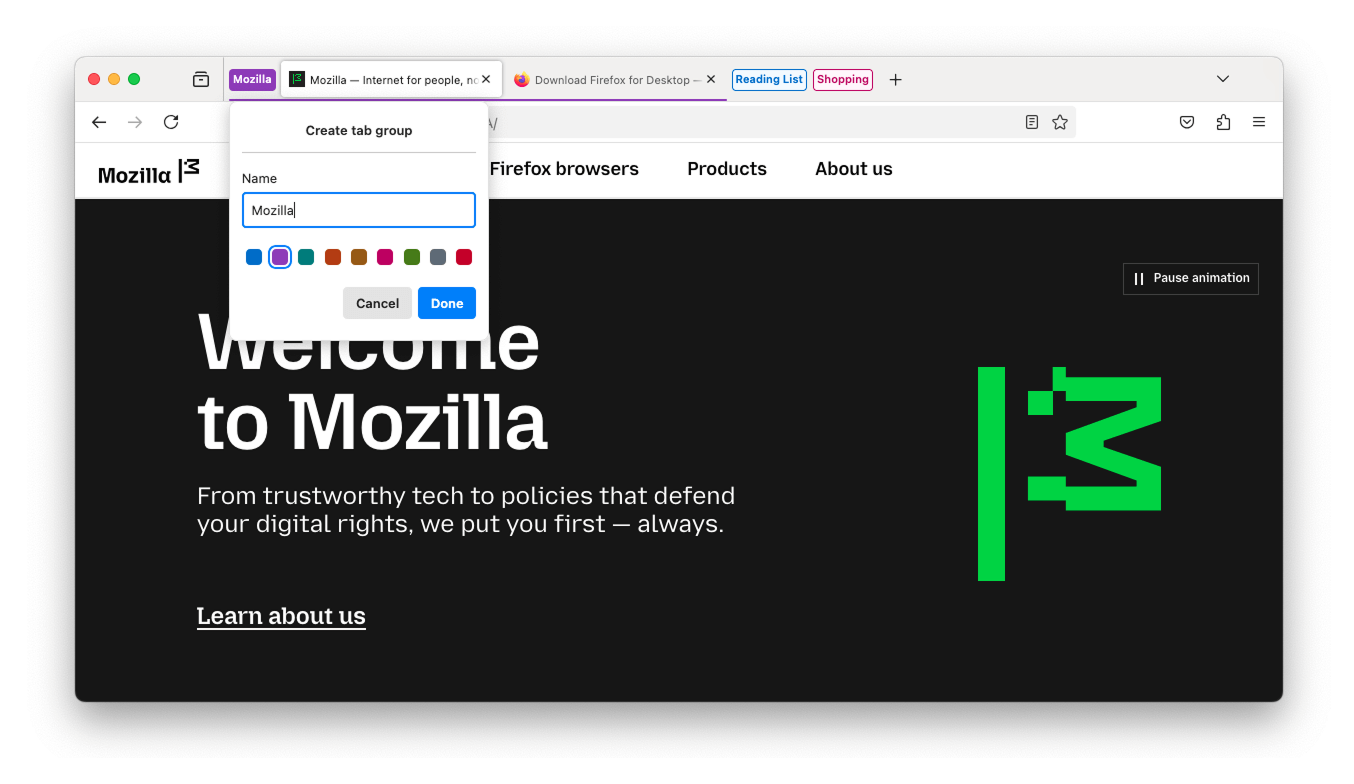
  • Tab groups begin rolling out today! Stay productive and organized with less effort by grouping related tabs together. One simple way to create a group is to drag a tab onto another, pause until you see a highlight, then drop to create the group. Groups can be named, color-coded, and are always saved. You can close a group and reopen it later.

    Screenshot of the new tab groups feature in action

    This feature is part of a progressive roll out.

    What is a progressive roll out?

    Certain new Firefox features are released gradually. This means some users will see the feature before everyone does. This approach helps to get early feedback to catch bugs and improve behavior quickly, meaning more Firefox users overall have a better experience.

  • Firefox Address Bar Refresh 2025 - new ways to search for things new, previously viewed, and more - all from the address bar:

    Features

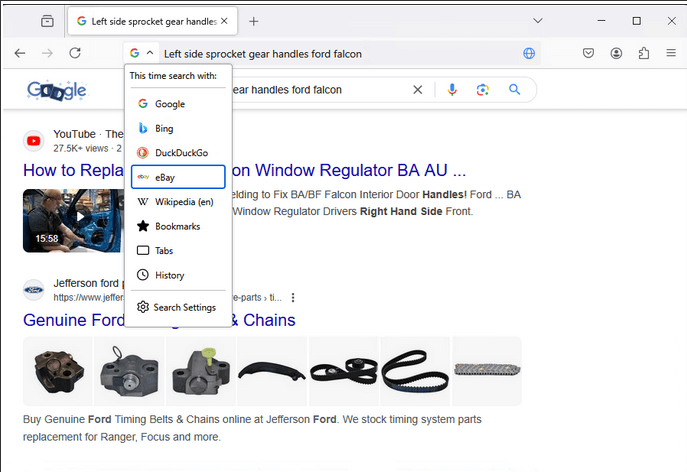
    Unified Search Button: A new, easy-to-access button in the address bar helps you switch between search engines and search modes with ease. This feature brings the simplicity of mobile Firefox to your desktop experience.

    Screenshot of the feature

    Search Term Persistence: Now when you refine a search in the address bar, the original term sticks around, making it easier to adjust your queries and find exactly what you're looking for.

    Screenshot of the feature

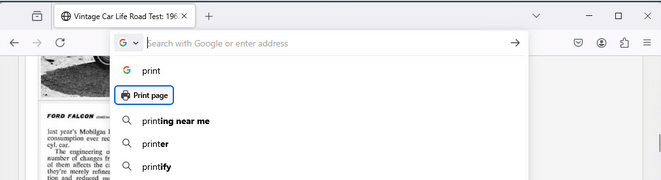
    Secondary Action Buttons: Suggestions for common Firefox features.

    Screenshot of the feature

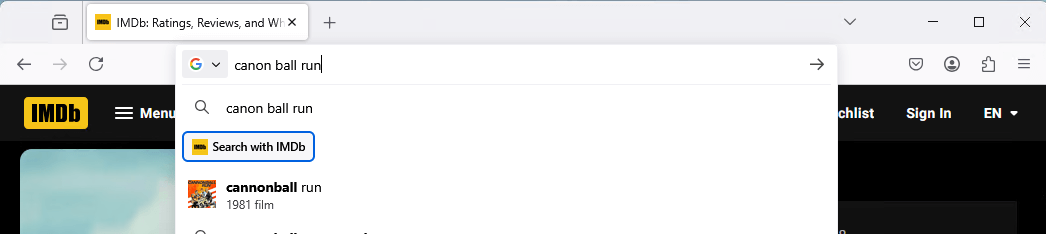
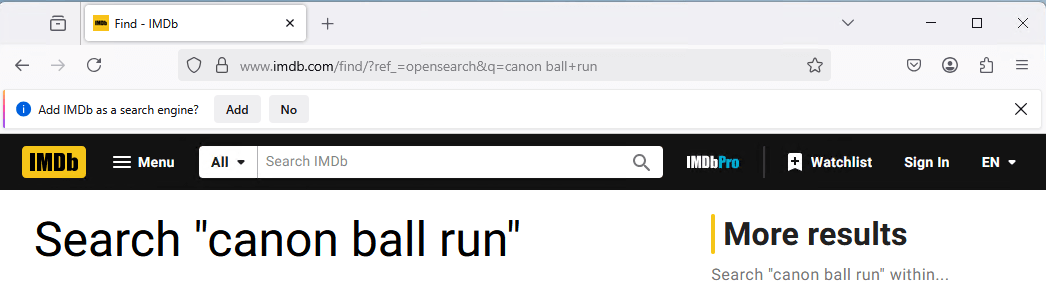
    Contextual Search Mode: Firefox detects if you are on a page that has search capability and offers that option for you to directly search with the page engine from the address bar. Use this option at least 2 times and Firefox will suggest adding the search engine to your Firefox.

    Screenshot of the feature

    Contextual Search Engine Options: Use a Contextual Search mode option at least 2 times and Firefox will suggest adding the search engine to your Firefox so that it’s always available to you.

    Screenshot of the feature

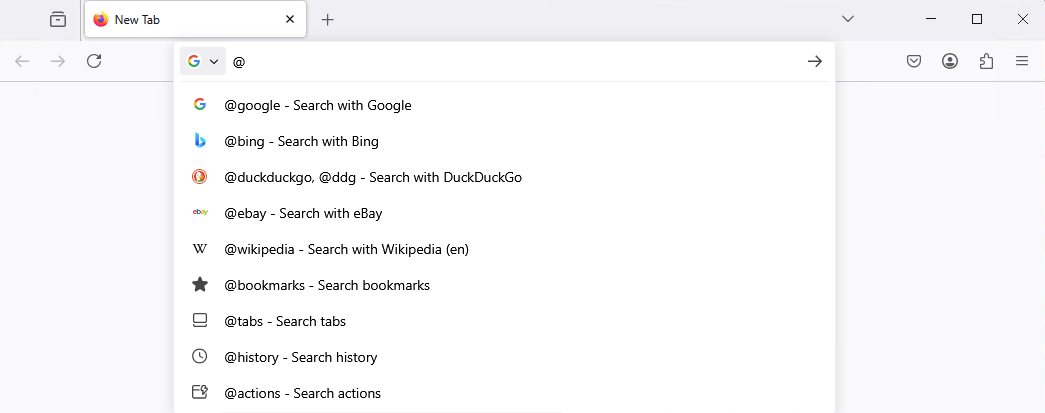
    Intuitive Search Keywords: You can access various address bar search modes with convenient and descriptive keywords (e.g. @bookmarks,@tabs,@history, @actions).

    Screenshot of the feature

    This feature is part of a progressive roll out.

    What is a progressive roll out?

    Certain new Firefox features are released gradually. This means some users will see the feature before everyone does. This approach helps to get early feedback to catch bugs and improve behavior quickly, meaning more Firefox users overall have a better experience.

  • Firefox now identifies all links in PDFs and turns them into hyperlinks.

  • Support HEVC playback on Linux.

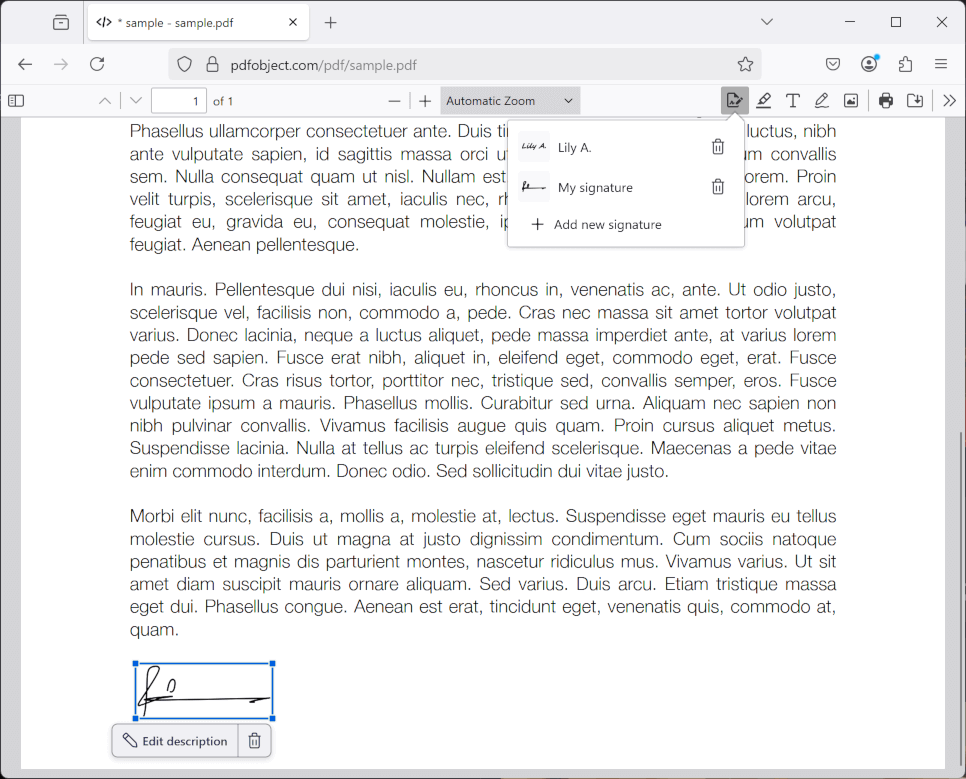
  • Now you can sign PDFs without leaving Firefox. Save your signatures to re-use later.

    Screenshot of the feature

    This feature is part of a progressive roll out.

    What is a progressive roll out?

    Certain new Firefox features are released gradually. This means some users will see the feature before everyone does. This approach helps to get early feedback to catch bugs and improve behavior quickly, meaning more Firefox users overall have a better experience.

  • You can now use the Firefox address bar as a calculator. Simply type an arithmetic expression and view the result in the address bar drop-down. Clicking on this result will copy it to your clipboard.

    Screenshot of the calculator feature in the URL bar

    This feature is part of a progressive roll out.

    What is a progressive roll out?

    Certain new Firefox features are released gradually. This means some users will see the feature before everyone does. This approach helps to get early feedback to catch bugs and improve behavior quickly, meaning more Firefox users overall have a better experience.

Fixed

Enterprise

Developer

Web Platform

  • Support for the SVG 2 path API is now available.

  • Support for the hyphenate-limit-chars property is now available. This property enables authors to have greater control over the use of automatic hyphenation.

Unresolved

  • We are investigating an increase in crashes for Windows users with Qihoo 360 security software. β€―β€―(Fixed in 137.0.1)

  • Due to recent changes in Chrome on Windows, some users might find that the Firefox migration wizard no longer successfully imports passwords from Chrome or Chrome-based browsers. As a workaround, you can export your passwords as a CSV file from Chrome and then import them into Firefox using either the migration wizard or the Firefox password manager.

Community Contributions

  • With the release of Firefox 137, we are pleased to welcome the developers who contributed their first code change to Firefox in this release, 17 of whom were brand new volunteers! Please join us in thanking each of these diligent and enthusiastic individuals, and take a look at their contributions:

  •  

v11.6.1

πŸ› Bug Fixes & Optimizations

πŸ“¦ Published Versions

  • @directus/app@13.8.1
  • @directus/api@26.0.1

  •  

vMix and AI: Presenting AIffirmatron, The Future of Social Stream Interaction

As a content creator, there’s nothing worse than going live and hearing the sound of silence. It’s disheartening when you’re putting all your effort into a stream, only to find that your audience isn’t engaging as you hoped. Enter AIffirmatron, the ultimate solution to this common live streaming dilemma!

What is AIffirmatron?

AIffirmatron is a revolutionary new tool that uses AI-generated comments to boost engagement during your live streams. It’s the perfect way to make sure your stream never feels lonely again. Whether you’re streaming on Twitch, YouTube, or another platform, AIffirmatron generates positive comments to create an active, lively atmosphere that attracts real viewers to join in on the fun.

How Does AIffirmatron Work?

AIffirmatron integrates seamlessly with vMix Social, providing an easy way to kickstart the interaction during your live broadcasts. The tool offers thousands of AI-generated comments, and you can choose to curate a steady flow or let them roll in continuously. These comments are designed to create the impression that you have an engaged, buzzing audienceβ€”encouraging others to comment and join the conversation.

While the comments are mostly positive, the best part about AIffirmatron is its variety. Not only does it include well-crafted, friendly comments, but it also features quirky, unhinged personas for a touch of unpredictability! After all, variety is the spice of life, and AIffirmatron delivers just the right balance of fun and engagement to keep your stream interesting.

Why Should You Use AIffirmatron?

  1. Instant Engagement: Never deal with silence again! AIffirmatron helps create an active, engaging environment from the start.
  2. Curated Comments: Easily manage the comments coming in with a customizable queue. Choose when and how the comments show up to fit your stream’s vibe.
  3. Realistic AI Personas: These aren’t generic bots. AIffirmatron uses intelligent AI personas to keep things real and lively.
  4. Seamless Integration: Fully compatible with vMix Social, making it simple to add to your existing setup.

Is AIffirmatron Right for You?

Whether you’re a professional streamer or just starting, AIffirmatron is the perfect tool to increase your engagement and create a more dynamic live stream. Don’t let your streams fall flatβ€”let AIffirmatron bring the energy and interaction you’ve been craving.

Ready to see your engagement soar? Try AIffirmatron today and watch your live stream transform!

  •  

Part-DB 1.17.0

Part-DB 1.17.0

Warning

From this version Part-DB uses the digikey v4 API. If you have an existing API key, make sure to select the Product Information V4 capability on digikey's api console. Otherwise the digikey info provider will not function!

Important

If you are using Part-DB it would be helpful if you fill out this short survey on your usage of Part-DB (Google Forms): https://forms.gle/Q15twx3YYq3qCNfe8

Tip

There is a new experimental docker image, which is much faster. See this post for more info.

Tip

You can help to translate Part-DB to other languages. See this post for more info.

Changes

  • Use Digikey V4 API for digikey provider (by @Danixu in #875)

New features

  • Added a way to change the location of parts as batch action, as long as they contain only one lot.
  • Improved attachment download compatibility (thanks @Treeed)
  • Show digikey packing type (tape&Reel, Box, etc.) in info provider search list
  • Render units of parameters with Latex (#856)
  • Added a command to download all external-only attachments to the local file system (php bin/console partdb:attachments:download)
  • Added an experimental automigration feature to docker image. Set DB_AUTOMIGRATE to true in your docker-compose file to automatically apply database migrations on container startup.

Bug fixes

  • Fixed bugs for pollin info provider
  • Workaround a bug in KiCAD which could cause a crash (#878)
  • Use own CA bundle for element14 provider, to workaround missing CA in debian (#891, #866)
  • Fixed problems with mouser info provider, where part numbers could not be resolved to a unique part (#888, #616)
  • Fixed 500 if internal attachment path was not resolvable to an URL (#898)
  • Fixed problem that global_theme config param was ignored (#880)
  • Fixed problem, that categories did not appear in KiCAD, even though they contained visible parts (#885)
  • Make database migrationn more compliant with SQL standard (#900)

Miscellaneous

  • Updated translations
  • Updated dependencies

New Contributors

Full Changelog: v1.16.1...v1.17.0

  •  

OBS Studio 31.0.3

Important

NVIDIA Kepler (600 and 700 series) GPUs are no longer supported for NVENC.

Note

NVIDIA users may need to update their GPU drivers to 551.76 (Windows) / 550.54.14 (Linux) or newer.

Important

The code signing certificate for OBS has been updated. This may impact game capture compatibility with some anti-cheat solutions with this OBS update. If you are a game or anti-cheat developer please see https://obsproject.com/kb/capture-hook-certificate-update for more information.

31.0.3 Hotfix Changes

  • Fixed a crash in OBS Studio 31.0.2 when attempting to log info about a browser source crash [WizardCM]
  • Fixed a crash on macOS if OBS used more than 8GB of memory [PatTheMav/jcm93]
  • Fixed a possible crash if OBS Studio was opened in Studio Mode [PatTheMav/tt2468]
  • Fixed a potential deadlock with browser sources on OBS shutdown [tt2468]
  • Fixed an issue with streams not reconnecting correctly after a disconnect [dsaedtler]
  • Fixed several issues with NVIDIA Background Blur [pkviet]
  • Fixed an issue where Video Capture Devices on macOS could be unintentionally flipped upside down [jcm93]
  • Fixed an issue where the Program View resolution would not update correctly [exeldro]

31.0.2 Hotfix Changes

  • Fixed a crash on Windows when initializing a Video Capture Device source that does not provide a valid frame size [RytoEX]
  • Fixed a crash on Windows when using NVIDIA Audio Effects filters with certain SDK versions [pkviet]
  • Fixed a crash on Windows when using obs-websocket with a config path that contained Unicode characters [PatTheMav/tt2468]
  • Fixed a crash on macOS when initializing a Video Capture Device source in a corrupt state [jcm93]
  • Fixed an issue on macOS where Python scripting would not work if Python was installed via Homebrew [jcm93]
  • Fixed an issue on Windows where browser sources would not recognize gamepad input if OBS Studio was not in focus [WizardCM]
  • Fixed an issue with browser sources where they would occasionally stutter for 250ms [reitowo/WizardCM/PatTheMav/tytan652/pkviet]
  • Fixed an issue on Linux where browser sources used more CPU than previous versions [tytan652]
  • Fixed the setting value range for NVENC target quality for AV1 [Bleuzen]
  • Fixed logging for NVENC lookahead values [DeeDeeG]
  • Added additional logging for browser sources [WizardCM/tt2468]

31.0.1 Hotfix Changes

  • Fixed a crash on macOS caused by hand gesture reactions [gxalpha]
  • Fixed a crash caused by malformed scene collection files [PatTheMav]
  • Fixed a possible crash on Linux when initializing PipeWire screen sharing [tytan652]
  • Fixed a possible deadlock and freeze on macOS while exiting OBS [izwb003]
  • Fixed an issue with inhibiting screensaver on Linux [tytan652]
  • Fixed an issue where migrated NVIDIA Audio Effects filters would not retain their position in the filter order [pkviet]
  • Fixed an issue where Scene Collections could have an incorrect base resolution [derrod]
  • Fixed an issue on Linux with Portable Mode causing the config directory to be in the wrong location [Penwy]
  • Fixed an issue where an Image Slideshow Source set to Random Playback Mode would stop on the last image [derrod]
  • Fixed a missing string for an NVENC error message [derrod]
  • Changed NVENC to not permit invalid custom options [derrod]

31.0 New Features

  • Added NVIDIA Blur Filter and Background Blur [pkviet]
  • Added preview scrollbars and zoom/scale indicator [cg2121/Warchamp7]
  • Added v210 format support for AJA device capture [paulh-aja]
  • Added Amazon IVS service integration [palana]
  • Added QSV AV1 Screen Content Coding [thyintel]
  • Enabled first-party YouTube Chat features [msuman-google]

31.0 Changes

  • Updated the browser source/docks CEF (Chromium) to version 127 (6533) on all platforms [reitowo/WizardCM/PatTheMav/tytan652/pkviet/kkartaltepe/Lain-B]
  • Changed scene items to use relative coordinates [derrod]
    • Existing scene collections will be automatically converted to use relative coordinates if the scene collection has a known output resolution set.
  • Split NVIDIA Audio Effects from Noise Suppression [pkviet]
    • Existing filters will be automatically migrated.
  • Changed the Image Slideshow's Playback Mode property from radio buttons to a dropdown [derrod]
  • Disabled the (currently unsupported) built-in Automatic Scene Switcher when using Wayland on Linux [tytan652]
  • Improved error messages for macOS Virtual Camera [jcm93]
  • Changed Display and Window capture on Windows to not capture the first found display or window [Lain-B]
  • Changed display and window capture on Linux to not capture implicitly [Lain-B]
  • Added a warning to Window Capture when trying to capture WinUI 3 applications with BitBlt [qhy040404]
  • Refactored the NVENC implementation with various improvements [derrod]
    • SDK 12.2 features, such as split encoding, are now supported.
    • Additional features from old SDKs are supported:
      • B-Frames as reference
      • Target Quality VBR mode (CQVBR)
    • A custom options field has been added to allow setting more options that don't warrant their own UI elements.
  • Improved screensaver inhibit functions on Linux in Flatpak [tytan652]
  • Changed scripts to correctly pass settings to modified callbacks on reload [Penwy]
  • Removed legacy QSV code for old devices (Haswell or older) [RytoEX]
  • Removed legacy QSV code for Windows 7 [RytoEX]
  • Removed default desktop audio device on macOS 13+ [jcm93]
  • Removed NVIDIA Kepler GPU support for NVENC [derrod]
  • Removed FTL support [derrod]
  • Removed legacy migrations from OBS Studio 28.1 and earlier [derrod]
    • If updating from these older versions, you may wish to update to OBS Studio 30.2 first, and then update to OBS Studio 31.
  • Removed support for Ubuntu 22.04 [derrod]
  • Removed legacy YouTube chat [gxalpha]
  • Blocked TikTok Virtual Camera from loading in OBS due to known issues [notr1ch]
  • Application settings have been split into "app" configuration and "user" configuration, rather than storing everything in global.ini [PatTheMav]

31.0 Bug Fixes

  • Fixed two crashes with the QSV encoder on Linux [kkartaltepe]
  • Fixed a crash with a race condition involving multitrack video output reconnect [dsaedtler]
  • Fixed two potential crashes in Linux Window Capture [Lain-B]
  • Fixed a crash on macOS that could occur if an audio device was disconnected [jcm93]
  • Fixed a crash on Windows when capturing D3D12 games [confusionattack/Lain-B]
  • Fixed a crash on Linux when importing a scene collection created on Windows [SarenDev]
  • Fixed a crash on Windows when capturing a Vulkan application [Charlese2]
  • Fixed a deadlock in MP4 muxer [derrod/notr1ch]
  • Fixed a deadlock when shutting down muxer [exeldro]
  • Fixed a potential deadlock when stopping an encoder [derrod]
  • Fixed a potential memory error and crash in text parser [fzwoch]
  • Fixed a couple minor memory leaks [pkviet]
  • Fixed a memory leak in PipeWire plugin [dimtpap]
  • Fixed a memory leak when playing an HDR media file [tt2468]
  • Fixed an issue on FreeBSD with handling SSL certificates [emaste]
  • Fixed an issue with pressed button color in the Rachni theme [shiina424]
  • Fixed an issue with some missing icons in the System theme [shiina424]
  • Fixed an SRT listener bug where the socket was not closed properly [pkviet]
  • Fixed an issue where the current scene collection could be erased to default when trying to switch to a different scene collection that's corrupted or invalid [derrod]
  • Fixed a buffer overrun in UTF-8 text conversion [derrod]
  • Fixed an issue that could cause bitrate spikes in QSV CBR [thyintel]
    • Note: This fix only applies to Lunar Lake or newer except Alder Lake N.
  • Fixed an issue where the Auto Configuration Wizard could unintentionally enable Enhanced Broadcasting [lexano-ivs]
  • Fixed issues with the audio clipping indicators displaying incorrectly on volume meters [norihiro]
  • Fixed an issue causing hotkeys to register inconsistently on macOS [jcm93]
  • Fixed an issue causing multitrack video output to fail if color format was set to I444 [dsaedtler]
  • Fixed an issue where Custom CSS in browser sources no longer worked with certain websites (namely YouTube chat) [vvto33]
  • Restored STUN support for WHIP output [mondain]

Checksums

OBS-Studio-31.0.3-Sources.tar.gz: f99f49eae21059cc3e38411e7e16b62de6be8579e2537b2d7504d82a504f34a9
OBS-Studio-31.0.3-Ubuntu-24.04-x86_64-dbsym.ddeb: e7c75c1d977e28358d1c586f9dfa725e32ecf47e1ec35544ba19e77b6631cc2b
OBS-Studio-31.0.3-Ubuntu-24.04-x86_64.deb: c6bbaec5ad8a68d4314bf6f10eb3519ba2a59187cb7d41bb3d2ba0a395561230
OBS-Studio-31.0.3-Windows-Installer.exe: 4800ea05ddcdde7832a1c58a2b1e29684eee122c08e23ab122c9815d05404c32
OBS-Studio-31.0.3-Windows-PDBs.zip: 386dd1fcffef3e3bfe97d99bc1e2e64bd16da7f16049752802e5f78db2a24487
OBS-Studio-31.0.3-Windows.zip: b7086a6b6162d5122eedf7773e96c723e455ad1a931b59d1097f020ee7ff145e
OBS-Studio-31.0.3-macOS-Apple-dSYMs.tar.xz: bc567a57d2394b974fc09b71525b801d9fa35a82a6d0c05476b2018bc70247d4
OBS-Studio-31.0.3-macOS-Apple.dmg: 29fe18704eb5134e3cc1e486dcfd2e3c1e69df06b918a20529c2e67cb9d9590d
OBS-Studio-31.0.3-macOS-Intel-dSYMs.tar.xz: d4759e41176509c0d1214ff670f664a4b938299804c35742a58587f65b005094
OBS-Studio-31.0.3-macOS-Intel.dmg: 1a91c95a05b7cfde6573b5d7c10aa00ef8f7a961e60fb38dd3167ac577657977

  •  

Ubuntu 25.04 (Plucky Puffin) Beta released

The Ubuntu team is pleased to announce the Beta release of the Ubuntu 25.04 Desktop, Server, and Cloud products.

Ubuntu 25.04, codenamed β€œPlucky Puffin”, continues Ubuntu’s proud tradition of integrating the latest and greatest open source technologies into a high-quality, easy-to-use Linux distribution. The team has been hard at work through this cycle, introducing new features and fixing bugs.

This Beta release includes images from not only the Ubuntu Desktop, Server, and Cloud products, but also the Kubuntu, Lubuntu, Ubuntu Budgie, UbuntuKylin, Ubuntu MATE, Ubuntu Studio, Ubuntu Unity and Xubuntu flavours.

The Beta images are known to be reasonably free of showstopper image build or installer bugs, while representing a very recent snapshot of 25.04 that should be representative of the features intended to ship with the final release expected on April 17, 2025.

Ubuntu, Ubuntu Server, Cloud Images:

Plucky Beta includes updated versions of most of our core set of packages, including a current 6.14 kernel, and much more.

To upgrade to Ubuntu 25.04 Beta from Ubuntu 24.10, follow these instructions:

https://help.ubuntu.com/community/PluckyUpgrades

The Ubuntu 25.04 Beta images can be downloaded at:

https://releases.ubuntu.com/25.04/ (Ubuntu and Ubuntu Server on x86)

This Ubuntu Server image features the next generation Subiquity server installer, bringing the comfortable live session and speedy install of the Ubuntu Desktop to server users.

Additional images can be found at the following links:

https://cloud-images.ubuntu.com/daily/server/plucky/current/ (Cloud Images)
https://cdimage.ubuntu.com/releases/24.10/beta/ (Non-x86)

As fixes will be included in new images between now and release, any daily cloud image from today or later (i.e. a serial of 20250327 or higher) should be considered a Beta image. Bugs found should be filed against the appropriate packages or, failing that, the cloud-images project in Launchpad.

The full release notes for Ubuntu 25.04 Beta can be found at:

https://discourse.ubuntu.com/t/plucky-puffin-release-notes/48687

Kubuntu:

Kubuntu is the KDE based flavour of Ubuntu. It uses the Plasma desktop and includes a wide selection of tools from the KDE project.

The Beta images can be downloaded at:

https://cdimage.ubuntu.com/kubuntu/releases/25.04/beta/

Lubuntu:

Lubuntu is a flavor of Ubuntu which uses the Lightweight Qt Desktop Environment (LXQt). The project’s goal is to provide a lightweight yet functional Linux distribution based on a rock-solid Ubuntu base.

The Beta images can be downloaded at:

https://cdimage.ubuntu.com/lubuntu/releases/25.04/beta/

Ubuntu Budgie:

Ubuntu Budgie is community developed desktop, integrating Budgie Desktop Environment with Ubuntu at its core.

The Beta images can be downloaded at:

https://cdimage.ubuntu.com/ubuntu-budgie/releases/25.04/beta/

UbuntuKylin:

UbuntuKylin is a flavor of Ubuntu that is more suitable for Chinese users.

The Beta images can be downloaded at:

https://cdimage.ubuntu.com/ubuntukylin/releases/25.04/beta/

Ubuntu Mate:

Ubuntu MATE is a flavor of Ubuntu featuring the MATE desktop environment.

The Beta images can be downloaded at:

https://cdimage.ubuntu.com/ubuntu-mate/releases/25.04/beta/

Ubuntu Studio:

Ubuntu Studio is a flavor of Ubuntu that provides a full range of multimedia content creation applications for each key workflow: audio, graphics, video, photography and publishing.

The Beta images can be downloaded at:

https://cdimage.ubuntu.com/ubuntustudio/releases/25.04/beta/

Ubuntu Unity:

Ubuntu Unity is a flavor of Ubuntu featuring the Unity7 desktop environment.

The Beta images can be downloaded at:

https://cdimage.ubuntu.com/ubuntu-unity/releases/25.04/beta/

Xubuntu:

Xubuntu is a flavor of Ubuntu that comes with Xfce, which is a stable, light and configurable desktop environment.

The Beta images can be downloaded at:

https://cdimage.ubuntu.com/xubuntu/releases/25.04/beta/

Regular daily images for Ubuntu, and all flavours, can be found at:

https://cdimage.ubuntu.com
Ubuntu is a full-featured Linux distribution for clients, servers and clouds, with a fast and easy installation and regular releases. A tightly-integrated selection of excellent applications is included, and an incredible variety of add-on software is just a few clicks away.

Professional technical support is available from Canonical Limited and hundreds of other companies around the world. For more information about support, visit https://ubuntu.com/support

If you would like to help shape Ubuntu, take a look at the list of ways you can participate at:

https://ubuntu.com/community/participate

Your comments, bug reports, patches and suggestions really help us to improve this and future releases of Ubuntu. Instructions can be found at:
https://help.ubuntu.com/community/ReportingBugs

You can find out more about Ubuntu and about this Beta release on our website, IRC channel and wiki.

To sign up for future Ubuntu announcements, please subscribe to Ubuntu’s very low volume announcement list at:
https://lists.ubuntu.com/mailman/listinfo/ubuntu-announce

Originally posted to the ubuntu-announce mailing list Thu Mar 27 7:56:41 UTC 2025 by Paride Legovini on behalf of the Ubuntu Release Team

  •  

FileZilla Server 1.10.0 released

New features:

  • It is now possible to configure which protocols users are allowed to login with

Bugfixes and minor changes:

  • Fixed validation of domain names during certificate creation if a component in the hostname consists purely of numbers
  • Administration UI: Fixed issues with renaming users
  • Windows installer: Improved logging
  •  

v11.6.0

⚠️ Potential Breaking Changes

  • @directus/api
    • Fixed filter hook altered payload not passed to action hook on create (#24812 by @ComfortablyCoding)
    • GraphQL primary key field types have changed from String to ID (#24757 by @Nitwel)

✨ New Features & Improvements

  • @directus/app
    • Added Visual Editor Beta (#24758 by @formfcw)
    • After creating a new content version, it will become the current selected version (#24606 by @robluton)
    • Added Version support to field rules. This allows conditional rules based on an item's version (#24646 by @robluton)
  • @directus/api
  • @directus/env
    • Added QUERYSTRING_MAX_PARSE_DEPTH configuration variable (#24833 by @Nitwel)
  • @directus/system-data
  • @directus/types
  • @directus/sdk

πŸ› Bug Fixes & Optimizations

πŸ“¦ Published Versions

  • @directus/app@13.8.0
  • @directus/api@26.0.0
  • @directus/components@1.0.3
  • @directus/composables@11.1.9
  • @directus/constants@13.0.1
  • create-directus-extension@11.0.12
  • create-directus-project@12.0.1
  • @directus/env@5.0.3
  • @directus/errors@2.0.1
  • @directus/extensions@3.0.4
  • @directus/extensions-registry@3.0.4
  • @directus/extensions-sdk@13.0.4
  • @directus/format-title@12.0.1
  • @directus/memory@3.0.3
  • @directus/pressure@3.0.3
  • @directus/random@2.0.1
  • @directus/release-notes-generator@2.0.1
  • @directus/schema@13.0.1
  • @directus/storage-driver-azure@12.0.3
  • @directus/storage-driver-cloudinary@12.0.3
  • @directus/storage-driver-gcs@12.0.3
  • @directus/storage-driver-s3@12.0.3
  • @directus/storage-driver-supabase@3.0.3
  • @directus/system-data@3.1.0
  • @directus/themes@1.0.10
  • @directus/types@13.1.0
  • @directus/utils@13.0.3
  • @directus/validation@2.0.3
  • @directus/sdk@19.1.0

  •  
❌