VIENNA, Austria – April 29, 2025 – Proxmox, a leading provider of open-source Enterprise IT solutions, celebrates its 20th anniversary. Since 2005, Proxmox has been committed to delivering secure, scalable, and user-friendly open-source solutions to enterprises worldwide.
Starting with Proxmox Mail Gateway and later launching Proxmox Virtual Environment—the first platform to combine container-based virtualization and the KVM hypervisor on a single interface—Proxmox has become synonymous with innovation and usability. Built-in technologies like ZFS and Ceph allow businesses to eliminate expensive storage infrastructure such as Fibre Channel or iSCSI SANs, further enhancing Proxmox VE's value. Today, the company’s flagship product Proxmox VE has become the open-source alternative to proprietary virtualization solutions such as VMware by Broadcom.
Milestones include the introduction of a subscription-based support model in 2013, the launch of the Rust-based Proxmox Backup Server in 2020, the development of a new, Yew-based GUI framework, and the recent Alpha release of Proxmox Datacenter Manager simplifying the management of multiple Proxmox VE clusters.
With more than 200,000 community members and 1.5 million hosts managed globally, Proxmox constantly deepens its partnerships with 1000+ resellers in over 142 countries, and with many hardware and software or backup suppliers like NVIDIA or Veeam. The Proxmox open solutions enable enterprises to avoid vendor lock-in and reduce IT costs significantly; approximately 95% of VMware setups could migrate seamlessly to Proxmox VE.
Proxmox continues to expand its product capabilities and global reach, delivering transparent, future-ready solutions for modern IT environments.
When we started Proxmox 20 years ago, our goal was simple: make powerful open-source server tools accessible to everyone. Today, seeing 1.5 millions of systems powered by Proxmox around the world, it’s clear we are achieving that goal. This success would not have been possible without our dedicated community, our loyal customers, our strong partners, and our passionate team. I sincerely thank everyone who has been part of this journey.Proxmox Founder Martin Maurer
Looking ahead, we will continue on our steady growth path. We are excited to expanding our portfolio with new solutions like Proxmox Datacenter Manager, which will greatly simplify the management of multiple Proxmox VE clusters. We are strengthening our support offerings, and expanding support and integration with various backup and storage tools, and deepening our collaboration with customers and partners. Open-source is the future, and we are proud to help shape it—with transparency, flexibility, and the power of community.Proxmox Founder Dietmar Maurer
###
About Proxmox Server Solutions Proxmox provides powerful and user-friendly open-source server software. Enterprises of all sizes and industries use the Proxmox solutions to deploy efficient and simplified IT infrastructures, minimize total cost of ownership, and avoid vendor lock-in. Proxmox also offers commercial support, training services, and an extensive partner ecosystem to ensure business continuity for its customers. Proxmox Server Solutions GmbH was established in 2005 and is headquartered in Vienna, Austria.
Contact: Daniela Häsler, Proxmox Server Solutions GmbH, marketing@proxmox.com
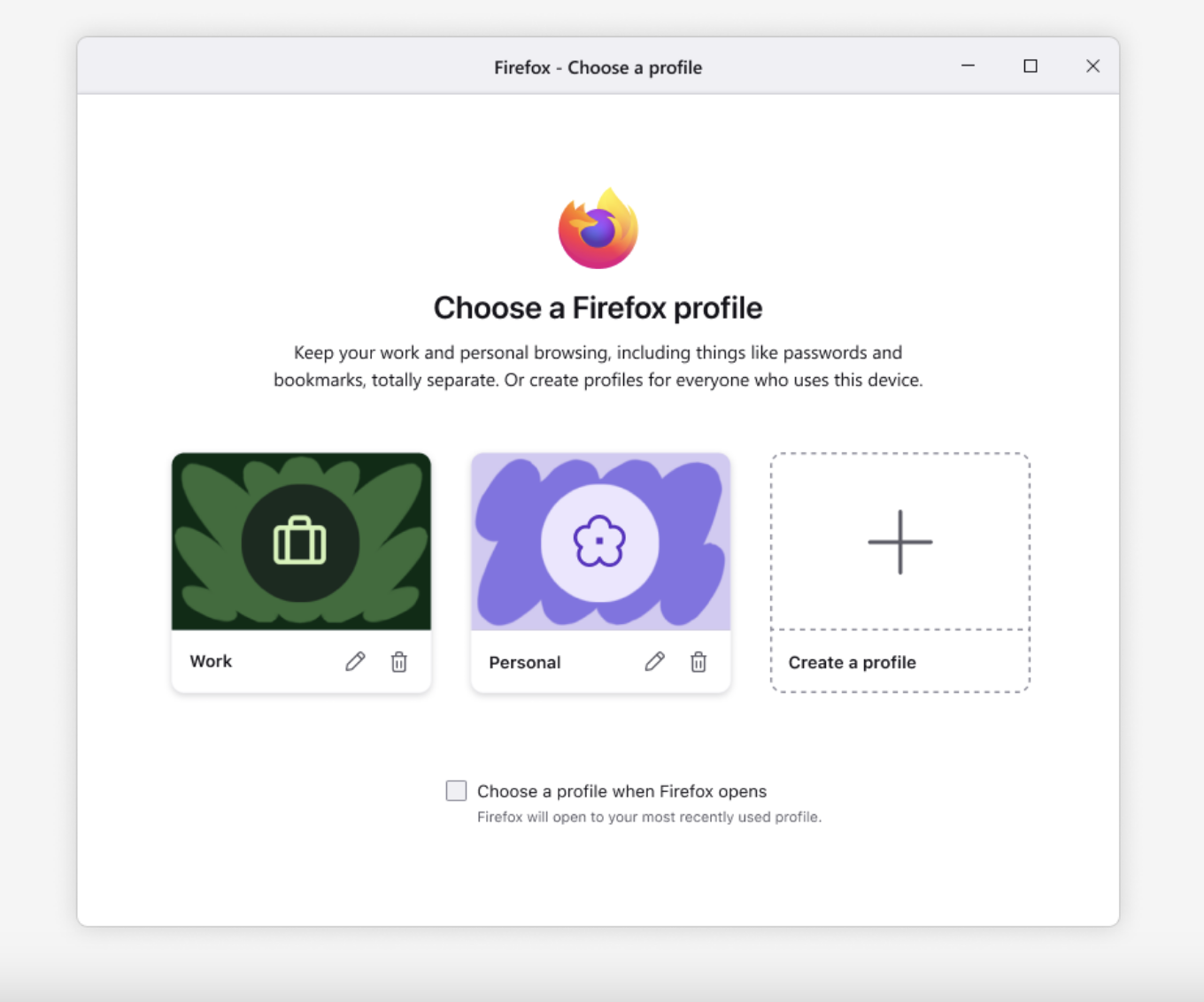
Profile management helps protect your privacy and stay focused by separating your online life into distinct profiles — for work, school, vacation planning, or whatever you choose. You can now name your profiles and customize them with avatars and color themes for easy recognition, then quickly switch between them — all while keeping bookmarks, tabs, and browsing history completely separate.
This feature is part of a progressive roll out.
What is a progressive roll out?
Certain new Firefox features are released gradually. This means some users will see the feature before everyone does. This approach helps to get early feedback to catch bugs and improve behavior quickly, meaning more Firefox users overall have a better experience.
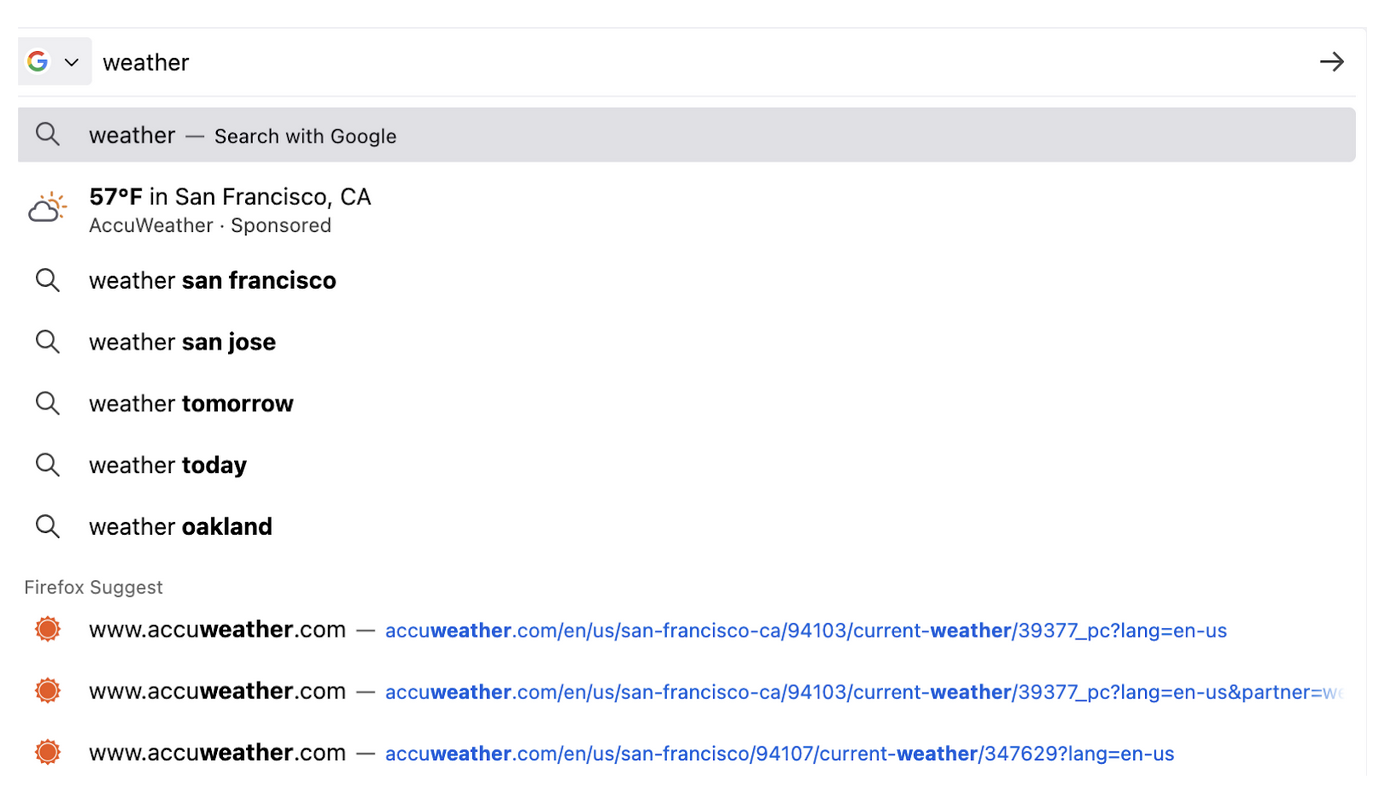
Users in the United States can now trigger weather suggestions in the address bar! Simply type a weather-related term or a city name, and view the result directly in the address bar dropdown.
Currently available in: United States
This feature is part of a progressive roll out.
What is a progressive roll out?
Certain new Firefox features are released gradually. This means some users will see the feature before everyone does. This approach helps to get early feedback to catch bugs and improve behavior quickly, meaning more Firefox users overall have a better experience.
Tab Groups, a new way to organize and take control of your tabs, is now available to all users worldwide. You can create a group by dragging one tab onto another, pausing, then dropping it. You can also now reposition a tab group on the tab bar by dragging it.
Firefox on Windows 11 now uses acrylic-style menus for popup windows, which better match the operating system’s aesthetic.
You can now copy links from background tabs using the tabstrip context menu on MacOS and Linux.
Improved the address and credit card autofill experience to better handle forms that update dynamically as users input information. Autofill now correctly fills newly revealed fields—such as those shown after selecting a country.
Rededicated previous color settings to Contrast Control settings. (Learn more)
Added support for the import map integrity field, allowing you to ensure the integrity of dynamically or statically imported modules.
Implemented support for Error.isError, enabling brand checks to determine whether an object is an instance of Error. (Learn more)
Added support for the error.captureStackTrace extension to improve compatibility with other browsers. (Learn more)
A new column has been added to the Network panel to display the full path of the request URL. This enhancement makes helps developers quickly view and analyze complete request paths.
Firefox now applies a uniform user agent (UA) style to <h1> elements, regardless of whether they are used inside <article>, <aside>, <nav>, or <section>. (Learn more)
This feature is part of a progressive roll out.
What is a progressive roll out?
Certain new Firefox features are released gradually. This means some users will see the feature before everyone does. This approach helps to get early feedback to catch bugs and improve behavior quickly, meaning more Firefox users overall have a better experience.
Web Platform
Added support for Import Attributes, allowing developers to specify additional metadata when importing modules.
Applications can now set their preferred degradation method to be used when the configured frame rate and resolution cannot be maintained. (Learn more)
Firefox now enables the cache directive for the Clear-Site-Data header, allowing websites to clear the network cache. This gives websites more control over stored data, such as clearing the cache during logout to help mitigate privacy risks. (Learn more)
Unresolved
Due to recent changes in Chrome on Windows, some users might find that the Firefox migration wizard no longer successfully imports passwords from Chrome or Chrome-based browsers. As a workaround, you can export your passwords as a CSV file from Chrome and then import them into Firefox using either the migration wizard or the Firefox password manager.
Community Contributions
With the release of Firefox 138, we are pleased to welcome the developers who contributed their first code change to Firefox in this release, 18 of whom were brand new volunteers! Please join us in thanking each of these diligent and enthusiastic individuals, and take a look at their contributions:
Adjusted clipping behavior for floating point audio when using volume boost. Should fix quality issues in some cases.
Added warning prompt to boost that informs users about a better solution for the common issue of "voices are too quiet", which is to enable mixing in the audio decoder (and adjust center mix level).
Improved support of .cue files that contain links to multiple audio files.
Fixes:
Fixed a dragging issue with the exclusive mode seekbar.
Ubuntu 25.04, codenamed “Plucky Puffin”, is here. This release continues Ubuntu’s proud tradition of integrating the latest and greatest open-source technologies into a high-quality, easy-to-use Linux distribution. The team has been hard at work through this cycle, partnering with the community and our partners, to introduce new features and fix bugs.
Ubuntu 25.04 introduces GNOME 48 with triple buffering for smoother performance, HDR settings, and new features like a Wellbeing Panel and Preserve Battery Health mode. A new modern PDF reader, Papers, is now the default.
The installer now offers a smoother experience when installing alongside other operating systems, with better BitLocker support, and advanced partitioning.
Built on the Linux 6.14 kernel, this release brings a new scheduling system with sched_ext, enhanced Wine/Proton gaming support through the new NTSYNC driver, and better container tooling via decoupled bpftools and linux-perf.
Developer experience takes a leap forward with the introduction of devpacks. These snap bundles deliver the latest Go and Spring ecosystems, alongside updated toolchains for Python, Rust, .NET, LLVM, OpenJDK, and more.
Ubuntu 25.04 also expands confidential computing to on-premise environments with AMD SEV-SNP host support, and introduces a new ARM64 Desktop ISO for next-gen hardware.
Networking and identity management see continued improvements, including secure time sync with NTS, better Active Directory (AD) integration, cloud authentication against EntraID and Google identity, and DNS-aware wait-online logic with Netplan.
The newest Edubuntu, Kubuntu, Lubuntu, Ubuntu Budgie, Ubuntu Cinnamon, Ubuntu Kylin, Ubuntu MATE, Ubuntu Studio, Ubuntu Unity, and Xubuntu are also being released today. More details can be found for these at their individual release notes under the Official Flavours section:
Users of Ubuntu 24.10 will be offered an automatic upgrade to 25.04 if they have selected to be notified of all releases rather than just LTS upgrades. For further information about upgrading, see:
As always, upgrades to the latest version of Ubuntu are entirely free of charge.
We recommend that all users read the release notes, which document caveats, workarounds for known issues, as well as more in-depth notes on the release itself. They are available at:
Ubuntu is a full-featured Linux distribution for desktops, laptops, IoT, cloud, and servers, with a fast and easy installation and regular releases. A tightly-integrated selection of excellent applications is included, and an incredible variety of add-on software is just a few clicks away.
Professional services including support are available from Canonical and hundreds of other companies around the world. For more information about support, visit:
Release Highlights: Although GeForce Game Ready Drivers and NVIDIA Studio Drivers can be installed on supported notebook GPUs, the original equipment manufacturer (OEM) provides certified drivers for your specific notebook on their website. NVIDIA recommends that you check with your notebook OEM for recommended software updates for your notebook.
Game Ready for GeForce RTX 5060 Ti
This new Game Ready Driver supports the new GeForce RTX 5060 Ti GPU and provides the best gaming experience for the latest new games supporting DLSS 4 technology including Black Myth: Wukong and No More Room in Hell 2.
Gaming Technology
Adds support for GeForce RTX 5060 Ti
Fixed Gaming and General Bugs
Please find an extensive list of fixed bugs in release note PDF (under Additional Information)
The MariaDB Foundation is pleased to announce the availability of MariaDB 11.5.1, a Release Candidate (RC) in the rolling release, and MariaDB 11.4.2, the first Generally Available (GA) release in the MariaDB 11.4 series. …
The MariaDB Foundation is pleased to announce the availability of MariaDB 11.5.0, a preview release in the MariaDB 11.5 series. MariaDB 11.5 is a short-term release. …
We are delighted to welcome Tempesta Technologies as a Silver Sponsor of the MariaDB Foundation!
Tempesta Technologies is the developer of Tempesta FW, an open-source hybrid of a web accelerator and a multi-layer firewall. …
Fixed an issue with DRM video playback on some sites caused by the general availability rollout of Microsoft's PlayReady hardware decryption DRM support in Firefox 137. PlayReady support is now limited to specific sites while broader compatibility continues to be tested. (Bug 1959827)
Due to recent changes in Chrome on Windows, some users might find that the Firefox migration wizard no longer successfully imports passwords from Chrome or Chrome-based browsers. As a workaround, you can export your passwords as a CSV file from Chrome and then import them into Firefox using either the migration wizard or the Firefox password manager.
 Log in