Lees weergave

NVIDIA Driver 581.29

Release Highlights:
Although GeForce Game Ready Drivers and NVIDIA Studio Drivers can be installed on supported notebook GPUs, the original equipment manufacturer (OEM) provides certified drivers for your specific notebook on their website. NVIDIA recommends that you check with your notebook OEM for recommended software updates for your notebook.

Game Ready for Borderlands 4 and Dying Light: The Beast

This new Game Ready Driver provides the best gaming experience for the latest new games supporting DLSS 4 technology including Borderlands 4 and Dying Light: The Beast.

Fixed Gaming Bugs

  • Marvel Rivals: Negative performance impact when using some 581.xx drivers [5444816]

Fixed General Bugs

  • N/A

Learn more in our Game Ready Driver article here.

Game Ready  Driver

  •  

Building the AI-powered local smart home

Building the AI-powered local smart home

Last year, we laid out our vision for AI in the smart home, which opened up experimentation with AI in Home Assistant. In that update, we made it easier to integrate all sorts of local and cloud AI tools, and provided ways to use them to control and automate your home. A year has passed, a lot has happened in the AI space, and our community has made sure that Home Assistant has stayed at the frontier.

We beat big tech to the punch; we were the first to make AI useful in the home. We did it by giving our community complete control over how and when they use AI, making AI a powerful tool to use in the home. As opposed to something that takes over your home. Our community is taking advantage of AI’s unique abilities (for instance, its image recognition or summarizing skills), while having the ability to exclude it from mission-critical things they’d prefer it not to handle. Best of all, this can all be run locally, without any data leaving your home!

Moreover, if users don’t want AI in their homes, that’s their choice, and they can choose not to enable any of these features. I hope to see big tech take an approach this measured, but judging by their last couple of keynotes, I’m not holding my breath.

Over the past year, we’ve added many new AI features and made them easy to use directly through Home Assistant’s user interface. We have kept up with all the developments in AI land and are using the latest standard to integrate more models and tools than ever before. We’re also continuing to benchmark local and cloud models to give users an idea of what works best. Keep reading to check out everything new, and maybe you can teach your smart home some cool new tricks.

Local AI is making the home very natural to control

Big thanks to our AI community contributor team:
@AllenPorter, @shulyaka, @tronikos, @IvanLH, @Joostlek!

Supercharging voice control with AI

We were doing voice assistants before AI was cool. In 2023, we kicked off our Year of the Voice. Since then, we’ve worked towards our goal of building all the parts needed for a local, open, and private voice assistant. When AI became the rage, we were quick to integrate it.

Today, users can chat with any large language model (LLM) that is integrated into Home Assistant, whether that’s in the cloud or run locally via a service like Ollama. Where Assist, our home-grown (non-AI) voice assistant agent, is focused on a predetermined list of mostly home control commands, AI allows you to ask more open-ended questions. Summarize what’s happening across the smart home sensors you’ve exposed to Assist, or get answers to trivia questions. You can even give your LLM a personality!

Users can also leverage the power of AI to speak the way they speak, as LLMs are much better at understanding the intent behind the words. By default, Assist will handle commands first. Only questions or commands it can’t understand will be sent to the AI you’ve set up. For instance, “Turn on the kitchen light” can be handled by Assist, while “It’s dark in the kitchen, can you help?” could be processed by an AI. This speeds up response times for simple commands and makes for a more sustainable voice assistant.

Another powerful addition from the past year is context sharing between agents. So your Assist agent can share the most recent commands with your chosen AI agent. This shared context lets you say something like “Add milk to my shopping list,” which Assist will act on, and to add more items, just say “Add rice.” The AI agent understands that these commands are connected and can act accordingly.

Here is an excellent walkthrough video of JLo's AI-powered home, showing many of these new features in action

Another helpful addition keeps the conversation going; if the LLM asks you a question, your Assist hardware will listen for your reply. If you say something like “It’s dark”, it might ask whether you’d like to turn on some lights, and you could tell it to proceed. We have taken this even further than other voice assistants, as you can now have Home Assistant initiate conversations. For example, you could set up an automation that detects when the garage door is open and asks if you’d like to close it (though this can also be done without AI with a very clever Blueprint).

AI pushed us to completely revamp our Text-to-Speech (TTS) system to take advantage of streaming responses from LLMs. While local AI models can be slow, we use a simple trick to make the delay almost unnoticeable. Now, both Piper (our local TTS) and Home Assistant Cloud TTS can begin generating audio as soon as the LLM produces the first few words, improving the speed of the spoken response by a factor of ten.

Prompt: “Tell me a long story about a frog”

Setup Time to start speaking
Cloud, non-streaming 6.62 sec
Cloud, streaming 0.51 sec (13x faster)
Piper, non-streaming 5.31 sec
Piper, streaming 0.56 sec (9.5x faster)

Ollama gemma3:4b on an RTX 3090, and Piper on an i5

Great hardware to work with AI

People built some really cool voice hardware, from landline telephones to little talking robots, but the fact that it was so DIY was always a barrier to entry. To make our voice assistant available to everyone, we released the Home Assistant Voice Preview Edition. This is an easy and affordable way to try Home Assistant Voice. It has some seriously powerful audio processing hardware inside its sleek package. If you were on the fence about trying out voice, it really is the best way to get started.
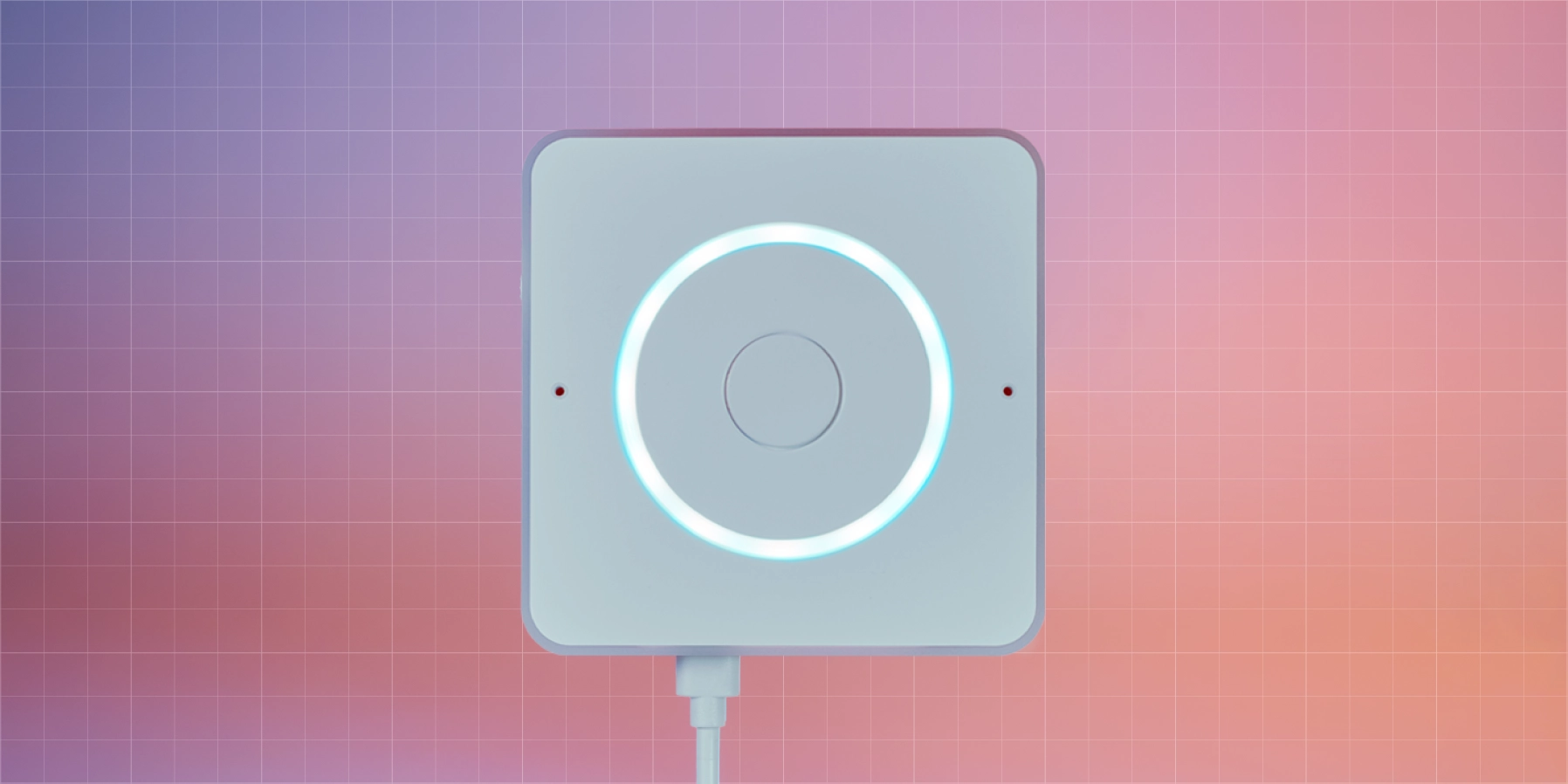
Home Assistant Voice Preview Edition Voice Preview Edition is not only open and powerful, but it looks and feels great too!

It’s now easier than ever to set up your Assist hardware to work with LLMs with our Voice Assistants settings page, and you can even assign a different LLM to each device. The LLM can recognize the room it’s in and the devices within it, making its responses more relevant. Assist was built to be a great way to control devices in your home, but with AI, it becomes so much more.

AI-powered suggestions

Last month, Home Assistant launched a new opt-in feature to leverage the power of AI when automating with Home Assistant. The goal is to shorten the journey from a blank slate to your finished idea.

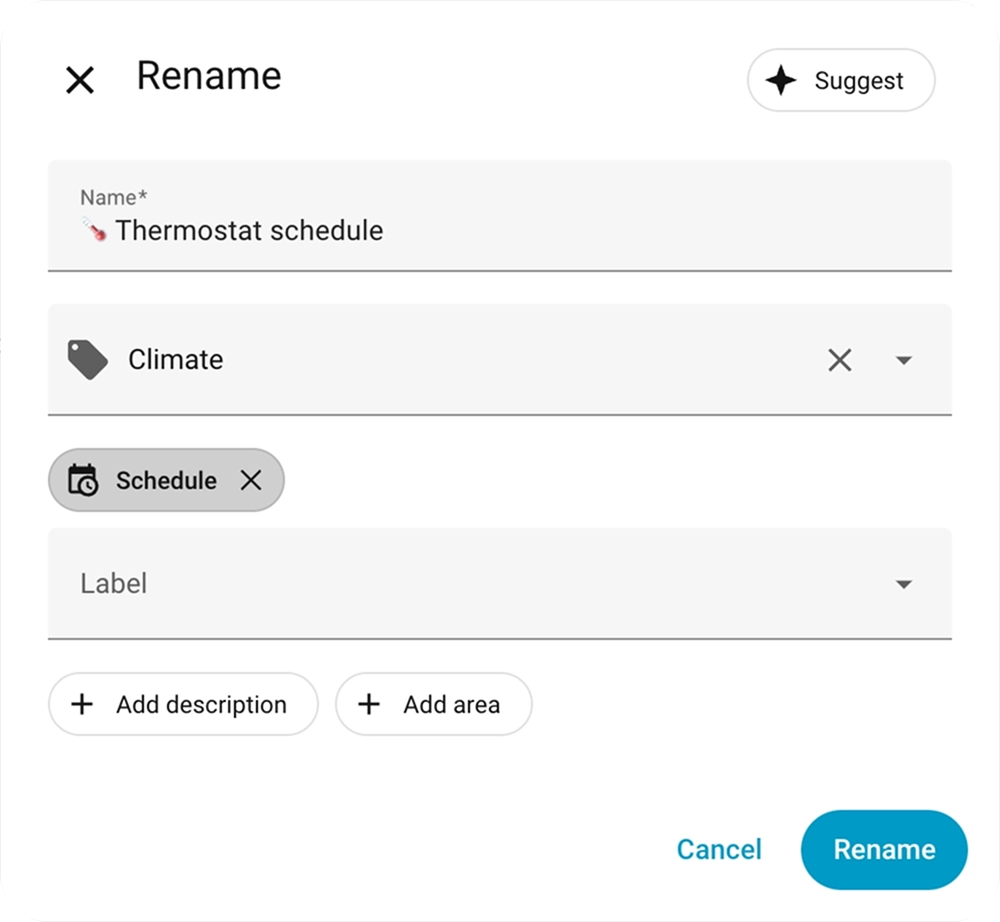
When saving an automation or script, users can now leverage the new Suggest button: When clicked, it will send your automation configuration along with the titles of your existing automations and labels to AI to suggest a name, description, category, and labels for your new automation. Over the coming months, we’re going to explore what other features can benefit from AI suggestions.

A rename modal open with the new Suggest button top right

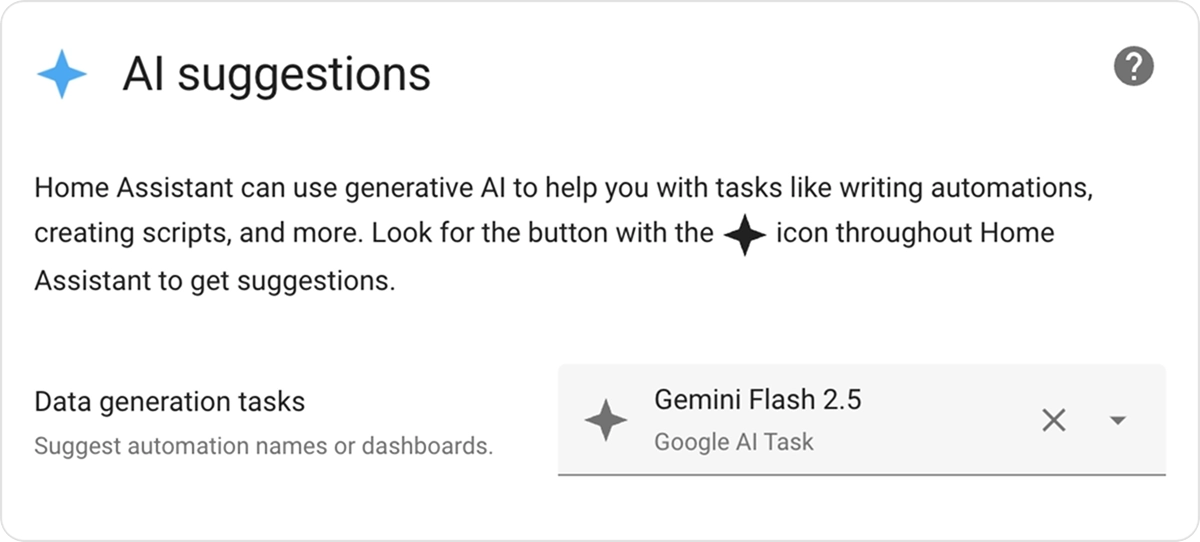
To opt-in to this feature, you need to take two steps. First, you need to configure an integration that provides an AI Tasks entity. For local AI, you can configure Ollama, or you can also leverage cloud-based AI like Google, OpenAI, or Anthropic. Once configured, you need to go to the new AI Task preferences pane under System -> General and pick the AI Task entity to power suggestions in the UI. If you don’t configure an AI Tasks entity, the Suggest button will not be visible.

The AI Suggestions setting within Home Assistant

AI Tasks gets the job done

Enabling AI Tasks does more than quickly label and summarize your automations; its true superpower is making AI easy to use in templates, scripts, and automations. AI Tasks allow other code to leverage AI to generate data, including options to attach files and define how you want that data output (for instance, a JSON schema).

We have all seen those incredible community creations, where a user leverages AI image recognition and analysis to detect available parking spots or count the number of chickens in the chicken coop. It’s likely that AI Tasks can now help you easily do this in Home Assistant, without the need for complex scripts, extra add-ons, or HACS integrations.

Below is a template entity that counts chickens in a video feed, all via a short and simple set of instructions.

template:
 - triggers:
     - trigger: homeassistant
       event: start
     - trigger: time_pattern
       minutes: "/5"
   actions:
     - action: ai_task.generate_data
       data:
         task_name: Count chickens
         instructions: >-
           This is the inside of my coop. How many birds (chickens, geese, and
           ducks) are inside the coop?
         structure:
           birds:
             selector:
               number:
         attachments:
           media_content_id: media-source://camera/camera.chicken_coop
           media_content_type: image/jpeg
       response_variable: result
   sensor:
     - name: "Chickens"
       state: "{{ result.data.birds }}"
       state_class: total

This template sends a snapshot of the camera to the AI, asking it to analyze what is going on. It defines that the output should always be a number, since we want to use that information in Home Assistant. All of this is embedded in a template entity that automatically updates every 5 minutes. An AI Task could also be embedded in an automation, a script, or any other place that can execute actions.
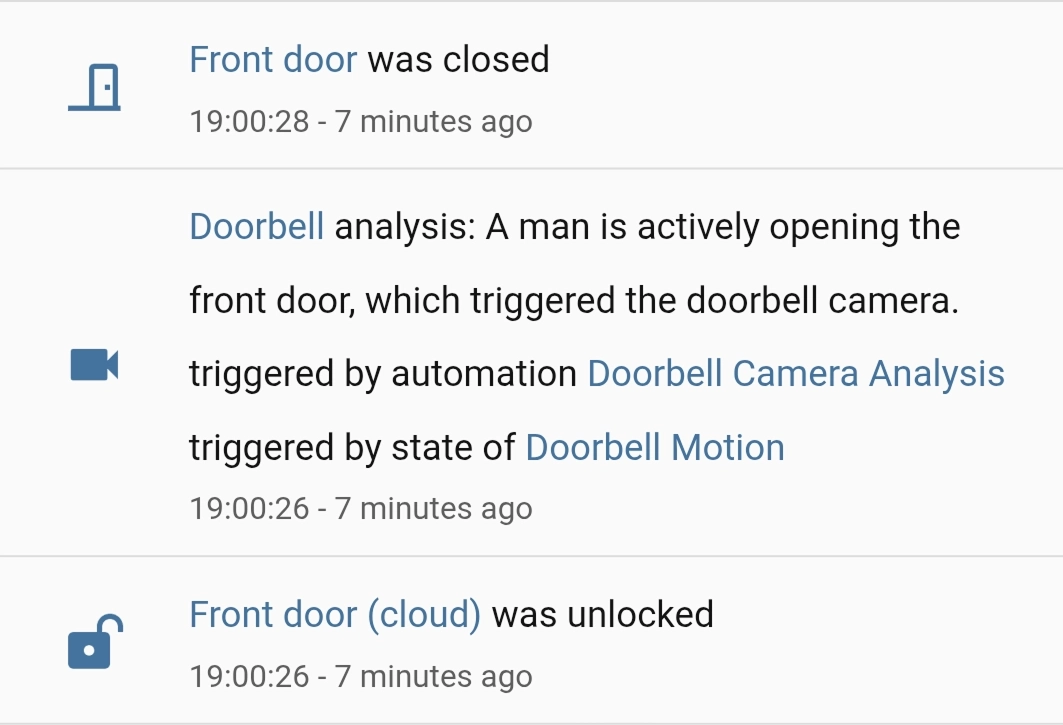
Activity view in Home Assistant of the doorbell image analyzed by AI Tasks An automation triggers an AI Task to identify what caused motion on a camera.

Lastly, users can set a default AI Task entity. This allows users to skip picking an entity ID when creating AI automations. It also lets you migrate everything that uses AI Tasks to the latest model with a single click. This also makes it easy to share blueprints that leverage AI Tasks, like this blueprint that analyzes a camera snapshot when motion is detected:

MCP opens a whole new world

Model Context Protocol (MCP) is a thin layer allowing LLMs to integrate anything. When the specification was announced, we quickly jumped on it and integrated it into Home Assistant. Effectively, these servers give Home Assistant’s Assist conversation agent access to all sorts of new tools. You could connect MCP servers that give Assist access to the latest news stories, your to-do lists, or a server that catalogues your vinyl collection, allowing you to have richer conversations (“Okay Nabu, which Replacements albums do I have, and which aren’t on my Vinyl-to-Purchase list?”).

On the flip side, you can also turn Home Assistant into an MCP server, allowing an AI system to access information about your home. For instance, you could create a local AI that’s great at making Home Assistant automations, and it could include all your entity names or available actions. MCP keeps gaining more support, and there are some great cloud and self-hosted solutions available.

How to pick a model

There are a lot of models available, it’s hard to know where to start. Luckily, Home Assistant’s resident AI guru @AllenPorter is here to help. He has put together an incredibly useful Home LLM Leaderboard. This dataset includes his extensive tests of cloud and local LLM options, and even has tests that give small local LLMs a fighting chance (see assist-mini).

Currently, the charts show the big cloud players’ most recent models ranking pretty close to each other, while recent local models that use 8GB or more of VRAM are nearly keeping up. In the past, there was a big disparity between most models, but now it’s hard to go wrong.

This is especially helpful as the options for LLMs in Home Assistant have just grown exponentially with the addition of OpenRouter, a unified interface for LLMs. With OpenRouter, users can access over 400 new models in Home Assistant, and it supports AI Tasks right from day one. We really are spoiled for choice.

The future is Open, and Open Source

Home Assistant is open. We believe that you should be in control of your data, and your smart home. All of it. Local LLMs and the way we have architected Home Assistant extends this choice to the AI space, all while maintaining your privacy.

Most crucially, we’ve made all of this open source. We are community-driven and work on this together with our community. The Open Home Foundation has no investors and is not beholden to anyone but our users. Our work is funded through hardware purchases and Home Assistant Cloud subscriptions, allowing us to make all the technology we build free and open.

  •  

v0.19.0-beta.2

This is the second beta release for 0.19! ✨ This beta solves multiple problems. Including some crashes preventing the app from being used. As always, the full changelog is below. For the previous changelog see v0.19.0-beta.1.

If you appreciate my work, you can show your support with a donation through GitHub sponsors (Credit card only) or through Buy Me a Coffee. Your support helps me continue improving and growing the app. Thank you!

🐛 Beta information

Beta versions are not guaranteed to work as expected. We encourage users to create detailed bug reports if any problems arise. Read our blog post for more information about our Android beta programs.

🏗️ Enhancements

💥 Crash fixes

🔧 Bugfixes

📈 Dependency updates

  • Update kotest to v6.0.3 #4916, by renovate[bot]
  • Update Kotlin to v2.2.20 #4923, by renovate[bot]
  • Update androidx.compose to v1.9.1 #4925, by renovate[bot]
  • Update dependency androidx.work:work-runtime to v2.10.4 #4926, by renovate[bot]
  • Update github/codeql-action action to v3.30.3 #4928, by renovate[bot]
  • Update androidx.activity to v1.11.0 #4929, by renovate[bot]
  • Update CI dependencies #4917, by renovate[bot]

Contributors

  •  

Counter-Strike 2 Update

[p][ MISC ][/p]
  • [p]Fixed an issue that would allow exec_async to continue executing in cheat protected servers resulting in random user input dropout.[/p][/*]
  • [p]Last chance to pick up the Gallery Case, Graphic Collection, and Character Craft stickers from The Armory.[/p][/*]
  •  

Part-DB 2.1.2

Part-DB 2.1.2

Important

If you are using Part-DB it would be helpful if you fill out this short survey on your usage of Part-DB (Google Forms): https://forms.gle/Q15twx3YYq3qCNfe8

Tip

You can help to translate Part-DB to other languages. See this post for more info.

Bug fixes

  • Fixed problem that default info provider option could not be empty (#1032)

Miscellaneous

  • Improved translations

  •  

Counter-Strike 2 Update

[p]\[ MAPS ][/p][p]Agency[/p]
  • [p]Updated to the latest version from the Community Workshop (Update Notes)[/p][/*]
[p]Grail[/p]
  • [p]Updated to the latest version from the Community Workshop (Update Notes)[/p][/*]
[p]\[ ANIMATION ][/p]
  • [p]Viewmodel animation fixes for the Bowie, Bayonet, Kukri, Nomad, Paracord, and Skeleton knives.[/p][/*]
[p]\[ MISC ][/p]
  • [p]Improved performance when firing weapons.[/p][/*]
  • [p]Fixed a case where viewmodel motion due to view angle changes depended on the direction you were facing.[/p][/*]
  •  

SECURITY: fix single-file shares

there is a discord server with an @everyone in case of future important updates, such as vulnerabilities (most recently 2025-09-07)

⚠️ ATTN: this release fixes CVE-2025-58753, an issue with shares

  • when a share is created for just one or more files inside a folder, it was possible to access the other files inside that folder by guessing the filenames
  • it was not possible to descend into subdirectories in this manner; only the sibling files were accessible
  • NOTE: this does NOT affect filekeys; this is specifically regarding the shr global-option

recent important news

🧪 new features

  • #761 IdP: option to replace the login/logout links and buttons with redirects into an IdP UI 09f2299
  • #726 disk-usage and server-version can be selectively hidden according to user permissions 19a4c45
  • option --shr-who / volflag shr_who decides who is able to create a share of that volume edafa15
  • #751 nixos: add globalExtraConfig to specify repeatable config parameters (thx @xvrqt!) 09e3018
  • some very small speedups (mainly u2c and ancient python versions) 74821a3
  • #759 #393 total folder size now decreases when files inside are deleted 96b109b
    • would previously require a reindex to get back on track

🩹 bugfixes

  • fix GHSA-pxvw-4w88-6x95 by fencing fileshares to just the shared files e0a92ba
  • #397 prevent hinting at valid passwords, even if they cannot be used to authenticate with 7a4ee4d
  • #747 disable some features if /tmp must be used for runtime config e6755aa
    • the config-folder will now also be created with chmod 700 (accessible by owner only)
  • #733 #298 fix hotkeys on non-qwerty keyboard layouts (dvorak etc.) e798a9a
  • #539 ftp-server: support clients which never does a CWD b049631
  • ignore the plaintext session-cookie on https; fixes some confusing behavior when switching from https to http c71128f
  • og-ua would prevent clients matching the pattern from accessing fullsize files
  • og-ua was only possible to set globally; the og_ua volflag was ignored 422f8f6
  • uds / unix-domain-sockets got wrong permissions when rm-sck was used e270fe6
  • #727 macos: support running from config-files 230a146
  • #539 avoid issues if someone uploads a file with a last-modified timestamp from year -9999999999999 eeb7738
  • using the spacebar to pause a video was jank on chrome bfcb6ea
  • block the next-song hotkey while a folder is loading f7e08ed
  • #748 fix rare js-panic when an action is aborted aaeec11
  • #738 bubbleparty: use /bin/bash (thx @ckastner!) 0469b5a

🔧 other changes

  • partyfuse: nice speedup by caching readdir too 06d2654
  • partyfuse: explain usage with usernames 1cdb388
  • connect-page: better examples when usernames enabled 3bdef75
  • docker: fix image annotations ab56238

🌠 fun facts


⚠️ not the latest version!

  •  

Part-DB 2.1.1

Part-DB 2.1.1

Important

If you are using Part-DB it would be helpful if you fill out this short survey on your usage of Part-DB (Google Forms): https://forms.gle/Q15twx3YYq3qCNfe8

Tip

You can help to translate Part-DB to other languages. See this post for more info.

Bug fixes

  • Fixed problem that tree views were not properly highlighted anymore

  •  

Part-DB 2.1.0

Part-DB 2.1.0

Important

If you are using Part-DB it would be helpful if you fill out this short survey on your usage of Part-DB (Google Forms): https://forms.gle/Q15twx3YYq3qCNfe8

Tip

You can help to translate Part-DB to other languages. See this post for more info.

New features

  • Added new exchange rate provider, that allow for more foreign currencies without need for fixer.io
  • Show what permissions a user is lacking in case of an access denied message
  • Do not mark relative links in markdown as external and open in new tab (thanks @d-buchmann)
  • Added option to import BOM files from KiCAD schematic editor and generic CSV files (thanks @barisgit)
  • Added an button to update label profiles directly from the label generator.
  • Allow to customize what items get shown at homepage (#470, #894)
  • Allow to hide version number at homepage
  • Allow to disable the extraction of parameters from part notes and description (#747)
  • Allow to select default info providers for a provider search (#556)
  • Made image size in part tables configurable
  • Made part table action bar sticky and floating to make it better visible and improve UX

Bug fixes

  • Allow import of label profiles (thanks @d-buchmann)
  • Fixed problem with currency admin (#1009)
  • Fixed LCSC provider (#1018)
  • Fixed CKeditor text color in dark mode (#1016)
  • Use better tilde symbols for LCSC provider data (@d-buchmann, #989)
  • Fixed pollin info provider (#1015)
  • Prevent that label profiles with duplicate names get created (#994)
  • Readdeed option to show all entries of a table

Miscellaneous

  • Updated dependencies
  • Improved documentation
  • Updated GNU Unifont

Full Changelog: v2.0.2...v2.1.0

  •  

Updated Debian 12: 12.12 released

The Debian project is pleased to announce the twelfth update of its oldstable distribution Debian 12 (codename bookworm). This point release mainly adds corrections for security issues, along with a few adjustments for serious problems. Security advisories have already been published separately and are referenced where available.
  •  

Updated Debian 13: 13.1 released

The Debian project is pleased to announce the first update of its stable distribution Debian 13 (codename trixie). This point release mainly adds corrections for security issues, along with a few adjustments for serious problems. Security advisories have already been published separately and are referenced where available.
  •  

OBS Studio 32.0.0 Beta 2

Beta 2 Changes

  • Fixed a crash in Beta 1 when loading an invalid config file in the Plugin Manager [FiniteSingularity]
  • Fixed a crash in Beta 1 when streaming to an invalid SRT URL [gxalpha]
  • Fixed a crash in Beta 1 when loading old NVIDIA Audio Effects SDK versions [pkviet/notr1ch]
  • Fixed a crash in Beta 1 when loading plugins that use removed API functions [gxalpha]
  • Fixed stack smash and TLS issues with browser sources on Linux [tytan652]
  • Fixed an issue in Beta 1 where Scene and Group sources would show as missing or invalid in the Sources list [exeldro]
  • Fixed an issue in Beta 1 where capture sources (screen capture, video device capture, and display capture) would not work on OpenGL [PatTheMav]
  • Fixed an issue in Beta 1 where the crash log prompt was appearing on systems where OBS Studio does not handle crash logs [tytan652]
  • Fixed an issue where GetGroupList with obs-websocket would return nothing [gxalpha]
  • Added experimental Metal renderer for Apple Silicon Macs [PatTheMav]
  • Changed the crash sentinel file location to its own subdirectory [PatTheMav]
  • Removed workarounds to prevent loading Qt 5 based plugins [RytoEX]
  • Removed ability on Linux to load plugins built for older major versions of OBS Studio [tytan652]
    • OBS Studio 32 (and future 32.x versions) on Linux can only load plugins linked against libobs 32.

32.0 New Features

  • Added a basic plugin manager [FiniteSingularity/PatTheMav/Warchamp7]
  • Added opt-in automatic crash log upload for Windows and macOS [PatTheMav/Warchamp7]
  • Added Voice Activity Detection (VAD) to NVIDIA RTX Audio Effects, which improves noise suppression for speech, as well as several optimizations to NVIDIA Effects [pkviet]
  • Added chair removal option for NVIDIA RTX Background Removal, allowing removal of chairs [pkviet]
  • Added Hybrid MOV support [derrod]
    • Brings ProRes support on macOS and a more widely supported HEVC/H.264 + PCM audio option to all platforms

32.0 Changes

  • OBS Studio will no longer load plugins built for a newer release of OBS to prevent future compatibility issues [norihiro]
  • Added custom OBS widgets in preparation for larger UI updates [derrod/gxalpha/Warchamp7]
  • Added preparations for Metal renderer (stay tuned!) [PatTheMav]
  • Improved audio deduplication logic to cover more cases of nested scenes, groups, and multiple canvases [pkviet]
  • Prevent audio duplication when sources are set to "Monitor and Output" while the monitoring device is also being captured [pkviet]
  • Updated the default settings for AMD encoders [rhutsAMD]
  • Improved accuracy of chapter markers in Hybrid MP4/MOV [derrod]
  • Re-hid the cursor in edit fields on macOS [gxalpha]
  • Improved format selection for PipeWire video capture [tytan652]

32.0 Bug Fixes

  • Potentially fixed a rare crash on macOS when moving or resizing the OBS window [PatTheMav]
  • Fixed a crash with SRT when using an invalid URL [pkviet]
  • Fixed a crash when setting non-default pkt_size with SRT [pkviet]
  • Fixed a crash in Media Source when playback starts with certain video files [howellrl]
  • Fixed rare occurrence of multiview becoming blank [norihiro]
  • Fixed SRT reconnection failures [pkviet]
  • Fixed overflow texture rendering sRGB-awareness [PatTheMav]
  • Fixed incorrect color range property setting for AMD AV1 encoder [rhutsAMD]
  • Fixed Hybrid MP4 file splitting not working correctly in some cases [derrod]
  • Fixed not being able to capture higher than 60fps with macOS Screen Capture [jcm93]
  • Fixed focus not displaying properly in hotkey settings on macOS [gxalpha]
  • Fixed the scrollbar appearing invisible in Light and Rachni themes [shiina424]
  • Fixed HEVC frame priority not being set correctly in some cases, potentially causing playback errors when dropping frames [dsaedtler]
  • Fixed an issue that could result in increases to output latency after temporary encoder stalls [dsaedtler]
  • Removed a workaround for older Qt versions that prevented docks from loading correctly while OBS is maximized [RytoEX]

Checksums

OBS-Studio-32.0.0-beta2-Sources.tar.gz: defe8b0602aaab56098611f914751287da34dc12788ce5a3eb1f02142712015a
OBS-Studio-32.0.0-beta2-Ubuntu-24.04-x86_64-dbsym.ddeb: 8141bb6a0be086a62f7feb681ecd50597b668fa41df1745946a58f5144142d4d
OBS-Studio-32.0.0-beta2-Ubuntu-24.04-x86_64.deb: 07682d7f9476089c68c87a0d417b3747057ea4fe703bd7869139bcc5e788bd53
OBS-Studio-32.0.0-beta2-Windows-arm64-PDBs.zip: 3351f40a0379793c4f69ce6f5616791b4cd2ad16fdcbbbe559611148d8601514
OBS-Studio-32.0.0-beta2-Windows-arm64.zip: a8b14d84a50737116f4c20e6635151d8277bc34d73b36c50543b4a777d09779c
OBS-Studio-32.0.0-beta2-Windows-x64-Installer.exe: a31d2f2656fcfab0f7eba4f9f5b60b65a079cee447b4fd0187a69b4789652763
OBS-Studio-32.0.0-beta2-Windows-x64-PDBs.zip: 15c1d64fe33c35cf15cb5b0e9962b70e0f349b9664ed600cff0934d577009620
OBS-Studio-32.0.0-beta2-Windows-x64.zip: e5df89f1fb8581d22405c8022799be8c057a69295442f6b04ae044ecd28a78f2
OBS-Studio-32.0.0-beta2-macOS-Apple-dSYMs.tar.xz: 6bcc4b35ea4003bfe544030c3756d3a61d1bcafed9bbeef8da539f8c72c85c33
OBS-Studio-32.0.0-beta2-macOS-Apple.dmg: 744e03ac701a6ad71128dc8abc0e295dadf5e69a951a396cf0ada328bb4bc4e3
OBS-Studio-32.0.0-beta2-macOS-Intel-dSYMs.tar.xz: 2618a237f797d6559b0c39c8ddc8827d74c7b5818237a0dd5e431cfdfec82116
OBS-Studio-32.0.0-beta2-macOS-Intel.dmg: 35fdb1b2e1ae4cd562fcf5fc4ed59614f583b893c254be5a7b1a0c6652088386

  •  

v0.19.0-beta.1

Welcome to the first beta of Jellyfin for Android TV 0.19! ✨

Some of the primary changes include: an improved networking layer, a redesigned search with voice input, the introduction of a new navigation experience across the app, support for seeking music and better queue management, a new 'Are you still watching?' prompt, and many performance and stability improvements under the hood.
Additionally, the photo viewer has been redesigned to align with the new video player’s design, which will be introduced in a future update.

This version is compatible with Jellyfin server 10.10.0 and 10.11.0.

If you appreciate my work, you can show your support with a donation through GitHub sponsors or buy me a bug. Your support helps me continue improving and growing the app. Thank you!

🐛 Beta information

Beta versions are not guaranteed to work as expected. We encourage users to create detailed bug reports if any problems arise. Read our blog post for more information about our Android beta programs.

This beta program will slowly rollout on Google Play in the coming weeks.

🌟 Highlights

🏗️ Enhancements

💥 Crash fixes

🔧 Bugfixes

🔃 Refactoring

📈 Dependency updates

  • Update aboutlibraries by renovate[bot] v12.2.4 #4766, v12.2.3 #4717, v12.2.1 #4707, v12.2.0 #4693, v12.1.2 #4642, v12.1.1 #4641, v12.1.0 #4637, v12.0.1 #4620, v12 (major) #4602, v11.6.3 #4469, v11.6.2 #4419, v11.4.0 #4374
  • Update com.android.tools.build:gradle by renovate[bot] v8.13.0 #4896, v8.12.2 #4888, v8.12.1 #4870, v8.12.0 #4830, v8.11.1 #4746, v8.10.1 #4689, v8.10.0 - autoclosed #4609, v8.9.1 #4542, v8.9.0 #4499, v8.8.2 - autoclosed #4485, v8.8.1 #4456, v8.8.0 #4392
  • Update io.mockk:mockk by renovate[bot] v1.14.5 #4793, v1.14.4 #4742, v1.14.2 #4629, v1.14.0 #4573, v1.13.17 #4490, v1.13.16 #4395
  • Update androidx.activity:activity by renovate[bot] v1.10.1 #4484, v1.10.0 #4406
  • Update dependency androidx.recyclerview:recyclerview to v1.4.0 #4407, by renovate[bot]
  • Update koin by renovate[bot] v4.1.1 #4900, v4.1.0 #4712, v4.0.4 #4557, v4.0.3 #4546, v4.0.2 #4414
  • Update gradle by renovate[bot] v9 #4831, v8.14.3 #4769, v8.14.2 #4708, v8.14.1 #4678, v8.14 #4622, v8.13 #4478, v8.12.1 #4418
  • Update androidx.compose.foundation:foundation by renovate[bot] v1.8.3 #4732, v1.8.2 #4676, v1.7.8 #4452, v1.7.7 #4429
  • Update androidx.compose.ui:ui-tooling by renovate[bot] v1.8.3 #4730, v1.8.2 #4670, v1.7.8 #4453, v1.7.7 #4430
  • Update androidx.fragment by renovate[bot] v1.8.8 #4700, v1.8.7 #4669, v1.8.6 #4451
  • Update appleboy/ssh-action action to v1.2.1 #4468, by renovate[bot]
  • Update dependency io.gitlab.arturbosch.detekt to v1.23.8 #4473, by renovate[bot]
  • Update dependency com.android.tools:desugar_jdk_libs to v2.1.5 #4479, by renovate[bot]
  • Update dependency androidx.constraintlayout:constraintlayout to v2.2.1 #4486, by renovate[bot]
  • Update org.jellyfin.sdk:jellyfin-core by renovate[bot] v1.7.0-beta.6 #4901, v1.7.0-beta.5 #4863, v1.7.0-beta.4 #4858, v1.6.7 #4556
  • Update androidx.tvprovider:tvprovider by renovate[bot] v1.1.0 #4645, v1.1.0-beta01 #4575
  • Update androidx.core:core-ktx by renovate[bot] v1.17.0 #4857, v1.16.0 #4576
  • Update github/codeql-action action by renovate[bot] v3.30.1 #4904, v3.30.0 #4895, v3.29.11 #4874, v3.29.10 #4868, v3.29.9 #4845, v3.29.8 #4842, v3.29.5 #4824, v3.29.4 #4813, v3.29.3 #4809, v3.29.2 #4764, v3.29.1 #4753, v3.28.19 #4699, v3.28.17 #4639, v3.28.16 #4611
  • Update androidx.leanback to v1.2.0 #4613, by renovate[bot]
  • Update androidx.work:work-runtime by renovate[bot] v2.10.3 #4826, v2.10.2 #4733, v2.10.1 #4616
  • Update androidx.compose by renovate[bot] v1.9.0 #4854, v1.8.1 #4644, v1.8.0 #4618
  • Update androidx.lifecycle by renovate[bot] v2.9.3 #4887, v2.9.2 #4795, v2.9.1 #4701, v2.9.0 #4646
  • Update coil by renovate[bot] v3.3.0 #4810, v3.2.0 #4657
  • Update dependency androidx.window:window to v1.4.0 #4671, by renovate[bot]
  • Update dependency androidx.appcompat:appcompat to v1.7.1 #4702, by renovate[bot]
  • Update Kotlin by renovate[bot] v2.2.10 #4856, v2.2.0 #4744
  • Update dependency org.jetbrains.kotlinx:kotlinx-serialization-json to v1.9.0 #4754, by renovate[bot]
  • Update gradle/actions action to v4.4.2 #4840, by renovate[bot]
  • Update actions/checkout action to v5 #4846, by renovate[bot]
  • Update dependency androidx.fragment:fragment-ktx to v1.8.9 #4853, by renovate[bot]
  • Update dependency io.github.peerless2012:ass-media to v0.3.0-rc03 - autoclosed #4855, by renovate[bot]
  • Update kotest by renovate[bot] v6.0.2 #4898, v6.0.1 #4879, v6 (major) #4867
  • Update actions/setup-java action to v5 #4873, by renovate[bot]
  • Update actions/stale action to v10 #4902, by renovate[bot]
  • Update Kotlin #4250, by renovate[bot]
  • Update CI dependencies #4386, by renovate[bot]
  • Update CI dependencies #4413, by renovate[bot]
  • Update CI dependencies #4425, by renovate[bot]
  • Update CI dependencies #4431, by renovate[bot]
  • Update CI dependencies #4474, by renovate[bot]
  • Update CI dependencies #4506, by renovate[bot]
  • Update CI dependencies #4529, by renovate[bot]
  • Update CI dependencies #4541, by renovate[bot]
  • Update CI dependencies #4570, by renovate[bot]
  • Update CI dependencies #4661, by renovate[bot]
  • Update CI dependencies #4719, by renovate[bot]
  • Update androidx.media3 #4817, by renovate[bot]

Contributors

  •  

5.2.0-beta.1

Note

UpSnap is, and always will be, free and open source software.

If someone is asking you to pay money for access to UpSnap binaries, source code, or licenses, you are being scammed.

The official and only trusted source for UpSnap is this repository (and its linked releases).
Do not pay third parties for something that is provided here for free.

Changelog

Features

Bug fixes

Others

Go dependencies

Npm dependencies

Github Actions

  •  

5.2.0-beta.0

Note

UpSnap is, and always will be, free and open source software.

If someone is asking you to pay money for access to UpSnap binaries, source code, or licenses, you are being scammed.

The official and only trusted source for UpSnap is this repository (and its linked releases).
Do not pay third parties for something that is provided here for free.

Changelog

Features

Bug fixes

Others

Npm dependencies

Github Actions

  •  

Counter-Strike 2 Update

[p][ MISC ][/p]
  • [p]Fixed an issue where player sounds would not visualize correctly on the minimap.[/p][/*]
  • [p]Fixed a crash when changing sound devices.[/p][/*]
  • [p]Fixed a case where sounds would play incorrectly as players move through water.[/p][/*]
  • [p]Fixed a case where viewmodel motion due to view angle changes misbehaved at certain frame rates.[/p][/*]
[p][ UI ][/p]
  • [p]Minor fixes to the Loadout UI layout on certain resolutions.[/p][/*]
  • [p]Trade-protected and rental items now allow "Unfavorite for CT" action.[/p][/*]
[p][/p][p][ MAPS ][/p][p]Ancient[/p]
  • [p]Various grenade and player clipping fixes.[/p][/*]
[p]Shoots[/p]
  • [p]Various grenade and player clipping fixes.[/p][/*]
[p]Grail[/p]
  • [p]Updated to the latest version from the Community Workshop (Update Notes)[/p][/*]
[p]Agency[/p]
  • [p]Updated to the latest version from the Community Workshop (Update Notes)[/p][/*]
[p]Dogtown[/p]
  • [p]Updated to the latest version from the Community Workshop (Update Notes)[/p][/*]
[p] [/p]
  •  

2025.9: Features for tiles and automations for miles

Home Assistant 2025.9! 🎉

But before we dive into this release: Did you see we launched a new product? 👀

We’ve introduced the Home Assistant Connect ZWA-2, the ultimate way to connect Z-Wave devices to Home Assistant. You can read all about it in our announcement blog 📰 or re-watch the product launch live stream on YouTube 📺.

It was a busy month, as we also had two new Works with Home Assistant program partners joining this month as well: AirGradient and Frient! 🎉

While the above was happening this month, as if the project wasn’t already busy enough, we kept on pushing to prepare for this release; and it is an absolute massive one! 🤯

This month introduces a new experimental Home dashboard, which aims to become the new default dashboard for Home Assistant in a future release. A first iteration, of which we love to see your feedback and input on. As you know, we develop and iterate in the open. Give it a shot and let us know what you think!

Talking about dashboards, my personal favorite card is definitely the tile card; it is just so versatile. And this release brings in a staggering amount of new features for it! Most notably, the ability to add a trend graph to the tile card! 📈

I’m the most excited about the visual changes to the automation editor this release brings: a sidebar. It is a huge and very visible change, that just makes so much sense. This release denotes the start of a whole series of improvements to the automation editor in this, and upcoming releases. As automations make a smart home feel magical, I personally can’t wait to see how this evolves. 🤖

Enjoy the release!

../Frenck

Automation editor sidebar

On this year’s Home Assistant roadmap, we have set the goal of making automations easier to create. We have big plans, all based on tons of research, and with this release… we are shipping the first part of all this work, with the intent to gradually add more improvements over multiple releases!

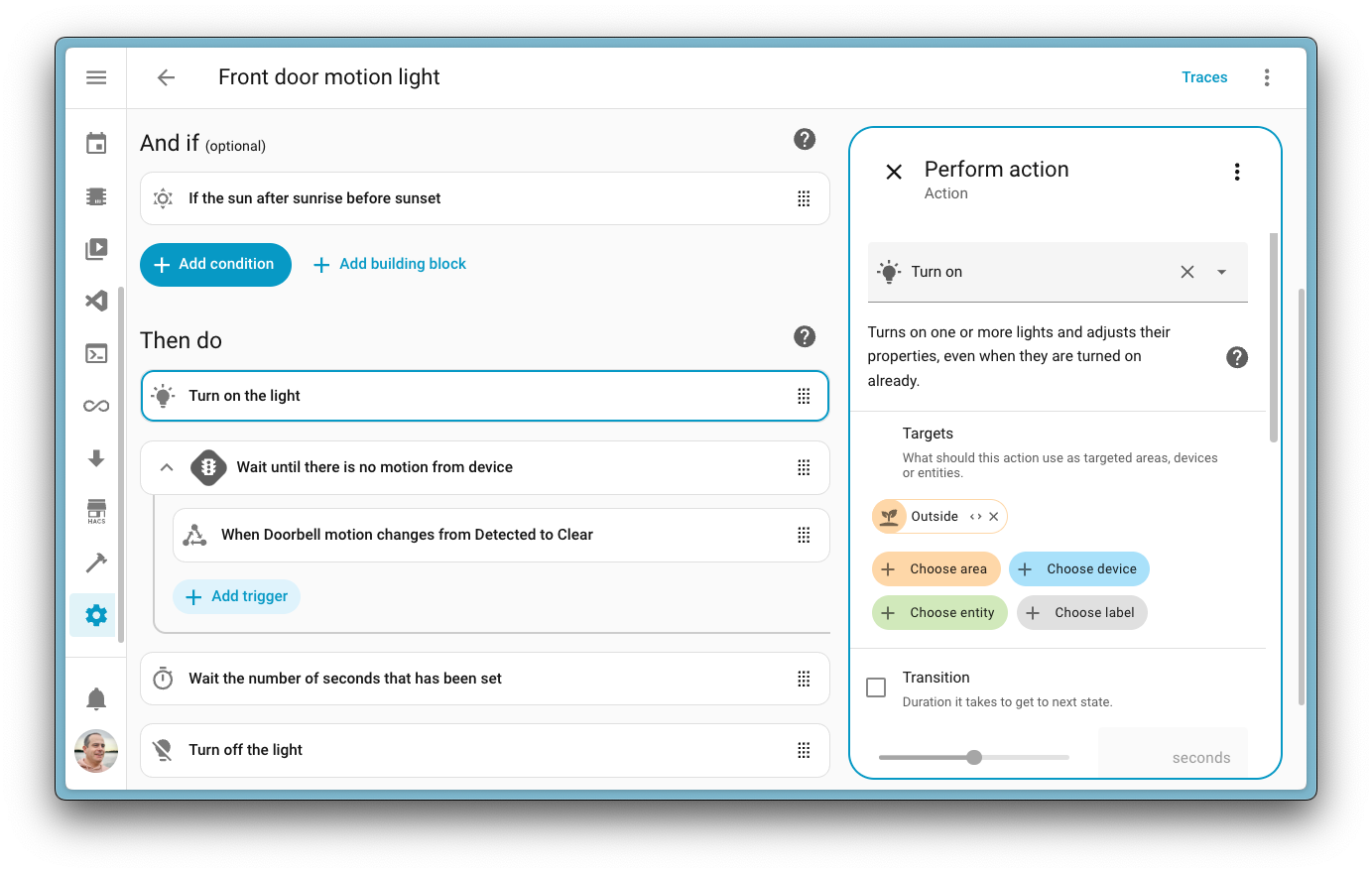
This release tweaks the automation editor user interface experience by introducing a sidebar! If you select an item in your automation, instead of that item expanding, it will open a new sidebar to the right with the settings for that selected item.

Screenshot showcasing a sidebar in our automation editor.

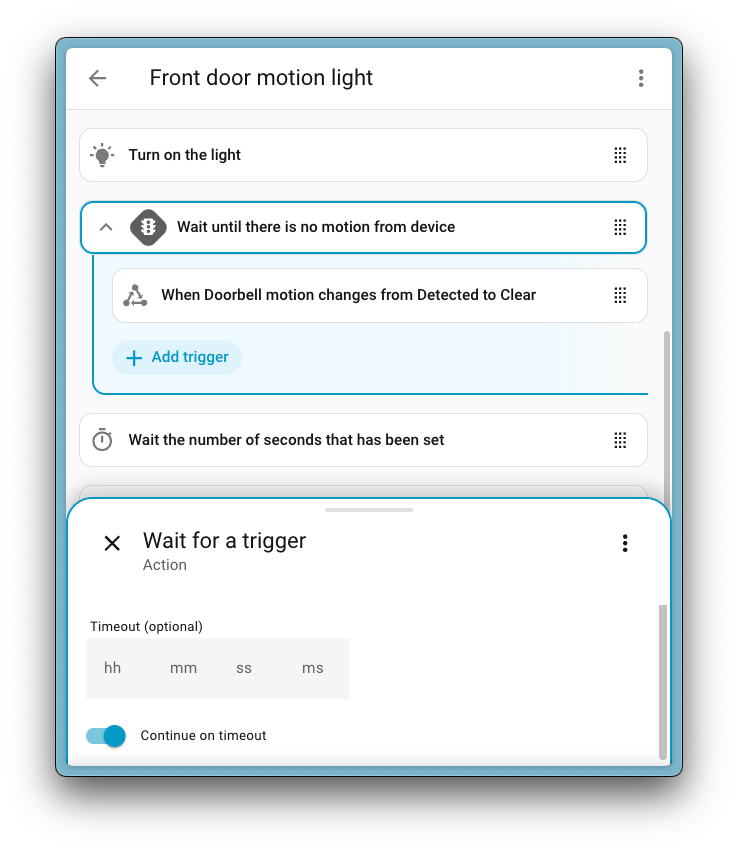
This allows you to keep an overview of your automation on the left side of your screen, while you can tweak its behavior on the right. Of course, we have thought of smaller screens as well. On mobile, instead of the sidebar, a sheet will pop up at the bottom of the screen. This pop-up is also resizable, making it easier than ever to edit an action while reviewing your triggers.

Screenshot showing how on a smaller screen device a sheet is shown from the bottom of the page.

Besides the sidebar, we have made tons of other little improvements as well. Tiny layout and styling changes that you will definitely notice as they really help with the overall readability. For example, small lines and borders around grouped elements have been added, making it easier to distinguish between different parts of your automation. Oh! And drag-and-drop support is now available on mobile! 🎉

Tip

One of Home Assistant’s greatest strengths is our community. We’re building the changes to our automations together, and your input will shape where it goes next. There are two ways to get involved:

Introducing the Home dashboard

Over the past year, we have focused on dashboards and their capabilities a lot. We’ve looked at a lot of your dashboards you’ve shared on socials, and talked to many of you about how you organize all your smart home devices and services. The goal? Making dashboards faster and easier to create, while still making them very customizable.

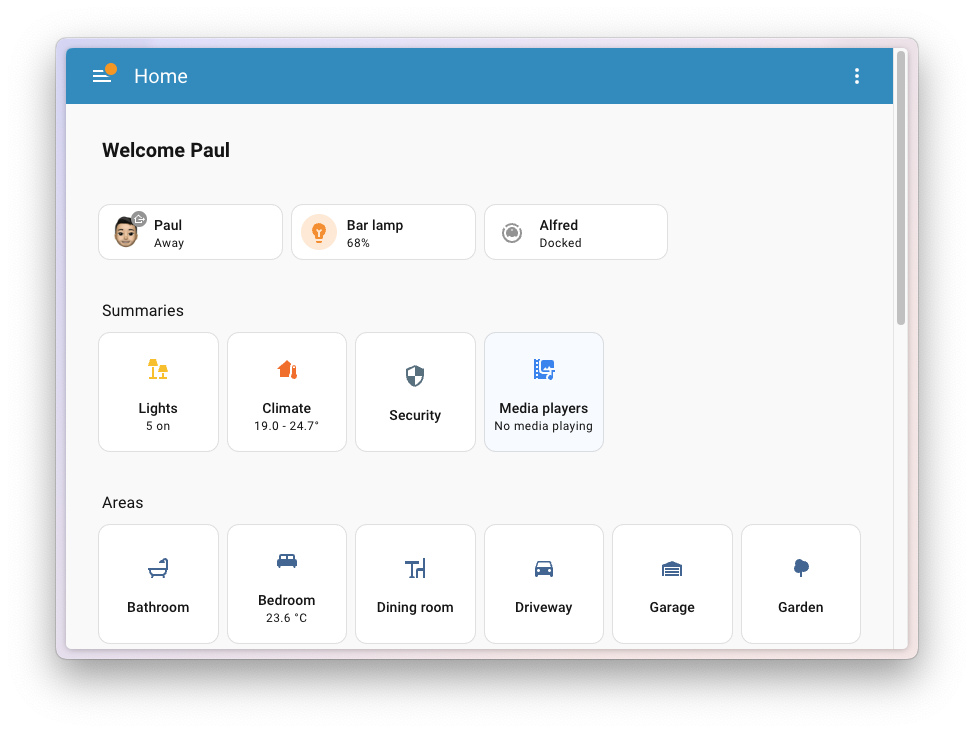
With this release, we’re introducing a brand-new Home dashboard. The purpose is simple: to give you easy access to the right information at the right time.

Screenshot of the new Home dashboard

The dashboard adapts to your Home Assistant experience level: powerful enough for advanced users, yet approachable for newcomers. We’re working to have it earn its name, and hope it will eventually become your new Home page. As always, it’s optional; you can always pick your own dashboard. This is the first iteration, and we’ll continue developing it in the open.

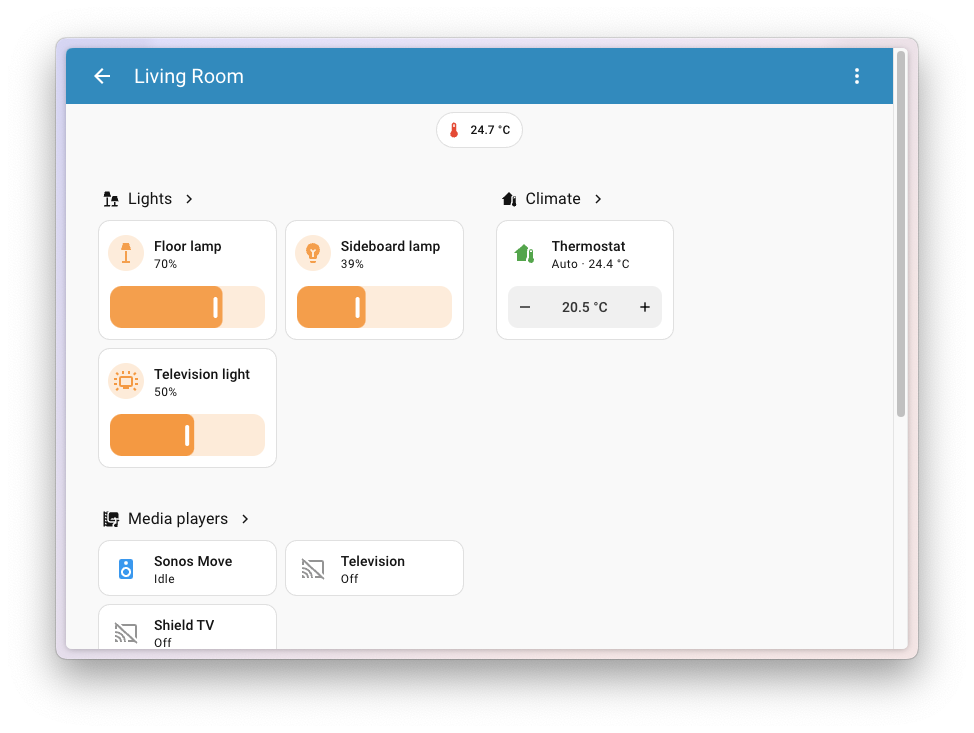
When you first open the Home dashboard, it gives you a quick way to navigate to useful summaries for your light, climate, security, and media devices. You can also browse by areas, getting an overview of all the devices and services associated with that part of your home.

We’re also introducing Favorites. You can pin any entity to the top, whether it’s a light, climate, or a person. We’d love to see what you choose (more on this in the future).

The Home dashboard is not just about quick control. It also brings insights and information about your home. This first release includes weather and energy cards. It’s a simple start, and we have a lot of ideas to explore with you. For example, helping you create your first automation, or show discovered devices.

Screenshot of the new Home dashboard viewing the living room area

For now, the Home dashboard is considered experimental. Configuration options are limited, and it’s guaranteed to evolve. It won’t appear automatically, and if you want to try it you’ll need to add it manually in the dashboard settings, by adding a new “Home” dashboard.

Tip

One of Home Assistant’s greatest strengths is our community. We’re building this dashboard together, and your input will shape where it goes next. There are two ways to get involved:

New tile card features

The tile card is the most versatile card we have in our arsenal of cards for our dashboards.

One superpower of the tile card is its “features”, which are small additions where you can add quick interactions to these cards. For example, a slider to control the brightness of a light or buttons for the speed presets of a fan. Features have been extended quite a bit in this release by a dedicated group of community members.

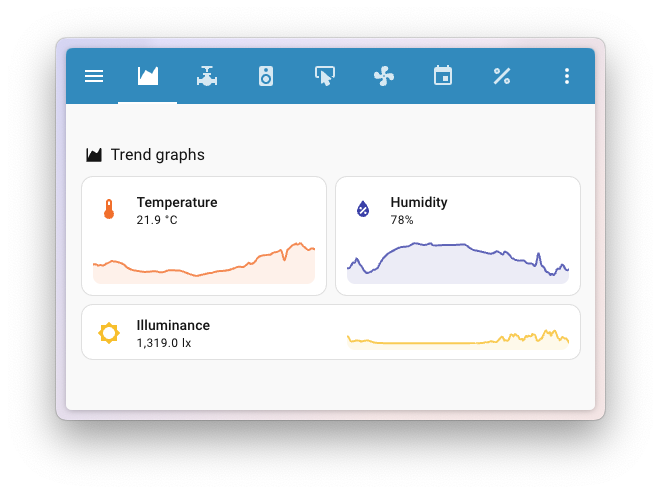
Trend chart

This release, an absolute banger is the addition of the trend chart features for tile cards created by @MindFreeze.

This feature adds a handy quick graph to the tile card, showing the history of a specific entity over time. For this initial version, the time window shown is 24 hours.

Screenshot showing a tile card using the new trend graph feature

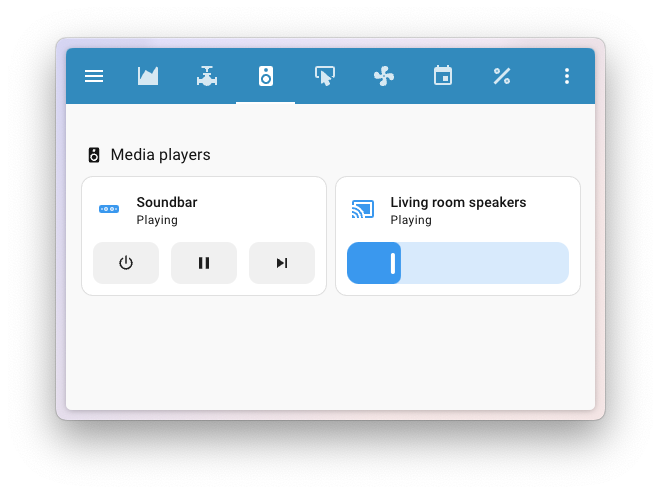
Media player controls

@timmo001, added tile card features for media player controls and volume! This makes the tile card now a viable alternative to the media player card. Awesome!

Screenshot showing a tile card using the new media player features

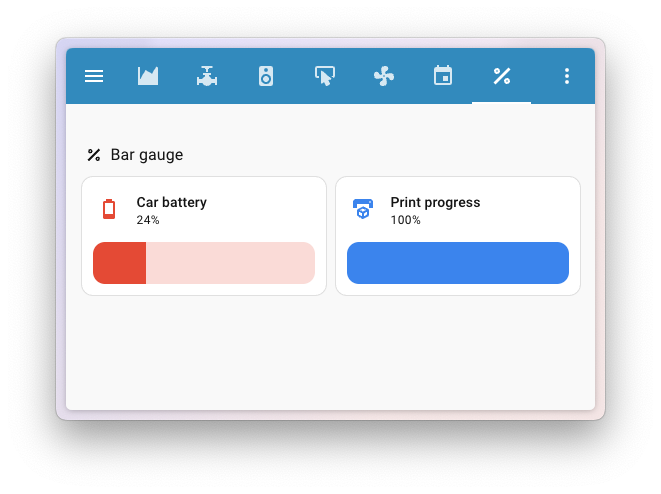
Bar gauge

A new tile card feature, made by @MindFreeze: The bar gauge!

For this initial version, it works with sensors that use a percentage (%) for their unit of measurement. This makes the card great, for example, for a battery overview dashboard. Nice work!

Screenshot showing a tile card using the new bar gauge feature

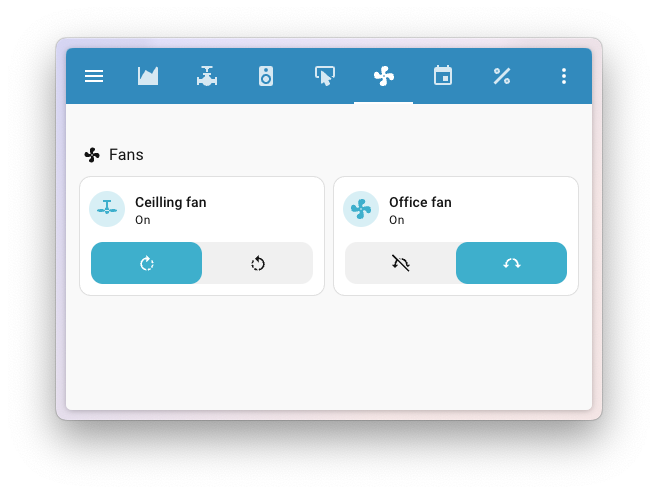
Fan direction and oscillation controls

Thanks to @pcan08 we now have a tile card feature to control fan direction and oscillation!

Screenshot showing a tile card using the new fan direction and oscillation features

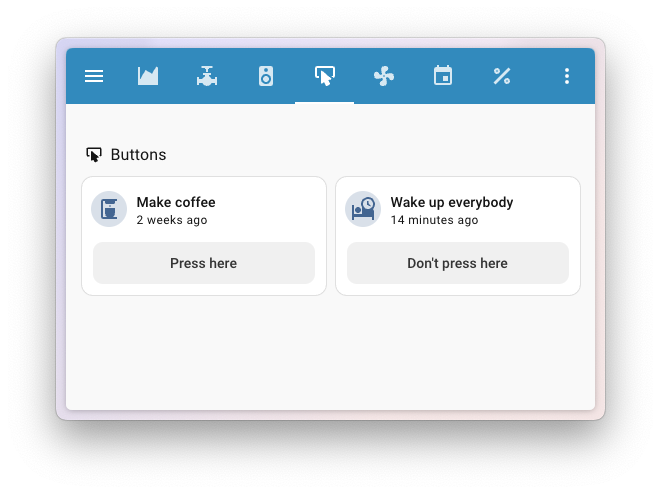
Buttons

Thanks to @dhoeben we now have a tile card feature for buttons! He added these buttons for automation, script, and button entities. The text can be changed to display standard button text or custom text.

Screenshot showing a tile card using the new button feature

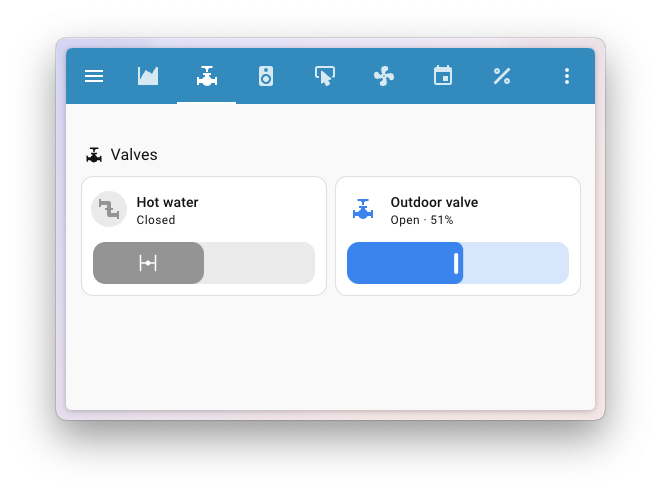
Valve open/close and position controls

Thanks to @timmo001 we now have a tile card feature to control the open/close and the position of valves.

Screenshot showing a tile card using the new open/close and valve position features

Setting the date

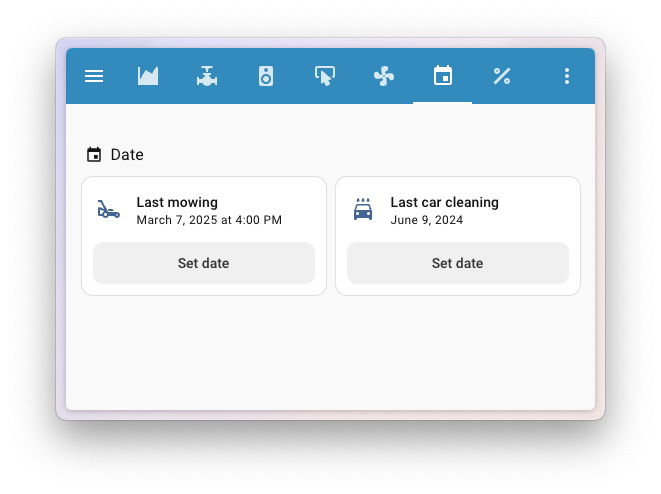
@timmo001 continued and also added a new tile card feature to support date and datetime entities (including the input datetime helpers). It allows you to add a feature that allows for setting a date.

Screenshot showing a tile card using the new date feature

Integrations

Thanks to our community for keeping pace with the new integrationsIntegrations connect and integrate Home Assistant with your devices, services, and more. [Learn more] and improvements to existing ones! You’re all awesome 🥰

New integrations

We welcome the following new integrations in this release:

Noteworthy improvements to existing integrations

It is not just new integrationsIntegrations connect and integrate Home Assistant with your devices, services, and more. [Learn more] that have been added; existing integrations are also being constantly improved. Here are some of the noteworthy changes to existing integrations:

  • Husqvarna Automower got some nice additions from @Thomas55555! You can now reset cutting blade usage time and track error events with a new event entity. Perfect for keeping track of your lawn mowing robot!
  • The Reolink integration now includes speak and doorbell volume controls, plus a chime silent time number entity! Nice @starkillerOG!
  • You can now send notifications with the PlayStation Network integration! Send direct messages to your friends! Thanks, @tr4nt0r!
  • Network admins will love @Tomeroeni bringing individual (enable/disable) switch port control to UniFi switches!
  • The OpenWeatherMap integration now includes a wind gust sensor, thanks to @gjohansson-ST!
  • @kizovinh added support for battery status and online status sensors to the EZVIZ integration, making it easier to monitor your EZVIZ cameras. Nice!
  • If you own a Russound RIO device, you can now browse your device’s saved presets directly from the media browser! Thanks, @noahhusby!
  • @mbo18 added an absolute humidity sensor to the Awair integration. Nice!
  • The Teslemetry integration added charging and preconditioning actions for your Tesla vehicle. Thanks, @Bre77!
  • @catsmanac added IQ Meter Collar and C6 Combiner support to the Enphase Envoy integration. Good work!

Integration quality scale achievements

One thing we are incredibly proud of in Home Assistant is our integration quality scale. This scale helps us and our contributors to ensure integrations are of high quality, maintainable, and provide the best possible user experience.

This release, we celebrate several integrationsIntegrations connect and integrate Home Assistant with your devices, services, and more. [Learn more] that have improved their quality scale:

This is a huge achievement for these integrations and their maintainers. The effort and dedication required to reach these quality levels is significant, as it involves extensive testing, documentation, error handling, and often complete rewrites of parts of the integration.

A big thank you to all the contributors involved! 👏

Now available to set up from the UI

While most integrationsIntegrations connect and integrate Home Assistant with your devices, services, and more. [Learn more] can be set up directly from the Home Assistant user interface, some were only available using YAML configuration. We keep moving more integrations to the UI, making them more accessible for everyone to set up and use.

The following integration is now available via the Home Assistant UI:

Farewell to the following

The following integrationIntegrations connect and integrate Home Assistant with your devices, services, and more. [Learn more] is no longer available as of this release:

  • Uonet+ Vulcan has been removed. Vulcan has changed their API and their policies forbid using the API from unofficial software.

Other noteworthy changes

There are many more improvements in this release; here are some of the other noteworthy changes:

  • Based on feature requests from the community, all modern template entity syntax now supports setting a default entity ID directly in YAML. Thanks @Petro31 for implementing that!
  • @Petro31 also added support for two new entity types to the template integration. You can now create your own templated event entities and update entities. Awesome!
  • Home Assistant now supports m³/min as a volume flow rate unit. Nice addition @fetzerch!
  • Our voice guy @synesthesiam has been busy with some great QoL improvements this release as well.
    • The intent handling for the default agent (non-LLM) now supports fuzzy matching. The technique ensures voice pipelines recognize many more sentences. This improvement is available for English only, while we are looking for ways to extend this to other languages.
    • We now have built-in intents to control the volume of (active) media players! Like the song? Just ask Home Assistant to turn it up a notch!
    • After all that dancing, you might have gotten a little warm. Hence in this release, we now also have intents to control fan speeds. Nice!

Analog clock

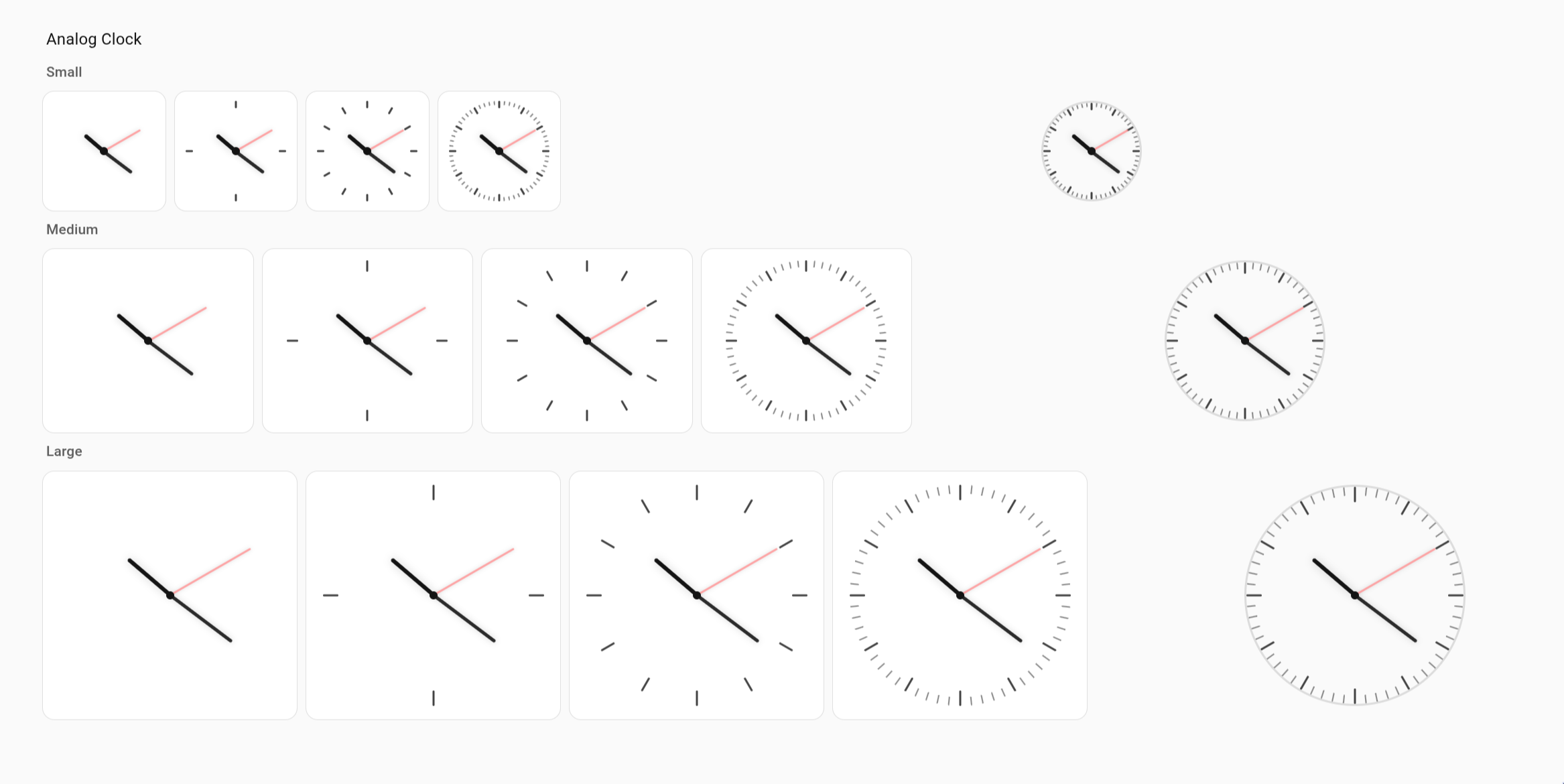
In Home Assistant 2025.4, we introduced the clock card, which provides a digital clock display for your dashboards.

For this release, @timmo001 made this card more feature-rich by adding support for displaying the clock in a customizable analog clock style. Nice!

Screenshot showing multiple analog clocks in different sizes and styles

Storage insights

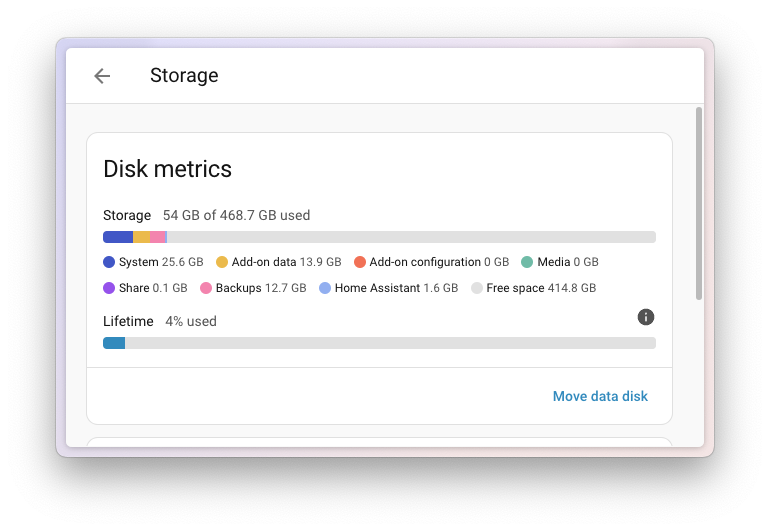
Disk almost full? You might wonder where your storage space has gone…

This release adds disk metrics to the storage configuration panel, letting you see usage at a glance, helping you identify what is taking up space.

Screenshot of the new disk metrics as shown in the storage configuration panel.

You can find these metrics by navigating to Settings > System > Storage, or by selecting the My Home Assistant button down below.

Patch releases

We will also release patch releases for Home Assistant 2025.9 in September. These patch releases only contain bug fixes. Our goal is to release a patch release once a week, aiming for Friday.

2025.9.1 - September 5

2025.9.2 - September 12

2025.9.3 - September 13

2025.9.4 - September 19

Need help? Join the community!

Home Assistant has a great community of users who are all more than willing to help each other out. So, join us!

Our very active Discord chat server is an excellent place to be, and don’t forget to join our amazing forums.

Found a bug or issue? Please report it in our issue tracker to get it fixed! Or check our help page for guidance on more places you can go.

Are you more into email? Sign up for the Open Home Foundation Newsletter to get the latest news about features, things happening in our community, and other projects that support the Open Home straight into your inbox.

Backward-incompatible changes

We do our best to avoid making changes to existing functionality that might unexpectedly impact your Home Assistant installation. Unfortunately, sometimes, it is inevitable.

We always make sure to document these changes to make the transition as easy as possible for you. This release has the following backward-incompatible changes:

Encoding units containing the μ character

The encoding for some units that contain the μ character has been changed. Users that consume state data from sensors that have changed units will be impacted (such as exported state data to InfluxDB). The units with a changed encoding are:

  • μSv/h for the aranet integration as a unit for radiation rate
  • μS/cm for UnitOfConductivity.MICROSIEMENS_PER_CM
  • μV for UnitOfElectricPotential.MICROVOLT
  • μg/ft³ for concentration in micrograms per cubic foot
  • μg/m³ for concentration in micrograms per cubic meter
  • μmol/s⋅m² for the fyta integration as a unit for light
  • μg for UnitOfMass.MICROGRAMS
  • μs for UnitOfTime.MICROSECONDS

(@jbouwh - #144853)

1-Wire

The raw_value attribute was previously deprecated and has now been removed.

(@gjohansson-ST - #150112) (documentation)

Alexa Devices

The sound list has been updated to match the one used by the Alexa Mobile app. The variant parameter is no longer required.

Check your automations to ensure the selected sound is still present.

(@chemelli74 - #151317) (documentation)

Husqvarna Automower BLE

The integration now requires the Automower PIN when being set up. This ensures Home Assistant can communicate with more models of mowers and with higher security levels.

(@alistair23 - #135440) (documentation)

KNX

KNX scene entities now also change their state when a scene was activated externally (from bus). Previously they only updated when activated from within Home Assistant.

(@farmio - #151218) (documentation)

SIA Alarm Systems

SIA alarm status code CF (armed with malfunctions) is now mapped to armed_away instead of to armed_custom_bypass.

(@etnoy - #132628) (documentation)

SwitchBot Bluetooth

The battery property on vacuum entities is being removed in Home Assistant. Therefore, this property is now removed from this integration and is replaced by a battery level sensor.

Please review your automations, scripts, and dashboards using the battery property and update the code to use the battery sensor instead.

(@MartinHjelmare - #150227) (documentation)

Yale August

The August integration now uses OAuth authentication with Yale August’s official API. This is a required one-time breaking change as the unofficial authentication method will stop working soon. This migration helps reduce unnecessary load on Yale August’s servers while ensuring continued access for all users.

When you update Home Assistant, you’ll be prompted to re-authenticate your August account:

  1. Select the notification or go to SettingsDevices & servicesAugust
  2. Select “Reconfigure” and follow the OAuth flow to sign in
  3. Once authenticated, your devices will work exactly as before

We’re grateful to Yale August for officially supporting Home Assistant with dedicated API access!

(@bdraco - #151080) (documentation)

If you are a custom integration developer and want to learn about changes and new features available for your integration: Be sure to follow our developer blog. The following changes are the most notable for this release:

All changes

Of course, there is a lot more in this release. You can find a list of all changes made here: Full changelog for Home Assistant Core 2025.9

  •  

Frient joins Works with Home Assistant

Frient joins Works with Home Assistant

We’re making new frients this week, and they’re bringing an extensive line of Zigbee devices to our Works With Home Assistant program. Each device is tested by our team, ensuring they provide the best experience possible for Home Assistant. Frient is widely available across Europe, and are well-known for their sleek, unobtrusive designs that its customers love for their high Home Approval Factor.

Our newest frient

Based in Denmark, the frient brand was developed by Onics, (formerly Develco Products), and they have years of experience with Zigbee devices. Frient is bringing its proven technology to the Works With Home Assistant program, as well as their Danish design that easily blends into almost any home.

Recent Works With partners have brought Z-Wave, Matter, and even Bluetooth devices to Home Assistant, but it’s been a couple of years 😅 since Zigbee-specific devices have joined the program. Zigbee is one of the most popular open protocols that is used with Home Assistant, with hundreds of thousands of users making use of it today. It’s a proven technology that connects directly to Home Assistant, no cloud or Wi-Fi connection required. Zigbee is a mesh protocol, where some devices act as repeaters, strengthening the network as more are added. It was built from the ground up to power the smart home, and has been optimized to give devices really long (sometimes multi-year) battery life.

"Joining the Works With Home Assistant program is a proud milestone for frient. It reflects our strong commitment to open, user-centric smart home experiences and ensures that our products seamlessly integrate with one of the most trusted platforms in the market. For Home Assistant users, it means more choice and flexibility — and for frient, it strengthens our position as a key player in the connected smart home space."

- Martin Langballe, International Business Development Manager at frient

All you need to get started with Zigbee in Home Assistant is a Zigbee adapter or ‘stick’, such as the Home Assistant Connect ZBT-1 (wow, we released this in 2022, I wonder when we’re finally going to build a successor? 😉). By plugging the adapter into a USB port on your Home Assistant system, it should then discover the device and add the ZHA integration. After that is set up, you can start adding devices to your Zigbee network.  We’ve even added in a cool new visualization so that you can see how your Zigbee devices interact with each other.

ZHA is built with the support of the Open Home Foundation, and it even has a full-time developer (@puddly) dedicated to improving it and helping certify new Works With partner devices. Your support makes this possible, whether through a Home Assistant Cloud subscription or by purchasing official hardware.

Devices

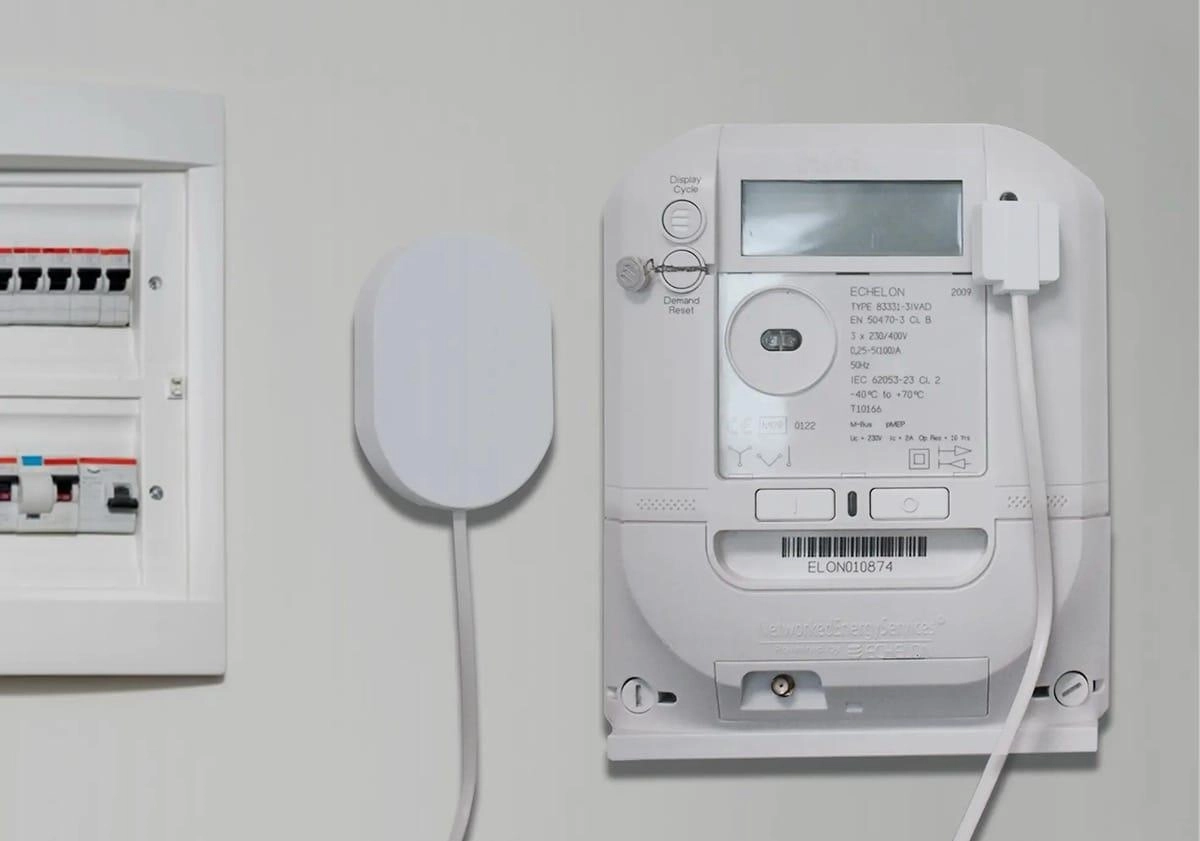
A frient device attached to a energy meter When your energy company won’t provide your raw usage data, there’s always another way 😉

In case you didn’t know, Works With Home Assistant differs from other certification programs as products are rigorously tested in-house to ensure they work seamlessly out of the box with Home Assistant. Any company joining also commits to providing long-term support and firmware updates while being a positive force in the Home Assistant community. Works With Home Assistant is operated by the Open Home Foundation, and the support of Home Assistant Cloud subscribers funds this work.

Our team has worked extensively with frient to ensure that the following items work seamlessly with Home Assistant.

This is a big portion of frient’s product line, and provides energy monitoring, device control, safety, and security sensors. The frient IO Module is the first certified Zigbee module that can be used to turn low-voltage dumb devices like electric blinds or garage doors into devices that can be controlled by Home Assistant.

There are some great devices here for building a more sustainable smart home. The Electricity Meter Interface 2 LED allows you to get the data off your energy meter and record it into Home Assistant. Another win for sustainability is their use of AA and AAA batteries wherever practical, meaning you can use rechargeables instead of constantly buying and recycling coin cells.

I also selfishly love to see some great UK-specific devices being brought into the program with the frient Smart Siren having both UK and EU versions.

Best frients forever

It’s great to see Zigbee get some high-quality certified Works With Home Assistant devices after a multi-year wait. Frient has put a good deal of work into this launch and are big fans of our work and the community. There are more exciting Zigbee developments to come, so stay tuned!

FAQs

Q: If I have a device that is not listed under “Works With Home Assistant” does this mean it’s not supported?

A: No! It just means that it hasn’t gone through a testing schedule with our team or doesn’t fit the requirements of the program. It might function perfectly well but be added to the testing schedule later down the road, or it might work under a different connectivity type that we don’t currently test under the program.

Q: Ok, so what’s the point of the Works With program?

A: It highlights the devices we know work well with Home Assistant and the brands that make a long-term commitment to keeping support for these devices going. The certification agreement specifies that the devices must have full functionality within Home Assistant, operate locally without the need for cloud, and will continue to do so long-term.

Q: How were these devices tested?

A: All devices in this list were tested using a standard HA Green Hub with the ZBT-1 and with the ZHA integration. We haven’t tested these devices with Zigbee2MQTT, so we would recommend checking their device compatibility documentation. If you have another hub, Zigbee adapter, or integration, that’s not a problem, but we test against these as they are the most effective way for our team to certify within our ecosystem.

Q: Will you be adding more frient devices to the program?

A: Why not! We’re thrilled to foster a close relationship with the team at frient to work together on any upcoming releases or add in further products that are not yet listed here.

  •  

Part-DB 2.0.2

Warning

Part-DB now requires PHP 8.2 or higher. It is recommended that you read the upgrade guide from v1 to v2 before upgrading.

Part-DB 2.0.2

This upgrade introduces a new web based configuration system. Existing configuration using environment variables will continue to work. If you want to configure these parameters via the WebUI in the future, an additional migration step is required. See the upgrade guide for more information.

Bug fixes

  • Properly pass environment variables to Part-DB in jbtronics/partdb1 docker image to prevent startup issues (issue #1006)

Improvements

  • Updated translations
  • Do not pollute docker error logs with deprecation notices

Full Changelog: v2.0.0...v2.0.1

  •  
❌