Lees weergave

FileZilla Server 1.11.1 released

New features:

  • UI: Added a new choice when removing groups that are still in use, now the affected users can be removed regardless of other group membership as well
  • UI: Small usability improvements to the group membership picker

Bugfixes and minor changes:

  • Fixed a crash if editing a user while they are logged in
  • Fixed listing the available mounts in the root directory if the root itself is not a defined mount point
  • UI: Fixed a crash when adding or removing groups
  •  

Counter-Strike 2 Update

[p]\[ GENESIS COLLECTION ][/p]
  • [p]Customers in Belgium, Netherlands, and France can now unseal their Sealed Genesis Terminal items.[/p][/*]
  • [p]Fixed purchasing errors for users with Steam Wallet funds in Chilean Peso, Colombian Peso, Costa Rican Colón, Indonesian Rupiah, Indian Rupee, Japanese Yen, South Korean Won, Kazakhstani Tenge, New Taiwan Dollar, Ukrainian Hryvnia, Uruguayan Peso, and Vietnamese Dong.[/p][/*]
[p]\[ ITEMS ][/p]
  • [p]Fixed position of the nametag and StatTrak module on Shadow Daggers.[/p][/*]
[p]\[ MAP SCRIPTING ][/p]
  • [p]Added javascript to the list of asset types.[/p][/*]
  • [p]Fixed type declaration for the newAngles parameter of Entity.Teleport.[/p][/*]
  • [p]Fixed a bug where GetTraceHit would crash when the config parameter was not specified.[/p][/*]
[p]\[ MISC ][/p]
  • [p]Improved timestep-independence of subtick movement acceleration.[/p][/*]
  •  

Happy 12th Birthday, Home Assistant!

Home Assistant 12th Anniversary

Every September, we celebrate the anniversary of Home Assistant’s first PR in 2013 – for our 12th birthday, we’re going all in on community again. Last month, we asked for submissions on how Home Assistant helps you, and today we will highlight our favorites! We will also take a look at all the cool milestones over the past year in the project, thanks to contributions from you all, and the new things coming up for the community.

It’s a communal effort

When I (Missy Quarry) joined as the Community & Social Media Manager in February 2024, I was still new to how an open source project the size of Home Assistant manages its community. Over the past 18 months, I’ve seen Home Assistant community members from all walks of life — whether DIY tinkerers or people simply looking to make small improvements at home — contribute in their own ways. By sharing your stories and inspiring others, you’ve helped the project grow.  For our 12th birthday, I want to celebrate these contributions, no matter the size or complexity. 😌

Before I jump into celebrating all your amazing contributions and how they shape the projects managed by the Open Home Foundation, I have a couple of birthday presents for you. 🎁

First, I’m thrilled to share our new Community website! Right now, it’s a simple hub to find community information with ease, but we expect to evolve this over the coming months (or so). You’ll find links to our official community platforms, information on events, and details on meetups, including how to get reimbursed for certain fees as a host. In the future, I’d like to include links to regional communities we’re aware of and showcase more of the kinds of stories I’ll be sharing today.

Feel like something’s missing from this new page? Let me know!

Next, we’ve been working hard to do more of our development in the open. Last September, I redesigned the Discord server and in doing so I gated the Developer category behind a role. This has made it more difficult to develop in the open with the channels hidden behind a role, so we’re switching things up.

As of this week, the Developer category is now read-only for every member. Want to take a peek into the future of Home Assistant? Head to the #projects channel and see what contributors are talking about! Want to join in and contribute with either your feedback or skills? I’ve created an info thread for the channel that explains how to assign yourself either the Developer or Designer role and unlock the ability to chat in the threads.

Let’s jump into those submitted stories now… 🤩

Happily ever after

In my opinion, the best thing about Home Assistant is its flexibility - you can integrate such a wide range of devices into it and use their data to build a unique-to-your-home experience. And that’s exactly why I wanted to hear how you, the community, use it in your own home to benefit you. Here are my favorite stories you submitted - I hope one inspires your next project. ✨

  • A coffee automation to improve Home Approval Factor. ☕️ Jordan made a morning automation to avoid having the coffee grinder grind his morning mood.

  • u/katschung helped their girlfriend fully accept Home Assistant by creating a dashboard with a retrogame-style floor plan. 🕹️

  • Sythsaz uses Home Assistant to make sure their pupper is fed. 🐾 “I’ve managed to make it so my dog’s food auto emails the vet then the response to the email gets put on my calendar so I know how long a bag of food lasts as well as adding the receipts to Google Drive.

  • Inspired by PowerDisplayESPHome, JannickBlmndl made an LED matrix that helps their household be more sustainable by being energy flexible. It displays the live energy prices from their energy provider. 📊

  • Tano Spirits in Melbourne, Australia, uses Home Assistant to automate their Japanese Shochu distillery, inspired by a small brewing company in Singapore. 🍻

  • Several years ago, HillPhantom found that Home Assistant wasn’t quite ready for him. Over the past year, though, he’s now got Ollama set up with his Home Assistant Voice Preview Edition and has been building guides on how to make your own mmWave radar sensors in Home Assistant. 👋🏻

  • Over just a few weeks, Pieter van Kampen recently integrated 190 devices that respond to voice control and more than 1200 active entities from his KNX home to create over 30 automations to help with everything from mowing the lawn to controlling shades based on the sun’s location and intensity. 🪟

  • MB used Zigbee buttons to help collect data for their son’s doctor after he developed some trouble sleeping. This gave excellent insight for the doctor to start looking into causes, and they even used the system remotely while doing further evaluation. 📈

  • Graham Hosking took automations to another level (before we did) with his AI Automation Suggester and Automation Inspector. It takes the load off your brain by helping come up with new, clever automations! 🤖

  • Wessam Lauf fell down the rabbit hole that is Home Assistant once he got his setup running. Inspired by the Graphite theme and after some LLM vibe-coding, he wrote a template for his very own theme, Frosted Glass - now available in HACS. 🎨

  • Too many of us anthropomorphize our homes, telling it to chill out when five things break the same day. Biofects took that to heart and created this Home Assistant avatar for his home (here’s a bonus, nightmare fuel first version). 🫣

Developers! 👏🏻 Developers! 👏🏻 Developers! 👏🏻

Our community is more than developers, it’s true. But we wouldn’t be the largest open source project on GitHub if we didn’t have a vibrant and active developer community. This ship sails largely due to their contributions, and we genuinely appreciate all of their efforts.

That’s why we’re eager to interview community members when we open new roles at the foundation. We’ve employed community members like Joostlek (who designed the new Integration Quality Scale and helps onboard new integrations into Core), Timo (who is our first ever Android developer and has focused on polishing the Android app), and Maxim (a talented developer from the Music Assistant community who works on both Music Assistant and ESPHome and is one of our newest additions to the team). Their contributions have helped shape how things work around here, but it was their contributions as community members that helped pave the way for their joining the foundation. These are just a select few of the several new hires at the foundation who were active community members.

(Have you checked our jobs page recently to see what roles are open? 👀)

With our community of contributors and working with Nabu Casa on the hardware design, we have successfully launched a few new pieces of hardware. The Home Assistant Voice Preview Edition brought in language experts from every corner of the world to help ensure our language coverage is the most robust in the industry. Thanks to contributors, we support languages like Greek, Icelandic, and more recently Irish Gaeilge! 😎 We had community contributors help make sure the Home Assistant Connect ZWA-2 was prepared for launch last month. Sincerely, we couldn’t be more grateful for your support and efforts in these spaces.

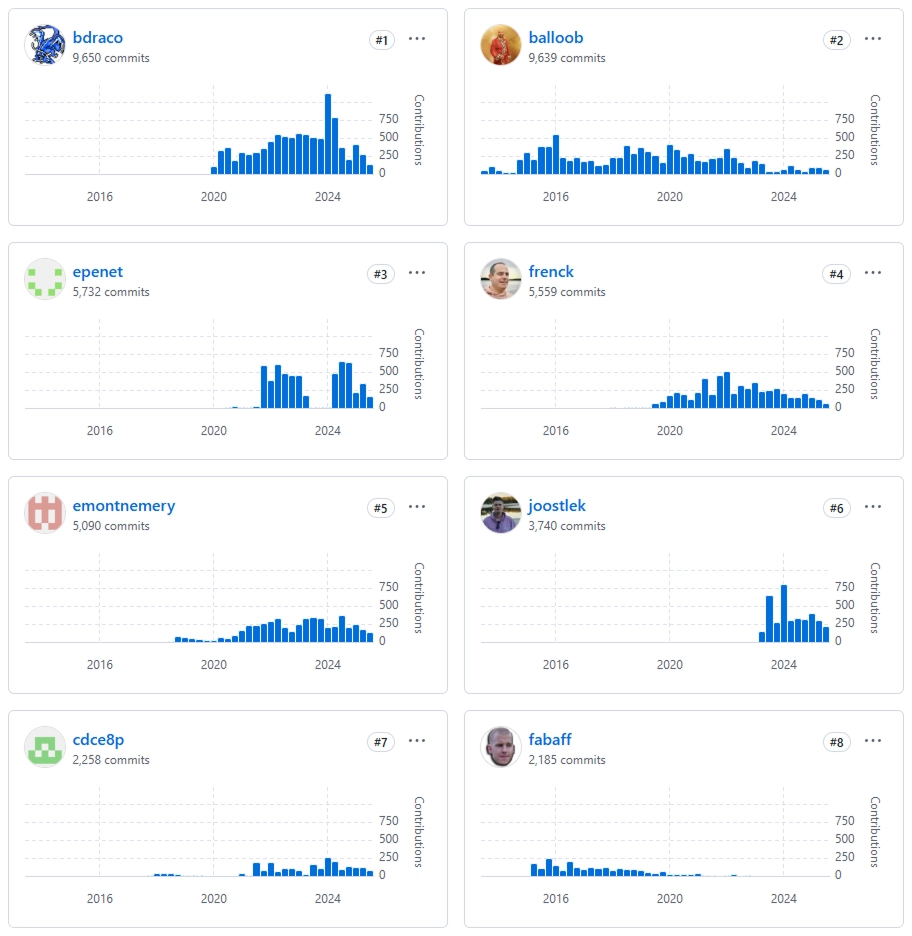
Here are some fun stats from our GitHub contributors (commits on our Core repo):

  • Last 12 months (Sept - Aug) - 14,385
  • Previous 12 months - 14,503

A SPECIAL CONGRATULATIONS to bdraco, who just last week surpassed balloob (the founder of Home Assistant) as the contributor with the most commits!

Top 8 contributors of all time for home-assistant/core The top 8 contributors of all time in home-assistant/core👏🏻

This is just a small peek into all the hard work that goes into maintaining Home Assistant - we have more repositories than just Core, and every single contribution is valued.

Honorable dev mention from the submitted community stories - I couldn’t leave Joostlek’s (joke) submission out. 🤣

  • Our very own Head of Developer Relations (his words), Joost Lekkerkerker, says Home Assistant helps keep him off the street. He’s just launched his new blog that talks about his vision of a smart home, and how he was inspired to not buy Tuya Wi-Fi lights after seeing my experience with some path lights.

Our humble gratitude

Community is the core of what we do and the heart of Home Assistant. We thrive because you care and contribute your valuable time to support our collective success. Whether you found our platform because you wanted more privacy from big tech, were intrigued by the number of choices implemented into a single app, or needed something to track your sustainability efforts — you support our values every day. Thanks for choosing us, and thank you for all you do to help support the foundation and the projects we maintain.

A very special thanks to all our Home Assistant Cloud subscribers and anyone who has purchased our official Home Assistant hardware. These support the full-time development of Home Assistant (along with ESPHome, Music Assistant, and so much more), and are the easiest way to ensure these projects keep getting cool new features!

We have more things coming down the line for you. In the near future, we plan on announcing a new merch store 👕. In the first half of next year, I’ll announce when Home Assistant Community Day 2026 will be. We’re already working with Nabu Casa on the next exciting hardware announcement (no spoilers…for now). And that’s not even touching the industry events we plan on attending, the State of the Open Home, and so much more. I’m excited to take you all on the journey we’re already working on over the next 12 months, and I’m always looking forward to another year of amazing contributions. 😌

  •  

Counter-Strike 2 Update

[p]\[ GENESIS COLLECTION ][/p]
  • [p]The Genesis Collection is now available, featuring 17 finishes from community contributors.[/p][/*]
  • [p]Access items in the Genesis Collection via the Genesis Uplink Terminal, available as a weekly drop.[/p][/*]
[p]\[ MAP SCRIPTING ][/p]
  • [p]Added cs_script, a JavaScript based scripting system for Counter-Strike maps.[/p][/*]
  • [p]Added script_zoo.vmap to demonstrate cs_script usage and functionality.[/p][/*]
[p]\[ UI ][/p]
  • [p]Added ability to inspect another player's loadout when spectating.[/p][/*]
  • [p]Added zoom (mousewheel) and pan (shift+drag) to all inspect panels.[/p][/*]
[p]\[ SOUND ][/p]
  • [p]Each grenade now has unique higher-fidelity sounds for draw, inspect, pin-pull, and throw.[/p][/*]
[p]\[ MISC ][/p]
  • [p]Various improvements to subtick shooting consistency.[/p][/*]
  •  

v11.12.0

⚠️ Potential Breaking Changes

Fixed USER_CREATED, USER_UPDATED, DATE_CREATED, and DATE_UPDATED values in content versioning. These fields now correctly reflect the actual user and timestamp of creation or last update, rather than the user and date of promotion. (#25744)

  • Requesting a non-existent version will now return a Forbidden error.

  • The USER_CREATED, USER_UPDATED, DATE_CREATED, and DATE_UPDATED fields will now represent the last actual changes, not the promotion metadata.

  • @directus/app

    • Fixed USER_CREATED, USER_UPDATED, DATE_CREATED, and DATE_UPDATED values in content versioning. These fields now correctly reflect the actual user and timestamp of creation or last update, rather than the user and date of promotion. (#25744 by @Nitwel)
  • @directus/api

    • Fixed USER_CREATED, USER_UPDATED, DATE_CREATED, and DATE_UPDATED values in content versioning. These fields now correctly reflect the actual user and timestamp of creation or last update, rather than the user and date of promotion. (#25744 by @Nitwel)

✨ New Features & Improvements

🐛 Bug Fixes & Optimizations

📦 Published Versions

  • @directus/app@14.0.0
  • @directus/api@31.0.0
  • @directus/composables@11.2.3
  • @directus/constants@13.0.3
  • create-directus-extension@11.0.19
  • @directus/env@5.2.0
  • @directus/errors@2.0.4
  • @directus/extensions@3.0.11
  • @directus/extensions-registry@3.0.11
  • @directus/extensions-sdk@16.0.2
  • @directus/format-title@12.1.0
  • @directus/memory@3.0.9
  • @directus/pressure@3.0.9
  • @directus/schema@13.0.3
  • @directus/schema-builder@0.0.6
  • @directus/storage@12.0.2
  • @directus/storage-driver-azure@12.0.9
  • @directus/storage-driver-cloudinary@12.0.9
  • @directus/storage-driver-gcs@12.0.9
  • @directus/storage-driver-local@12.0.2
  • @directus/storage-driver-s3@12.0.9
  • @directus/storage-driver-supabase@3.0.9
  • @directus/stores@1.0.4
  • @directus/system-data@3.3.0
  • @directus/themes@1.1.5
  • @directus/types@13.2.3
  • @directus/update-check@13.0.3
  • @directus/utils@13.0.10
  • @directus/validation@2.0.9
  • @directus/sdk@20.1.0

  •  

2.5.3.10

Changes from 2.5.3 to 2.5.3.10:

Updates:

  • Updated LAV Filters to version 0.80-7-g5810a
  • Updated MPC Video Renderer to version 0.9.14.2454

Fixes:

  • A few small fixes and improvements.

Changes from 2.5.2 to 2.5.3:

Updates:

  • Updated LAV Filters to version 0.80-5-g49ded
  • Updated MPC Video Renderer to version 0.9.13.2451

Additions/improvements:

  • Added new options to customize the toolbar. Several new (optional) buttons have been added. You can now add/remove/re-order buttons.
  • Added a few new toolbar images/skins.
  • Old toolbar skins are no longer supported. A few old ones have been converted to new format, but we really need people to make proper new designs.

Fixes:

  • A few small fixes and improvements.

  •  

Bitfocus Companion v4.1.0

📦 Downloads available at

💵 Donate to the project at

Companion v4.1.0 - Release Notes

Ending support for macOS 11

This is the last version of Companion to support macOS 11. Starting with Companion 4.2 you will need to be running macOS 12 or later.

UI improvements

This release focuses on polishing the UI.

A major addition is "collections" — a way to group connections, triggers, or custom variables so you can manage or enable/disable them together. Collections make organising complex setups and toggling related items during events much easier.

connection-collections

We also made a number of small adjustments to improve clarity and flow, such as reworking table layouts in many places.

surfaces-list

These changes prioritise organisation and usability so you can work more quickly.

Local variables

On each button or trigger you can now define local variables. These variables are scoped to that single button or trigger — they do not exist outside of it. Local variables can be configured in a few ways:

  • Work like custom variables (can hold a static value and be changed by actions).
  • Be expression-driven (value is the result of an expression evaluated when needed).
  • Take the value of a feedback.

A key point: not all actions and feedbacks support local variables. Supported items will show a globe icon to indicate compatibility. We're working to broaden support; modules will add compatibility over time and further improvements are planned for 4.2.

local-variables

Improving support for expressions

Expressions let you build more complex configurations and transform data flowing into or out of connections. They allow you to normalise, combine, or conditionally modify values before they're consumed or sent.

The new Expression Variables page lets you define variables computed from expressions. These can be referenced wherever connection or custom variables are accepted; their value is calculated from the expression you provide.

expression-variables

Expression variables can:

  • Return a computed value from an expression.
  • Depend on other variables, feedbacks, connection state, or local variables defined on a button/trigger (so you can break complex logic into sub-expressions or take input from feedbacks).
  • Be used anywhere standard variables are used (actions, feedbacks, connection fields, etc.).

Notes:

  • Circular dependencies between variables are possible but discouraged; they will be rate-limited and can incur a notable performance cost.

Custom backup rules

Companion now supports custom backup rules, allowing you to schedule backups, and keep more restore points.

You can pick how often to run, where to store them, choose how many to keep (auto-pruned), and select the file format.

Tip: Saving backups to a synced folder (Dropbox, OneDrive, or similar), automatically keeps an off-site copy — great for extra safety and easy access across machines.

backup-settings

And more

  • Various UX improvements
    • Connections, triggers and custom variables can be added to 'collections' for grouping
    • Connections and triggers can be enabled/disabled by their collections
    • Connections, triggers and surfaces tables have had their contents rearranged to flow more naturally
    • Surfaces has been reworked to utilise a right panel for the selected surface.
    • Any right hand panels of pages have been refined
    • Version number has moved into the sidebar instead of header
    • Improve clarity of beta module versions
    • Layout improvements of some pages on mobile
    • Indicate whether custom-variable value is valid while typing
    • Improved layout of the launcher window, including a new settings window
    • Add filter/search to triggers page
    • Improved import page
    • Improve emulator list page
  • Added Expression Variables. Similar to Custom Variables, but their value is the result of an expression that executes when needed.
  • Add new 'while loop' action
  • Ability to define 'local variables' on buttons and triggers.
    • Not all actions or feedbacks support these, this will improve over time
  • Additional expression functions
    • arrayIndexOf & arrayLastIndexOf
  • Button step can be driven from an expression
  • Multiple connections from the Elgato Stream Deck software are now supported.
  • Support for Logitech MX Creative Console (buttons, not wheel)
  • Support for MiraBox HSV293S
  • Importing configs can be performed more granularly, without needing to reset everything
  • Variables for installation name
  • Expansion of the Ember+ api
    • Expose variables
    • Allow setting custom-variable values
    • Expose action recorder
  • Support for 'secret' field types in connection config
  • Attempt to keep screen awake in emulator/tablet views
  • Support for defining custom backup rules
  • Syslog support for logging
  • Improve docker image command syntax
  • UI can be hosted under a subpath when behind a reverse proxy
  • Replace the library used for communication with the UI
    • This improves the type safety and code quality of this api and makes it easier for us to work with.
    • There should be no notable impact to users
🐞 BUG FIXES
  • Surface page settings not being persisted correctly in exports
  • Load PNG button not always accepting files
  • Help tooltips not always showing
  • Some internal actions incorrectly claiming to support expressions
  • Some dropdown fields not updating their options when expected
  • Duplicating triggers first execution incorrect
  • Improve drag and drop behaviour in action/feedback lists
  • Sanitise page ids at startup, to ensure the config is sane
  • Better handling when no compatible versions of a module are available to be installed

Full Changelog: v4.0.3...v4.1.0

  •  

Firefox 143.0

New

  • On Windows, Firefox now supports running websites as web apps pinned directly to the taskbar. These are sites that you can pin and run as simplified windows directly from the taskbar without losing access to your installed add-ons. This feature is not currently available for Firefox installs from the Microsoft Store.

  • Tabs can now be pinned by dragging them to the start of the tab strip, making it easier to keep important sites within reach.

    Screenshot showing the drag and drop area for pinning tabs

  • Copilot from Microsoft can now be chosen as a chatbot to use in the sidebar for quick access without leaving your main view.

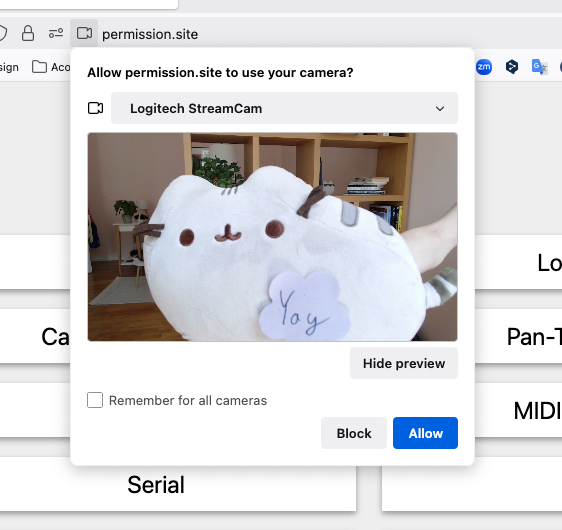
  • When a site asks for camera access, it can now be previewed inside the permission dialog. This is especially helpful when switching between multiple cameras.

    Screenshot showing camera preview inside permission dialog

  • The Firefox address bar can now show you important dates and events. This feature supports displaying events (e.g. “Mother’s Day”) in the United States, United Kingdom, Germany, France, and Italy regions.

  • Firefox has expanded its Fingerprinting Protection by reporting constant values for several more attributes of user's computers.

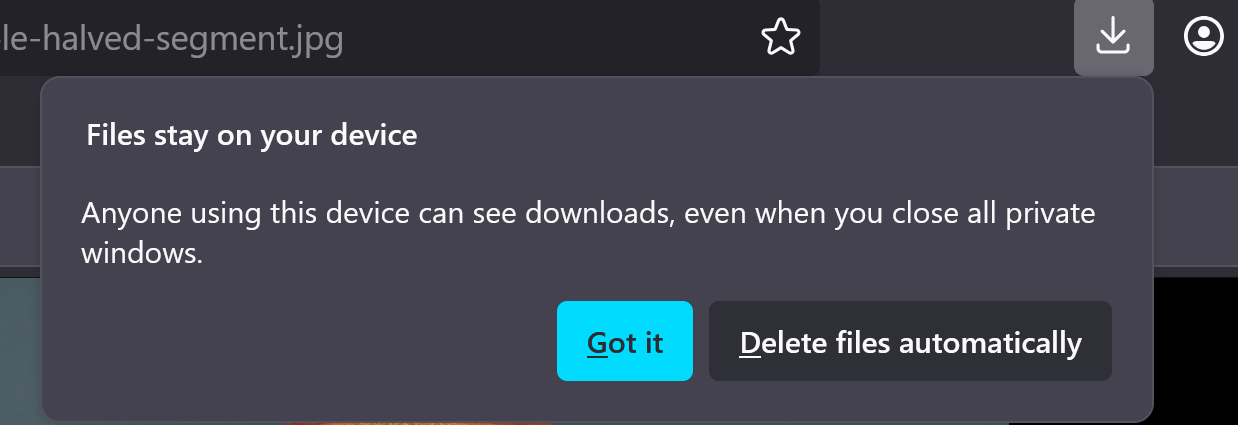
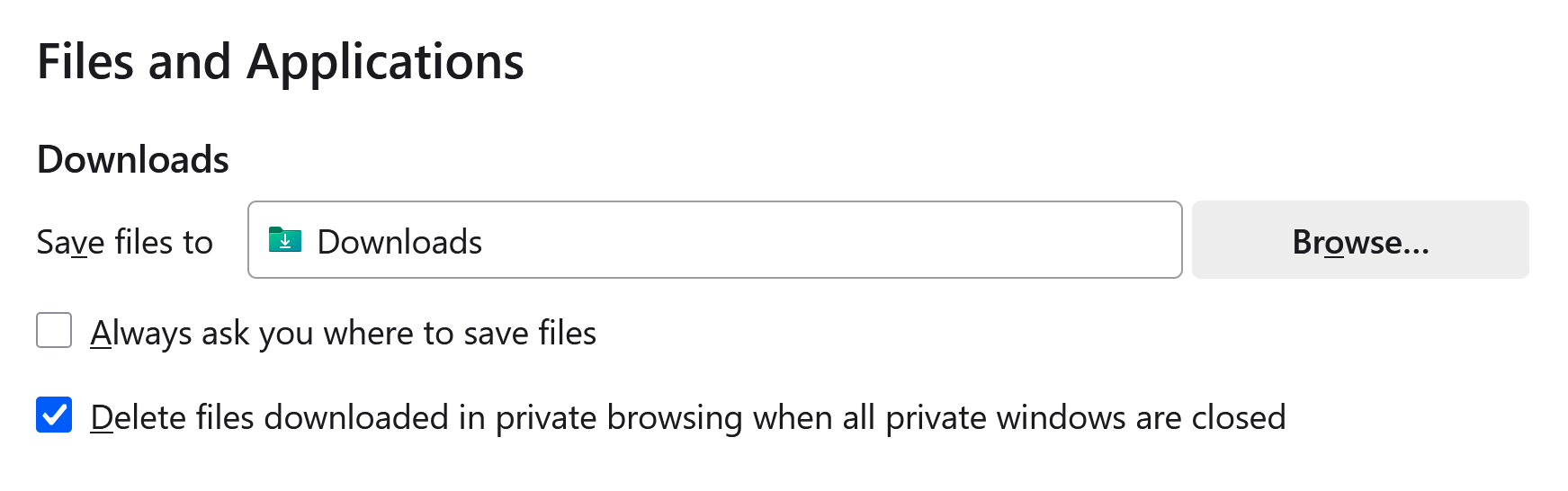
  • When downloading a file in Private Browsing mode, Firefox now asks whether to keep or delete it after that session ends. You can adjust this behavior in Settings.

    Screenshot showing file deletion prompt
    Screenshot showing setting for always deleting files

  • Firefox now supports Windows UI Automation, which improves support for accessibility tools such as Windows Voice Access, Text Cursor Indicator and Narrator.

    This feature is part of a progressive roll out.

    What is a progressive roll out?

    Certain new Firefox features are released gradually. This means some users will see the feature before everyone does. This approach helps to get early feedback to catch bugs and improve behavior quickly, meaning more Firefox users overall have a better experience.

Fixed

Enterprise

Developer

  • Unchecking the Group Similar Messages setting now prevents successive similar messages from being grouped so that all messages are displayed in the output.

  • Switching between unmodified and pretty printed sources in the debugger no longer opens a new tab for pretty printed content.

  • When the Inspector is focused, the eyedropper can now be launched to pick a color via the Ctrl+Shift+Y keyboard shortcut.

Web Platform

  • Firefox now supports xHE-AAC audio playback on Windows 11 22H2+, macOS, and Android 9+.

  • Firefox now uses an updated grid sizing algorithm to better align with the CSS Grid specification. Grid layouts that use percentage row sizes or grid items containing elements with aspect ratios (such as images) will now render correctly in more cases.

  • <input type=color> now recognizes the CSS <color> format in addition to the color hex format (#ffffff). This means that color names like black and more complex strings like rgb(200 200 200) are now valid inputs. For now the value will always be converted to the hex format.

  • Restrictions were removed that prevented setting the display property on <details> elements, and a ::details-content pseudo-element was added to style the expandable/collapsible contents of those elements.

Community Contributions

  •  

5.2.1

Note

UpSnap is, and always will be, free and open source software.

If someone is asking you to pay money for access to UpSnap binaries, source code, or licenses, you are being scammed.

The official and only trusted source for UpSnap is this repository (and its linked releases).
Do not pay third parties for something that is provided here for free.

Changelog

Bug fixes

  •  

5.2.0

Note

UpSnap is, and always will be, free and open source software.

If someone is asking you to pay money for access to UpSnap binaries, source code, or licenses, you are being scammed.

The official and only trusted source for UpSnap is this repository (and its linked releases).
Do not pay third parties for something that is provided here for free.

Changelog

Features

Bug fixes

Others

Go dependencies

Npm dependencies

Github Actions

  •  

case-sensitivity, give or take

there is a discord server with an @everyone in case of future important updates, such as vulnerabilities (most recently 2025-09-07)

recent important news

🧪 new features

  • #781 case-sensitive behavior is now simulated on Windows/Macos/Fat32/NTFS 8b66874
    • avoids some of the scary issues associated with case-insensitive filesystems
    • unfortunately this is expensive and may be noticeably slower in large folders; disable the safeguard with casechk: n if you know you don't need it
  • #789 case-insensitive search for unicode filenames/paths (thx @km-clay!) e2aa8fc ecd18ad
    • default-disabled because it is somewhat expensive; enable with global-option srch-icase
  • CB-1 add --qr-stdout and --qr-stderr to show qr-code even with -q d7887f3

🩹 bugfixes

  • #775 the basic-uploader didn't accept empty files 25749b4
  • opt-out from index.html with ?v did not work as documented 3d09bec
  • Windows: dedup could get rejected by the filesystem if the origin file had a timestamp from the cambrian era e09f3c9
  • webdav would incorrectly return an error for Depth:0 on an unmapped root 3a2381f
  • markdown-editor would waste another http roundtrip on certain documents 14b7e51
  • --help didn't render if terminal was non-UTF8 3f45492

🔧 other changes

  • #788 fixed a hotkey typo in the imageviewer (thx @tkroo!) 5c1a43c
  • #778 improved polish translation (thx @daimond113!) 52438bc
  • #798 debian: fixed an issue in the systemd script (thx @Beethoven-n, and congrats on commit number 4000!) dfd9e00
  • media-tag conductor is no longer mapped to circle (album-artist) 9c9e405
  • "download-selection-as-zip" now produces a better filename, sel-FOLDERNAME.zip instead of FIRSTFILE.zip 8f58762
  • detect and warn if IdP volumes are misconfigured in a particular way 83bd197

🌠 fun facts

  • the themesong of this release is KO3 - Give it up? because that's what the car mechanic got to enjoy when i forgot to unplug the flashdrive before handing in the shitbox for service

⚠️ not the latest version!

  •  

NVIDIA Driver 581.29

Release Highlights:
Although GeForce Game Ready Drivers and NVIDIA Studio Drivers can be installed on supported notebook GPUs, the original equipment manufacturer (OEM) provides certified drivers for your specific notebook on their website. NVIDIA recommends that you check with your notebook OEM for recommended software updates for your notebook.

Game Ready for Borderlands 4 and Dying Light: The Beast

This new Game Ready Driver provides the best gaming experience for the latest new games supporting DLSS 4 technology including Borderlands 4 and Dying Light: The Beast.

Fixed Gaming Bugs

  • Marvel Rivals: Negative performance impact when using some 581.xx drivers [5444816]

Fixed General Bugs

  • N/A

Learn more in our Game Ready Driver article here.

Game Ready  Driver

  •  

Building the AI-powered local smart home

Building the AI-powered local smart home

Last year, we laid out our vision for AI in the smart home, which opened up experimentation with AI in Home Assistant. In that update, we made it easier to integrate all sorts of local and cloud AI tools, and provided ways to use them to control and automate your home. A year has passed, a lot has happened in the AI space, and our community has made sure that Home Assistant has stayed at the frontier.

We beat big tech to the punch; we were the first to make AI useful in the home. We did it by giving our community complete control over how and when they use AI, making AI a powerful tool to use in the home. As opposed to something that takes over your home. Our community is taking advantage of AI’s unique abilities (for instance, its image recognition or summarizing skills), while having the ability to exclude it from mission-critical things they’d prefer it not to handle. Best of all, this can all be run locally, without any data leaving your home!

Moreover, if users don’t want AI in their homes, that’s their choice, and they can choose not to enable any of these features. I hope to see big tech take an approach this measured, but judging by their last couple of keynotes, I’m not holding my breath.

Over the past year, we’ve added many new AI features and made them easy to use directly through Home Assistant’s user interface. We have kept up with all the developments in AI land and are using the latest standard to integrate more models and tools than ever before. We’re also continuing to benchmark local and cloud models to give users an idea of what works best. Keep reading to check out everything new, and maybe you can teach your smart home some cool new tricks.

Local AI is making the home very natural to control

Big thanks to our AI community contributor team:
@AllenPorter, @shulyaka, @tronikos, @IvanLH, @Joostlek!

Supercharging voice control with AI

We were doing voice assistants before AI was cool. In 2023, we kicked off our Year of the Voice. Since then, we’ve worked towards our goal of building all the parts needed for a local, open, and private voice assistant. When AI became the rage, we were quick to integrate it.

Today, users can chat with any large language model (LLM) that is integrated into Home Assistant, whether that’s in the cloud or run locally via a service like Ollama. Where Assist, our home-grown (non-AI) voice assistant agent, is focused on a predetermined list of mostly home control commands, AI allows you to ask more open-ended questions. Summarize what’s happening across the smart home sensors you’ve exposed to Assist, or get answers to trivia questions. You can even give your LLM a personality!

Users can also leverage the power of AI to speak the way they speak, as LLMs are much better at understanding the intent behind the words. By default, Assist will handle commands first. Only questions or commands it can’t understand will be sent to the AI you’ve set up. For instance, “Turn on the kitchen light” can be handled by Assist, while “It’s dark in the kitchen, can you help?” could be processed by an AI. This speeds up response times for simple commands and makes for a more sustainable voice assistant.

Another powerful addition from the past year is context sharing between agents. So your Assist agent can share the most recent commands with your chosen AI agent. This shared context lets you say something like “Add milk to my shopping list,” which Assist will act on, and to add more items, just say “Add rice.” The AI agent understands that these commands are connected and can act accordingly.

Here is an excellent walkthrough video of JLo's AI-powered home, showing many of these new features in action

Another helpful addition keeps the conversation going; if the LLM asks you a question, your Assist hardware will listen for your reply. If you say something like “It’s dark”, it might ask whether you’d like to turn on some lights, and you could tell it to proceed. We have taken this even further than other voice assistants, as you can now have Home Assistant initiate conversations. For example, you could set up an automation that detects when the garage door is open and asks if you’d like to close it (though this can also be done without AI with a very clever Blueprint).

AI pushed us to completely revamp our Text-to-Speech (TTS) system to take advantage of streaming responses from LLMs. While local AI models can be slow, we use a simple trick to make the delay almost unnoticeable. Now, both Piper (our local TTS) and Home Assistant Cloud TTS can begin generating audio as soon as the LLM produces the first few words, improving the speed of the spoken response by a factor of ten.

Prompt: “Tell me a long story about a frog”

Setup Time to start speaking
Cloud, non-streaming 6.62 sec
Cloud, streaming 0.51 sec (13x faster)
Piper, non-streaming 5.31 sec
Piper, streaming 0.56 sec (9.5x faster)

Ollama gemma3:4b on an RTX 3090, and Piper on an i5

Great hardware to work with AI

People built some really cool voice hardware, from landline telephones to little talking robots, but the fact that it was so DIY was always a barrier to entry. To make our voice assistant available to everyone, we released the Home Assistant Voice Preview Edition. This is an easy and affordable way to try Home Assistant Voice. It has some seriously powerful audio processing hardware inside its sleek package. If you were on the fence about trying out voice, it really is the best way to get started.
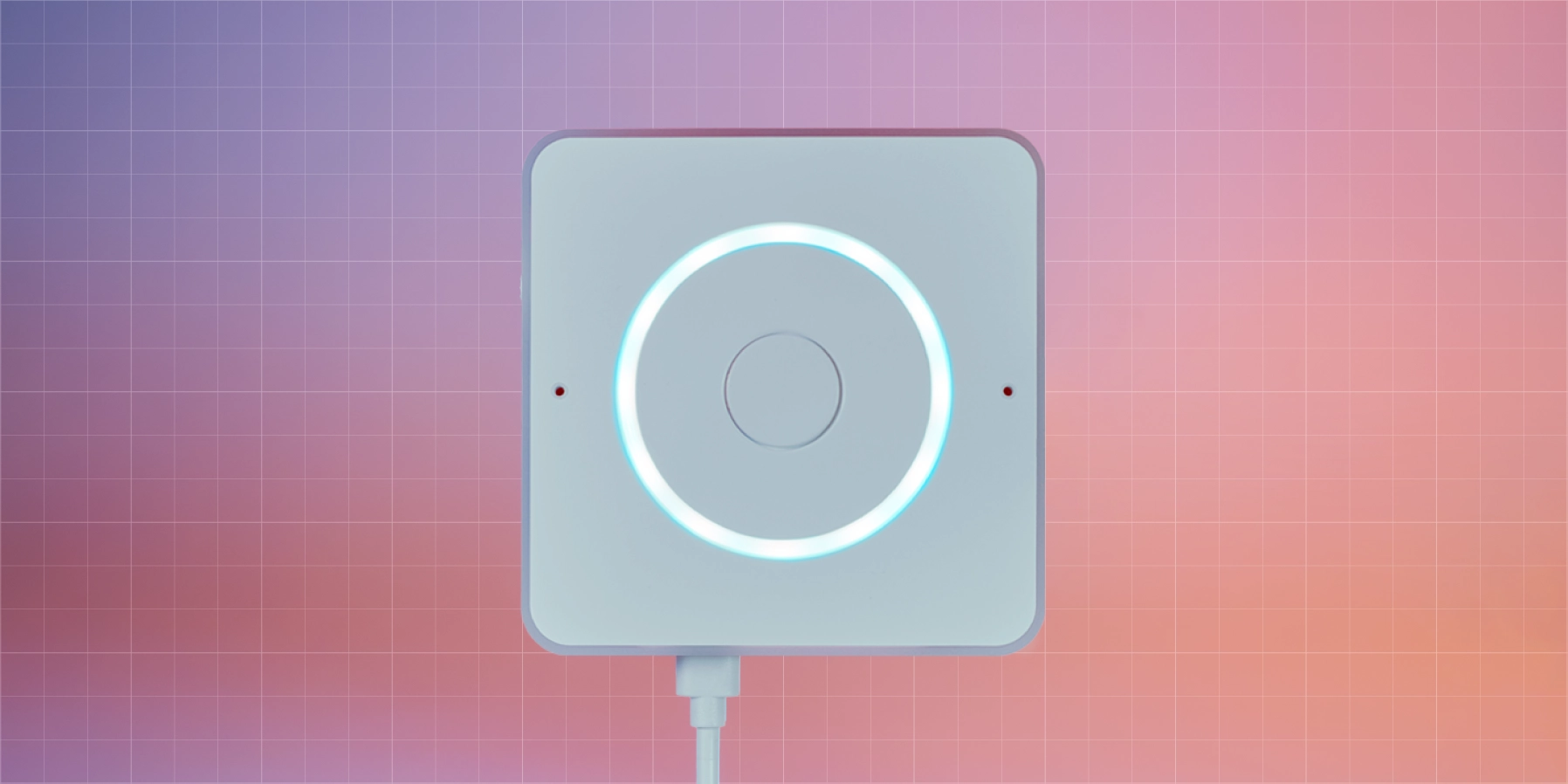
Home Assistant Voice Preview Edition Voice Preview Edition is not only open and powerful, but it looks and feels great too!

It’s now easier than ever to set up your Assist hardware to work with LLMs with our Voice Assistants settings page, and you can even assign a different LLM to each device. The LLM can recognize the room it’s in and the devices within it, making its responses more relevant. Assist was built to be a great way to control devices in your home, but with AI, it becomes so much more.

AI-powered suggestions

Last month, Home Assistant launched a new opt-in feature to leverage the power of AI when automating with Home Assistant. The goal is to shorten the journey from a blank slate to your finished idea.

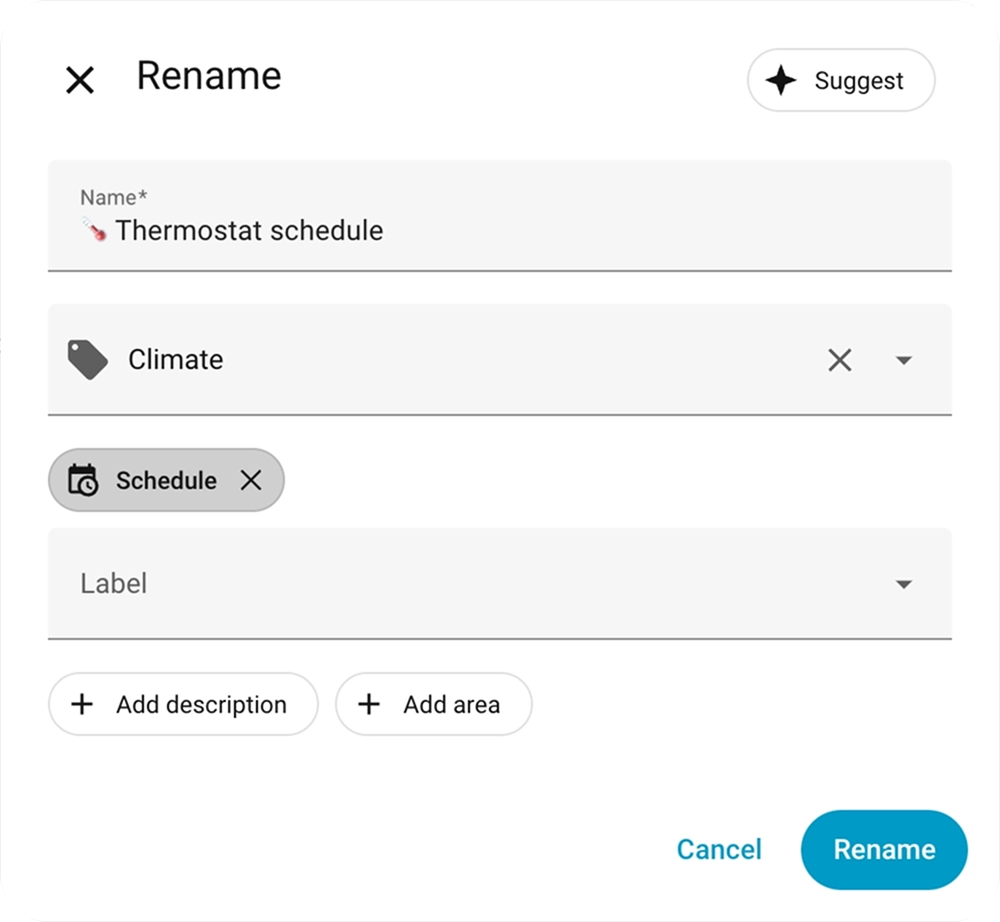
When saving an automation or script, users can now leverage the new Suggest button: When clicked, it will send your automation configuration along with the titles of your existing automations and labels to AI to suggest a name, description, category, and labels for your new automation. Over the coming months, we’re going to explore what other features can benefit from AI suggestions.

A rename modal open with the new Suggest button top right

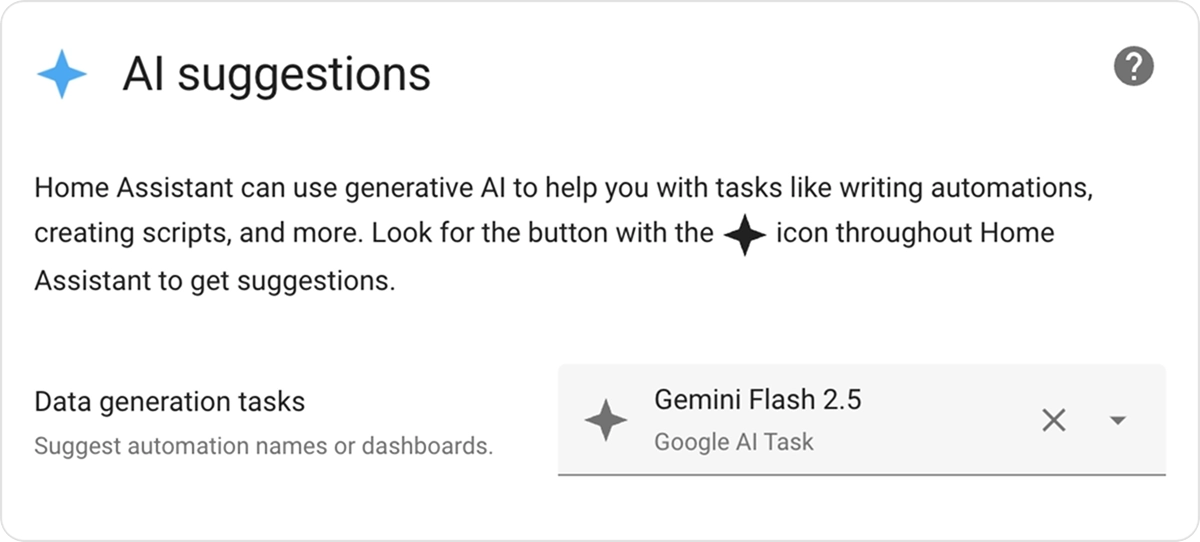
To opt-in to this feature, you need to take two steps. First, you need to configure an integration that provides an AI Tasks entity. For local AI, you can configure Ollama, or you can also leverage cloud-based AI like Google, OpenAI, or Anthropic. Once configured, you need to go to the new AI Task preferences pane under System -> General and pick the AI Task entity to power suggestions in the UI. If you don’t configure an AI Tasks entity, the Suggest button will not be visible.

The AI Suggestions setting within Home Assistant

AI Tasks gets the job done

Enabling AI Tasks does more than quickly label and summarize your automations; its true superpower is making AI easy to use in templates, scripts, and automations. AI Tasks allow other code to leverage AI to generate data, including options to attach files and define how you want that data output (for instance, a JSON schema).

We have all seen those incredible community creations, where a user leverages AI image recognition and analysis to detect available parking spots or count the number of chickens in the chicken coop. It’s likely that AI Tasks can now help you easily do this in Home Assistant, without the need for complex scripts, extra add-ons, or HACS integrations.

Below is a template entity that counts chickens in a video feed, all via a short and simple set of instructions.

template:
 - triggers:
     - trigger: homeassistant
       event: start
     - trigger: time_pattern
       minutes: "/5"
   actions:
     - action: ai_task.generate_data
       data:
         task_name: Count chickens
         instructions: >-
           This is the inside of my coop. How many birds (chickens, geese, and
           ducks) are inside the coop?
         structure:
           birds:
             selector:
               number:
         attachments:
           media_content_id: media-source://camera/camera.chicken_coop
           media_content_type: image/jpeg
       response_variable: result
   sensor:
     - name: "Chickens"
       state: "{{ result.data.birds }}"
       state_class: total

This template sends a snapshot of the camera to the AI, asking it to analyze what is going on. It defines that the output should always be a number, since we want to use that information in Home Assistant. All of this is embedded in a template entity that automatically updates every 5 minutes. An AI Task could also be embedded in an automation, a script, or any other place that can execute actions.
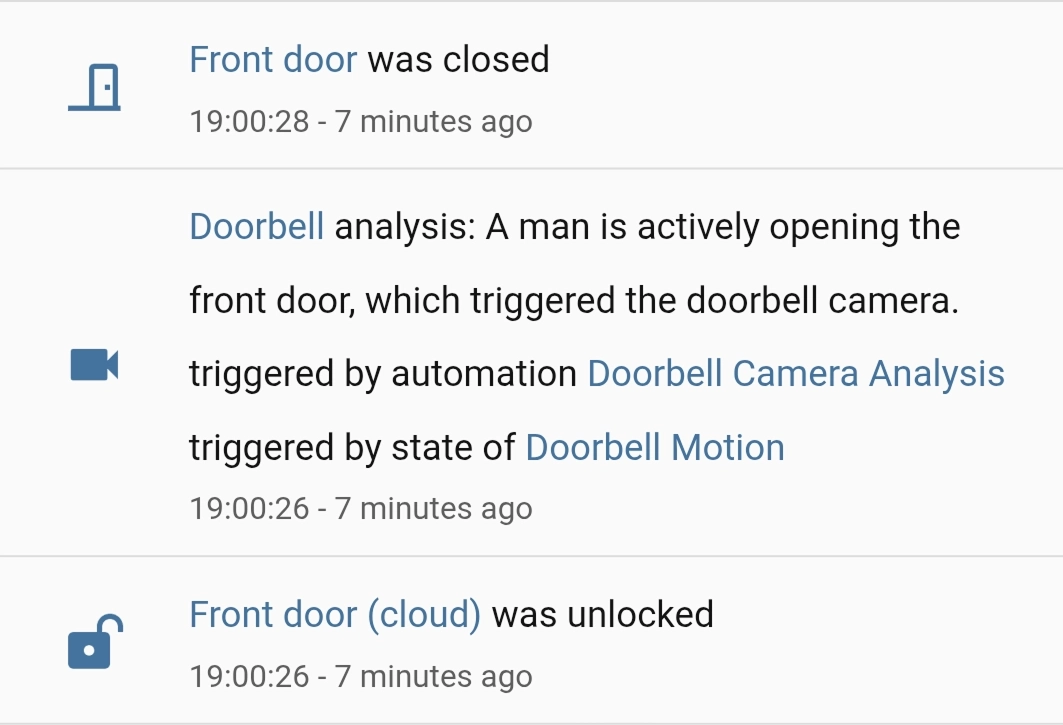
Activity view in Home Assistant of the doorbell image analyzed by AI Tasks An automation triggers an AI Task to identify what caused motion on a camera.

Lastly, users can set a default AI Task entity. This allows users to skip picking an entity ID when creating AI automations. It also lets you migrate everything that uses AI Tasks to the latest model with a single click. This also makes it easy to share blueprints that leverage AI Tasks, like this blueprint that analyzes a camera snapshot when motion is detected:

MCP opens a whole new world

Model Context Protocol (MCP) is a thin layer allowing LLMs to integrate anything. When the specification was announced, we quickly jumped on it and integrated it into Home Assistant. Effectively, these servers give Home Assistant’s Assist conversation agent access to all sorts of new tools. You could connect MCP servers that give Assist access to the latest news stories, your to-do lists, or a server that catalogues your vinyl collection, allowing you to have richer conversations (“Okay Nabu, which Replacements albums do I have, and which aren’t on my Vinyl-to-Purchase list?”).

On the flip side, you can also turn Home Assistant into an MCP server, allowing an AI system to access information about your home. For instance, you could create a local AI that’s great at making Home Assistant automations, and it could include all your entity names or available actions. MCP keeps gaining more support, and there are some great cloud and self-hosted solutions available.

How to pick a model

There are a lot of models available, it’s hard to know where to start. Luckily, Home Assistant’s resident AI guru @AllenPorter is here to help. He has put together an incredibly useful Home LLM Leaderboard. This dataset includes his extensive tests of cloud and local LLM options, and even has tests that give small local LLMs a fighting chance (see assist-mini).

Currently, the charts show the big cloud players’ most recent models ranking pretty close to each other, while recent local models that use 8GB or more of VRAM are nearly keeping up. In the past, there was a big disparity between most models, but now it’s hard to go wrong.

This is especially helpful as the options for LLMs in Home Assistant have just grown exponentially with the addition of OpenRouter, a unified interface for LLMs. With OpenRouter, users can access over 400 new models in Home Assistant, and it supports AI Tasks right from day one. We really are spoiled for choice.

The future is Open, and Open Source

Home Assistant is open. We believe that you should be in control of your data, and your smart home. All of it. Local LLMs and the way we have architected Home Assistant extends this choice to the AI space, all while maintaining your privacy.

Most crucially, we’ve made all of this open source. We are community-driven and work on this together with our community. The Open Home Foundation has no investors and is not beholden to anyone but our users. Our work is funded through hardware purchases and Home Assistant Cloud subscriptions, allowing us to make all the technology we build free and open.

  •  

v0.19.0-beta.2

This is the second beta release for 0.19! ✨ This beta solves multiple problems. Including some crashes preventing the app from being used. As always, the full changelog is below. For the previous changelog see v0.19.0-beta.1.

If you appreciate my work, you can show your support with a donation through GitHub sponsors (Credit card only) or through Buy Me a Coffee. Your support helps me continue improving and growing the app. Thank you!

🐛 Beta information

Beta versions are not guaranteed to work as expected. We encourage users to create detailed bug reports if any problems arise. Read our blog post for more information about our Android beta programs.

🏗️ Enhancements

💥 Crash fixes

🔧 Bugfixes

📈 Dependency updates

  • Update kotest to v6.0.3 #4916, by renovate[bot]
  • Update Kotlin to v2.2.20 #4923, by renovate[bot]
  • Update androidx.compose to v1.9.1 #4925, by renovate[bot]
  • Update dependency androidx.work:work-runtime to v2.10.4 #4926, by renovate[bot]
  • Update github/codeql-action action to v3.30.3 #4928, by renovate[bot]
  • Update androidx.activity to v1.11.0 #4929, by renovate[bot]
  • Update CI dependencies #4917, by renovate[bot]

Contributors

  •  

Counter-Strike 2 Update

[p][ MISC ][/p]
  • [p]Fixed an issue that would allow exec_async to continue executing in cheat protected servers resulting in random user input dropout.[/p][/*]
  • [p]Last chance to pick up the Gallery Case, Graphic Collection, and Character Craft stickers from The Armory.[/p][/*]
  •  

Part-DB 2.1.2

Part-DB 2.1.2

Important

If you are using Part-DB it would be helpful if you fill out this short survey on your usage of Part-DB (Google Forms): https://forms.gle/Q15twx3YYq3qCNfe8

Tip

You can help to translate Part-DB to other languages. See this post for more info.

Bug fixes

  • Fixed problem that default info provider option could not be empty (#1032)

Miscellaneous

  • Improved translations

  •  

Counter-Strike 2 Update

[p]\[ MAPS ][/p][p]Agency[/p]
  • [p]Updated to the latest version from the Community Workshop (Update Notes)[/p][/*]
[p]Grail[/p]
  • [p]Updated to the latest version from the Community Workshop (Update Notes)[/p][/*]
[p]\[ ANIMATION ][/p]
  • [p]Viewmodel animation fixes for the Bowie, Bayonet, Kukri, Nomad, Paracord, and Skeleton knives.[/p][/*]
[p]\[ MISC ][/p]
  • [p]Improved performance when firing weapons.[/p][/*]
  • [p]Fixed a case where viewmodel motion due to view angle changes depended on the direction you were facing.[/p][/*]
  •  
❌