Log in
Development Build
Below are development builds for testing purposes.
Latest development build: 2.5.4.25 (October 22nd 2025)
Latest stable release build: 2.5.4.0
https://github.com/clsid2/mpc-hc/releases/tag/2.5.4


Below are development builds for testing purposes.
Latest development build: 2.5.4.25 (October 22nd 2025)
Latest stable release build: 2.5.4.0
https://github.com/clsid2/mpc-hc/releases/tag/2.5.4
Ubuntu 25.10, codenamed “Questing Quokka”, is here. This release continues Ubuntu’s proud tradition of integrating the latest and greatest open-source technologies into a high-quality, easy-to-use Linux distribution. The team has been hard at work through this cycle, partnering with the community and our partners, to introduce new features and fix bugs.
Ubuntu 25.10 introduces GNOME 49 with media and power controls on the lock screen, HDR brightness settings, and enhanced accessibility features in line with the European Accessibility Act. New apps include Loupe, a modern image viewer, and Ptyxis, a lightweight terminal emulator.
Built on the Linux 6.17 kernel, this release brings nested virtualization on Arm, early Intel TDX host support for confidential computing, and enhanced support for TPM-backed full disk encryption with passphrase support, recovery key management and better integration with firmware updates. Network Time Security (NTS) is enabled by default for more secure time synchronization.
Developer experience advances with updated toolchains for Python 3.13.7 and availability of 3.14 RC3, GCC 15, Rust 1.85, Go 1.25, OpenJDK 25, and previews of .NET 10 and Zig.
Ubuntu 25.10 also debuts Rust-based implementations of sudo and coreutils for improved memory safety, and adopts the new RVA23 profile as the baseline for RISC-V, paving the way to Ubuntu 26.04 LTS.
The newest Edubuntu, Kubuntu, Lubuntu, Ubuntu Budgie, Ubuntu Cinnamon, Ubuntu Kylin, Ubuntu MATE, Ubuntu Studio, and Xubuntu are also being released today. More details can be found for these at their individual release notes under the Official Flavours section:
https://discourse.ubuntu.com/t/questing-quokka-release-notes/59220#heading–official-flavours
Maintenance updates will be provided for 9 months for all flavours releasing with 25.10.
In order to download Ubuntu 25.10, visit:
Users of Ubuntu 25.04 will be offered an automatic upgrade to 25.10 if they have selected to be notified of all releases rather than just LTS upgrades. For further information about upgrading, see:
https://ubuntu.com/download/desktop/upgrade
As always, upgrades to the latest version of Ubuntu are entirely free of charge.
We recommend that all users read the release notes, which document caveats, workarounds for known issues, as well as more in-depth notes on the release itself. They are available at:
https://discourse.ubuntu.com/t/questing-quokka-release-notes/59220
Find out what’s new in this release with a graphical overview:
https://ubuntu.com/desktop
https://ubuntu.com/desktop/features
If you have a question, or if you think you may have found a bug but aren’t sure, you can try asking in any of the following places:
https://matrix.to/#/#support:ubuntu.com
https://discourse.ubuntu.com/support
https://lists.ubuntu.com/mailman/listinfo/ubuntu-users
If you would like to help shape Ubuntu, take a look at the list of ways you can participate at:
https://ubuntu.com/community/contribute
Ubuntu is a full-featured Linux distribution for desktops, laptops, IoT, cloud, and servers, with a fast and easy installation and regular releases. A tightly-integrated selection of excellent applications is included, and an incredible variety of add-on software is just a few clicks away.
Professional services including support are available from Canonical and hundreds of other companies around the world. For more information about support, visit:
You can learn more about Ubuntu and about this release on our website listed below:
To sign up for future Ubuntu announcements, please subscribe to Ubuntu’s very low volume announcement list at:
https://lists.ubuntu.com/mailman/listinfo/ubuntu-announce
Originally posted to the ubuntu-announce mailing list on Thu Oct 9 09:46:52 UTC 2025 by Utkarsh Gupta, on behalf of the Ubuntu Release Team.
This beta release addresses DoVi/HDR10+ playback issues on certain Fire TV devices, and a bug that made Live TV fail to direct play.
If you appreciate my work, you can show your support with a donation through Buy Me a Coffee or GitHub sponsors. Your support helps me continue improving and growing the app. Thank you!
Beta versions are not guaranteed to work as expected. We encourage users to create detailed bug reports if any problems arise. Read our blog post for more information about our Android beta programs.

Full Changelog: v4.1.2...v4.1.3

last_page_id or name #3650Full Changelog: v4.1.1...v4.1.2
Hot off the release of OS 8.0.2, we’ve got a great new batch of feature updates for you as we get closer to the release of elementary OS 8.1!
The first stable release of elementary Maps is now available for download on any Linux OS. For now we’ve focused on some of the basics like showing your current location, searching for locations, and handling geo:// uri links.
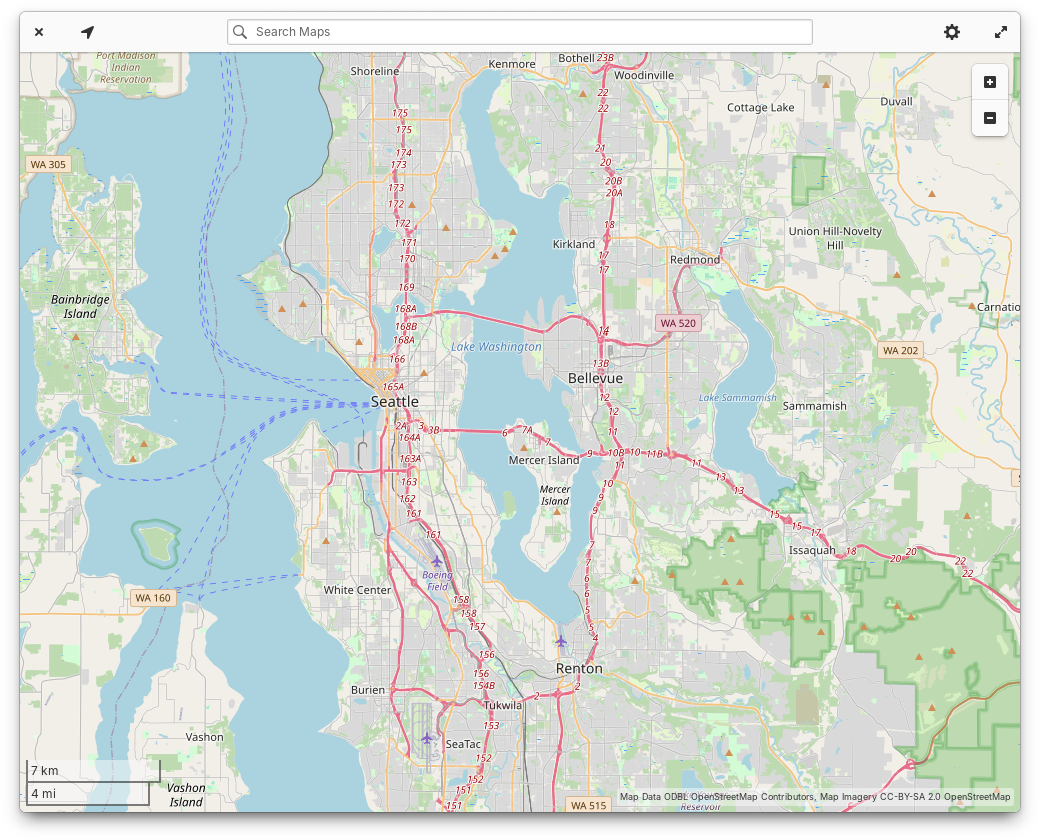
You may recall that Maps evolved from the Atlas code base originally written by Steffen Schuhmann for elementary OS. Ryo has worked hard to maintain the code and update it for the latest platform libraries like GTK4. Since the rename, we’ve updated the app to match the latest elementary styles and design conventions. We’ve also added an illustrated view switcher between Explore and Transit maps and when you search you’ll see color coded place type icons next to search results. Keyboard navigation, screen reader accessibility, and performance should also be slightly improved. Plus we have a modernized app icon, shoutouts to Micah for providing art direction.
On the Home page, the “Updates & installed apps” button is now properly labeled for screen readers. We’ve fixed a minor visual bug with banner shadows. And the “Education” category now has an icon.
In app info views, we now show a simple percentage-based app rating when ratings are available from ODRS—the same ratings server used by apps like GNOME Software. Expect future versions of AppCenter to expand our support for ratings and reviews, but for now we have some groundwork laid out. App info views also now show content warnings with a more compact layout. Italo updated our “End of Life” warnings to contain more accurate language, and licensing information now shows more detail and a simplified summary. Plus, we now show when a game supports playing with controllers. Leonhard added support for app addons, and we’ve simplified the “What’s New” section to show just the latest release, with the option to view more releases in a separate version history window.
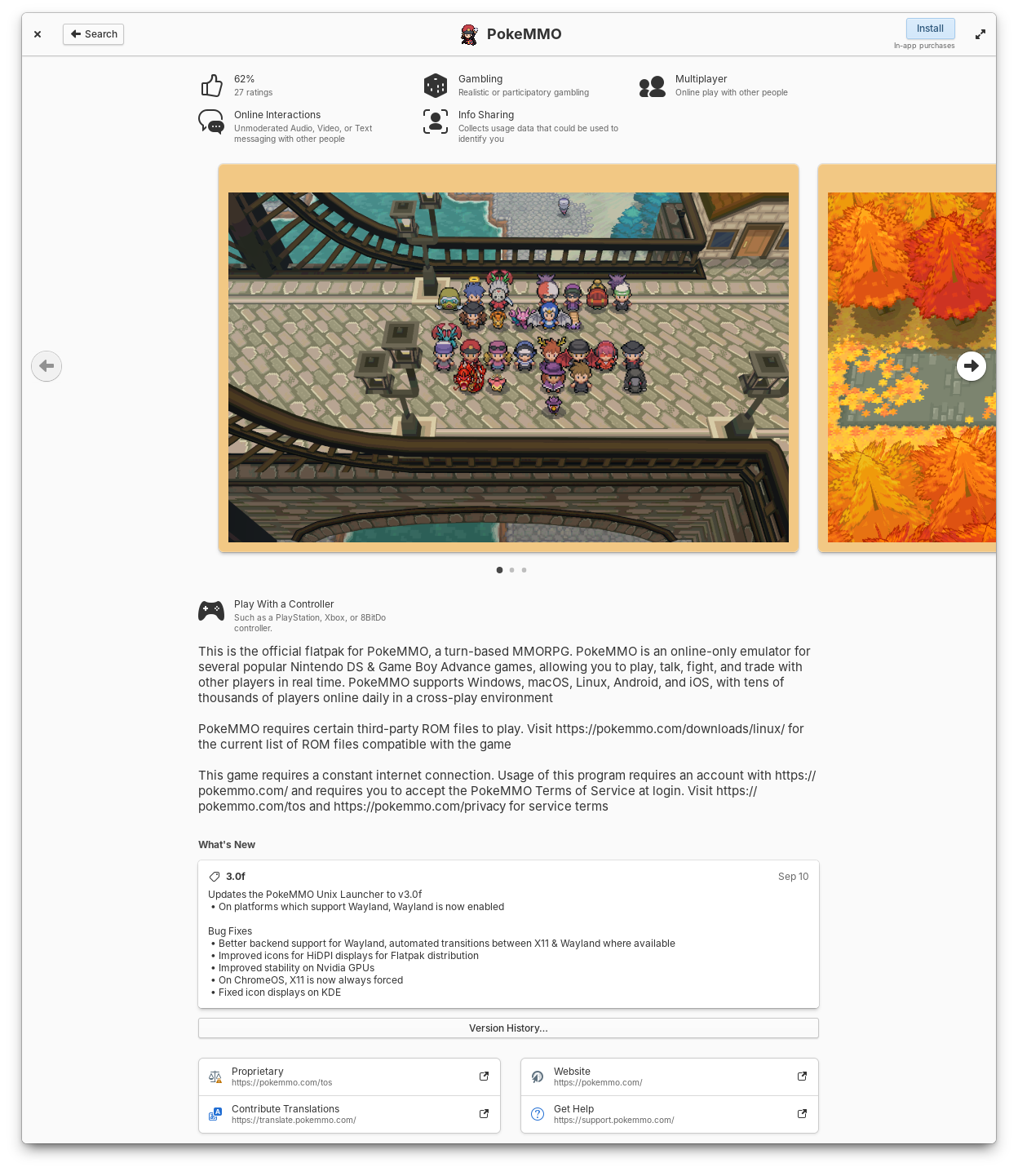
Apps now show ratings, controller support, simplified release notes, and license summaries
Leonhard did a ton of work in this release to make app updates faster and more reliable. The code has been massively streamlined and we’ve resolved reported crashes that some folks were experiencing while checking for updates. Plus we’re now using GTK 4’s FilterListModels for improved performance. The “Last checked” time is now updated every minute while the updates view is open and the gear menu can now be opened with the keyboard shortcut F10.
We’ve made a few changes to the way installed apps are shown to make it easier to keep up with what’s new when you have automatic app updates turned on. Installed apps are now sorted by release date instead of alphabetically. The Releases dialog got a slight redesign and you can now see recent releases for all installed apps. And we’ve adjusted where the version number and store origin labels appear to clean up their layout.
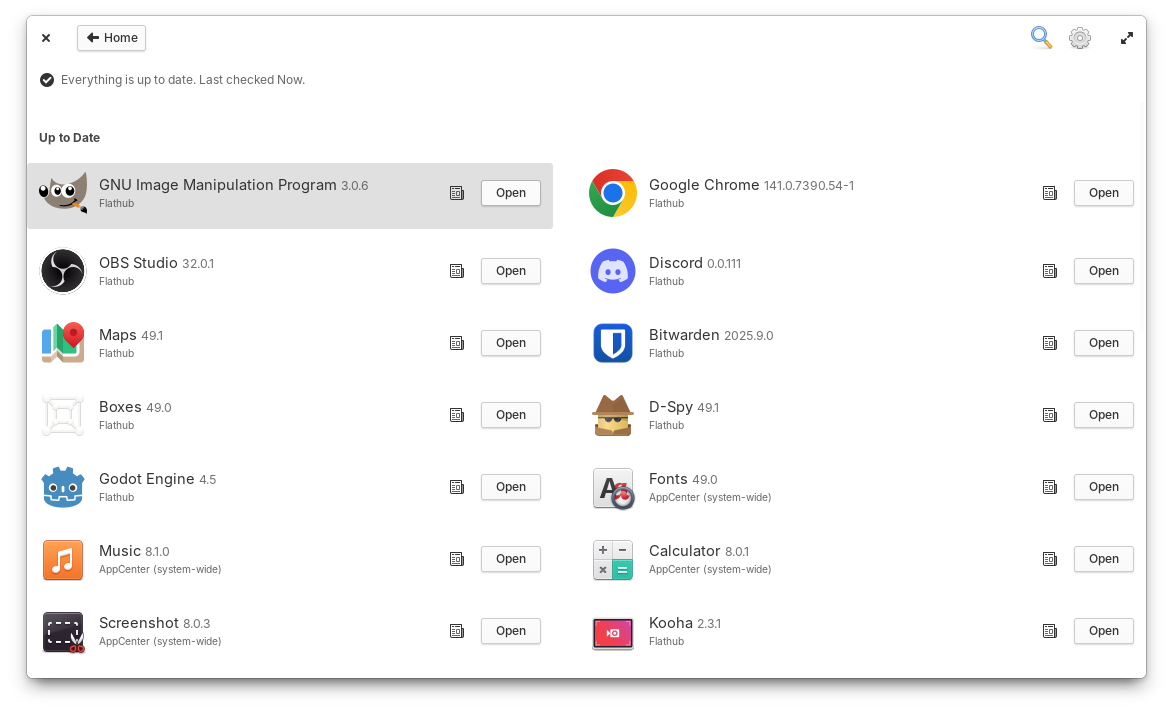
You can check past release notes for all installed apps.
Occasionally, app icons can take a little longer to load; When this happens they’ll now fall back to a nicer placeholder and cross fade into their proper icons once available, thanks to Italo. We’ve changed the label of the action button for free apps from “Free” to “Install”, according to your feedback. “Recent” apps in Category views should feature a more up-to-date selection and be a bit faster to load. And Search Results will now show in two columns when enough space is available so that you can see more results at once.
When we ran our desktop survey 75% of you told us that you expected to see background apps in the Dock, so we now have Background Portal support in the Dock thanks to Leonhard! Here you can see a list of apps running the background without a window, their supplied reason for running the background, and you have the ability to force them to quit. You can always further manage app permissions in System Settings → Applications and choose which apps are allowed to run in the background.
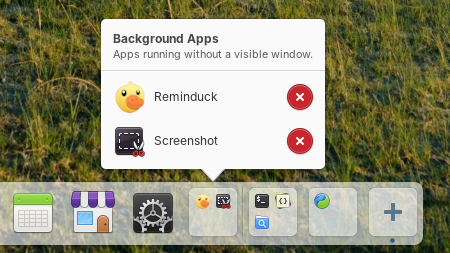
Background apps now show in the Dock
New contributor Sebastian fixed issues with the placement of app name tooltips, added a shake animation when you try to open a new window on a single-window app with middle-click, and fixed an issue where re-arranging app icons in the dock could cause them to shake indefinitely. Leonhard fixed an issue where maximized windows would be behind a portion of the dock when hiding is turned off. And William improved the color of the indicator dot for apps which are active on another workspace.
In Quick Settings, we’ll now show a message when you try to turn on the onscreen keyboard in a Secure Session since it’s currently only available in a Classic session. And we’ve added a couple of nice animations when you toggle Dark Mode or Rotation Lock.
Vishal fixed a potential crash when using the network indicator on the Lock Screen. And we’ve improved Airplane Mode: it will now only disable networking radios, not Bluetooth or wired networks. Plus you can now jump to System Settings when middle-clicking networking toggle buttons.
Application settings now has a setting to select your default Maps app, and you can start typing to search apps right away instead of having to select the search icon first.
Leo put a ton of effort into this latest release of the Login & Lock Screen, including support for the automatic accent color and Dark mode! We now also sync more of your settings like panel transparency and power settings. We’ve improved keyboard navigation, and will automatically select the Classic session if accessibility features are used, for example, during Initial Setup. We’ll also do a better job of remembering your last selected user card and their session type.
Jeremy also pushed another round of maintenance updates for our developer tools! Files now does a better job when drag-n-dropping files into other apps, and Properties windows now show a more precise date and time for file modification. Code’s terminal pane now does a better job syncing with your Terminal app settings, and he fixed an issue where exiting a shell would break the terminal pane. In the Terminal app, he improved unsafe paste warning detection for commands that contain newlines, and the search bar now takes up a more appropriate amount of space.
As always, pop open System Settings → System on elementary OS 8 and hit “Update All” to get these updates plus your regular security, bug fix, and translation updates. Or set up automatic updates and get a notification when updates are ready to install!
We landed blur-behind in a couple of more places in Early Access! The Dock is now slightly more transparent and things behind it will be blurred. This improves legibility when for example busy text is behind the dock. And we’ve also merged some updated styles for Notifications including slight transparency, blur-behind, more rounded corners, and softer shadows. Plus Leo cleaned up Notification close animations. If you’re not a fan of transparency and blur effects, you can always turn off “Panel Transparency” in System Settings → Dock & Panel.

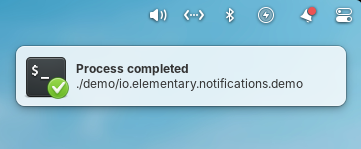
The Dock and Notifications now have transparency and blur-behind effects
Subhadeep has merged in initial support for fingerprint enrollment in User settings. We’re still working out the experience for fingerprint authentication dialogs for example, but if you have a compatible fingerprint reader you should be able to start testing support and send us feedback about what is and isn’t working.
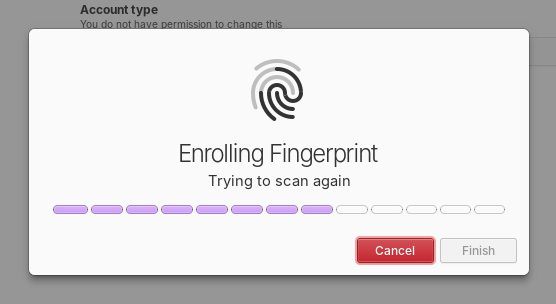
Initial support for enrolling fingerprints was merged
Plus, daily and release candidate quality builds will now use the Secure Session by default. We’ve received a ton of feedback that the updates we’ve made since the release of OS 8 have made the experience of using the Secure session much better than the Classic session for most people, including improved performance and fewer bugs encountered. So we’re really excited to make it the default experience going forward.
At the moment we’re at 24% of our monthly funding goal and 321 Sponsors on GitHub! Shoutouts to everyone helping us reach our goals here. Your monthly sponsorship funds development and makes sure we have the resources we need to give you the best version of elementary OS we can!
Monthly release candidate builds and daily Early Access builds are available to GitHub Sponsors from any tier! Beware that Early Access builds are not considered stable and you will encounter fresh issues when you run them. We’d really appreciate reporting any problems you encounter with the Feedback app or directly on GitHub.
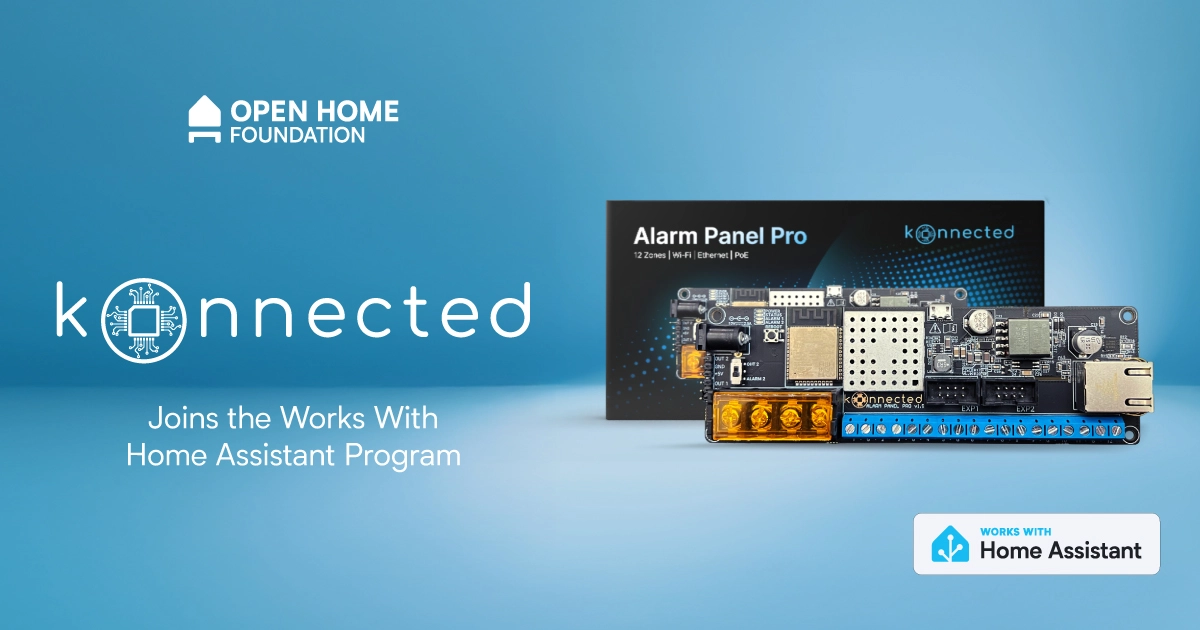
Works with Home Assistant is opening its doors to another new partner who is bringing the first Garage Door Openers and Alarm Panel to the program, all of which are using ESPHome under the hood. Konnected are well known for their devices that let you retrofit new smarts into the devices you already have, allowing you to use them in Home Assistant and keep them working longer.
Konnected have been well-known in the Home Assistant community, as they’ve been active members for years. As members of the community, they know how hard it can be to connect the devices that are already built into your home, whether they’re smart or not. That’s why Konnected’s first product was their drop-in replacement alarm panel boards, which allow you to take decades-old wired alarm systems and add them into Home Assistant.
Another challenge the community was facing was garage door openers (GDOs), especially cloud-based openers. In the early days of Home Assistant, the community figured out the APIs for these providers and controlled them that way. Some manufacturers noticed this and put barriers up blocking people from controlling the devices they own, claiming it as “unauthorized usage” 🙄.
The community was naturally incensed, and did what tinkerers tend to do when a cloud gets in their way — they began tinkering with hardware. A community emerged to take back control of these devices, starting with projects like ratgdo, which Konnected used as a base for their work. Today, because of these projects, there are multiple great open source tools to control a large number of these GDOs, ranging from DIY schematics to finished controllers. Konnected has an open source solution which works locally, as well as having the form factor and safety standards to match. Even better, Konnected devices are available in over 60 countries.
For anyone who has used Konnected for quite some time, you’ll notice that they had their own integration, which has now been deprecated in favor of the ESPHome firmware, so that it’s always straightforward to find (or build) the firmware you need. They even publish all their code on GitHub 👏, which allows the community to help them fix issues and add features.
"We've been users of Home Assistant ourselves since 2018 and thrilled to finally be officially part of the Works with Home Assistant program. Konnected shares many of the same founding principles as Home Assistant, including our commitment to 100% local control, open-source firmware, and high-quality hardware that makes your home smarter, safer and accessible to everyone."
- Nate Clark, Founder / CEO at KonnectedKonnected is another example of ESPHome (a project from the Open Home Foundation) fostering an entirely new ecosystem of Open Home projects. It works fully locally, and it’s perfect for tinkerers, allowing you to build DIY smart home devices yourself (get started with one of our ready-made projects). Konnected also have a thriving community of their own if you have questions or comments.
Creators can also use it to make pre-built, plug-and-play products that give users a really seamless experience. Devices are easily discovered and added to your Wi-Fi network and Home Assistant, along with a one-click update within Home Assistant. To learn more about how Konnected uses ESPHome, look out for Nate on the next ESPHome live stream on October 14!
Remember, the development of projects like ESPHome from the Open Home Foundation is supported by Home Assistant Cloud subscribers and anyone who purchases Home Assistant hardware. While all of Konnected’s devices work locally, if you’re interested in remote access, allowing you to keep tabs on your home’s security when you’re out and about, check out Home Assistant Cloud.
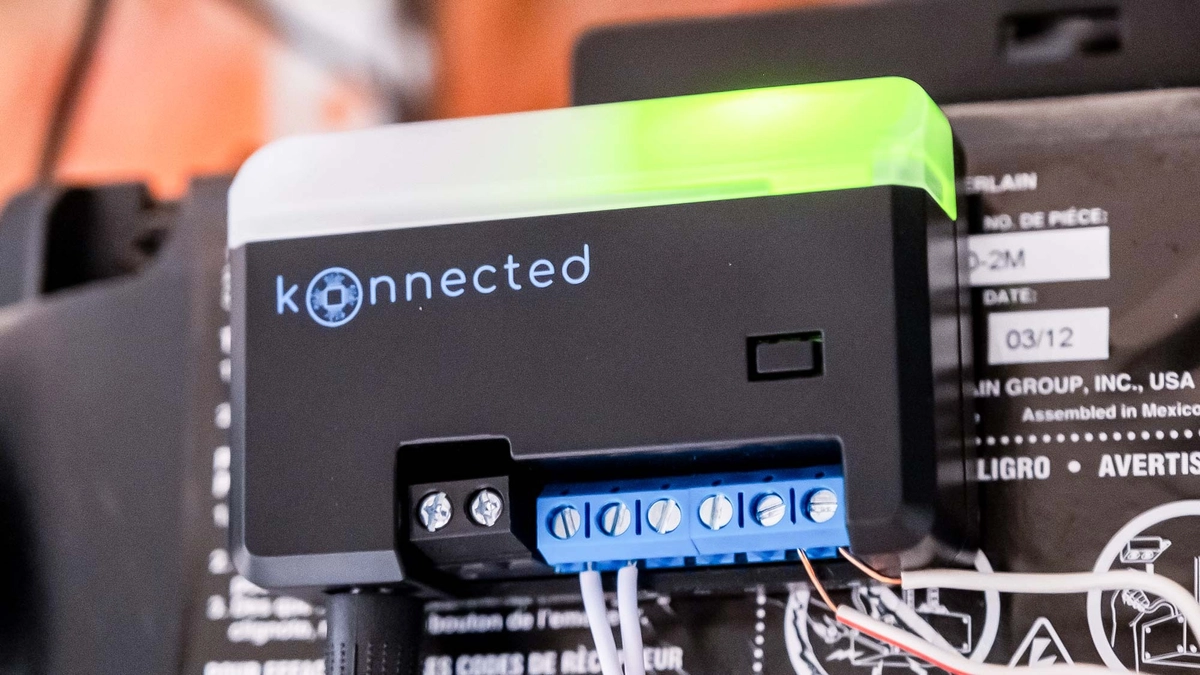 The Konnected Smart Garage Door Opener blaQ
For anyone new to the Works With Home Assistant program, it’s a way for us to formally certify devices that have been tested by our team, and help you know what works great out of the box with Home Assistant. Any company joining also commits to providing long-term support and firmware updates. Works With Home Assistant is operated by the Open Home Foundation, and the support of Home Assistant Cloud subscribers funds this work. These items were all tested by members of the ESPHome team to see exactly how they function in their own homes.
The Konnected certified devices are listed below:
A nice benefit of retrofitting your old wired security system is not needing to maintain loads of battery-powered sensors 🪫. The Alarm Panel Pro has the ability to connect 12 zones (security speak for individual or joined up sensors), it also allows you to connect keypads and sirens, and includes 12V power for the devices that need that. It’s highly customizable, and there’s also plenty of support available if you need help with installation. You can power it using 12V or Power-over-Ethernet, or both! The Alarm Panel Pro is designed to be always-on, and they’ve designed it to consume very little power. This also allows it to easily run for hours on their backup battery.
You’ll also probably be wondering why there are two different variants of the garage door openers, and that’s because each supports a different set of manufacturers. There is a wizard to help you figure out which variant will work with your opener. Between the Konnected GDO blaQ and White, you get support for some of the biggest manufacturers out there, including Chamberlain, LiftMaster, Craftsman, Merlin, Genie, Stanley, and more.
Even with the Konnected controlling your garage door opener, you’re still able to use the included remote or the original manufacturer’s app (if you like that kind of torture). The GDO White features a built-in optical laser sensor that detects whether your garage door is open or closed. The GDO blaQ offers control over the opener’s light and lock, and can even partially open the door (for openers that support these features).
As we mentioned at the top, it’s great to have more products added to the program that help people get the most out of the things they already own. A big part of the Open Home Foundation’s mission is sustainability in the smart home, and Konnected are helping our community get longer lasting use of their existing security and garage door systems.
Q: If I have a device that is not listed under ‘Works with Home Assistant does this mean it’s not supported?
A: No! It just means that it hasn’t gone through a testing schedule with our team or doesn’t fit the requirements of the program. It might function perfectly well, but has not yet been added to the testing schedule, or it might work under a different connectivity type that we don’t currently test under the program.
Q: Ok, so what’s the point of the Works with program?
A: It highlights the devices we know work well with Home Assistant and the brands that make a long-term commitment to keeping support for these devices going. The certification agreement specifies that the devices must have full functionality within Home Assistant, operate locally without the need for cloud and will continue to do so long-term.
Q: How were these devices tested?
A: All devices in this list were tested using a standard Home Assistant Green Hub with the ESPHome integration. If you have another set-up that’s not a problem, but we test against these as they are the most effective way for our team to certify within our ecosystem.
Q: Will you be adding more Konnected devices to the program?
A: Why not! Konnected are also looking to do some exciting things with Matter soon, so we’re excited to work together on any upcoming releases or add in further products that are not yet listed here.


there is a discord server with an @everyone in case of future important updates, such as vulnerabilities (most recently 2025-09-07)
I to run in-process for a 140x speed boost 41ed559
I hook has a bug then it can deadlock copyparty)s to send info on stdin instead of argv 4542ad3wram) efd19af
chpw and IdP-auth is now supported 3f59710ui-filesz option can have a trailing hyphen now 2248705?v suffix to open mediafiles in the mediaplayer f8e1981/favicon.png (samsung-android)min image from 45 to 33 MiB a8f53d5--licenses 805a705

Note
If someone is asking you to pay money for access to UpSnap binaries, source code, or licenses, you are being scammed.
The official and only trusted source for UpSnap is this repository (and its linked releases).
Do not pay third parties for something that is provided here for free.

Video direct play now works again on Jellyfin 10.10 servers and the app no longer crashes on Android 6 and older.
If you appreciate my work, you can show your support with a donation through GitHub sponsors (Credit card only) or through Buy Me a Coffee. Your support helps me continue improving and growing the app. Thank you!
Beta versions are not guaranteed to work as expected. We encourage users to create detailed bug reports if any problems arise. Read our blog post for more information about our Android beta programs.
Boo! 👻
We just celebrated our birthday 🥳, which means it is time for spooky season; get ready for Halloween! And, hello to the October release of Home Assistant 2025.10! 🎃
This release iterates on some of the features we introduced in the last couple of releases, but also introduces some brand-new ones!
The highlight of this release is definitely the iterations of the automation editor, which gained a sidebar last release, and now has gained undo/redo functionality, a resizable sidebar, improved copy/paste, and more! Thanks for all the feedback you provided on the previous release; it made a massive difference in this release.
Using multiple wake words for voice assistants is now possible, which opens up a lot of possibilities, especially for dual-language households (like mine 😉). Dashboards get more intelligent by suggesting entities based on your usage patterns, and the AI Task can now generate images, which I’m curious to see what the community will do with it!
Enjoy the release!
../Frenck
A huge thank you to all the contributors who made this release possible! And a special shout-out to @JLo, @laupalombi, and @piitaya who helped write the release notes this release. Also, @googanhiem, @SeraphicRav, @tronikos, and @richardpolzer for putting effort into tweaking its contents. Thanks to them, these release notes are in great shape. ❤️
In the last release, we introduced a new layout for the automation editor, and your feedback has been invaluable in helping us refine it!
This release fixes a few of the most common issues we managed to gather from all of you. Thanks for all the feedback! ❤️
Working on an action that is too complex for a small sidebar? Maybe one with a few YAML fields? You can now resize the sidebar to adapt the layout to your current task!
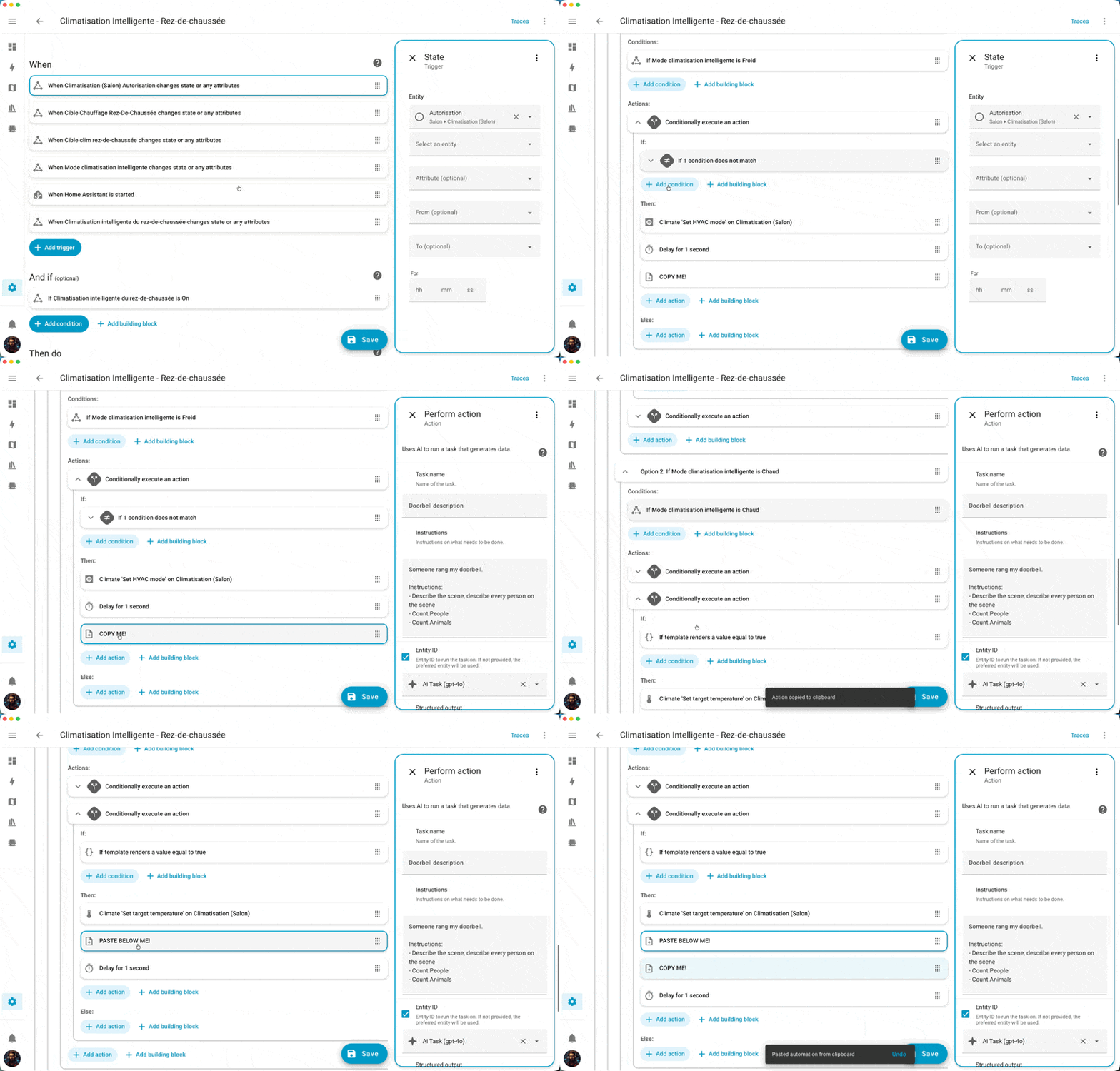
We previously introduced keyboard shortcuts to copy and cut.
Pasting was more complex to bring to life because you can paste a block (trigger, condition, action) in many different locations in your automation. In this release, we introduce a really simple pattern. If you previously copied a block, you can paste it below any block simply by selecting it and pressing CTRL+V.
Another very simple, but very welcome, quality-of-life improvement to the automation editor!
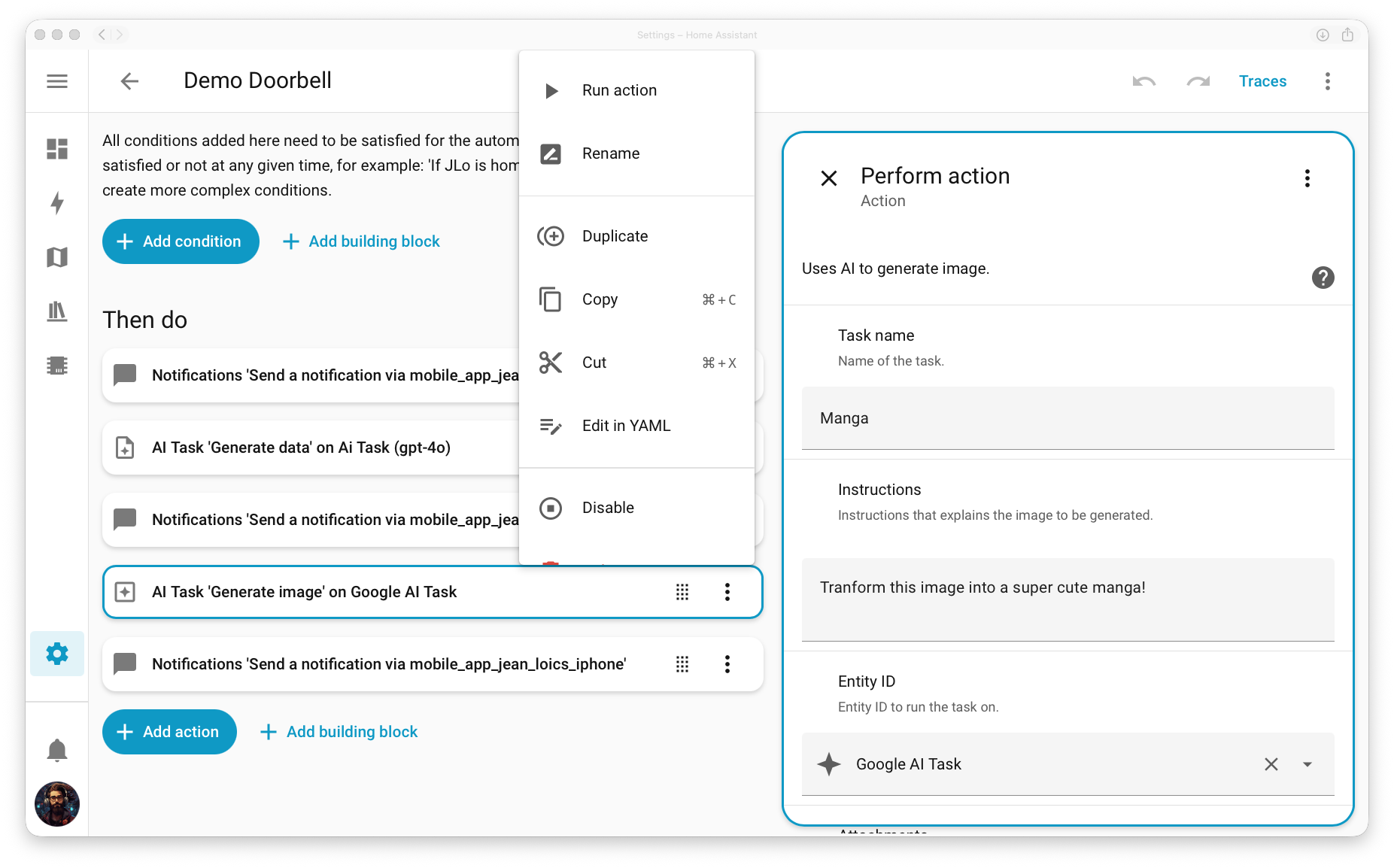
We initially relocated the overflow menu (the menu that appears when you click the ⋮) with all the options related to a block on the sidebar, thinking this would make the flow cleaner.
Due to popular demand and helpful feedback that some actions were more difficult to reach (such as testing a condition or running an action), we decided to bring it back to the main section of the editor as well.
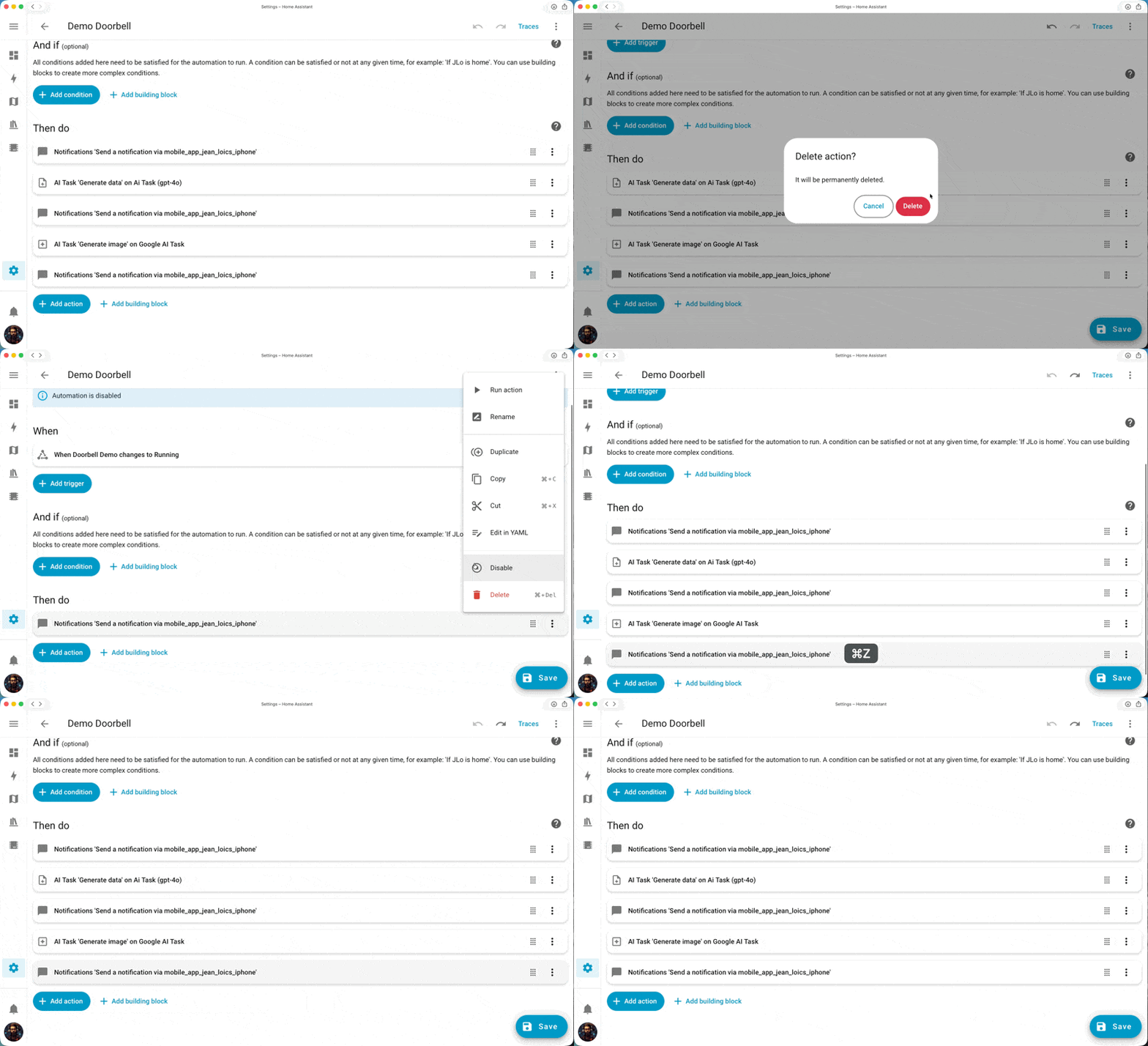
We’ve all been there: you’re building a complex automation, make a mistake, and want to revert it, only to find out that it’s really not simple. Up until now, the only way to revert some unsaved changes made to an automation was to close it and start over again… A very painful workflow.
This release introduces an Undo functionality (and its associated Redo). You can now undo up to 75 steps back in your automation editing history (and redo them if you want). Standard keyboard shortcuts (CTRL+Z and CTRL+Y) are also available! An amazing contribution from @jpbede, thanks!
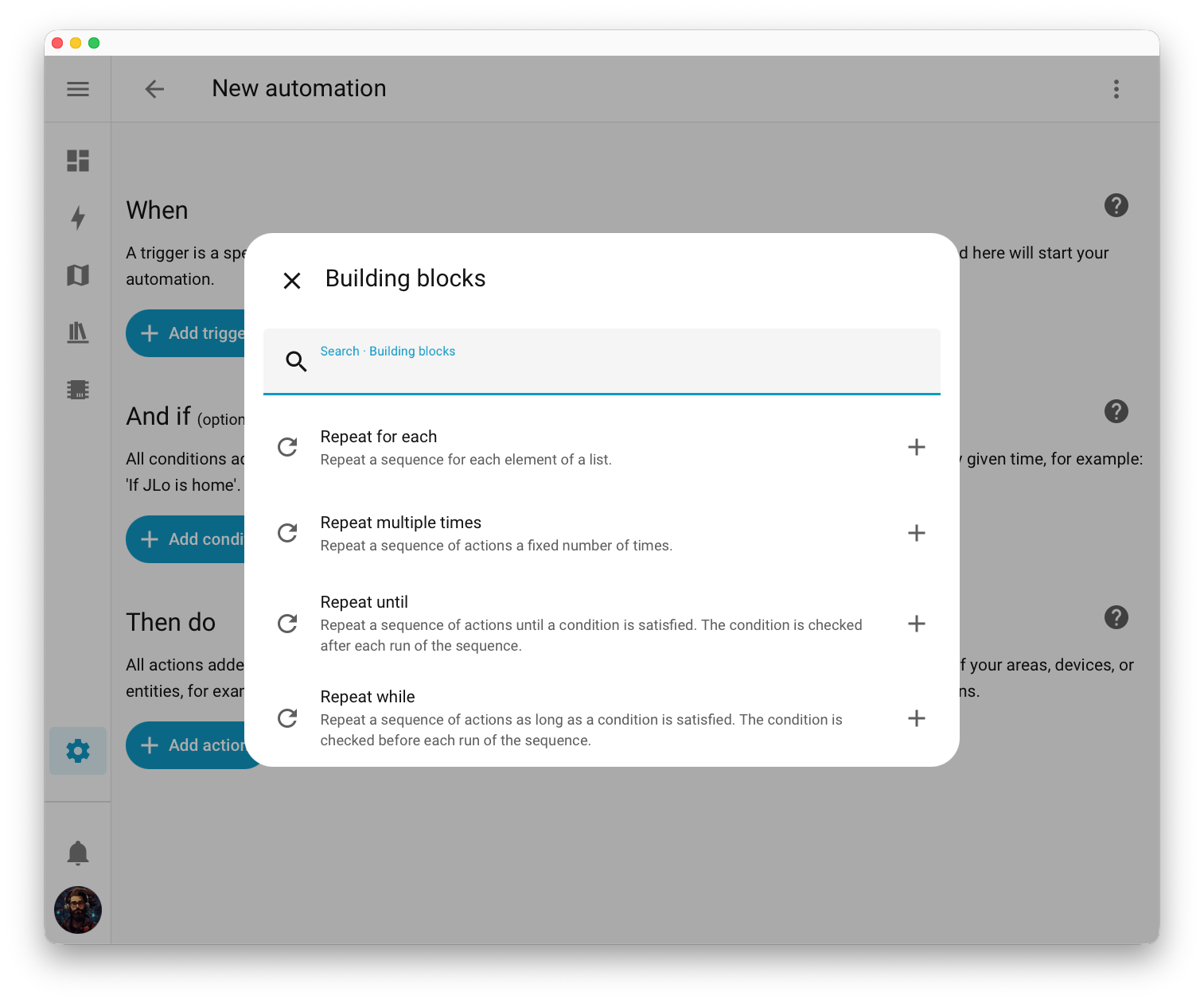
Finally, we noticed some unwanted complexity in our “repeat” building block, which allows you to repeat one or multiple actions for as long as you need to.
This complexity stemmed from the fact that we were trying to cover four main use cases in a single block.
We decided to split this building block into four smaller ones, with simpler descriptions explaining each use case. Nice!
Here’s how they were separated:
Note
For our advanced users: This evolution is only cosmetic. The YAML format of the repeat block does not change; this means your existing automations will not be affected by this change.
Tip
One of Home Assistant’s greatest strengths is our community. We’re building this automation editor together, and your input will shape where it goes next. There are two ways to get involved:
In 2025.8, we introduced a way to generate data using the LLM of your choice, paving the way to more AI-driven automations, dashboards, and other smart home interactions.
In this release, we introduce a way to generate images!
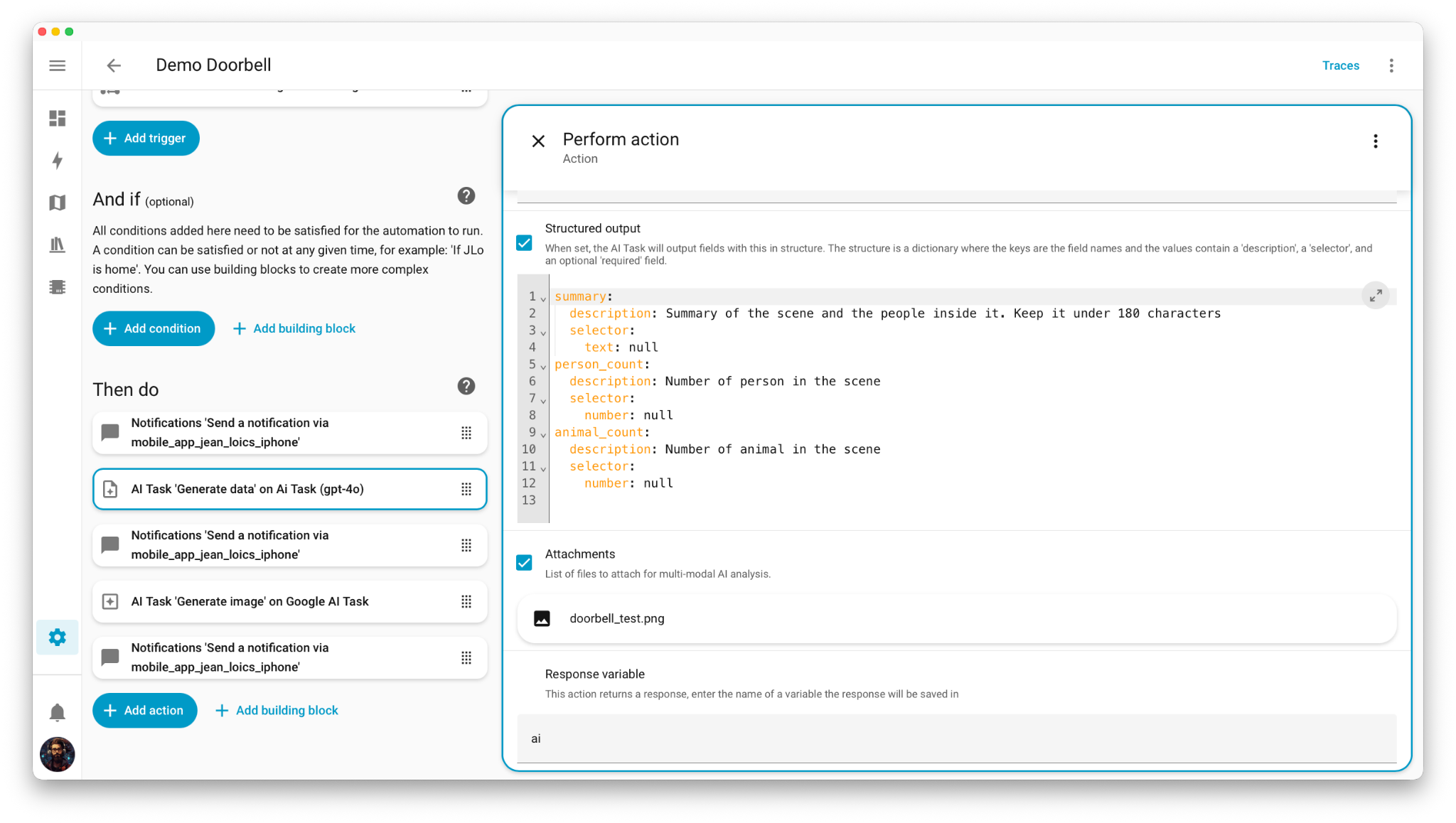
Now every time someone rings your doorbell, you can receive a notification with a cartoon version of the doorbell snapshot. @JLo has made this example a reality, and here’s his demo with the associated automation!
alias: Demo Doorbell
triggers:
- trigger: state
entity_id:
- binary_sensor.doorbell_demo
to: "on"
actions:
- action: notify.mobile_app_iphone
data:
title: "🔔 Doorbell "
message: Processing image ...
data:
tag: doorbell
- action: ai_task.generate_data
data:
task_name: Doorbell description
instructions: |-
Someone rang my doorbell.
Instructions:
- Describe the scene, describe every person on the scene
- Count People
- Count Animals
entity_id: ai_task.ai_task_gpt_4o
structure:
summary:
description: >-
Summary of the scene and the people inside it. Keep it under 180
characters
selector:
text: null
person_count:
description: Number of person in the scene
selector:
number: null
animal_count:
description: Number of animal in the scene
selector:
number: null
attachments:
media_content_id: media-source://media_source/local/doorbell_test.png
media_content_type: image/png
metadata:
title: doorbell_test.png
thumbnail: null
media_class: image
children_media_class: null
navigateIds:
- {}
- media_content_type: app
media_content_id: media-source://media_source
response_variable: ai
- action: notify.mobile_app_iphone
data:
title: >-
🔔 Doorbell ({{ai.data.person_count}} 🧑🏻🦱 / {{ai.data.animal_count}}
🐊)
message: "{{ai.data.summary}}"
data:
tag: doorbell
- action: ai_task.generate_image
data:
task_name: Manga
instructions: Transform this image into a super cute manga!
entity_id: ai_task.google_ai_task
attachments:
media_content_id: media-source://media_source/local/doorbell_test.png
media_content_type: image/png
metadata:
title: doorbell_test.png
thumbnail: null
media_class: image
children_media_class: null
navigateIds:
- {}
- media_content_type: app
media_content_id: media-source://media_source
response_variable: ai_image
enabled: true
- action: notify.mobile_app_iphone
data:
title: >-
🔔 Doorbell ({{ai.data.person_count}} 🧑🏻🦱 / {{ai.data.animal_count}}
🐊)
message: "{{ai.data.summary}}"
data:
tag: doorbell
image: http://homeassistant.local:8123{{ai_image.url}}
enabled: true
mode: single
Image generation is already working great, and we cannot wait to see what you will build with this!
In the last release, we introduced the Home dashboard, offering a simpler way to control and monitor your smart home if you don’t have the time, energy, or need to customize your own dashboard in detail.
Now we’ve added a new concept: sections of suggested entities. This follows a basic algorithm that suggests entities you have interacted with the most in the past. It then shows these entities based on the hour of the day, with only relevant controls being suggested.
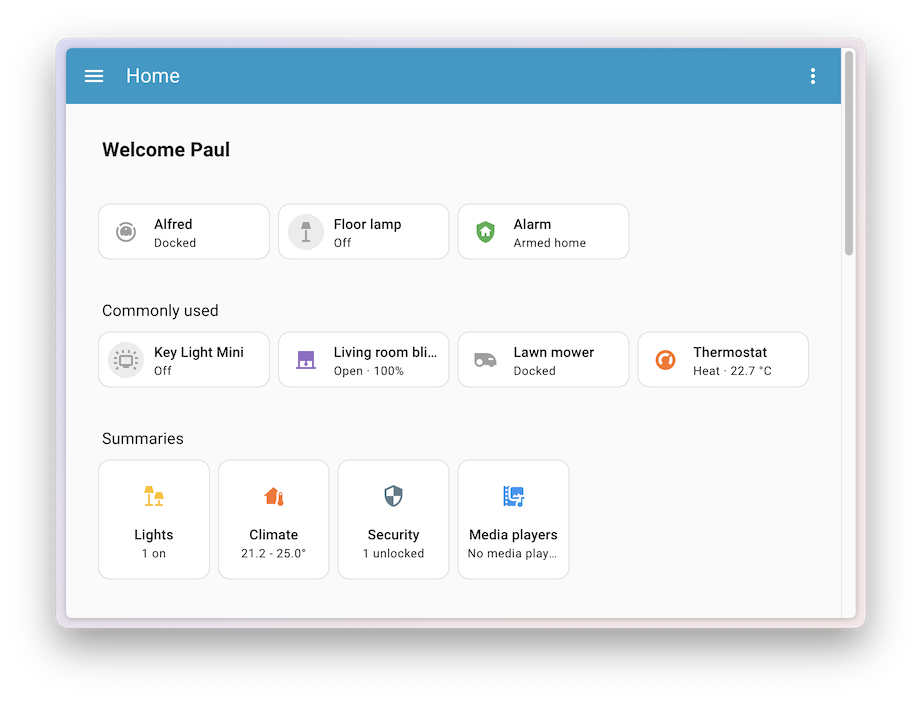
If you’re creating a manual dashboard with sections, you can integrate these prediction controls directly into it. The setup follows a section-based approach:
strategy:
  type: common-controls
  title: Common controls
Tip
One of Home Assistant’s greatest strengths is our community. We’re building this dashboard together, and your input will shape where it goes next. There are two ways to get involved:
For a very long time, ESPHome-based voice assistants (even the tiny Atom Echo) secretly supported multiple wake words under the hood. With this release, we’re finally opening up this feature to you!
You can now define two wake words and two assistants for every voice assistant in your home!
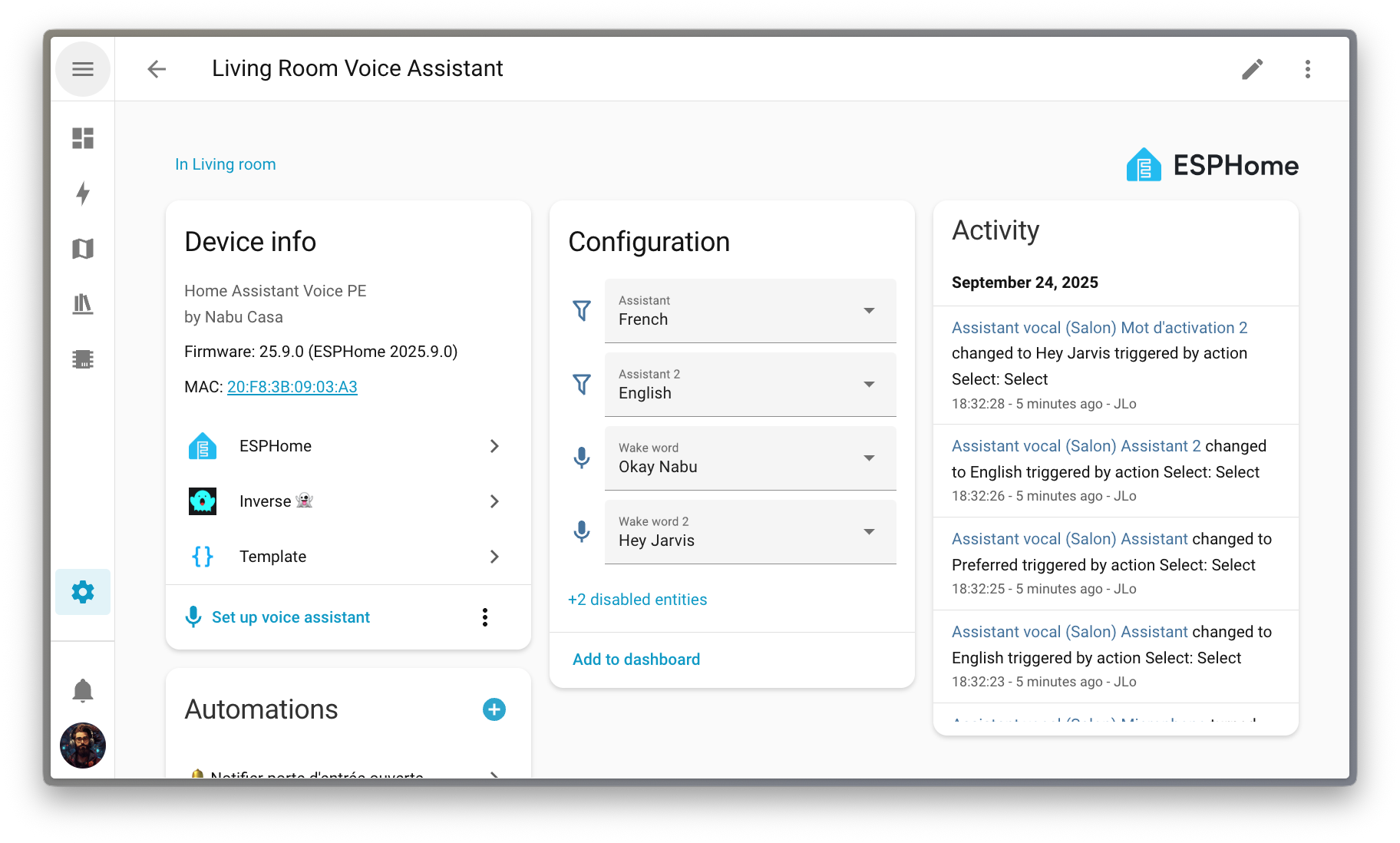
This makes it straightforward to support dual-language households by assigning different wake words to different languages. For example, “Okay Nabu” could be used for French, while “Hey Jarvis” is used for English.
Multiple wake words and assistants can be used for other purposes as well. Want to keep your local and cloud-based voice assistants separate? Easy! “Okay Nabu” could be used for a cloud-based assistant while “Hey Jarvis” is used for a local one.
We’d love to hear feedback on how you plan to use multiple wake words in your home!
After a voice command, Assist responds with a short confirmation like “Turned on the lights” or “Brightness set”. This lets you know that it understood your command and took the appropriate actions. However, if you’re in the same room as the voice assistant, this confirmation can feel redundant since you can see or hear that the appropriate actions were taken.
Starting with this release, Assist will detect if your voice command’s actions all took place within the same area as the satellite device. If so, a short confirmation “beep” will be played instead of the full verbal response. Besides being less verbose, this also serves as a quick reminder that your voice command only affected the current area.
Note
This feature does not work for AI-enabled Assistants, as they can generate a wide variety of responses that can’t be replaced with a simple beep.
Thanks to our community for keeping pace with the new integrationsIntegrations connect and integrate Home Assistant with your devices, services, and more. [Learn more] and improvements to existing ones! You’re all awesome 🥰
We welcome the following new integrations in this release:
It is not just new integrationsIntegrations connect and integrate Home Assistant with your devices, services, and more. [Learn more] that have been added; existing integrations are also being constantly improved. Here are some of the noteworthy changes to existing integrations:
One thing we are incredibly proud of in Home Assistant is our integration quality scale. This scale helps us and our contributors to ensure integrations are of high quality, maintainable, and provide the best possible user experience.
This release, we celebrate several integrationsIntegrations connect and integrate Home Assistant with your devices, services, and more. [Learn more] that have improved their quality scale:
3 integrations reached platinum 🏆
2 integrations reached silver 🥈
3 integrations reached bronze 🥉
This is a huge achievement for these integrations and their maintainers. The effort and dedication required to reach these quality levels is significant, as it involves extensive testing, documentation, error handling, and often complete rewrites of parts of the integration.
A big thank you to all the contributors involved! 👏
While most integrationsIntegrations connect and integrate Home Assistant with your devices, services, and more. [Learn more] can be set up directly from the Home Assistant user interface, some were only available using YAML configuration. We keep moving more integrations to the UI, making them more accessible for everyone to set up and use.
The following integrations are now available via the Home Assistant UI:
There are many more improvements in this release; here are some of the other noteworthy changes:
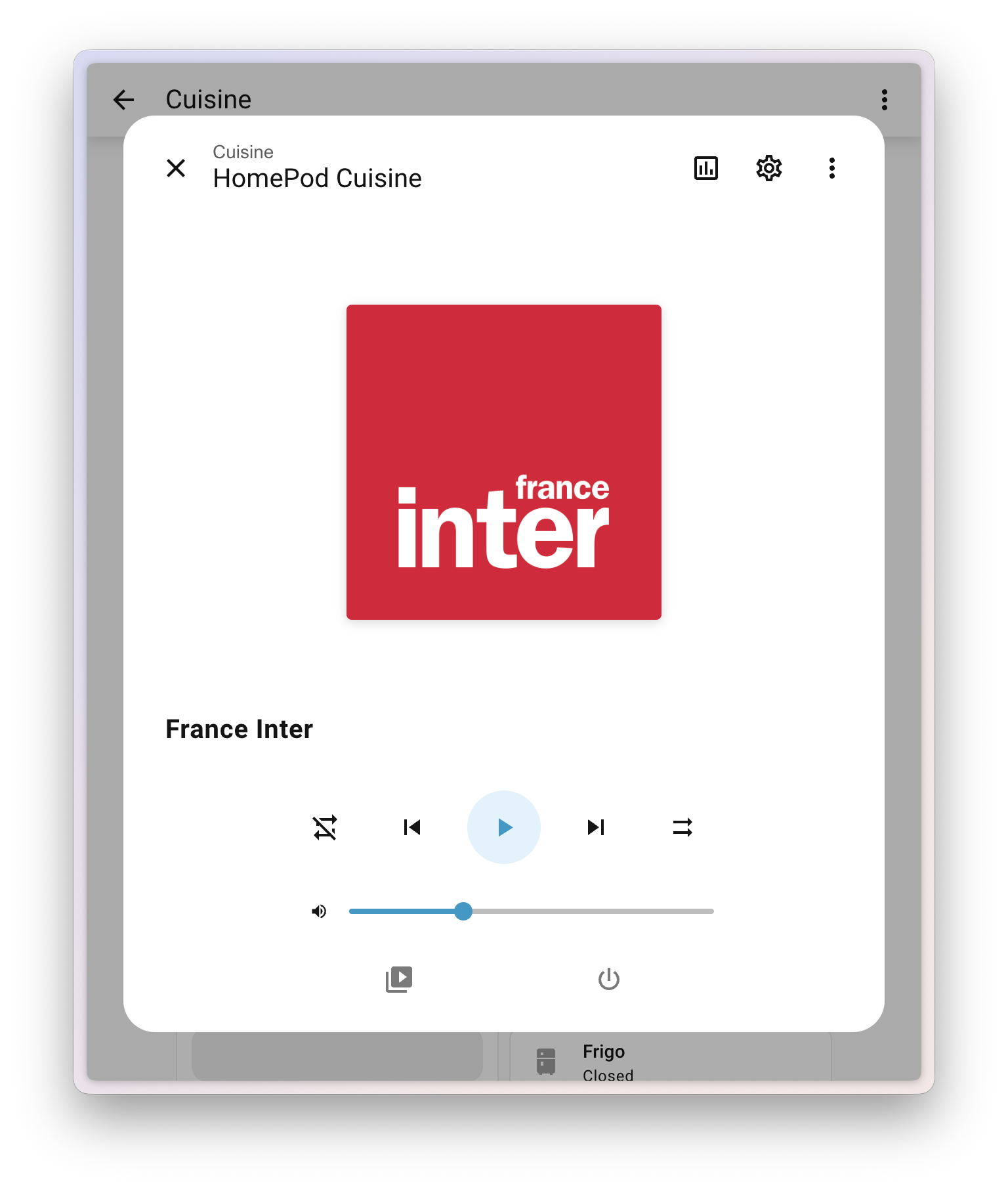
webhook_id. Thanks, @RoboMagus!MCF (1000 Cubic Feet) as an alternate unit of measure for volume, thanks to @ekobres, @xtimmy86x added m/min for speed sensors, and @pioto added inH₂O pressure unit support. Nice!This one, we have @jpbede and @matthiasdebaat to thank for! The ‘more information’ dialogs for media players have a revamped design, offering a cleaner and more intuitive interface.
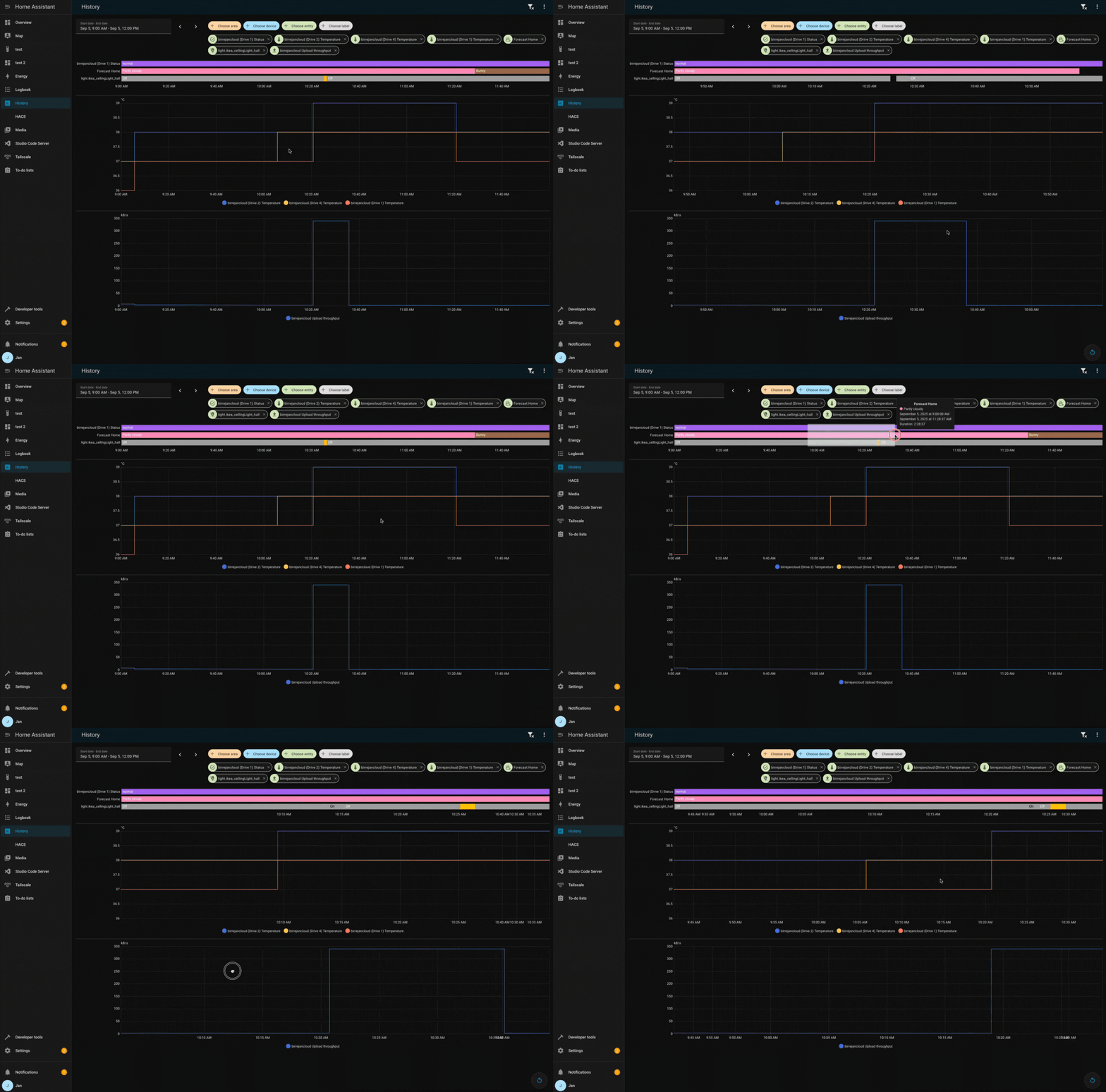
When you have multiple charts in the history panel, zooming in on one chart will now automatically zoom in on all other charts as well. This makes it easier to compare data across different entities. Well done, @birrejan!
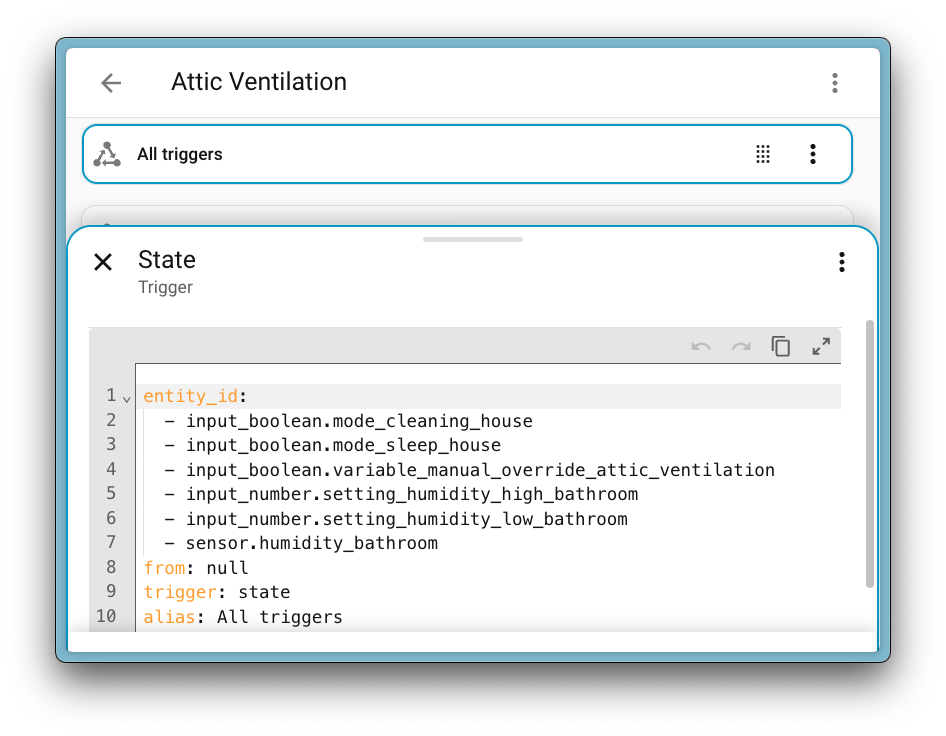
@TCWORLD has contributed a toolbar for the YAML and template code editors in our UI. This solves an issue where the previous floating button would float over the content of the editor and obscure it from view.
The new toolbar also includes undo and redo buttons, bringing the same convenient undo and redo functionality we introduced for the automation editor to these code editors as well. Plus, there’s a nice little copy button to quickly copy your code! Nice!
We will also release patch releases for Home Assistant 2025.10 in October. These patch releases only contain bug fixes. Our goal is to release a patch release once a week, aiming for Friday.
markdown field description in ntfy integration (@tr4nt0r - #153421)ZeroDivisionError (@TheJulianJES - #153422)slack (@NoRi2909 - #153427)presencezone entity to the new API/firmware (@bieniu - #153737)sharkiq dependency bump to 1.4.2 (@Freebien - #153931)async_schedule_reload instead of async_reload for ZHA (@puddly - #154397)long_press entry for trigger_type in strings.json for Hue (@mvdwetering - #154437)Home Assistant has a great community of users who are all more than willing to help each other out. So, join us!
Our very active Discord chat server is an excellent place to be, and don’t forget to join our amazing forums.
Found a bug or issue? Please report it in our issue tracker to get it fixed! Or check our help page for guidance on more places you can go.
Are you more into email? Sign up for the Open Home Foundation Newsletter to get the latest news about features, things happening in our community, and other projects that support the Open Home straight into your inbox.
We do our best to avoid making changes to existing functionality that might unexpectedly impact your Home Assistant installation. Unfortunately, sometimes, it is inevitable.
We always make sure to document these changes to make the transition as easy as possible for you. This release has the following backward-incompatible changes:
Configuration and diagnostic entities with a label assigned to them will now be targeted/affected by service actions targeting that label. Previously, those entity categories were ignored on service action calls targeting labels.
If you have an automation or script with an action targeting a label, make sure that only entities that should be affected have that label assigned, even if they are config or diagnostic entities.
(@abmantis - #149309) (labels docs)
HERE deprecated the previous free tier. The new Base Plan has 5000 free requests per month. The automatic update interval of the HERE Travel Time integration changed from 5 minutes to 30 minutes, so one route can be supported without costs.
The Home Connect Alarm clock entity has been removed from the time platform, please use the number entity instead.
Removed previously deprecated extra attributes, please review your automations.
Shelly Gas:
Shelly Air:
(@chemelli74 - #140386) (shelly docs)
The effect of the property “invert position” is extended from the position itself to the status (open or closed). With this adjustment, it is no longer necessary to use cover templates to invert the position to correct the status. If you have covers with inverted position and are using the state in automations, you must adjust the automations accordingly.
The windFree preset mode for the air conditioner has been renamed to wind_free to allow translation to happen. Please adapt automations accordingly.
(@joostlek - #152833) (smartthings docs)
Switch Tibber electricity pricing to 15-minute intervals.
tibber.get_prices action now returns 15-minute data instead of hourly.price_level attribute is removed and no longer supported.intraday_price_ranking attribute is now scaled to (0,1) to better support 15-minute prices.We removed official support for Zabbix 5.0 from the integration. While this does not directly break connections to Zabbix 5.0, future updates will not check for compatibility with this version. Note that Zabbix 5 LTS left its support window in May of 2025.
(@nolsto - #149450) (zabbix docs)
ZhongHong’s climate entities set_fan_mode action behavior has changed.
The fan mode values are now converted to lowercase instead of uppercase to ensure compliance with the standard convention.
If you have automations relying on uppercase fan mode values, you will need to update them to use lowercase values instead.
(@Blear - #151559) (zhong_hong docs)
If you are a custom integration developer and want to learn about changes and new features available for your integration: Be sure to follow our developer blog. The following changes are the most notable for this release:
Of course, there is a lot more in this release. You can find a list of all changes made here: Full changelog for Home Assistant Core 2025.10
Donations are appreciated. There is now a PayPal option.
Updates:
Fixes:
Subtitle downloads from OpenSubtitles may fail depending on time of day. This is due to our daily download quota being exceeded. Current amount of donations is barely enough to pay for the existing quota. So it is unlikely that quota can be increased and situation will get worse over time.
If you create an OpenSubtitles account and configure it in MPC-HC settings then you may be able to bypass the quota.
Options > Subtitles > Misc > Right-click on OpenSubtitles.com > Setup > Fill in username/password
If you want to create you own toolbar design, read this.
You can help improve and complete translations. See this topic for more info. There are several languages where recently added options have not yet been translated.
A lot of people seem to be unaware of some of the awesome features that have been added to MPC-HC in the past years. Here is a list of useful options and features that everyone should know about:
If you appreciate my work, you can show your support with a donation through GitHub sponsors (Credit card only) or through Buy Me a Coffee. Your support helps me continue improving and growing the app. Thank you!
Beta versions are not guaranteed to work as expected. We encourage users to create detailed bug reports if any problems arise. Read our blog post for more information about our Android beta programs.
VIENNA, Austria – October 01, 2025 – Leading open-source server solutions provider Proxmox Server Solutions GmbH (henceforth “Proxmox”), celebrating its 20th year of innovation, today announced the release of Proxmox Mail Gateway 9.0. Main highlight of the updated email security solution is its modernized core now built upon Debian 13 “Trixie”, ensuring a robust foundation for the open-source platform.
Available in the market since 2005, the anti-spam and antivirus filtering solution Proxmox Mail Gateway functions as a full-featured mail proxy, deployed between the firewall and the internal mail server. It protects organizations against threats such as spam, viruses, Trojans, and phishing emails.
Debian 13 “Trixie” at the core
This core update brings the latest Debian 13 “Trixie” release as foundation for Proxmox Mail Gateway including newer packages, improved hardware support, and enhanced security. Proxmox Mail Gateway 9.0 is using a newer Linux kernel 6.14 as stable default, enhancing hardware compatibility and performance. Also, updates to the latest versions of leading open-source technologies for email security like ClamAV 1.4.3 and SpamAssassin 4.0.2 are included. For existing users of version 8.2 , an extensively tested and detailed upgrade path is available to enable a smooth upgrade.
Redesigned quarantine interface for mobile
Users can now manage quarantined messages with a completely rebuilt interface optimized for mobile devices. Developed with the Rust-based Yew framework, the new quarantine UI replaces the previous implementation and provides a faster, cleaner, and more user-friendly experience on smartphones and tablets.
More flexible authentication and SSO
The single sign-on (SSO) and authentication realm features, first introduced in version 8.2, have been significantly improved and expanded. OpenID Connect realms are now fully configurable via the graphical user interface, including claim mappings and default role assignment for auto-provisioned users. This allows seamless integration with popular identity and access management solutions such as Keycloak, Zitadel, or LemonLDAP::NG.
Security enhancements and refined filtering
This version incorporates multiple hardening measures. The Content-Type filtering engine has been adjusted to support the updated MIME type definitions for Microsoft executables, ensuring these high-risk files continue to be reliably blocked.
Proxmox Mail Gateway 9.0 is available now for download. The ISO image contains the complete feature-set and can be quickly installed on bare-metal using the installation wizard. Upgrades from version 8.2 to 9.0 are supported and a detailed migration guide is available. It is also possible to install the solution on top of Debian or as a container appliance inside Proxmox VE.
Proxmox Mail Gateway is free and open-source software, published under the GNU AGPLv3. For enterprise users, Proxmox Server Solutions GmbH offers a subscription-based support model, which provides access to the extensively tested Enterprise Repository, as well as technical support. Subscription prices start at EUR 180 per host, per year, for unlimited users and domains. The Enterprise Repository provides regular updates via the web interface, and is recommended for production use.
Resources:
###
About Proxmox Mail Gateway
Proxmox Mail Gateway is the leading open-source email security solution, protecting your mail server against all email threats from the moment they emerge. Organizations of any size can easily deploy and implement the comprehensive anti-spam and antivirus platform in just a few minutes. Deploying the full-featured mail proxy between the firewall and an internal mail server allows you to control all incoming and outgoing email traffic from the central, web-based interface. Proxmox filters all email traffic at the gateway before it reaches the mail server, protecting businesses against email attacks and other malicious threats. Proxmox Mail Gateway is open-source software, licensed under the GNU AGPLv3. Enterprise support subscriptions are available from Proxmox.
About Proxmox Server Solutions
Proxmox provides powerful and user-friendly open-source server software. For 20 years, enterprises of all sizes and industries use the Proxmox solutions to deploy efficient and simplified IT infrastructures, minimize total cost of ownership, and avoid vendor lock-in. Proxmox also offers commercial support, training services, and an extensive partner ecosystem to ensure business continuity for its customers. Proxmox Server Solutions GmbH was established in 2005 and is headquartered in Vienna, Austria.
Contact: Daniela Häsler, Proxmox Server Solutions GmbH, marketing@proxmox.com

Adjusted the timing of the new drag-to-pin interaction cue for better reliability. (Bug 1989344)
Fixed an issue that prevented some extensions from updating via the Add-ons Manager. (Bug 1984724)
Fixed a regression that prevented Firefox View sections from collapsing/expanding as expected. (Bug 1989200)
Addressed a WebExtensions storage issue that could cause Firefox to crash on startup with certain extensions installed. (Bug 1989840)
Fixed an issue where opening an add-on's "Extension settings" from the post-install prompt could break the Customize tab and some keyboard shortcuts until restart. (Bug 1983869)
Reduced long delays when loading certain websites while connected to networks that block UDP connections. (Bug 1980812)
Various stability and security fixes.
Reference link to 143.0.1 release notes.