 Log in
Minecraft 25w42a (snapshot) Released
25w42a is the second snapshot for Java Edition 1.21.11, released on October 14, 2025.
Full changelog: https://minecraft.wiki/Java_Edition_25w42a


Focus on just one tab in a group without the clutter. Your active tab now stays in view, keeping things tidy even with the group collapsed.
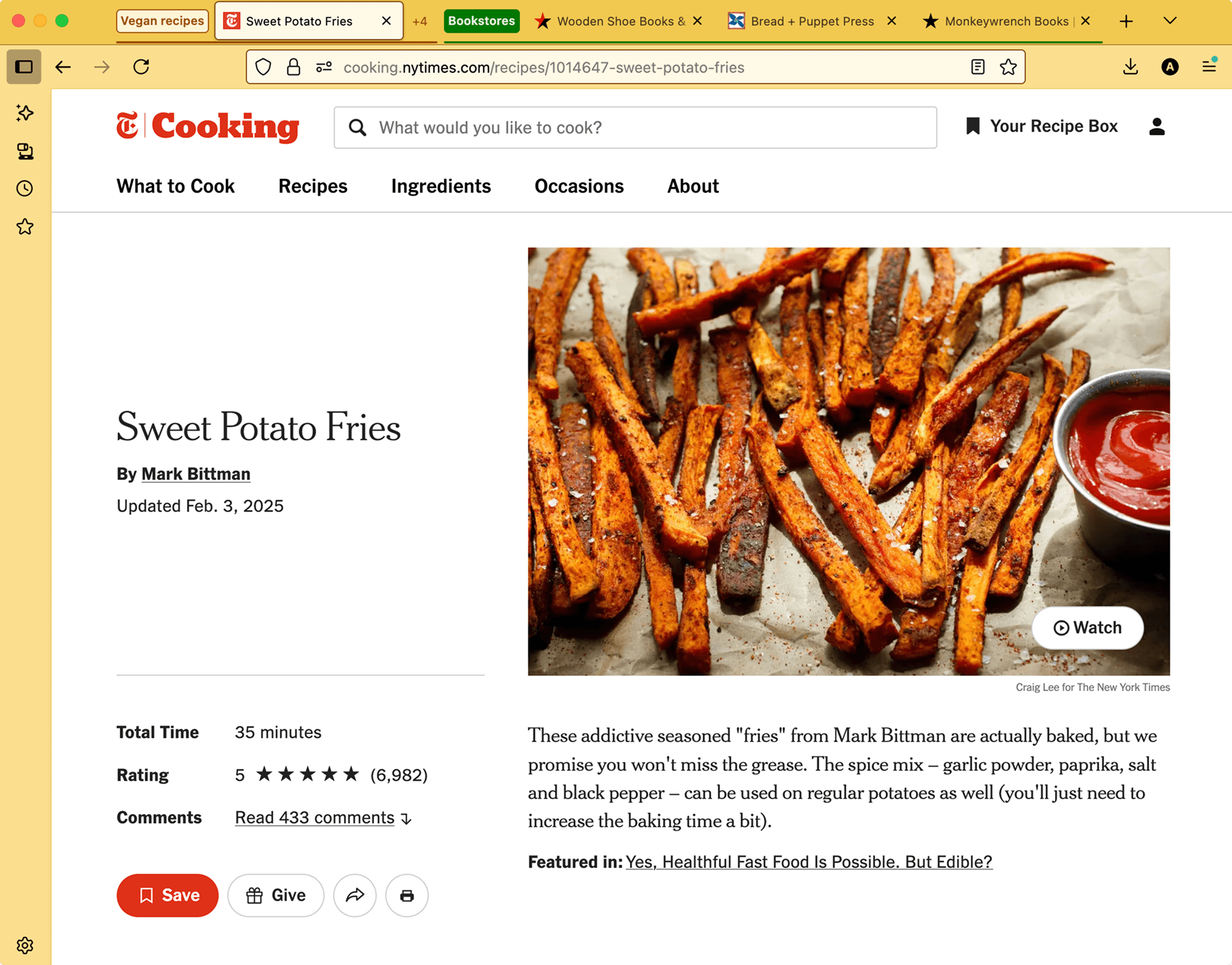
We’re excited to share another tab groups update that addresses a top request from our community! You can now drag a tab into a collapsed group without automatically expanding it. It’s a quick way to stay organized while minimizing visual distractions.
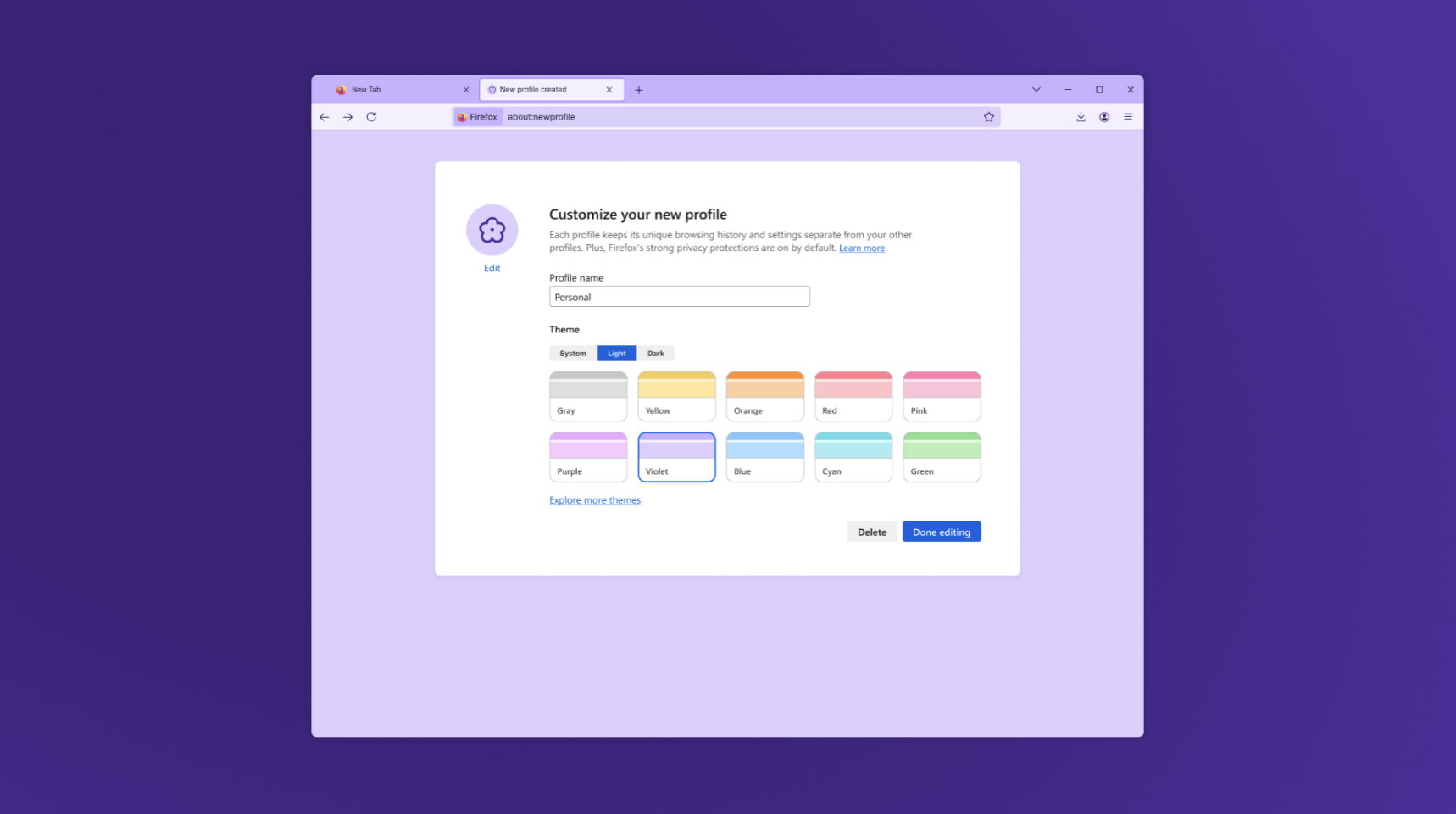
Profile management, now rolling out gradually to users globally over the next few weeks, helps you protect your privacy and stay focused by separating your online life into distinct profiles for work, school, vacation planning, or whatever you choose. You can name your profiles and customize them with avatars and color themes for easy recognition, then quickly switch between them while keeping bookmarks, tabs, and browsing history completely separate. The new Profiles feature is available for Windows 11, Mac, and Linux users, with Windows 10 support coming soon.

This feature is part of a progressive roll out.
Certain new Firefox features are released gradually. This means some users will see the feature before everyone does. This approach helps to get early feedback to catch bugs and improve behavior quickly, meaning more Firefox users overall have a better experience.
You can now close a Picture-in-Picture window without pausing the video. Press Shift + Click on the close button or use Shift + Esc to exit while keeping playback uninterrupted.
Logins stored in the Firefox Password Manager are now encrypted on disk using a modern encryption scheme (AES-256-CBC), replacing the older 3DES-CBC. This change improves local data protection. Logins synced through Firefox Sync remain end-to-end encrypted and already use AES-256-GCM.
Visual search powered by Google Lens
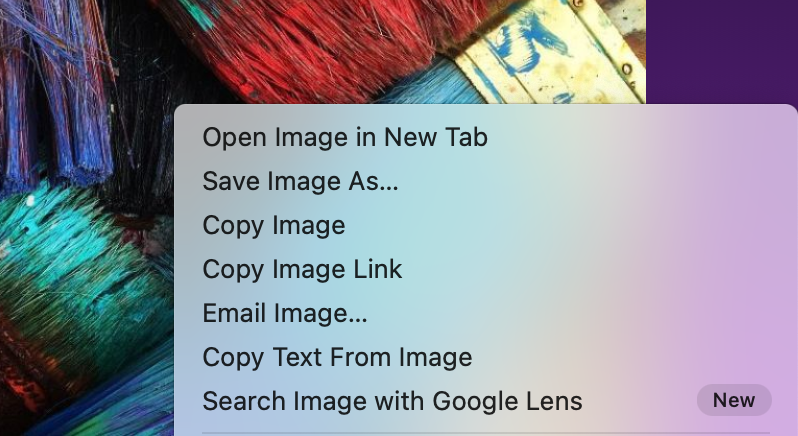
With just a right-click on any image, you can now:
✨ Find similar products, places, or objects
✨ Copy, translate, or search text from images
✨ Get inspiration for learning, travel, or shopping
Look for the new “Search Image with Google Lens” option in your right-click menu (highlighted with a NEW badge at first).
This is a desktop-only feature, rolling out worldwide. Your default search engine must be set to Google in order to use it.
This feature is part of a progressive roll out.
Certain new Firefox features are released gradually. This means some users will see the feature before everyone does. This approach helps to get early feedback to catch bugs and improve behavior quickly, meaning more Firefox users overall have a better experience.
Perplexity AI Search in Firefox
On desktop, Firefox now includes Perplexity, an AI-powered answer engine built into the browser. Perplexity delivers direct, conversational answers to complex questions, helping you get quick summaries, accurate references, or creative inspiration without digging through multiple sources. It’s rolling out worldwide from the address bar via the unified search button.
This feature is part of a progressive roll out.
Certain new Firefox features are released gradually. This means some users will see the feature before everyone does. This approach helps to get early feedback to catch bugs and improve behavior quickly, meaning more Firefox users overall have a better experience.
The following languages are now available for translation:

Various security fixes.
The following languages have improved translation quality:

On Windows, when opening a link from another application, Firefox will only use a window on the current virtual desktop or open a new window if needed.

You can find information about policy updates and enterprise specific bug fixes in the Firefox for Enterprise 144 Release Notes.

You can now jump to a CSS custom property's definition from within the var() function in style rules.
The events tooltip in the Inspector now shows a badge besides custom events, making it easier to differentiate them from built-in events.

Firefox now supports the Element.moveBefore API.
Firefox now supports math-shift compact.
Firefox now supports PerformanceEventTiming.interactionId, allowing developers to group related input events. This enables support for the Interaction to Next Paint (INP) responsiveness metric.
Firefox now supports the command and commandfor attributes.
Firefox now supports the View Transitions API Level 1. The View Transitions API provides a mechanism for easily creating animated transitions between different website views.
Dithering is now applied when linear-gradient, conic-gradient, and radial-gradient are rendered using hardware WebRender.
Firefox now supports the upsert proposal. This adds getOrInsert and getOrInsertComputed methods to Map and WeakMap. These methods either return the value associated with a key, or insert a default value, and then return that value, simplifying handling of cases where it's not known if a key is already present in the Map or WeakMap.
Firefox now supports the lock() and unlock() methods of ScreenOrientation interface on Windows tablets and Android devices.
Firefox now supports worker transfer for RTCDataChannel.
Firefox now supports the resizeMode getUserMedia constraint, allowing developers to crop and downscale video captured from a camera to any resolution they choose.
Firefox now supports the WebGPU GPUDevice.importExternalTexture API on Windows.
WebCodecs on Windows now has a batch-encoding path for VideoEncoder, improving performance with higher throughput and lower submission latency due to a larger default batch size.
Gecko-specific CSS2Properties was renamed to CSSStyleProperties, to align with the latest web standard and for better interoperability with other browser engines.

With the release of Firefox 144, we are pleased to welcome the developers who contributed their first code change to Firefox in this release, 12 of whom were brand new volunteers! Please join us in thanking each of these diligent and enthusiastic individuals, and take a look at their contributions:

We are pleased to announce the ninth release candidate preview release of Jellyfin 10.11.0!
This is a preview release, intended for those interested in testing 10.11.0 before it's final public release. We welcome testers to help find as many bugs as we can before the final release.
As always, please ensure you stop your Jellyfin server and take a full backup before upgrading!
Please see the WIP release notes here for now: https://notes.jellyfin.org/v10.11.0_features
PLEASE READ THOSE NOTES THOROUGHLY BEFORE UPGRADING; current RC users should have a seamless upgrade. If you have any questions, please ask in our Matrix chat.
This preview release is distributed in all our traditional forms, though not automatically via our Apt repository or latest tag.
10.11.0-rc9 or preview tags.Full Changelog: v10.11.0-rc8...v10.11.0-rc9
Previous RC Changelogs: https://github.com/jellyfin/jellyfin/releases/tag/v10.11.0-rc8


Last month, we launched the Home Assistant Connect ZWA-2, our take on the best possible Z-Wave adapter. Based on the reviews, it sounds like we hit the mark 😎. Today, we’re announcing a new, experimental firmware that allows you to do even more with the ultimate Z-Wave adapter.
I’m Keith, a Senior Hardware and Software Engineer at Nabu Casa, but you also might know me from my work on the ESPHome project. If you weren’t aware, Nabu Casa is the commercial partner of the Open Home Foundation, and the organization that helps build official Home Assistant hardware.
During the launch, one piece of feedback we often received was that people wanted more flexibility in where they could place Connect ZWA-2 in their home — often far away from their Home Assistant system. It was no easy feat (more on that below), but we were able to build a solution that allows you to put it anywhere you have a network connection.
This experimental firmware will allow you to not only leverage the Wi-Fi chip inside the Connect ZWA-2, but also use it with other hardware to facilitate the use of the much-requested PoE. 🎉 This new firmware is only possible because of the second-generation platform we built Connect ZWA-2 on, which is open by design, allowing you to tinker and extend the device you own. Every piece of Home Assistant hardware reflects Nabu Casa and the foundation’s philosophy of constant evolution, and the software it launches with is just the beginning. Whenever we think of a cool new capability, we will work together to add it.
If you want to start using your Connect ZWA-2 with Portable Z-Wave today, visit the brand new home for all the foundation’s web-based tools. Just be aware that this is experimental, and we recommend you read through this blog to understand how it works and its limitations. You can also watch the upcoming ESPHome livestream, where we’ll discuss this new tech in depth.
 Home Assistant Connect ZWA-2 connected to a Waveshare ESP32-S3-ETH
To get started using your Connect ZWA-2 over your local network, you can use one of the two following configurations:
First, before installing this new firmware, make sure to back up your Z-Wave network and ensure your Home Assistant instance is running version 2025.10.2 or later. Only after those steps should you use the toolkit website for Portable Z-Wave. The toolkit’s wizard will walk you through the whole process of installing and connecting your device to your network. When the installation is complete, it should join your network and be discovered by both the ESPHome and Z-Wave integrations in Home Assistant.
This firmware has proven to work well in our lab and home environments, but the real world is a different place; your local network and Z-Wave network might behave differently. For this reason, we’re seeking your feedback. If you try it out, please let us know about your experience – good or bad, brief or long-winded – by leaving a comment below. We’re eager to know how and where we can improve it!
Before we launch any of our hardware products, we try to get our pre-production batch to as many testers as possible – most are hobbyists and tinkerers from the community, and of course, the first thing they tend to do is get out the screwdriver and open it up (to be fair, it’s designed to be easy to open — no glue, no clips). When looking at the insides of Connect ZWA-2, they were instantly greeted with an ESP32 chip, and were equally excited and confused. It was initially included just as a USB controller, and yes, an ESP32-S3 is a bit overkill for this specific task, but we wanted to give the device room to grow. This brings us to the experiment we are sharing with you today…
When you use a Z-Wave adapter with Home Assistant, which relies on the Z-Wave JS add-on, they use USB to communicate via a specialized Z-Wave serial protocol. And yes, it is technically possible to run this Z-Wave serial protocol over your network (serial-over-IP), but our testing reveals that it’s not as reliable or as easy as we’d like. Some parts of the Z-Wave serial protocol are latency (delay) sensitive, specifically the acknowledgment of Z-Wave packets. If your network is busy and decides to take its sweet time with one of those critical packets, your Z-Wave device’s connection can time out and fail. This can stall Z-Wave device communication, or even completely break it.
For Z-Wave to work over a network, we need to address the latency-sensitive parts on the actual device; everything else can be forwarded over the network. This is where ESPHome steps in: it’s the open source software for network-capable microcontrollers that runs on ESP32 devices. We built an ESP32 into the Connect ZWA-2, and it has the horsepower (and Wi-Fi antenna) to handle this task.
To help make this all possible, we added Z-Wave support to ESPHome, allowing it to talk to Z-Wave chips. We then added the ability for Home Assistant and Z-Wave JS to communicate with Z-Wave adapters via ESPHome. As this work is open source, it shouldn’t be limited just to our Connect ZWA-2. Theoretically, it should be able to work with any certified Z-Wave adapter connected to an ESP32. However, before we look at supporting other adapters, we want to ensure that it’s stable when running on the Connect ZWA-2.
 Home Assistant connected to the ZWA-2 via its integrated Wi-Fi chip.
 Home Assistant connected to the ZWA-2 via the PoE module.
ESPHome handles serial message acknowledgments internally, then leverages its API (specifically its Protobuf implementation) to send the messages over the network more reliably than serial-over-IP. Even if your home network is bogged down by some spikes in traffic, ESPHome will have you covered, keeping your Z-Wave network stable. That’s not to say this has no impact on performance, but it may be less than you think – or can even notice!
Wi-Fi is very convenient, but the million-dollar question is: how will it impact your Z-Wave network? To find out, we ran some benchmarks to see how Portable Z-Wave stacks up to its USB counterpart.
Compared to a direct serial (USB) connection, a data packet will take longer to travel between Home Assistant/Z-Wave JS and your Z-Wave network when routed through your local network. On a network with only a low to moderate workload, the additional delay is very small and is generally not noticeable. That said, if your network is heavily stressed or the Wi-Fi signal is poor, you should expect packets to take longer to move around, which can lead to a perceivable delay. It can still control your lights and other devices, but it may be a bit slower. Here are some numbers illustrating the typical latency that we were able to achieve across our test environments:
| Connection type | Min (ms) | Max (ms) | Mean (ms) |
|---|---|---|---|
| USB | 4 | 9 | 5.36 |
| Ethernet | 15 | 32 | 25.14 |
| Wi-Fi | 15 | 92 | 29.16 |
Your results will likely differ somewhat, especially in less ideal conditions and environments. For instance, if you place your Connect ZWA-2 in a spot with really poor Wi-Fi connectivity, you might notice devices not reflecting their actual state or other buggy behavior. Avoid using VPNs or other complex network routing or configuration, as that will add latency. Also, don’t worry about Wi-Fi interfering with your Z-Wave network, as they operate on totally different radio frequencies that don’t interact. I think with a healthy dose of common sense, you can find a great spot that gets both great Wi-Fi connectivity while nicely optimizing your Z-Wave network.
This project was brought to you by a collaboration between Nabu Casa and the people below from the Open Home Foundation. None of this would be possible without the support of Home Assistant Cloud subscribers and those who care about Z-Wave and have purchased the Home Assistant Connect ZWA-2. Thank you!
Thanks to Dominic, founder of Z-Wave JS, for quickly jumping in on this project, adding support to Z-Wave JS, and building the browser installation tooling.
Thanks to Nick and Jesse for their support with the ESPHome implementation.
Thanks to Steven for making the new Open Home Foundation toolbox website to allow easy installation of the experiment.
Q: Is the Portable Z-Wave experiment limited to the Home Assistant Connect ZWA-2?
A: Theoretically, it should work with other Z-Wave adapters, but thus far we have only tested it with the ZWA-2. The code is part of ESPHome 2025.10, Home Assistant 2025.10.2, and Z-Wave JS v15.15.0. We chose Home Assistant Connect ZWA-2 as the first device with support since it already contains an ESP32-S3. If you’d like to try it out with your favorite Z-Wave adapter, you should start by taking a look at our ESPHome configuration for the ZWA-2 (all that should need changing are the vendor and product IDs to match the Z-Wave adapter).
Q: Is the Portable Z-Wave experiment limited to Home Assistant?
A: No. It is made to work directly with Z-Wave JS. If you use Z-Wave JS v15.15.0, either standalone or with another smart home platform, you are able to use it, too! Configure Z-Wave JS to connect to esphome://<IP OF THE ZWA-2>.
Q: Can I use Ethernet instead of Power-over-Ethernet?
A: Yes. Use a Power-over-Ethernet injector in combination with the Waveshare ESP32-S3-ETH board.
Below are development builds for testing purposes.
Latest development build: 2.5.4.25 (October 22nd 2025)
Latest stable release build: 2.5.4.0
https://github.com/clsid2/mpc-hc/releases/tag/2.5.4

Ubuntu 25.10, codenamed “Questing Quokka”, is here. This release continues Ubuntu’s proud tradition of integrating the latest and greatest open-source technologies into a high-quality, easy-to-use Linux distribution. The team has been hard at work through this cycle, partnering with the community and our partners, to introduce new features and fix bugs.
Ubuntu 25.10 introduces GNOME 49 with media and power controls on the lock screen, HDR brightness settings, and enhanced accessibility features in line with the European Accessibility Act. New apps include Loupe, a modern image viewer, and Ptyxis, a lightweight terminal emulator.
Built on the Linux 6.17 kernel, this release brings nested virtualization on Arm, early Intel TDX host support for confidential computing, and enhanced support for TPM-backed full disk encryption with passphrase support, recovery key management and better integration with firmware updates. Network Time Security (NTS) is enabled by default for more secure time synchronization.
Developer experience advances with updated toolchains for Python 3.13.7 and availability of 3.14 RC3, GCC 15, Rust 1.85, Go 1.25, OpenJDK 25, and previews of .NET 10 and Zig.
Ubuntu 25.10 also debuts Rust-based implementations of sudo and coreutils for improved memory safety, and adopts the new RVA23 profile as the baseline for RISC-V, paving the way to Ubuntu 26.04 LTS.
The newest Edubuntu, Kubuntu, Lubuntu, Ubuntu Budgie, Ubuntu Cinnamon, Ubuntu Kylin, Ubuntu MATE, Ubuntu Studio, and Xubuntu are also being released today. More details can be found for these at their individual release notes under the Official Flavours section:
https://discourse.ubuntu.com/t/questing-quokka-release-notes/59220#heading–official-flavours
Maintenance updates will be provided for 9 months for all flavours releasing with 25.10.
In order to download Ubuntu 25.10, visit:
Users of Ubuntu 25.04 will be offered an automatic upgrade to 25.10 if they have selected to be notified of all releases rather than just LTS upgrades. For further information about upgrading, see:
https://ubuntu.com/download/desktop/upgrade
As always, upgrades to the latest version of Ubuntu are entirely free of charge.
We recommend that all users read the release notes, which document caveats, workarounds for known issues, as well as more in-depth notes on the release itself. They are available at:
https://discourse.ubuntu.com/t/questing-quokka-release-notes/59220
Find out what’s new in this release with a graphical overview:
https://ubuntu.com/desktop
https://ubuntu.com/desktop/features
If you have a question, or if you think you may have found a bug but aren’t sure, you can try asking in any of the following places:
https://matrix.to/#/#support:ubuntu.com
https://discourse.ubuntu.com/support
https://lists.ubuntu.com/mailman/listinfo/ubuntu-users
If you would like to help shape Ubuntu, take a look at the list of ways you can participate at:
https://ubuntu.com/community/contribute
Ubuntu is a full-featured Linux distribution for desktops, laptops, IoT, cloud, and servers, with a fast and easy installation and regular releases. A tightly-integrated selection of excellent applications is included, and an incredible variety of add-on software is just a few clicks away.
Professional services including support are available from Canonical and hundreds of other companies around the world. For more information about support, visit:
You can learn more about Ubuntu and about this release on our website listed below:
To sign up for future Ubuntu announcements, please subscribe to Ubuntu’s very low volume announcement list at:
https://lists.ubuntu.com/mailman/listinfo/ubuntu-announce
Originally posted to the ubuntu-announce mailing list on Thu Oct 9 09:46:52 UTC 2025 by Utkarsh Gupta, on behalf of the Ubuntu Release Team.
This beta release addresses DoVi/HDR10+ playback issues on certain Fire TV devices, and a bug that made Live TV fail to direct play.
If you appreciate my work, you can show your support with a donation through Buy Me a Coffee or GitHub sponsors. Your support helps me continue improving and growing the app. Thank you!
Beta versions are not guaranteed to work as expected. We encourage users to create detailed bug reports if any problems arise. Read our blog post for more information about our Android beta programs.

Full Changelog: v4.1.2...v4.1.3

last_page_id or name #3650Full Changelog: v4.1.1...v4.1.2
Hot off the release of OS 8.0.2, we’ve got a great new batch of feature updates for you as we get closer to the release of elementary OS 8.1!
The first stable release of elementary Maps is now available for download on any Linux OS. For now we’ve focused on some of the basics like showing your current location, searching for locations, and handling geo:// uri links.
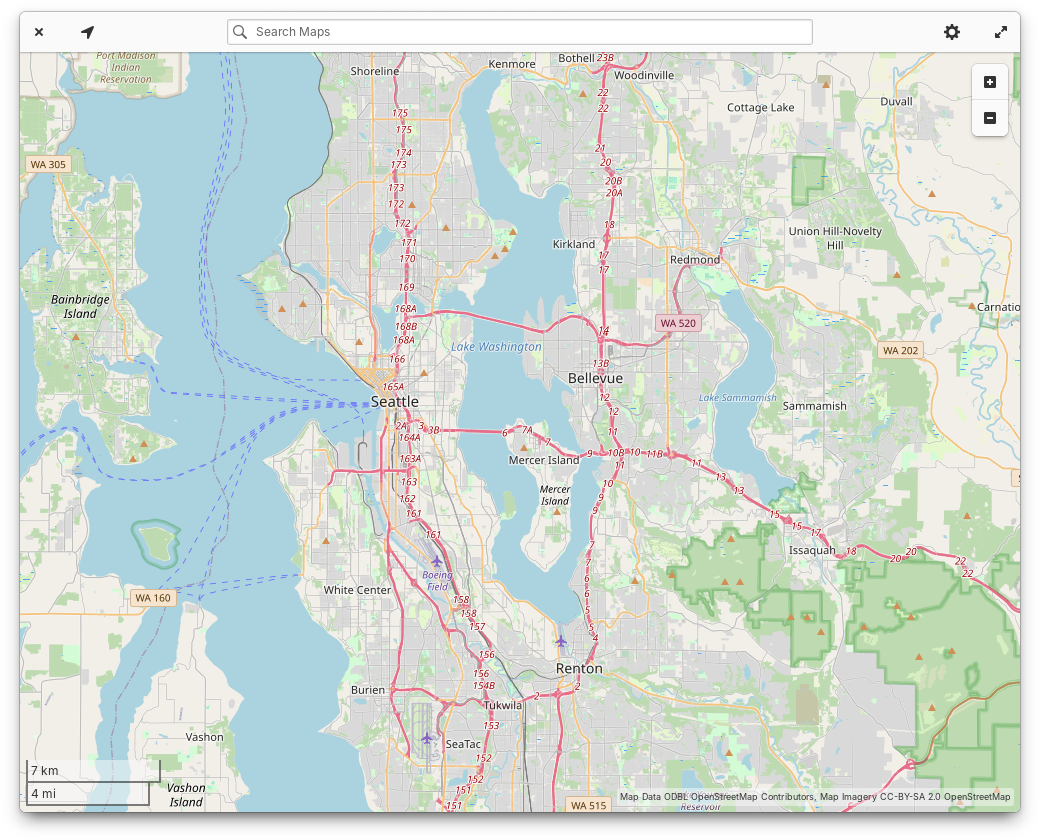
You may recall that Maps evolved from the Atlas code base originally written by Steffen Schuhmann for elementary OS. Ryo has worked hard to maintain the code and update it for the latest platform libraries like GTK4. Since the rename, we’ve updated the app to match the latest elementary styles and design conventions. We’ve also added an illustrated view switcher between Explore and Transit maps and when you search you’ll see color coded place type icons next to search results. Keyboard navigation, screen reader accessibility, and performance should also be slightly improved. Plus we have a modernized app icon, shoutouts to Micah for providing art direction.
On the Home page, the “Updates & installed apps” button is now properly labeled for screen readers. We’ve fixed a minor visual bug with banner shadows. And the “Education” category now has an icon.
In app info views, we now show a simple percentage-based app rating when ratings are available from ODRS—the same ratings server used by apps like GNOME Software. Expect future versions of AppCenter to expand our support for ratings and reviews, but for now we have some groundwork laid out. App info views also now show content warnings with a more compact layout. Italo updated our “End of Life” warnings to contain more accurate language, and licensing information now shows more detail and a simplified summary. Plus, we now show when a game supports playing with controllers. Leonhard added support for app addons, and we’ve simplified the “What’s New” section to show just the latest release, with the option to view more releases in a separate version history window.
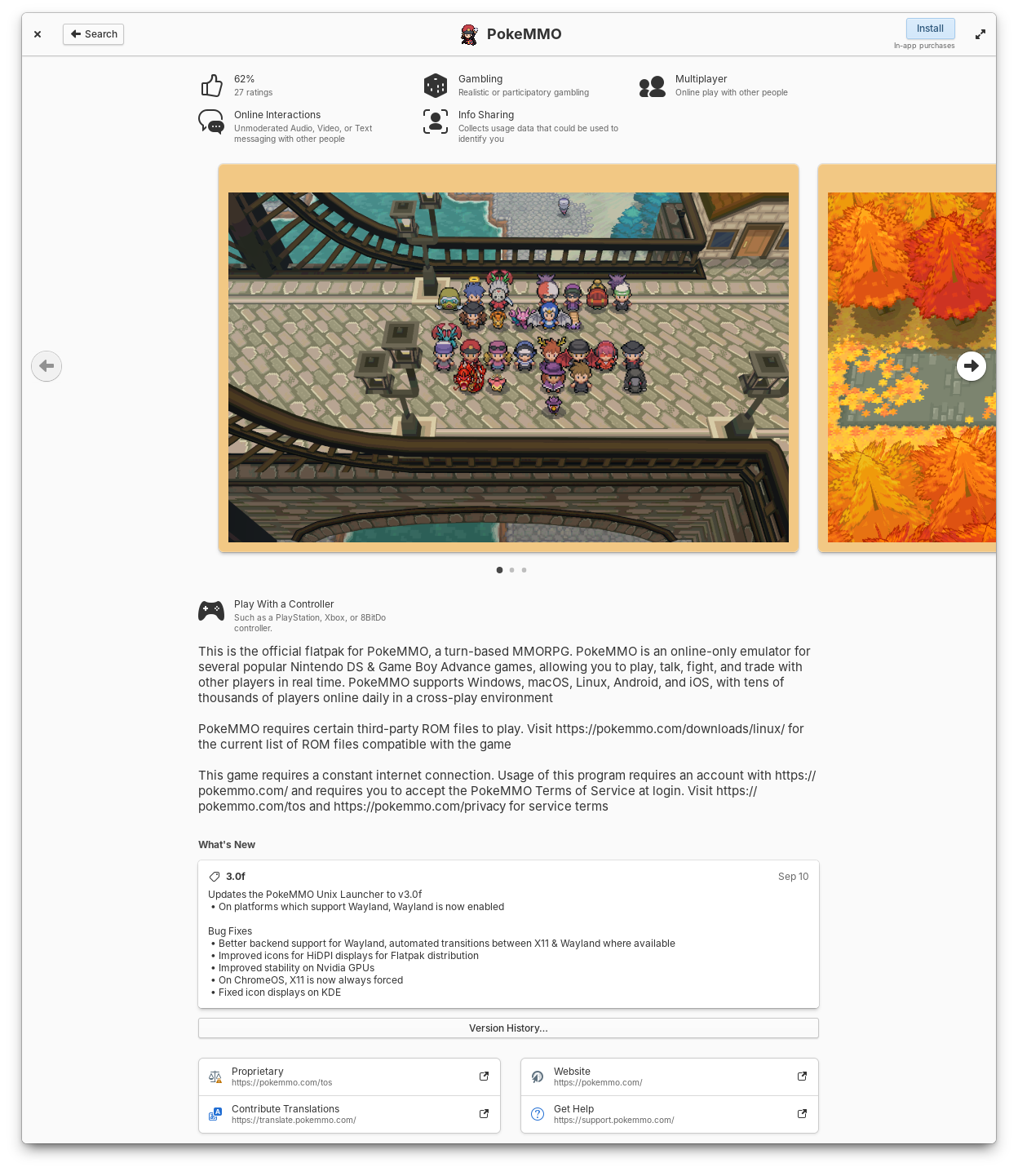
Apps now show ratings, controller support, simplified release notes, and license summaries
Leonhard did a ton of work in this release to make app updates faster and more reliable. The code has been massively streamlined and we’ve resolved reported crashes that some folks were experiencing while checking for updates. Plus we’re now using GTK 4’s FilterListModels for improved performance. The “Last checked” time is now updated every minute while the updates view is open and the gear menu can now be opened with the keyboard shortcut F10.
We’ve made a few changes to the way installed apps are shown to make it easier to keep up with what’s new when you have automatic app updates turned on. Installed apps are now sorted by release date instead of alphabetically. The Releases dialog got a slight redesign and you can now see recent releases for all installed apps. And we’ve adjusted where the version number and store origin labels appear to clean up their layout.
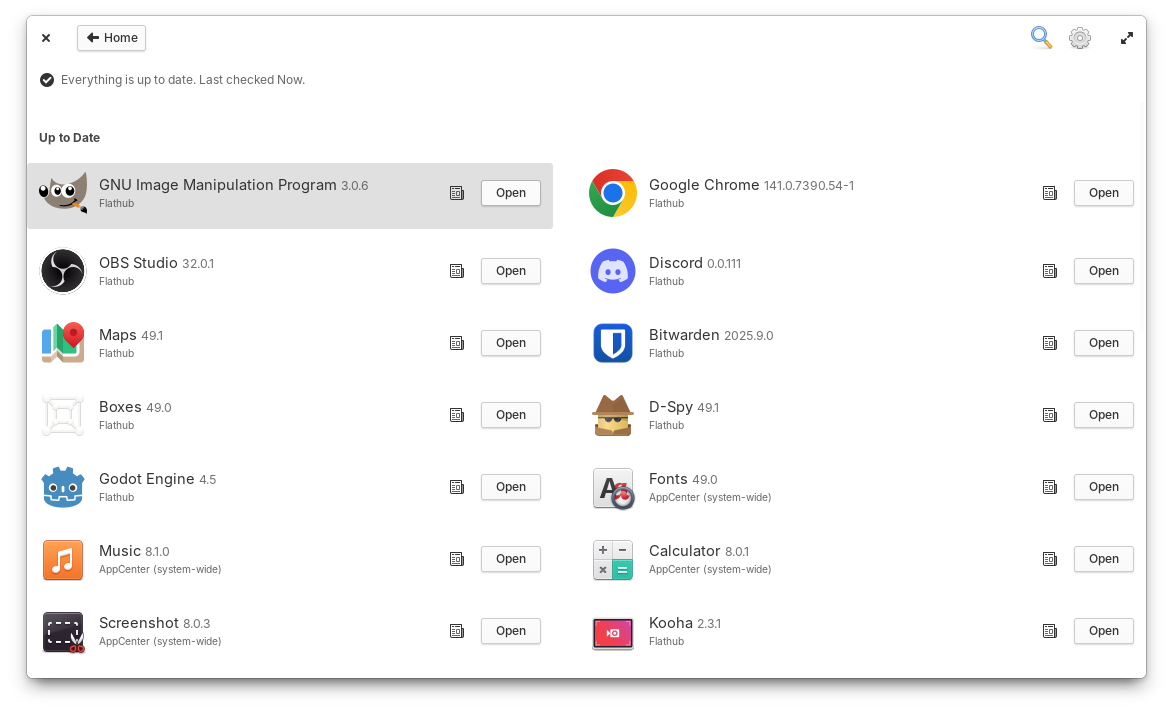
You can check past release notes for all installed apps.
Occasionally, app icons can take a little longer to load; When this happens they’ll now fall back to a nicer placeholder and cross fade into their proper icons once available, thanks to Italo. We’ve changed the label of the action button for free apps from “Free” to “Install”, according to your feedback. “Recent” apps in Category views should feature a more up-to-date selection and be a bit faster to load. And Search Results will now show in two columns when enough space is available so that you can see more results at once.
When we ran our desktop survey 75% of you told us that you expected to see background apps in the Dock, so we now have Background Portal support in the Dock thanks to Leonhard! Here you can see a list of apps running the background without a window, their supplied reason for running the background, and you have the ability to force them to quit. You can always further manage app permissions in System Settings → Applications and choose which apps are allowed to run in the background.
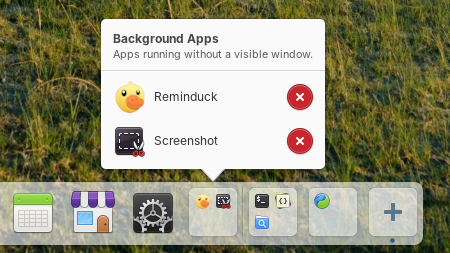
Background apps now show in the Dock
New contributor Sebastian fixed issues with the placement of app name tooltips, added a shake animation when you try to open a new window on a single-window app with middle-click, and fixed an issue where re-arranging app icons in the dock could cause them to shake indefinitely. Leonhard fixed an issue where maximized windows would be behind a portion of the dock when hiding is turned off. And William improved the color of the indicator dot for apps which are active on another workspace.
In Quick Settings, we’ll now show a message when you try to turn on the onscreen keyboard in a Secure Session since it’s currently only available in a Classic session. And we’ve added a couple of nice animations when you toggle Dark Mode or Rotation Lock.
Vishal fixed a potential crash when using the network indicator on the Lock Screen. And we’ve improved Airplane Mode: it will now only disable networking radios, not Bluetooth or wired networks. Plus you can now jump to System Settings when middle-clicking networking toggle buttons.
Application settings now has a setting to select your default Maps app, and you can start typing to search apps right away instead of having to select the search icon first.
Leo put a ton of effort into this latest release of the Login & Lock Screen, including support for the automatic accent color and Dark mode! We now also sync more of your settings like panel transparency and power settings. We’ve improved keyboard navigation, and will automatically select the Classic session if accessibility features are used, for example, during Initial Setup. We’ll also do a better job of remembering your last selected user card and their session type.
Jeremy also pushed another round of maintenance updates for our developer tools! Files now does a better job when drag-n-dropping files into other apps, and Properties windows now show a more precise date and time for file modification. Code’s terminal pane now does a better job syncing with your Terminal app settings, and he fixed an issue where exiting a shell would break the terminal pane. In the Terminal app, he improved unsafe paste warning detection for commands that contain newlines, and the search bar now takes up a more appropriate amount of space.
As always, pop open System Settings → System on elementary OS 8 and hit “Update All” to get these updates plus your regular security, bug fix, and translation updates. Or set up automatic updates and get a notification when updates are ready to install!
We landed blur-behind in a couple of more places in Early Access! The Dock is now slightly more transparent and things behind it will be blurred. This improves legibility when for example busy text is behind the dock. And we’ve also merged some updated styles for Notifications including slight transparency, blur-behind, more rounded corners, and softer shadows. Plus Leo cleaned up Notification close animations. If you’re not a fan of transparency and blur effects, you can always turn off “Panel Transparency” in System Settings → Dock & Panel.

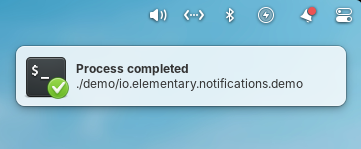
The Dock and Notifications now have transparency and blur-behind effects
Subhadeep has merged in initial support for fingerprint enrollment in User settings. We’re still working out the experience for fingerprint authentication dialogs for example, but if you have a compatible fingerprint reader you should be able to start testing support and send us feedback about what is and isn’t working.
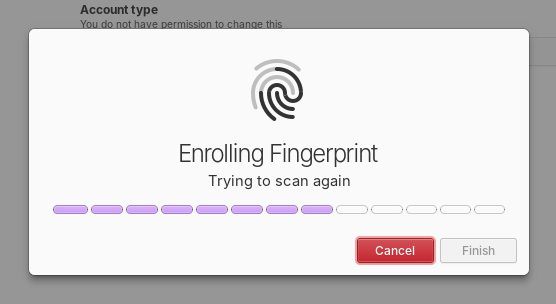
Initial support for enrolling fingerprints was merged
Plus, daily and release candidate quality builds will now use the Secure Session by default. We’ve received a ton of feedback that the updates we’ve made since the release of OS 8 have made the experience of using the Secure session much better than the Classic session for most people, including improved performance and fewer bugs encountered. So we’re really excited to make it the default experience going forward.
At the moment we’re at 24% of our monthly funding goal and 321 Sponsors on GitHub! Shoutouts to everyone helping us reach our goals here. Your monthly sponsorship funds development and makes sure we have the resources we need to give you the best version of elementary OS we can!
Monthly release candidate builds and daily Early Access builds are available to GitHub Sponsors from any tier! Beware that Early Access builds are not considered stable and you will encounter fresh issues when you run them. We’d really appreciate reporting any problems you encounter with the Feedback app or directly on GitHub.
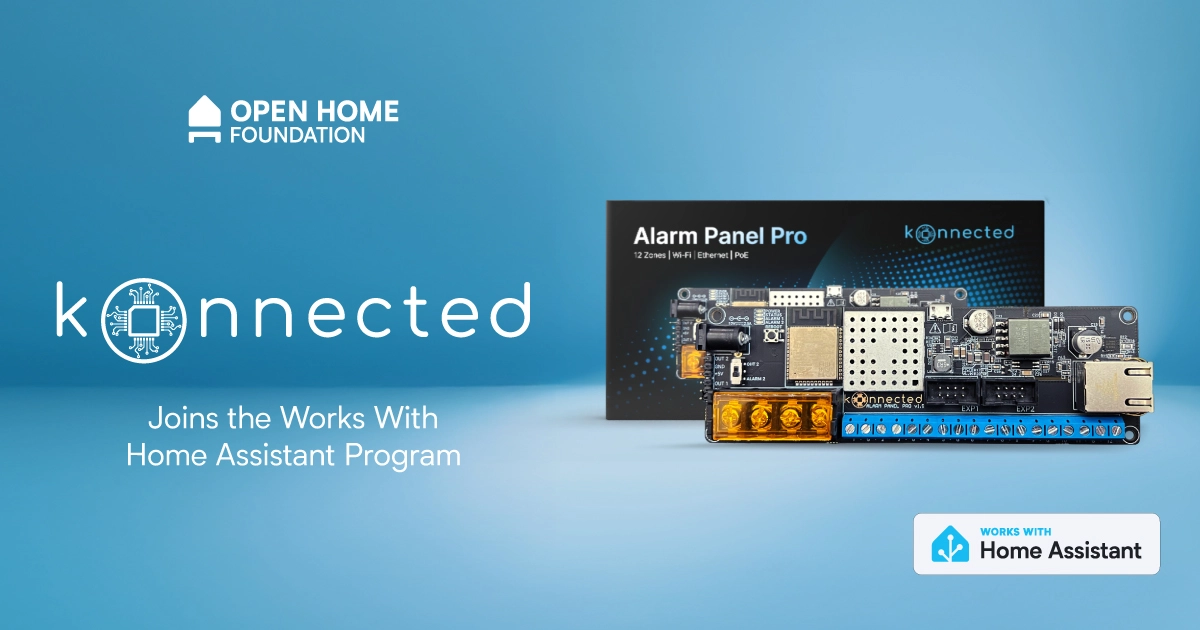
Works with Home Assistant is opening its doors to another new partner who is bringing the first Garage Door Openers and Alarm Panel to the program, all of which are using ESPHome under the hood. Konnected are well known for their devices that let you retrofit new smarts into the devices you already have, allowing you to use them in Home Assistant and keep them working longer.
Konnected have been well-known in the Home Assistant community, as they’ve been active members for years. As members of the community, they know how hard it can be to connect the devices that are already built into your home, whether they’re smart or not. That’s why Konnected’s first product was their drop-in replacement alarm panel boards, which allow you to take decades-old wired alarm systems and add them into Home Assistant.
Another challenge the community was facing was garage door openers (GDOs), especially cloud-based openers. In the early days of Home Assistant, the community figured out the APIs for these providers and controlled them that way. Some manufacturers noticed this and put barriers up blocking people from controlling the devices they own, claiming it as “unauthorized usage” 🙄.
The community was naturally incensed, and did what tinkerers tend to do when a cloud gets in their way — they began tinkering with hardware. A community emerged to take back control of these devices, starting with projects like ratgdo, which Konnected used as a base for their work. Today, because of these projects, there are multiple great open source tools to control a large number of these GDOs, ranging from DIY schematics to finished controllers. Konnected has an open source solution which works locally, as well as having the form factor and safety standards to match. Even better, Konnected devices are available in over 60 countries.
For anyone who has used Konnected for quite some time, you’ll notice that they had their own integration, which has now been deprecated in favor of the ESPHome firmware, so that it’s always straightforward to find (or build) the firmware you need. They even publish all their code on GitHub 👏, which allows the community to help them fix issues and add features.
"We've been users of Home Assistant ourselves since 2018 and thrilled to finally be officially part of the Works with Home Assistant program. Konnected shares many of the same founding principles as Home Assistant, including our commitment to 100% local control, open-source firmware, and high-quality hardware that makes your home smarter, safer and accessible to everyone."
- Nate Clark, Founder / CEO at KonnectedKonnected is another example of ESPHome (a project from the Open Home Foundation) fostering an entirely new ecosystem of Open Home projects. It works fully locally, and it’s perfect for tinkerers, allowing you to build DIY smart home devices yourself (get started with one of our ready-made projects). Konnected also have a thriving community of their own if you have questions or comments.
Creators can also use it to make pre-built, plug-and-play products that give users a really seamless experience. Devices are easily discovered and added to your Wi-Fi network and Home Assistant, along with a one-click update within Home Assistant. To learn more about how Konnected uses ESPHome, look out for Nate on the next ESPHome live stream on October 14!
Remember, the development of projects like ESPHome from the Open Home Foundation is supported by Home Assistant Cloud subscribers and anyone who purchases Home Assistant hardware. While all of Konnected’s devices work locally, if you’re interested in remote access, allowing you to keep tabs on your home’s security when you’re out and about, check out Home Assistant Cloud.
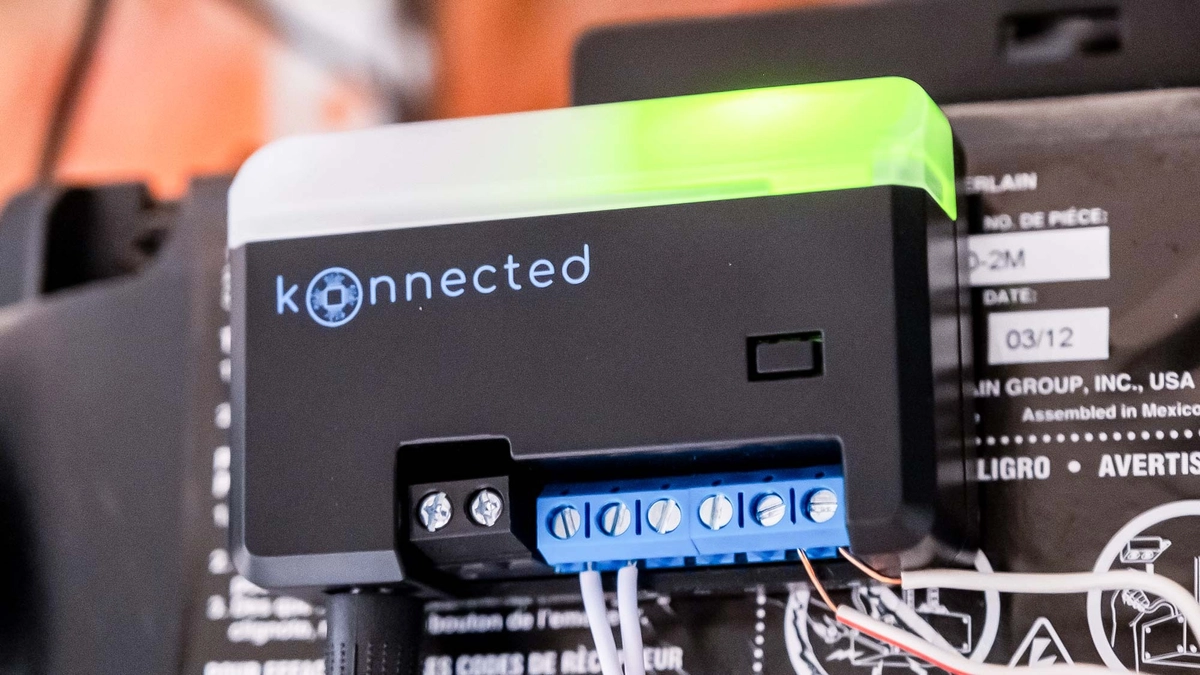 The Konnected Smart Garage Door Opener blaQ
For anyone new to the Works With Home Assistant program, it’s a way for us to formally certify devices that have been tested by our team, and help you know what works great out of the box with Home Assistant. Any company joining also commits to providing long-term support and firmware updates. Works With Home Assistant is operated by the Open Home Foundation, and the support of Home Assistant Cloud subscribers funds this work. These items were all tested by members of the ESPHome team to see exactly how they function in their own homes.
The Konnected certified devices are listed below:
A nice benefit of retrofitting your old wired security system is not needing to maintain loads of battery-powered sensors 🪫. The Alarm Panel Pro has the ability to connect 12 zones (security speak for individual or joined up sensors), it also allows you to connect keypads and sirens, and includes 12V power for the devices that need that. It’s highly customizable, and there’s also plenty of support available if you need help with installation. You can power it using 12V or Power-over-Ethernet, or both! The Alarm Panel Pro is designed to be always-on, and they’ve designed it to consume very little power. This also allows it to easily run for hours on their backup battery.
You’ll also probably be wondering why there are two different variants of the garage door openers, and that’s because each supports a different set of manufacturers. There is a wizard to help you figure out which variant will work with your opener. Between the Konnected GDO blaQ and White, you get support for some of the biggest manufacturers out there, including Chamberlain, LiftMaster, Craftsman, Merlin, Genie, Stanley, and more.
Even with the Konnected controlling your garage door opener, you’re still able to use the included remote or the original manufacturer’s app (if you like that kind of torture). The GDO White features a built-in optical laser sensor that detects whether your garage door is open or closed. The GDO blaQ offers control over the opener’s light and lock, and can even partially open the door (for openers that support these features).
As we mentioned at the top, it’s great to have more products added to the program that help people get the most out of the things they already own. A big part of the Open Home Foundation’s mission is sustainability in the smart home, and Konnected are helping our community get longer lasting use of their existing security and garage door systems.
Q: If I have a device that is not listed under ‘Works with Home Assistant does this mean it’s not supported?
A: No! It just means that it hasn’t gone through a testing schedule with our team or doesn’t fit the requirements of the program. It might function perfectly well, but has not yet been added to the testing schedule, or it might work under a different connectivity type that we don’t currently test under the program.
Q: Ok, so what’s the point of the Works with program?
A: It highlights the devices we know work well with Home Assistant and the brands that make a long-term commitment to keeping support for these devices going. The certification agreement specifies that the devices must have full functionality within Home Assistant, operate locally without the need for cloud and will continue to do so long-term.
Q: How were these devices tested?
A: All devices in this list were tested using a standard Home Assistant Green Hub with the ESPHome integration. If you have another set-up that’s not a problem, but we test against these as they are the most effective way for our team to certify within our ecosystem.
Q: Will you be adding more Konnected devices to the program?
A: Why not! Konnected are also looking to do some exciting things with Matter soon, so we’re excited to work together on any upcoming releases or add in further products that are not yet listed here.


there is a discord server with an @everyone in case of future important updates, such as vulnerabilities (most recently 2025-09-07)
I to run in-process for a 140x speed boost 41ed559
I hook has a bug then it can deadlock copyparty)s to send info on stdin instead of argv 4542ad3wram) efd19af
chpw and IdP-auth is now supported 3f59710ui-filesz option can have a trailing hyphen now 2248705?v suffix to open mediafiles in the mediaplayer f8e1981/favicon.png (samsung-android)min image from 45 to 33 MiB a8f53d5--licenses 805a705

Note
If someone is asking you to pay money for access to UpSnap binaries, source code, or licenses, you are being scammed.
The official and only trusted source for UpSnap is this repository (and its linked releases).
Do not pay third parties for something that is provided here for free.

Video direct play now works again on Jellyfin 10.10 servers and the app no longer crashes on Android 6 and older.
If you appreciate my work, you can show your support with a donation through GitHub sponsors (Credit card only) or through Buy Me a Coffee. Your support helps me continue improving and growing the app. Thank you!
Beta versions are not guaranteed to work as expected. We encourage users to create detailed bug reports if any problems arise. Read our blog post for more information about our Android beta programs.

