 Log in
v0.19.2
🔧 Bugfixes
- Downgrade AGP to v8.11.1 #5075, by @nielsvanvelzen
- Fix lyrics not synced on screensaver #5076, by @nielsvanvelzen
- Fix speechRecognizer not using BCP47 tag for language extra #5077, by @nielsvanvelzen
Contributors


New uNmINeD development snapshot is available for download!
Changes:
Updates:
Changes/improvements:
Fixes:

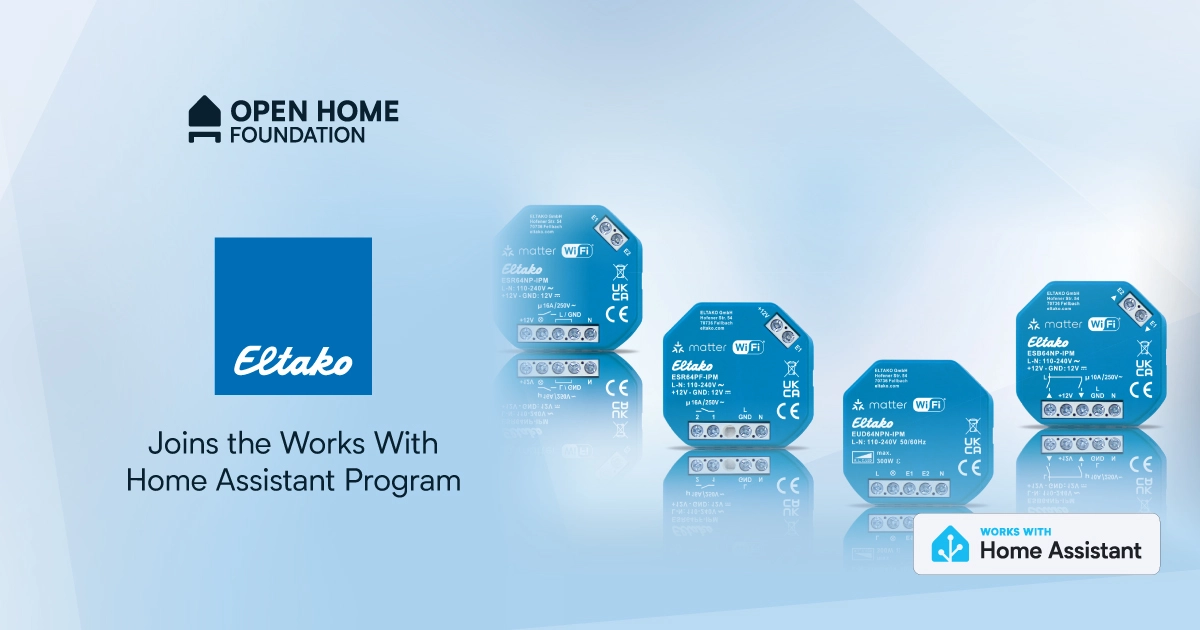
We’re delighted to welcome ELTAKO to the Works with Home Assistant program! ELTAKO’s robust relay switches have formed the blueprint for smart building and smart home control across Europe for decades – and happen to be the first Matter relays to join the program.
You may never have seen one of ELTAKO’s little blue devices before, and that’s the point. They usually sit quietly behind walls, furniture and in distribution boards, doing their jobs without interfering with interiors. Now, thanks to their joining the Works with Home Assistant program, you can bring these professional-level installations to your own smart set-up.
ELTAKO has been a well-known name in the German building trade and throughout Europe for more than 75 years. In fact, the name itself derives from ‘ELektrischer TAst-KOntakt’ (electrical push-button contact) in a nod to ELTAKO’s first impulse switch innovation that started it all back in 1949.
For those of us who haven’t been around quite that long, an impulse switch (also known as a latching or step relay) toggles a circuit on or off each time it receives an electrical pulse. Instead of requiring constant power, it ‘remembers’ its state until the next signal. As well as using less energy, this means it’s possible to control a single light or system from multiple switches without complex wiring – with obvious advantages for the smart home. So synonymous is the brand with this type of device that impulse switches are still referred to as ‘ELTAKOS’ by the professional electricians and engineers who use them.
Because of this innovative spirit, it’s perhaps no surprise that over the years ELTAKO has broadened its range to a full ecosystem of sensors, dimmers, and energy meters – all based on wired or wireless technologies, such as RS485, EnOcean, Modbus or DALI, which are built for longevity and local control, rather than cloud dependency.
True to that philosophy, ELTAKO has embraced open standards such as Matter, ensuring its products speak the same languages that support our mission to keep homes open, private, and locally controlled.
"As a manufacturer that has relied on open standards like Matter and EnOcean from the very beginning, joining the Works with Home Assistant program is a natural step for us. This allows us to make our products accessible to an even larger community and enables our customers to integrate them seamlessly into diverse smart home environments. We are convinced that the future lies in openness and interoperability – which is why we deliberately embrace partnerships that offer users long-term investment security and maximum flexibility."
- Kai Sepp, Sales Director North & West Europe at ELTAKOELTAKO’s integration with Home Assistant starts with items from the 64 series, which was awarded the SmartHome Germany Award this year. This is the brand’s line that uses Matter over Wi-Fi, showing just how serious they are about interoperability moving forward.
We were also lucky enough to see the ELTAKO team at ISE Barcelona this year, and we’ll be catching up with them again at the Connectivity Standards Alliance (CSA) meeting in November, also in Barca. Since CSA certification is a must for brands joining the program, it’s great to see ELTAKO so engaged.
As always, all the devices below have gone through our rigorous certification process to ensure they meet our standards for performance, reliability and open-home compatibility.
What devices have been certified?
These Matter devices that work over Wi-Fi are all about giving you freedom to control your current hardware – switch lights on and off and dim them automatically – without replacing it all. The shading actuator is particularly useful in continental Europe, where shutters are more common. It has a good energy-saving use case to reduce the need for air conditioning, since automatic shutters help keep your home cool in summer and warm in winter, potentially reducing utility bills. This also reflects ELTAKO’s wider focus on sustainability – from low-power devices to recyclable packaging and shipping materials.
In case you didn’t know, when using Matter devices with Home Assistant you have local control with no need for external internet for day-to-day operation. If you do want to access your dashboard while you’re away from home, using Home Assistant Cloud is a simple, secure, way to do this (and help fund Home Assistant’s development in the process!).
Like all brands within the Works with Home Assistant program, ELTAKO isn’t just adding our little blue logo to their little blue products – they’re joining our community. That means active engagement and shared expertise to help everyone get the best from their devices. Because ELTAKO’s products are built to professional standards, installation can sometimes require a qualified electrician – especially for wired set-ups. That’s where ELTAKO’s directory of system partners and specialists in many regions, as well as a tech support hotline, can help you find the installation advice you need, whether you’re a complete novice or electrical enthusiast.
With ELTAKO on board, we hope Home Assistant users will have further flexibility to explore new devices and experiment with different set-ups, as well as open up more ways to mix and match products to build a professional-standard smart home.
Q: If I have a device that is not listed under ‘Works with Home Assistant’ does this mean it’s not supported?
A: No! It just means that it hasn’t gone through a testing schedule with our team or doesn’t fit the requirements of the program. It might function perfectly well but be added to the testing schedule later down the road, or it might work under a different connectivity type that we don’t currently test under the program.
Q: OK, so what’s the point of the Works with program?
A: It highlights the devices we know work well with Home Assistant and the brands that make a long-term commitment to keeping support for these devices going. The certification agreement specifies that the devices must have key functionality within Home Assistant, operate locally without the need for cloud, and will continue to do so long-term.
Q: How were these devices tested?
A: All devices in this list were tested using a standard HA Green Hub and with our certified Matter Integration. If you have another set-up that’s not a problem, but we test against these as they are the most effective way for our team to certify within our ecosystem.
Q: Will you be adding more ELTAKO devices to the program?
A: Why not! We’re thrilled to foster a close relationship with the team at ELTAKO to work together on any upcoming releases, or add in further products that are not yet listed here. We’re really excited about what ELTAKO are doing with EnOcean and green power generally, but we haven’t tested or certified any of these products yet. We don’t have this protocol as part of the Works with Home Assistant certification (even if people are already using EnOcean in Home Assistant), and could explore how we certify these kinds of products.
The Chrome team is delighted to announce the promotion of Chrome 142 to the stable channel for Windows, Mac and Linux. This will roll out over the coming days/weeks.
Chrome 142.0.7444.59 (Linux) 142.0.7444.59/60 Windows and 142.0.7444.60 Mac contains a number of fixes and improvements -- a list of changes is available in the log. Watch out for upcoming Chrome and Chromium blog posts about new features and big efforts delivered in 142.
Security Fixes and Rewards
Note: Access to bug details and links may be kept restricted until a majority of users are updated with a fix. We will also retain restrictions if the bug exists in a third party library that other projects similarly depend on, but haven’t yet fixed.
This update includes 20 security fixes. Below, we highlight fixes that were contributed by external researchers. Please see the Chrome Security Page for more information.
[$50000][447613211] High CVE-2025-12428: Type Confusion in V8. Reported by Man Yue Mo of GitHub Security Lab on 2025-09-26
[$50000][450618029] High CVE-2025-12429: Inappropriate implementation in V8. Reported by Aorui Zhang on 2025-10-10
[$10000][442860743] High CVE-2025-12430: Object lifecycle issue in Media. Reported by round.about on 2025-09-04
[$4000][436887350] High CVE-2025-12431: Inappropriate implementation in Extensions. Reported by Alesandro Ortiz on 2025-08-06
[N/A][439522866] High CVE-2025-12432: Race in V8. Reported by Google Big Sleep on 2025-08-18
[N/A][449760249] High CVE-2025-12433: Inappropriate implementation in V8. Reported by Google Big Sleep on 2025-10-07
[N/A][452296415] High CVE-2025-12036: Inappropriate implementation in V8. Reported by Google Big Sleep on 2025-10-15
[$3000][337356054] Medium CVE-2025-12434: Race in Storage. Reported by Lijo A.T on 2024-04-27
[$3000][446463993] Medium CVE-2025-12435: Incorrect security UI in Omnibox. Reported by Hafiizh on 2025-09-21
[$2000][40054742] Medium CVE-2025-12436: Policy bypass in Extensions. Reported by Luan Herrera (@lbherrera_) on 2021-02-08
[$2000][446294487] Medium CVE-2025-12437: Use after free in PageInfo. Reported by Umar Farooq on 2025-09-20
[$1000][433027577] Medium CVE-2025-12438: Use after free in Ozone. Reported by Wei Yuan of MoyunSec VLab on 2025-07-20
[TBD][382234536] Medium CVE-2025-12439: Inappropriate implementation in App-Bound Encryption. Reported by Ari Novick on 2024-12-04
[N/A][430555440] Low CVE-2025-12440: Inappropriate implementation in Autofill. Reported by Khalil Zhani on 2025-07-09
[N/A][444049512] Medium CVE-2025-12441: Out of bounds read in V8. Reported by Google Big Sleep on 2025-09-10
[TBD][452071845] Medium CVE-2025-12443: Out of bounds read in WebXR. Reported by Aisle Research on 2025-10-15
[$3000][390571618] Low CVE-2025-12444: Incorrect security UI in Fullscreen UI. Reported by syrf on 2025-01-18
[$1000][428397712] Low CVE-2025-12445: Policy bypass in Extensions. Reported by Thomas Greiner on 2025-06-29
[$1000][444932667] Low CVE-2025-12446: Incorrect security UI in SplitView. Reported by Hafiizh on 2025-09-14
[TBD][442636157] Low CVE-2025-12447: Incorrect security UI in Omnibox. Reported by Khalil Zhani on 2025-09-03
We would also like to thank all security researchers that worked with us during the development cycle to prevent security bugs from ever reaching the stable channel.
Interested in switching release channels? Find out how here. If you find a new issue, please let us know by filing a bug. The community help forum is also a great place to reach out for help or learn about common issues.
Srinivas Sista
Google Chrome
nginx-1.29.3 mainline version has been released.
njs-0.9.4 version has been released, featuring HTTP forward proxy support for ngx.fetch() API in http and stream.
nginx-1.29.2 mainline version has been released.
njs-0.9.2 version has been released, featuring HTTP keepalive support for ngx.fetch() API in http and stream.
nginx-1.29.1 mainline version has been released.
nginx-1.29.0 mainline version has been released, featuring Early Hints support.
nginx-1.28.0 stable version has been released, incorporating new features and bug fixes from the 1.27.x mainline branch — including memory usage and CPU usage optimizations in complex SSL configurations, automatic re‑resolution of hostnames in upstream groups, performance enhancements in QUIC, OCSP validation of client SSL certificates and OCSP stapling support in the stream module, variables support in the proxy_limit_rate, fastcgi_limit_rate, scgi_limit_rate, and uwsgi_limit_rate directives, the proxy_pass_trailers directive, and more.

Fixed an issue where the list of available locales in about:settings contained more locales than were downloaded or currently supported. (Bug 1994642)
Fixed an issue where using the keyboard to open the Unified Search dropdown was inconsistent. The dropdown now expands properly, allowing users to select a search engine using the keyboard. (Bug 1979826)
Fixed an issue where curated photo collections on Microsoft OneDrive's Photos “For You” page failed to load, showing a gray screen instead of content. Collections now display as expected. (Bug 1986533)
Fixed a startup crash affecting Windows users with Avast or other security software installed. (Bug 1992678)
Fixed an issue on macOS where the emoji picker shortcut and menu entry stopped working after switching between apps. (Bug 1980815)
Fixed an issue on macOS where dragging images from Firefox into third-party apps like Preview could fail or behave unexpectedly. (Bug 1995345)
Fixed performance and video playback issues on macOS 26 (Tahoe) that occurred when the system was under heavy load. (Bug 1995638)
Fixed a browser hang on macOS 26 (Tahoe) that could occur when bookmark folders contained loops or repeated references to themselves. (Bug 1995621)
Reference link to 144.0 release notes.
nginx-1.29.3 mainline version has been released.
From refreshed user interface elements to playback improvements, there are many changes across the board in this update of Jellyfin for Android TV. Read about all the highlights on our blog post or have a look through the full changelog below.
If you appreciate my work, you can show your support with a donation through Buy Me a Coffee or GitHub sponsors. Your support helps me continue improving and growing the app. Thank you!
