 Log in
FileZilla Client 3.69.4 released
Bugfixes and minor changes:
- Fixed an issue whith the certificate verification dialog not becoming scrollable on certificates with many subject alternative names
- Updated to libfilezilla 0.52.0

The Stable channel has been updated to 142.0.7444.162/.163 for Windows and 142.0.7444.162 for Mac and 142.0.7444.162 for Linux, which will roll out over the coming days/weeks. A full list of changes in this build is available in the Log.
Security Fixes and Rewards
Note: Access to bug details and links may be kept restricted until a majority of users are updated with a fix. We will also retain restrictions if the bug exists in a third party library that other projects similarly depend on, but haven’t yet fixed.
This update includes 1 security fix. Below, we highlight fixes that were contributed by external researchers. Please see the Chrome Security Page for more information.
Interested in switching release channels? Find out how here. If you find a new issue, please let us know by filing a bug. The community help forum is also a great place to reach out for help or learn about common issues.

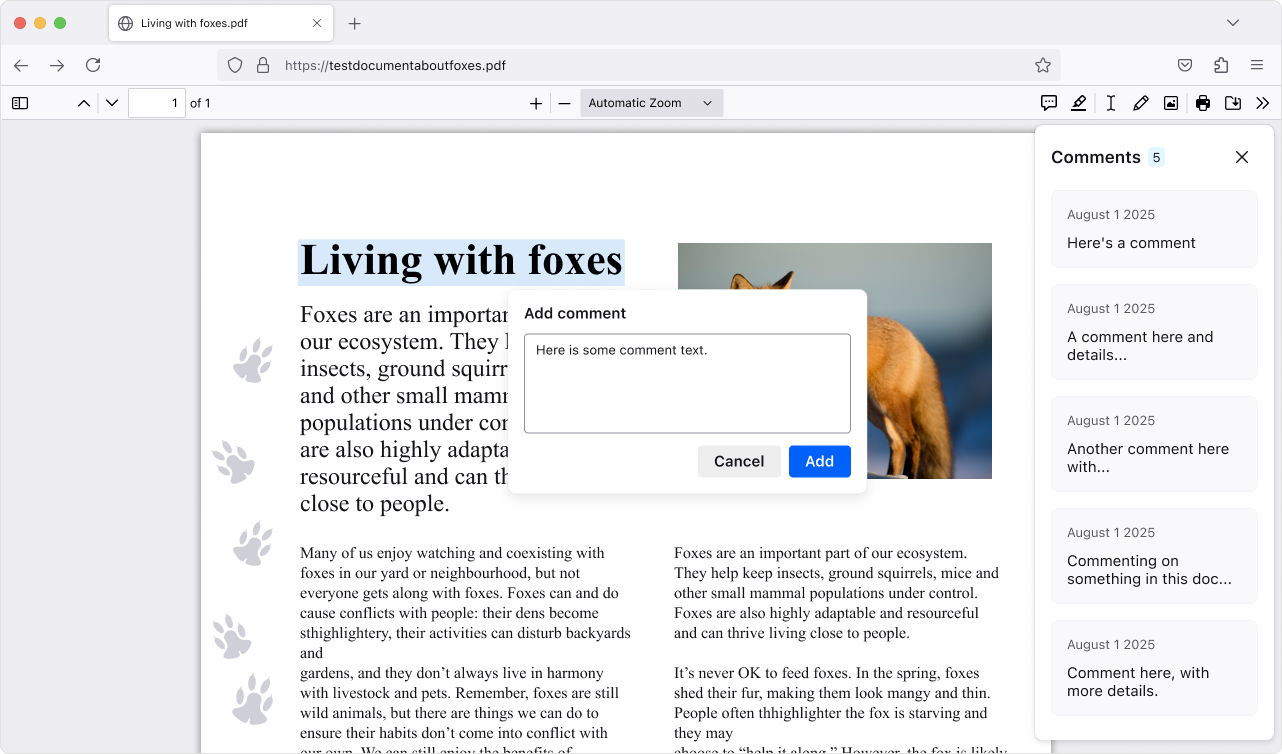
Add, edit, and delete comments to make your own notes in PDFs (summaries, questions, tasks, etc.). The comment sidebar helps you scan all your comments and quickly jump to them, which is handy for long or heavily marked-up PDFs.
This version introduces a new phase of privacy protections, building on our research on reducing browser fingerprinting. These new defenses cut the percentage of users seen as unique almost in half, ensuring a safer and more private browsing experience in Private Browsing or when using Enhanced Tracking Protection set to Strict.
Need a reminder of what tabs are in a group? Hover over the tab group name to get a preview of the tabs inside without opening it.
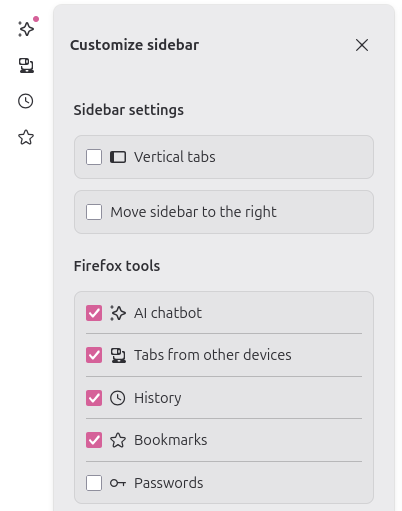
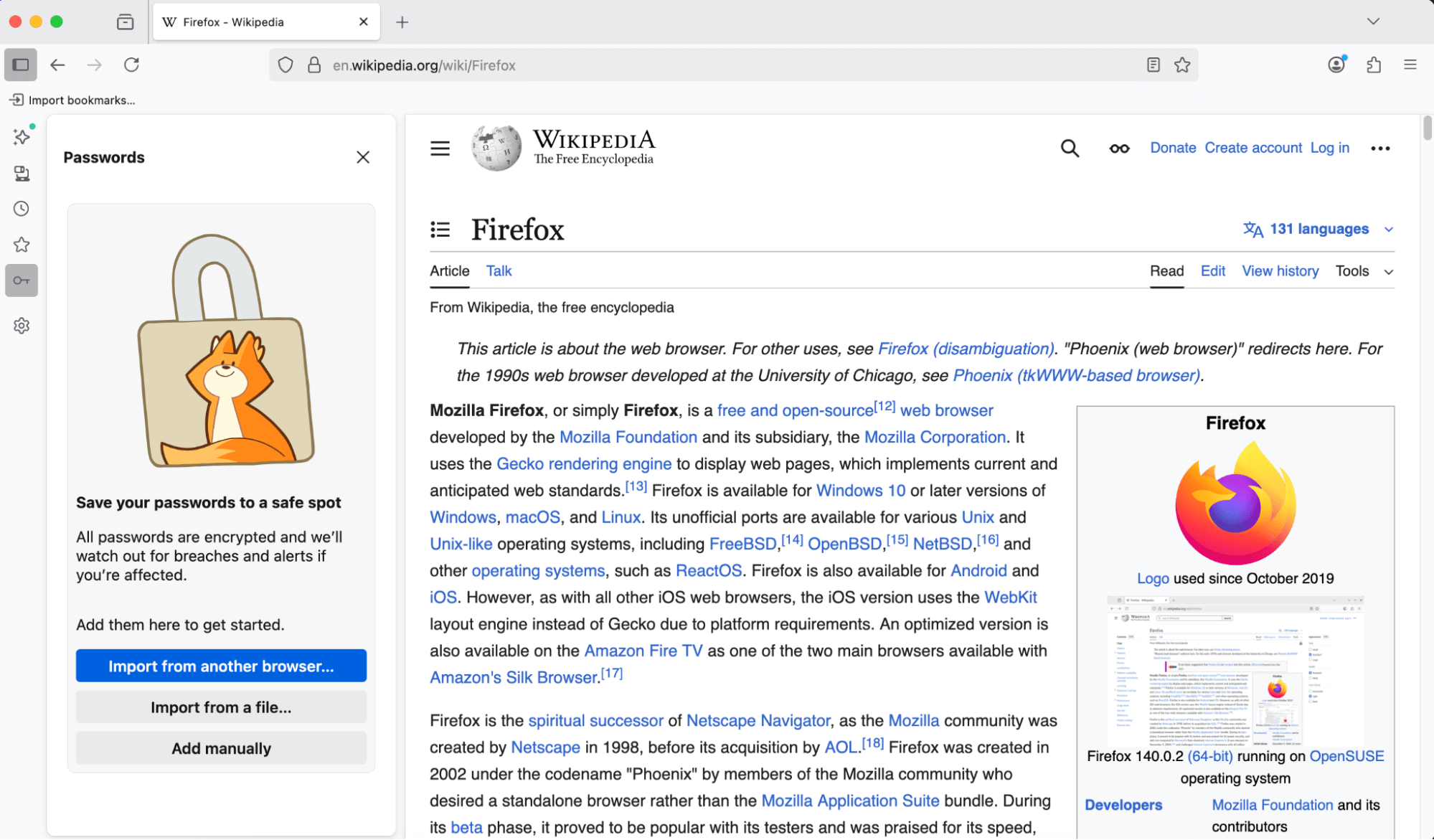
You can now access and manage your saved passwords right from the sidebar—no need to open a new tab or window. Stay on the page you’re on and get to your logins faster.
Copy Link to Highlight allows users to share arbitrary sections of a page with others by copying a link through the context menu with a given selection
The Translations feature has an improved experience when translating between languages with different script directions.
New brand-inspired wallpapers are available for New Tab on desktop, with versions for both light and dark mode.
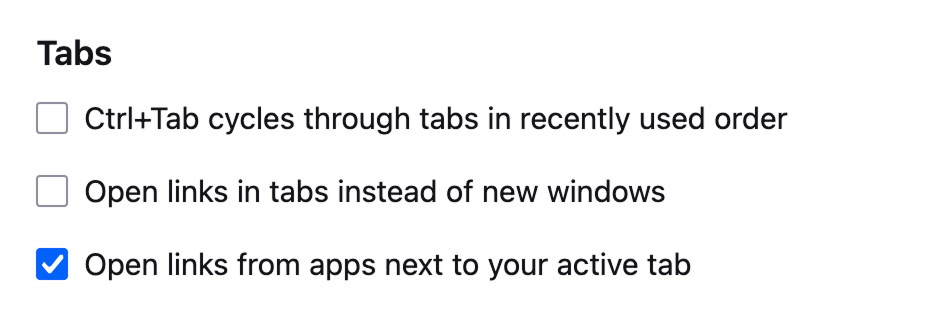
With the new Open links from apps next to your active tab setting, you can have links from other applications open next to your active tab instead of at the end of the tab strip.
Enhanced Bounce Tracking Protection’s stateless mode is now enabled by default in ETP Strict, blocking more advanced tracking techniques based on redirection
For most Windows users, the existing desktop shortcut for launching Firefox has been replaced with the desktop launcher, a small program that will launch Firefox if it is installed, but if it is not installed will prompt the user to install Firefox. This will provide an easy installation point for Firefox users who acquire a new Windows device, where Firefox will not be installed by default, but the desktop launcher program may have synced via OneDrive or other cloud storage product. Learn more.


Various security fixes.

Firefox no longer supports 32-bit Linux systems. We recommend installing the 64-bit version for continued updates and support.
Horizontal tabs are now slightly more rounded to match the look of vertical tabs. Buttons and text inputs, including the address bar, have also been updated for consistency.
When no extensions are installed, clicking the Extensions button now shows a message highlighting how extensions can enhance your browsing, with links to the Firefox Add-ons store.
Local translation models are now compressed with Zstandard, reducing download sizes and on-device storage consumption. As always, all Firefox translations happen securely and privately on your local device, unlike other browsers that translate using cloud services.
We updated default automation preferences to better support Agentic browsing, reducing the steps agents need to complete a task and chances for the agent to get stuck.

You can find information about policy updates and enterprise specific bug fixes in the Firefox for Enterprise 145 Release Notes.

Microsoft UI Automation phased release rollout at 100%. Microsoft UI Automation is the new accessibility framework for Microsoft Windows. This will provide better assistive technology (AT) support and performance on Windows for current and future assistive technologies.

Support has been added for the Atomics.waitAsync proposal, which is a non-blocking, asynchronous version of Atomics.wait. This allow synchronization of threads based upon the value in a shared memory location, for more details please consult our MDN documentation.
Firefox now supports the new Integrity-Policy header for enforcing sub-resource integrity for scripts. Further implementation of this header is underway.
Added Matroska support for the most commonly used codecs: AVC, HEVC, VP8, VP9, AV1, AAC, Opus, and Vorbis.
The text-autospace property is now supported, allowing automatic spacing adjustments between characters from different scripts.
The WebGPU DOM API (spec; MDN) is now available on macOS 26 (Tahoe) on Apple Silicon. For details, see the Mozilla Graphics Team Blog.

On Windows, clicking tabs may not work at the very top of the screen when Firefox is maximized on a second monitor. We’re working to fix this in a future release. (Fixed in 147.0)

With the release of Firefox 145, we are pleased to welcome the developers who contributed their first code change to Firefox in this release, 5 of whom were brand new volunteers! Please join us in thanking each of these diligent and enthusiastic individuals, and take a look at their contributions:

This release contains the following fixes and changes:

New uNmINeD development snapshot is available for download!
Changes:
This is a hotfix release for the Windows GUI builds.
Linux, macOS and CLI builds have not changed, they are still at version 0.19.52.
@directus/app@14.1.2@directus/api@32.0.2@directus/composables@11.2.6create-directus-extension@11.0.22@directus/extensions-sdk@17.0.2

This is a hotfix for 5.1.10 that fixes the DxgiAdapterService, which is used by plugins that initialize DirectX using their own interop.
The 5.1.10 update was a maintenance release that added a Romanian translation, fixed some important bugs, and updated the bundled FileType plugins.
There are two releases of Paint.NET:
 Settings -> Updates -> Check Now.
Changes since 5.1.10:
Changes in 5.1.10 that were new since 5.1.9:
This is a maintenance release that adds a Romanian translation, fixes some important bugs, and updates the bundled FileType plugins.
There are two releases of Paint.NET:
Settings -> Updates -> Check Now.
Changes since 5.1.9:
If you appreciate my work, you can show your support with a donation through Buy Me a Coffee or GitHub sponsors. Your support helps me continue improving and growing the app. Thank you!

@directus/app@14.1.1@directus/api@32.0.1@directus/composables@11.2.5create-directus-extension@11.0.21@directus/env@5.3.1@directus/extensions@3.0.13@directus/extensions-registry@3.0.13@directus/extensions-sdk@17.0.1@directus/memory@3.0.11@directus/pressure@3.0.11@directus/schema-builder@0.0.8@directus/storage-driver-azure@12.0.11@directus/storage-driver-cloudinary@12.0.11@directus/storage-driver-gcs@12.0.11@directus/storage-driver-s3@12.0.11@directus/storage-driver-supabase@3.0.11@directus/system-data@3.4.1@directus/themes@1.1.7@directus/types@13.3.1@directus/utils@13.0.12@directus/validation@2.0.11
The MariaDB Foundation is pleased to announce the availability of MariaDB 11.8.4, MariaDB 11.4.9, MariaDB 10.11.5 and MariaDB 10.6.24, the latest stable releases in their respective long-term series (receiving regular maintenance and support for three years from their first stable release dates, and critical security fixes as source code releases for two additional years beyond). …
Continue reading \"MariaDB 11.8.4, 11.4.9, 10.11.15 and 10.6.24 now available\"
The post MariaDB 11.8.4, 11.4.9, 10.11.15 and 10.6.24 now available appeared first on MariaDB.org.

The first release of Monitor as an elementary OS default app is here! Monitor is an app for monitoring your system resources and running processes, including with optional panel indicators. Since its last release, we’ve completed the port to GTK4, rewrote the settings menu, and a ton more under the hood. Massive thanks to Stanisław, Ryo, and more for their hard work here.
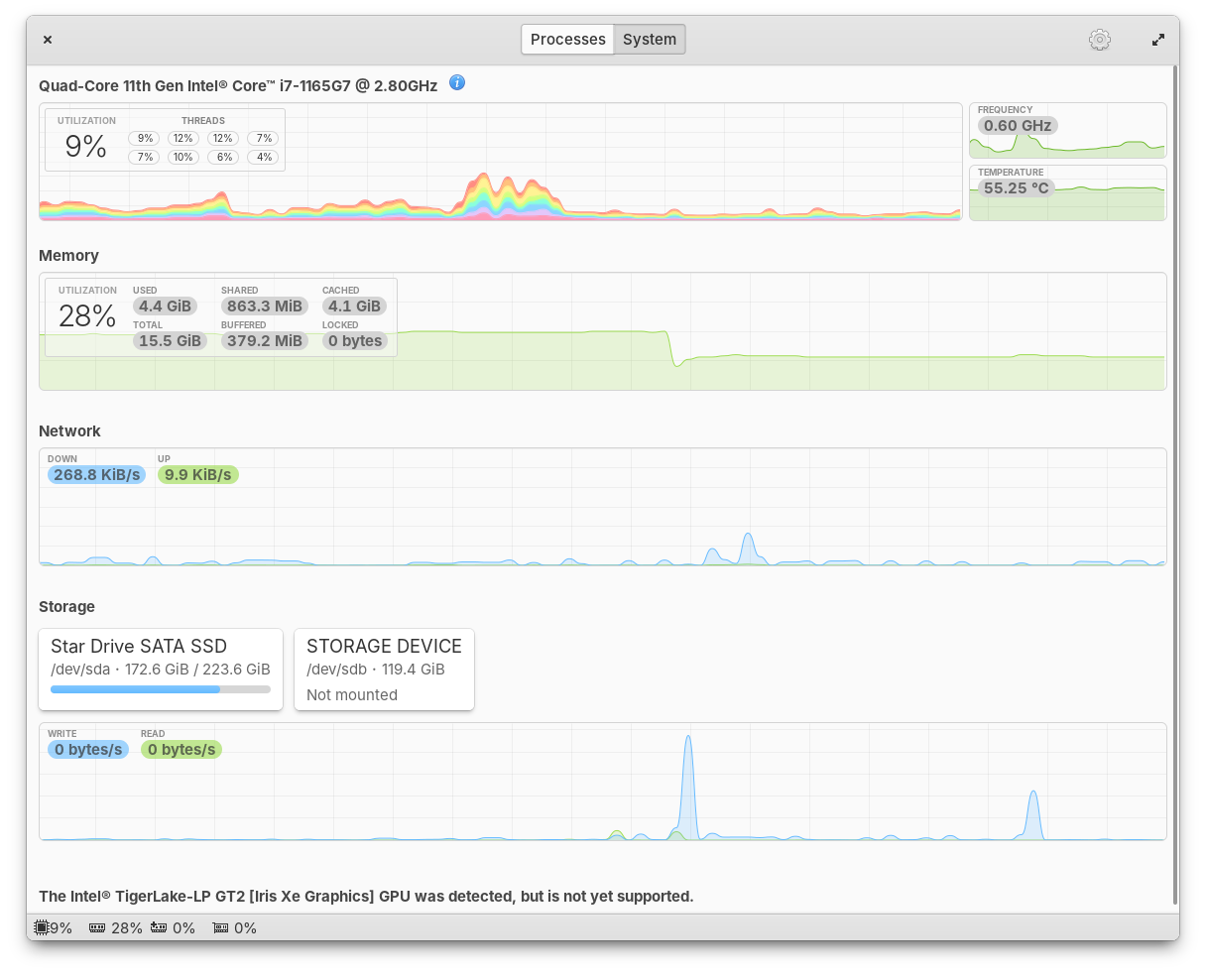
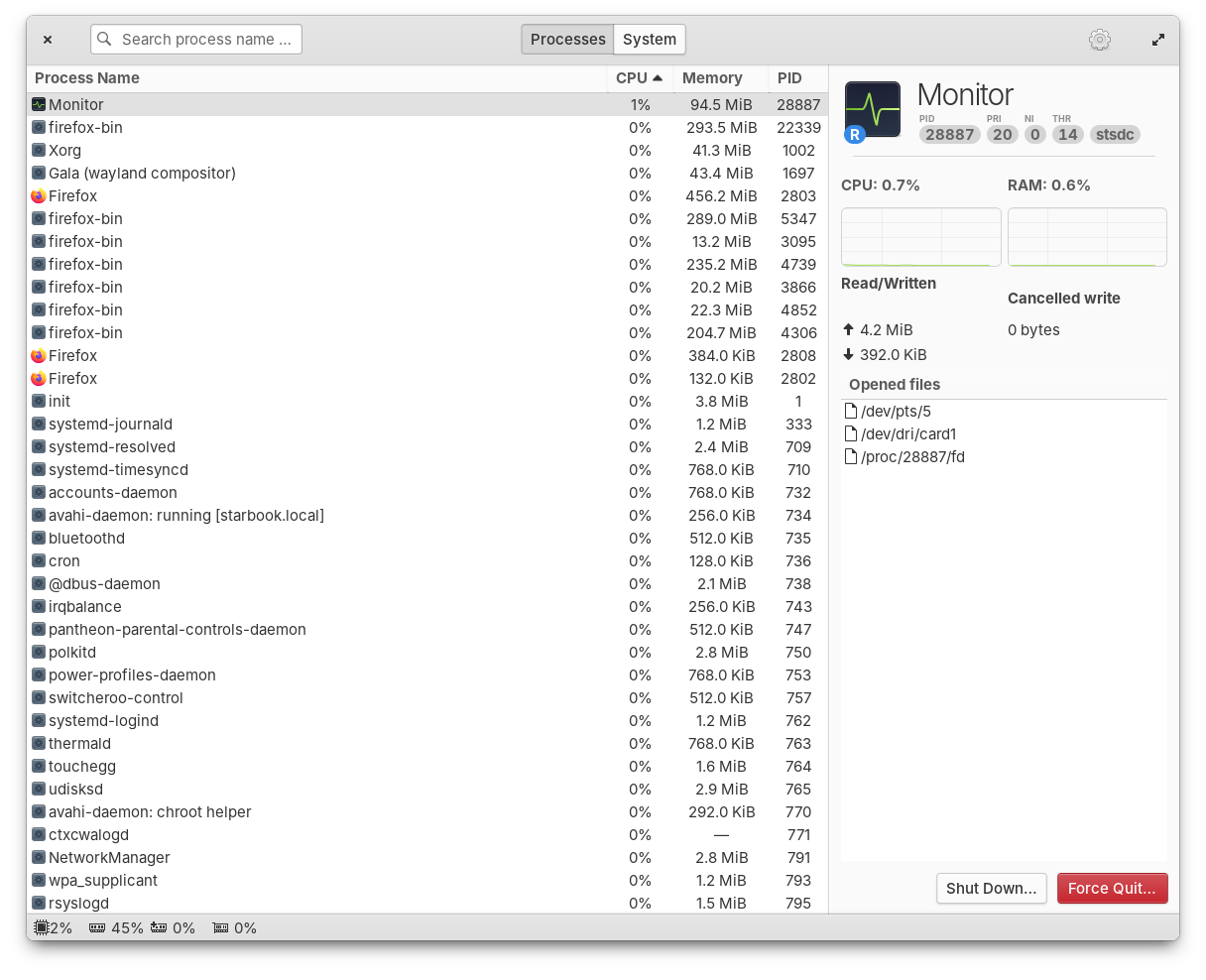
Monitor running processes and available resources
Monitor should be automatically installed on your next update, but if you for some reason don’t get it, you can install Monitor with the Terminal command sudo apt install io.elementary.monitor.
Another massive bug fix release of our Window Manager has landed with 19 fixed issues including improved performance, fixes for HiDPI, and better animations. We’ve fixed issues with dock menus sometimes appearing behind the dock, apps will now launch correctly when you switch between Classic and Secure sessions, and more.
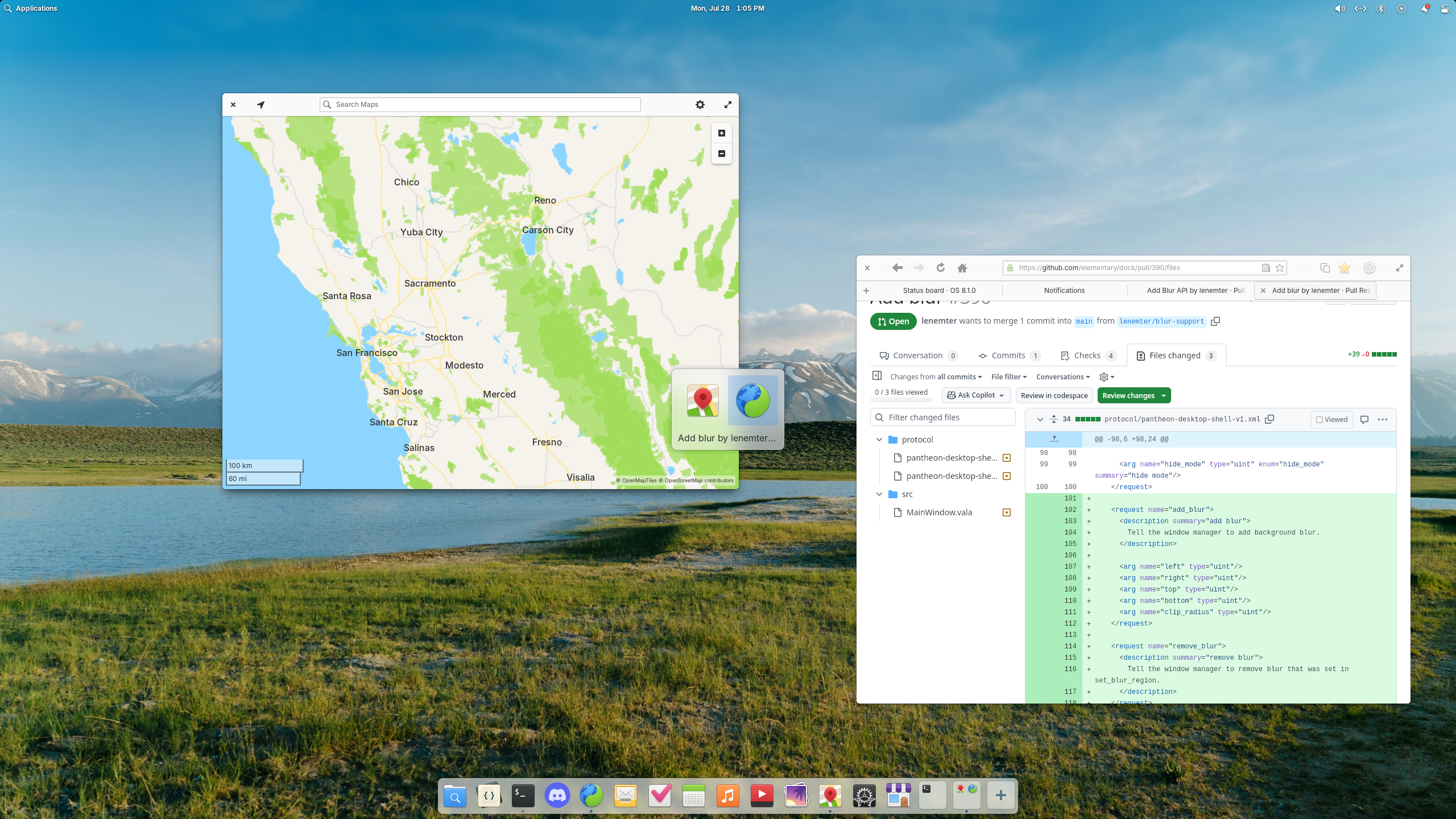
Blur effects have landed in the window switcher and are coming to the Dock
Plus, this release introduces a new blur effect. You’ll first notice it in the Alt + Tab window switcher, but in future updates we will also blur behind the Dock and Notifications. Big thanks to Leo and Leonhard for their hard work on this release.
We landed a highly requested redesign of folder icons thanks to newhoa. The new folder design is more rounded and more closely matches the design of the Files app icon.
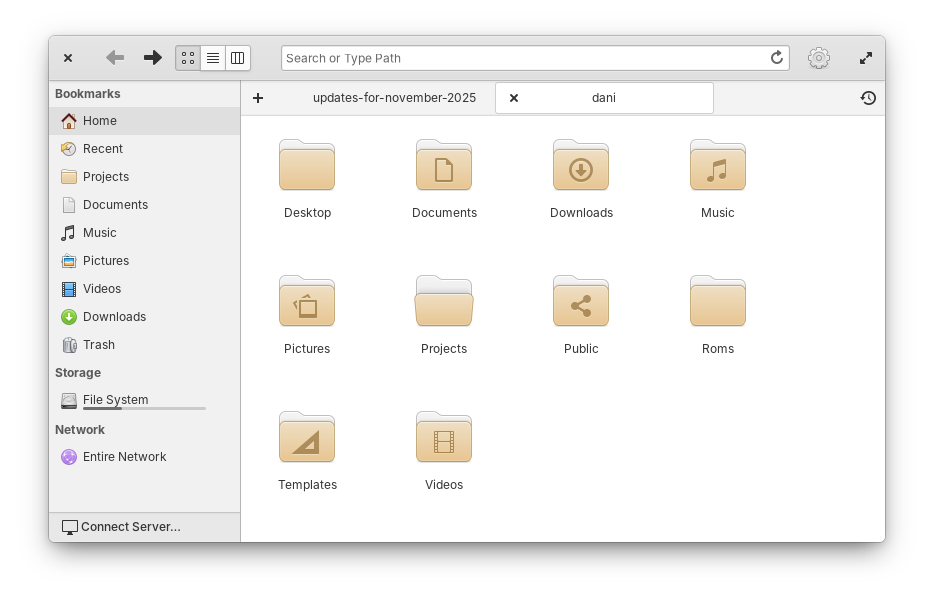
Folder icons have been redesigned with rounded corners
Icons featuring a computer mouse have been slightly redesigned to include a scroll wheel. And, icons featuring a mouse pointer have been updated to match the new pointer design, thanks to William.
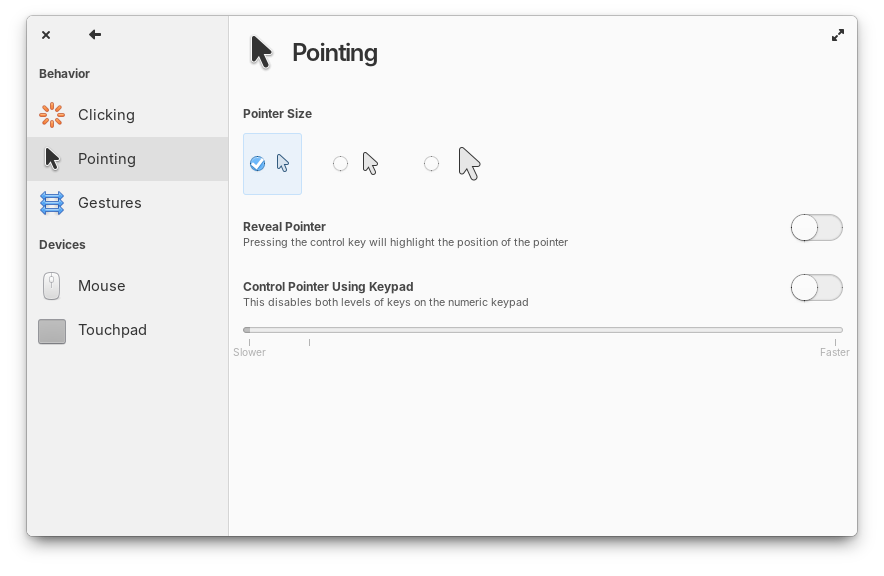
Mouse and Pointer icons have been updated
Plus a number of smaller clean ups including adding missing sizes for certain icons, adjusting lighting, and rounding a few edges. Finally, we now fall back to Adwaita icons when an app is missing a non-standard icon name, thanks to David Lapshin.
In the symbols sidebar, tooltips for C language symbols are now more information like their Vala counterparts. When you clone a git branch, we now send an unobtrusive toast to let you know cloning has completed. Global searches now respect your search case sensitivity settings. Opening a second window no longer results in duplicate project entries in the project chooser. And the “Open Folder” keyboard shortcut has been fixed. Shoutouts Jeremy for his hard work on Code.
Jeremy also fixed a number of small issues with Files including expanding trashed folders in the list view, refreshing views properly when files are deleted, and preventing a potential freeze when the Templates folder contains too many files and subfolders. Plus, Files now shows a setting for Date & Time format.
In Power settings we now show a small warning about increased energy usage with certain options. The Sound menu now uses a toggle icon like Quick Settings instead of a switch to quickly mute. And media keys for volume now work on the Lock Screen thanks to Leo.
As always, pop open System Settings → System on elementary OS 8 and hit “Update All” to get these updates plus your regular security, bug fix, and translation updates. Or set up automatic updates and get a notification when updates are ready to install!
We’re laser focused on preparing to release OS 8.1 so big new features will almost exclusively be targeted to OS 9 from now on. We don’t have OS 9 builds available yet for you to try, but we are working on them already! We’ll let sponsors know first when OS 9 builds are available in Early Access to test. But for now, we have just one more thing.
64-bit Universal ARM builds from the stable updates channel are now available on our Builds website. These builds replace the old device-specific builds for platforms like Raspberry Pi and Pinebook, plus they add support for other ARM devices supported by Linux. This is thanks to the hard work of NN708 who has been dedicated to seeing this project through over the several months it took to complete.
At the moment we’re at 24% of our monthly funding goal and 324 Sponsors on GitHub! Shoutouts to everyone helping us reach our goals here. Your monthly sponsorship funds development and makes sure we have the resources we need to give you the best version of elementary OS we can!
Monthly release candidate builds and daily Early Access builds are available to GitHub Sponsors from any tier! Beware that Early Access builds are not considered stable and you will encounter fresh issues when you run them. We’d really appreciate reporting any problems you encounter with the Feedback app or directly on GitHub.
The Stable channel has been updated to 142.0.7444.134/.135 for Windows and 142.0.7444.135 for Mac and 142.0.7444.134 for Linux, which will roll out over the coming days/weeks. A full list of changes in this build is available in the Log.
Security Fixes and Rewards
Note: Access to bug details and links may be kept restricted until a majority of users are updated with a fix. We will also retain restrictions if the bug exists in a third party library that other projects similarly depend on, but haven’t yet fixed.
This update includes 5 security fixes. Below, we highlight fixes that were contributed by external researchers. Please see the Chrome Security Page for more information.
Interested in switching release channels? Find out how here. If you find a new issue, please let us know by filing a bug. The community help forum is also a great place to reach out for help or learn about common issues.
Home Assistant 2025.11! 🎉
November is here, and we’ve been hard at work refining some of the main experiences that you interact with every day, and I think you’re going to love what we’ve built.
My personal favorite this release? The brand new target picker. 🎯
It’s one of those changes that seems simple on the surface, but makes such a huge difference in how you build automations. You can finally see exactly what you’re targeting, with full context about which device an entity belongs to and which area it’s in. No more guessing whether you’re controlling the right ceiling light when you have three of them!
But that’s just the beginning. We’re continuing with the automation editor improvements, this time with a completely redesigned dialog for adding triggers, conditions, and actions. It’s cleaner, easier to read, and sets the foundation for some really exciting stuff coming in future releases. 🤫
And speaking of making things clearer, you can now control exactly how entity names appear on your dashboard cards. Want to show just the entity name? The device name? The area? Or combine them? Even if you rename things, your dashboards will stay perfectly in sync. No more manual updates needed!
Oh, and energy dashboard fans will appreciate the new pie chart view for device energy, complete with totals displayed in the corner of every energy card. 🥧
Enjoy the release!
../Frenck
PS: Oh, and pssst… Don’t tell anyone 🤫, but there might be something exciting being released on November 19th. Hit the bell on this announced YouTube stream to not miss it. Stay tuned! 😀
A huge thank you to all the contributors who made this release possible! And a special shout-out to @bramkragten, @JLo, @MindFreeze, @agners, and @piitaya who helped write the release notes this release. Also, @silamon and @GemPolisher for putting effort into tweaking its contents. Thanks to them, these release notes are in great shape. ❤️
Have you ever been building an automation and wondered, “Wait, which ceiling light is this?” when you see three entities all named “Ceiling light”? Or tried to figure out how many lights you’re actually controlling when you target an entire floor or area?
We’ve all been there. Until now, the target picker didn’t show you the full picture. You couldn’t see which device an entity belonged to or which area it was assigned to. And when you selected a floor or area as your target, you had no idea how many entities you were actually affecting. This uncertainty meant many of you stuck with targeting individual entities, even though larger targets (like areas and floors) can make your automations much more flexible.
The new target picker changes all that. Now you get full context for everything you’re targeting, and you can see exactly how many entities will be affected by your action.
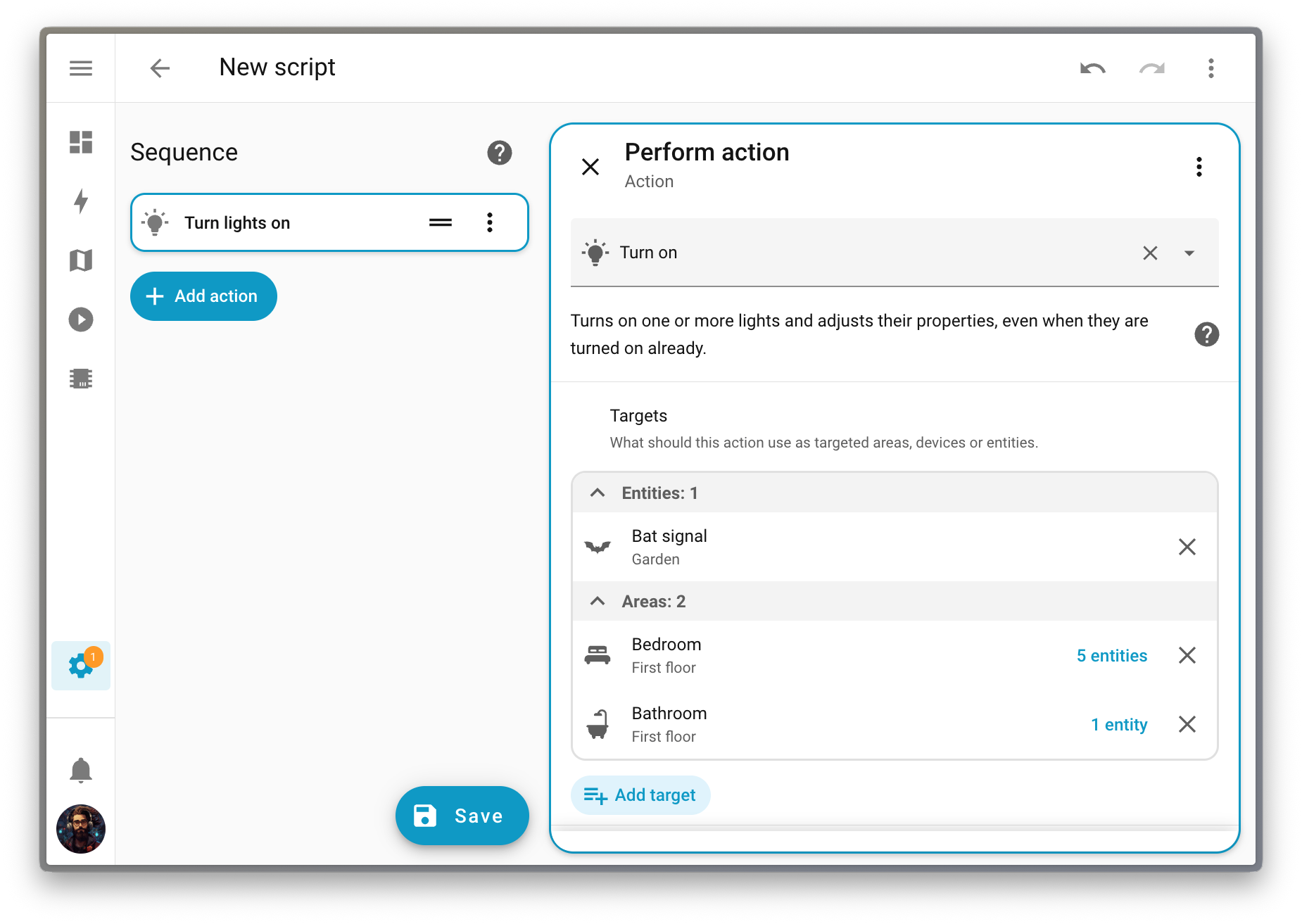
Want to dig deeper? You can expand any floor, area, or device to see exactly which entities are included and where they’re coming from.
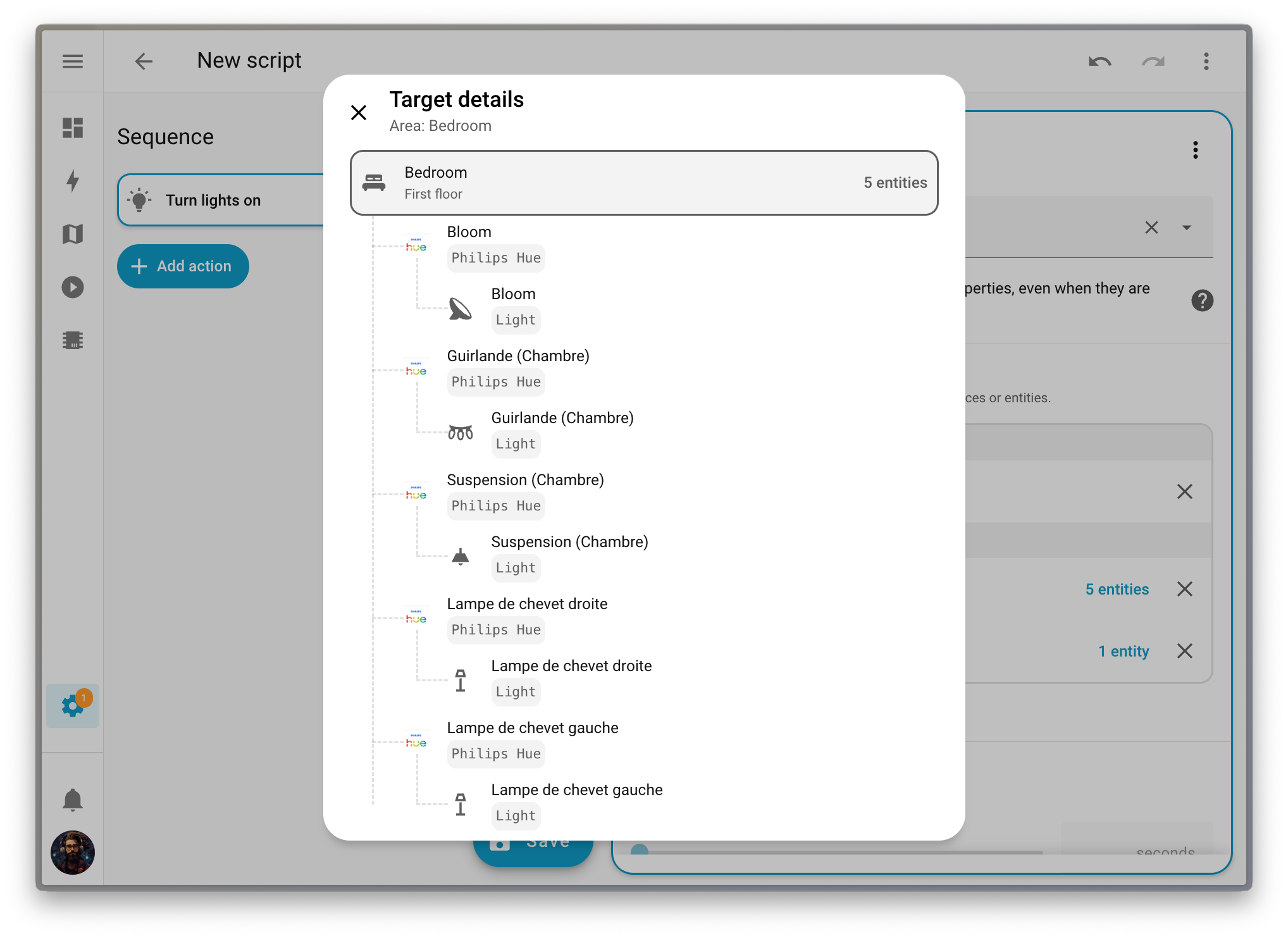
This makes it so much easier to build automations that scale with your home. When you target an area or floor, your automation automatically adapts as you add or remove devices. No more updating your automations every time you add a new light or sensor. Your automations just work, which is exactly how it should be.
It’s no secret that we’re currently working hard on making automations easier to create. After the release of the automation sidebar two releases ago, we are now introducing a new dialog to add triggers, conditions, and actions.
The changes are purely cosmetic: the dialog is bigger, so the description of each block is simpler to read, with a two-pane layout to ease both navigation and block selection.
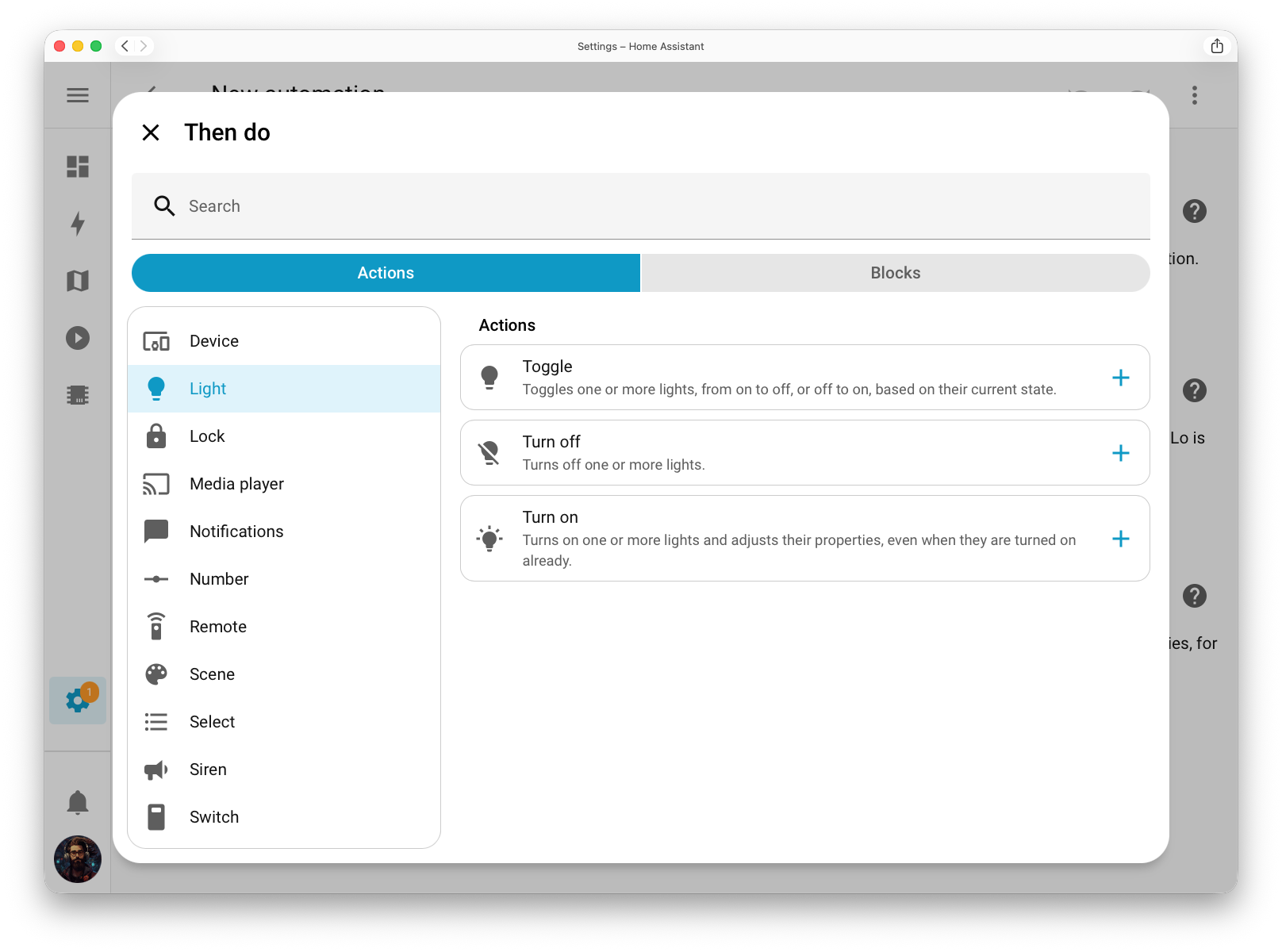
The building blocks (which are used to perform more complex conditions or sequences of actions, such as repeating actions or branching out your sequence into multiple paths) have been moved into the main dialog on a second tab. There is now a single entry point to add something to an automation instead of two, greatly reducing the number of buttons in complex automations.
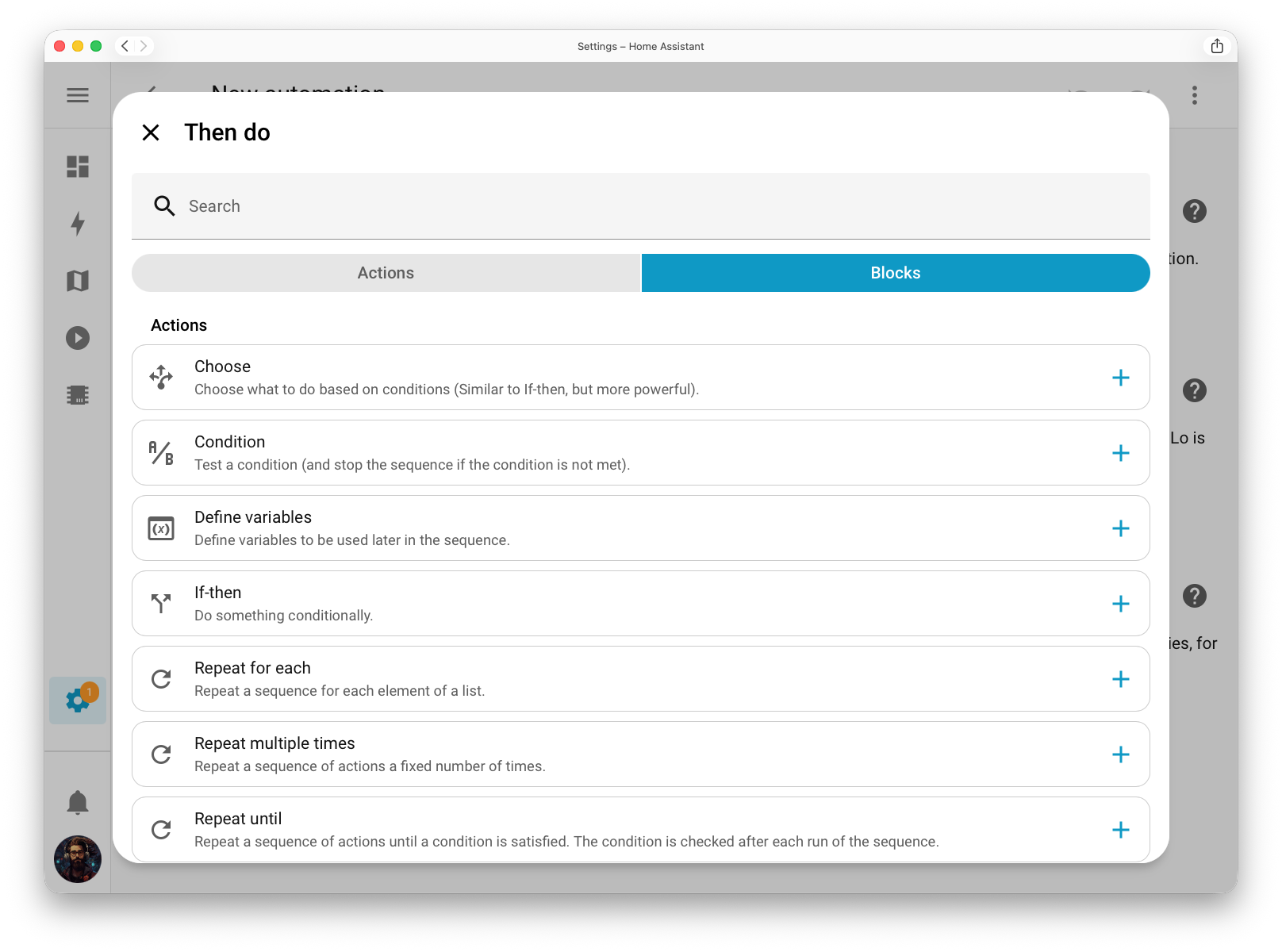
As mentioned above, these changes are purely cosmetic, for now! But this new dialog is the foundation of what’s coming next, and we cannot wait to present that to you once it finally lands.
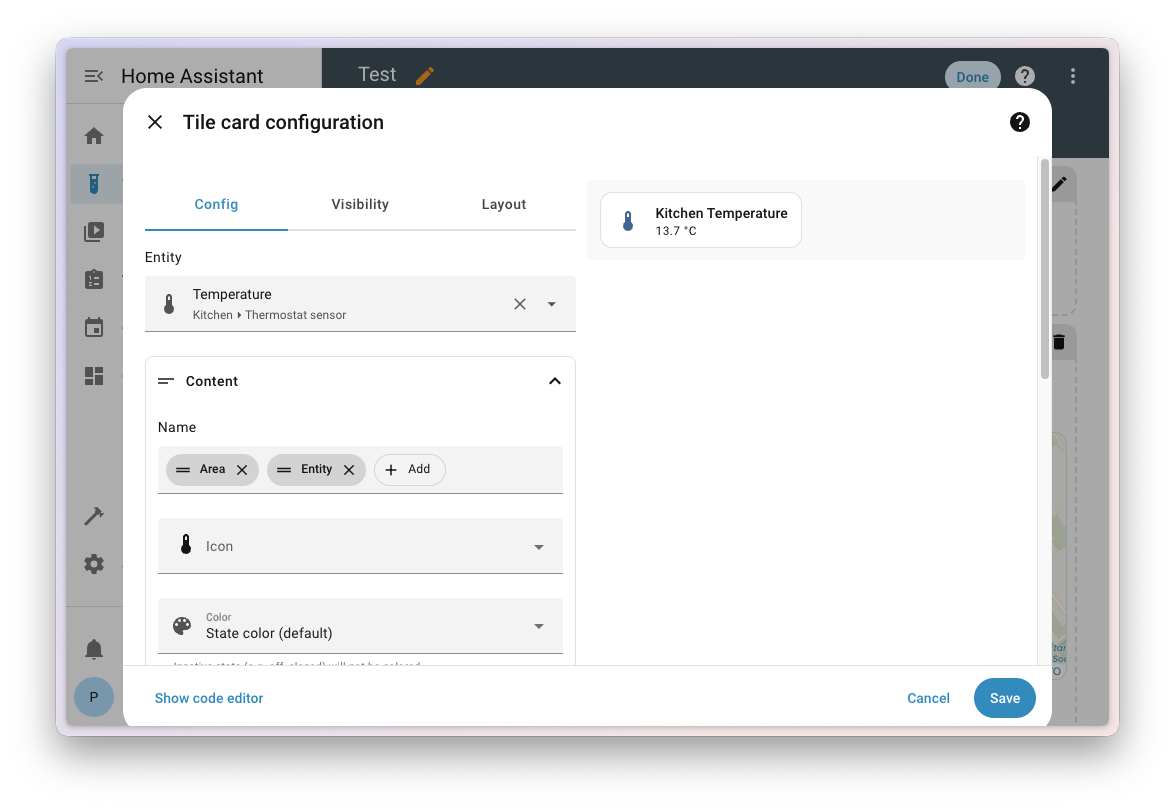
A few releases ago, we gave the entity picker a big upgrade by adding more context so you could easily see where each entity belongs (May 2025 release). In this release, we’re bringing that same flexibility to your dashboards.
You can now choose how names appear on your cards: show the entity, device, area, floor, or even combine them. This gives you full control over how your dashboards look and feel. For example, in a dedicated section for a specific device, you might choose to display only the entity name to avoid repeating the device name on every card.
Of course, you can still set a custom name if you want complete control over the text shown.
And the best part? If you rename an entity or device, your dashboards will automatically stay in sync. No more manual edits needed; everything just updates itself.
We’ve added a new layout to the devices energy graph: “pie” 🥧. You can toggle between the regular bar chart and the new pie chart by clicking the icon in the top-right corner.
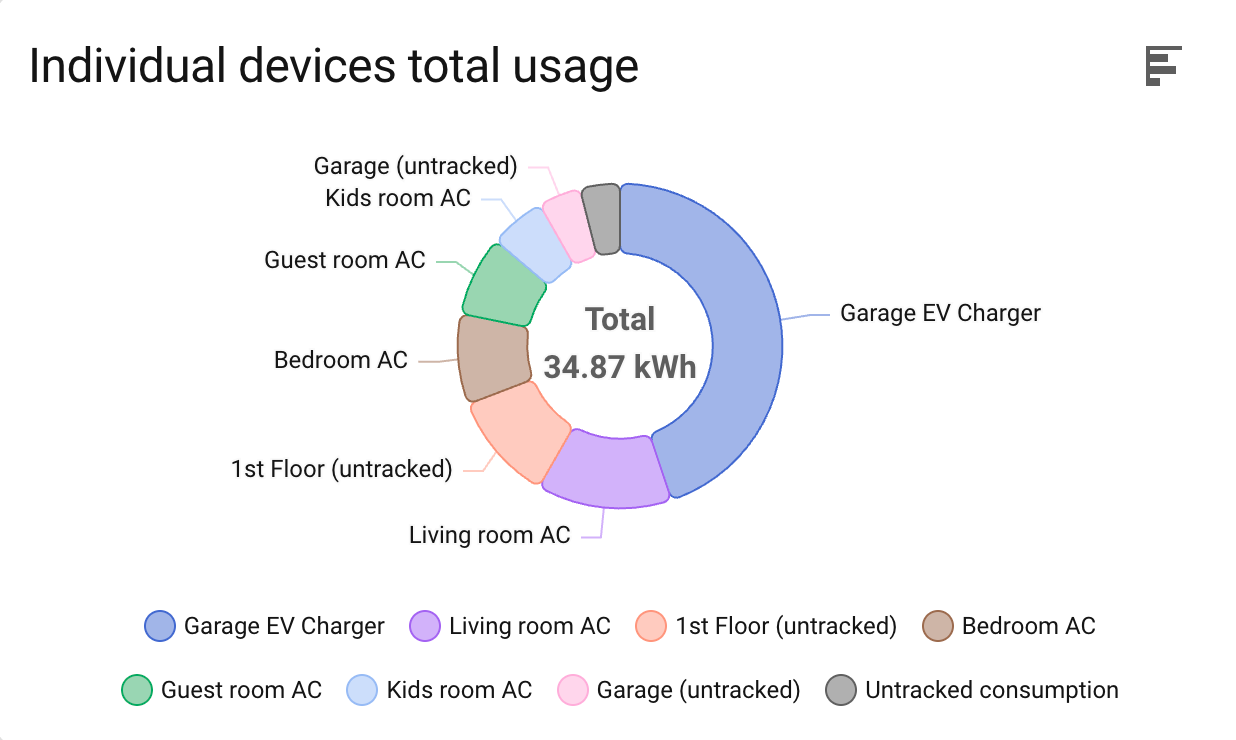
Doing this made the top-right corner of the other energy cards feel empty, so we used that space to display the total energy for the selected period. For example, if the date picker is set to today, the total solar energy for today will be displayed in the corner of the solar production graph card.
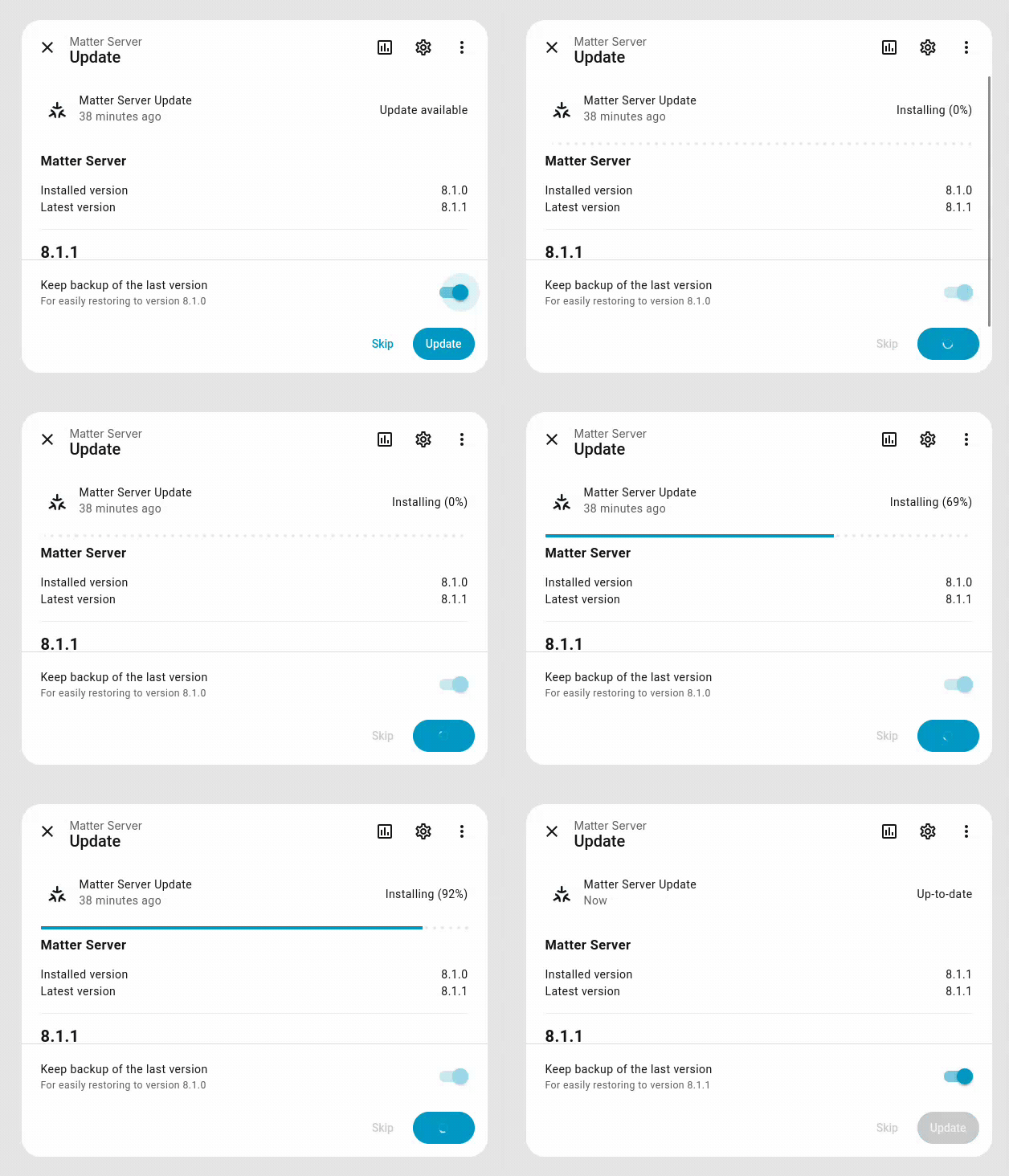
With this release, you can now track the progress of updates to Home Assistant and Add-ons (managed by the Supervisor)! The progress includes the stages of downloading and unpacking, so the time required will vary based on your internet speed, CPU performance, and system load. As a result, the progress is not reflected as perfectly linear, but it does still provide a good estimate of how far along the update is.
Thanks to our community for keeping pace with the new integrationsIntegrations connect and integrate Home Assistant with your devices, services, and more. [Learn more] and improvements to existing ones! You’re all awesome. 🥰
We welcome the following new integrations in this release:
Actron Air, added by @kclif9
The Actron Air integration allows you to control Actron Air air conditioning controllers in Home Assistant.
Sunricher DALI, added by @niracler
Integrate with Sunricher DALI, a platform for managing and monitoring DALI-based lighting systems.
Fing, added by @Lorenzo-Gasparini
The Fing integration provides network scanning, device detection, and presence monitoring capabilities using the Fing platform.
Firefly III, added by @erwindouna
Integrate with the Firefly III project, a free open source personal finance manager with full transaction management, budgets, categories, and reports.
iNELS, added by @epdevlab
Integrate with the iNELS smart home system to manage lighting, heating, and automation components for enhanced home control.
Lunatone Gateway, added by @MoonDevLT
Integrate with Lunatone Gateway, enabling control and monitoring of DALI lighting systems through Lunatone’s DALI gateway interface.
Meteo.lt, added by @xE1H
The Meteo.lt integration uses meteorological data from the Lithuanian Hydrometeorological Service (LHMT) to provide regional weather forecasts for locations in Lithuania.
Nintendo Parental Controls, added by @pantherale0
The Nintendo Parental Controls integration connects with Nintendo’s parental management service, allowing you to monitor and manage device usage and restrictions.
OpenRGB, added by @felipecrs
The OpenRGB integration allows unified control of RGB lighting across various hardware brands and devices through the OpenRGB project.
It’s not just new integrationsIntegrations connect and integrate Home Assistant with your devices, services, and more. [Learn more] that have been added; existing integrations are also being constantly improved. Here are some of the noteworthy changes:
While most integrationsIntegrations connect and integrate Home Assistant with your devices, services, and more. [Learn more] can be set up directly from the Home Assistant user interface, some were only available using a YAML configuration. We keep moving more integrations to the UI, making them more accessible for everyone to set up and use.
The following integration is now available via the Home Assistant UI:
One thing we are incredibly proud of in Home Assistant is our integration quality scale. This scale helps us and our contributors to ensure integrations are of high quality, maintainable, and provide the best possible user experience.
This release, we celebrate several integrationsIntegrations connect and integrate Home Assistant with your devices, services, and more. [Learn more] that have improved their quality scale:
Seven integrations reached platinum 🏆
Four integrations reached silver 🥈
This is a huge achievement for these integrations and their maintainers. The effort and dedication required to reach these quality levels is significant, as it involves extensive testing, documentation, error handling, and often complete rewrites of parts of the integration.
A big thank you to all the contributors involved! 👏
The following integrationsIntegrations connect and integrate Home Assistant with your devices, services, and more. [Learn more] are no longer available as of this release:
There are many more improvements in this release; here are some of the other noteworthy changes:
If you’re using the Home Assistant Operating System, we have some great news for you! We’ve made our logging system way more efficient. 🚀
You might not realize it, but all those Home Assistant logs you can find in Settings > System > Logs were actually being stored on your disk twice. 🙈
Home Assistant OS keeps all logs for everything, including Home Assistant itself, in a very efficient way, even across restarts! But on top of that, we were also writing them to a log file in your Home Assistant configuration folder.
That’s not ideal. It takes twice the disk space, but more importantly, it causes unnecessary wear on your storage medium, which means it will fail sooner. This is especially concerning if you’re using an SD card in, for example, a Raspberry Pi.
As of this release, we’ve stopped writing logs to the configuration folder. You can still view and download all logs from the Home Assistant settings page, just like before. We’ve adapted that page to read the logs from the OS directly instead.
Tip
Are you more into the command line? No worries, our Home Assistant CLI has you covered. Check it out by running ha core logs --help for more information.
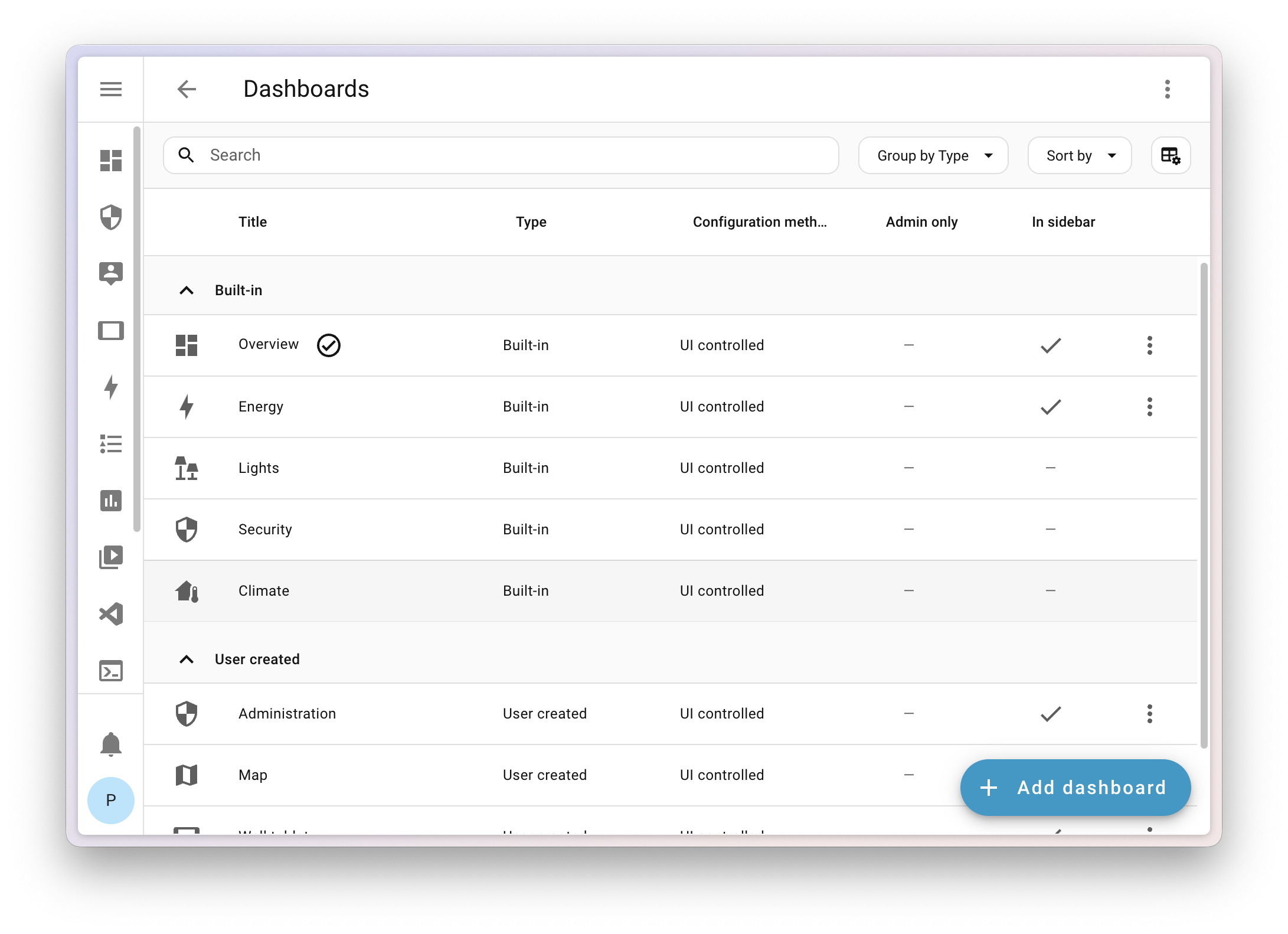
Following the improvements introduced in the latest releases, this release makes the experience even smoother and more intuitive.
We’ve simplified and reorganized things:
These improvements bring everything together more naturally, helping your Home Dashboard feel less like a setup and more like a true reflection of your home.
We will also release patch releases for Home Assistant 2025.11 in November. These patch releases only contain bug fixes. Our goal is to release a patch release once a week, aiming for Friday.
@progress_step decorator from ZHA and Hardware integration (@puddly - #155867)HomeAssistantErrors in ZHA config flow (@TheJulianJES - #156075)None (@mib1185 - #156220)temperature_delta device class translations (@jbouwh - #156685)Home Assistant has a great community of users who are all more than willing to help each other out. So, join us!
Our very active Discord chat server is an excellent place to be, and don’t forget to join our amazing forums.
Found a bug or issue? Please report it in our issue tracker to get it fixed! Or check our help page for guidance on more places you can go.
Are you more into email? Sign up for the Open Home Foundation Newsletter to get the latest on features, things happening in our community, and other projects that support the Open Home straight into your inbox.
We do our best to avoid making changes to existing functionality that might unexpectedly impact your Home Assistant installation. Unfortunately, sometimes, it is inevitable.
We always make sure to document these changes to make the transition as easy as possible for you. This release has the following backward-incompatible changes:
Previously, the group’s assumed state was always false, regardless of the state of its child entities.
This has now changed:
The group will now have an assumed state of true if at least one child entity has an assumed state.
This makes the group’s assumed state reflect the uncertainty of its children more accurately.
These domains have been added: switch, fan, light, and cover.
(@piitaya - #154163) (group docs)
The last_time_reachable attribute has been removed from the asuswrt device tracker.
Use the last_changed attribute instead in your automations.
(@ollo69 - #154219) (asuswrt docs)
The state of LG webOS TV media player entities that do not have an automation trigger to turn on the device will be set to unavailable instead of off.
(@thecode - #155164) (webostv docs)
The mealie integration now requires Mealie version 2 or later.
Mealie version 1 is no longer supported. Version 2 was released in October 2024, so over a year ago. Given the differences between versions 1 and 2, we are no longer able to support or test backward compatibility with version 1.
The tilt position of motion_blinds devices has been corrected to align with the Home Assistant standards.
The new tilt position will be: 0 = closed/covering the window opening, 100 = open/letting light through.
The previous tilt position can be converted to the new tilt position as follows:
new = 100 - oldcurrent_tilt_position = 100 -> 0current_tilt_position = 75 -> 25current_tilt_position = 50 -> 50current_tilt_position = 25 -> 75current_tilt_position = 0 -> 100open_cover_tilt -> close_cover_tiltclose_cover_tilt -> open_cover_tiltAny automations concerning Motion Blinds devices that use the current_tilt_position attribute or use tilt open/close will need to be adjusted.
The mobile_app integration, which supports the iPhone and Android companion apps, now handles zone-only updates better. When your companion app sends just the zone name (not the exact coordinates), the device tracker will show the zone’s friendly name.
The person entity now shows the zone’s friendly name (not its object ID) for custom zones. This might break existing automations that trigger on a person’s state.
As an example, if you have a zone named zone.kids_school with the friendly name School:
person and device_tracker entities would be kids_school when the “Location Sent” in the companion app was set to send “Zone Name Only” and School when it was set to “Exact”.person and device_tracker entities will be School for both the “Location Sent” settings in the companion app.(@Ashus - #149453) (mobile_app docs)
The Nederlandse Spoorwegen entity is now displayed as a timestamp entity, rather than a string. Please adapt your automations and scripts.
The Speed parameter in the ONVIF GoToPreset action is now optional.
The default of 0.5 is no longer set. If you want to restore the previous behavior you have to set speed to 0.5 in your action.
In the OralB integration, states and attributes have changed.
In multiple places, spaces have been replaced with underscores:
Toothbrush state:
flight menu → flight_menuselection menu → selection_menufinal test → final_testpcb test → pcb_testBrushing mode:
daily clean → daily_cleangum care → gum_caretongue cleaning → tongue_cleaningsuper sensitive → super_sensitivedeep clean → deep_cleanPressure:
power button pressed → power_button_pressedbutton pressed → button_pressedSector:
no sector → no_sectorsector 1 → sector_1sector 2 → sector_2sector 3 → sector_3sector 4 → sector_4Automations should be updated to use the new states and attributes.
(@tr4nt0r - #153605) (oralb docs)
The discovery of Renault functionality was previously based on assumptions that may have created invalid and non-functional entities. These will no longer be created.
(@epenet - #154137) (renault docs)
The Traccar integration has been updated to use a more secure API Token for authentication. This is a required, one-time breaking change to align with Traccar’s security recommendations and ensure the integration continues to work.
This release migrates the integration away from the older username/password method, ensuring continued stability and security for all users while also allowing users with SSO-based setups to use the integration.
When you update Home Assistant, the existing Traccar integration will need to be re-authenticated:
Once you’ve done this, your Traccar devices and entities will work exactly as they did before.
The Account tier and Gold tenure sensors have been retired, as they no longer receive updates following the transition from Xbox Live Gold to Xbox Game Pass. Additionally, the In party and In multiplayer binary sensors have been removed, since they’ve been non-functional for quite some time.
If you are a custom integration developer and want to learn about changes and new features available for your integration, be sure to follow our developer blog. The following changes are the most notable for this release:
Of course, there is a lot more in this release. You can find a list of all changes here: Full changelog for Home Assistant Core 2025.11
Removed non-relational types from RELATIONAL_TYPES constant (#25964)
Extensions or external code using RELATIONAL_TYPES should note the excluded presentation and group.
Fixed <scope>.delete filter hook running after permission check. Fixed keys returned by the hook not being used in place of the original keys. (#26034)
Keys returned by the hook are now used in place of the original keys.
The hook will trigger regardless of user permissions. Ensure any necessary permission checks are performed prior to any data processing.
@directus/api
<scope>.delete filter hook running after permission check. Fixed keys returned by the hook not being used in place of the original keys. (#26034 by @ComfortablyCoding)@directus/constants
@directus/extensions-sdk
METRICS_NAME_PREFIX environment variable (#25819 by @ComfortablyCoding)mcp_enabled, mcp_allow_deletes, mcp_system_prompt_enabled and visual_editor_urls in telemetry reports (#25989 by @connorwinston)METRICS_NAME_PREFIX environment variable (#25819 by @ComfortablyCoding)RELATIONAL_TYPES constant (#25964 by @formfcw)directus_comments and directus_extensions to websocket subscriptions (#25464 by @ComfortablyCoding)node-schedule with cron (#25874 by @gaetansenn)tar-fs dependency from 2.1.3 to 2.1.4 (#25958 by @br41nslug)RELATIONAL_TYPES constant (#25964 by @formfcw)updateFields function to the SDK (#25889 by @br41nslug)undefined value in SDK query parsing (#25952 by @br41nslug)3.858.0 → 3.918.03.864.0 → 3.918.03.858.0 → 3.918.012.28.0 → 12.29.12.29.5 → 2.29.71.3.0 → 1.3.22.30.8 → 2.31.09.32.0 → 9.38.06.1.18 → 6.1.196.1.18 → 6.1.196.1.18 → 6.1.196.1.18 → 6.1.196.1.18 → 6.1.197.16.0 → 7.17.25.1.0 → 5.1.21.17.1 → 1.20.21001.0.0 → 1001.0.11000.0.31 → 1000.0.431000.0.18 → 1000.0.2528.0.6 → 28.0.916.0.1 → 16.0.30.34.38 → 0.34.414.1.0 → 4.4.32.10.4 → 2.76.11.10.2 → 2.3.00.5.1 → 0.6.03.2.24 → 3.2.253.1.1 → 3.1.21.4.9 → 1.4.109.0.8 → 9.0.95.0.0 → 5.1.06.4.17 → 7.0.31.5.5 → 1.5.67.7.0 → 7.7.113.6.0 → 14.0.013.6.0 → 14.0.013.6.0 → 14.0.04.5.0 → 4.7.00.43.1 → 0.44.01.11.0 → 1.12.21.8.0 → 1.8.35.4.1 → 5.6.25.0.0 → 5.0.214.0.0 → 14.0.26.0.0 → 6.0.13.2.6 → 3.3.017.2.1 → 17.2.30.25.9 → 0.25.119.32.0 → 9.38.010.4.0 → 10.5.17.6.5 → 7.6.611.3.0 → 11.3.216.3.0 → 16.4.018.0.1 → 20.0.1012.9.0 → 12.10.05.7.0 → 5.8.25.4.0 → 5.5.31.8.2 → 1.13.010.21.1 → 10.24.011.1.0 → 11.2.216.1.1 → 16.4.14.0.7 → 4.1.010.0.3 → 10.1.13.14.3 → 3.15.35.1.5 → 5.1.67.0.5 → 7.0.101.4.1 → 1.5.06.9.0 → 6.10.06.2.0 → 7.2.013.1.1 → 13.1.26.0.8 → 6.0.139.2.0 → 9.3.04.46.2 → 4.52.58.0.1 → 8.1.11.89.2 → 1.93.27.7.2 → 7.7.30.34.3 → 0.34.47.3.0 → 7.3.37.1.0 → 7.1.216.23.0 → 16.25.039.0.0 → 39.0.17.4.3 → 7.5.26.8.5 → 6.8.60.14.2 → 0.15.114.20.3 → 4.20.65.8.3 → 5.9.38.38.0 → 8.46.27.13.0 → 7.16.03.0.4 → 3.0.77.1.3 → 7.1.123.5.18 → 3.5.2211.1.11 → 11.1.124.5.1 → 4.6.33.0.5 → 3.1.24.0.14 → 4.1.124.0.1 → 4.0.2@directus/app@14.1.0@directus/api@32.0.0@directus/composables@11.2.4@directus/constants@14.0.0create-directus-extension@11.0.20create-directus-project@12.0.3@directus/env@5.3.0@directus/errors@2.0.5@directus/extensions@3.0.12@directus/extensions-registry@3.0.12@directus/extensions-sdk@17.0.0@directus/format-title@12.1.1@directus/memory@3.0.10@directus/pressure@3.0.10@directus/release-notes-generator@2.0.3@directus/schema@13.0.4@directus/schema-builder@0.0.7@directus/storage@12.0.3@directus/storage-driver-azure@12.0.10@directus/storage-driver-cloudinary@12.0.10@directus/storage-driver-gcs@12.0.10@directus/storage-driver-local@12.0.3@directus/storage-driver-s3@12.0.10@directus/storage-driver-supabase@3.0.10@directus/stores@1.0.5@directus/system-data@3.4.0@directus/themes@1.1.6@directus/types@13.3.0@directus/update-check@13.0.4@directus/utils@13.0.11@directus/validation@2.0.10@directus/sdk@20.1.1

