
 Log in
Lees weergave
Version 16.5.0 – Oct 1, 2025
Bug Fixes
- WC-1309: Fixed a hang when deleting assets from Asset Manager.
- WC-1307: Fixed unable to mute user’s microphone in a Zoom Meeting.
- WC-1299/1290: Fixed a rare crash when starting an output.
- WC-1254: Fixed a rare crash when opening the Stock Media Library.
- WC-1248/1226/1222/1134/812: Fixed an issue where users on certain networks could not stream to Facebook.
- WC-1245: Fixed an audio issue with sources that produce 24 kHz audio.
- WC-1230: Fixed Zoom Panelist audio disappears when the Panelist leaves then re-joins the Webinar.
- WC-1214: Fixed Stock Media Library shows nothing after entering a search query, then erasing it.
- WC-1200/934/612/565: Fixed flickering issues when using Video Filters, especially with the Multi-Viewer enabled.
- WC-1176: Fixed user needs to refresh connection to PTZ cameras when opening a saved document.
- WC-1119: Fixed an issue where the clock overlay would get ahead of the system clock.
- WC-928: Fixed an issue that caused Gatekeeper to block Wirecast from launching on some macOS systems.
- WC-702: Fixed an issue where Wirecast did not recognize anonymous Zoom guests.
- WC-673: Fixed applying a virtual PTZ or Background Removal filter to an SRT source causes the source to drop frames on Windows with D3D12.
- WC-670: Fixed an issue where Zoom shots would not reconnect after reconnecting to the internet.
- WC-511: Fixed an issue where the Virtual Camera did not show up in the list of video sources for certain third-party apps on macOS.
Download
Wirecast 16.5.0Download
Wirecast 16.5.0Download
release notes for more
details and system requirements
Version 16.4.1 – Mar 14, 2025
Bug Fixes
- WC-1151 / 1130 / 1125: Fixed issues with connecting to destinations that require Adobe authentication. This fixes connecting to ChurchStreaming.tv, AWS and Wowza servers that require Adobe authentication among others.
- WC-1138: Fixed several crashes with certain audio devices that use unsupported sample rates on macOS. The minimum supported sample rate is 8 kHz, and the maximum is 192 kHz for System Devices.
- WC-1136: Fixed hold behavior when playing media files.
- WC-934: Fixed issue with single frame of black video during a media file loop or transitioning between different media files.
Download
Wirecast 16.4.1Download
Wirecast 16.4.1Download
release notes for more
details and system requirements
Version 16.4.0 – Dec 2, 2024
Bug Fixes
- WC-1068: Fixed a rare crash at startup.
- WC-1049: Remove use of “Not Configured” as the default destination name.
- WC-1046: Fixed cannot connect to Teams using RTMPS.
- WC-951: Fixed a rare crash on Windows.
- WC-939: Show a better error message when the user cannot stream to a Facebook page due to restrictions.
- WC-206: Improve playback of SRT sources when timestamps are out of order.
Download
Wirecast 16.4.0Download
Wirecast 16.4.0Download
release notes for more
details and system requirements
Version 16.3.1 – Oct 16, 2024
Bug Fixes
- WC-1042: Fixed audio distortions with certain audio sources on Windows.
- WC-1026: Fixed an issue with Multistream where destinations were reporting a disconnection when there was no disconnection.
- WC-1020: Give better error messages when a user attempts to use Multistream and there are too many active sessions with the account.
- WC-1017: Add Multistream status button to server timeout page in Output Settings.
- WC-1000: Enable LinkedIn destination with Multistream.
- WC-793: Fixed translations missing for Multistream service.
- WC-787: Fixed Multicast/Unicast outputs.
Download
Wirecast 16.3.1Download
Wirecast 16.3.1Download
release notes for more
details and system requirements
Version 16.3 – Oct 1, 2024
Features and Improvements:
- Wirecast Cloud Multistream (Beta): Stream to multiple destinations while only using the resources of one stream! Currently supporting 2 destinations.
- Facebook API v19 Update
- NDI SDK 6.0 Update
- WC-167: Improved SRT source logging when the peer rejects the connection. For example, give a specific error when the peer rejects the password.
Bug Fixes
- WC-972: Fixed a rare crash when adding media files to a document.
- WC-844: Fixed Rendezvous audio output selector applies wrong selection.
- WC-727: Fixed rendering issue with certain custom scoreboard PNG sources.
- WC-726: Fixed Facebook Business pages do not appear in the Pages drop-down list.
- WC-662: Move macOS EULA into application.
- WC-508: Fixed UI issues in Video Filters.
Download
Wirecast 16.3Download
Wirecast 16.3Download
release notes for more
details and system requirements
FileZilla Client 3.69.5 released
Bugfixes and minor changes:
- macOS: Fixed issue with toolbar size
QNAP lanceert de TS-h1655XeU-RP: 3U 10GbE ZFS ondiepe NAS voor krachtige opslag en virtualisatie
{
Taipei, Taiwan, 12 november 2025 – QNAP® Systems, Inc., een toonaangevende innovator op het gebied van computer-, netwerk- en opsl ...} More
FileZilla Client 3.69.4 released
Bugfixes and minor changes:
- Fixed an issue whith the certificate verification dialog not becoming scrollable on certificates with many subject alternative names
- Updated to libfilezilla 0.52.0
Stable Channel Update for Desktop
The Stable channel has been updated to 142.0.7444.162/.163 for Windows and 142.0.7444.162 for Mac and 142.0.7444.162 for Linux, which will roll out over the coming days/weeks. A full list of changes in this build is available in the Log.
Security Fixes and Rewards
Note: Access to bug details and links may be kept restricted until a majority of users are updated with a fix. We will also retain restrictions if the bug exists in a third party library that other projects similarly depend on, but haven’t yet fixed.
This update includes 1 security fix. Below, we highlight fixes that were contributed by external researchers. Please see the Chrome Security Page for more information.
[TBD][457351015] High CVE-2025-13042: Inappropriate implementation in V8. Reported by 303f06e3 on 2025-11-03
We would also like to thank all security researchers that worked with us during the development cycle to prevent security bugs from ever reaching the stable channel.
Many of our security bugs are detected using AddressSanitizer, MemorySanitizer, UndefinedBehaviorSanitizer, Control Flow Integrity, libFuzzer, or AFL.
Interested in switching release channels? Find out how here. If you find a new issue, please let us know by filing a bug. The community help forum is also a great place to reach out for help or learn about common issues.
Srinivas Sista
Google Chrome
Google Chrome
Minecraft 25w46a (snapshot) Released
25w46a is the sixth and final snapshot for Java Edition 1.21.11, released on November 11, 2025.
Full changelog: https://minecraft.wiki/Java_Edition_25w46a
Firefox 145.0

New
-
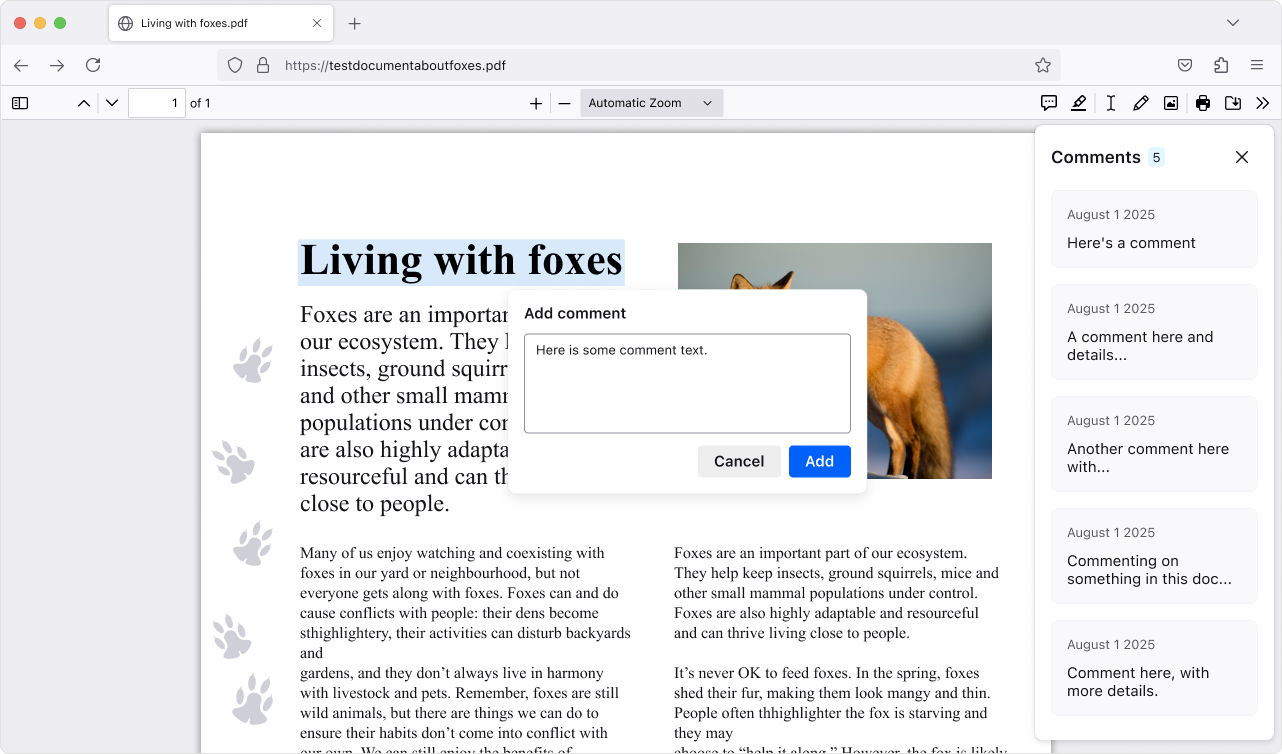
Add, edit, and delete comments to make your own notes in PDFs (summaries, questions, tasks, etc.). The comment sidebar helps you scan all your comments and quickly jump to them, which is handy for long or heavily marked-up PDFs.
-
This version introduces a new phase of privacy protections, building on our research on reducing browser fingerprinting. These new defenses cut the percentage of users seen as unique almost in half, ensuring a safer and more private browsing experience in Private Browsing or when using Enhanced Tracking Protection set to Strict.
-
Need a reminder of what tabs are in a group? Hover over the tab group name to get a preview of the tabs inside without opening it.
-
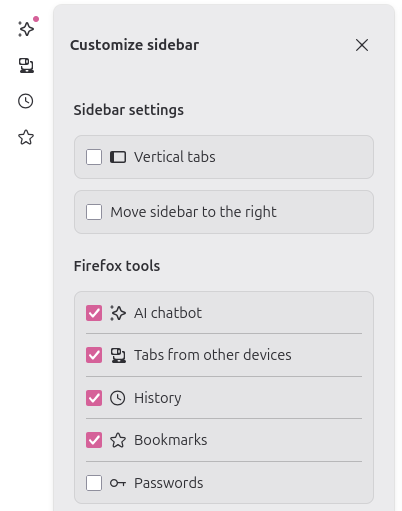
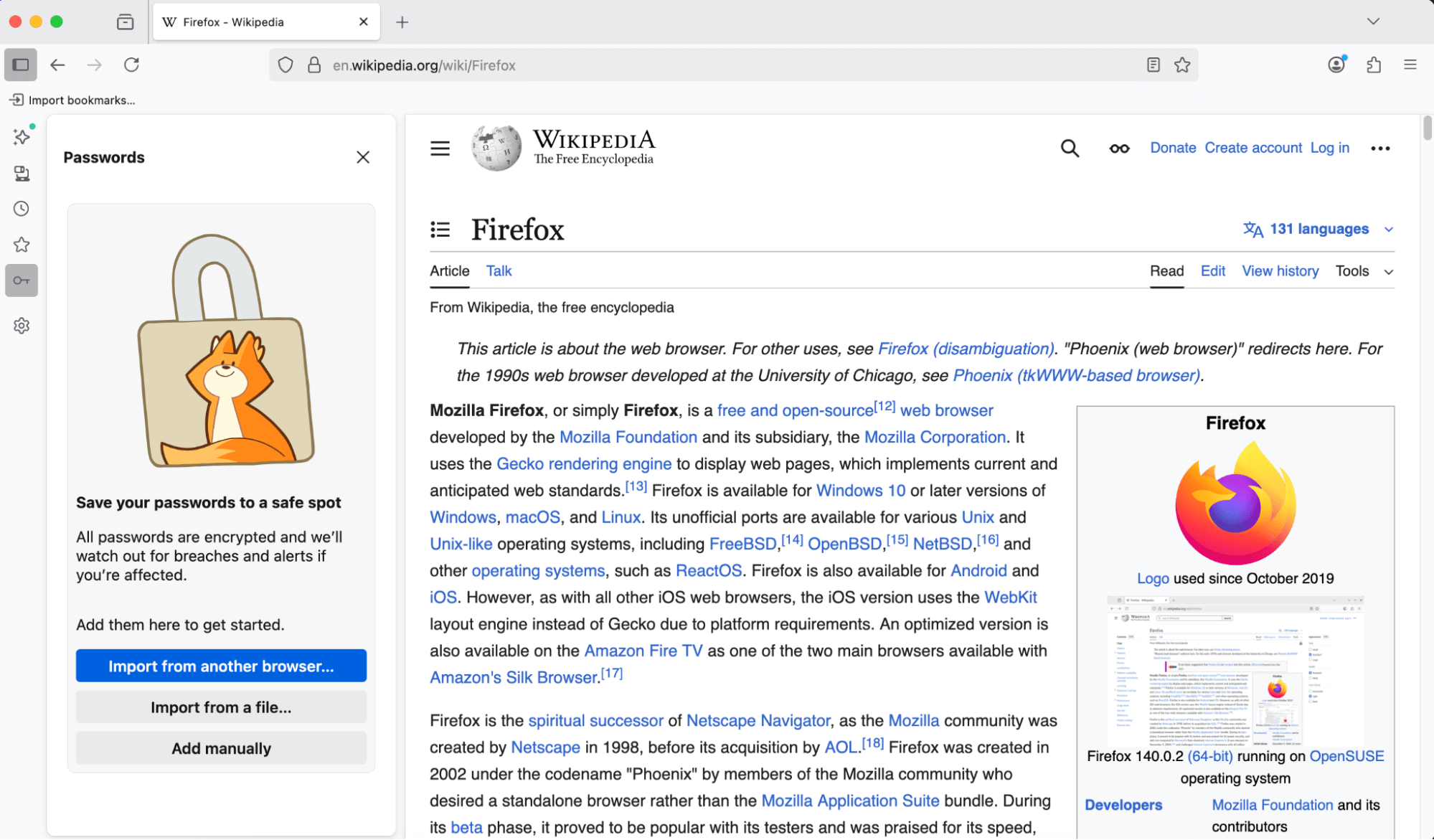
You can now access and manage your saved passwords right from the sidebar—no need to open a new tab or window. Stay on the page you’re on and get to your logins faster.
-
Copy Link to Highlight allows users to share arbitrary sections of a page with others by copying a link through the context menu with a given selection
-
The Translations feature has an improved experience when translating between languages with different script directions.
-
New brand-inspired wallpapers are available for New Tab on desktop, with versions for both light and dark mode.
-
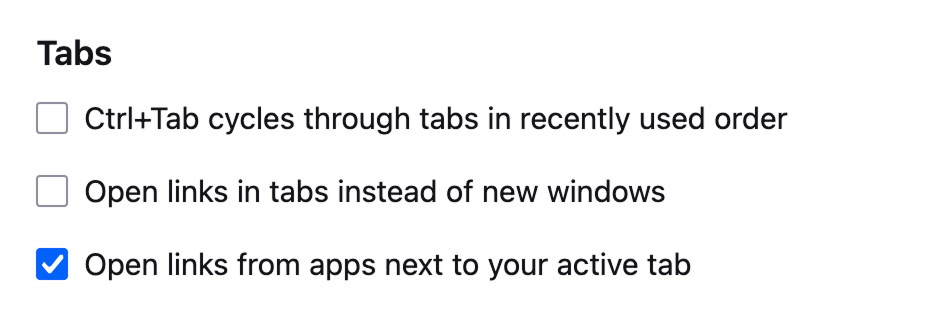
With the new Open links from apps next to your active tab setting, you can have links from other applications open next to your active tab instead of at the end of the tab strip.
-
Enhanced Bounce Tracking Protection’s stateless mode is now enabled by default in ETP Strict, blocking more advanced tracking techniques based on redirection
-
For most Windows users, the existing desktop shortcut for launching Firefox has been replaced with the desktop launcher, a small program that will launch Firefox if it is installed, but if it is not installed will prompt the user to install Firefox. This will provide an easy installation point for Firefox users who acquire a new Windows device, where Firefox will not be installed by default, but the desktop launcher program may have synced via OneDrive or other cloud storage product. Learn more.


Fixed
-
Various security fixes.

Changed
-
Firefox no longer supports 32-bit Linux systems. We recommend installing the 64-bit version for continued updates and support.
-
Horizontal tabs are now slightly more rounded to match the look of vertical tabs. Buttons and text inputs, including the address bar, have also been updated for consistency.
-
When no extensions are installed, clicking the Extensions button now shows a message highlighting how extensions can enhance your browsing, with links to the Firefox Add-ons store.
-
Local translation models are now compressed with Zstandard, reducing download sizes and on-device storage consumption. As always, all Firefox translations happen securely and privately on your local device, unlike other browsers that translate using cloud services.
-
We updated default automation preferences to better support Agentic browsing, reducing the steps agents need to complete a task and chances for the agent to get stuck.

Enterprise
-
You can find information about policy updates and enterprise specific bug fixes in the Firefox for Enterprise 145 Release Notes.

Developer
-
Microsoft UI Automation phased release rollout at 100%. Microsoft UI Automation is the new accessibility framework for Microsoft Windows. This will provide better assistive technology (AT) support and performance on Windows for current and future assistive technologies.

Web Platform
-
Support has been added for the
Atomics.waitAsyncproposal, which is a non-blocking, asynchronous version ofAtomics.wait. This allow synchronization of threads based upon the value in a shared memory location, for more details please consult our MDN documentation. -
Firefox now supports the new
Integrity-Policyheader for enforcing sub-resource integrity for scripts. Further implementation of this header is underway. -
Added Matroska support for the most commonly used codecs: AVC, HEVC, VP8, VP9, AV1, AAC, Opus, and Vorbis.
-
The text-autospace property is now supported, allowing automatic spacing adjustments between characters from different scripts.
-
The WebGPU DOM API (spec; MDN) is now available on macOS 26 (Tahoe) on Apple Silicon. For details, see the Mozilla Graphics Team Blog.

Unresolved
-
On Windows, clicking tabs may not work at the very top of the screen when Firefox is maximized on a second monitor. We’re working to fix this in a future release.(Fixed in 147.0)

Community Contributions
-
With the release of Firefox 145, we are pleased to welcome the developers who contributed their first code change to Firefox in this release, 5 of whom were brand new volunteers! Please join us in thanking each of these diligent and enthusiastic individuals, and take a look at their contributions:
BookStack v25.11.1
Links
Full List of Changes
This release contains the following fixes and changes:
- Fixes database queries causing errors with versions of MySQL <= 5.7. (#5877)

miniSIPServer V60 (build 20251110)
Download de Windows-versie voor 5 clients.
uNmINeD 0.19.53-dev
New uNmINeD development snapshot is available for download!
Changes:
- (GUI) Fixed clipboard issues on Windows
This is a hotfix release for the Windows GUI builds.
Linux, macOS and CLI builds have not changed, they are still at version 0.19.52.
v11.13.2
🐛 Bug Fixes & Optimizations
- @directus/composables
- Fixed tabular view loading items after delay (#26154 by @ComfortablyCoding)
📦 Published Versions
@directus/app@14.1.2@directus/api@32.0.2@directus/composables@11.2.6create-directus-extension@11.0.22@directus/extensions-sdk@17.0.2

Paint.NET 5.1.11 is now available
This is a hotfix for 5.1.10 that fixes the DxgiAdapterService, which is used by plugins that initialize DirectX using their own interop.
The 5.1.10 update was a maintenance release that added a Romanian translation, fixed some important bugs, and updated the bundled FileType plugins.
Get the Update
There are two releases of Paint.NET:
-
Microsoft Store release (recommended)
- You can purchase it here. This helps fund development and is an alternative or supplement to sending in a donation. In addition, updates happen automatically in the background when you’re not using the app.
- If you already have it installed, the update should happen automatically once Microsoft certifies the update, usually within the next day or so. To get the update immediately (once it’s certified), you can follow the instructions listed here.
- Classic Desktop release
- Download the installer from the website. This is the recommended download if you don’t have Paint.NET installed. It can also be used to update the app.
- If you already have it installed, you should be offered the update automatically within the next few days, but you can also get it immediately by going to
 Settings -> Updates -> Check Now.
- Offline Installers and Portable ZIPs are available over on GitHub.
Change Log
Changes since 5.1.10:
- Fixed the DxgiAdapterService not implementing IDxgiAdapterService2 due to a bad merge conflict
Changes in 5.1.10 that were new since 5.1.9:
- New: Added a Romanian (RO) translation
- Fixed a crash (BadNumberException) when moving selected pixels off-canvas, then modifying the selection, then moving the selected pixels back on-canvas
- Changed Effects->Noise->Add Noise’s Coverage property to be a float instead of an integer
- Fixed a rare crash when the system wakes from sleep
- Fixed a small GCHandle leak
- Fixed HlslTernaryFunctionEffect when using 3 value parameters
- Added IDxgiAdapterService2 for plugin use
- Updated the bundled AvifFileType plugin to v3.13.1 (thanks @null54!)
- Updated the bundled JPEG XL FileType plugin to v1.2.0, which improves support for HBD/HDR image loading (thanks @null54!)
- Updated the bundled WebP FileType plugin to v1.6.0 (thanks @null54!)

Paint.NET 5.1.10 is now available
This is a maintenance release that adds a Romanian translation, fixes some important bugs, and updates the bundled FileType plugins.
Get the Update
There are two releases of Paint.NET:
-
Microsoft Store release (recommended)
- You can purchase it here. This helps fund development and is an alternative or supplement to sending in a donation. In addition, updates happen automatically in the background when you’re not using the app.
- If you already have it installed, the update should happen automatically once Microsoft certifies the update, usually within the next day or so. To get the update immediately (once it’s certified), you can follow the instructions listed here.
- Classic Desktop release
- Download the installer from the website. This is the recommended download if you don’t have Paint.NET installed. It can also be used to update the app.
- If you already have it installed, you should be offered the update automatically within the next few days, but you can also get it immediately by going to Settings -> Updates -> Check Now.
- Offline Installers and Portable ZIPs are available over on GitHub.
Change Log
Changes since 5.1.9:
- New: Added a Romanian (RO) translation
- Fixed a crash (BadNumberException) when moving selected pixels off-canvas, then modifying the selection, then moving the selected pixels back on-canvas
- Changed Effects->Noise->Add Noise’s Coverage property to be a float instead of an integer
- Fixed a rare crash when the system wakes from sleep
- Fixed a small GCHandle leak
- Fixed HlslTernaryFunctionEffect when using 3 value parameters
- Added IDxgiAdapterService2 for plugin use
- Updated the bundled AvifFileType plugin to v3.13.1 (thanks @null54!)
- Updated the bundled JPEG XL FileType plugin to v1.2.0, which improves support for HBD/HDR image loading
(thanks @null54!) - Updated the bundled WebP FileType plugin to v1.6.0 (thanks @null54!)
v0.19.3
If you appreciate my work, you can show your support with a donation through Buy Me a Coffee or GitHub sponsors. Your support helps me continue improving and growing the app. Thank you!
🏗️ Enhancements
- Fix low quality card images #4956, by @Syquel
- Remove display Dolby Vision checks #5084, by @nielsvanvelzen
- Get audio duration from player instead of item metadata in AudioNowPlayingFragment #5113, by @nielsvanvelzen
💥 Crash fixes
- Avoid divide by zero in Seekbar #5102, by @nielsvanvelzen
- Fix crash in FullDetailsFragmentHelper.resumePlayback #5119, by @nielsvanvelzen
🔧 Bugfixes
- fix: clear only audio stream index on media item start #5086, by @bin101
- Infer subtitle format from media stream path for external players #5104, by @nielsvanvelzen
Contributors

BookStack v25.11
Links
Full List of Changes
- Added API endpoints for comments. (#5850, #4194))
- Added API endpoints for reading image data. (#5860, #5519)
- Added Groovy code syntax highlighting support. (#5822)
- Added new flags to the create admin command. (#5749)
- Added option for display timezone, and improved UI use consistency. (#5790, #4786)
- Added proper pagination to search. (#5854)
- Updated API docs with better model ordering, and quick navigation select. (#5865)
- Updated codebase to meet PHPstan level 3. (#5785)
- Updated database comments table to remove redundant text column. (#4821)
- Updated database format for core item types. (#5800)
- Updated framework to Laravel 12, and perform some major dependency upgrades. (#5782)
- Updated page delete handling to nullify related images instead of leaving old IDs. (#5846)
- Updated permission handling in code to use enums instead of strings. (#5793)
- Updated translations with latest Crowdin changes. (#5843)
- Updated user delete handling to nullify, or better handle, ID references on delete. (#5844)
- Fixed old API-scripts link leading to archived repo. (#5813)
- Fixed search timeout when a high per-page frequency match was encountered. (#5863)
miniSIPServer V60 (build 20251108)
Download de Windows-versie voor 5 clients.
v11.13.1
🐛 Bug Fixes & Optimizations
- @directus/app
- @directus/api
- Amended file imports to disallow importing multiple records into singleton collections (#26120 by @gaetansenn)
- @directus/system-data
- Removed defunct accepted_terms settings field (#26135 by @u12206050)
- Fixed accounts with minimum access permissions unable to add 2fa (#26059 by @br41nslug)
- @directus/composables
- Fixed layout display dependant on item count request (#26045 by @ComfortablyCoding)
- @directus/types
📦 Published Versions
@directus/app@14.1.1@directus/api@32.0.1@directus/composables@11.2.5create-directus-extension@11.0.21@directus/env@5.3.1@directus/extensions@3.0.13@directus/extensions-registry@3.0.13@directus/extensions-sdk@17.0.1@directus/memory@3.0.11@directus/pressure@3.0.11@directus/schema-builder@0.0.8@directus/storage-driver-azure@12.0.11@directus/storage-driver-cloudinary@12.0.11@directus/storage-driver-gcs@12.0.11@directus/storage-driver-s3@12.0.11@directus/storage-driver-supabase@3.0.11@directus/system-data@3.4.1@directus/themes@1.1.7@directus/types@13.3.1@directus/utils@13.0.12@directus/validation@2.0.11
MariaDB 11.8.4, 11.4.9, 10.11.15 and 10.6.24 now available
The MariaDB Foundation is pleased to announce the availability of MariaDB 11.8.4, MariaDB 11.4.9, MariaDB 10.11.5 and MariaDB 10.6.24, the latest stable releases in their respective long-term series (receiving regular maintenance and support for three years from their first stable release dates, and critical security fixes as source code releases for two additional years beyond). …
Continue reading \"MariaDB 11.8.4, 11.4.9, 10.11.15 and 10.6.24 now available\"
The post MariaDB 11.8.4, 11.4.9, 10.11.15 and 10.6.24 now available appeared first on MariaDB.org.
miniSIPServer V60 (build 20251107)
Download de Windows-versie voor 5 clients.
NVIDIA Driver 581.80
Release Highlights:
Although GeForce Game Ready Drivers and NVIDIA Studio Drivers can be installed on supported notebook GPUs, the original equipment manufacturer (OEM) provides certified drivers for your specific notebook on their website. NVIDIA recommends that you check with your notebook OEM for recommended software updates for your notebook.
Game Ready for Call of Duty: Black Ops 7
This new Game Ready Driver provides the best gaming experience for the latest new games supporting DLSS 4 technology including Call of Duty: Black Ops 7. In addition, there is Game Ready support for Anno 117: Pax Romana and Europa Universalis V which feature DLSS Super Resolution.
Fixed Gaming Bugs
Fixed General Bugs
Learn more in our Game Ready Driver article here.
Although GeForce Game Ready Drivers and NVIDIA Studio Drivers can be installed on supported notebook GPUs, the original equipment manufacturer (OEM) provides certified drivers for your specific notebook on their website. NVIDIA recommends that you check with your notebook OEM for recommended software updates for your notebook.
Game Ready for Call of Duty: Black Ops 7
This new Game Ready Driver provides the best gaming experience for the latest new games supporting DLSS 4 technology including Call of Duty: Black Ops 7. In addition, there is Game Ready support for Anno 117: Pax Romana and Europa Universalis V which feature DLSS Super Resolution.
Fixed Gaming Bugs
- F1 25: Performance optimizations when using DLSS Frame Generation [5422722]
Fixed General Bugs
- Vulkan apps crash when launched on Core 2 Duo / Core 2 Quad CPUs [5509161]
Learn more in our Game Ready Driver article here.

MediaInfo 25.10
+ MXF: crosscheck of ADM profiles
+ MXF: experimental ARRI UL support, more video streams detected
+ TTML: better support files with SMPTE timecode and ticks instead of frame rate
+ MXF: update UL names from the MXF registry (details view)
x AC-4: Add Bitstream level and Presentation level, fix
x MXF: Fix infinite loop in some ARRI files
x ADM: fix tagList related false positive conformance errors
x WAV: fix buggy non word aligned files check with 4 GB+ files
x I2452, PAC: skip '\0' prefix in content
x I2451, TTML: change timecode output "format" from TTML style to classic timecode
+ MXF: experimental ARRI UL support, more video streams detected
+ TTML: better support files with SMPTE timecode and ticks instead of frame rate
+ MXF: update UL names from the MXF registry (details view)
x AC-4: Add Bitstream level and Presentation level, fix
x MXF: Fix infinite loop in some ARRI files
x ADM: fix tagList related false positive conformance errors
x WAV: fix buggy non word aligned files check with 4 GB+ files
x I2452, PAC: skip '\0' prefix in content
x I2451, TTML: change timecode output "format" from TTML style to classic timecode
QNAP lanceert de TL-R6020Sep-RP 4U High-Density SAS/SATA JBOD met 60 schijfhouders, met Petabyte-expansie op petabyte-schaal voor ondernemingen
{
Taipei, Taiwan, 6 november 2025 - QNAP® Systems, Inc., een toonaangevende innovator op het gebied van computer-, netwerk- en opsla ...} More
Who Monitors The Monitor?
Monitor
The first release of Monitor as an elementary OS default app is here! Monitor is an app for monitoring your system resources and running processes, including with optional panel indicators. Since its last release, we’ve completed the port to GTK4, rewrote the settings menu, and a ton more under the hood. Massive thanks to Stanisław, Ryo, and more for their hard work here.
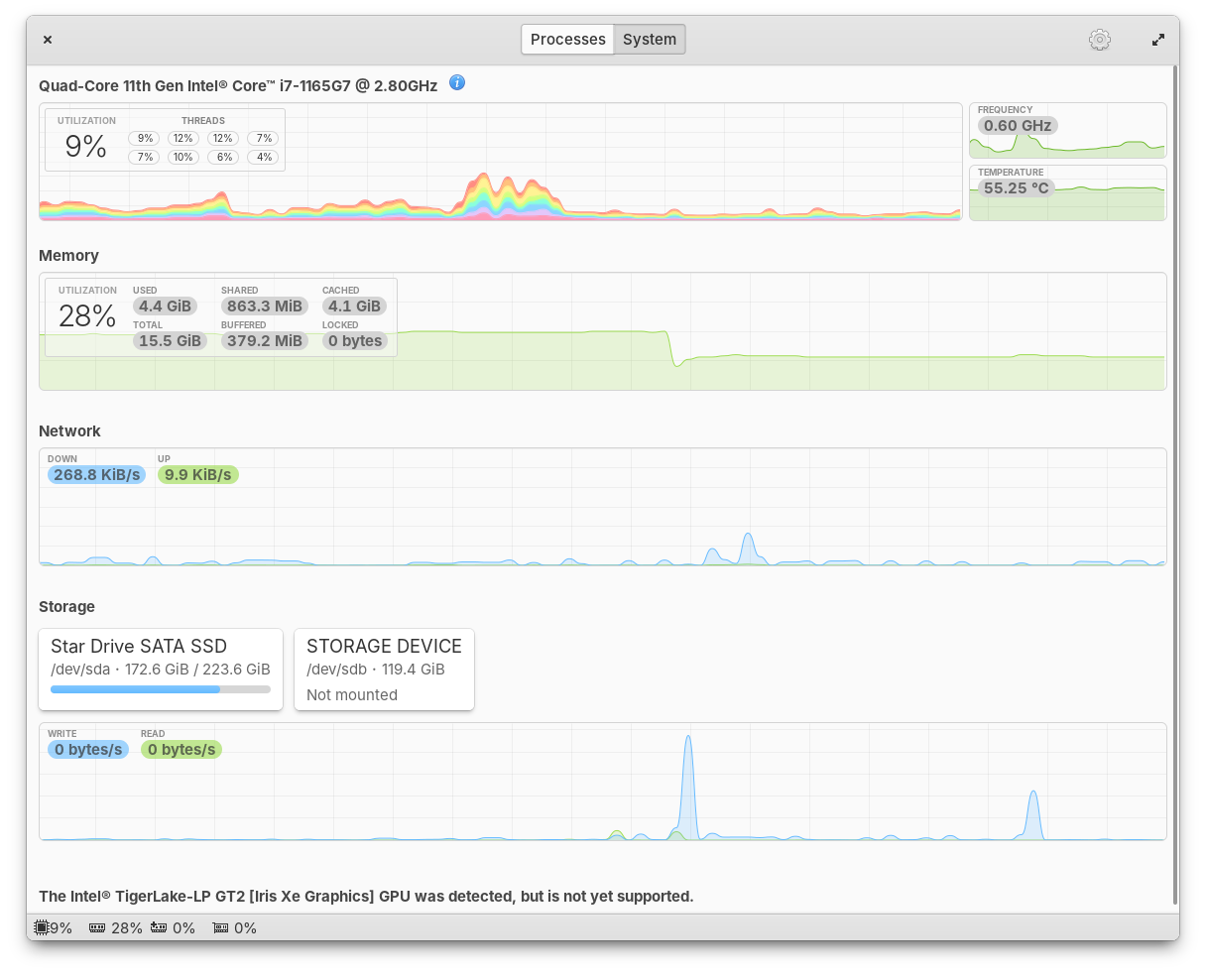
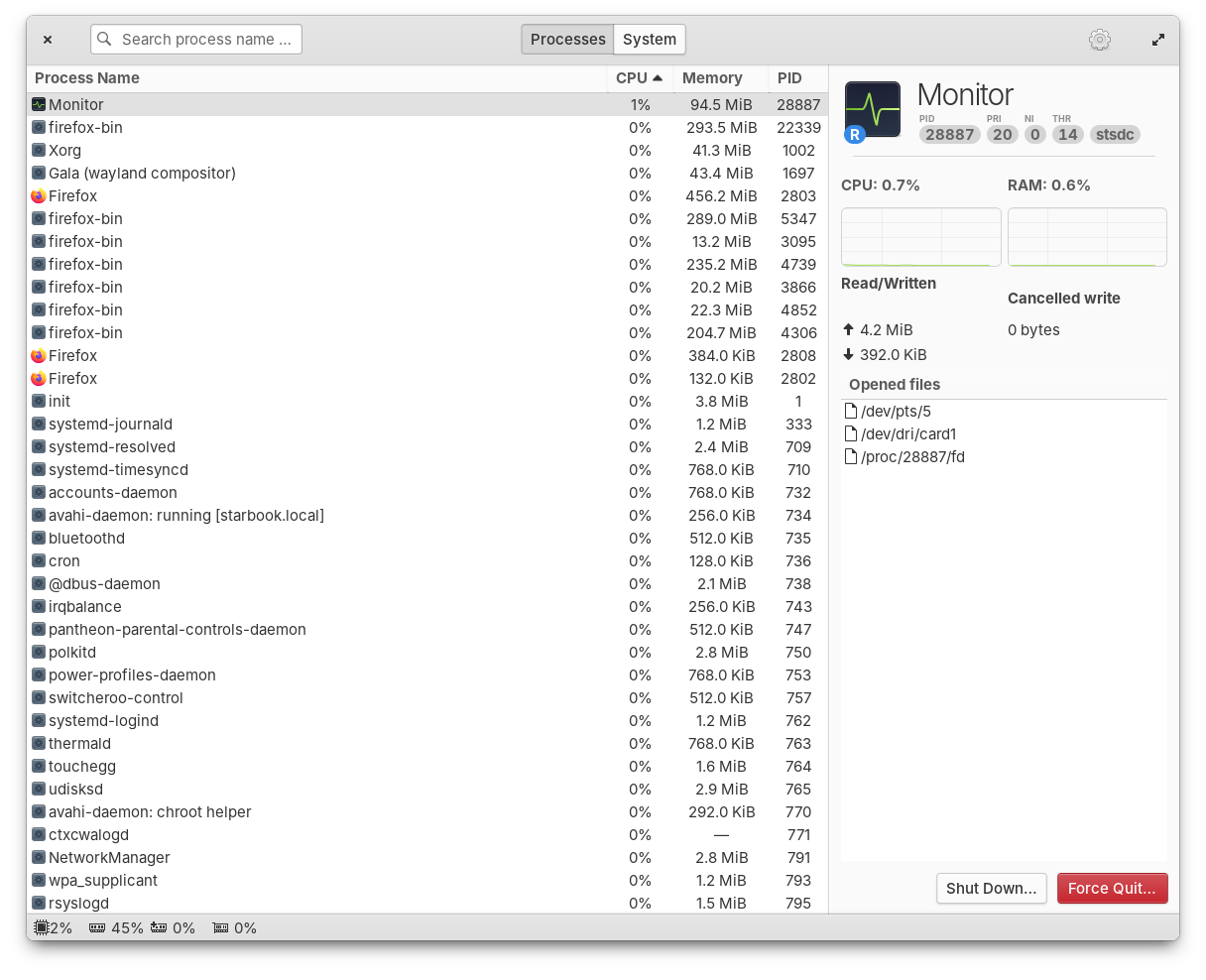
Monitor running processes and available resources
Monitor should be automatically installed on your next update, but if you for some reason don’t get it, you can install Monitor with the Terminal command sudo apt install io.elementary.monitor.
Window Manager & Dock
Another massive bug fix release of our Window Manager has landed with 19 fixed issues including improved performance, fixes for HiDPI, and better animations. We’ve fixed issues with dock menus sometimes appearing behind the dock, apps will now launch correctly when you switch between Classic and Secure sessions, and more.
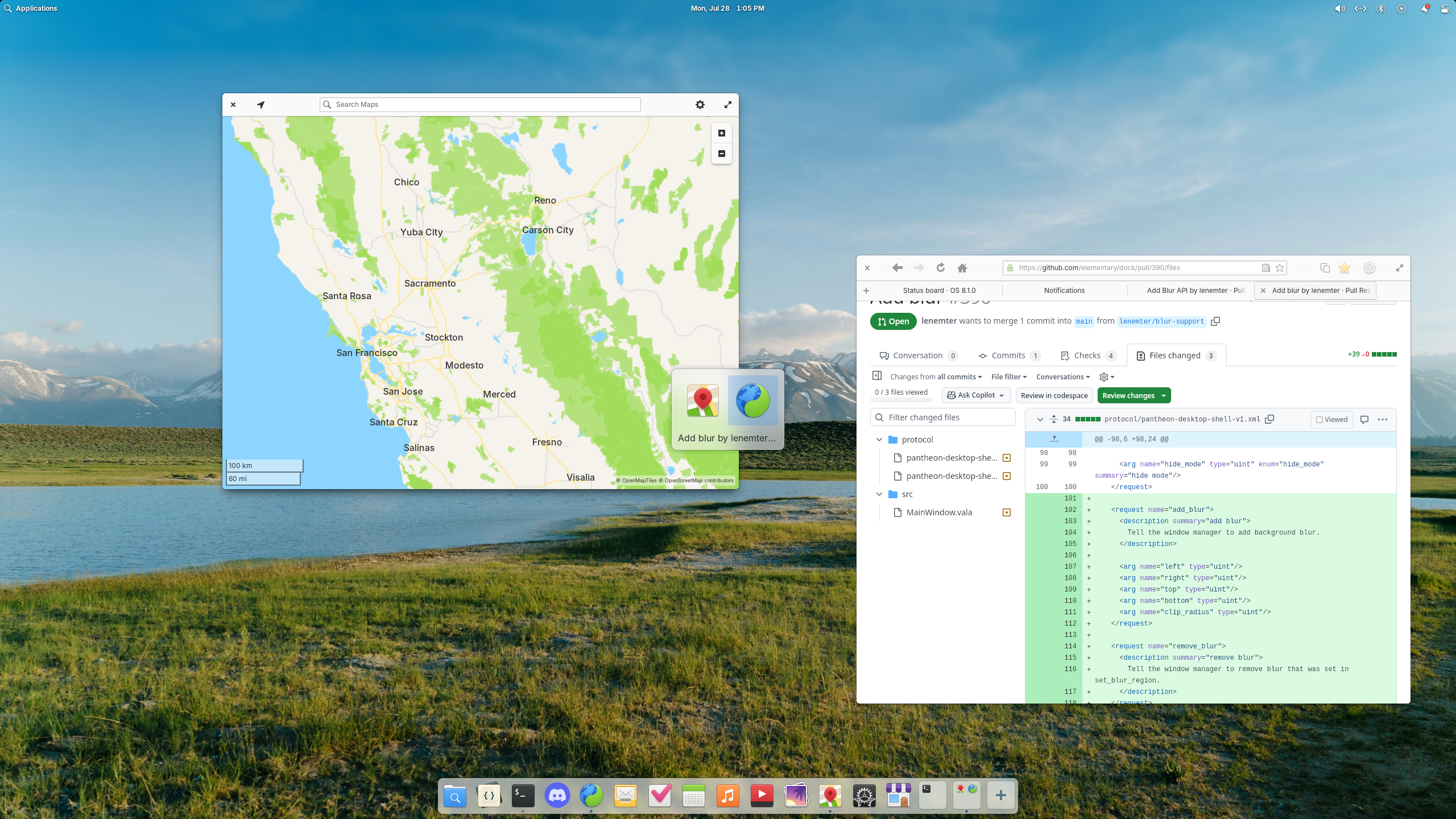
Blur effects have landed in the window switcher and are coming to the Dock
Plus, this release introduces a new blur effect. You’ll first notice it in the Alt + Tab window switcher, but in future updates we will also blur behind the Dock and Notifications. Big thanks to Leo and Leonhard for their hard work on this release.
Icons
We landed a highly requested redesign of folder icons thanks to newhoa. The new folder design is more rounded and more closely matches the design of the Files app icon.
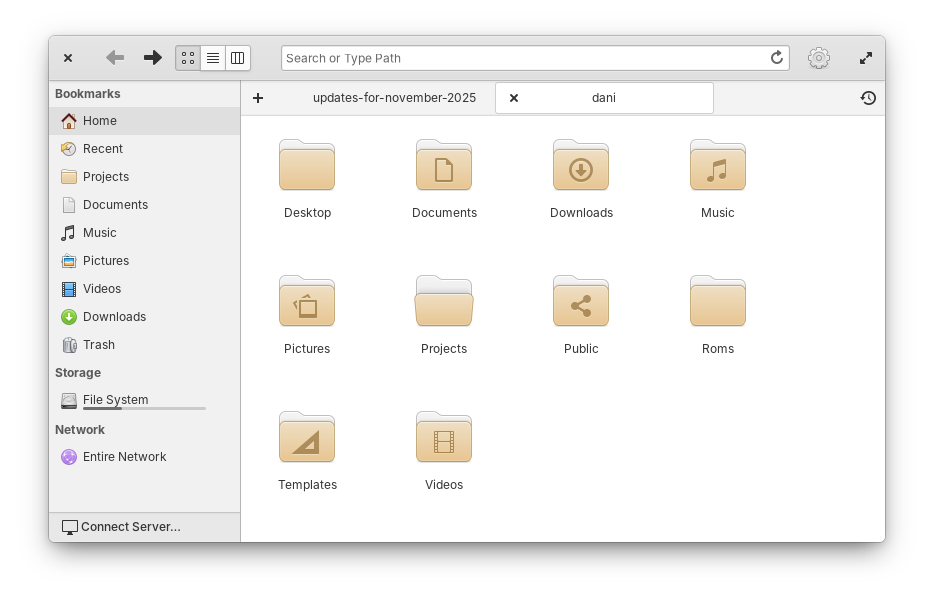
Folder icons have been redesigned with rounded corners
Icons featuring a computer mouse have been slightly redesigned to include a scroll wheel. And, icons featuring a mouse pointer have been updated to match the new pointer design, thanks to William.
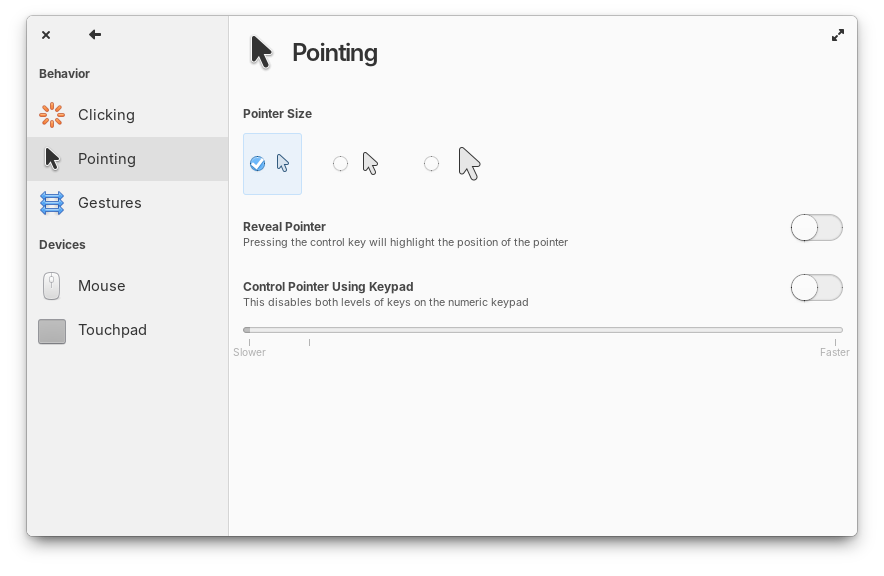
Mouse and Pointer icons have been updated
Plus a number of smaller clean ups including adding missing sizes for certain icons, adjusting lighting, and rounding a few edges. Finally, we now fall back to Adwaita icons when an app is missing a non-standard icon name, thanks to David Lapshin.
Code
In the symbols sidebar, tooltips for C language symbols are now more information like their Vala counterparts. When you clone a git branch, we now send an unobtrusive toast to let you know cloning has completed. Global searches now respect your search case sensitivity settings. Opening a second window no longer results in duplicate project entries in the project chooser. And the “Open Folder” keyboard shortcut has been fixed. Shoutouts Jeremy for his hard work on Code.
Files
Jeremy also fixed a number of small issues with Files including expanding trashed folders in the list view, refreshing views properly when files are deleted, and preventing a potential freeze when the Templates folder contains too many files and subfolders. Plus, Files now shows a setting for Date & Time format.
And More
In Power settings we now show a small warning about increased energy usage with certain options. The Sound menu now uses a toggle icon like Quick Settings instead of a switch to quickly mute. And media keys for volume now work on the Lock Screen thanks to Leo.
Get These Updates
As always, pop open System Settings → System on elementary OS 8 and hit “Update All” to get these updates plus your regular security, bug fix, and translation updates. Or set up automatic updates and get a notification when updates are ready to install!
Early Access
We’re laser focused on preparing to release OS 8.1 so big new features will almost exclusively be targeted to OS 9 from now on. We don’t have OS 9 builds available yet for you to try, but we are working on them already! We’ll let sponsors know first when OS 9 builds are available in Early Access to test. But for now, we have just one more thing.
64-bit Universal ARM builds from the stable updates channel are now available on our Builds website. These builds replace the old device-specific builds for platforms like Raspberry Pi and Pinebook, plus they add support for other ARM devices supported by Linux. This is thanks to the hard work of NN708 who has been dedicated to seeing this project through over the several months it took to complete.
Sponsors
At the moment we’re at 24% of our monthly funding goal and 324 Sponsors on GitHub! Shoutouts to everyone helping us reach our goals here. Your monthly sponsorship funds development and makes sure we have the resources we need to give you the best version of elementary OS we can!
Monthly release candidate builds and daily Early Access builds are available to GitHub Sponsors from any tier! Beware that Early Access builds are not considered stable and you will encounter fresh issues when you run them. We’d really appreciate reporting any problems you encounter with the Feedback app or directly on GitHub.
