Lees weergave

v11.13.2

🐛 Bug Fixes & Optimizations

📦 Published Versions

  • @directus/app@14.1.2
  • @directus/api@32.0.2
  • @directus/composables@11.2.6
  • create-directus-extension@11.0.22
  • @directus/extensions-sdk@17.0.2

  •  

Paint.NET 5.1.11 is now available

This is a hotfix for 5.1.10 that fixes the DxgiAdapterService, which is used by plugins that initialize DirectX using their own interop.

The 5.1.10 update was a maintenance release that added a Romanian translation, fixed some important bugs, and updated the bundled FileType plugins.

Get the Update

There are two releases of Paint.NET:

  • Microsoft Store release (recommended)
    • You can purchase it here. This helps fund development and is an alternative or supplement to sending in a donation. In addition, updates happen automatically in the background when you’re not using the app.
    • If you already have it installed, the update should happen automatically once Microsoft certifies the update, usually within the next day or so. To get the update immediately (once it’s certified), you can follow the instructions listed here.
  • Classic Desktop release
    • Download the installer from the website. This is the recommended download if you don’t have Paint.NET installed. It can also be used to update the app.
    • If you already have it installed, you should be offered the update automatically within the next few days, but you can also get it immediately by going to ⚙ Settings -> Updates -> Check Now.
    • Offline Installers and Portable ZIPs are available over on GitHub.

Change Log

Changes since 5.1.10:

  • Fixed the DxgiAdapterService not implementing IDxgiAdapterService2 due to a bad merge conflict

Changes in 5.1.10 that were new since 5.1.9:

  • New: Added a Romanian (RO) translation
  • Fixed a crash (BadNumberException) when moving selected pixels off-canvas, then modifying the selection, then moving the selected pixels back on-canvas
  • Changed Effects->Noise->Add Noise’s Coverage property to be a float instead of an integer
  • Fixed a rare crash when the system wakes from sleep
  • Fixed a small GCHandle leak
  • Fixed HlslTernaryFunctionEffect when using 3 value parameters
  • Added IDxgiAdapterService2 for plugin use
  • Updated the bundled AvifFileType plugin to v3.13.1 (thanks @null54!) 
  • Updated the bundled JPEG XL FileType plugin to v1.2.0, which improves support for HBD/HDR image loading (thanks @null54!)
  • Updated the bundled WebP FileType plugin to v1.6.0 (thanks @null54!)

  •  

Paint.NET 5.1.10 is now available

This is a maintenance release that adds a Romanian translation, fixes some important bugs, and updates the bundled FileType plugins.

Get the Update

There are two releases of Paint.NET:

  • Microsoft Store release (recommended)
    • You can purchase it here. This helps fund development and is an alternative or supplement to sending in a donation. In addition, updates happen automatically in the background when you’re not using the app.
    • If you already have it installed, the update should happen automatically once Microsoft certifies the update, usually within the next day or so. To get the update immediately (once it’s certified), you can follow the instructions listed here.
  • Classic Desktop release
    • Download the installer from the website. This is the recommended download if you don’t have Paint.NET installed. It can also be used to update the app.
    • If you already have it installed, you should be offered the update automatically within the next few days, but you can also get it immediately by going to ⚙ Settings -> Updates -> Check Now.
    • Offline Installers and Portable ZIPs are available over on GitHub.

Change Log

Changes since 5.1.9:

  • New: Added a Romanian (RO) translation
  • Fixed a crash (BadNumberException) when moving selected pixels off-canvas, then modifying the selection, then moving the selected pixels back on-canvas
  • Changed Effects->Noise->Add Noise’s Coverage property to be a float instead of an integer
  • Fixed a rare crash when the system wakes from sleep
  • Fixed a small GCHandle leak
  • Fixed HlslTernaryFunctionEffect when using 3 value parameters
  • Added IDxgiAdapterService2 for plugin use
  • Updated the bundled AvifFileType plugin to v3.13.1 (thanks @null54!)
  • Updated the bundled JPEG XL FileType plugin to v1.2.0, which improves support for HBD/HDR image loading
    (thanks @null54!)
  • Updated the bundled WebP FileType plugin to v1.6.0 (thanks @null54!)

  •  

v0.19.3

If you appreciate my work, you can show your support with a donation through Buy Me a Coffee or GitHub sponsors. Your support helps me continue improving and growing the app. Thank you!

🏗️ Enhancements

💥 Crash fixes

🔧 Bugfixes

  • fix: clear only audio stream index on media item start #5086, by @bin101
  • Infer subtitle format from media stream path for external players #5104, by @nielsvanvelzen

Contributors

  •  

BookStack v25.11

Links

Full List of Changes

  • Added API endpoints for comments. (#5850, #4194))
  • Added API endpoints for reading image data. (#5860, #5519)
  • Added Groovy code syntax highlighting support. (#5822)
  • Added new flags to the create admin command. (#5749)
  • Added option for display timezone, and improved UI use consistency. (#5790, #4786)
  • Added proper pagination to search. (#5854)
  • Updated API docs with better model ordering, and quick navigation select. (#5865)
  • Updated codebase to meet PHPstan level 3. (#5785)
  • Updated database comments table to remove redundant text column. (#4821)
  • Updated database format for core item types. (#5800)
  • Updated framework to Laravel 12, and perform some major dependency upgrades. (#5782)
  • Updated page delete handling to nullify related images instead of leaving old IDs. (#5846)
  • Updated permission handling in code to use enums instead of strings. (#5793)
  • Updated translations with latest Crowdin changes. (#5843)
  • Updated user delete handling to nullify, or better handle, ID references on delete. (#5844)
  • Fixed old API-scripts link leading to archived repo. (#5813)
  • Fixed search timeout when a high per-page frequency match was encountered. (#5863)

  •  

v11.13.1

🐛 Bug Fixes & Optimizations

  • @directus/app
  • @directus/api
    • Amended file imports to disallow importing multiple records into singleton collections (#26120 by @gaetansenn)
  • @directus/system-data
  • @directus/composables
  • @directus/types
    • Fixed system owner interface behaving unexpectedly (#26132 by @Nitwel)

📦 Published Versions

  • @directus/app@14.1.1
  • @directus/api@32.0.1
  • @directus/composables@11.2.5
  • create-directus-extension@11.0.21
  • @directus/env@5.3.1
  • @directus/extensions@3.0.13
  • @directus/extensions-registry@3.0.13
  • @directus/extensions-sdk@17.0.1
  • @directus/memory@3.0.11
  • @directus/pressure@3.0.11
  • @directus/schema-builder@0.0.8
  • @directus/storage-driver-azure@12.0.11
  • @directus/storage-driver-cloudinary@12.0.11
  • @directus/storage-driver-gcs@12.0.11
  • @directus/storage-driver-s3@12.0.11
  • @directus/storage-driver-supabase@3.0.11
  • @directus/system-data@3.4.1
  • @directus/themes@1.1.7
  • @directus/types@13.3.1
  • @directus/utils@13.0.12
  • @directus/validation@2.0.11

  •  

MariaDB 11.8.4, 11.4.9, 10.11.15 and 10.6.24 now available

The MariaDB Foundation is pleased to announce the availability of MariaDB 11.8.4, MariaDB 11.4.9, MariaDB 10.11.5 and MariaDB 10.6.24, the latest stable releases in their respective long-term series (receiving regular maintenance and support for three years from their first stable release dates, and critical security fixes as source code releases for two additional years beyond). …

Continue reading \"MariaDB 11.8.4, 11.4.9, 10.11.15 and 10.6.24 now available\"

The post MariaDB 11.8.4, 11.4.9, 10.11.15 and 10.6.24 now available appeared first on MariaDB.org.

  •  

NVIDIA Driver 581.80

Release Highlights:
Although GeForce Game Ready Drivers and NVIDIA Studio Drivers can be installed on supported notebook GPUs, the original equipment manufacturer (OEM) provides certified drivers for your specific notebook on their website. NVIDIA recommends that you check with your notebook OEM for recommended software updates for your notebook.

Game Ready for Call of Duty: Black Ops 7

This new Game Ready Driver provides the best gaming experience for the latest new games supporting DLSS 4 technology including Call of Duty: Black Ops 7. In addition, there is Game Ready support for Anno 117: Pax Romana and Europa Universalis V which feature DLSS Super Resolution.

Fixed Gaming Bugs
  • F1 25: Performance optimizations when using DLSS Frame Generation [5422722]

Fixed General Bugs

  • Vulkan apps crash when launched on Core 2 Duo / Core 2 Quad CPUs [5509161]

Learn more in our Game Ready Driver article here.

Game Ready  Driver

  •  

MediaInfo 25.10

+ MXF: crosscheck of ADM profiles
+ MXF: experimental ARRI UL support, more video streams detected
+ TTML: better support files with SMPTE timecode and ticks instead of frame rate
+ MXF: update UL names from the MXF registry (details view)
x AC-4: Add Bitstream level and Presentation level, fix
x MXF: Fix infinite loop in some ARRI files
x ADM: fix tagList related false positive conformance errors
x WAV: fix buggy non word aligned files check with 4 GB+ files
x I2452, PAC: skip '\0' prefix in content
x I2451, TTML: change timecode output "format" from TTML style to classic timecode
  •  

Who Monitors The Monitor?

Monitor

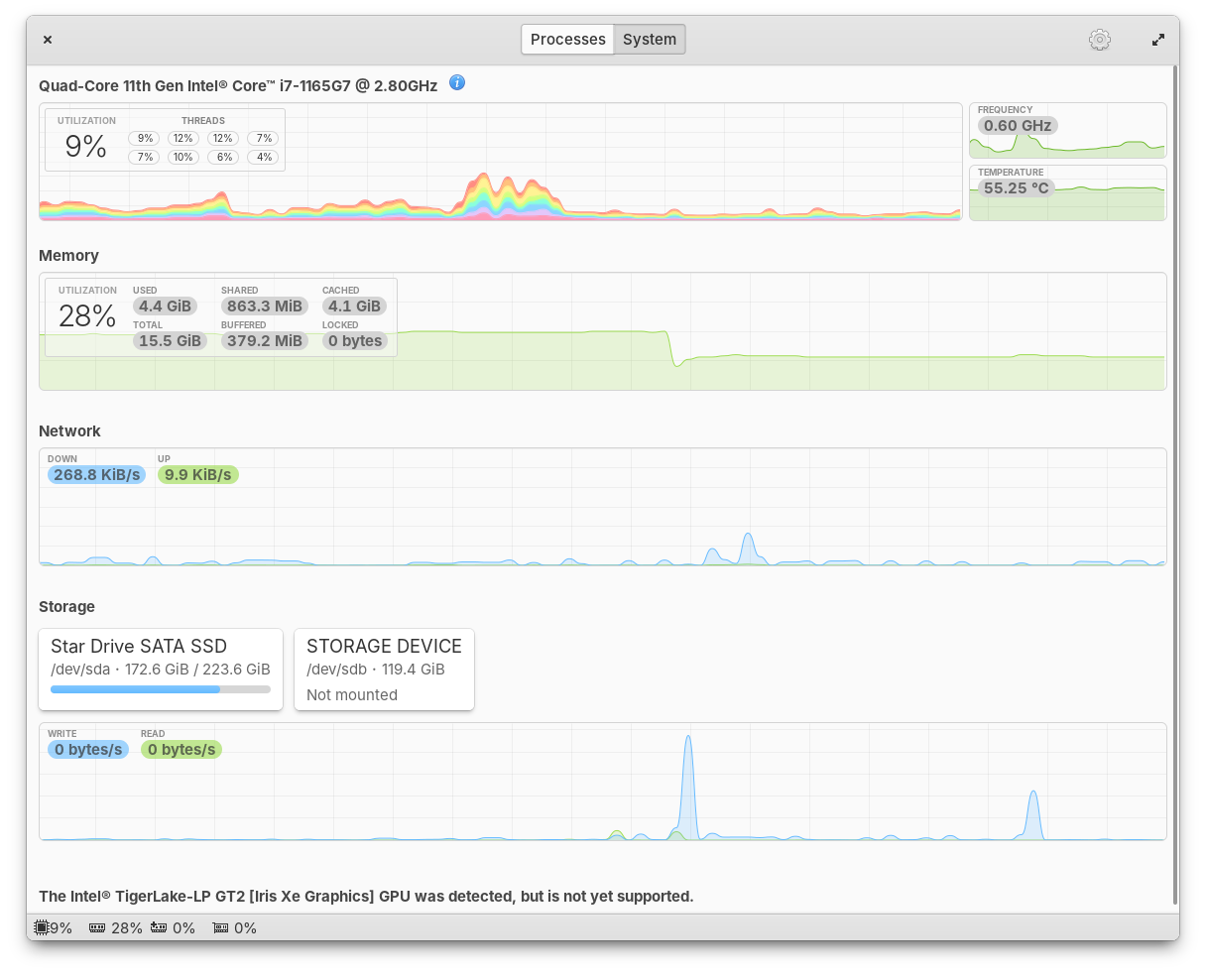
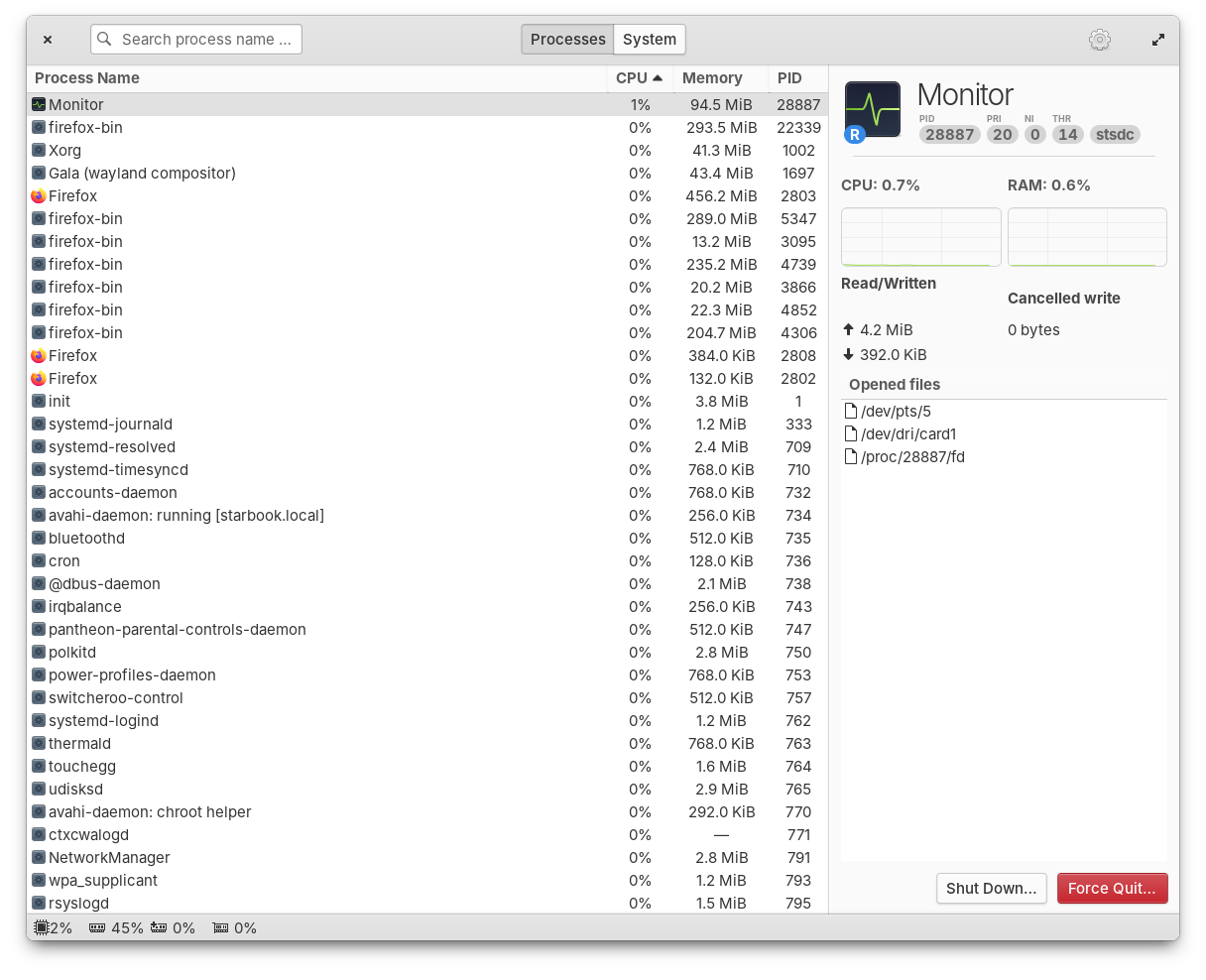
The first release of Monitor as an elementary OS default app is here! Monitor is an app for monitoring your system resources and running processes, including with optional panel indicators. Since its last release, we’ve completed the port to GTK4, rewrote the settings menu, and a ton more under the hood. Massive thanks to Stanisław, Ryo, and more for their hard work here.

Monitor Processes Monitor Resources

Monitor running processes and available resources

Monitor should be automatically installed on your next update, but if you for some reason don’t get it, you can install Monitor with the Terminal command sudo apt install io.elementary.monitor.

Window Manager & Dock

Another massive bug fix release of our Window Manager has landed with 19 fixed issues including improved performance, fixes for HiDPI, and better animations. We’ve fixed issues with dock menus sometimes appearing behind the dock, apps will now launch correctly when you switch between Classic and Secure sessions, and more.

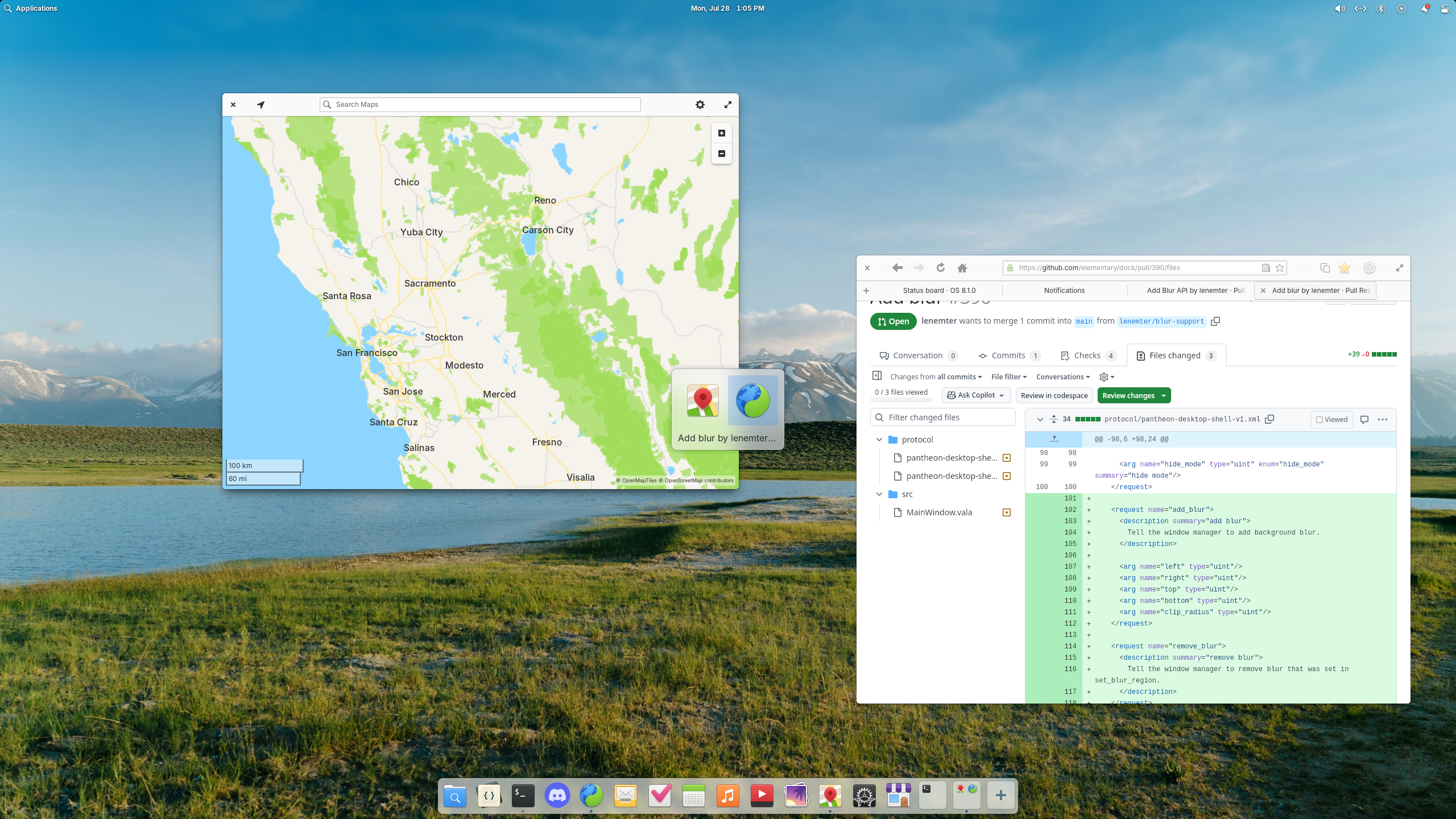
Desktop Blur

Blur effects have landed in the window switcher and are coming to the Dock

Plus, this release introduces a new blur effect. You’ll first notice it in the Alt + Tab window switcher, but in future updates we will also blur behind the Dock and Notifications. Big thanks to Leo and Leonhard for their hard work on this release.

Icons

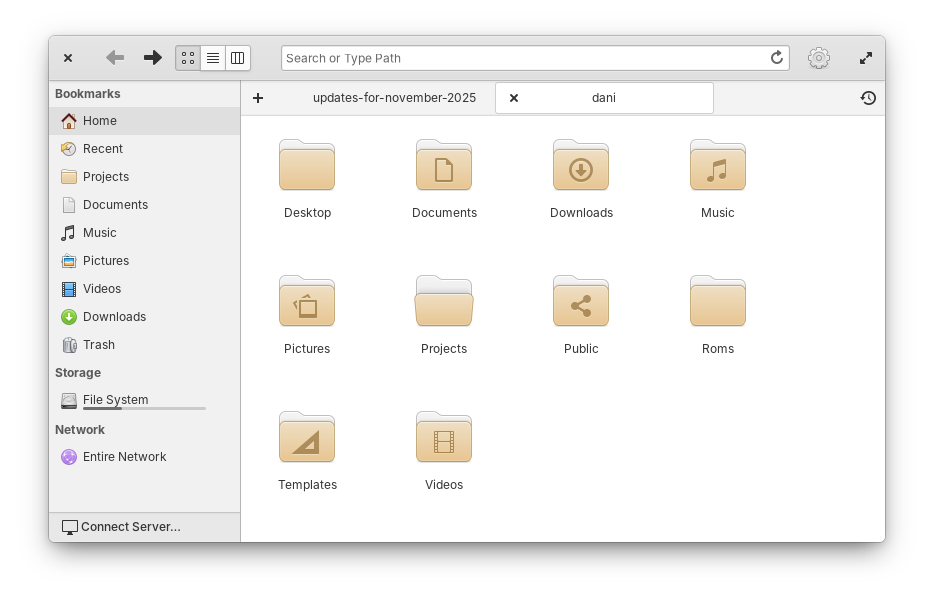
We landed a highly requested redesign of folder icons thanks to newhoa. The new folder design is more rounded and more closely matches the design of the Files app icon.

Folder icons

Folder icons have been redesigned with rounded corners

Icons featuring a computer mouse have been slightly redesigned to include a scroll wheel. And, icons featuring a mouse pointer have been updated to match the new pointer design, thanks to William.

Pointer icons

Mouse and Pointer icons have been updated

Plus a number of smaller clean ups including adding missing sizes for certain icons, adjusting lighting, and rounding a few edges. Finally, we now fall back to Adwaita icons when an app is missing a non-standard icon name, thanks to David Lapshin.

Code

In the symbols sidebar, tooltips for C language symbols are now more information like their Vala counterparts. When you clone a git branch, we now send an unobtrusive toast to let you know cloning has completed. Global searches now respect your search case sensitivity settings. Opening a second window no longer results in duplicate project entries in the project chooser. And the “Open Folder” keyboard shortcut has been fixed. Shoutouts Jeremy for his hard work on Code.

Files

Jeremy also fixed a number of small issues with Files including expanding trashed folders in the list view, refreshing views properly when files are deleted, and preventing a potential freeze when the Templates folder contains too many files and subfolders. Plus, Files now shows a setting for Date & Time format.

And More

In Power settings we now show a small warning about increased energy usage with certain options. The Sound menu now uses a toggle icon like Quick Settings instead of a switch to quickly mute. And media keys for volume now work on the Lock Screen thanks to Leo.

Get These Updates

As always, pop open System Settings → System on elementary OS 8 and hit “Update All” to get these updates plus your regular security, bug fix, and translation updates. Or set up automatic updates and get a notification when updates are ready to install!


Early Access

We’re laser focused on preparing to release OS 8.1 so big new features will almost exclusively be targeted to OS 9 from now on. We don’t have OS 9 builds available yet for you to try, but we are working on them already! We’ll let sponsors know first when OS 9 builds are available in Early Access to test. But for now, we have just one more thing.

64-bit Universal ARM builds from the stable updates channel are now available on our Builds website. These builds replace the old device-specific builds for platforms like Raspberry Pi and Pinebook, plus they add support for other ARM devices supported by Linux. This is thanks to the hard work of NN708 who has been dedicated to seeing this project through over the several months it took to complete.


Sponsors

At the moment we’re at 24% of our monthly funding goal and 324 Sponsors on GitHub! Shoutouts to everyone helping us reach our goals here. Your monthly sponsorship funds development and makes sure we have the resources we need to give you the best version of elementary OS we can!

Monthly release candidate builds and daily Early Access builds are available to GitHub Sponsors from any tier! Beware that Early Access builds are not considered stable and you will encounter fresh issues when you run them. We’d really appreciate reporting any problems you encounter with the Feedback app or directly on GitHub.

💾

  •  

Stable Channel Update for Desktop

The Stable channel has been updated to 142.0.7444.134/.135 for Windows and 142.0.7444.135 for Mac and 142.0.7444.134 for Linuxwhich will roll out over the coming days/weeks. A full list of changes in this build is available in the Log.


Security Fixes and Rewards

Note: Access to bug details and links may be kept restricted until a majority of users are updated with a fix. We will also retain restrictions if the bug exists in a third party library that other projects similarly depend on, but haven’t yet fixed.


This update includes 5 security fixes. Below, we highlight fixes that were contributed by external researchers. Please see the Chrome Security Page for more information.


[TBD][443906252] High CVE-2025-12725: Out of bounds write in WebGPU. Reported by Anonymous on 2025-09-09

[TBD][447172715] High CVE-2025-12726: Inappropriate implementation in Views. Reported by Alesandro Ortiz on 2025-09-25

[TBD][454485895] High CVE-2025-12727: Inappropriate implementation in V8. Reported by 303f06e3 on 2025-10-23

[TBD][452392032] Medium CVE-2025-12728: Inappropriate implementation in Omnibox. Reported by Hafiizh on 2025-10-16

[TBD][454354281] Medium CVE-2025-12729: Inappropriate implementation in Omnibox. Reported by Khalil Zhani on 2025-10-23


We would also like to thank all security researchers that worked with us during the development cycle to prevent security bugs from ever reaching the stable channel.

Many of our security bugs are detected using AddressSanitizer, MemorySanitizer, UndefinedBehaviorSanitizer, Control Flow Integrity, libFuzzer, or AFL.


Interested in switching release channels? Find out how here. If you find a new issue, please let us know by filing a bug. The community help forum is also a great place to reach out for help or learn about common issues.


Srinivas Sista
Google Chrome
  •  

2025.11: Pick, automate, and a slice of pie 🥧

Home Assistant 2025.11! 🎉

November is here, and we’ve been hard at work refining some of the main experiences that you interact with every day, and I think you’re going to love what we’ve built.

My personal favorite this release? The brand new target picker. 🎯

It’s one of those changes that seems simple on the surface, but makes such a huge difference in how you build automations. You can finally see exactly what you’re targeting, with full context about which device an entity belongs to and which area it’s in. No more guessing whether you’re controlling the right ceiling light when you have three of them!

But that’s just the beginning. We’re continuing with the automation editor improvements, this time with a completely redesigned dialog for adding triggers, conditions, and actions. It’s cleaner, easier to read, and sets the foundation for some really exciting stuff coming in future releases. 🤫

And speaking of making things clearer, you can now control exactly how entity names appear on your dashboard cards. Want to show just the entity name? The device name? The area? Or combine them? Even if you rename things, your dashboards will stay perfectly in sync. No more manual updates needed!

Oh, and energy dashboard fans will appreciate the new pie chart view for device energy, complete with totals displayed in the corner of every energy card. 🥧

Enjoy the release!

../Frenck

PS: Oh, and pssst… Don’t tell anyone 🤫, but there might be something exciting being released on November 19th. Hit the bell on this announced YouTube stream to not miss it. Stay tuned! 😀

A huge thank you to all the contributors who made this release possible! And a special shout-out to @bramkragten, @JLo, @MindFreeze, @agners, and @piitaya who helped write the release notes this release. Also, @silamon and @GemPolisher for putting effort into tweaking its contents. Thanks to them, these release notes are in great shape. ❤️

A brand new target picker

Have you ever been building an automation and wondered, “Wait, which ceiling light is this?” when you see three entities all named “Ceiling light”? Or tried to figure out how many lights you’re actually controlling when you target an entire floor or area?

We’ve all been there. Until now, the target picker didn’t show you the full picture. You couldn’t see which device an entity belonged to or which area it was assigned to. And when you selected a floor or area as your target, you had no idea how many entities you were actually affecting. This uncertainty meant many of you stuck with targeting individual entities, even though larger targets (like areas and floors) can make your automations much more flexible.

The new target picker changes all that. Now you get full context for everything you’re targeting, and you can see exactly how many entities will be affected by your action.
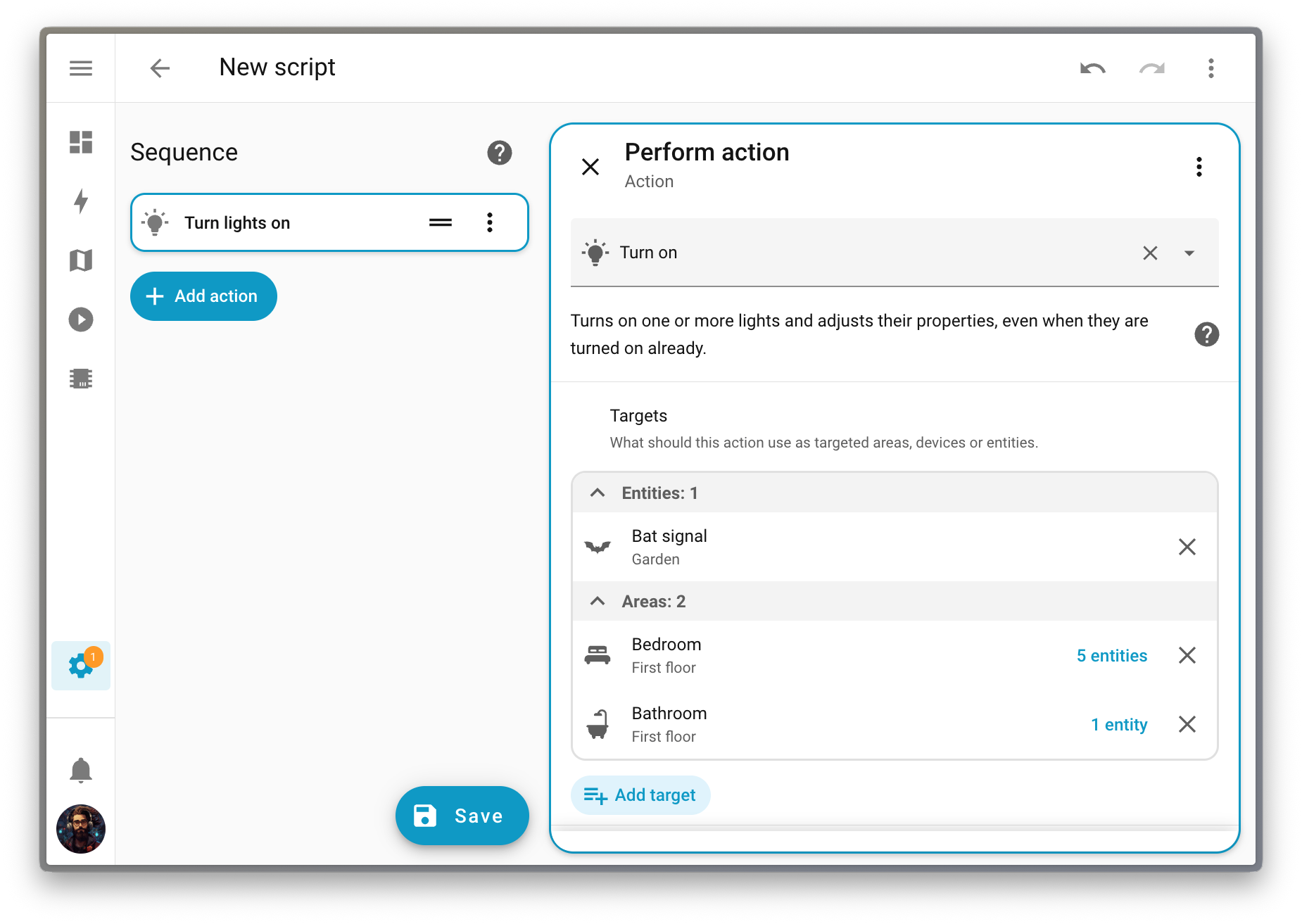
Screenshot of a light action configuration with targets picked.

Want to dig deeper? You can expand any floor, area, or device to see exactly which entities are included and where they’re coming from.
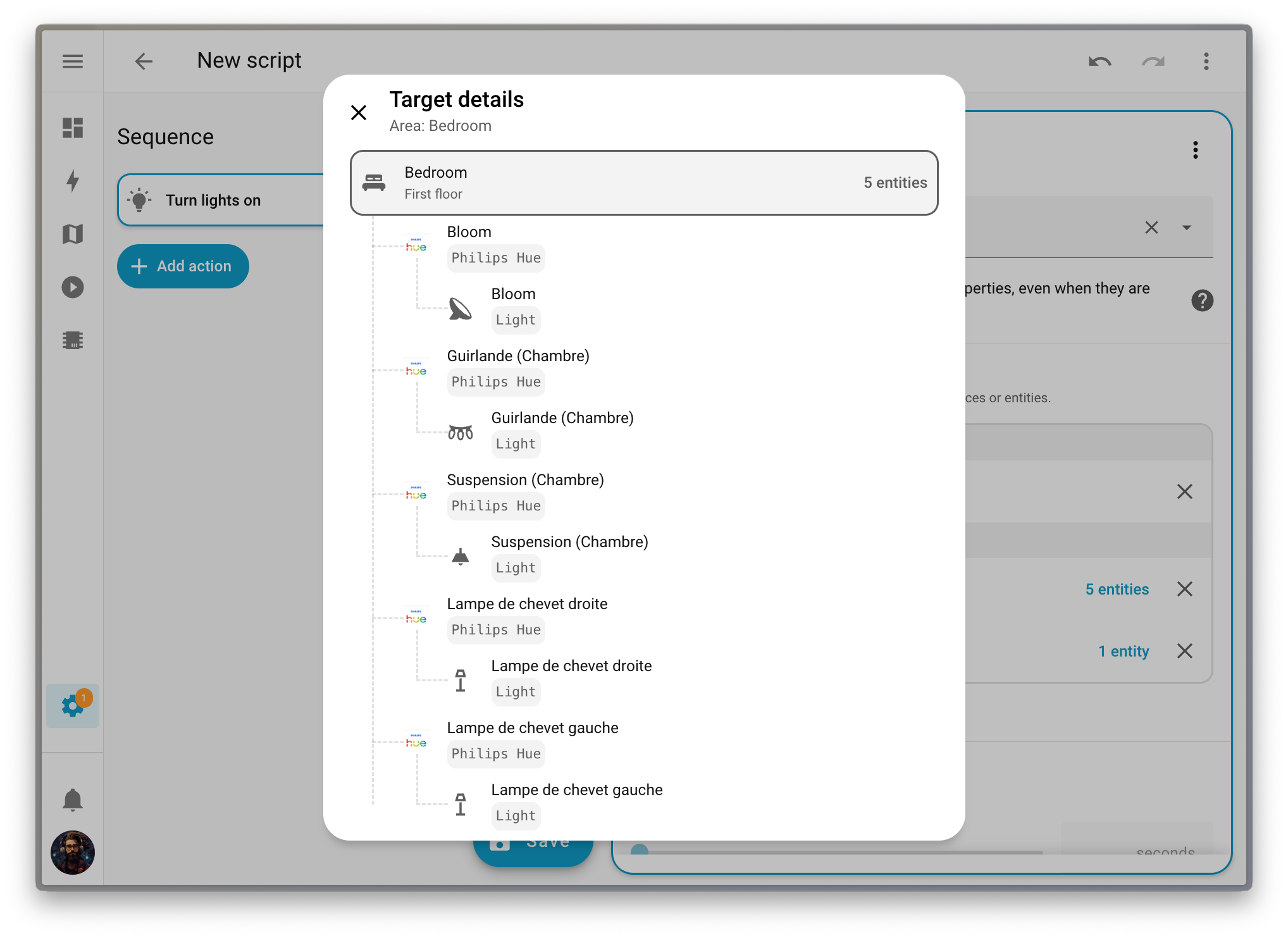
Screenshot of the details of a target.

This makes it so much easier to build automations that scale with your home. When you target an area or floor, your automation automatically adapts as you add or remove devices. No more updating your automations every time you add a new light or sensor. Your automations just work, which is exactly how it should be.

A brand new way to add triggers, conditions, and actions in your automations

It’s no secret that we’re currently working hard on making automations easier to create. After the release of the automation sidebar two releases ago, we are now introducing a new dialog to add triggers, conditions, and actions.

The changes are purely cosmetic: the dialog is bigger, so the description of each block is simpler to read, with a two-pane layout to ease both navigation and block selection.
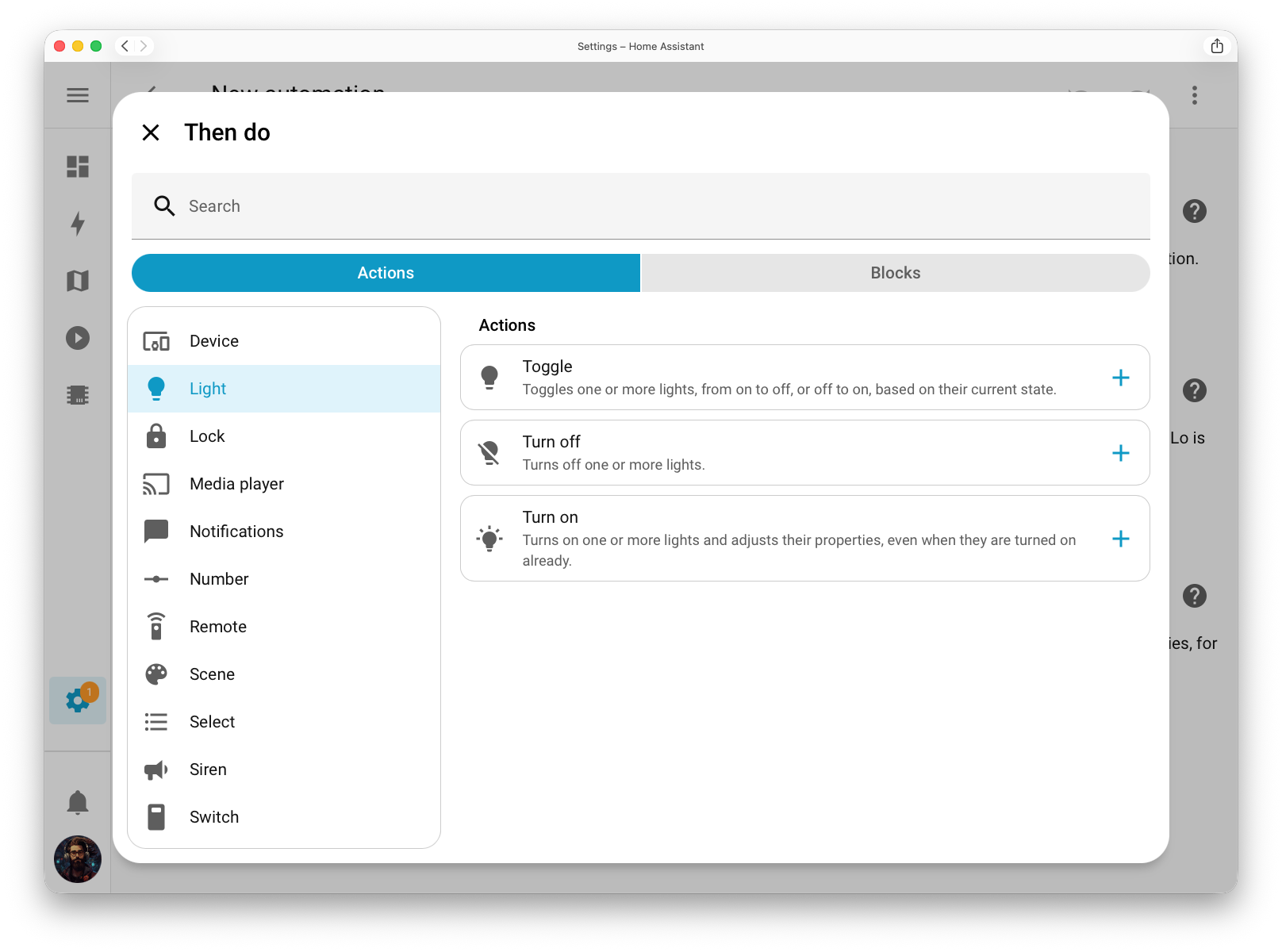
Screenshot of the new dialog to add an action.

The building blocks (which are used to perform more complex conditions or sequences of actions, such as repeating actions or branching out your sequence into multiple paths) have been moved into the main dialog on a second tab. There is now a single entry point to add something to an automation instead of two, greatly reducing the number of buttons in complex automations.
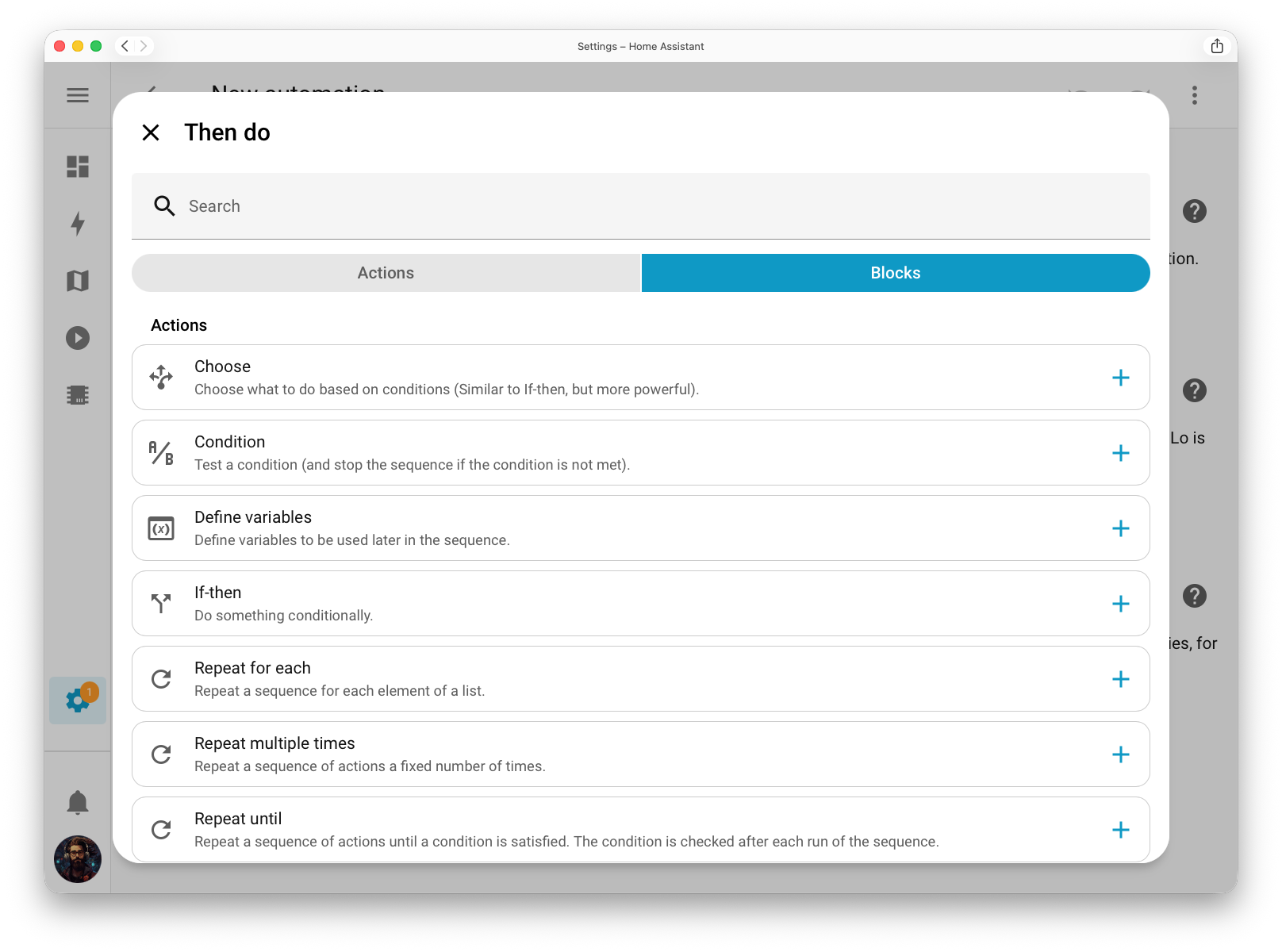
Screenshot of the new dialog to add a building block to an action.

As mentioned above, these changes are purely cosmetic, for now! But this new dialog is the foundation of what’s coming next, and we cannot wait to present that to you once it finally lands.

Naming entities on your dashboard

A few releases ago, we gave the entity picker a big upgrade by adding more context so you could easily see where each entity belongs (May 2025 release). In this release, we’re bringing that same flexibility to your dashboards.

You can now choose how names appear on your cards: show the entity, device, area, floor, or even combine them. This gives you full control over how your dashboards look and feel. For example, in a dedicated section for a specific device, you might choose to display only the entity name to avoid repeating the device name on every card.

Of course, you can still set a custom name if you want complete control over the text shown.

And the best part? If you rename an entity or device, your dashboards will automatically stay in sync. No more manual edits needed; everything just updates itself.
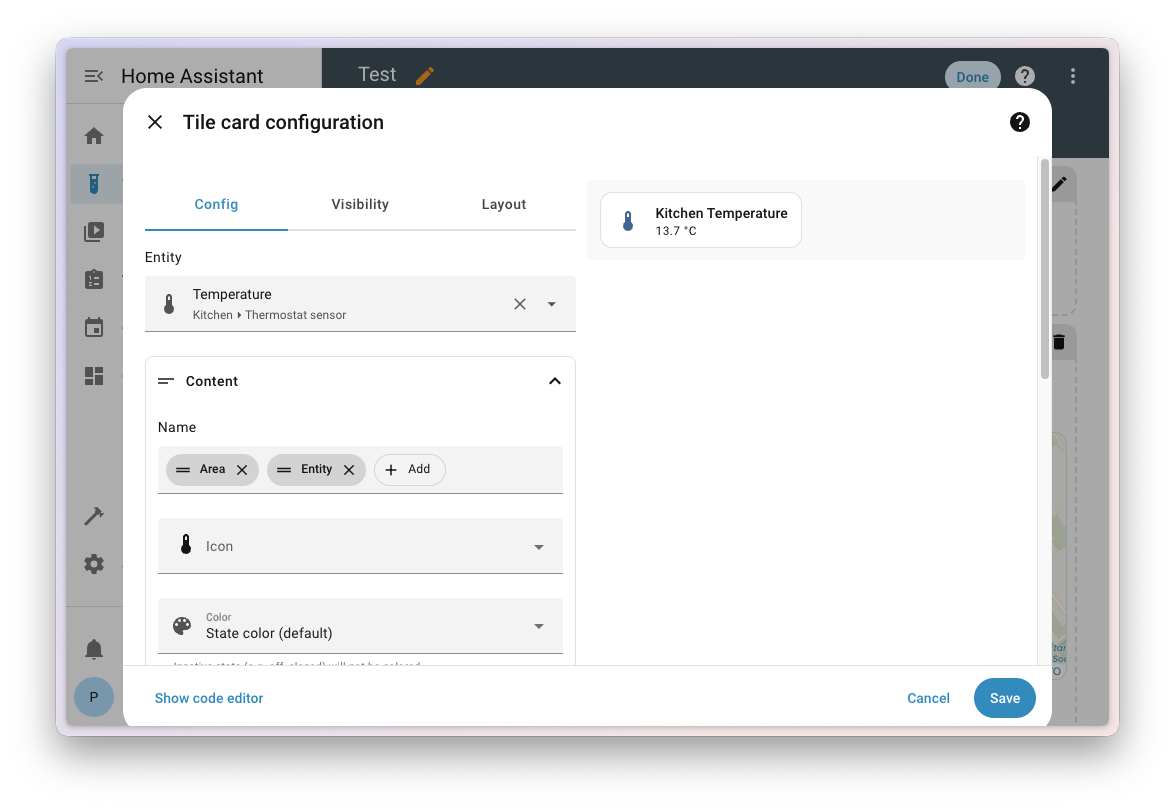
Screenshot of the configuration dialog of a tile card.

Energy pie

We’ve added a new layout to the devices energy graph: “pie” 🥧. You can toggle between the regular bar chart and the new pie chart by clicking the icon in the top-right corner.
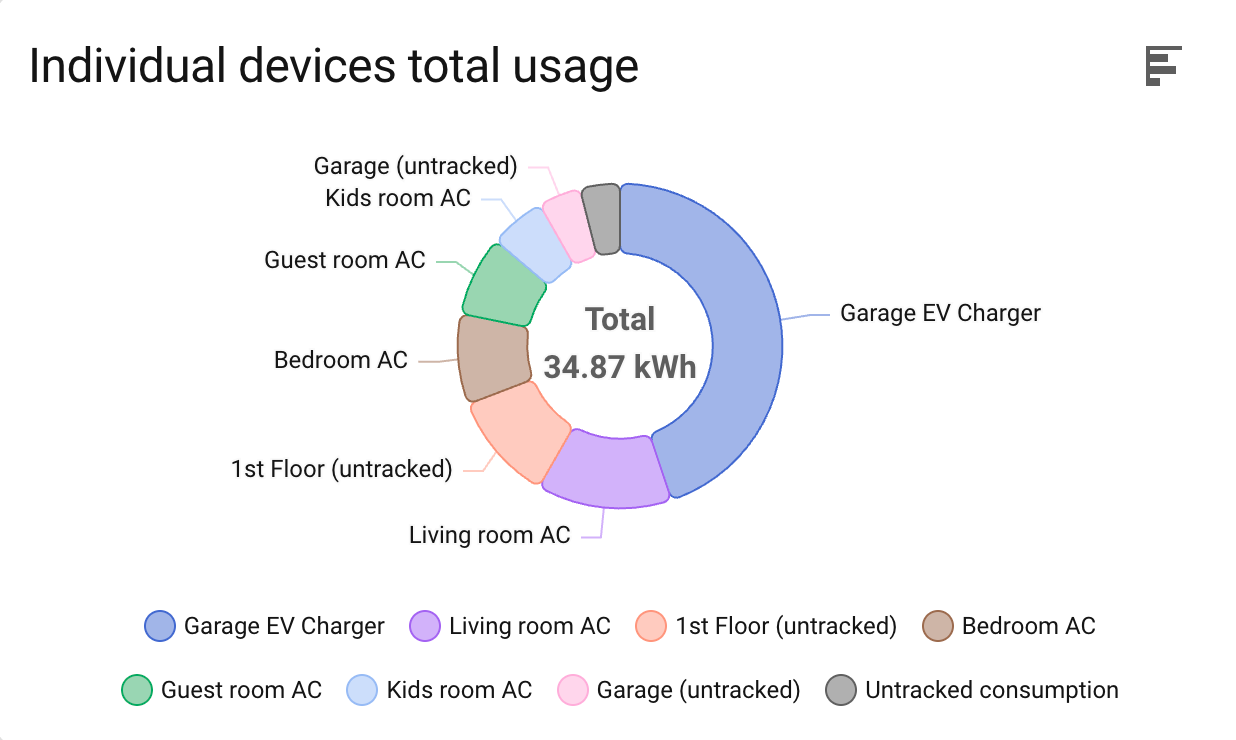
Screenshot showing the devices energy graph in pie layout.

Doing this made the top-right corner of the other energy cards feel empty, so we used that space to display the total energy for the selected period. For example, if the date picker is set to today, the total solar energy for today will be displayed in the corner of the solar production graph card.

Progress for Home Assistant and Add-on updates

With this release, you can now track the progress of updates to Home Assistant and Add-ons (managed by the Supervisor)! The progress includes the stages of downloading and unpacking, so the time required will vary based on your internet speed, CPU performance, and system load. As a result, the progress is not reflected as perfectly linear, but it does still provide a good estimate of how far along the update is.
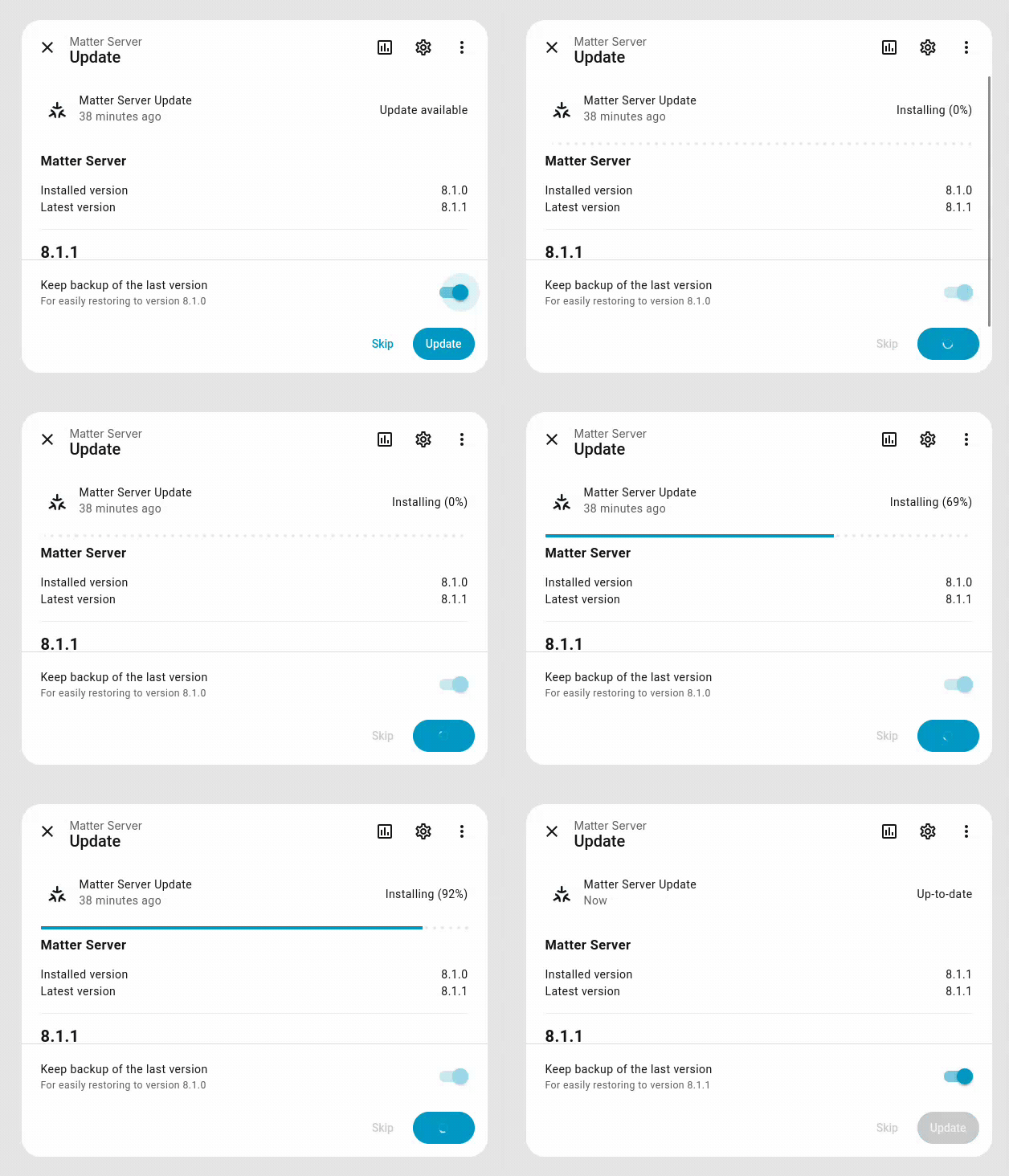
Screen recording showing an add-on update with progress reporting.

Integrations

Thanks to our community for keeping pace with the new integrationsIntegrations connect and integrate Home Assistant with your devices, services, and more. [Learn more] and improvements to existing ones! You’re all awesome. 🥰

New integrations

We welcome the following new integrations in this release:

Noteworthy improvements to existing integrations

It’s not just new integrationsIntegrations connect and integrate Home Assistant with your devices, services, and more. [Learn more] that have been added; existing integrations are also being constantly improved. Here are some of the noteworthy changes:

  • The SwitchBot integration now supports garage door openers. Thanks @zerzhang!
  • @tr4nt0r added support for notifications to the Habitica integration. Nice work!
  • The VegeHub integration now has support for switches to control actuators. Cool @Thulrus!
  • The Portainer integration gained support for switches, buttons, and sensors, so you can control and monitor all your containers! Well done @erwindouna!
  • The Volvo integration can now show the location of your car and has buttons to control it. We got @thomasddn to thank for that!
  • ElevenLabs can now be used for speech-to-text. Thanks @ehendrix23!
  • You can now control the LEDs of supported UniFi network devices! Thanks @Sese-Schneider!
  • @barneyonline added binary sensors to the Yardian integration. Nice!
  • You can now set the temperature of your 3D printer’s tool and bed with the OctoPrint integration. Thanks @AmadeusW!
  • The Niko Home Control integration now also adds your scenes into Home Assistant! Thanks @VandeurenGlenn!
  • Your Control4 climate devices (for example, thermostats) are now supported in Home Assistant. Thanks @davidrecordon!
  • Support for controlling Growatt MIN/TLX inverters was added, and you can now enable grid charge! Thanks @johanzander!
  • @hanwg added event entities to the Telegram bot integration. You can use these entities to more easily automate when you get a message, for example! Cool!
  • The Xbox integration now has support for images! It shows an image of the game you are currently playing, the avatar, and the Gamerpic for yourself and your friends. Thanks @tr4nt0r!
  • @AndyTempel added support for solar production forecasting to Victron Remote Monitoring, so you can now use it in the energy dashboard to see a forecast of how much solar energy you will produce today!
  • The Shelly integration now supports climate and valve entities. Thanks @thecode!
  • @starkillerOG improved the Reolink integration; it can now report bicycles and the type of person, vehicle, and animal. So you now know if a man or a woman is detected on your cameras. Great work!

Now available to set up from the UI

While most integrationsIntegrations connect and integrate Home Assistant with your devices, services, and more. [Learn more] can be set up directly from the Home Assistant user interface, some were only available using a YAML configuration. We keep moving more integrations to the UI, making them more accessible for everyone to set up and use.

The following integration is now available via the Home Assistant UI:

Integration quality scale achievements

One thing we are incredibly proud of in Home Assistant is our integration quality scale. This scale helps us and our contributors to ensure integrations are of high quality, maintainable, and provide the best possible user experience.

This release, we celebrate several integrationsIntegrations connect and integrate Home Assistant with your devices, services, and more. [Learn more] that have improved their quality scale:

This is a huge achievement for these integrations and their maintainers. The effort and dedication required to reach these quality levels is significant, as it involves extensive testing, documentation, error handling, and often complete rewrites of parts of the integration.

A big thank you to all the contributors involved! 👏

Farewell to the following

The following integrationsIntegrations connect and integrate Home Assistant with your devices, services, and more. [Learn more] are no longer available as of this release:

  • Vultr has been removed. The integration has not been working since the API v1 that it used was taken offline in September 2023.
  • IBM Watson IoT Platform has been removed. On September 8, 2020, IBM announced the withdrawal of its support for the IBM Watson IoT Platform and successively discontinued all versions until September 30, 2022.
  • Plum Lightpad has been removed. Their servers have been shut down, which made the integration non-functional.

Other noteworthy changes

There are many more improvements in this release; here are some of the other noteworthy changes:

  • @thecode added group support for valves, so you can group multiple valves into one.
  • Searching in data tables got a lot better; you can now search over multiple columns at once. Thanks @wendevlin!
  • Energy graphs now show the total of the period in the top-right corner. Great addition, @MindFreeze!
  • Thanks to @karwosts, you can now use images from any integration providing images for your dashboard background.

Improved logging efficiency

If you’re using the Home Assistant Operating System, we have some great news for you! We’ve made our logging system way more efficient. 🚀

You might not realize it, but all those Home Assistant logs you can find in Settings > System > Logs were actually being stored on your disk twice. 🙈

Home Assistant OS keeps all logs for everything, including Home Assistant itself, in a very efficient way, even across restarts! But on top of that, we were also writing them to a log file in your Home Assistant configuration folder.

That’s not ideal. It takes twice the disk space, but more importantly, it causes unnecessary wear on your storage medium, which means it will fail sooner. This is especially concerning if you’re using an SD card in, for example, a Raspberry Pi.

As of this release, we’ve stopped writing logs to the configuration folder. You can still view and download all logs from the Home Assistant settings page, just like before. We’ve adapted that page to read the logs from the OS directly instead.

Tip

Are you more into the command line? No worries, our Home Assistant CLI has you covered. Check it out by running ha core logs --help for more information.

The new Home Dashboard keeps getting smarter

Following the improvements introduced in the latest releases, this release makes the experience even smoother and more intuitive.

We’ve simplified and reorganized things:

  • Suggested entities and favorites are now combined into a single, smart section, showing you what’s most relevant in one place.
  • Areas are now grouped by floor, making it easier to browse and understand your home’s layout at a glance.
  • The Lights, Climate, and Security views have been moved to their own dedicated dashboards, so you can access them directly under Settings > Dashboards. These dashboards now also include devices that aren’t assigned to any specific area, ensuring nothing is overlooked.

These improvements bring everything together more naturally, helping your Home Dashboard feel less like a setup and more like a true reflection of your home.
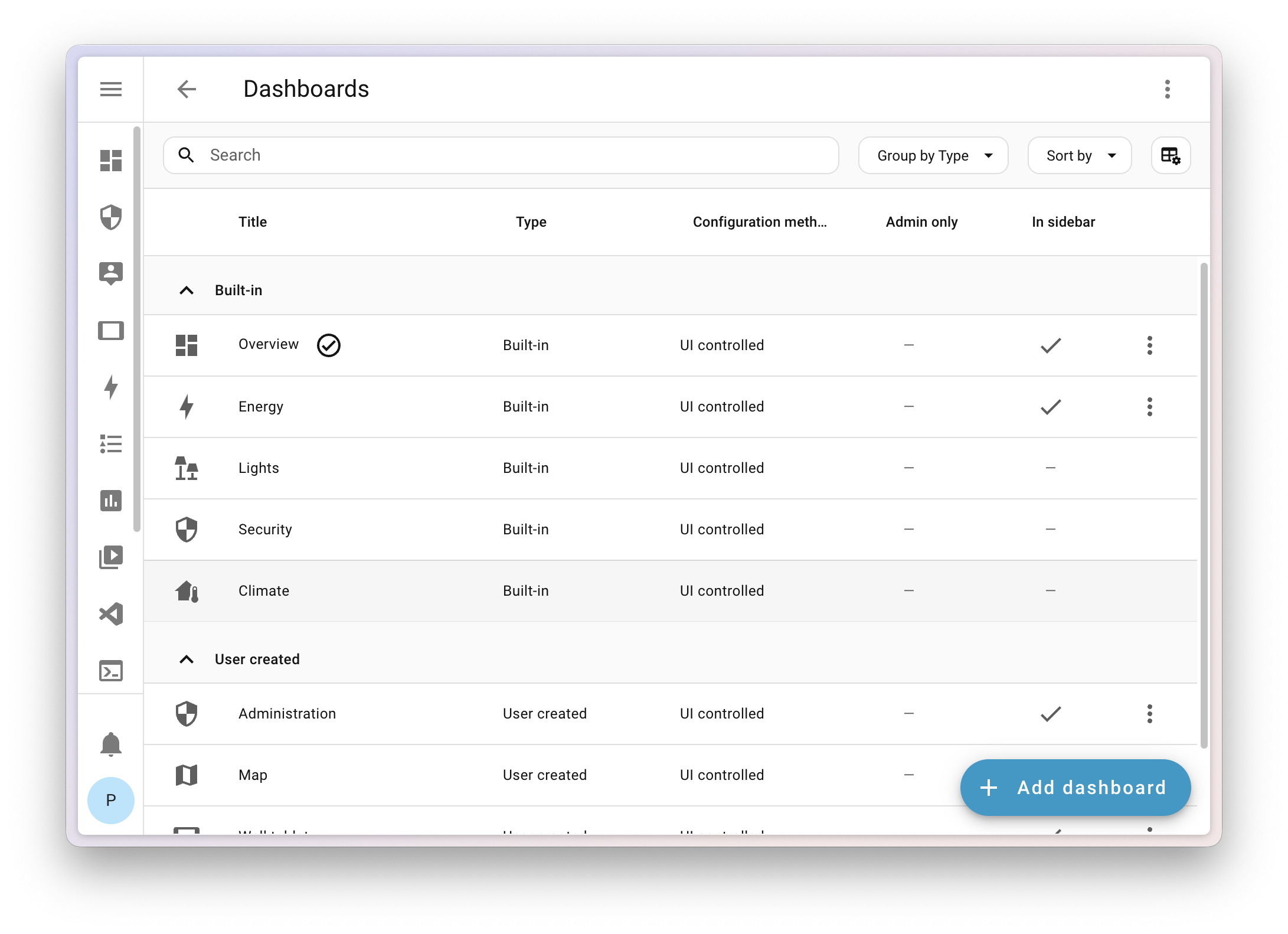
New built-in dashboards in dashboards config panel

Patch releases

We will also release patch releases for Home Assistant 2025.11 in November. These patch releases only contain bug fixes. Our goal is to release a patch release once a week, aiming for Friday.

2025.11.1 - November 7

2025.11.2 - November 14

2025.11.3 - November 21

Need help? Join the community

Home Assistant has a great community of users who are all more than willing to help each other out. So, join us!

Our very active Discord chat server is an excellent place to be, and don’t forget to join our amazing forums.

Found a bug or issue? Please report it in our issue tracker to get it fixed! Or check our help page for guidance on more places you can go.

Are you more into email? Sign up for the Open Home Foundation Newsletter to get the latest on features, things happening in our community, and other projects that support the Open Home straight into your inbox.

Backward-incompatible changes

We do our best to avoid making changes to existing functionality that might unexpectedly impact your Home Assistant installation. Unfortunately, sometimes, it is inevitable.

We always make sure to document these changes to make the transition as easy as possible for you. This release has the following backward-incompatible changes:


Set assumed state to group if at least one child has assumed state

Previously, the group’s assumed state was always false, regardless of the state of its child entities.

This has now changed:

The group will now have an assumed state of true if at least one child entity has an assumed state. This makes the group’s assumed state reflect the uncertainty of its children more accurately. These domains have been added: switch, fan, light, and cover.

(@piitaya - #154163) (group docs)

Asuswrt

The last_time_reachable attribute has been removed from the asuswrt device tracker. Use the last_changed attribute instead in your automations.

(@ollo69 - #154219) (asuswrt docs)

LG webOS TV

The state of LG webOS TV media player entities that do not have an automation trigger to turn on the device will be set to unavailable instead of off.

(@thecode - #155164) (webostv docs)

Mealie

The mealie integration now requires Mealie version 2 or later.

Mealie version 1 is no longer supported. Version 2 was released in October 2024, so over a year ago. Given the differences between versions 1 and 2, we are no longer able to support or test backward compatibility with version 1.

(@andrew-codechimp - #153203) (mealie docs)

Motion Blinds

The tilt position of motion_blinds devices has been corrected to align with the Home Assistant standards. The new tilt position will be: 0 = closed/covering the window opening, 100 = open/letting light through. The previous tilt position can be converted to the new tilt position as follows:

  • new = 100 - old
  • current_tilt_position = 100 -> 0
  • current_tilt_position = 75 -> 25
  • current_tilt_position = 50 -> 50
  • current_tilt_position = 25 -> 75
  • current_tilt_position = 0 -> 100
  • open_cover_tilt -> close_cover_tilt
  • close_cover_tilt -> open_cover_tilt

Any automations concerning Motion Blinds devices that use the current_tilt_position attribute or use tilt open/close will need to be adjusted.

(@starkillerOG - #149777) (motion_blinds docs)

Mobile app

The mobile_app integration, which supports the iPhone and Android companion apps, now handles zone-only updates better. When your companion app sends just the zone name (not the exact coordinates), the device tracker will show the zone’s friendly name.

The person entity now shows the zone’s friendly name (not its object ID) for custom zones. This might break existing automations that trigger on a person’s state.

As an example, if you have a zone named zone.kids_school with the friendly name School:

  • Before this change, the state of the corresponding person and device_tracker entities would be kids_school when the “Location Sent” in the companion app was set to send “Zone Name Only” and School when it was set to “Exact”.
  • After this change, the state of the corresponding person and device_tracker entities will be School for both the “Location Sent” settings in the companion app.

(@Ashus - #149453) (mobile_app docs)

Nederlandse Spoorwegen

The Nederlandse Spoorwegen entity is now displayed as a timestamp entity, rather than a string. Please adapt your automations and scripts.

(@joostlek - #154011) (nederlandse_spoorwegen docs)

ONVIF

The Speed parameter in the ONVIF GoToPreset action is now optional.

The default of 0.5 is no longer set. If you want to restore the previous behavior you have to set speed to 0.5 in your action.

(@carlos-sarmiento - #149636) (onvif docs)

OralB

In the OralB integration, states and attributes have changed.

In multiple places, spaces have been replaced with underscores:

  • Toothbrush state:

    • flight menuflight_menu
    • selection menuselection_menu
    • final testfinal_test
    • pcb testpcb_test
  • Brushing mode:

    • daily cleandaily_clean
    • gum caregum_care
    • tongue cleaningtongue_cleaning
    • super sensitivesuper_sensitive
    • deep cleandeep_clean
  • Pressure:

    • power button pressedpower_button_pressed
    • button pressedbutton_pressed
  • Sector:

    • no sectorno_sector
    • sector 1sector_1
    • sector 2sector_2
    • sector 3sector_3
    • sector 4sector_4

Automations should be updated to use the new states and attributes.

(@tr4nt0r - #153605) (oralb docs)

Renault

The discovery of Renault functionality was previously based on assumptions that may have created invalid and non-functional entities. These will no longer be created.

(@epenet - #154137) (renault docs)

Traccar Server

The Traccar integration has been updated to use a more secure API Token for authentication. This is a required, one-time breaking change to align with Traccar’s security recommendations and ensure the integration continues to work.

This release migrates the integration away from the older username/password method, ensuring continued stability and security for all users while also allowing users with SSO-based setups to use the integration.

When you update Home Assistant, the existing Traccar integration will need to be re-authenticated:

  1. Generate an API Token on your Traccar server (you’ll find this option in your Traccar server’s user settings).
  2. Go to Settings > Devices & services > Traccar Server.
  3. Click “Reconfigure” and enter your new API Token when prompted.

Once you’ve done this, your Traccar devices and entities will work exactly as they did before.

(@pantherale0 - #155297) (traccar_server docs)

Xbox

The Account tier and Gold tenure sensors have been retired, as they no longer receive updates following the transition from Xbox Live Gold to Xbox Game Pass. Additionally, the In party and In multiplayer binary sensors have been removed, since they’ve been non-functional for quite some time.

(@tr4nt0r - #154891) (xbox docs)

If you are a custom integration developer and want to learn about changes and new features available for your integration, be sure to follow our developer blog. The following changes are the most notable for this release:

All changes

Of course, there is a lot more in this release. You can find a list of all changes here: Full changelog for Home Assistant Core 2025.11

  •  

Counter-Strike 2 Update

[p]\[ GAMEPLAY ][/p]
  • [p]Fixed a case where air acceleration was clamped incorrectly while surfing.[/p][/*]
  • [p]Fixed a case where slowly surfing up a ramp was handled incorrectly due to misidentification as a jump apex.[/p][/*]
  • [p]Fix a bug causing "Delay Sniper Rifle Un-Scope after Shot" to be inconsistent.[/p][/*]
[p][/p][p]\[ DEMO ][/p]
  • [p]Added TrueView demo playback, which reconstructs the observed player's original experience more accurately by re-running client-side prediction.[/p][/*]
  • [p]TrueView playback will show the effects of Damage Prediction, if it was enabled by the observed player at the time.[/p][/*]
  • [p]TrueView does not reconstruct the precise timings of rendered frames, so some differences between the original player's experience and TrueView playback will remain, especially in very slow motion playback.  The player's frame at the time when the mouse was clicked, which is used for hit registration, is shown accurately to the nearest demo playback frame. However, reaction effects such as recoil, muzzle flash, blood splatter, and ragdoll are delayed while playing the game by one or two frames due to the way CPU and GPU work is pipelined, and will not appear at the same time during demo playback.[/p][/*]
  • [p]TrueView demo playback might not work properly on old demos and is disabled by default if the playback client version does not match the client version when the demo was recorded. You can set cl_demo_predict 2 to override this.[/p][/*]
  • [p]Fixed a bug causing third person models to not animate smoothly.[/p][/*]
  • [p]Fixed a bug causing time to lurch forward by one tick when unpausing a demo.[/p][/*]
[p][/p][p]\[ MISC ][/p]
  • [p]Animation fixes for G3SG1 bolt.[/p][/*]
  • [p]Fixed developer console scrollbar to accept mouse clicks.[/p][/*]
  •  

v11.13.0

⚠️ Potential Breaking Changes

Removed non-relational types from RELATIONAL_TYPES constant (#25964)
Extensions or external code using RELATIONAL_TYPES should note the excluded presentation and group.

Fixed <scope>.delete filter hook running after permission check. Fixed keys returned by the hook not being used in place of the original keys. (#26034)

  • Keys returned by the hook are now used in place of the original keys.

  • The hook will trigger regardless of user permissions. Ensure any necessary permission checks are performed prior to any data processing.

  • @directus/api

    • Fixed <scope>.delete filter hook running after permission check. Fixed keys returned by the hook not being used in place of the original keys. (#26034 by @ComfortablyCoding)
    • Restricted system collection fields to only allow indexing (#24820 by @br41nslug)
  • @directus/constants

    • Removed non-relational types from RELATIONAL_TYPES constant (#25964 by @formfcw)
  • @directus/extensions-sdk

✨ New Features & Improvements

  • @directus/app
    • Introduced the Content Comparison Modal for side-by-side review of version and revision changes. (#25782 by @robluton)
    • Added interface config option to control indicator appearance (#26086 by @formfcw)
    • Added schema snapshot download button to the admin view of the studio (#25903 by @Nitwel)
    • Added setup flow and license agreement banner (#25983 by @Nitwel)
    • Added comparison indicators for group interfaces (#26086 by @formfcw)
  • @directus/api
  • @directus/types
    • Added interface config option to control indicator appearance (#26086 by @formfcw)
    • Added setup flow and license agreement banner (#25983 by @Nitwel)
  • @directus/system-data
    • Added setup flow and license agreement banner (#25983 by @Nitwel)
  • @directus/env
    • Added setup flow and license agreement banner (#25983 by @Nitwel)
    • Added support for custom metric name prefix via the METRICS_NAME_PREFIX environment variable (#25819 by @ComfortablyCoding)

🐛 Bug Fixes & Optimizations

⬆️ Dependency Updates

  • @aws-sdk/client-s3: 3.858.03.918.0
  • @aws-sdk/client-sesv2: 3.864.03.918.0
  • @aws-sdk/lib-storage: 3.858.03.918.0
  • @azure/storage-blob: 12.28.012.29.1
  • @changesets/cli: 2.29.52.29.7
  • @editorjs/attaches: 1.3.01.3.2
  • @editorjs/editorjs: 2.30.82.31.0
  • @eslint/js: 9.32.09.38.0
  • @fullcalendar/core: 6.1.186.1.19
  • @fullcalendar/daygrid: 6.1.186.1.19
  • @fullcalendar/interaction: 6.1.186.1.19
  • @fullcalendar/list: 6.1.186.1.19
  • @fullcalendar/timegrid: 6.1.186.1.19
  • @google-cloud/storage: 7.16.07.17.2
  • @mapbox/mapbox-gl-geocoder: 5.1.05.1.2
  • @modelcontextprotocol/sdk: 1.17.11.20.2
  • @pnpm/logger: 1001.0.01001.0.1
  • @pnpm/workspace.find-packages: 1000.0.311000.0.43
  • @pnpm/workspace.pkgs-graph: 1000.0.181000.0.25
  • @rollup/plugin-commonjs: 28.0.628.0.9
  • @rollup/plugin-node-resolve: 16.0.116.0.3
  • @sinclair/typebox: 0.34.380.34.41
  • @smithy/node-http-handler: 4.1.04.4.3
  • @supabase/storage-js: 2.10.42.76.1
  • @tus/server: 1.10.22.3.0
  • @tus/utils: 0.5.10.6.0
  • @types/async: 3.2.243.2.25
  • @types/chroma-js: 3.1.13.1.2
  • @types/cookie-parser: 1.4.91.4.10
  • @types/inquirer: 9.0.89.0.9
  • @types/mapbox__mapbox-gl-geocoder: 5.0.05.1.0
  • @types/nodemailer: 6.4.177.0.3
  • @types/qrcode: 1.5.51.5.6
  • @types/semver: 7.7.07.7.1
  • @vueuse/core: 13.6.014.0.0
  • @vueuse/integrations: 13.6.014.0.0
  • @vueuse/router: 13.6.014.0.0
  • apexcharts: 4.5.04.7.0
  • argon2: 0.43.10.44.0
  • axios: 1.11.01.12.2
  • axios-cache-interceptor: 1.8.01.8.3
  • chalk: 5.4.15.6.2
  • color: 5.0.05.0.2
  • commander: 14.0.014.0.2
  • decamelize: 6.0.06.0.1
  • dompurify: 3.2.63.3.0
  • dotenv: 17.2.117.2.3
  • esbuild: 0.25.90.25.11
  • eslint: 9.32.09.38.0
  • eslint-plugin-vue: 10.4.010.5.1
  • focus-trap: 7.6.57.6.6
  • fs-extra: 11.3.011.3.2
  • globals: 16.3.016.4.0
  • happy-dom: 18.0.120.0.10
  • inquirer: 12.9.012.10.0
  • ioredis: 5.7.05.8.2
  • keyv: 5.4.05.5.3
  • ky: 1.8.21.13.0
  • liquidjs: 10.21.110.24.0
  • lru-cache: 11.1.011.2.2
  • marked: 16.1.116.4.1
  • mime: 4.0.74.1.0
  • minimatch: 10.0.310.1.1
  • mysql2: 3.14.33.15.3
  • nanoid: 5.1.55.1.6
  • nodemailer: 7.0.57.0.10
  • ofetch: 1.4.11.5.0
  • oracledb: 6.9.06.10.0
  • p-limit: 6.2.07.2.0
  • pino-pretty: 13.1.113.1.2
  • pm2: 6.0.86.0.13
  • pretty-ms: 9.2.09.3.0
  • rollup: 4.46.24.52.5
  • rollup-plugin-node-externals: 8.0.18.1.1
  • sass-embedded: 1.89.21.93.2
  • semver: 7.7.27.7.3
  • sharp: 0.34.30.34.4
  • snappy: 7.3.07.3.3
  • strip-ansi: 7.1.07.1.2
  • stylelint: 16.23.016.25.0
  • stylelint-config-standard: 39.0.039.0.1
  • tar: 7.4.37.5.2
  • tinymce: 6.8.56.8.6
  • tsdown: 0.14.20.15.11
  • tsx: 4.20.34.20.6
  • typescript: 5.8.35.9.3
  • typescript-eslint: 8.38.08.46.2
  • undici: 7.13.07.16.0
  • unplugin-yaml: 3.0.43.0.7
  • vite: 7.1.37.1.12
  • vue: 3.5.183.5.22
  • vue-i18n: 11.1.1111.1.12
  • vue-router: 4.5.14.6.3
  • vue-tsc: 3.0.53.1.2
  • zod: 4.0.144.1.12
  • zod-validation-error: 4.0.14.0.2

📦 Published Versions

  • @directus/app@14.1.0
  • @directus/api@32.0.0
  • @directus/composables@11.2.4
  • @directus/constants@14.0.0
  • create-directus-extension@11.0.20
  • create-directus-project@12.0.3
  • @directus/env@5.3.0
  • @directus/errors@2.0.5
  • @directus/extensions@3.0.12
  • @directus/extensions-registry@3.0.12
  • @directus/extensions-sdk@17.0.0
  • @directus/format-title@12.1.1
  • @directus/memory@3.0.10
  • @directus/pressure@3.0.10
  • @directus/release-notes-generator@2.0.3
  • @directus/schema@13.0.4
  • @directus/schema-builder@0.0.7
  • @directus/storage@12.0.3
  • @directus/storage-driver-azure@12.0.10
  • @directus/storage-driver-cloudinary@12.0.10
  • @directus/storage-driver-gcs@12.0.10
  • @directus/storage-driver-local@12.0.3
  • @directus/storage-driver-s3@12.0.10
  • @directus/storage-driver-supabase@3.0.10
  • @directus/stores@1.0.5
  • @directus/system-data@3.4.0
  • @directus/themes@1.1.6
  • @directus/types@13.3.0
  • @directus/update-check@13.0.4
  • @directus/utils@13.0.11
  • @directus/validation@2.0.10
  • @directus/sdk@20.1.1

  •  

Minecraft 25w45a (snapshot) Released

25w45a is the fifth snapshot for Java Edition 1.21.11, released on November 4, 2025, which adds a coral variant of zombie nautilus and a netherite tier of horse armor. Full changelog: https://minecraft.wiki/Java_Edition_25w45a
  •  

10.11.2

🚀 Jellyfin Server 10.11.2

We are pleased to announce the latest stable release of Jellyfin, version 10.11.2! This minor release brings several bugfixes to improve your Jellyfin experience. As always, please ensure you take a full backup before upgrading!

You can find more details about and discuss this release on our forums.

Changelog (6)

🔒 Security

  • Update password reset to always return the same response structure [PR #15254], by @thornbill

📈 General Changes

  •  

november

there is a discord server with an @everyone in case of future important updates, such as vulnerabilities (most recently 2025-09-07)

recent important news

🧪 new features

  • #961 the /?shares listing now shows the list of filenames for each share 2cc53ea

🩹 bugfixes

  • #967 per-volume md/lg sandbox rules are now applied during navigation db60951
    • if a volume has no-sb-lg or no-sb-md set then it'll apply when navigating into that volume, and vice-versa

⚠️ not the latest version!

  •  

uNmINeD 0.19.52-dev

New uNmINeD development snapshot is available for download!

Changes:

  • Fixed color of artificial deepslate blocks (now it’s dark gray instead of light gray)
  • (CLI) Fixed broken --shadows parameter for image rendering
  •  
❌