1.21.11 Release Candidate 3 (known as 1.21.11-rc3 in the launcher) is the third and final release candidate for Java Edition 1.21.11, released on December 8, 2025.
Full changelog: https://minecraft.wiki/Java_Edition_1.21.11-rc3
Wana boot and install OS through network (PXE)? Welcome to my new project iVentoy.
About iVentoy https://www.iventoy.com/
iVentoy is an enhanced version of the PXE server.
Extremely easy to use
Many advanced features
x86 Legacy BIOS, IA32 UEFI, x86_64 UEFI and ARM64 UEFI mode supported
110+ common types of OS supported (Windows/WinPE/Linux/VMware)
......
After upgrade, you need to run php bin/console doctrine:migrations:migrate (or equivalent) as webserver user after upgrade.. If you are running a docker container, use sudo docker exec --user=www-data partdb php bin/console doctrine:migrations:migrate, or sudo -E inside the docker container, to ensure that the migrations are applied to the correct database.
Tip
If you like Part-DB, consider donating to support the development. Press the sponsor button on the main github page, for more info.
Important
If you are using Part-DB it would be helpful if you fill out this short survey on your usage of Part-DB (Google Forms): https://forms.gle/Q15twx3YYq3qCNfe8
New features
Added the ability to define custom part states (PR #1053, thanks to @webdevinition)
Added the ability to automatically suggest and generate IPNs (PR #1054, thanks to @webdevinition)
Added experimental ability to rename datastructure types with the new synonym system, which allows you to define domain specific names for concepts of "parts", "categories", etc. (thanks @webdevinition)
Improvements
Improved ability to determine category from info provider (#1113)
Do not require a trailing slash for DEFAULT_URI (#1118)
Define preview images for partkeepr imports (#1115)
Release Highlights: Although GeForce Game Ready Drivers and NVIDIA Studio Drivers can be installed on supported notebook GPUs, the original equipment manufacturer (OEM) provides certified drivers for your specific notebook on their website. NVIDIA recommends that you check with your notebook OEM for recommended software updates for your notebook.
Game Ready for Battlefield 6: Winter Offensive
This new Game Ready Driver provides the best gaming experience for the latest new games supporting DLSS 4 technology including Battlefield 6: Winter Offensive and Call of Duty: Black Ops 7. In addition, support for 32-bit GPU-accelerated PhysX effects has been added for select classic titles on GeForce RTX 50 Series GPUs.
Fixed Gaming Bugs
Battlefield 6: Gaming stability issues [5582125]
Counter-Strike 2: Text may appear slightly distorted when in-game resolution is lower than the native resolution of the display [5278913]
Like a Dragon: Infinite Wealth: Light flickering after driver update on some system configurations [5432356]
Like a Dragon Gaiden: The Man Who Erased His Name: Corruption after driver update on some system configurations [5432356]
Black Myth: Wukong: Lower performance in driver branches newer than R570 [5562283]
Monster Hunter World: Iceborne: Some particle effects may be missing on GeForce RTX 50 Series GPUs [5546598]
Call of Duty: Black Ops 3: Gameplay becomes dim over time [5488108]
Madden 26: Stability issues [5535693]
Users running R580 branch drivers (58x.xx) or newer may observe lower performance in some games after updating to Windows 11 October 2025 KB5066835 [5561605]
The Witcher 3: Wild Hunt: Random corruption on main character's sword corruption [5363151]
Fixed General Bugs
Adobe Premiere Pro: Freeze During Export Using Hardware Encoding [5431822]
Sophos Home Antivirus: System stability issues [5581371]
Green line observed while viewing videos in Chromium browser on GeForce RTX 50 Series GPUs [5535388]
This is a fairly large change that aims to stabilize OBS Studio's application shutdown process. This reduces the number of scenarios in which the "OBS Studio Unclean Shutdown" dialog will appear and also fixes a crash when forcing a log off or shutdown with active outputs.
Fixed a crash during canvas removal [dsaedtler]
Fixed a forced application shutdown while changing scene collections due to attempting to access removed sources [exeldro]
Fixed several audio monitoring deduplication issues [pkv]
32.0.2 Hotfix Changes
Fixed a crash on macOS when attempting to login with service integrations [PatTheMav]
Fixed an issue on macOS where Syphon Client sources could be blank/transparent [gxalpha]
32.0.1 Hotfix Changes
Fixed a possible crash in 32.0.0 on Windows when opening source properties [wanhongqing123]
Fixed an issue in 32.0.0 where browser sources would break after switching scenes [tytan652]
This issue may also have caused increased resource usage.
Fixed an issue in 32.0.0 with the audio deduplication logic when an Audio Capture Source device is also used for monitoring [pkv]
Fixed an issue in 32.0.0 where Multitrack Video settings were unavailable to Custom Services [PatTheMav]
32.0 New Features
Added a basic plugin manager [FiniteSingularity/PatTheMav/Warchamp7]
Added opt-in automatic crash log upload for Windows and macOS [PatTheMav/Warchamp7]
Added Voice Activity Detection (VAD) to NVIDIA RTX Audio Effects, which improves noise suppression for speech, as well as several optimizations to NVIDIA Effects [pkv]
Added chair removal option for NVIDIA RTX Background Removal, allowing removal of chairs [pkv]
Added experimental Metal renderer for Apple Silicon Macs [PatTheMav]
Added Hybrid MOV support [derrod]
Brings ProRes support on macOS and a more widely supported HEVC/H.264 + PCM audio option to all platforms
32.0 Changes
OBS Studio will no longer load plugins built for a newer release of OBS to prevent future compatibility issues [norihiro]
Added custom OBS widgets in preparation for larger UI updates [derrod/gxalpha/Warchamp7]
Added preparations for Metal renderer (stay tuned!) [PatTheMav]
Changed default bitrate from 2500 to 6000 Kbps [notr1ch]
Changed the crash sentinel file location to its own subdirectory [PatTheMav]
Improved audio deduplication logic to cover more cases of nested scenes, groups, and multiple canvases [pkv]
Prevent audio duplication when sources are set to "Monitor and Output" while the monitoring device is also being captured [pkv]
Updated the default settings for AMD encoders [rhutsAMD]
Improved accuracy of chapter markers in Hybrid MP4/MOV [derrod]
Re-hid the cursor in edit fields on macOS [gxalpha]
Improved format selection for PipeWire video capture [tytan652]
Removed workarounds to prevent loading Qt 5 based plugins [RytoEX]
Removed the --disable-shutdown-check launch flag [PatTheMav]
Hybrid MP4/MOV is now out of beta and has been made the default output format for new profiles [derrod]
32.0 Bug Fixes
Potentially fixed a rare crash on macOS when moving or resizing the OBS window [PatTheMav]
Fixed a crash with SRT when using an invalid URL [pkv]
Fixed a crash when setting non-default pkt_size with SRT [pkv]
Fixed a crash in Media Source when playback starts with certain video files [howellrl]
Fixed a UI deadlock when opening source properties from the Sources list when the Windows setting 'Snap mouse to default button in dialog boxes' was enabled by adding a 200ms delay before creating the properties window [Warchamp7]
Fixed a memory leak when trying to output Hybrid MP4 to a non-writeable location [norihiro]
Fixed rare occurrence of multiview becoming blank [norihiro]
1.21.11 Release Candidate 2 (known as 1.21.11-rc2 in the launcher) is the second release candidate for Java Edition 1.21.11, released on December 5, 2025, which fixes a crash.
Full changelog: https://minecraft.wiki/Java_Edition_1.21.11-rc2
1.21.11 Release Candidate 1 (known as 1.21.11-rc1 in the launcher) is the first release candidate for Java Edition 1.21.11, released on December 4, 2025, which tweaks spear mechanics.
Full changelog: https://minecraft.wiki/Java_Edition_1.21.11-rc1
VIENNA, Austria – December 04, 2025 –Enterprise software developer Proxmox Server Solutions GmbH (henceforth “Proxmox”) today announced the immediate availability of the stable version 1.0 of Proxmox Datacenter Manager. This new product directly addresses the increasing complexity of operating distributed and large-scaled Proxmox-based environments. Proxmox Datacenter Manager offers a holistic single pane of glass view for the administration, monitoring, and scaling of Proxmox VE and Proxmox Backup Server, with the primary goal of providing administrators with comprehensive and seamless control.
Managing growing data centers, distributed across multiple locations or clusters, consistently presents major challenges for enterprises and teams. A lack of global oversight, fragmented metrics, and the need to perform complex operations manually across various environments can quickly lead to inefficiencies and increased error susceptibility.
Proxmox Datacenter Manager was developed as the strategic answer to this scaling challenge. It bridges the gap between individual Proxmox-based nodes and clusters, providing a unified view of the entire infrastructure. This not only simplifies routine tasks but also enables advanced functionalities that were previously difficult to achieve.
Highlights of Proxmox Datacenter Manager 1.0
Proxmox Datacenter Manager delivers a set of core functions specifically designed for managing complex, enterprise-grade environments:
Centralized overview and metrics aggregation: Users can connect multiple Proxmox “remotes” (nodes and clusters) and gain a real-time, consolidated overview from a single dashboard. The consolidated dashboard displays the global health status of all Proxmox VE clusters and Proxmox Backup Server instances. It aggregates critical resource usage, including CPU, RAM, and storage I/O, and provides an immediate view of critical key performance indicators (KPIs) and performance metrics to identify bottlenecks and potential issues early on. Data is cached locally, maintaining offline visibility of the last known state.
Dynamic, role-based custom views: With customizable dashboards, IT teams can create highly filtered, targeted overviews based on specific remotes, resource types, or operational tags. Crucially, the Proxmox Datacenter Manager leverages its native role-based access control (RBAC) to grant users access to these tailored views without providing direct access to the underlying virtual machines or hosts. This functionality ensures granular permission management and delivers need-to-know transparency across diverse teams and multi-tenant environments.
Multi-cluster management: Seamlessly connect to and manage independent Proxmox-based clusters and standalone nodes.
Cross-cluster live migration: One of the most prominent features is the capability for the live migration of VMs between different clusters. This empowers administrators to perform responsive load shifts and maintenance work without downtime.
Basic VM & container life-cycle management for virtual infrastructure: Routine administrative tasks such as starting, stopping, or configuring VMs, containers, and storage resources can be executed directly from the central interface. Further, with the included native Role-Based Access Control (RBAC), Proxmox Datacenter Manager allows to precisely manage user permissions and centralize task histories and logs to simplify auditing and meeting compliance requirements.
Powerful search functionality: Version 1.0 comes with a highly intuitive and powerful search functionality. Inspired by query languages like those used in Elasticsearch and GitHub, administrators can instantly filter and locate resources. Data can be filtered by resource type (remote, VM, container), status (stopped, running, etc.) or by custom tags, therefore ensuring that even in infrastructures managing thousands of virtual guests, critical resources and diagnostic data are found with unprecedented speed and precision.
Centralized SDN capabilities (EVPN): The platform features support for Software-Defined Networking (SDN), enabling the configuration of EVPN zones and VNets across multiple remotes from a single interface, simplifying complex network overlays and network administration in highly scaled environments.
Centralized update management: Proxmox Datacenter Manager introduces a central Update Management Panel that gives administrators an instant overview of all available updates across their entire Proxmox VE and Proxmox Backup Server infrastructure. Updates can be rolled out directly from the Datacenter Manager interface, simplifying patch management and strengthening the overall security posture. In addition, Datacenter Manager provides unified, secure shell access to all managed remotes from a single console.
Open-source software stack: Proxmox Datacenter Manager is based on Debian 13.2 “Trixie”, uses a newer Linux kernel version 6.17 as stable default, and includes ZFS 2.3. Furthermore, its core software stack is written in the high-performance Rust programming language, with a responsive user interface built upon the new Rust/Yew Proxmox UI framework, delivering enhanced speed and an optimal user experience.
"The modern infrastructure landscape demands adaptability, from data centers to edge locations. Organizations need tools that evolve alongside their business. Proxmox Datacenter Manager is designed as a key building block within our expanding ecosystem, empowering customers with the right solution for every stage of their journey", says Tim Marx, COO at Proxmox. "By choosing the Proxmox ecosystem, organizations unlock a wide range of deployment options. From high-performance setups at hyperscalers to distributed branch offices that maintain data sovereignty. Our consistent commitment to openness ensures long-term interoperability and real freedom of choice for customers and partners."
Availability
Proxmox Datacenter Manager 1.0 is immediately available for download. Users can obtain a complete installation image via ISO download, which contains the full feature-set of the solution and can be installed quickly on bare-metal systems using an intuitive installation wizard.
Seamless distribution upgrades from older versions of Proxmox Datacenter Manager are possible using the standard APT package management system. Furthermore, it is also possible to install Proxmox Datacenter Manager on top of an existing Debian installation. As Free/Libre and Open Source Software (FLOSS), the entire solution is published under the GNU AGPLv3.
For enterprise users, Proxmox Server Solutions GmbH offers professional support through subscription plans. A subscription provides access to the stable Enterprise Repository with timely updates via the web interface, as well as to certified technical support and is recommended for production use. Customers with active Enterprise Support for their Proxmox remotes also gain access to Proxmox Datacenter Manager updates and support.
About Proxmox Server Solutions Proxmox provides powerful and user-friendly open-source server software. Enterprises of all sizes and industries use the Proxmox solutions to deploy efficient and simplified IT infrastructures, minimize total cost of ownership, and avoid vendor lock-in. Proxmox also offers commercial support, training services, and an extensive partner ecosystem to ensure business continuity for its customers. Proxmox Server Solutions GmbH was established in 2005 and is headquartered in Vienna, Austria.
Contact: Daniela Häsler, Proxmox Server Solutions GmbH, marketing@proxmox.com
As the year winds down and the holidays approach, we’re closing out 2025 with a release that’s all about giving you more control and a little bit of magic. ✨
This month, we’re unveiling Home Assistant Labs, a brand-new space where you can preview features before they go mainstream. And what better way to kick it off than with Winter mode? ❄️ Enable it and watch snowflakes drift across your dashboard. It’s completely unnecessary, utterly delightful, and exactly the kind of thing we love to build. ❄️
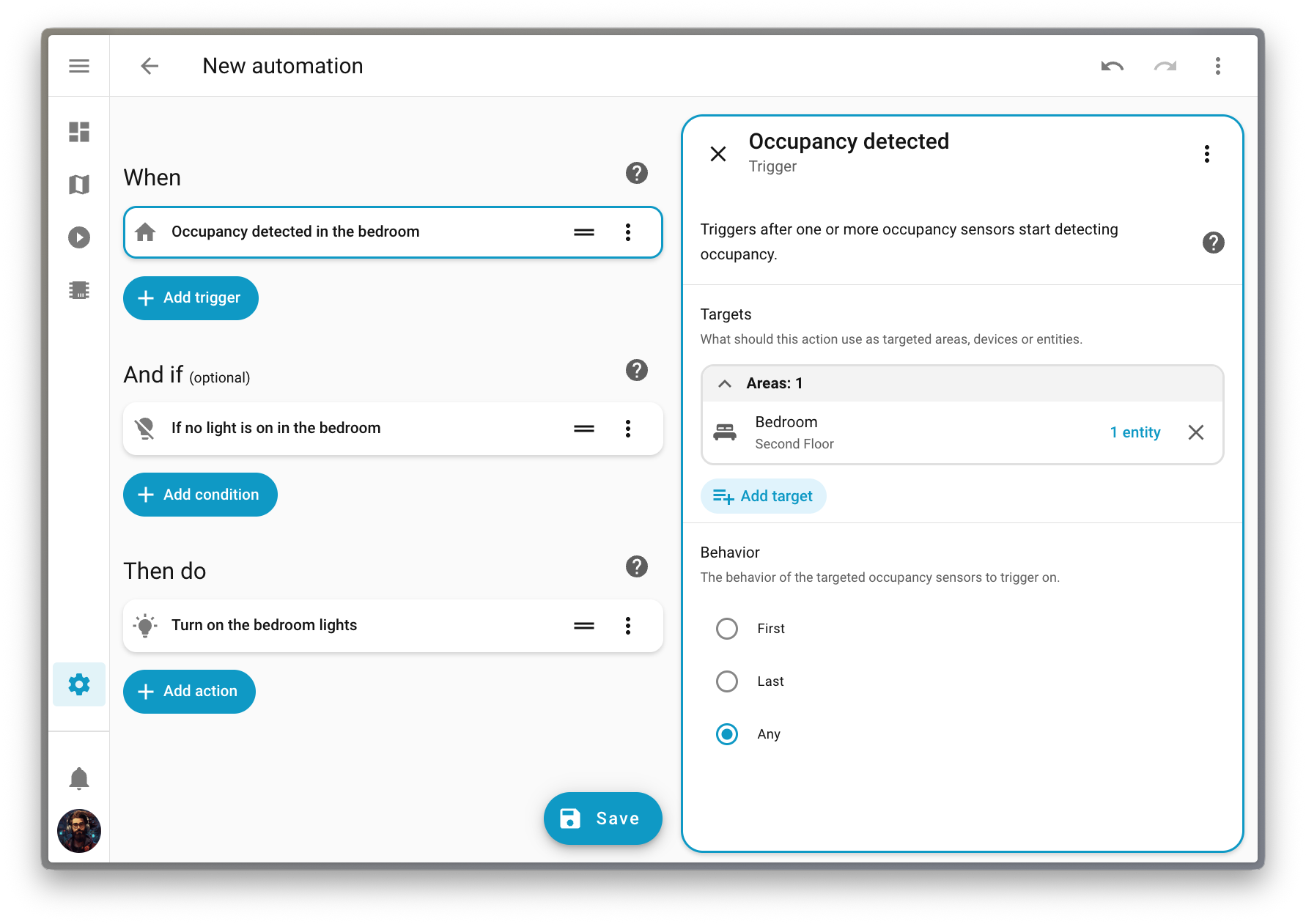
But that’s just the beginning. We’ve been working on making automationsAutomations in Home Assistant allow you to automatically respond to things that happen in and around your home. [Learn more] more intuitive over the past releases, and this release finally delivers purpose-specific triggers and conditions. Instead of thinking in (numeric) states, you can now simply say “When a light turns on” or “If the climate is heating”. It’s automation building the way our mind works, as it should be. 🧠
Oh, and if you’re looking to level up your Zigbee or Thread network, check out the Home Assistant Connect ZBT-2 we released last month. It’s four times faster and has a gorgeous new antenna design that you’ll actually want to display on your desk. 📡
From all of us working on Home Assistant:
Thank you for an amazing 2025! ❤️
Happy holidays, and enjoy the release!
../Frenck
A little holiday cheer 🎄🎶
Jingle Labs by Frenck and Darren
Dashing through the code,
With a brand-new Labs to show,
Snowflakes start to fall,
Watch the dashboard glow!
Triggers now make sense,
Conditions feel just right,
What fun it is to automate,
Your smart home every night!
Chorus
Jingle Labs, jingle Labs,
Features on the way!
Oh what fun it is to run,
Home Assistant every day, hey!
Jingle Labs, jingle Labs,
Winter mode is here!
Turn your lights on with a thought,
And spread some holiday cheer!
Power graphs are live,
Water meters too,
Dashboards you can set,
For every user’s view!
Xbox got some love,
Shelly’s platinum now,
Contributors came through this year,
Take a final bow!
Chorus
Jingle Labs, jingle Labs,
Triggers for the win!
Climate, lights, and fans galore,
Let the automations spin!
Jingle Labs, jingle Labs,
Thank you all so much!
Happy holidays from us,
Now go and automate stuff!
When we develop new features for Home Assistant, we often find ourselves in a tricky spot. A feature might be fully built and tested, but we’re not entirely sure if it’s the right fit for everyone just yet. Maybe we want to gather some real-world feedback first, or perhaps we want to see how the community uses it before committing to keeping it around forever.
That’s where Home Assistant Labs comes in! 🧪
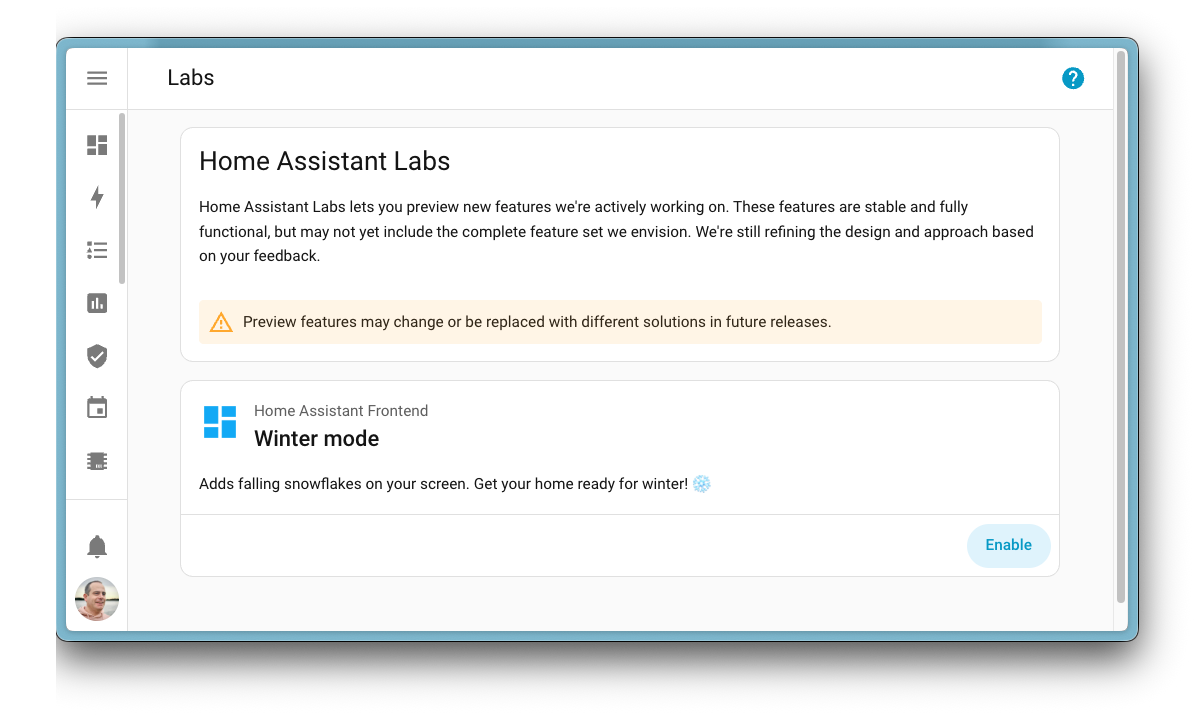
Labs is a brand-new place in Home Assistant that gives you a sneak peek at features we’re working on. These are not unfinished experiments or unstable beta features. They are fully functional and tested, but they might change or even disappear based on feedback. We are committed to building in the open, and we want to give more people the choice to hop into the lab with us. By joining us, your feedback will directly help refine these features for the entire community.
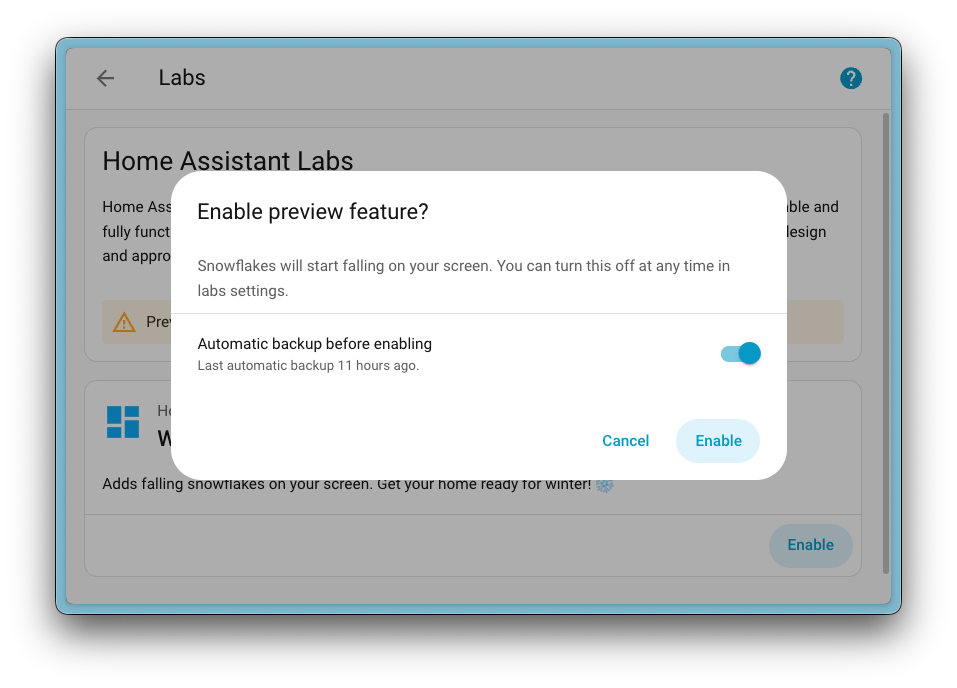
The very first preview feature available in Labs is Winter mode ❄️, inspired by a community post on Reddit originally created by u/Possible-Week-5815. Enable it, and watch your Home Assistant interface transform into a winter wonderland with falling snow. A fun way to get into the holiday spirit!
When you enable a preview feature, you can also choose to create a backup first, just to be safe. And if you change your mind? Simply disable it again. No restart required!
Preview features are off by default, and enabling them won’t affect your existing setup. It’s completely optional, so if you prefer to stick with the battle-proven experience, that’s totally fine. But if you’re curious and want to explore what’s coming next, Labs is the place to be.
But what was the first Labs preview feature we put in there? Well, it’s a big one…
Purpose-specific triggers and conditions
Almost two years ago, we released a new automationAutomations in Home Assistant allow you to automatically respond to things that happen in and around your home. [Learn more] editor that unwrapped all our actionsActions are used in several places in Home Assistant. As part of a script or automation, actions define what is going to happen once a trigger is activated. In scripts, an action is called sequence. [Learn more] and made them easier to understand. Instead of a single, obscure “Call service” action, you now see clear options like “Light: Turn on” or “Media Player: Set Volume”.
Ever since, we’ve been wondering: could we do the same for triggersA trigger is a set of values or conditions of a platform that are defined to cause an automation to run. [Learn more] and conditionsConditions are an optional part of an automation that will prevent an action from firing if they are not met. [Learn more]? Instead of relying on technical, state-based options, what if we could offer intuitive alternatives that just make sense? Options like “When a light turns on” or “If a light is on”.
That idea set a two-year plan in motion, and today it’s finally becoming a reality.
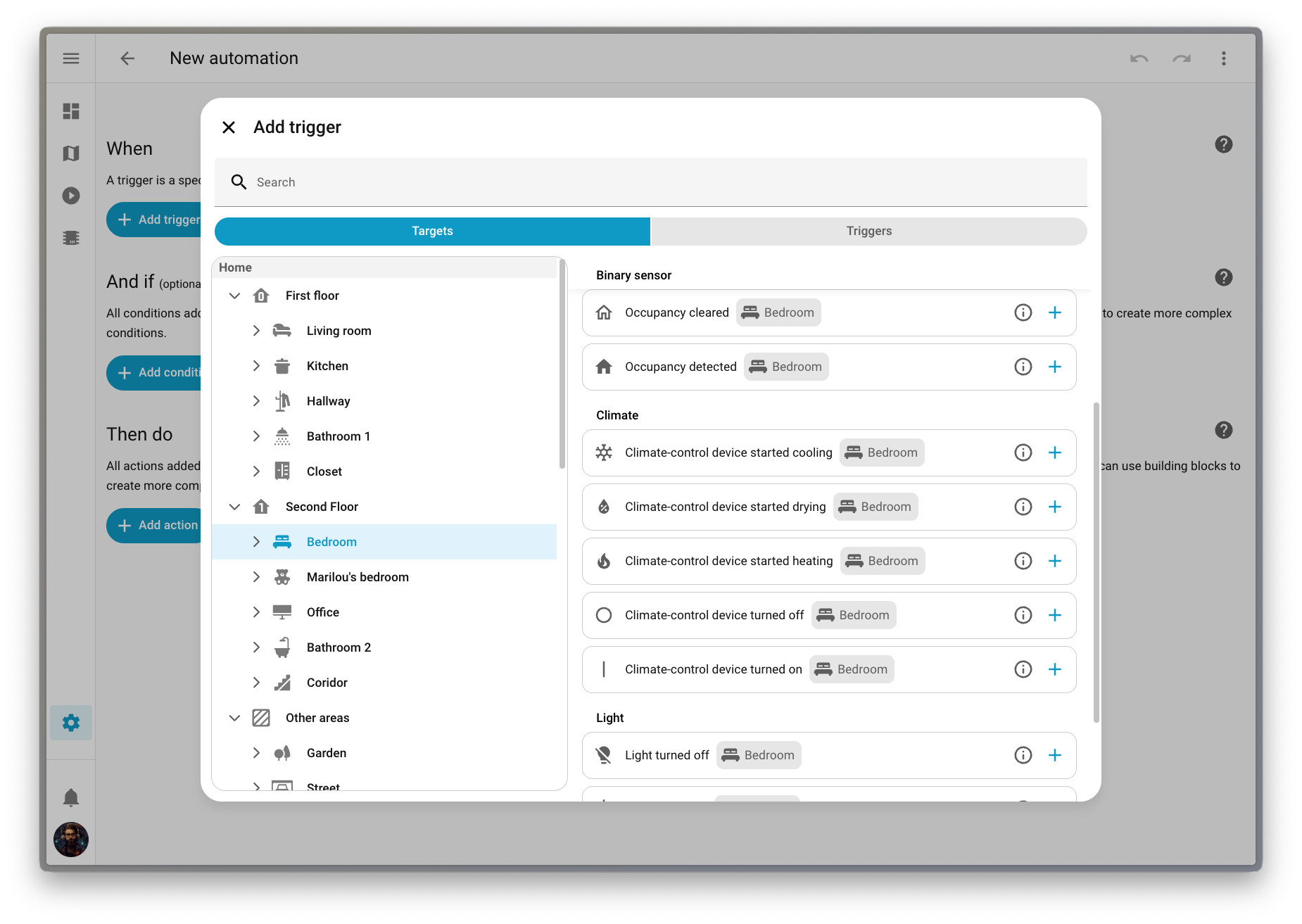
Along the way, we discovered something interesting: many of you take a “target-first” approach when building automationsAutomations in Home Assistant allow you to automatically respond to things that happen in and around your home. [Learn more]. You think about what you want to automate (a deviceA device is a model representing a physical or logical unit that contains entities., an entityAn entity represents a sensor, actor, or function in Home Assistant. Entities are used to monitor physical properties or to control other entities. An entity is usually part of a device or a service. [Learn more], or an areaAn area in Home Assistant is a logical grouping of devices and entities that are meant to match areas (or rooms) in the physical world: your home. For example, the living room area groups devices and entities in your living room. [Learn more]) before thinking about how to automate it (which action to perform or which trigger to use). This release embraces that mindset with a completely new way to build automations.
Purpose-specific triggers and conditions are now provided directly by domainsEach integration in Home Assistant has a unique identifier: The domain. It is often shown as the first part (before the dot) of entity IDs. like Light, Climate, Fan, and others, covering the most common automation use cases.
These new triggers and conditions fully support targeting. This means you can trigger an automation when any light in your living room turns on, without having to list them one by one or create a group beforehand. Targeting an area keeps things simple: it’s always aligned with how your home is organized, and you don’t have to update anything when you add or remove devices.
LabelsLabels in Home Assistant allow grouping elements irrespective of their physical location or type. Labels can be assigned to areas, devices, entities, automations, scenes, scripts, and helpers. Labels can be used in automations and scripts as a target for actions. Labels can also be used to filter data. [Learn more] are supported too! You can now check if any of your Christmas lights are on. Perfect timing for the holidays! 🎄
We’ve also introduced a new way to pick triggers, conditions, and actions that fits this target-first approach. You can navigate your home by floorA floor in Home Assistant is a logical grouping of areas that are meant to match the physical floors in your home. Devices & entities are not assigned to floors but to areas. Floors can be used in automations and scripts as a target for actions. For example, to turn off all the lights on the downstairs floor when you go to bed. [Learn more], then area, then device, and see exactly which options are available for each target. It’s a much more intuitive way to build automationsAutomations in Home Assistant allow you to automatically respond to things that happen in and around your home. [Learn more].
This feature is still being refined, so we’ve made it available as a preview feature in Labs. Head over to Settings > System > Labs to enable it and help us shape the future of automation building!
More dashboard improvements!
We have a lot of dashboard improvements to share in this release! From better default dashboard management to an improved Home dashboard, we have been busy making your Home Assistant experience even better.
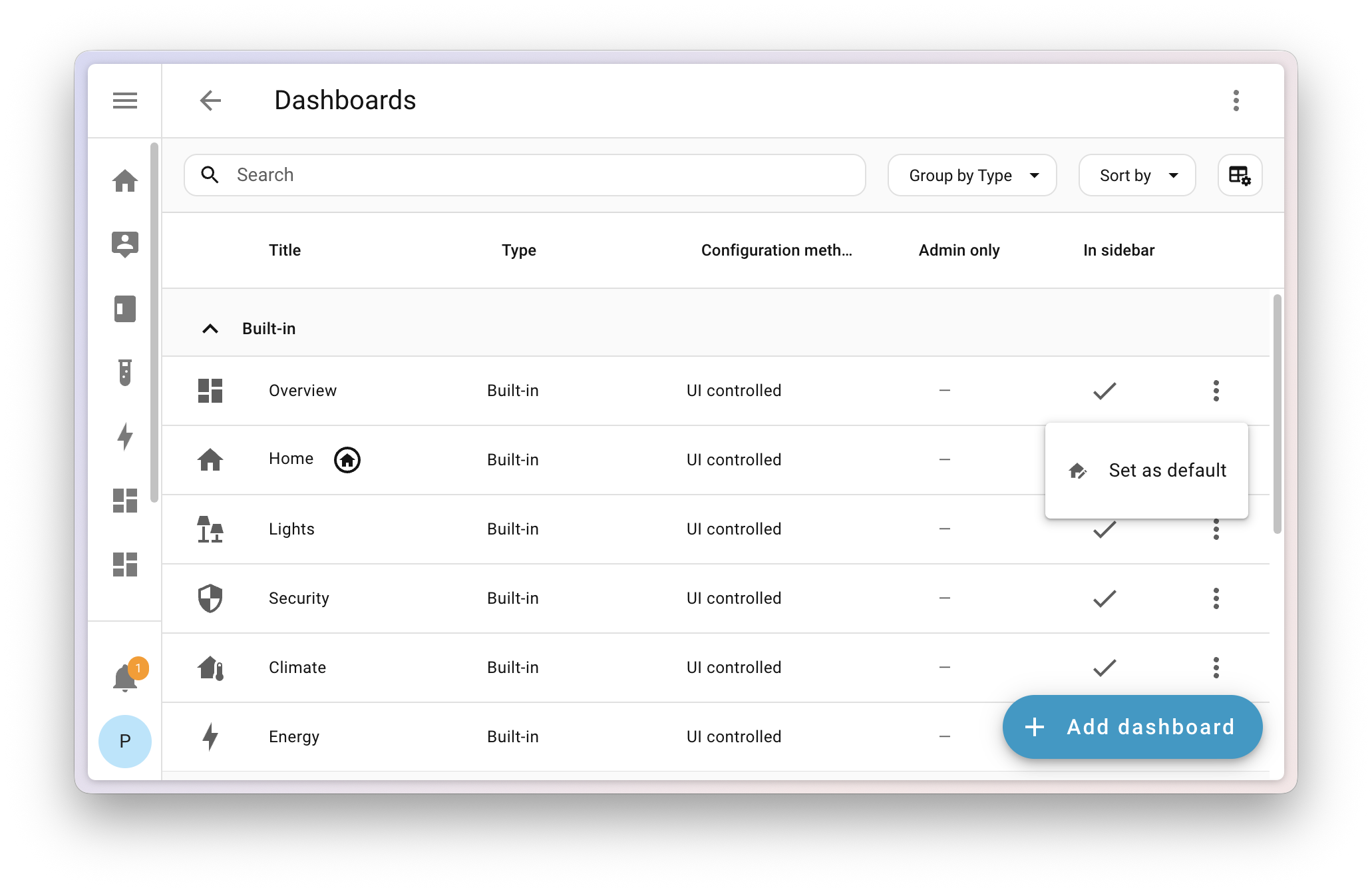
Set a system-wide default dashboard
Picking a default dashboard is now a system-level setting that takes effect instantly for all users on your Home Assistant installation. The dashboard you choose will appear at the top of the sidebar, replacing the current default.
But don’t worry, personal preferences still matter! We added a new setting in your User profile where you can override the system default and set your own preferred dashboard.
If you set your phone to one dashboard and your wall tablet to another, they’ll now both revert to the default dashboard. If you want your wall tablet to use a different dashboard than your other devices, we recommend giving it a separate user profile that you can customize however you want.
Reorder areas and floors
When using the built-in dashboard experiences (Home, Lights, Security, and others), one of the main pain points was the strict ordering of areasAn area in Home Assistant is a logical grouping of devices and entities that are meant to match areas (or rooms) in the physical world: your home. For example, the living room area groups devices and entities in your living room. [Learn more] (alphabetically) and floorsA floor in Home Assistant is a logical grouping of areas that are meant to match the physical floors in your home. Devices & entities are not assigned to floors but to areas. Floors can be used in automations and scripts as a target for actions. For example, to turn off all the lights on the downstairs floor when you go to bed. [Learn more] (numerically by level). This often didn’t make sense in a real home, where your guest bathroom shouldn’t appear before your living room, and the attic is rarely more relevant than the main floor.
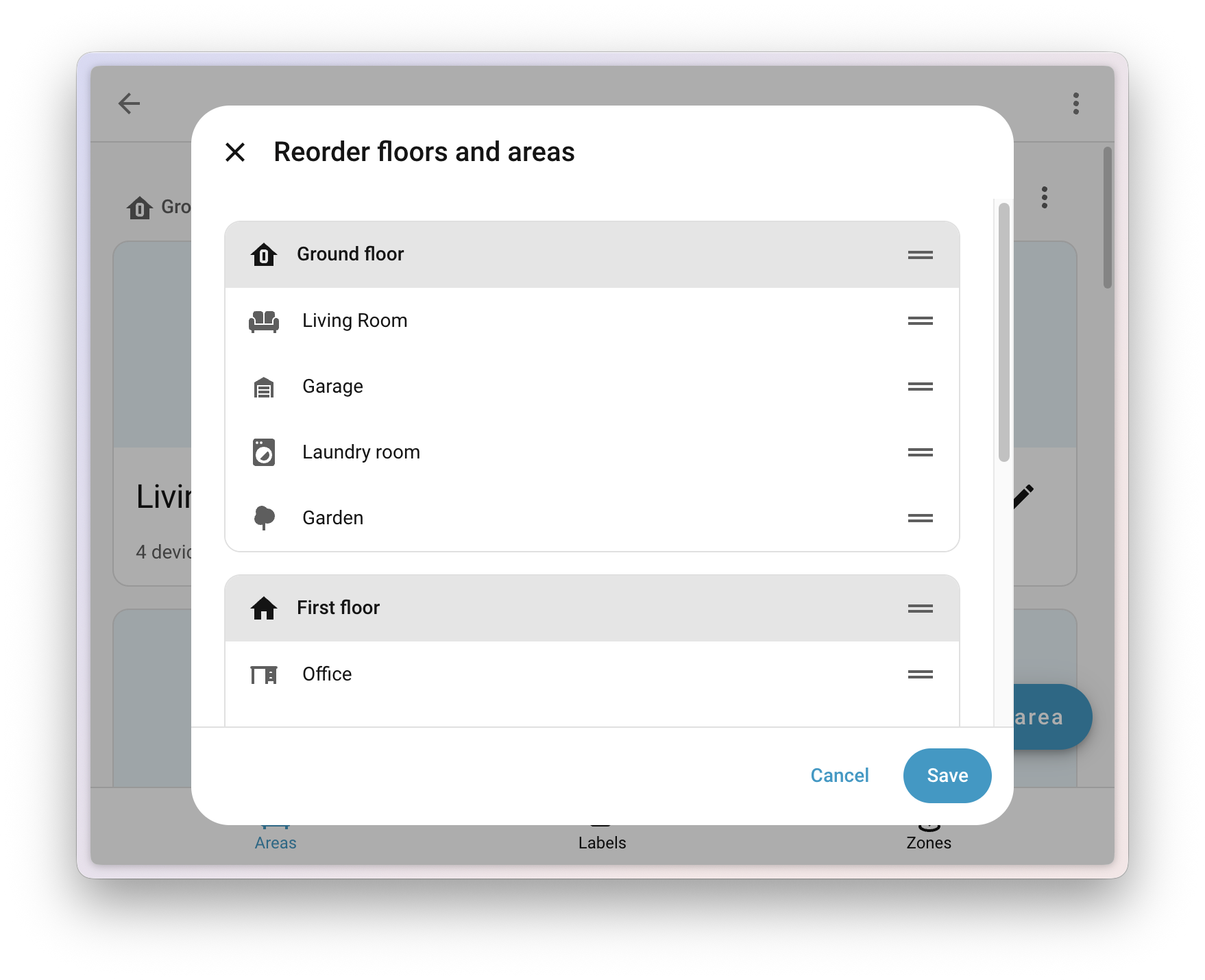
Now you can go to Settings > Areas, labels & zones and use the new Reorder floors and areas menu to manually drag and drop any area or floor to reorder them. Your changes will instantly apply to all built-in dashboards that show areas and floors.
Experimental dashboards have graduated
With the launch of Labs, we retired the experimental flag from the dashboard creation list. The Home dashboard can now be found in the dashboard list (still not visible by default), and the Areas dashboard has evolved into Home, so we’ve removed it for now. If you’re using the Areas dashboard, it will continue to work; you just won’t be able to create another.
Note
We want to keep hearing your voice! Share your experience with us in the Home dashboard survey and help us improve every step of the way. And of course join us on Discord to work together on the future of dashboards.
Home dashboard improvements
We added a new sidebar to the Home dashboard that gathers quick access links we think are useful for you. There’s also a nicer area and floor layout that uses space more efficiently. On a more technical level, the Home dashboard is now a proper built-in dashboard and shows up in the dashboard list.
Important
There is a chance your current favorites might disappear in this release and need to be re-added. This is due to the migration of this dashboard from a strategy to a built-in dashboard.
Undo and redo in the dashboard editor
The dashboard editor now includes the undo and redo feature that we added in 2025.10 to the automationAutomations in Home Assistant allow you to automatically respond to things that happen in and around your home. [Learn more] and scriptScripts are components that allow you to specify a sequence of actions to be executed by Home Assistant when turned on. [Learn more] editor. This allows you to experiment safely while editing your dashboards. You can undo up to 75 changes or restore them with a single click, making editing dashboards faster and less stressful.
Thanks to @jpbede for implementing this handy feature!
Power and water in the Energy dashboard
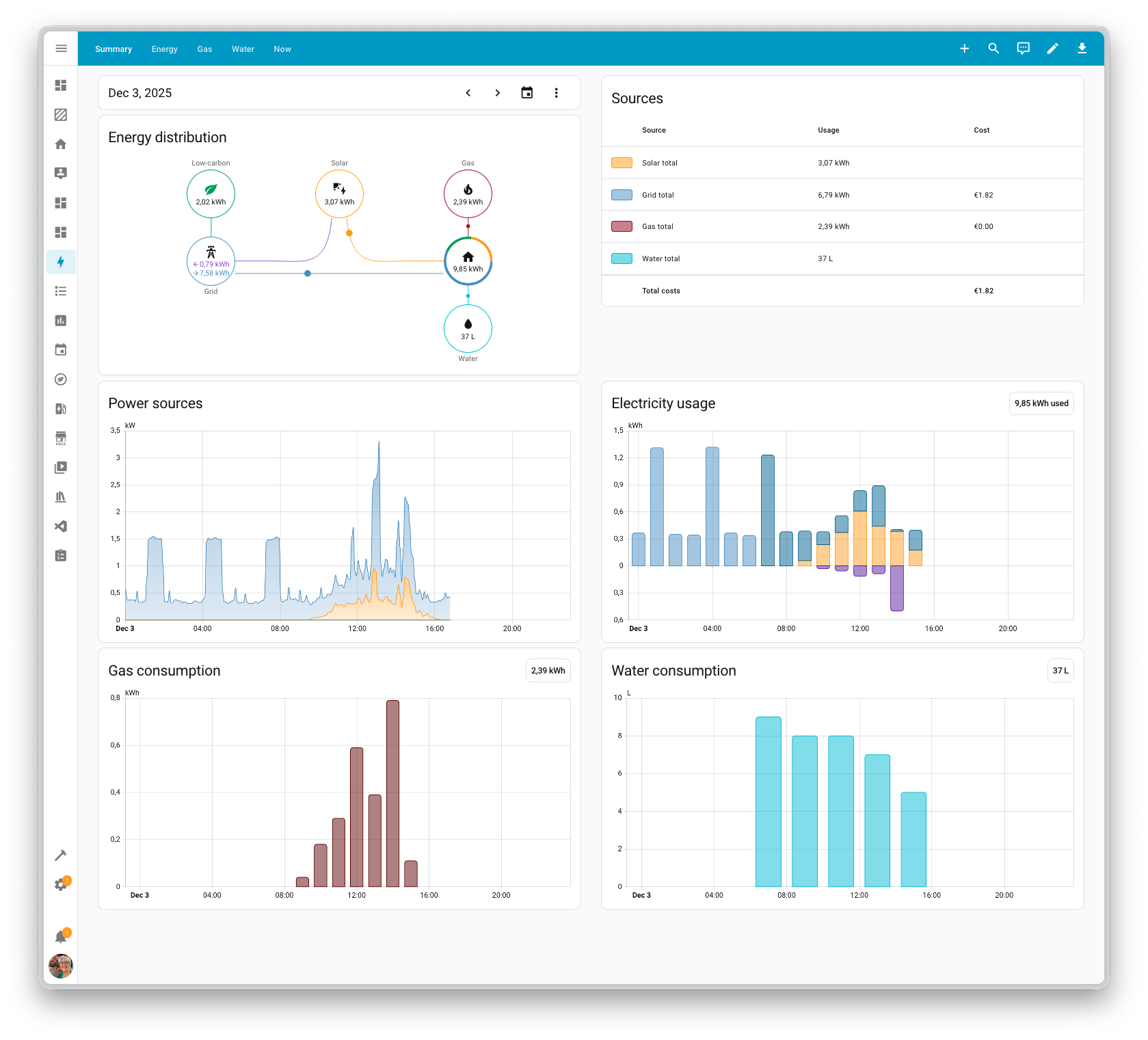
The Energy dashboard has been helping you track your energy and gas usage for years now, and this release brings two great additions: real-time power monitoring and downstream water tracking.
Real-time power monitoring
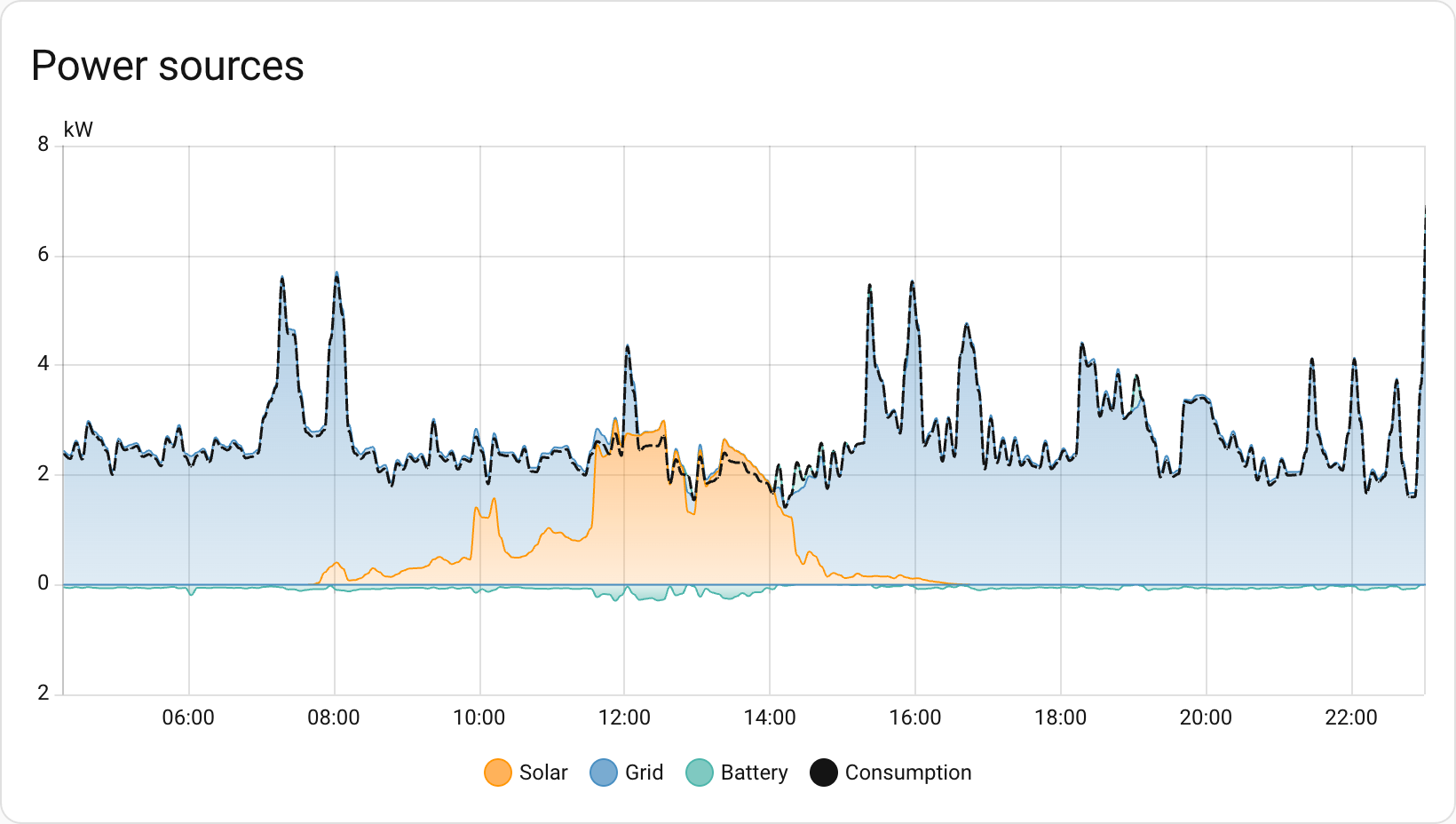
Until now, the Energy dashboard was all about energy: the cumulative kWh you’ve consumed or produced over time. But sometimes you want to know what’s happening right now. How much power is that appliance actually drawing? Is your solar system producing at this very moment?
With this release, you can now configure power sensors alongside your energy sensors. Track your real-time grid consumption, see how much you’re exporting back to the grid, and watch those watts flow in real-time. The power configuration options now appear alongside energy settings for each source or device, and new power graphs let you see your power consumption throughout the day.
Downstream water meters
The Energy dashboard has been tracking your water consumption for a while now, but it was missing something: the ability to see where all that water is actually going. Just like you can track individual devices for energy consumption, you can now add downstream water meters to break down your water usage.
Got a smart irrigation controller? A water softener with a flow meter? A separate meter for your pool? Now you can track them all and see exactly how your water consumption is distributed across different uses.
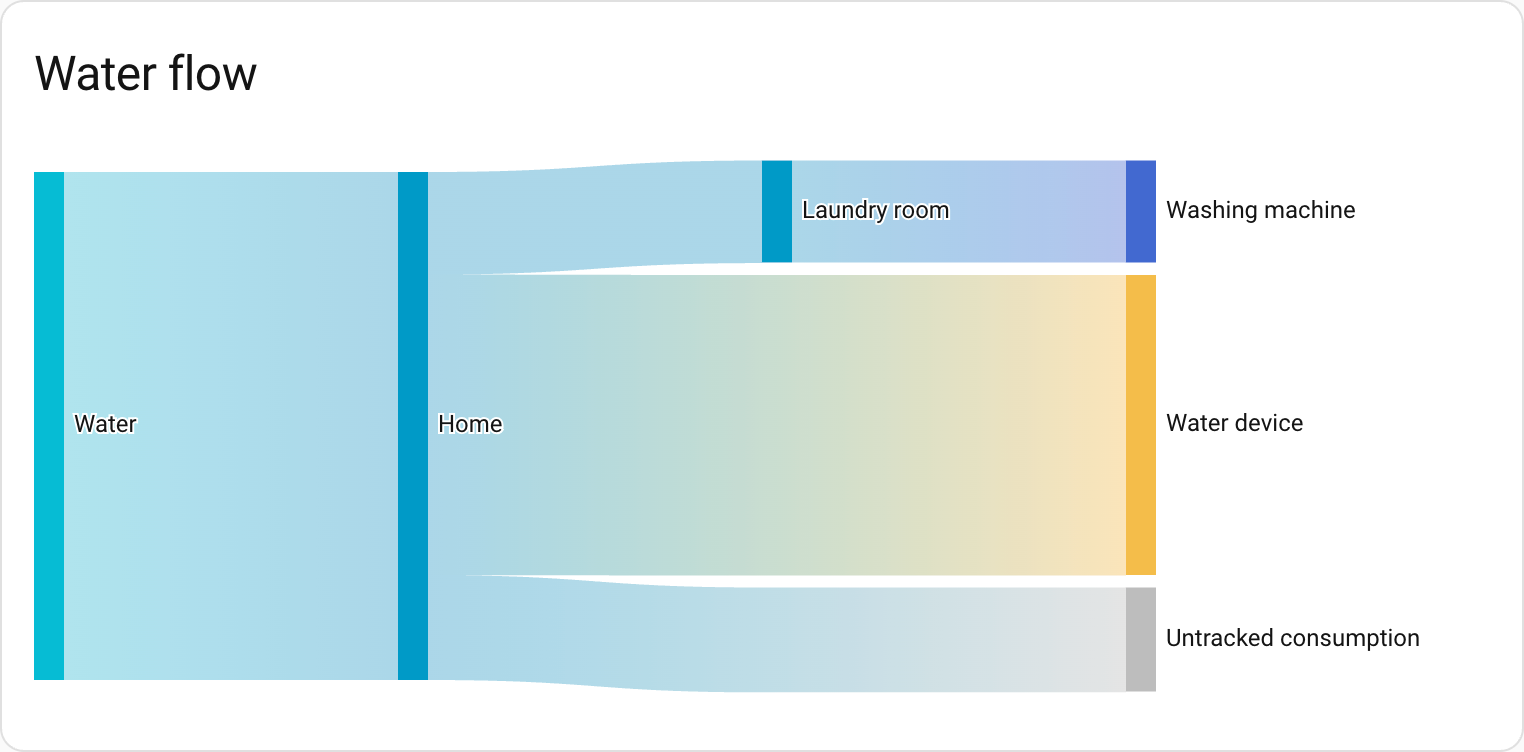
There’s also a brand-new water sankey card that visualizes your water flow, just like the energy sankey diagram you already know. It’s a great way to see where your water is going at a glance.
The new water sankey card shows where your water is going at a glance.
New energy layout
To make room for this new functionality, the Energy dashboard has been reorganized. Don’t worry: if you only have energy configured, you’ll still see the same dashboard. But if you add water, gas, or power, the dashboard will be split into several tabs.
Integrations
Thanks to our community for keeping pace with the new integrationsIntegrations connect and integrate Home Assistant with your devices, services, and more. [Learn more] and improvements to existing ones! You’re all awesome 🥰
New integrations
We welcome the following new integrations in this release:
Airobot, added by @mettolen
Control and monitor your Airobot smart thermostats for intelligent floor heating control via the local REST API.
Anglian Water, added by @pantherale0
Integrate your Anglian Water smart water meter to track water usage and consumption costs.
Backblaze B2, added by @ElCruncharino
Use a Backblaze B2 cloud storage bucket as a backup location for your Home Assistant backups.
EnergyID, added by @Molier
Sync anything from your home directly to EnergyID for advanced analytics, performance tracking and benchmarking.
Essent, added by @jaapp
Monitor dynamic electricity and gas prices for Essent customers in the Netherlands with variable pricing contracts.
Google Air Quality, added by @Thomas55555
Get real-time air quality data for your location using Google’s Air Quality API.
Google Weather, added by @tronikos
Use Google Weather as a source for weather data, providing current conditions, hourly forecasts for the next 24 hours, and daily forecasts for the next 10 days.
Hanna, added by @bestycame
Fetch pool water quality data from your Hanna Pool Controller device, including pH, chlorine levels, ORP values, and water temperature.
Home Assistant Labs, added by @frenck
A dedicated panel where you can preview and test new features before they become standard in Home Assistant.
Philips Hue BLE, added by @flip-dots
Control your Philips Hue Bluetooth lights directly with Home Assistant, without the need for a Hue Bridge.
Saunum, added by @mettolen
Integrate your Saunum Leil sauna control unit to precisely control temperature and monitor your sauna’s operation.
Victron BLE, added by @rajlaud
Integrate Victron Energy devices that support the Bluetooth Low Energy protocol for real-time monitoring.
This release also has new virtual integrations. Virtual integrations are stubs that are handled by other (existing) integrations to help with findability. These ones are new:
It is not just new integrationsIntegrations connect and integrate Home Assistant with your devices, services, and more. [Learn more] that have been added; existing ones are also being constantly improved. Here are some of the noteworthy changes to existing integrations:
@piitaya updated the ESPHome integration to let Home Assistant generate entity IDs using its standard rules, aligning it with how other integrations work.
Thanks to @bdraco, you can configure Wi-Fi on Shelly generation 2+ devices directly from Home Assistant via Bluetooth.
Shelly now supports control modes for upcoming Shelly Cury devices. Nice work, @bieniu!
The Tuya integration received a lot of love! Cat litter boxes now expose switches, buttons, lights, and sensors for controlling your pet’s automated litter box. On top of that, doorbell events are now supported too. Thanks, @heindrichpaul!
@starkillerOG expanded the Reolink integration with an exposure mode select and audio noise reduction controls for supported cameras.
Air conditioner and microwave support has landed in the Home Connect integration, expanding the range of supported BSH appliances. Thanks, @Diegorro98!
@zerzhang added support for the SwitchBot smart thermostat radiator to the SwitchBot integration. Nice!
The Xbox integration got some love from @tr4nt0r! You can now link multiple Xbox accounts, track how many friends you (and your friends) have, see if they’re in a party, and control more remote functions. The media browser also gained a new category showcasing official game art and screenshots.
Got an Ecovacs robot? The Ecovacs integration now has a border spin switch (to reach those tricky edges while mopping) and an auto-empty select entity. Thanks, @aronnebrivio!
The VeSync integration gained a child lock switch, giving you control over this safety feature for your devices. Thanks, @cdnninja!
The SQL integration now supports using templates in your queries, giving you more flexibility when querying your databases. Great addition, @gjohansson-ST!
@tomwilkie expanded the Prometheus integration to export metrics for the water_heater domain.
The Anthropic integration now supports AI task entities. Thanks, @Shulyaka!
Portainer can now show you resource usage of your containers. Nice work, @erwindouna!
@thomasddn added a button to enable reduced guard mode for compatible vehicles to the Volvo integration.
The Plugwise integration now supports the new Anna P1 device and gained a select entity for zone profiles on Adam devices. Thanks, @bouwew!
Bang & Olufsen users can now use their Beoremote One with Home Assistant. The remote’s buttons are exposed as event entities. Awesome, @mj23000!
One thing we are incredibly proud of in Home Assistant is our integration quality scale. This scale helps us and our contributors to ensure integrations are of high quality, maintainable, and provide the best possible user experience.
This release, we celebrate several integrationsIntegrations connect and integrate Home Assistant with your devices, services, and more. [Learn more] that have improved their quality scale:
This is a huge achievement for these integrations and their maintainers. The effort and dedication required to reach these quality levels is significant, as it involves extensive testing, documentation, error handling, and often complete rewrites of parts of the integration.
A big thank you to all the contributors involved! 👏
Now available to set up from the UI
While most integrationsIntegrations connect and integrate Home Assistant with your devices, services, and more. [Learn more] can be set up directly from the Home Assistant user interface, some were only available using YAML configuration. We keep moving more integrations to the UI, making them more accessible for everyone to set up and use.
The following integration is now available via the Home Assistant UI:
The following integrationsIntegrations connect and integrate Home Assistant with your devices, services, and more. [Learn more] are no longer available as of this release:
Dominos Pizza: The Dominos Pizza integration has been removed. The integration no longer functions and its underlying source has been unmaintained since 2019.
Flick Electric: The Flick Electric integration has been removed. All customers of the Flick Electric company have already been moved to Meridian Energy. The service this integration used is already non-functional.
The following integrations have been removed as they are incompatible with the currently supported installation methods:
Bluetooth Tracker
CUPS
Decora
dlib Face Detect
dlib Face Identify
Eddystone Temperature
GStreamer
Keyboard
LIRC
Pandora
Raspberry Pi Camera
SMS
Snips
TensorFlow
Other noteworthy changes
There are many more improvements in this release; here are some of the other noteworthy changes:
New template math functions! @akx added clamp, wrap, and remap to manipulate numbers in your templates. Awesome!
The activity card now supports filtering by state, making it easier to see specific events. Nice one, @karwosts!
@MindFreeze added min and max options to the bar gauge feature for tile cards, giving you more control over the gauge range.
You can now delete helpers directly from the helpers panel, without having to open them first. Thanks, @frenck!
The blueprints panel now shows how many automations and scripts use each blueprint. Great for keeping track, @EarMaster!
@timmo001 added a handy trick: double-click the automation editor sidebar to reset its width.
Labels now show up on the device information card, making it easier to see how your devices are organized. Thanks again, @timmo001!
Get insight into your AI conversations
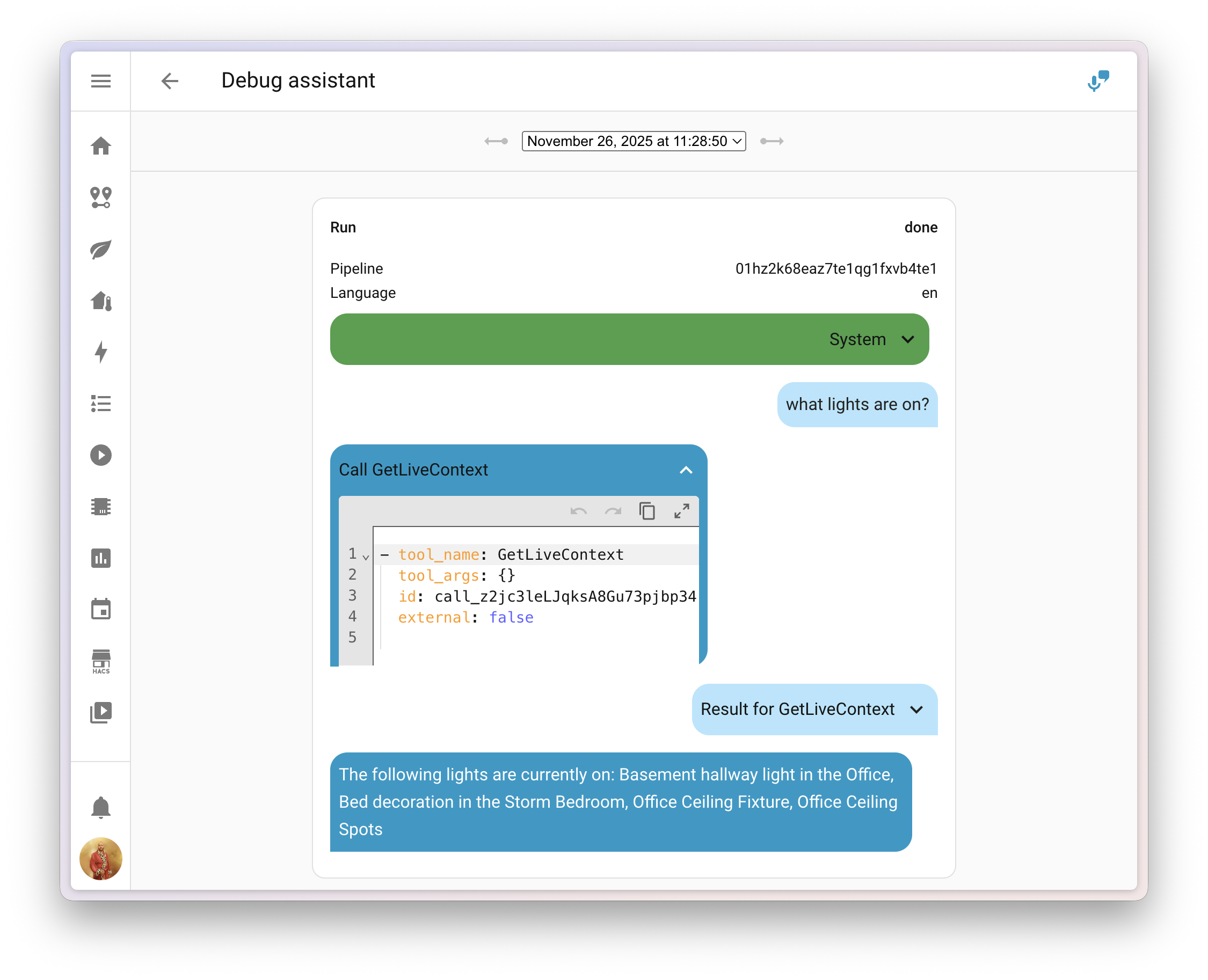
Ever played around with AI in Home Assistant and wondered what data is actually being sent?
@balloob upgraded the voice assistant debug interface, and you can now inspect the system prompt that tells the AI how to behave, along with any tool calls it made to generate your answer.
This makes it much easier to figure out why the AI decided to skip over that one entityAn entity represents a sensor, actor, or function in Home Assistant. Entities are used to monitor physical properties or to control other entities. An entity is usually part of a device or a service. [Learn more], or why it called a specific tool. You can find the debug interface in the voice assistant configuration panel.
Add entities to Android widgets and favorites
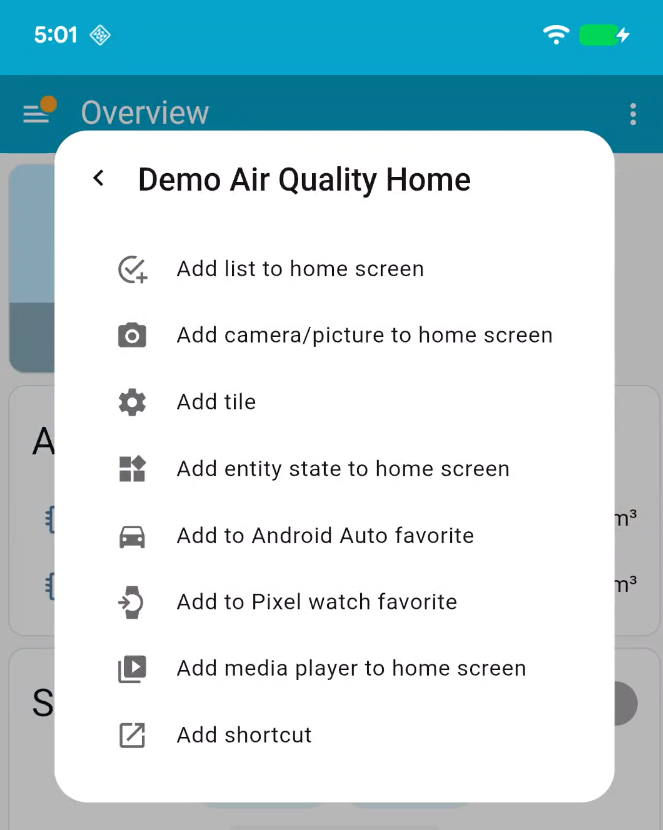
If you’re using the Home Assistant Companion app for Android, there’s a handy new feature waiting for you! Starting with app version 2025.11, you can now add entitiesAn entity represents a sensor, actor, or function in Home Assistant. Entities are used to monitor physical properties or to control other entities. An entity is usually part of a device or a service. [Learn more] to widgets and Android Auto favorites directly from the entity’s more info dialog.
With just a few taps, you can:
Add widgets for quick control of entities right from your home screen
Set entities as Android Auto favorites, making them quickly accessible in your car
No more deep-diving into app settings! The Add to option appears in the more info dialog with options tailored to the entity you’re viewing. For example, adding a media player widget is only available for media players.
This is a first step in integrating native mobile features directly into the Home Assistant interface. Future releases will expand this with support for creating shortcuts, tiles, and watch favorites.
We will also release patch releases for Home Assistant 2025.12 in December. 🎄
These patch releases only contain bug fixes. Our goal is to release a patch
release once a week, aiming for Friday.
Bump aiomealie to 1.1.1 and statically define mealplan entry types (@andrew-codechimp - #158907)
Update systembridgeconnector to 5.2.4, fix media source (@timmo001 - #158917)
Assume cover or valve is always “running” in google assistant when the state is assumed or the position is reported to allow it to be be stopped (@jbouwh - #158919)
Home Assistant has a great community of users who are all more than willing to help each other out. So, join us!
Our very active Discord chat server is an excellent place to be, and don’t forget to join our amazing forums.
Found a bug or issue? Please report it in our issue tracker to get it fixed! Or check our help page for guidance on more places you can go.
Are you more into email? Sign up for the Open Home Foundation Newsletter to get the latest news about features, things happening in our community, and other projects that support the Open Home straight into your inbox.
Backward-incompatible changes
We do our best to avoid making changes to existing functionality that might unexpectedly impact your Home Assistant installation. Unfortunately, sometimes it is inevitable.
We always make sure to document these changes to make the transition as easy as possible for you. This release has the following backward-incompatible changes:
Core and Supervised installation methods, and 32-bit systems
After a 6-month deprecation period, support for the Home Assistant Core and Home Assistant Supervised installation methods, as well as all 32-bit system architectures (i386, armhf, and armv7), has now been fully removed.
These installation methods and architectures will no longer receive updates, including security updates. If you are still using one of these installation methods or architectures, please migrate to a supported installation method and architecture as soon as possible to continue receiving updates and support.
Hive has removed support for their security products. We have removed the alarm control panel from the integration, as the Hive APIs no longer support these products.
The legacy license plate event sensor has been removed from the UniFi Protect integration, as it no longer functions with Protect 6 and newer. The UniFi Protect integration has not been compatible with Protect versions older than 6 for quite some time.
This sensor has been replaced with a new Vehicle Detection Event entity that provides significantly more functionality, including license plate recognition, vehicle type detection, color detection, and confidence scores. The new event entity fires with a 3-second delay to ensure optimal thumbnail and LPR data quality.
The Xbox media browser has been completely overhauled to support multiple accounts and introduce a range of other improvements. As part of this update, the format of the media-source identifiers has been changed as well.
The following and followers sensors introduced in the last release previously included friends in their counts. After a recent API update, friends are no longer included.
If you are a custom integration developer and want to learn about changes and new features available for your integration: Be sure to follow our developer blog. The following changes are the most notable for this release:
1.21.11 Pre-Release 5 (known as 1.21.11-pre5 in the launcher) is the fifth and final pre-release for Java Edition 1.21.11, released on December 3, 2025.
Full changelog: https://minecraft.wiki/Java_Edition_1.21.11-pre5
v1.14.3 (2024-08-30) fixed a bug that was introduced in v1.13.8 (2024-08-13); this bug could lead to data loss -- see the v1.14.3 release-notes for details
🧪 new features
hooks now behave more usefully/predictably; 889bd32
hooks returning 0 will run the next hook (if any), and let the initiating action proceed if no other hooks object
hooks returning 100 will stop processing successive hooks, but return success, letting the initiating action proceed
hooks returning anything else will stop processing successive hooks (like the documentation always said) and also fail the initiating action (if hook is checked)
zmq hooks can now respond with json, doing relocations and all that stuff

 Log in







 The new water sankey card shows where your water is going at a glance.