 Log in
Srinivas Sista
Google Chrome



Fixed an issue where fingerprinting protection caused incorrect font rendering on popular websites. (Bug 2000429)
Fixed crashes related to media playback and GMP process shutdown. (Bug 2002697)
Fixed an issue where desktop profile shortcuts were being unintentionally removed when changing copied profile settings. (Bug 1998209)
Improved sidebar text contrast when using vertical tabs with certain themes. (Bug 2006091)
When restoring from a backup, the restore success message will appear over the new tab page instead of one of the tabs restored from a backup, to avoid cases where the restored tab canceled the restore success message. (Bug 2003307)
Various security fixes.
Reference link to 146.0 release notes.

On Windows, clicking tabs may not work at the very top of the screen when Firefox is maximized on a second monitor. We’re working to fix this in a future release. (Fixed in 147.0)

It appears as though the latest NVIDIA GeForce drivers for December 2025 (591.44 – WHQL) have increased the number of NVENC encodes to 12. We couldn’t find anything in the release notes, but someone reported it on our forums. We set up a vMix 29 preset and then added dual recordings, multicorders, SRT, telestrator and streams all with the hardware encoder ticked and… it worked with 12! This was with an RTX 5070.

Now just because you have 12 hardware encodes at your disposal, probably doesn’t mean you should try this with your 2060 at high resolutions and framerates. Definitely test out the actual number of encodes you need and experiment with the resolution and frame rate.
You can see all of the cards that support 12 hardware encodes by checking out the NVIDIA Encoder Matrix.
It’s been a busy few months composing behind the scenes, building up to a massive crescendo. Today, the beat finally drops on Music Assistant’s biggest update yet. With version 2.7, Music Assistant is getting all jazzed up with a visual overhaul, a chart-topping lineup of new features and providers, along with a brand-new streaming protocol we’re spinning up ourselves.
Of course, you can always update and experience all the great new stuff without reading the rest of this, but you might miss a deep cut. In fact, we can’t even cover everything in this blog (there really is that much), so go sing your praises for anything we missed in the comments!
Marvin joins the team
Music Assistant has gained its first full-time employee at the Open Home Foundation. No, not me! My day job is leading the Ecosystems department at the foundation (which comprises all the software projects the Foundation has that are not Home Assistant itself). Marvin will be joining the foundation in the new year to work full-time on Music Assistant, leading the project’s day-to-day operations. Marvin has been contributing to the project for three years now, working on all sorts of parts of the project, and specifically with the Apple Music and YouTube providers.
Not to worry, I’m pretty obsessed with my audio setup and will still be tinkering on my little pet project 😁.
A visual overhaul
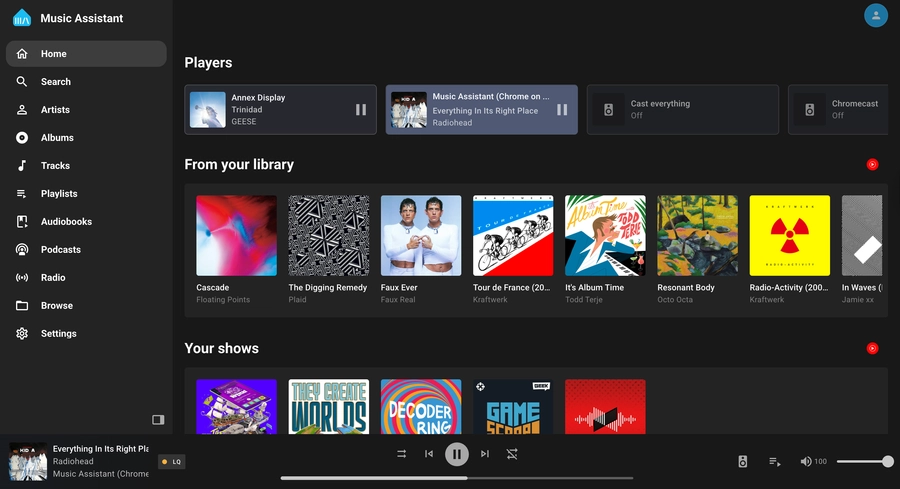 A well deserved visual refresh
Music Assistant joining the foundation has given us a lot more than a nice open home; it’s given the project clearer direction and some expert help. One area some people felt Music Assistant fell short was its UI and UX, and in version 2.7, we’re starting the process of giving it a major overhaul, making it look as good as your music sounds!
This is just the beginning of a big process, so expect every update to bring more polish. The first thing you’ll probably notice is the collapsible navbar on the left of the screen, which looks pretty familiar to another Assistant 😉. Now it’s much more intuitive, especially for new users. The settings page has also been made much easier to navigate with breadcrumbs.
The biggest star of the show is the new Built-in Player, which lets you listen to music on the browser you’re using to hunt for your next track. Great for double-checking if the next song is family-friendly before sending it to every speaker in the home.
Users and logins
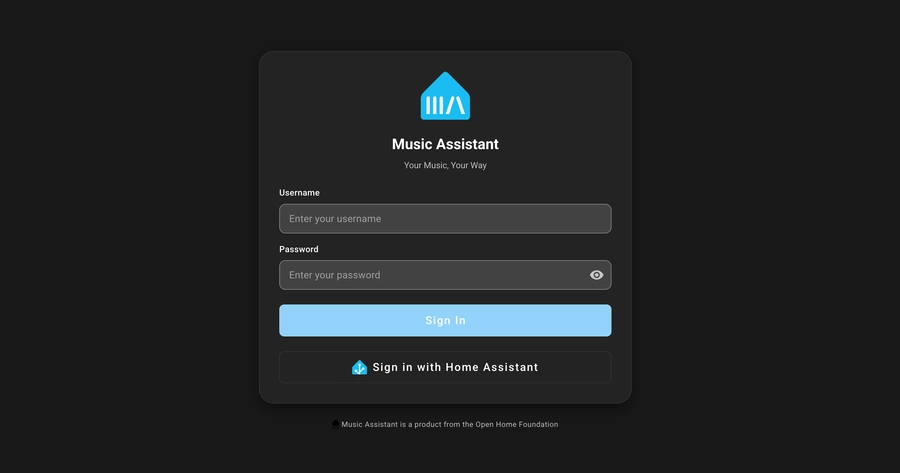 User profiles for the whole family!
A lot of new features we’ve implemented wouldn’t be possible without some form of login and authentication. It was a much-requested feature, as security even within your home shouldn’t be ignored. We know logging in every once in a while can be a minor inconvenience, but we’ve tried to make it as unobtrusive as possible, even implementing a way to use your Home Assistant login as a “Single Sign-On”.
You can now have different user profiles with their own music providers. No more having four Tidal accounts all sitting next to each other, cluttering up the Playlists tab. You can even assign who has access to each speaker; say goodbye to the kids playing Demon Hunters on your office speaker during your performance review 😅. In Settings, just head to the User Management section, where you can add and edit your new users.
Remote music streaming
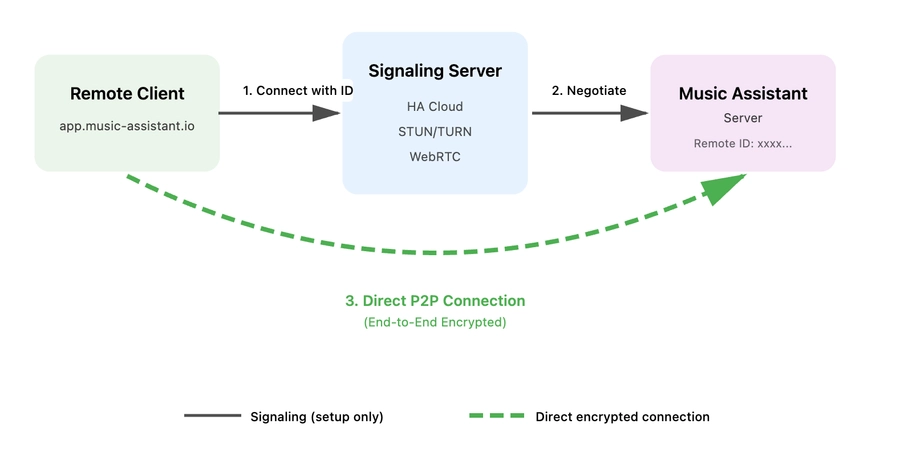 No matter where, no matter when
One feature made possible with our new login interface is remote music streaming – yes, that’s correct, Music Assistant anywhere you can connect to the internet. We’ve created a new web app that allows for remote connections while you’re out and about.
It uses Home Assistant Cloud’s built-in multimedia streaming capabilities (WebRTC) to help route the audio from your Music Assistant server to wherever you are. A Home Assistant Cloud subscription is not required to use this feature; a big shoutout to Nabu Casa for providing their infrastructure for free to our users. Home Assistant Cloud subscribers get access to even more powerful routing, which improves streaming in more places. This subscription also supports the full-time development of Music Assistant 🙏.
This connection is peer-to-peer and end-to-end encrypted, meaning no one will know if you’re listening to ABBA 😊. I wouldn’t say it’s ready to replace your current music streaming service, but it’s a great way to get your FLACs playing at a friend’s house. You could even open two instances of the web app and stream it to two devices, and they’ll be synchronized… but how is that even possible?
Introducing Sendspin
For some time, the Music Assistant team has been looking for the best way to stream audio, album art, and other music visualizations to the devices we have around our homes. There are a couple of projects out there doing cool stuff with streaming audio, but not any that fit our needs. So, when it doesn’t exist, it’s time to start building.
Introducing Sendspin, a new multimedia streaming and synchronizing protocol. It’s fully open source and free to use. Sendspin can stream high-fidelity audio, album art, and visualizer data, automatically adapting to each device’s capabilities. Imagine an e-paper display showcasing the album cover, while multiple speakers play in sync, and smart lights pulse to the rhythm.
The best way to use it right now is either via your browser or a Home Assistant Voice Preview Edition running beta firmware. We’ve built the experimental ability to use Sendspin on Google Cast-capable speakers (we’re also looking to do the same with AirPlay-capable speakers), which will allow Sendspin to work with a lot of different hardware.
A big thanks to Maxim and Kevin at the Open Home Foundation, who have been instrumental in making Sendspin a reality. Even though it can do some impressive stuff today, it’s very much a tech preview, and this announcement is our call to all developers and DIY audio hobbyists – we need your help building and testing this. This is the spec, start building with it!
All the best things in life are meant to be shared, and your music should be as free and open as the software we love. So spin that record 💿, drop the needle, and send that music across your entire home.
AirPlay additions
We recently added support for external audio sources, the first being Spotify Connect. This allows you to stream audio from the Spotify app to your Music Assistant server, which could send it across all your speakers, even if they don’t support Spotify Connect. We’ve now added the ability to send AirPlay audio to Music Assistant, which you can then send anywhere in your home.
We also now support AirPlay 2 speakers as a player provider, which means perfectly synced audio across all your AirPlay 2-capable speakers, like HomePods. We recommend reading the limitations in the documentation, as not all AirPlay 2 devices are made equal 🤦♂️.
Lyrics support
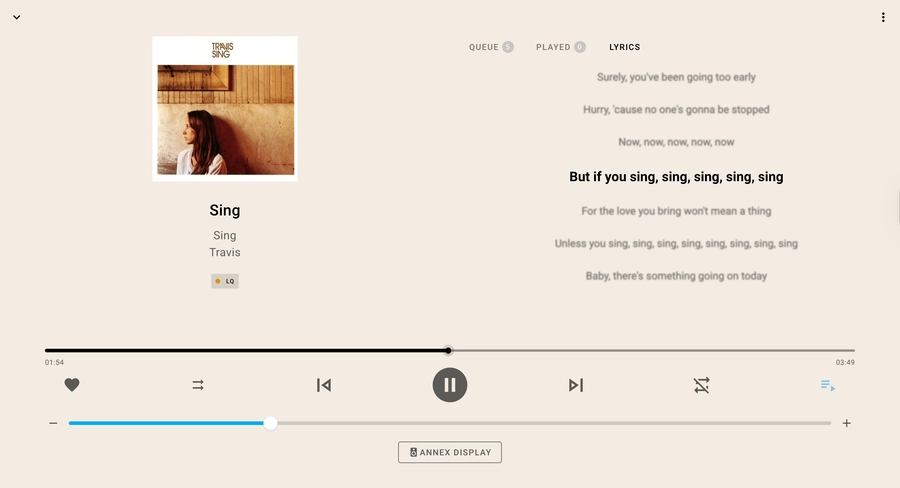 It's time for karaoke!
Never again be left guessing what Kurt is saying in Smells Like Teen Spirit. As of Music Assistant 2.6, you can now see the lyrics of the song you’re playing. If the lyrics provider supports it, there is the ability to have these words time-synced, making it more like karaoke. Lyrics can be found when you open the queue menu and it will be in the “lyrics” tab (this tab will only appear if the track name, artist and album are matched to the lyrics providers). We started with support of LRCLIB, but have since added Tidal lyric syncing, Genius lyrics, and local LRC files.
Smart fading
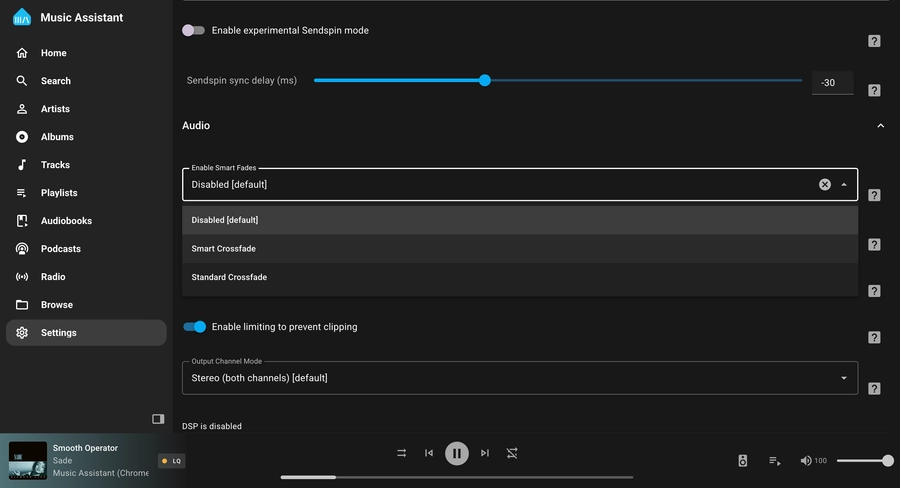 Making your playlists seamless
Music Assistant is now your personal in-house DJ, perfectly blending one song into the next, and unlike a DJ it always takes your requests 😎. This latest update adds Smart fading, which takes into account the BPM of each song, to make crossfading between songs sound more natural. To turn it on, go to your player of choice, scroll down to the Audio section, and choose “Enable Smart Fades”.
And much more
None of these updates are small things, but I’m running out of space, so here is the rest of the hot 100:
Join the audio revolution
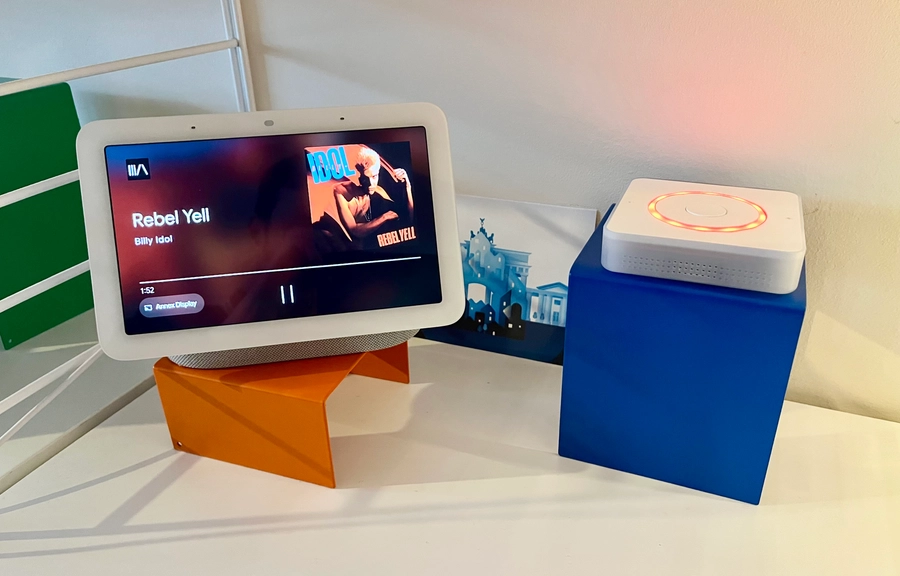 Music Assistant is also cast compatible!
Your music, your players – it’s time to take back control of your music and the devices you want to play it on. If you’re new to Music Assistant, check how to get started here. While we’re excited about these new features, we’re not hitting pause anytime soon. We’d love to hear your feedback in the comments or on Discord.

there is a discord server with an @everyone in case of future important updates, such as vulnerabilities (most recently 2025-09-07)
xf-proto-fb to support reverseproxies which do not provide an x-forwarded-proto header 9c64788
--ipar, reverseproxy-aware alternative to --ipa 3368421
idp-chsub can be used to replace spaces in IdP usernames/groupnames 5e1d9a5@acct group was unavailable in groupless IdP setups b6c2ec1

Full Changelog: v4.2.0...v4.2.1

The Stable channel has been updated to 143.0.7499.146/.147 for Windows/Mac and 143.0.7499.146 for Linux, which will roll out over the coming days/weeks. A full list of changes in this build is available in the Log.
2025-12-12: Updated to include more details for bug number 466192044
Security Fixes and Rewards
Note: Access to bug details and links may be kept restricted until a majority of users are updated with a fix. We will also retain restrictions if the bug exists in a third party library that other projects similarly depend on, but haven’t yet fixed.
Note: Access to bug details and links may be kept restricted until a majority of users are updated with a fix. We will also retain restrictions if the bug exists in a third party library that other projects similarly depend on, but haven’t yet fixed.
This update includes 2 security fixes. Below, we highlight fixes that were contributed by external researchers. Please see the Chrome Security Page for more information.
[$10000][448294721] High CVE-2025-14765: Use after free in WebGPU. Reported by Anonymous on 2025-09-30
[TBD][466786677] High CVE-2025-14766: Out of bounds read and write in V8. Reported by Shaheen Fazim on 2025-12-08
We would also like to thank all security researchers that worked with us during the development cycle to prevent security bugs from ever reaching the stable channel.
Many of our security bugs are detected using AddressSanitizer, MemorySanitizer, UndefinedBehaviorSanitizer, Control Flow Integrity, libFuzzer, or AFL.
Interested in switching release channels? Find out how here. If you find a new issue, please let us know by filing a bug. The community help forum is also a great place to reach out for help or learn about common issues.
The Extended Stable channel has been updated to 142.0.7444.243 for Windows and Mac which will roll out over the coming days/weeks.
We are pleased to announce the latest stable release of Jellyfin, version 10.11.5! This minor release brings several bugfixes to improve your Jellyfin experience. As always, please ensure you take a full backup before upgrading!
You can find more details about and discuss this release on our forums.

there is a discord server with an @everyone in case of future important updates, such as vulnerabilities (most recently 2025-09-07)
prologues, epilogues, readmes, preadmes (global-options and/or volflags) accept a comma-separated list of filenames to look forthank you for playing ban-message ce2eebaCache-Control response-header 3bc0bf1
ipu with idp users 594ec39@eaDir 1b0eb45X-Forwarded-Proto is not added by the reverseproxy ad45de9 1b222fb
X-Forwarded-Host too before realizing that's generally not a thingchpw.json before starting copyparty is now supported and no longer crashes on startup efc6a09
OBS-Studio-32.0.4-Sources.tar.gz: d9e62ea24305fbfe14c69a6422de1525fe84da232df2cc0d7e4601a840bdbba8
OBS-Studio-32.0.4-Ubuntu-24.04-x86_64-dbsym.ddeb: 7cdc30ce70df76a0b1a0e6b33f612f8283d150c6072a8edf03ec0e6d86d9d93d
OBS-Studio-32.0.4-Ubuntu-24.04-x86_64.deb: b146f22a34888bb9854bd7574fc949b00043ba38d222da13f71c180050bf289b
OBS-Studio-32.0.4-Windows-arm64-PDBs.zip: 19a191edbaccbb35fd00ed2145f3cb911770ac4e6d4635d48233004ccab22ed5
OBS-Studio-32.0.4-Windows-arm64.zip: 89ff3f7a065089d6527837663d5fda79df64cffce480a129abe04d49745a204b
OBS-Studio-32.0.4-Windows-x64-Installer.exe: 46a18bce8e2ff662b700c91d340a519376e712fe0af0d335536e4f9fd253f10a
OBS-Studio-32.0.4-Windows-x64-PDBs.zip: 031a9183d754f1e0d3c1219cc8d977267e17cde9bef055dfd0dcd088a806fa85
OBS-Studio-32.0.4-Windows-x64.zip: fd367a7f156319426f1a600720c1288ad0011da168dff41e0f94dbb18cc1dc0f
OBS-Studio-32.0.4-macOS-Apple-dSYMs.tar.xz: 920f0df7770fd54f5f06ecaee4ac4324b44afd564b8b1f70ec105fa088306134
OBS-Studio-32.0.4-macOS-Apple.dmg: 7c056644636a794cb18281af98d54b5795ad8b0985e950d93b8c510b645b6298
OBS-Studio-32.0.4-macOS-Intel-dSYMs.tar.xz: 1ba9b861620783b9ccbd045e60cbe2caba06e60ca7d753aa56394ee4db50c2af
OBS-Studio-32.0.4-macOS-Intel.dmg: 7d610f5ab1c9d14290d827e449b2cc9ed99bb8b49a890d1cacf0611acebe44fa

Just in time for the holidays, another release packed with improvements to both music and video playback!

IdentifyItemView by @JPKribs in #1587ItemView by @JPKribs in #1606ActiveSessionsView Cleanup by @JPKribs in #1614PlayButton Cleanup by @JPKribs in #1651ItemView by @JPKribs in #1616Action ButtonStyle by @JPKribs in #1547ActionButtons to a ButtonStyle by @JPKribs in #1688ItemView on End of Playback by @JPKribs in #1589FlowLayout Height Calculations by @JPKribs in #1632.tvShows UserViews Recursively by @JPKribs in #1645ItemView Layout Issues for Uncached Images by @JPKribs in #1638Transmission and fix severe hang by @LePips in #1719WrappingHStack for FlowLayout by @JPKribs in #1569ParentalRating Usage by @JPKribs in #1571TextPair/TextPairView for LabeledContent by @LePips in #1576xcconfig by @LePips in #1578xcconfig DEVELOPMENT_TEAM by @LePips in #1579ItemViews by @JPKribs in #1600NavigationStack by @LePips in #1602PagingLibraryView runtime warnings by @LePips in #1607.Sheet Cleanup by @JPKribs in #1609PosterButton refactoring and zoom transitions by @LePips in #1617Main by @JPKribs in #1655ItemView TODOs by @JPKribs in #1639Stateful macro by @LePips in #1714Stateful Macro - ActiveSessionsViewModel by @JPKribs in #1717Stateful Macro - APIKeysViewModel & AddServerUserViewModel by @JPKribs in #1718Stateful Macro - Server Devices & Details by @JPKribs in #1720UserSignInViewModel to Stateful macro, various other work by @LePips in #1745@Stateful - ServerActivityDetailViewModel by @JPKribs in #1782ErrorView Cleanup by @JPKribs in #1798Full Changelog: 1.3...1.4

nginx-1.29.4 mainline version has been released, featuring HTTP/2 to backend and Encrypted ClientHello support.
==================================================================
Wana boot and install OS through network (PXE)? Welcome to my new project iVentoy.
About iVentoy https://www.iventoy.com/
iVentoy is an enhanced version of the PXE server.
Extremely easy to use
Many advanced features
x86 Legacy BIOS, IA32 UEFI, x86_64 UEFI and ARM64 UEFI mode supported
110+ common types of OS supported (Windows/WinPE/Linux/VMware)
......
SHA-256
1fef1e804d4d963c1cff7a6dca7758be503a08b101fc8440d85270acd0767493  ventoy-1.1.09-linux.tar.gz
4bcafc308a8be5bd944255641e63cc3cbb78aaa62de388bc6eb59e5b77dd20f3  ventoy-1.1.09-livecd.iso
ff531a78d60c604cee67d56d02102a1147e647d0fb8fb8516f77712d05d5b99d  ventoy-1.1.09-windows.zip

The Extended Stable channel has been updated to 142.0.7499.235 for Windows and Mac which will roll out over the coming days/weeks.
The Stable channel has been updated to 143.0.7499.109/.110 for Windows/Mac and 143.0.7499.109 for Linux, which will roll out over the coming days/weeks. A full list of changes in this build is available in the Log.
2025-12-12: Updated to include more details for bug number 466192044
Security Fixes and Rewards
Note: Access to bug details and links may be kept restricted until a majority of users are updated with a fix. We will also retain restrictions if the bug exists in a third party library that other projects similarly depend on, but haven’t yet fixed.
This update includes 3 security fixes. Below, we highlight fixes that were contributed by external researchers. Please see the Chrome Security Page for more information.
[N/A][466192044] High CVE-2025-14174: Out of bounds memory access in ANGLE. Reported by Apple Security Engineering and Architecture (SEAR) and Google Threat Analysis Group on 2025-12-05
[$2000][460599518] Medium CVE-2025-14372: Use after free in Password Manager. Reported by Weipeng Jiang (@Krace) of VRI on 2025-11-14
[$2000][461532432] Medium CVE-2025-14373: Inappropriate implementation in Toolbar. Reported by Khalil Zhani on 2025-11-18
Google is aware that an exploit for CVE-2025-14174 exists in the wild.
We would also like to thank all security researchers that worked with us during the development cycle to prevent security bugs from ever reaching the stable channel.
Many of our security bugs are detected using AddressSanitizer, MemorySanitizer, UndefinedBehaviorSanitizer, Control Flow Integrity, libFuzzer, or AFL.
Interested in switching release channels? Find out how here. If you find a new issue, please let us know by filing a bug. The community help forum is also a great place to reach out for help or learn about common issues.
We recommend running CasparCG 2.5 on CPUs which support AVX2. Officially Chrome claims to require AVX2, and it is required for some of our in-progress HDR support.
Intel CPUs based on Haswell or later support this, which were first released to consumers in 2013, or 2014 for servers.
Starting with CasparCG 2.6, this will become a requirement.
Make sure to install the latest MSVC runtime, the compiler update requires a newer version than 2.4 https://aka.ms/vc14/vc_redist.x64.exe
Full Changelog: v2.4.3-stable...v2.5.0-stable
