 Log in
uNmINeD 0.19.54-dev
New uNmINeD development snapshot is available for download!
Changes:
- Fixed support for Bedrock worlds without a LevelDB log file
- Updated to .NET 10
- Updated to Avalonia 11.3.10

New uNmINeD development snapshot is available for download!
Changes:
This is the 13th — and last — update of the year to ElegantFin.
Key Changes
You can read the full commit history here.
Known issues
You may use the provided CSS file for self-hosting purposes. Alternatively, you may use the following code snippet to get the latest version via a free CDN.
@import url("https://cdn.jsdelivr.net/gh/lscambo13/ElegantFin@main/Theme/ElegantFin-jellyfin-theme-build-latest-minified.css");
For more detailed information, be sure to read the README.md file.

BookStack v25.12.1 has been released.
This is a security release which adds limits to search operations, and adds size checks to ZIP import files before they are extracted.
These changes help prevent potential abuse to host disk space usage and/or service availability.
We recommended to update your instance if untrusted users have ZIP import permissions, or if untrusted users can perform searches.
Thanks to Jeong Woo Lee (@eclipse07077-ljw) and Gabriel Rodrigues (aka TEXUGO) for reporting these vulnerabilities.

Starting with this release the app will show a warning if used with a Jellyfin 10.10 server. The app will keep working with Jellyfin 10.10 until the next major app release.
If you appreciate my work, you can show your support with a donation through Buy Me a Coffee or GitHub sponsors. Your support helps me continue improving and growing the app. Thank you!

Full Changelog: v4.2.1...v4.2.2

Note
If someone is asking you to pay money for access to UpSnap binaries, source code, or licenses, you are being scammed.
The official and only trusted source for UpSnap is this repository (and its linked releases).
Do not pay third parties for something that is provided here for free.

This is a major release, just in time for the holidays 🎄
Selected new features ✨:
userdate:PT1H for the past hourImproved performance 🏎️:
Selected bug fixes 🐛:
Breaking changes 💥:
This release has been made by @Alkarex, @Frenzie, @Inverle, @aledeg, @andris155, @horvi28, @math-GH, @minna-xD and newcomers @Darkentia, @FollowTheWizard, @GreyChame1eon, @McFev, @jocmp, @larsks, @martinhartmann, @matthew-neavling, @pudymody, @raspo, @scharmach, @scollovati, @stag-enterprises, @vandys, @xtmd, @yzx9.
Full changelog:
userdate:PT1H for the past hour #8093\b and \B for regex search using PostgreSQL #8141~ subsequent-sibling #8154
Retry-After rules for proxies #8029, #8218data: to CSP in subscription controller #8253Retry-After #8195f.kind to ease migrations from FreshRSS versions older than 1.20.0 #8148config.custom.php during install #8033window.bcrypt object #8166chart.js v4 update #8298WordPress.com HTTP duplicates with WebSub Automattic/pushpress#16cli/health.php compatibility with OpenID Connect #8040cli/access-permissions.sh to detect the correct permission Web group such as www-data, apache, or httpexec() function for git update #8228DOMDocument::saveHTML() scrambling charset encoding in some versions of libxml2 #8296php-intl #8334<select> #8190Promise to async/await: #8182move #8214lib_rss.php with potential breaking changes for some extensions #8193,#[Deprecated] #8325--no-progress #8315

This is the twelfth update to ElegantFin.
Key Changes
You can read the full commit history here.
Known issues
You may use the provided CSS file for self-hosting purposes. Alternatively, you may use the following code snippet to get the latest version via a free CDN.
@import url("https://cdn.jsdelivr.net/gh/lscambo13/ElegantFin@main/Theme/ElegantFin-jellyfin-theme-build-latest-minified.css");
For more detailed information, be sure to read the README.md file.
This is the eleventh update to ElegantFin.
Key Changes
You can read the full commit history here.
Known issues
You may use the provided CSS file for self-hosting purposes. Alternatively, you may use the following code snippet to get the latest version via a free CDN.
@import url("https://cdn.jsdelivr.net/gh/lscambo13/ElegantFin@main/Theme/ElegantFin-jellyfin-theme-build-latest-minified.css");
For more detailed information, be sure to read the README.md file.
This is the tenth update to ElegantFin.
Key Changes
Ctrl+Plus to increase their sizeYou can read the full commit history here.
Known issues
You may use the provided CSS file for self-hosting purposes. Alternatively, you may use the following code snippet to get the latest version via a free CDN.
@import url("https://cdn.jsdelivr.net/gh/lscambo13/ElegantFin@main/Theme/ElegantFin-jellyfin-theme-build-latest-minified.css");
For more detailed information, be sure to read the README.md file.
This is the ninth and largest update to ElegantFin since it was first publicly released in December last year. Here are some key changes packed in this update:
Ctrl + Minus.You can read the full commit history here.
Known issues
Ctrl+Plus to zoom in to around 125% scale in your web browser.You may use the provided CSS file for self-hosting purposes. Alternatively, you may use the following code snippet to get the latest version via a free CDN.
@import url("https://cdn.jsdelivr.net/gh/lscambo13/ElegantFin@main/Theme/ElegantFin-jellyfin-theme-build-latest-minified.css");
For more detailed information, be sure to read the README.md file.
This is the eighth update to ElegantFin.
Key Changes
You can view the full commit history here.
Special thanks to the following contributors for their invaluable contributions to this update:
Code Contributors: rlauuzo and many others
Bug Reporters: Spirited, server-imp and many others
Known issues
You may use the provided CSS file for self-hosting purposes. Alternatively, you may use the following code snippet to get the latest version via a free CDN.
@import url("https://cdn.jsdelivr.net/gh/lscambo13/ElegantFin@main/Theme/ElegantFin-jellyfin-theme-build-latest-minified.css");
For more detailed information, be sure to read the README.md file.
This is the seventh update to ElegantFin.
Key Changes
You can view the full commit history here.
Special thanks to the following contributors for their invaluable contributions to this update:
Code Contributors: All
Bug Reporters: Wernouxe, AlessandroTischer, Jam, Manuel García and many others
Known issues
You may use the provided CSS file for self-hosting purposes. Alternatively, you may use the following code snippet to get the latest version via a free CDN.
@import url("https://cdn.jsdelivr.net/gh/lscambo13/ElegantFin@main/Theme/ElegantFin-jellyfin-theme-build-latest-minified.css");
For more detailed information, be sure to read the README.md file.
This is the sixth update to ElegantFin.
Key Changes
You can view the full commit history here.
Special thanks to the following contributors for their invaluable contributions to this update:
Code Contributors: KeyboardDabbler, Stephan Renggli and many others
Bug Reporters: Wernouxe, AlessandroTischer, Tim Wilson, Victor Löfgren and many others
Known issues
You may use the provided CSS file for self-hosting purposes. Alternatively, you may use the following code snippet to get the latest version via a free CDN.
@import url("https://cdn.jsdelivr.net/gh/lscambo13/ElegantFin@main/Theme/ElegantFin-jellyfin-theme-build-latest-minified.css");
For more detailed information, be sure to read the README.md file.
This is the fifth update to ElegantFin.
Key Changes
Special thanks to the following contributors for their invaluable contributions to this update:
Code Contributors: Travis Lane, KeyboardDabbler
Bug Reporters: Wernouxe, celticslment, donchi40, COxDE and many others
You can view the full commit history here.
You may use the provided CSS file for self-hosting purposes. Alternatively, you may use the following code snippet to get the latest version via a free CDN.
@import url("https://cdn.jsdelivr.net/gh/lscambo13/ElegantFin@main/Theme/ElegantFin-jellyfin-theme-build-latest-minified.css");
For more detailed information, be sure to read the README.md file.
This is the fourth update to ElegantFin.
Key Changes
Special thanks to @Tormak9970 for his contributions
Known issues
You may use the provided CSS file for self-hosting purposes. Alternatively, you may use the following code snippet to get the latest version via a free CDN.
@import url("https://cdn.jsdelivr.net/gh/lscambo13/ElegantFin@main/Theme/ElegantFin-jellyfin-theme-build-latest-minified.css");
For more detailed information, be sure to read the README.md file.
This is the third update to ElegantFin.
Key Changes
You may use the provided CSS file for self-hosting purposes. Alternatively, you may use the following code snippet to get the latest version via a free CDN.
@import url("https://cdn.jsdelivr.net/gh/lscambo13/ElegantFin@main/Theme/ElegantFin-jellyfin-theme-build-latest-minified.css");
For more detailed information, be sure to read the README.MD file.
nginx-1.28.1 stable version has been released.
Below are development builds for testing purposes.
Latest development build: 2.5.6.41 (January 4th 2026)
Latest stable release build: 2.5.6.0
https://github.com/clsid2/mpc-hc/releases/tag/2.5.6

Today, we’re proud to announce that elementary OS 8.1 is available to download now and shipping on several high-quality computers!

With OS 8.1, we’ve focused in on:
To get elementary OS 8.1 now, head to elementary.io for the download—or read on for an overview of what’s new.
We released elementary OS 8 last November with a new Secure Session—powered by Wayland—that ensures applications respect your privacy and consent, a brand new Dock with productive multitasking and window management features, expanded access to cross-platform apps, a revamped updates experience, and new features and settings that empower our diverse community through Inclusive Design. Over the last year we’ve continued to build upon that work to deliver new features and fix issues based on your feedback, plus we’ve improved support for a range of devices including HiDPI and Multi-touch devices.
For the initial release of OS 8, we kept the Classic Session as the default session type to make sure that the apps and features you rely on would continue to work as you expect, with the option to try a new Secure Session if it interested you. Since then we’ve released updates every month fixing issues that you’ve reported, third party app developers have updated their apps to support Wayland-based sessions, and hardware makers like Nvidia have fixed issues in their drivers to support Wayland-based sessions. I’m proud to say that as of now we’ve heard that the Secure Session provides a much better experience for most people and supports a broader range of modern hardware features. So in OS 8.1, the Secure Session is now the default session, with the option to fall back to the Classic Session if you still need it.
You’ll also notice that password authentication dialogs have a new feature in a Secure Session: when opened, the rest of the screen will dim and other windows won’t be allowed to steal focus. This prevents accidentally typing your password anywhere other than the authentication dialog and you’ll be able to make sure these are legitimate system dialogs and not an application trying to read your password.
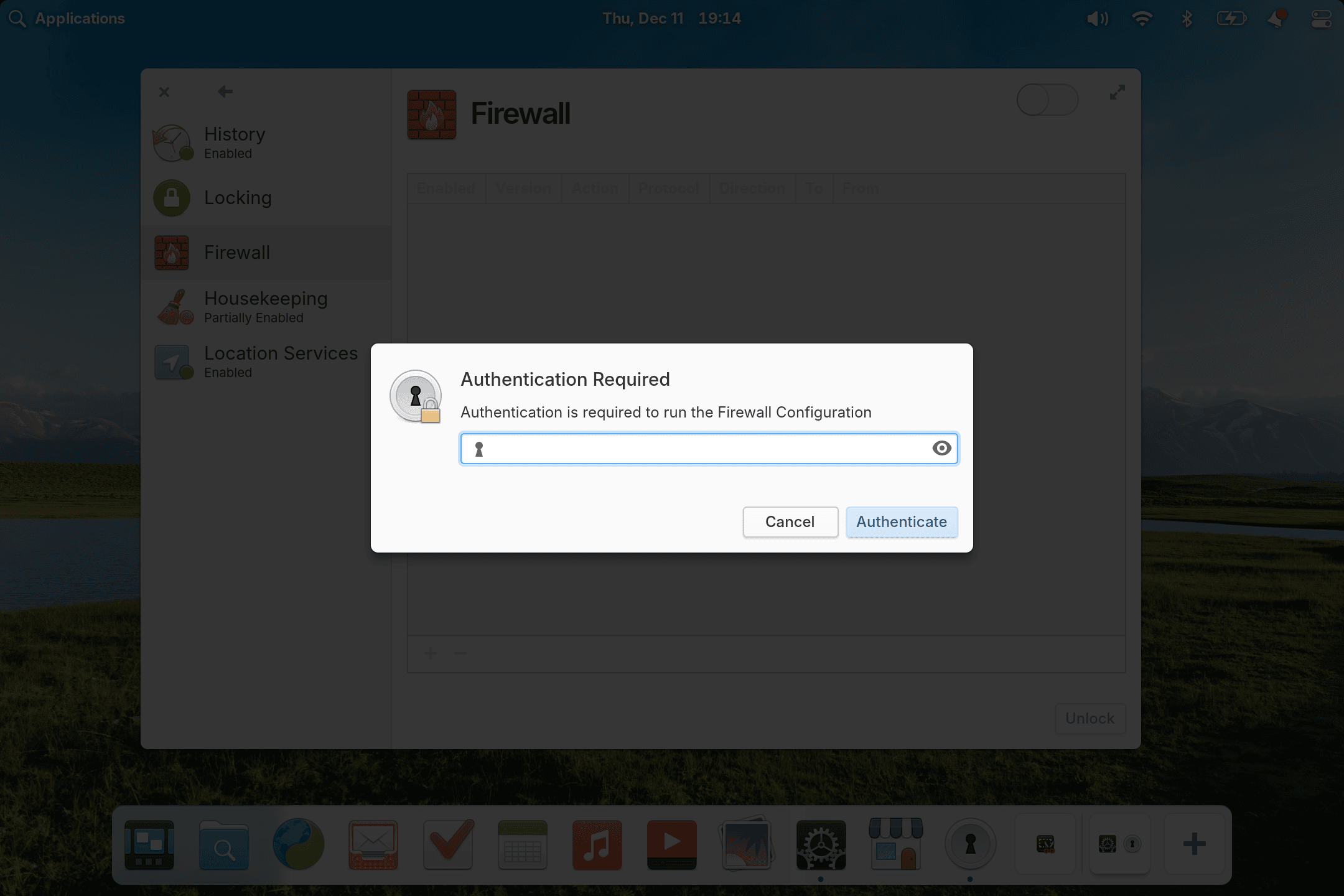
Authentication dialogs prevent focus stealing in Secure Sessions
Plus, we’ve resolved reported issues that prevented some apps from starting correctly when switching between Classic and Secure sessions, so rest assured that you’ll be able to reach for a Classic session if you need it. And we ship new AppArmor profiles that resolve some Flatpak sandbox issues—especially notable if you’d previously had trouble with Steam or running apps in a Guest session.
One of the first updates we made to the Dock was to bring back a few things you told us that you missed from Plank, the previous dock on elementary OS 7 and before. We made sure to show multiple running dots for apps with multiple open windows, and made sure to adjust the color of running dots depending on if they were running in this workspace or another one. You can once again cycle through open app windows when you hold a drag-n-drop over its app icon. And we’ve added Pressure Reveal, which makes it easier to select app controls at the bottom of the screen without accidentally revealing the Dock.
When we ran our desktop survey 75% of you told us that you expected to see background apps in the Dock, so we now have support for the Background Portal. Here you can see a list of apps running in the background without a window, their supplied reason for running the background, and you have the ability to force them to quit. You can always further manage app permissions in System Settings → Applications and choose which apps are allowed to run in the background.

The Dock now shows Background Apps and Workspaces
Another 60% said that they used the Multitasking View to manage putting apps in the background, so we’ve brought the workspace switcher up from the Multitasking View directly into the Dock. You can press the “+” tile to open new workspaces or select an existing workspace to switch to it. You can also drag-n-drop to rearrange workspaces and—my favorite new feature—clicking on a workspace that’s already open will show the Multitasking View, making it super easy to jump directly to the app you’re looking for with only the mouse. You can also now launch apps from the Dock directly into the Multitasking View, streamlining setting up your workspaces just how you like them. So whether you want to manage apps that run without a window, or focus-in by moving apps to another workspace, you can do so directly from the Dock at any time.
The Dock is now accessible in the Multitasking View
Plus we’ve improved animations—especially while switching workspaces—and added a shake animation when you try to open a new window on a single-window app with middle-click. App launchers will still register your clicks even if your pointer is below the dock. And non-flatpak sideloaded apps that don’t correctly match their launchers can now sometimes be matched by the Dock anyways.
Finally, there’s a new option to enable Hotcorners even while an app is fullscreened in System Settings → Desktop → Multitasking. If you have that option turned on, you can also access the Applications Menu with Super while playing a fullscreen game, for example. And we now only show the Applications Menu hotcorner option in its corresponding panel corner—that’s top-left for folks reading left-to-right and top-right for folks reading right-to-left.
In OS 8, we made the decision to include Flathub—the most popular third-party app store for Linux—in addition to our own app store which contains apps made especially for elementary OS. This brought access to tons of cross-platform apps like Discord and Bitwarden, and now we’ve added new features to AppCenter to accommodate even more new types of cross-platform apps.
On App info pages, we now show a simple percentage-based app rating when ratings are available from ODRS—the same ratings server used by apps like GNOME Software. Plus, when developers provide screenshots for multiple platforms, we now show you the ones intended for elementary OS. We’ve added support for app addons, and we now show when a game supports playing with controllers. Plus we’ve revamped licensing information to make it easier to understand and with more details, and we show a new link type when developers want to encourage you to get involved.
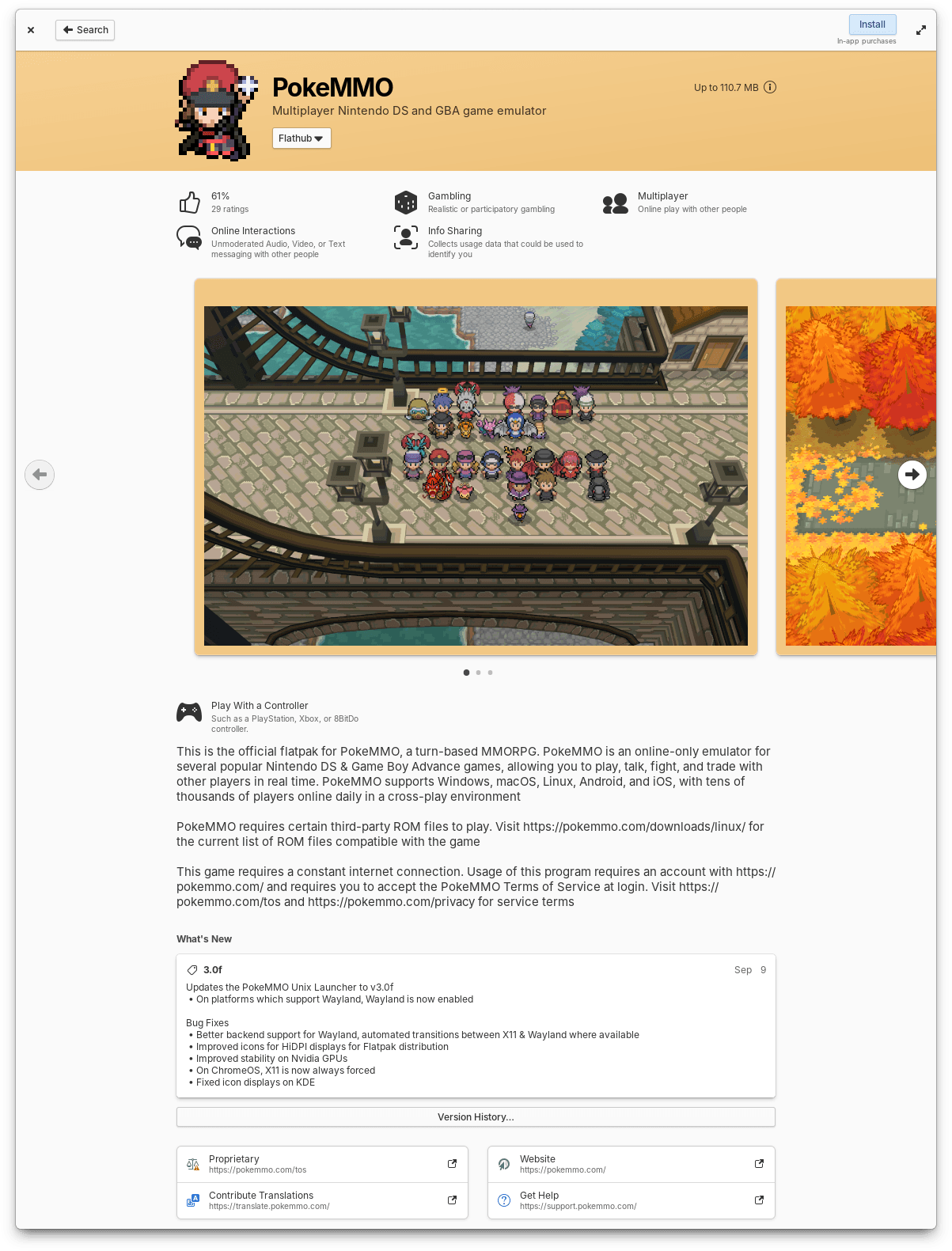
AppCenter now shows more info about apps, including ratings
We’ve changed the label of the action button for free apps from “Free” to “Install”, according to your feedback. And we now show a small label next to the action button for apps which contain in-app purchases. This is especially useful for easily identifying free-to-play games or alt stores like Steam or Heroic Games Launcher. Search is also much faster and search results will now show in two columns when enough space is available so that you can see more results at once.
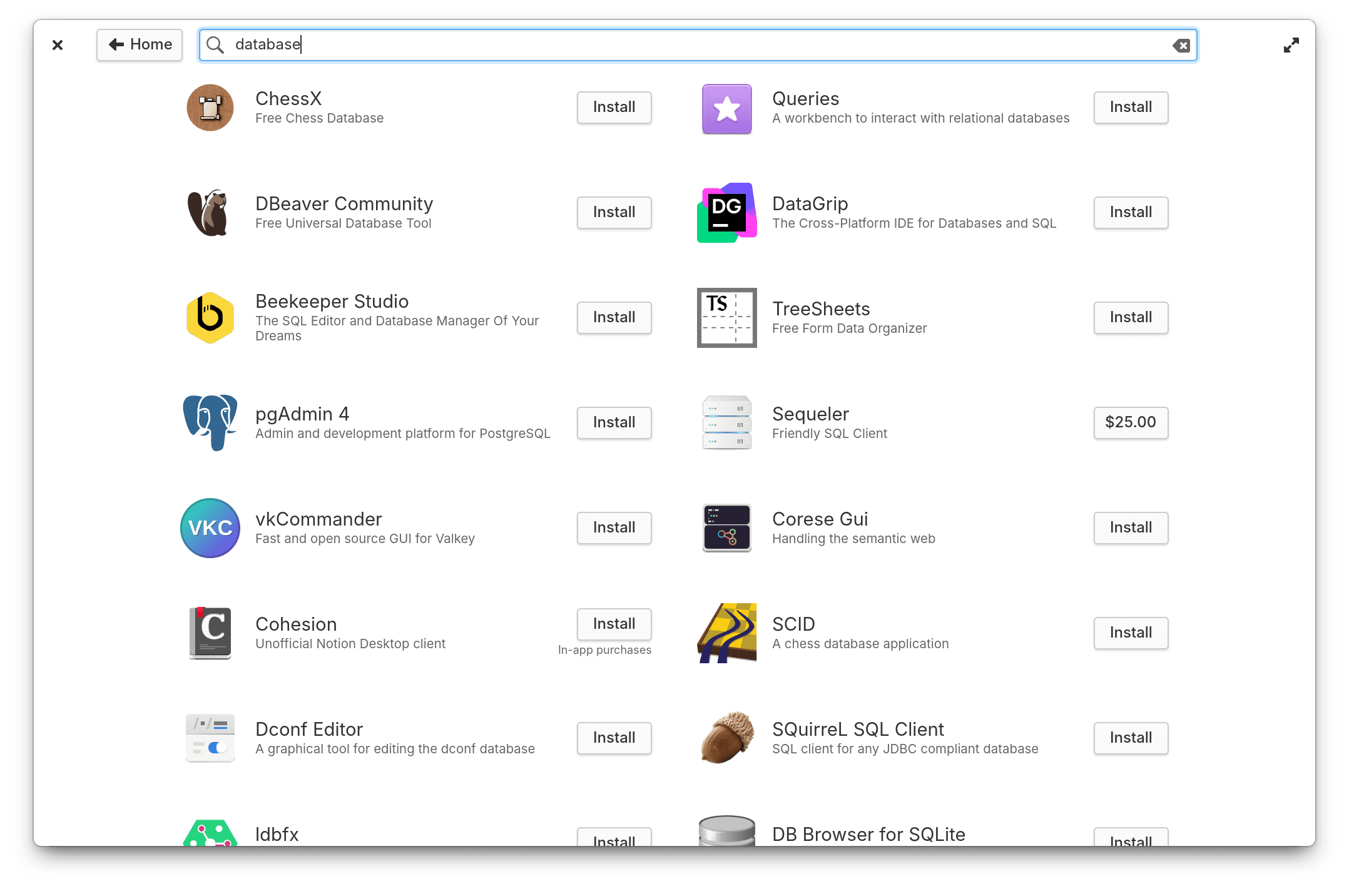
Apps with in-app purchases are now accounted for
Occasionally, app icons can take a little longer to load; When this happens they’ll now fall back to a nicer placeholder and cross fade into their proper icons once available. Plus, we now reload app icons on-the-fly as their data is processed. That means you’ll no longer get occasionally stuck with an AppCenter which shows missing images for apps which have taken a bit longer than usual to load.
In OS 8 we split updates into two distinct places: app updates which stay in AppCenter and never require a restart to install, and system updates which now appear in System Settings and always require a restart to install. This has allowed us to massively streamline updates code in AppCenter and make app updates much faster and more reliable. Plus, we’ve made a few changes to the way installed apps are shown to make it easier to keep up with what’s new when you have automatic app updates turned on: Installed apps are now sorted by release date instead of alphabetically, the Releases dialog got a slight redesign and you can now see recent releases for all installed apps, and we’ve adjusted where the version number and store origin labels appear to clean up their layout. Finally, the “Last checked” time is now updated every minute while the updates view is open

Updated apps and their release notes have been cleaned up
System Updates have gotten much more feature-rich as well. We now show how large an update will be before you download it, and there’s a progress bar while downloading. We also skip held-back packages—such as phased or staged updates—when preparing the updates bundle so that it will more reliably succeed.
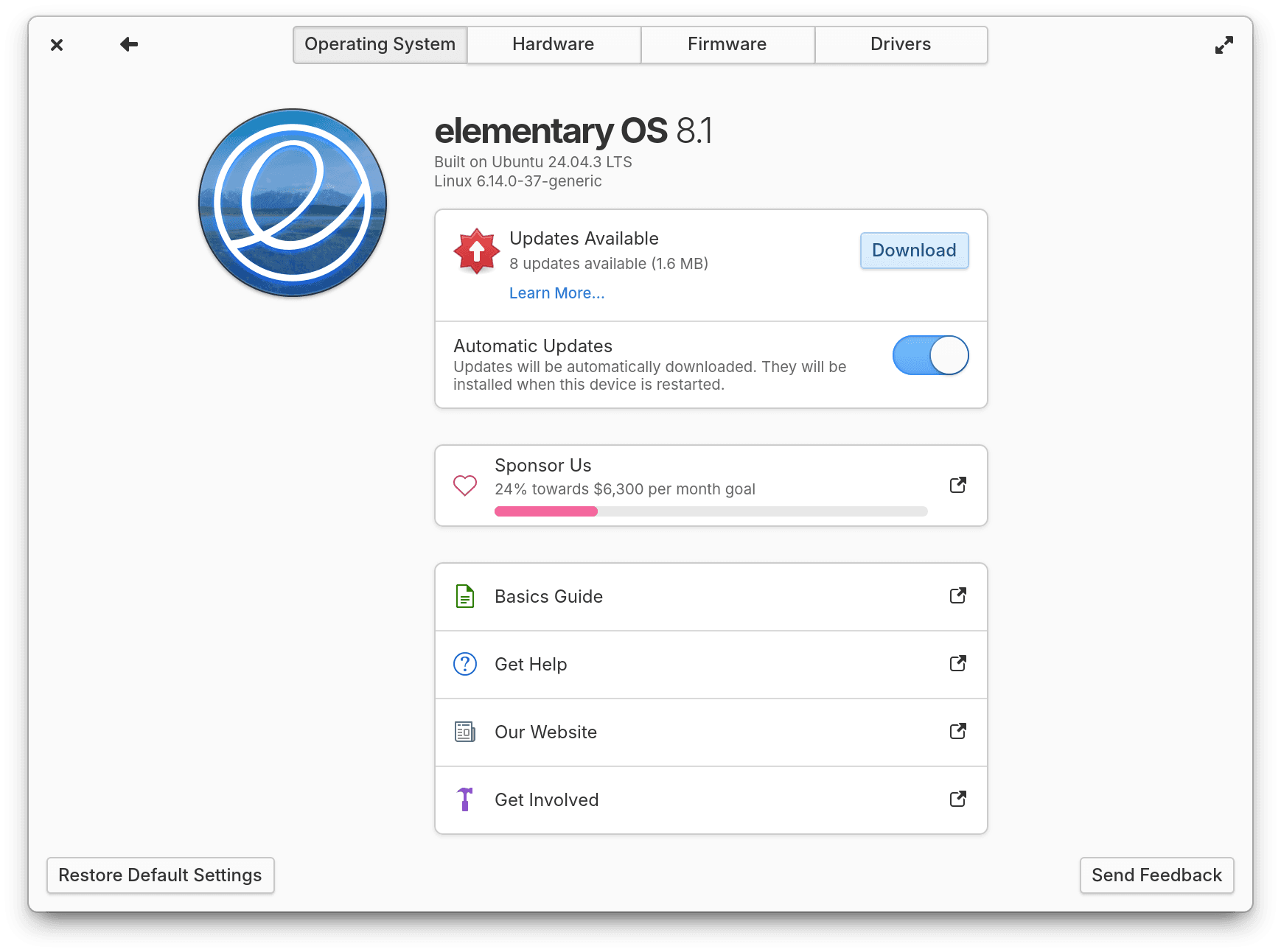
System Updates are more informative and reliable
The updates check has been rewritten to make sure it no longer runs in Demo Mode, only happens once daily, and won’t slow down your initial login. We’ll also no longer automatically download updates when on metered internet connections and send a notification instead. Plus, there’s now an action to jump directly to the System Updates page from System Settings’ context menu in the Dock or Applications Menu or via search.
We’ve always prided ourselves on being a community that is driven by human-centered design first. And for the better part of the last decade, this has increasingly meant paying extra attention to accessibility. These days we’ve adopted a philosophy called Inclusive Design. This holistic design philosophy includes not just things like designing for permanent physical disability, but also considers barriers to inclusion with things like access to the internet, localization, cognitive ability, situational and temporary disability, and more. As a community that includes folks with a range of abilities and access challenges ourselves, we believe that we succeed when we build open computing experiences that seek to be more inclusive and fail when accessibility is considered an afterthought.
During the development of OS 8, we had the pleasure of being introduced to Florian—a fully blind cybersecurity enthusiast—and thanks to his feedback we completely rewrote navigation in Onboarding to be more keyboard and screen reader friendly, as well as took another look at Installation and Initial Setup to vastly improve our entire first run experience for blind folks. This year, Florian joined us again for another round of accessibility testing and we’ve released another round of updates. The “Before Installing”, “Try or Install”, “Choose a Disk”, and “Encryption” views should all have much improved accessible labels. Things like password quality feedback in both the Installer and Initial Setup will now be read aloud by the screen reader, and we fixed a couple instances where the screen reader would announce text style markup. Thanks to this feedback, OS 8.1 can be installed and set up completely blind in most cases, an important win for maintaining your independence as a person with vision disabilities.
Plus, thanks to feedback from Aaron who you may know from his blog series on Linux accessibility, Notifications and the Shortcut Overlay both got releases that add screen reader support. We’ve also improved screen reader labels in Calendar main menu, when adding new calendar sources, and the event dialog. In System Settings, Firmware updates navigation has been rewritten with better screen reader support. And in AppCenter, we’ve improved some screen reader labels on the home page, to name a few cases.
Getting around with the keyboard is essential for blind folks, and we’ve made a number of improvements there too. It starts on the Lock Screen where we’ll automatically select the Classic session if accessibility features are used that don’t yet work in the Secure session. We’ve also made sure media keys—like volume keys and rockers—now work on the Lock Screen. Main menus are now properly marked in most apps and can be opened directly with the keyboard shortcut F10. Plus we fixed some instances of apps not closing with the keyboard shortcut Ctrl + Q.
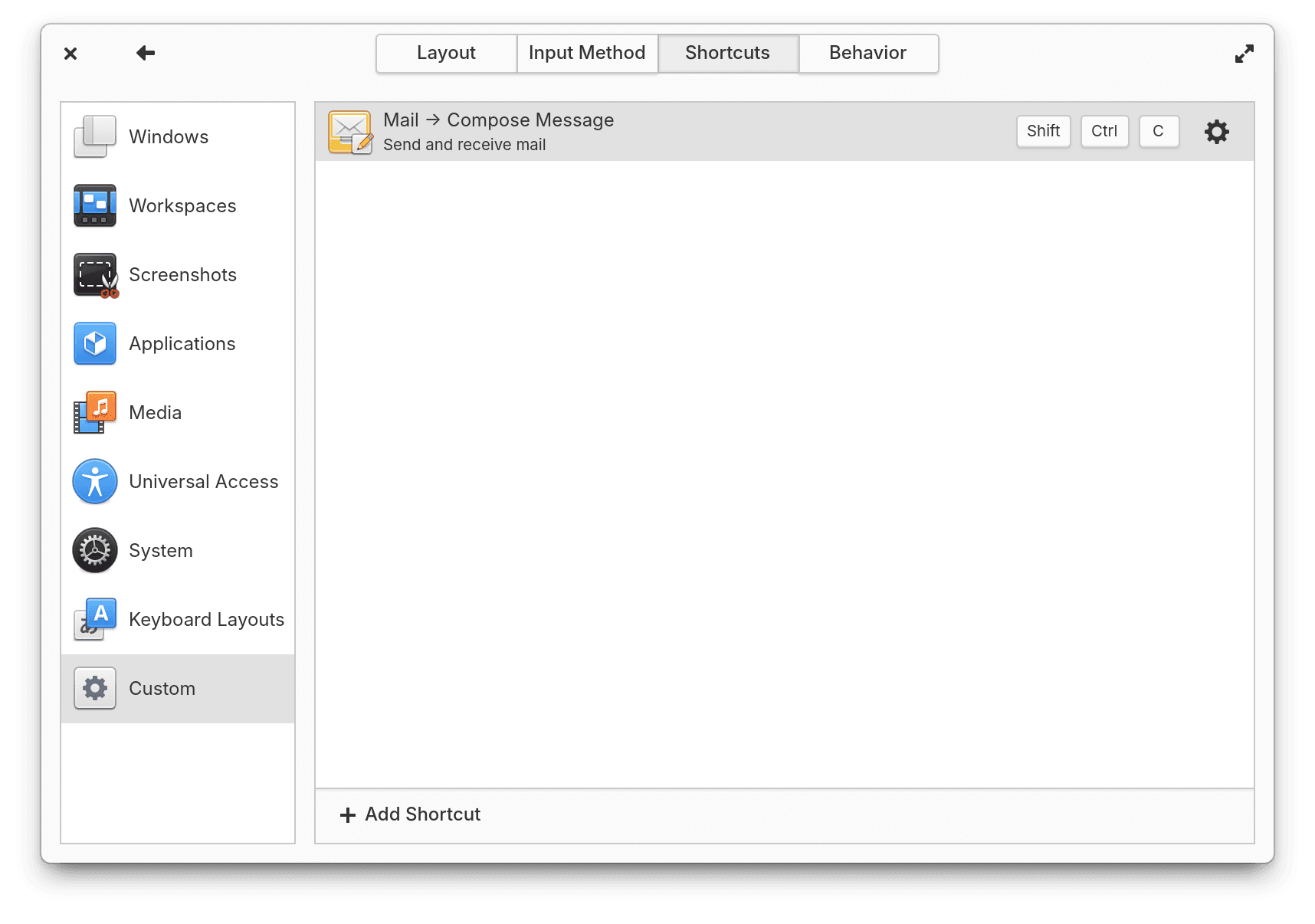
You can create custom keyboard shortcuts for apps and their actions
In System Settings → Keyboard → Shortcuts → Custom you can now choose from a list of installed apps and their actions—in addition to being able to execute custom commands. This makes it super straightforward to add a keyboard shortcut for your most common workflows like composing a new email or adding a new Calendar event. Plus System Settings will also now warn you if your desired keyboard shortcut conflicts with a common system shortcut like “Copy”, “Paste”, or “New Tab”.
For those of us who suffer from eye strain or headaches, we now have Dark Mode schedule snoozing. So when you manually toggle Dark Mode on or off while using a timed or sunset-to-sunrise schedule, your schedule will resume on the next schedule change instead of being canceled completely. Plus we now use Dark Mode screenshots and brand colors in AppCenter when available, and the Lock Screen will follow your Dark Mode settings as well.
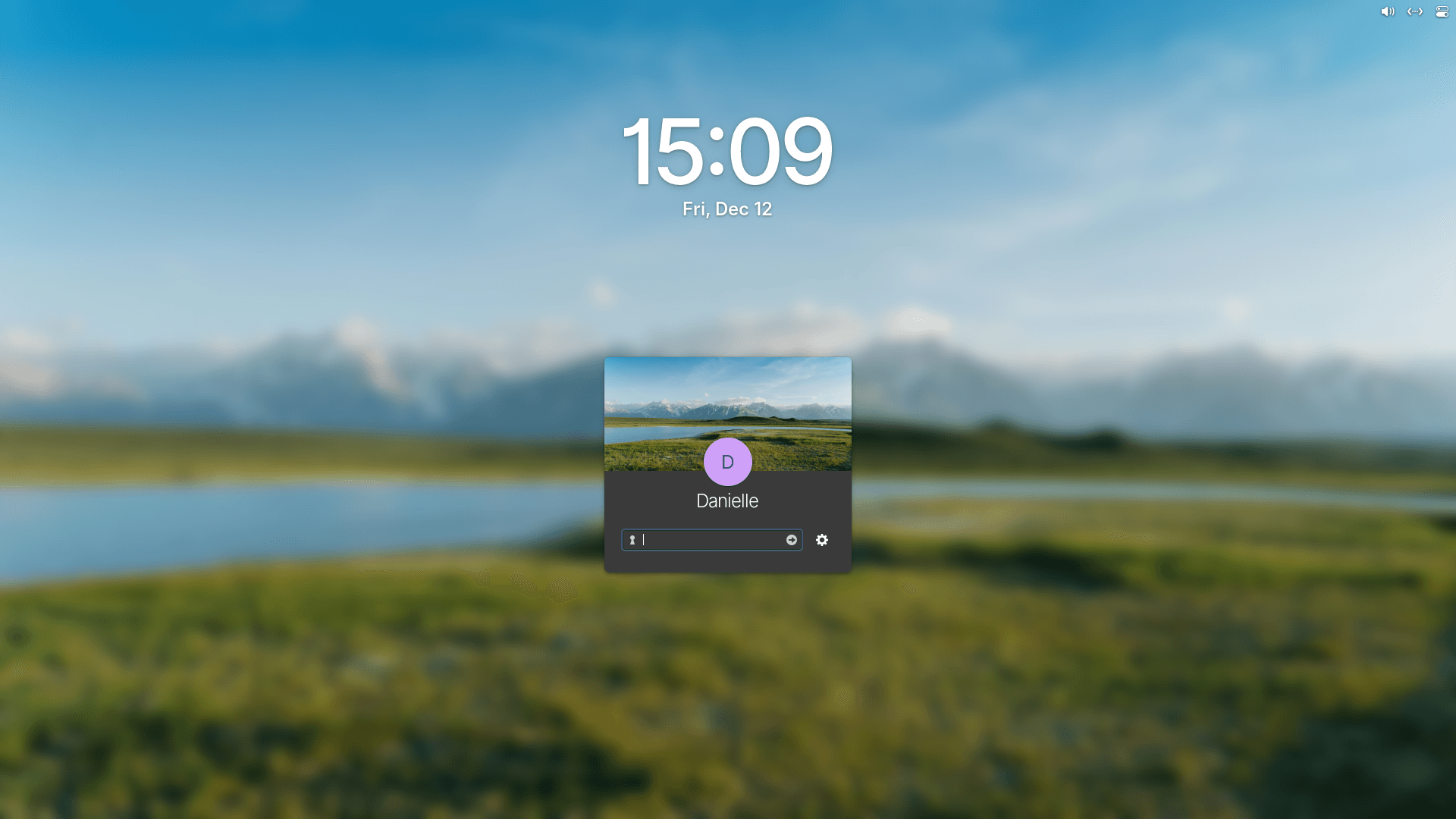
The Lock Screen now supports Dark Mode
The Reduce Motion setting now covers a whole new range of animations across the desktop and in apps—perfect for folks who get motion sick or find animations distracting. And we’ve made sure to still keep around smooth transitions for things like multi-touch gestures.
We’ve also increased text color contrast in Terminal and transparent elements like the Dock, Notifications, and Window Switcher will all respect the “Panel Translucency” setting in System Settings → Desktop → Dock & Panel. Plus we now make sure that display filters aren’t captured in screenshots. And of course this release comes with a ton of translation updates! Special thanks to our hard-working internationalization community and especially our new Chinese localizers.
OS 8.1 includes the latest long-term support Hardware Enablement stack from Ubuntu, including Linux 6.14 and Mesa 25. This new version of the Linux kernel brings improved performance—especially while gaming or moving files—plus reduced power consumption for certain AMD and Intel chipsets and GPUs. It also brings some new security features and support for Intel “Lunar Lake” processors. Plus support for more webcams, USB network devices, joysticks and gamepads, wifi devices, microphones, and more.
For the first time we now also offer ARM64 builds for devices that boot with UEFI. This means you’ll be able to run OS 8.1 on M-series Apple Silicon and devices where you can load UEFI-supporting firmware like Raspberry Pi. This version of Linux also supports certain Qualcomm and Rockchip processors, for example.
Many notebooks and tablets now ship with displays that aren’t quite HiDPI, but are more pixel dense than traditional displays. In OS 8, we only supported integer display scaling which left these devices in an awkward position with an interface that is either too large or too small. In OS 8.1, we now support fractional display scaling in the Secure Session.
We’ve resolved several reported issues with multi-monitor including some issues that occurred when monitor layouts changed or during specific operations like drag-n-drop. And the Installer is now always re-centered on screen, fixing issues with screen layouts that change while it’s loading—including with some virtual machines.
In previous versions of elementary OS, there were places where buttons would only appear when an area was hovered with the pointer, such as in Calendar’s main menu or in the Multitasking View. We now make sure to show those buttons all the time, making them accessible on touch and more discoverable generally. And you can open context menus in more places using a long-press gesture, like in the Dock. We’ve also implemented a brand new Gesture Controller in our window manager which has enabled new features for multi-touch, like swiping up in Multitasking View to close windows. And in Quick Settings, we’ll now show a message when you try to turn on the onscreen keyboard in a Secure Session since it’s currently only available in a Classic session.
We’ve also improved stylus detection in Wacom settings preventing a crash when no stylus is found and fixed the Middle-click paste option in Secure sessions.
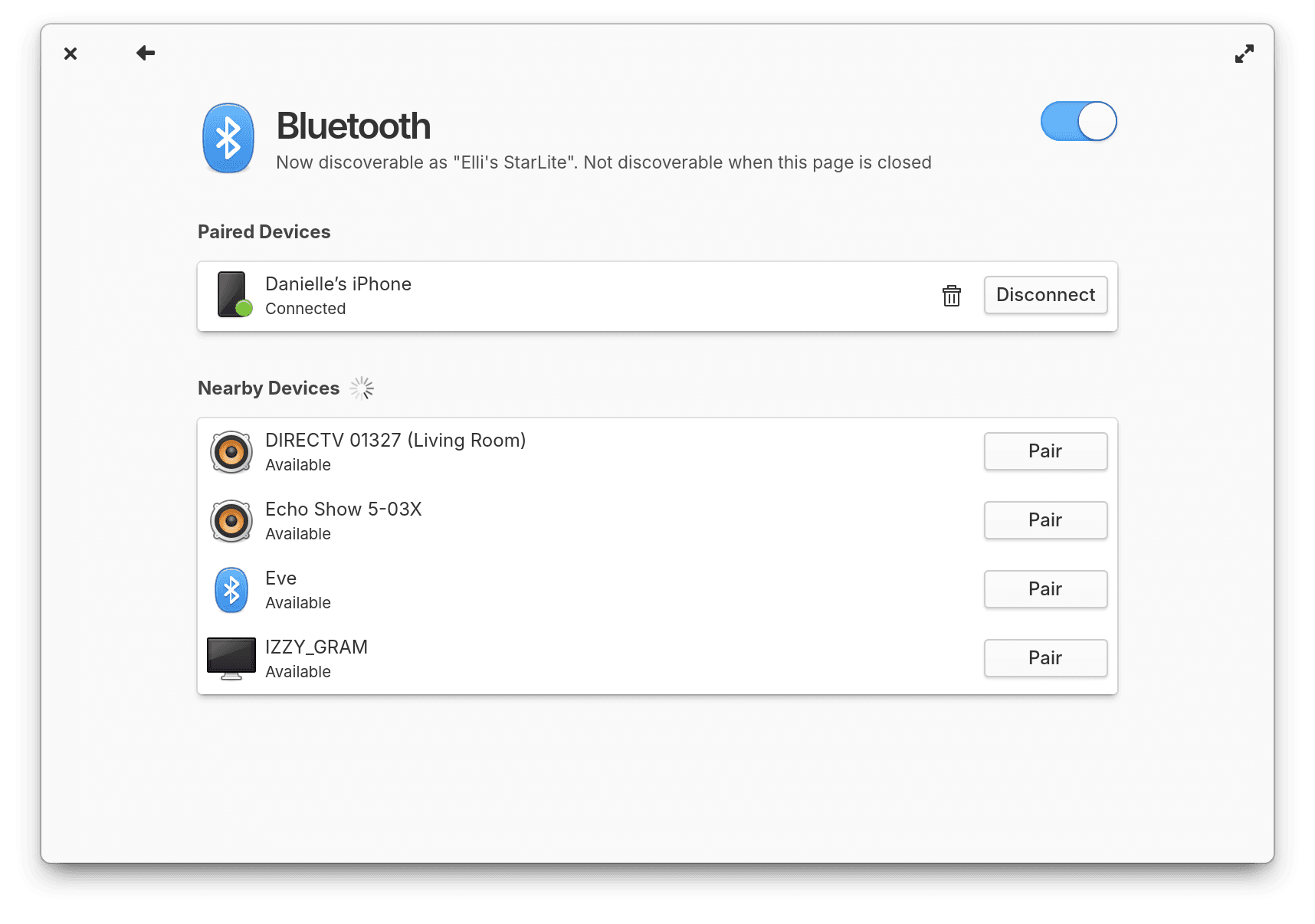
Bluetooth Settings has been redesigned, while also improving the keyboard navigation and screen reader experience
Bluetooth Settings has been redesigned to bring more visual separation between nearby and paired devices, while also improving the keyboard navigation and screen reader experience. We resolved an issue where sometimes devices would be duplicated in the list and fixed issues when a pairing request requires entering passcodes—like with some keyboards. You’ll now also see fewer unnamed devices when discovering, enabling and disabling Bluetooth on devices that have been hardware locked should now work reliably, and to top it all off performance when listing lots of devices has also been improved. Plus, we fixed an issue where connecting Bluetooth devices could cause the Lock Screen to freeze and we’ve improved Airplane Mode: it will now only disable networking radios, not Bluetooth or wired networks.
For some folks with complex partitioning schemes, the Installer would close unexpectedly when entering the custom install mode. We’ve tracked down a number of the corner cases that caused these types of crashes and have not only resolved them, but also added new tests to prevent them from resurfacing in the future.
In the Power menu, we now show the device model if available, and avoid erroneously showing an empty battery icon. And in Power settings we now show a small warning about increased energy usage with certain options.
One of our greatest competitive advantages is our ability to directly connect you with designers and developers to address feedback in a timely manner. Instead of being abstracted behind various layers of customer representatives and having to wait, in some cases, years for fixes, you can reach out directly to the folks responsible for a component and receive a fix in as little as a few weeks. We love hearing from you and take pride in the tightness of this feedback loop. Since the release of OS 8, we’ve been able to successfully address over 1,100 of the reports you filed.
We’ve also started keeping track of what kind of report a filed issue is. Of those 1,100 about 72% of them were fixed bugs—unexpected or disruptive software behaviors. About 18% of reports were new features or enhancements that you requested. And the last 10% were things like project management tasks, technical debt, and code cleanup that our team uses to improve software quality.
OS 8.1 introduces a blur-behind effect for translucent desktop elements like the Dock, Notifications, and the Alt + Tab window switcher. This not only looks nice but helps visually separate these elements from applications while maintaining legibility.
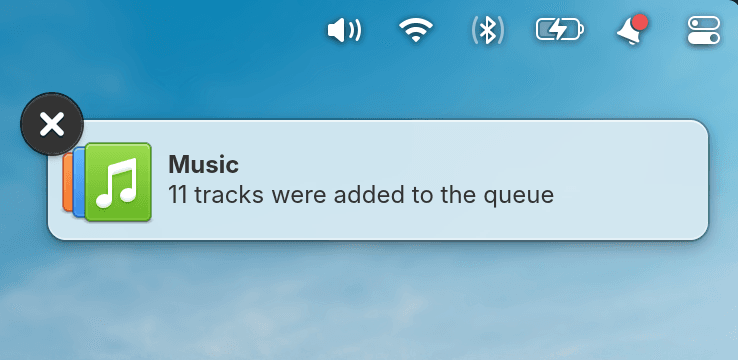
Notifications have rounder corners and a blur-behind effect
In addition to the aforementioned redesign of Bluetooth Settings and the design changes in AppCenter, we also landed a few more smaller design updates. Locale settings has a fresh layout with its options aligned more cleanly and improved links to additional settings. The Screencast Portal now features an improved design for selecting which display or window should be captured, as well as respecting options for capturing the pointer. The Encryption step of the Installer was redesigned to fit on a single page. Picture-in-Picture windows now have rounded corners. And you’ll notice Notifications have rounder corners to match the Dock and their close animation now matches the associated swipe gesture.
In OS 8, you’d often see certain buttons or controls highlighted in apps to indicate where keyboard navigation was currently focused. This is an essential accessibility feature, but could be distracting for folks who navigate with a mouse or touch screen. In OS 8.1, these focus indicators will show up while navigating with the keyboard, but disappear when not being used.

Folder icons were redesigned by popular demand
We also made some highly requested changes to icons, starting with folders. The new folder design is more rounded and more closely matches the design of the Files app icon. Icons featuring a computer mouse have been slightly redesigned to include a scroll wheel. And, icons featuring a mouse pointer have been updated to match the new pointer design. We also updated the pointer icons in Mouse & Touchpad settings. Plus a number of smaller clean ups including adding missing sizes for certain icons, adjusting lighting, and rounding a few edges. Finally, we now fall back to Adwaita icons when an app is missing a non-standard icon name
Some apps send notifications but don’t properly integrate with our granular notification settings, leaving you stuck without an option to limit notifications that you don’t want to see. In OS 8.1, you can now directly deny access for apps to send notification bubbles in System Settings → Applications alongside other app permissions. Plus we now do a better job finding app icons for non-Flatpak sideloaded apps.
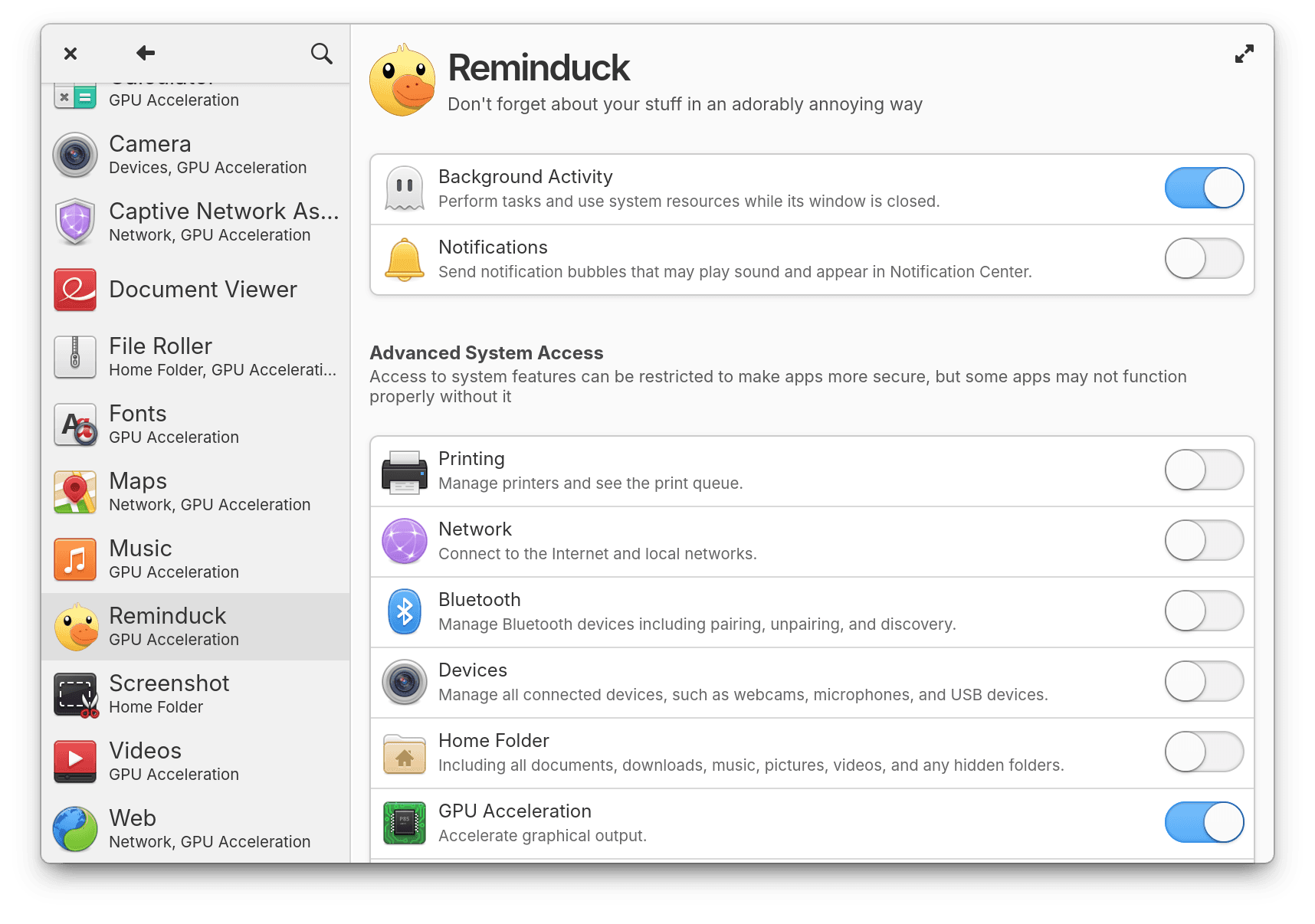
You can now directly deny app access to notifications
System Settings now also allows configuring its own notifications in System Settings → Notifications. So you can turn off bubbles if you don’t want to receive notifications about updates, for example. Plus we’ve improved the behavior of apps like Terminal to make sure we withdraw stale notifications when they are no longer relevant, so your notification center should be a lot less noisy. And Screenshot notifications now open the Image Viewer when clicked and have an option to show the image in Files.
In Network there are two new settings: whether a network should be automatically connected to when available and whether to reduce background data usage when connected to that network. Plus you can now jump to System Settings when middle-clicking networking toggle buttons in the panel.
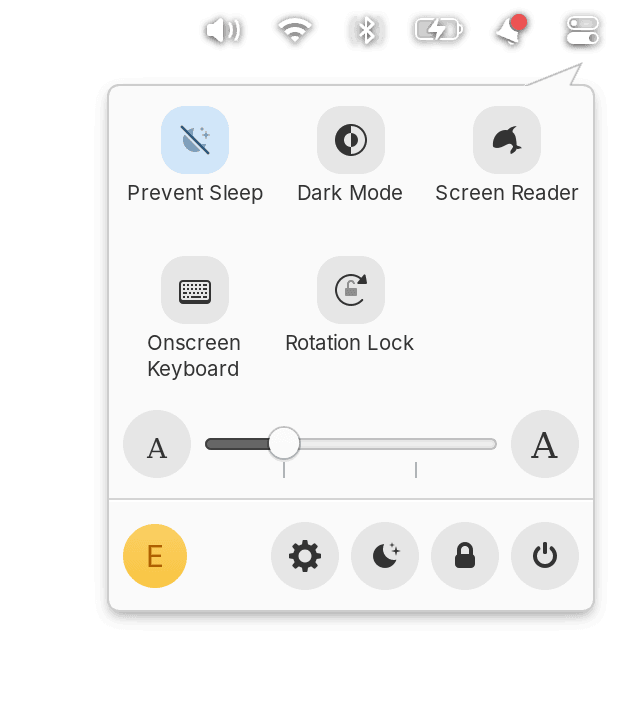
You can Prevent Sleep from Quick Settings
In the Sound menu we fixed loading album art from certain apps like Google Chrome. And in Quick Settings we added a new page where you can see which other people are logged in and quickly switch between accounts. Plus, we added a new “Prevent Sleep” toggle. This is useful when you’re giving a presentation or have a long-running background task where you want to temporarily avoid letting the computer go to sleep on its normal schedule.
Settings pages with sidebars now remember the width you adjusted them to. And we’ve also added the phrase “about this device” as a search term for the System page. Plus, we sync even more of your settings—like panel transparency, orientation lock, and power settings—to the Lock Screen.
A system monitor app has been one of the top requested default app additions for quite some time, and I’m happy to announce that we now ship with one! Monitor is an app for monitoring your system resources and running processes, including with optional panel indicators.
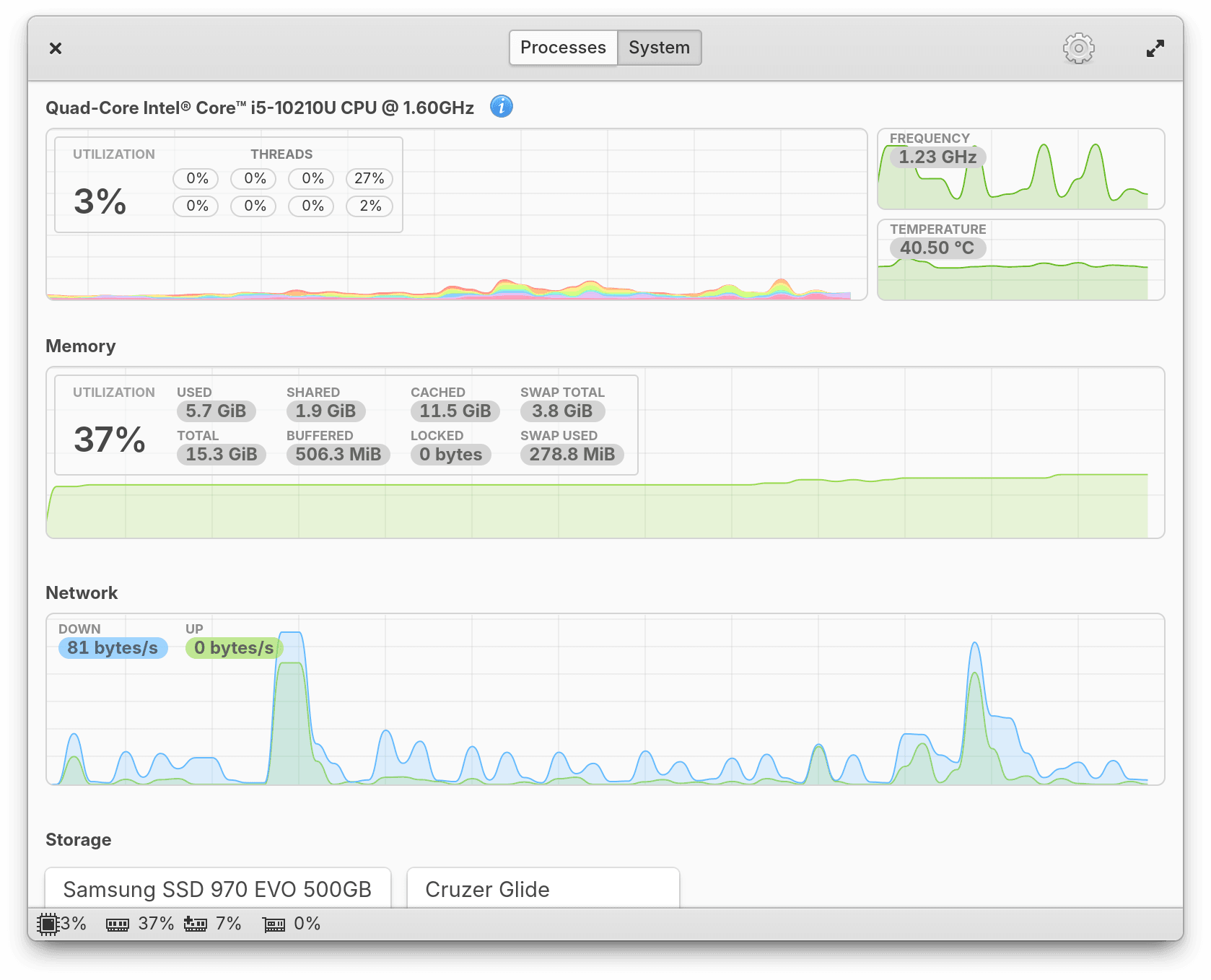
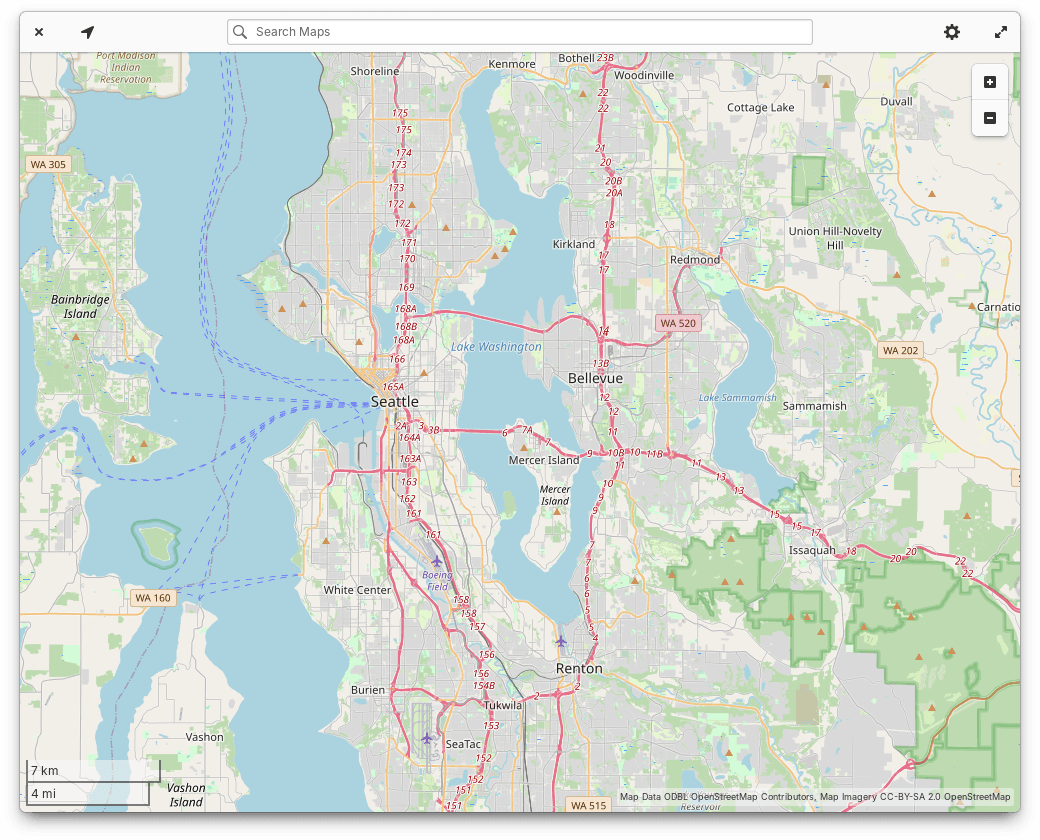
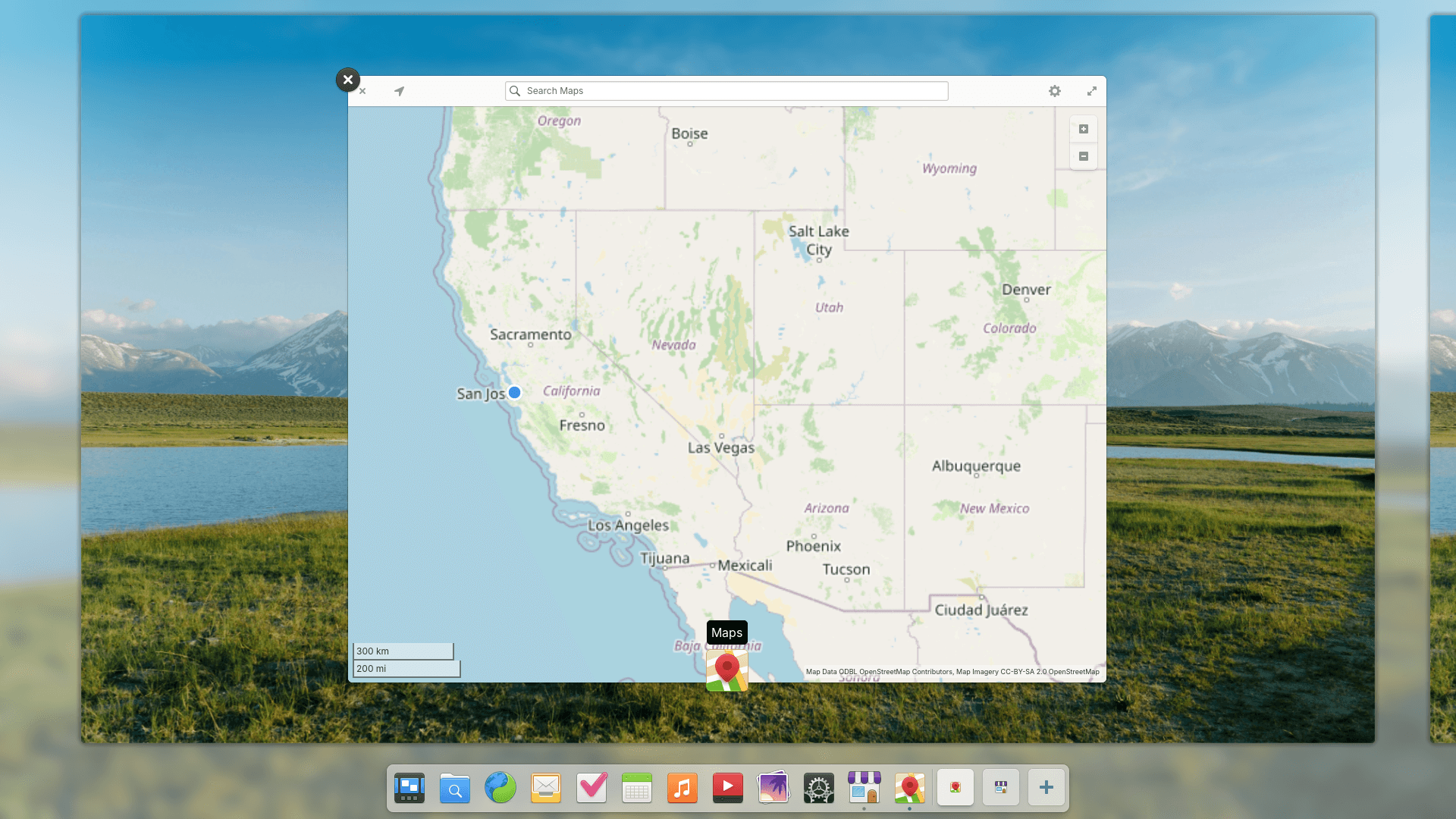
We have two new default apps: Maps & Monitor
We’re also now shipping Maps, which currently covers the basics like Explore and Transit maps, showing your current location, searching for locations, and handling geo:// uri links—enabling features like opening a Calendar event’s location. Plus Application settings now has a setting to select your default Maps app.
Music now includes a number of important new features for managing the queue. The queue and the last played track will be saved and restored when you open and close the app. You can remove individual tracks via their respective context menus or clear the entire queue. You can also now search the queue by track name, and performance has been improved for large queues. Plus album artwork will now show in media controls in the panel and we fixed a couple of issues with long artists names or when using large system fonts.
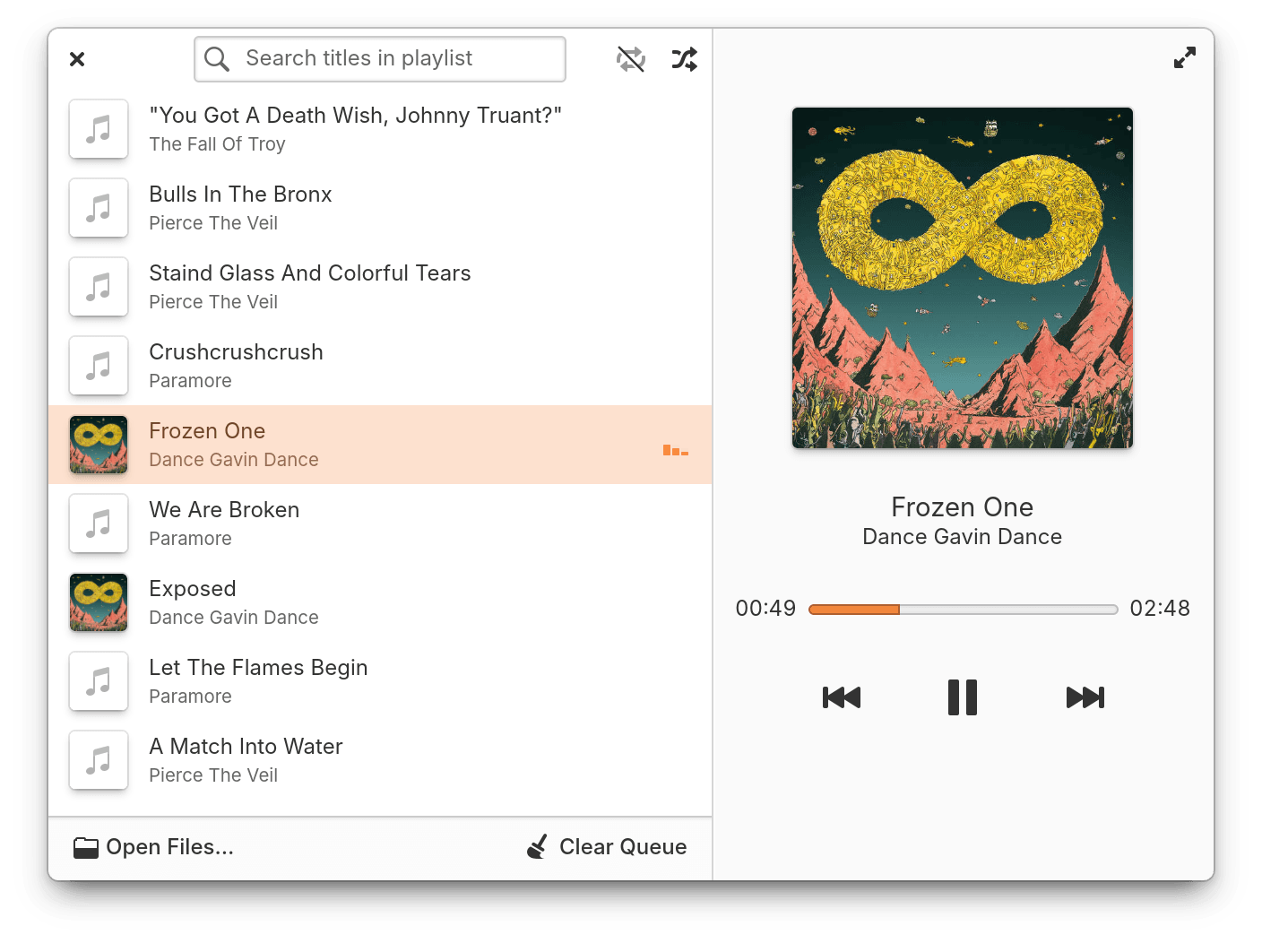
Music has new features to manage the queue
Files now supports the admin:// uri protocol for opening a path as an administrator and the New file submenu now respects the hierarchy of folders in Templates. Plus Properties windows now show a more precise date and time for file modification and there’s a new setting for Date & Time format in the main menu.
Code can now clone git repositories via the projects menu in the sidebar, you can switch to remote git branches, and you’ll be asked how to handle uncommitted changes when switching branches. The Symbols sidebar now shows a lot more information about Vala and C symbols in their tooltips. And you can create edit marks by clicking in the source view gutter that can be jumped between via the context menu or with the keyboard shortcuts Alt + ← / →. Plus, the terminal pane now does a better job syncing with your Terminal app settings like Natural Copy/Paste.
Terminal now uses the more modern tab bar widget you’re used to from Web, Files, and Code, and it includes a new option to hide the tab bar when there’s only a single tab open. We’ve also greatly expanded paste protection to cover other authentication methods like the doas command as well as commands that include options to skip confirmation like -y, --interactive=never, and --force. We’ve also improved detection of commands that contain newlines and react to drag-n-drop operations. Finally, paste protection will now better warn you when a single paste contains multiple alarming elements. And if you don’t want paste protection, there’s a new option to disable it.
We’re also shipping GNOME Web 48.3 which brings improved performance and web compatibility as well as a redesigned bookmarks sidebar.
elementary OS 8.1 is available as a pay-what-you-can purchase at elementary.io today. Localized direct downloads and a torrent magnet link are provided.
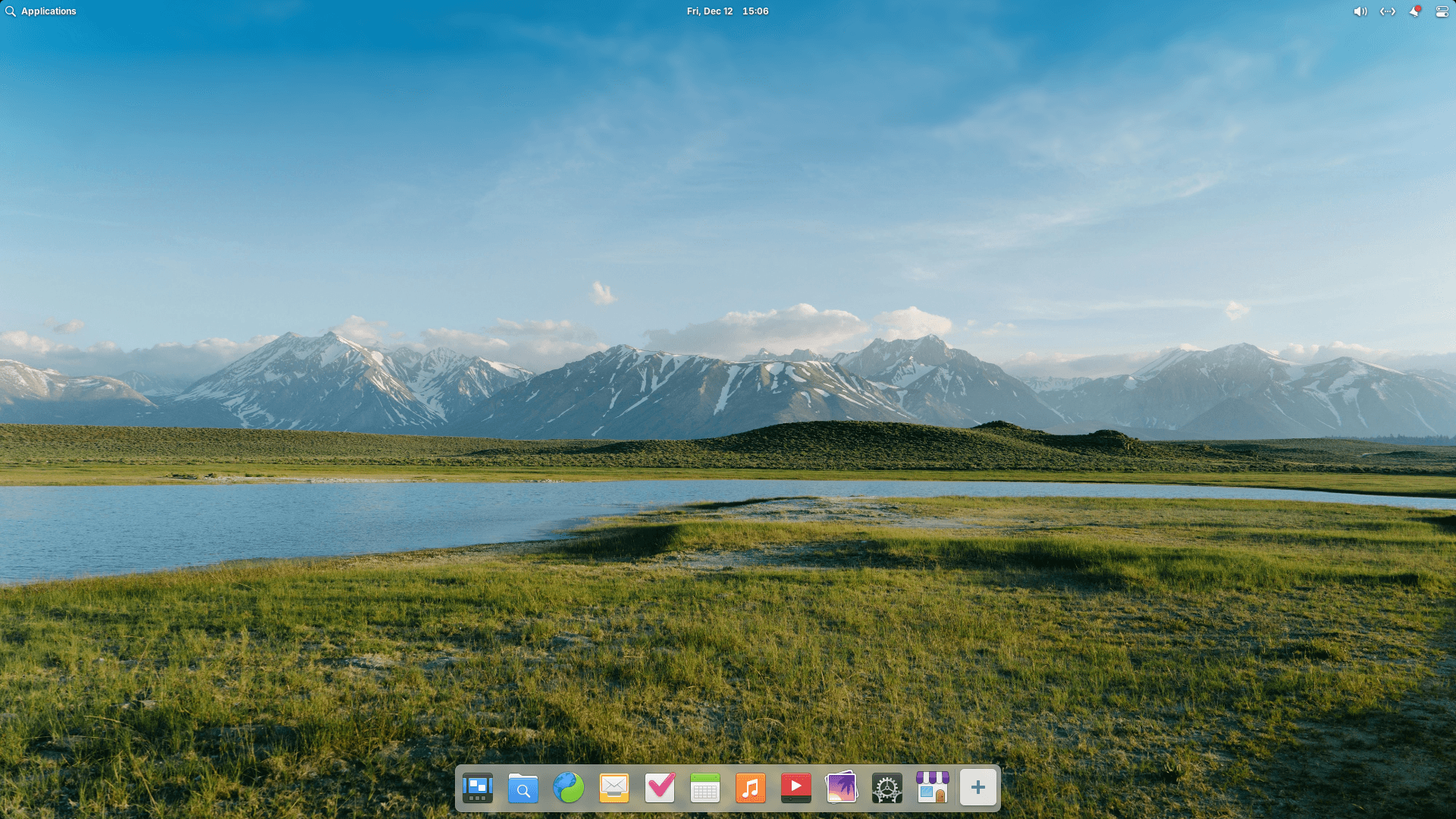
OS 8.1 will receive additional feature and bug fix updates on a monthly schedule that will be reported on here on our blog, so stay tuned for even more updates in the future!
Our hardware retailers Laptop with Linux, Star Labs, and Slimbook are offering elementary OS 8.1 out of the box starting today! Visit retailers’ individual sites for more information.
Wana boot and install OS through network (PXE)? Welcome to my new project iVentoy.
About iVentoy https://www.iventoy.com/
iVentoy is an enhanced version of the PXE server.
Extremely easy to use
Many advanced features
x86 Legacy BIOS, IA32 UEFI, x86_64 UEFI and ARM64 UEFI mode supported
110+ common types of OS supported (Windows/WinPE/Linux/VMware)
......
SHA-256
1113abe6e1bb712834fe574a966621a912858004f4fefd701666ec97c5beb208  ventoy-1.1.10-linux.tar.gz
57ae81baf8ba6bd028ca8b335f5a7d59dcb37d2927b55392e8d947d08018f313  ventoy-1.1.10-livecd.iso
c65e6bff33a376bd3fd3243eb9cdd923c07f7d051c934c7b6ad72f7bf6c80049  ventoy-1.1.10-windows.zip

Important
For the latest downloads, see the Development Builds section in the README. https://github.com/jellyfin/jellyfin-desktop?tab=readme-ov-file#development-builds
This version sees a name change to Jellyfin Desktop, an upgrade to Qt 6, and a whole slew of other enhancements and fixes.
Note: Settings from Jellyfin Media Player will not be migrated. You will need to reconfigure the client and re-add your server.
Changes:
~/.local/share/jellyfin-desktop~/Library/Application Support/Jellyfin DesktopC:\Users\<USER>\AppData\Local\Jellyfin Desktop--config-dir and --log-level CLI optionsnative/ assets direct into application binary (no more separate files)org.jellyfin.JellyfinDesktop

Important
Please do not open any GitHub issues for this release. It is the last of the Qt 5 releases and we have recently changed the master branch to Qt 6.
We will only be accepting GitHub issues relating to Qt 6 builds going forward. The latest of those builds are linked to in the Development Builds section of the README https://github.com/jellyfin/jellyfin-desktop?tab=readme-ov-file#development-builds
This version fixes a bunch of bugs and removes the obsolete third party plugin for intro skipping. Please note this release drops support for MacOS 12 due to GitHub Actions dropping runner support.
Changes:
About Windows Downloads:
0xc0000142 error you need to use the x64-legacy build.

Prerelease note:
MacOS Prerelease note:
xattr -r -d com.apple.quarantine JellyfinMediaPlayer-*.dmg to allow it to run.This version fixes a bunch of bugs and removes the obsolete third party plugin for intro skipping.
Changes:
About Windows Downloads:
Flatpak Test Build:
flatpak install --user https://dl.flathub.org/build-repo/170842/com.github.iwalton3.jellyfin-media-player.flatpakref
This is a hotfix which fixes the previous release so it can work on servers which are running on a subpath/base url (i.e. example.com/jellyfin instead of jellyfin.example.com).
Note: It is normal to have to log into your servers again after installing this update if you are upgrading from v1.10.1 or older.
About Windows Downloads:

