 Log in
QNAP lanceert de QXG-100G2SF-BCM, Dual-port 100GbE Netwerkuitbreidingskaart
{
Taipei, Taiwan, 8 januari 2026 – QNAP® Systems, Inc. (QNAP), een toonaangevende innovator op het gebied van computer-, netwerk- en ...} More

Note
If someone is asking you to pay money for access to UpSnap binaries, source code, or licenses, you are being scammed.
The official and only trusted source for UpSnap is this repository (and its linked releases).
Do not pay third parties for something that is provided here for free.


The Stable channel has been updated to 144.0.7559.59 for Windows and Mac as part of our early stable release to a small percentage of users. A full list of changes in this build is available in the log.
You can find more details about early Stable releases here.
Interested in switching release channels? Find out how here. If you find a new issue, please let us know by filing a bug. The community help forum is also a great place to reach out for help or learn about common issues.
Srinivas Sista
Google Chrome
Happy New Year! 🥂
I hope you had a wonderful holiday, spending time with your loved ones. We’re kicking off 2026 with a smaller release, as our contributors and maintainers have been enjoying some well-deserved time off as well. But don’t worry, there’s still plenty of good stuff in this release!
Home Assistant 2026.1 brings a refreshed Home dashboard experience on mobile, with summary cards right at your fingertips without extra taps. We’ve also made it easier than ever to navigate to the protocol connecting your devices, such as Zigbee, Z-Wave, Thread and more.
For automation enthusiasts, we’re continuing our work on our even more “human-friendly” triggers, which can be enabled via Home Assistant Labs, so you can build automations using easy-to-understand language instead of technical state changes, like initiating automations if a button is pressed or someone arrives home.
On the integrations front, we welcome eight new integrations to the family, including pet tracking with Fressnapf, energy monitoring with eGauge, and smart heating control with Watts Vision +. Plus, improvements to existing integrations from our amazing community contributors.
I wish you a happy and healthy 2026! Enjoy the release!
../Frenck
A huge thank you to all the contributors who made this release possible! And a special shout-out to @bramkragten, @piitaya, and @abmantis who helped write the release notes for this release. ❤️
The Home dashboard continues to evolve! In the previous release, we introduced a brand-new sidebar layout, weather tiles, and energy distribution summaries. This release takes it even further with a streamlined mobile experience and better device management.
On mobile devices, the Home dashboard now displays summary cards (like lights, climate, security, media players, weather, and energy) directly at the top of the view, followed by your favorites and areas. This replaces the previous tab-based navigation, giving you instant access to everything that matters without any extra taps.
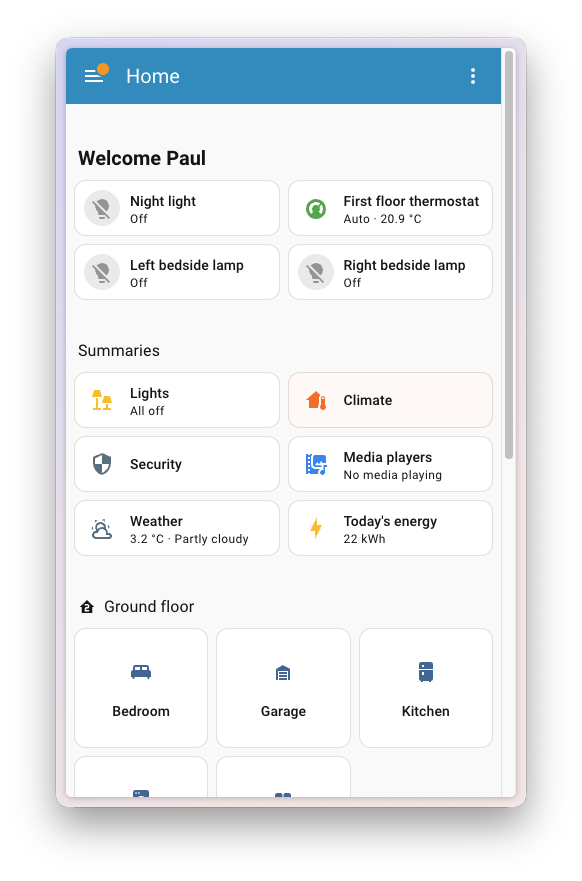
The desktop experience remains unchanged, with summaries displayed in the sidebar under the For you heading.
Ever wondered where your devices went after you removed them from an area? A new Devices page now appears on the Home dashboard, showing all devices that aren’t currently assigned to a specific area. This makes it easy to find and control those “orphaned” devices without hunting through the settings.
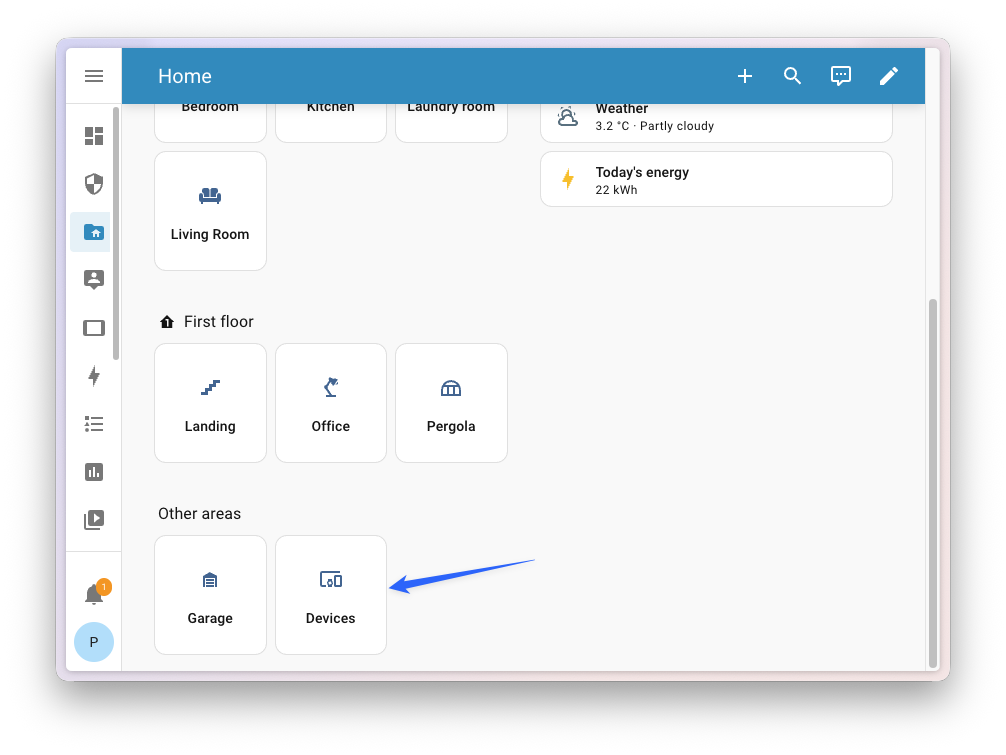 The new Devices page shows devices not assigned to any area.
In the previous release, we introduced purpose-specific triggers and conditions. Instead of thinking in technical state changes, you can now simply pick things like “When a light turns on” or “If the climate is heating” when building your automations.
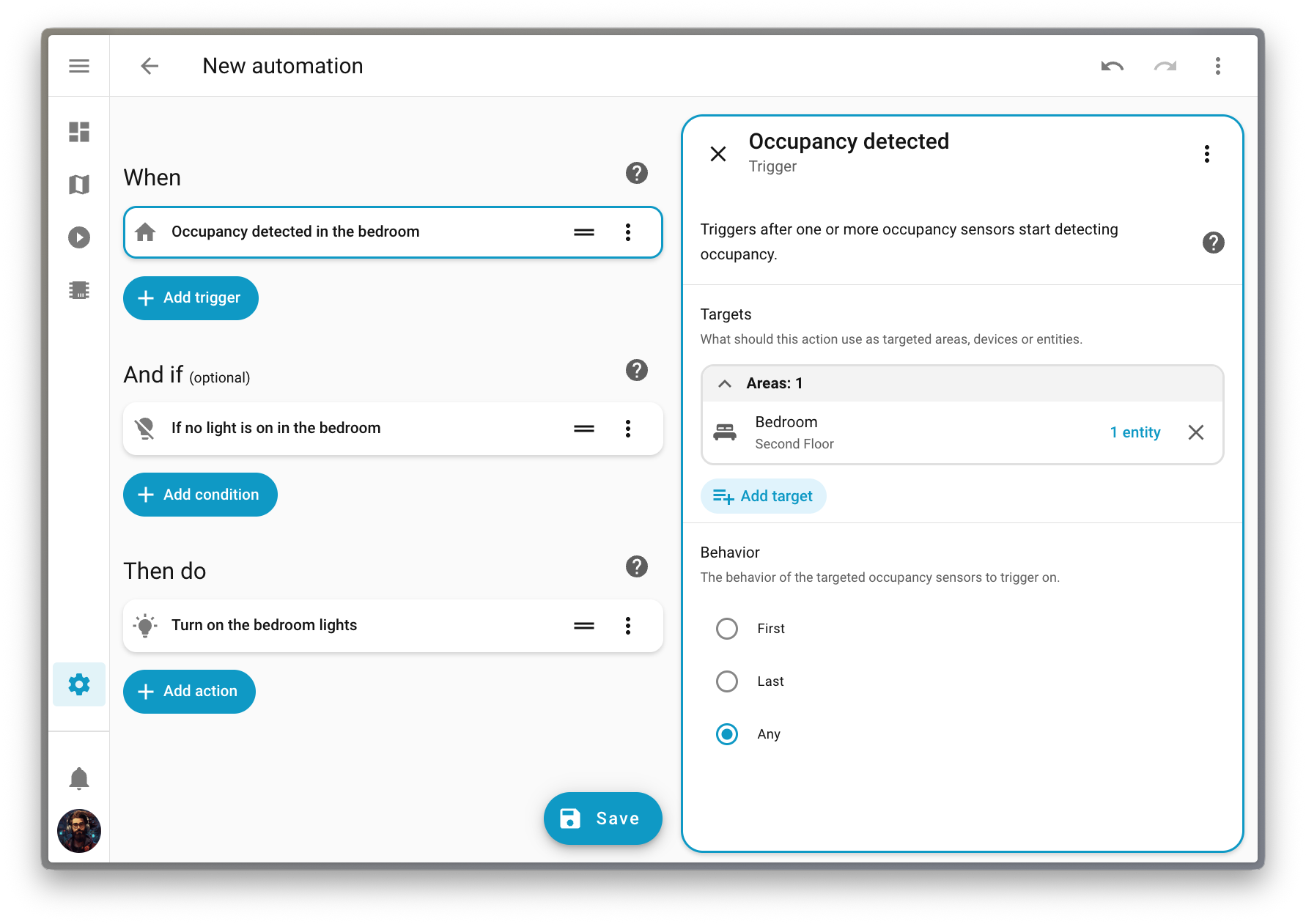
This feature is still being refined in Home Assistant Labs, but this release adds a lot more trigger types, making this new approach even more useful. Here is an overview of all the new triggers added in this release:
As the new purpose-specific triggers and conditions all support targeting something bigger than a simple entity (an area, a floor, or even a label), we also redesigned how the target gets displayed on the automation flow.
The goal of this change is to allow you to quickly glance at your automation, and understand its purpose.
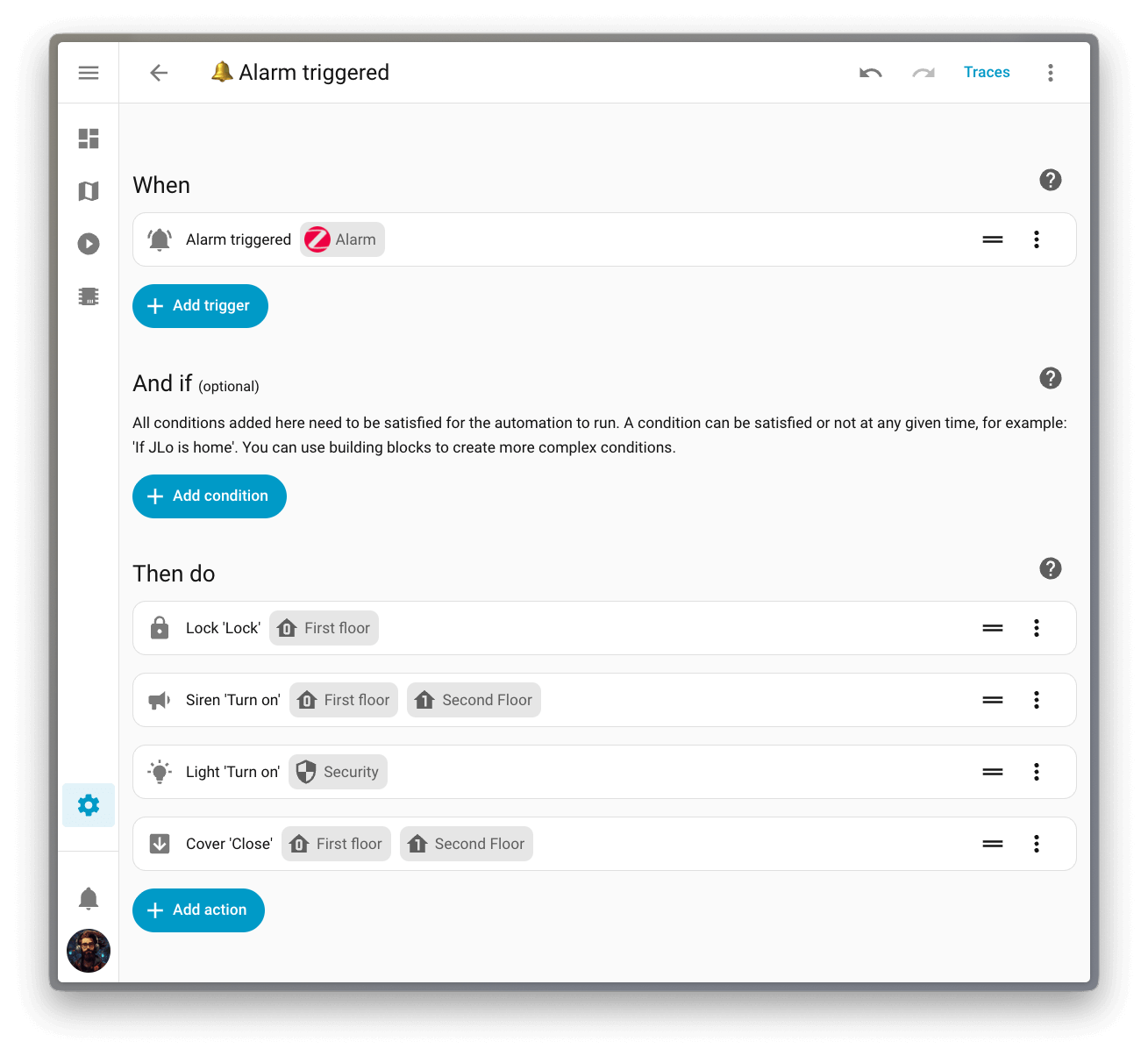
Head over to Settings > System > Labs to enable purpose-specific triggers and conditions and give them a try!
For an organization that loves the open standards that seamlessly connect our devices, we sure didn’t promote them enough! Most people didn’t even know that Home Assistant has dedicated dashboards for protocols like Zigbee, Z-Wave, and more.
This release reorganizes the Settings page to give these open protocols a more prominent spot. The protocols section now appears right after the core settings, making it much easier to find all the different ways you’re connecting your devices and quickly access some very useful protocol-specific configurations.
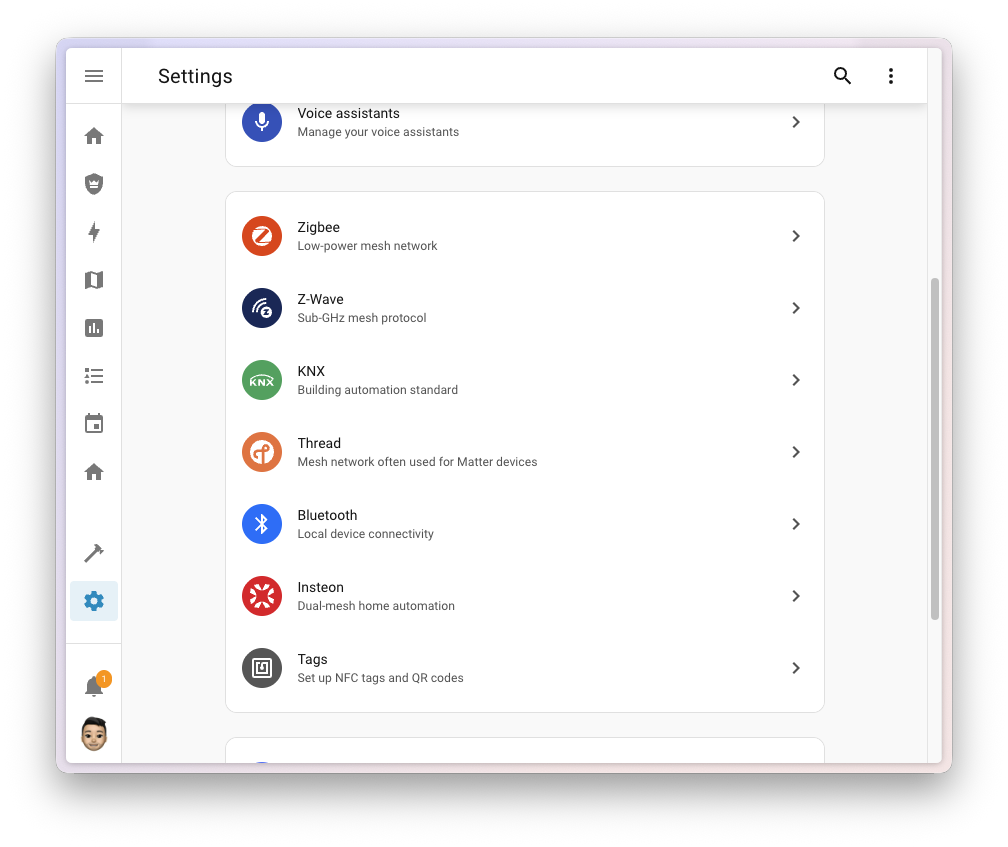
The menu items only appear when you have the corresponding integration set up, so you’ll only see what’s relevant to your setup.
Thanks to our community for keeping pace with the new integrationsIntegrations connect and integrate Home Assistant with your devices, services, and more. [Learn more] and improvements to existing ones! You’re all awesome 🥰
We welcome the following new integrations in this release:
This release also has new virtual integrations. Virtual integrations are stubs that are handled by other (existing) integrations to help with findability. These ones are new:
It is not just new integrationsIntegrations connect and integrate Home Assistant with your devices, services, and more. [Learn more] that have been added; existing ones are also being constantly improved. Here are some of the noteworthy changes to existing integrations:
set_time action to the Risco integration, allowing you to sync your local alarm panel’s clock and fix those pesky clock drift issues.A huge thank you to all the contributors who improved these integrations, and to everyone else who contributed improvements that aren’t listed here. Your work makes Home Assistant better for everyone! ❤️
One thing we are incredibly proud of in Home Assistant is our integration quality scale. This scale helps us and our contributors to ensure integrations are of high quality, maintainable, and provide the best possible user experience.
This release, we celebrate several integrationsIntegrations connect and integrate Home Assistant with your devices, services, and more. [Learn more] that have improved their quality scale:
2 integrations reached platinum 🏆
4 integrations reached silver 🥈
2 integrations reached bronze 🥉
This is a huge achievement for these integrations and their maintainers. The effort and dedication required to reach these quality levels is significant, as it involves extensive testing, documentation, error handling, and often complete rewrites of parts of the integration.
A big thank you to all the contributors involved! 👏
While most integrationsIntegrations connect and integrate Home Assistant with your devices, services, and more. [Learn more] can be set up directly from the Home Assistant user interface, some were only available using YAML configuration. We keep moving more integrations to the UI, making them more accessible for everyone to set up and use.
The following integrations are now available via the Home Assistant UI:
There are many more improvements in this release; here are some of the other noteworthy changes:
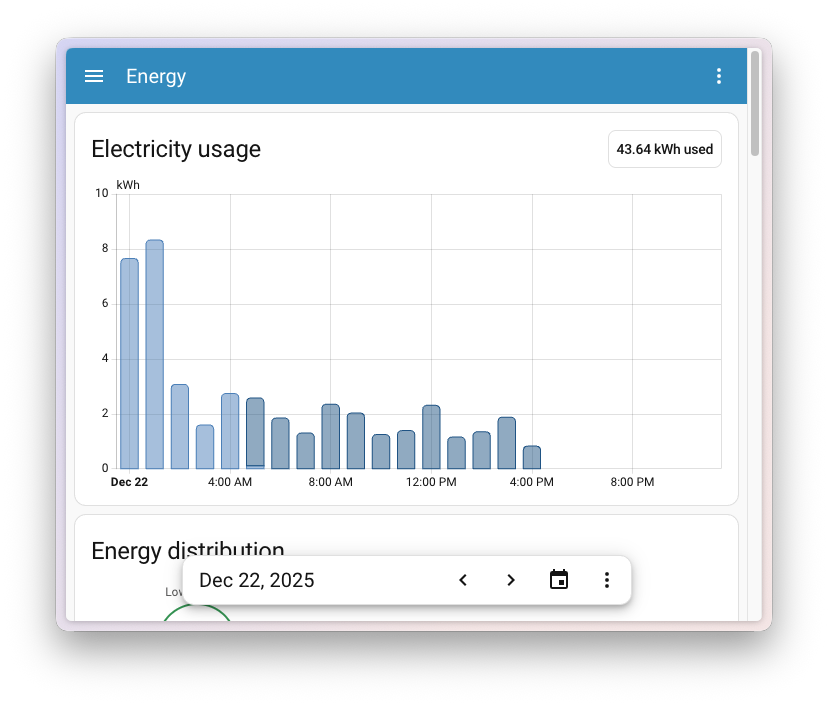
name option, giving you more flexibility in your dashboard designs, thanks to @ildar170975.In the previous release, the Energy dashboard received a big update with real-time power monitoring and downstream water tracking. However, some of you noticed that navigating between periods required scrolling back up, making it harder to compare data while looking at graphs further down the page.
This release fixes that! The date picker is now sticky at the bottom of the screen, so you can easily switch between days, weeks, or months without losing sight of the graph you’re viewing. This also makes it much easier to access on mobile devices.
ESPHome 2025.12 introduced a powerful new feature called API action responses, enabling true bidirectional communication between your ESPHome devices and Home Assistant. With this release, Home Assistant now fully supports receiving these responses!
Previously, when calling an action on an ESPHome device, communication was one-way: you could send a command, but the device couldn’t send structured data back. Now, your ESPHome devices can return JSON data in response to actions, unlocking new possibilities like querying device configuration, reading sensor values on demand, or retrieving diagnostic information.
This is particularly useful for actions that answer questions rather than perform tasks. For example, you could create an action that returns your device’s current Wi-Fi signal strength, firmware version, or any custom sensor readings, all as structured data you can use in your automations.
To get started, check out the ESPHome documentation on action responses for configuration examples.
We will also release patch releases for Home Assistant 2026.1 in January. These patch releases only contain bug fixes. Our goal is to release a patch release once a week, aiming for Friday.
server_host for container installations (@emontnemery - #161443)Home Assistant has a great community of users who are all more than willing to help each other out. So, join us!
Our very active Discord chat server is an excellent place to be, and don’t forget to join our amazing forums.
Found a bug or issue? Please report it in our issue tracker to get it fixed! Or check our help page for guidance on more places you can go.
Are you more into email? Sign up for the Open Home Foundation Newsletter to get the latest news about features, things happening in our community, and other projects that support the Open Home straight into your inbox.
We do our best to avoid making changes to existing functionality that might unexpectedly impact your Home Assistant installation. Unfortunately, sometimes it is inevitable.
We always make sure to document these changes to make the transition as easy as possible for you. This release has the following backward-incompatible changes:
The climate entities provided by the Coolmaster integration now use medium for the medium fan mode; before this change, it was med. If your automations are using med when setting or querying the fan speed, you’ll have to change it to medium.
The “Supports hairpinning” binary sensor has been removed from the Tailscale integration. According to the official Tailscale API documentation, this information is no longer tracked and will always return null.
Select entity state values have been changed from their original mixed-case format to snake_case format with proper translations. This improves consistency and enables proper localization support.
Affected select entities include: chime type, recording mode, infrared mode, status light mode, HDR mode, doorbell text, LCD message, and others.
Example changes:
Mechanical → mechanical, Digital → digitalAlways → always, Detections → detections, Never → neverAuto → auto, On → on, AutoNoLEDsOn → auto_no_leds_onOn → on, Off → off, OnWhenDark → on_when_darkAuto → auto, On → on, Off → offIf you have automations, scripts, or templates that check or set the state of UniFi Protect select entities, you need to update them to use the new snake_case values. The UI will continue to display properly translated, human-readable text.
(@RaHehl - #159284) (unifiprotect docs)
Allowing extra/unused parameters has been removed from the action for Telegram bot. Only users who have used undefined parameters for Telegram bot actions are affected. If you are affected, remove such parameters from your automations and scripts. Supported parameters can be found in the Telegram bot notification actions documentation.
(@hanwg - #158886) (telegram_bot docs)
The advancedSleep fan mode has been changed to advanced_sleep. If you have automations or scripts using this fan mode, please update them accordingly.
(@cdnninja - #158956) (vesync docs)
If you are a custom integration developer and want to learn about changes and new features available for your integration, be sure to follow our developer blog.
Of course, there is a lot more in this release. You can find a list of all changes made here: Full changelog for Home Assistant Core 2026.1.
Note
If someone is asking you to pay money for access to UpSnap binaries, source code, or licenses, you are being scammed.
The official and only trusted source for UpSnap is this repository (and its linked releases).
Do not pay third parties for something that is provided here for free.
The Extended Stable channel has been updated to 142.0.7444.265 for Windows and Mac which will roll out over the coming days/weeks.
The Stable channel has been updated to 143.0.7499.192/.193 for Windows/Mac and 143.0.7499.192 for Linux, which will roll out over the coming days/weeks. A full list of changes in this build is available in the Log.
Security Fixes and Rewards
Note: Access to bug details and links may be kept restricted until a majority of users are updated with a fix. We will also retain restrictions if the bug exists in a third party library that other projects similarly depend on, but haven’t yet fixed.
Note: Access to bug details and links may be kept restricted until a majority of users are updated with a fix.
We will also retain restrictions if the bug exists in a third party library that other projects similarly depend on,
but haven’t yet fixed.
This update includes 1 security fix.
Below, we highlight fixes that were contributed by external researchers.
Please see the Chrome Security Page for more information.
[TBD][463155954] High CVE-2026-0628: Insufficient policy enforcement in WebView tag. Reported by Gal Weizman on 2025-11-23
We would also like to thank all security researchers that worked with us during the development cycle to prevent security bugs from ever reaching the stable channel.
Many of our security bugs are detected using AddressSanitizer, MemorySanitizer, UndefinedBehaviorSanitizer, Control Flow Integrity, libFuzzer, or AFL.
Interested in switching release channels? Find out how here. If you find a new issue, please let us know by filing a bug. The community help forum is also a great place to reach out for help or learn about common issues.
Fix issue #430: Autoformat on Save with empty XML-Elements.
Formatting Options has new setting to format Xml attributes each on a separate line.

Fix issue #425: "No byte order mark on save" option throws stream closed exception add unit test.
Apply dark mode to window titlebar.
Issue 409: Not able to validate XML against multiple not referenced Schemas
Issue 329: Incomplete schema validation of large XML files ( > ~20 MB).
Report invalid characters undex 0x20.
Fix unit tests so they run on Windows 11, including a work around for dotnet/winforms#10244.
Issue 324: Generate xml from schema, see ttps://youtu.be/5I_q1oXz02I.
Issue 385:: "XML Reload" removes loaded XSLT. You can now get auto-reload when xml file changes on disk
and you can turn off the prompt in options dialog and it will reapply the XSLT automatically.
update to WebView2 version 1.0.2739.15
Also preserve the selection in the XML tree view across file reloads.
Issue 382: Add progress bar on long XSLT transform operations.
Issue 379: Add Preserve Whitespace option so your XSLT transforms can output the whitespace correctly.
Bug 383: Reload of a "not loaded" file
Bug 381: Multiple instances resets the settings
Bug 380: Opening bad XML file keeps watching the file
Issue 382: Add progress bar on long XSLT transform operations.
Issue 379: Add Preserve Whitespace option so your XSLT transforms can output the whitespace correctly.
Bug 383: Reload of a "not loaded" file
Bug 381: Multiple instances resets the settings
Bug 380: Opening bad XML file keeps watching the file
Add ability to load .json files.
Add #367 preserve Options Dialog box relative location and size
Bug 370: Error Message after SEARCHING and drag & drop of a new file
Bug 371: Unhandled exception loading XML file with the http://www.crossref.org/schema/deposit/crossref4.4.2.xsd schemas.
Add ability to load .json files.
Add #367 preserve Options Dialog box relative location and size
Bug 370: Error Message after SEARCHING and drag & drop of a new file
Bug 371: Unhandled exception loading XML file with the http://www.crossref.org/schema/deposit/crossref4.4.2.xsd schemas.
No notable changes in this release. Bumping versions for a new TestFlight build.
Full Changelog: v1.7.0.8...v1.8.0.0

This release is only to provide an updated TestFlight build since the current build has expired.
There are no notable changes since the published 1.7.0.8 version.
Full Changelog: v1.7.0.8...v1.7.0.9
Tip
If you like Part-DB, consider donating to support the development. Press the sponsor button on the main github page, for more info.
Important
If you are using Part-DB it would be helpful if you fill out this short survey on your usage of Part-DB (Google Forms): https://forms.gle/Q15twx3YYq3qCNfe8
Full Changelog: v2.3.0...v2.4.0

The Asterisk Development Team would like to announce
the release of asterisk-22.7.0.
The release artifacts are available for immediate download at
https://github.com/asterisk/asterisk/releases/tag/22.7.0
and
https://downloads.asterisk.org/pub/telephony/asterisk
Repository: https://github.com/asterisk/asterisk
Tag: 22.7.0
This release resolves issues reported by the community
and would have not been possible without your participation.
Thank You!
The STIR_SHAKEN_ATTESTATION dialplan function has been added
which will allow suppressing attestation on a call-by-call basis
regardless of the profile attached to the outgoing endpoint.
CHANNEL(adsicpe) can now be read or written to change
the channels' ADSI CPE capability setting.
Added a new option to HANGUPCAUSE to access additional
information about hangup reason. Reason headers from pjsip
could be read using 'tech_extended' cause type.
The DIGIT_SUM function can be used to return the digit sum of
a number.
The 't' option for ReceiveSF now allows for a timer since
the last digit received, in addition to the number-wide timeout.
The answer and progress dial timeouts now have millisecond
precision, instead of having to be whole numbers.
The DAHDI_CHANNEL function allows for getting/setting
certain properties about DAHDI channels from the dialplan.
As part of Asterisk 21, macros were removed from Asterisk.
This resulted in argument order changing for the Queue dialplan
application since the macro argument was removed. Upgrade notice was
missed when this was done, so this upgrade note has been added to
provide a record of such and a notice to users who may have not upgraded
yet.
New audiosocket message types 0x11 - 0x18 has been added
for slin12, slin16, slin24, slin32, slin44, slin48, slin96, and
slin192 audio. External applications using audiosocket may need to be
updated to support these message types if the audiosocket channel is
created with one of these audio formats.
The threadpool_* options in stasis.conf have now been deprecated
though they continue to be read and used. They have been replaced with taskpool
options that give greater control over the underlying taskpool used for stasis.
A "tech_cause" parameter has been added to the
ChannelHangupRequest and ChannelDestroyed ARI event messages and a "TechCause"
parameter has been added to the HangupRequest, SoftHangupRequest and Hangup
AMI event messages. For chan_pjsip, these will be set to the last SIP
response status code for off-nominally terminated calls. The parameter is
suppressed for nominal termination.
The ARI /bridges/play and /bridges/record REST APIs have new
parameters that allow the caller to specify the format to be used on the
"Announcer" and "Recorder" channels respecitvely.
The taskpool API has been added for common usage of a
pool of taskprocessors. It is suggested to use this API instead of the
threadpool+taskprocessor approach.

The Asterisk Development Team would like to announce
the release of asterisk-21.12.0.
The release artifacts are available for immediate download at
https://github.com/asterisk/asterisk/releases/tag/21.12.0
and
https://downloads.asterisk.org/pub/telephony/asterisk
Repository: https://github.com/asterisk/asterisk
Tag: 21.12.0
This release resolves issues reported by the community
and would have not been possible without your participation.
Thank You!
Added a new option to HANGUPCAUSE to access additional
information about hangup reason. Reason headers from pjsip
could be read using 'tech_extended' cause type.
The DAHDI_CHANNEL function allows for getting/setting
certain properties about DAHDI channels from the dialplan.
The Asterisk Development Team would like to announce
the release of asterisk-23.1.0.
The release artifacts are available for immediate download at
https://github.com/asterisk/asterisk/releases/tag/23.1.0
and
https://downloads.asterisk.org/pub/telephony/asterisk
Repository: https://github.com/asterisk/asterisk
Tag: 23.1.0
This release resolves issues reported by the community
and would have not been possible without your participation.
Thank You!
The STIR_SHAKEN_ATTESTATION dialplan function has been added
which will allow suppressing attestation on a call-by-call basis
regardless of the profile attached to the outgoing endpoint.
CHANNEL(adsicpe) can now be read or written to change
the channels' ADSI CPE capability setting.
Added a new option to HANGUPCAUSE to access additional
information about hangup reason. Reason headers from pjsip
could be read using 'tech_extended' cause type.
The DIGIT_SUM function can be used to return the digit sum of
a number.
The 't' option for ReceiveSF now allows for a timer since
the last digit received, in addition to the number-wide timeout.
The answer and progress dial timeouts now have millisecond
precision, instead of having to be whole numbers.
The DAHDI_CHANNEL function allows for getting/setting
certain properties about DAHDI channels from the dialplan.
As part of Asterisk 21, macros were removed from Asterisk.
This resulted in argument order changing for the Queue dialplan
application since the macro argument was removed. Upgrade notice was
missed when this was done, so this upgrade note has been added to
provide a record of such and a notice to users who may have not upgraded
yet.
New audiosocket message types 0x11 - 0x18 has been added
for slin12, slin16, slin24, slin32, slin44, slin48, slin96, and
slin192 audio. External applications using audiosocket may need to be
updated to support these message types if the audiosocket channel is
created with one of these audio formats.
The threadpool_* options in stasis.conf have now been deprecated
though they continue to be read and used. They have been replaced with taskpool
options that give greater control over the underlying taskpool used for stasis.
A "tech_cause" parameter has been added to the
ChannelHangupRequest and ChannelDestroyed ARI event messages and a "TechCause"
parameter has been added to the HangupRequest, SoftHangupRequest and Hangup
AMI event messages. For chan_pjsip, these will be set to the last SIP
response status code for off-nominally terminated calls. The parameter is
suppressed for nominal termination.
The ARI /bridges/play and /bridges/record REST APIs have new
parameters that allow the caller to specify the format to be used on the
"Announcer" and "Recorder" channels respecitvely.
The taskpool API has been added for common usage of a
pool of taskprocessors. It is suggested to use this API instead of the
threadpool+taskprocessor approach.
The Asterisk Development Team would like to announce
the release of asterisk-20.17.0.
The release artifacts are available for immediate download at
https://github.com/asterisk/asterisk/releases/tag/20.17.0
and
https://downloads.asterisk.org/pub/telephony/asterisk
Repository: https://github.com/asterisk/asterisk
Tag: 20.17.0
This release resolves issues reported by the community
and would have not been possible without your participation.
Thank You!
The STIR_SHAKEN_ATTESTATION dialplan function has been added
which will allow suppressing attestation on a call-by-call basis
regardless of the profile attached to the outgoing endpoint.
CHANNEL(adsicpe) can now be read or written to change
the channels' ADSI CPE capability setting.
Added a new option to HANGUPCAUSE to access additional
information about hangup reason. Reason headers from pjsip
could be read using 'tech_extended' cause type.
The DIGIT_SUM function can be used to return the digit sum of
a number.
The 't' option for ReceiveSF now allows for a timer since
the last digit received, in addition to the number-wide timeout.
The answer and progress dial timeouts now have millisecond
precision, instead of having to be whole numbers.
The DAHDI_CHANNEL function allows for getting/setting
certain properties about DAHDI channels from the dialplan.
New audiosocket message types 0x11 - 0x18 has been added
for slin12, slin16, slin24, slin32, slin44, slin48, slin96, and
slin192 audio. External applications using audiosocket may need to be
updated to support these message types if the audiosocket channel is
created with one of these audio formats.
The threadpool_* options in stasis.conf have now been deprecated
though they continue to be read and used. They have been replaced with taskpool
options that give greater control over the underlying taskpool used for stasis.
A "tech_cause" parameter has been added to the
ChannelHangupRequest and ChannelDestroyed ARI event messages and a "TechCause"
parameter has been added to the HangupRequest, SoftHangupRequest and Hangup
AMI event messages. For chan_pjsip, these will be set to the last SIP
response status code for off-nominally terminated calls. The parameter is
suppressed for nominal termination.
The ARI /bridges/play and /bridges/record REST APIs have new
parameters that allow the caller to specify the format to be used on the
"Announcer" and "Recorder" channels respecitvely.
The taskpool API has been added for common usage of a
pool of taskprocessors. It is suggested to use this API instead of the
threadpool+taskprocessor approach.
The Asterisk Development Team would like to announce
release candidate 2 of asterisk-23.1.0.
The release artifacts are available for immediate download at
https://github.com/asterisk/asterisk/releases/tag/23.1.0-rc2
and
https://downloads.asterisk.org/pub/telephony/asterisk
Repository: https://github.com/asterisk/asterisk
Tag: 23.1.0-rc2
This release resolves issues reported by the community
and would have not been possible without your participation.
Thank You!
Author: George Joseph
Date: 2025-11-06
After PR #1498 added read locking to channelstorage_cpp_map_name_id, if ARI
channels/externalMedia was called with a custom channel id AND the
cpp_map_name_id channel storage backend is in use, a deadlock can occur when
hanging up the channel. It's actually triggered in
channel.c:__ast_channel_alloc_ap() when it gets a write lock on the
channelstorage driver then subsequently does a lookup for channel uniqueid
which now does a read lock. This is an invalid operation and causes the lock
state to get "bad". When the channels try to hang up, a write lock is
attempted again which hangs and causes the deadlock.
Now instead of the cpp_map_name_id channelstorage driver "get" APIs
automatically performing a read lock, they take a "lock" parameter which
allows a caller who already has a write lock to indicate that the "get" API
must not attempt its own lock. This prevents the state from getting mesed up.
The ao2_legacy driver uses the ao2 container's recursive mutex so doesn't
have this issue but since it also implements the common channelstorage API,
it needed its "get" implementations updated to take the lock parameter. They
just don't use it.
Resolves: #1578
The Asterisk Development Team would like to announce
release candidate 2 of asterisk-22.7.0.
The release artifacts are available for immediate download at
https://github.com/asterisk/asterisk/releases/tag/22.7.0-rc2
and
https://downloads.asterisk.org/pub/telephony/asterisk
Repository: https://github.com/asterisk/asterisk
Tag: 22.7.0-rc2
This release resolves issues reported by the community
and would have not been possible without your participation.
Thank You!
Author: George Joseph
Date: 2025-11-06
After PR #1498 added read locking to channelstorage_cpp_map_name_id, if ARI
channels/externalMedia was called with a custom channel id AND the
cpp_map_name_id channel storage backend is in use, a deadlock can occur when
hanging up the channel. It's actually triggered in
channel.c:__ast_channel_alloc_ap() when it gets a write lock on the
channelstorage driver then subsequently does a lookup for channel uniqueid
which now does a read lock. This is an invalid operation and causes the lock
state to get "bad". When the channels try to hang up, a write lock is
attempted again which hangs and causes the deadlock.
Now instead of the cpp_map_name_id channelstorage driver "get" APIs
automatically performing a read lock, they take a "lock" parameter which
allows a caller who already has a write lock to indicate that the "get" API
must not attempt its own lock. This prevents the state from getting mesed up.
The ao2_legacy driver uses the ao2 container's recursive mutex so doesn't
have this issue but since it also implements the common channelstorage API,
it needed its "get" implementations updated to take the lock parameter. They
just don't use it.
Resolves: #1578

