
 Log in
Lees weergave
2026.3: A clean sweep
Home Assistant 2026.3! 🎉
After last month’s massive release, this one is a nice and relaxed one. We took a step back from the big headline features and fully focused on something equally important: getting the amazing contributions from our community reviewed, polished, and merged. 💚
And did our community deliver! This release is packed with tons of new integrationsIntegrations connect and integrate Home Assistant with your devices, services, and more. [Learn more], lots of noteworthy improvements to the ones you already use, boatloads of bug fixes, and a really nice list of integrations that climbed up the integration quality scale. 📈
It’s releases like these that really show the strength of our open-source community. Every single contribution matters, and this month that shows more than ever. Thank you all! 🙏
My personal favorite this month? The automation editor change: Continue on error has finally landed in the UI. I actually wrote this feature years ago, but it was only available through YAML. Seeing it now land in the visual editor (making it accessible to everyone) is just awesome. It’s one of those small things that make a big difference in everyday use. 🤩
Oh, and before I forget: have you seen our brand new merch store? The Open Home Foundation store is live! I have to be honest: the quality is really great. The hoodie is so darn comfy it’s ridiculous. I’ve been wearing mine non-stop. Go check it out! 🏃
Also, mark your calendars: State of the Open Home 2026 is happening on April 8 in Utrecht, the Netherlands! Join us live in the audience for a celebration of everything we’ve built together, a look at what’s ahead, and your chance to help shape the future of the Open Home. Tickets are limited, so grab yours while you can! 🎟️
Enjoy the release!
../Frenck
- Send your vacuum to clean specific areas
- Energy dashboard improvements
- Continue on error in the automation editor
- Wake word detection on your Android phone (experimental)
- Integrations
- Other noteworthy changes
- Patch releases
- Need help? Join the community
- Backward-incompatible changes
- All changes
A huge thank you to all the contributors who made this release possible! And a special shout-out to @TimoPtr, @arturpragacz, and @MindFreeze who helped write the release notes this release. Also, @CoMPaTech, @balloob, @OnFreund, and @silamon for putting effort into tweaking its contents. Thanks to them, these release notes are in great shape. ❤️
Send your vacuum to clean specific areas
Got a robot vacuum? You can now tell it exactly which areas to clean! This release introduces the clean area action, which lets you send your vacuum to clean one or more specific areas on demand, right from Home Assistant. In this release, it’s supported by Matter, Ecovacs, and Roborock.
The best part? The action uses your existing Home Assistant areas, not some obscure vendor-specific identifiers. You simply map the segments your vacuum knows about to the areas you’ve already set up in Home Assistant, and that’s all there is to it.
Getting started
When your vacuum supports area cleaning, you can set up the mapping through the vacuum’s entity settings. Open the vacuum entity, select the settings icon, and look for the Map vacuum segments to areas section. From there, you can match the segments your vacuum has detected to your Home Assistant areas.
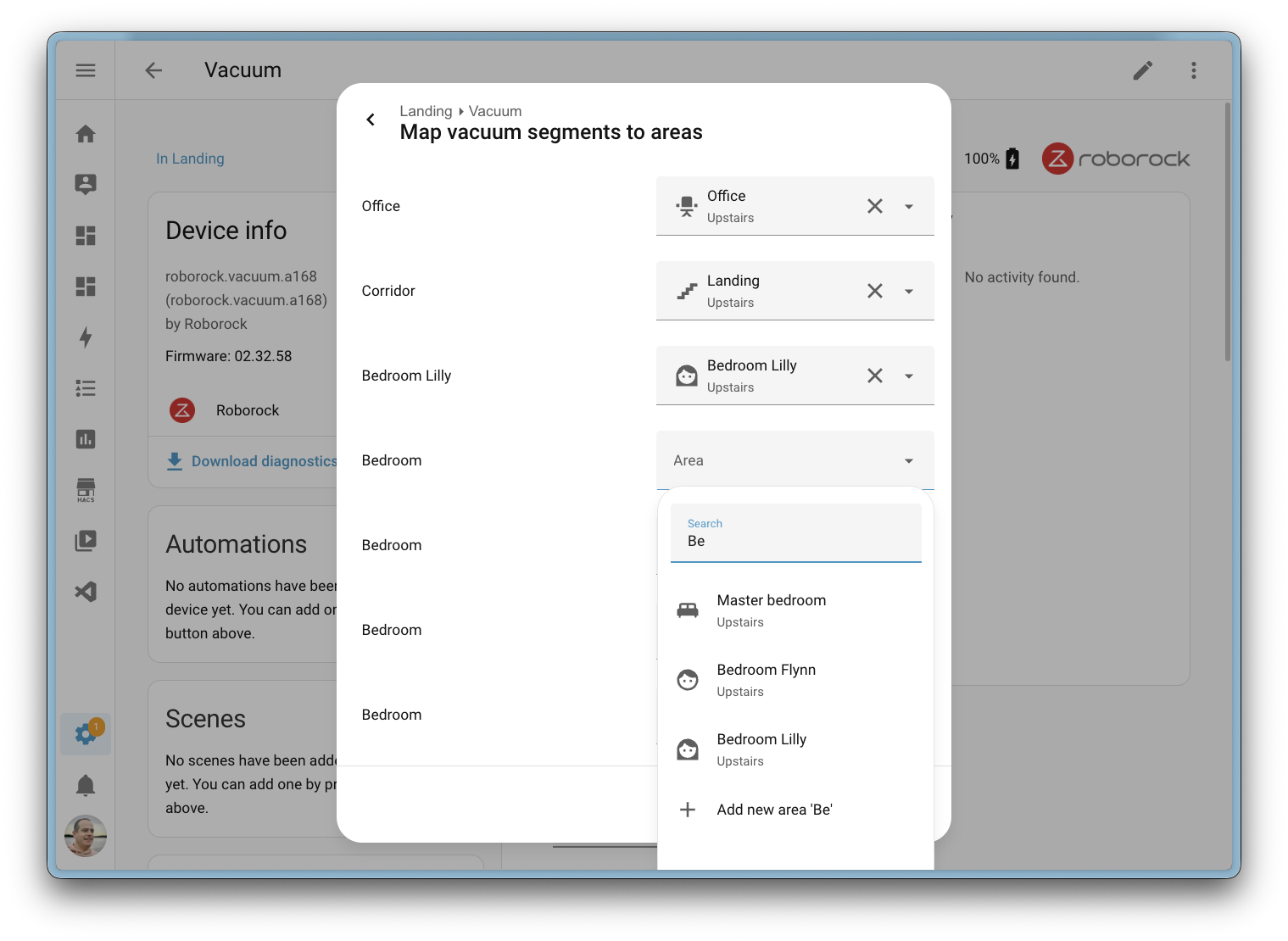
If your vacuum’s internal segment layout ever changes (for example, after remapping in the manufacturer’s app or the vacuum rediscovering its environment), Home Assistant will notice. A repair issue will alert you that the segments have changed, so you can update your mapping and make sure everything stays in sync.
Paving the way for voice
Because the mapping uses native Home Assistant areas, this feature lays the groundwork for future voice assistant support. Imagine simply saying “clean the kitchen” and having your vacuum head to the right area. That’s not available just yet, but the foundation is now in place to make it happen.
Energy dashboard improvements
The Energy dashboard received a nice batch of improvements this release.
The Now view gained badges that show real-time power consumption, gas flow rate, and water flow rate at a glance. Water also gets its own Sankey chart in the Now view, giving you a visual breakdown of water usage across your home, just like the existing power Sankey chart.

To reduce ambiguity, the second tab on the Energy dashboard has been renamed from Energy to Electricity, since the dashboard covers electricity, gas, and water. On the configuration side, the energy settings page is now split into three tabs: Electricity, Gas, and Water, making it easier to find and manage your energy sources.
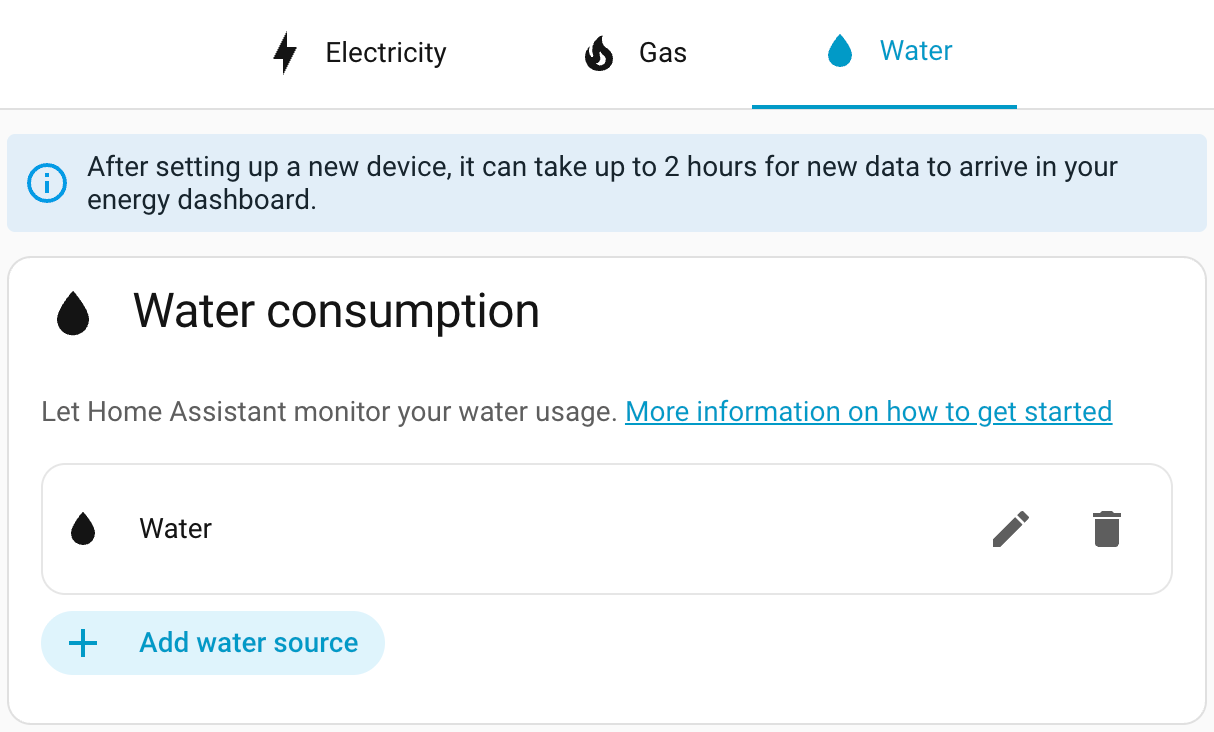
Finally, energy bar chart tooltips now include the day of the week, helping you quickly spot usage patterns.
Thanks, @MindFreeze, @NoRi2909, and @gpoitch! 🎉
Continue on error in the automation editor
The automation editor now has a Continue on error option for actions, directly accessible from the visual editor. Previously, this setting was only available through YAML.
You can find it in the three-dots menu of any action. When enabled, a visual indicator appears on the action row, so you can quickly see which actions will continue running even if they encounter an error.
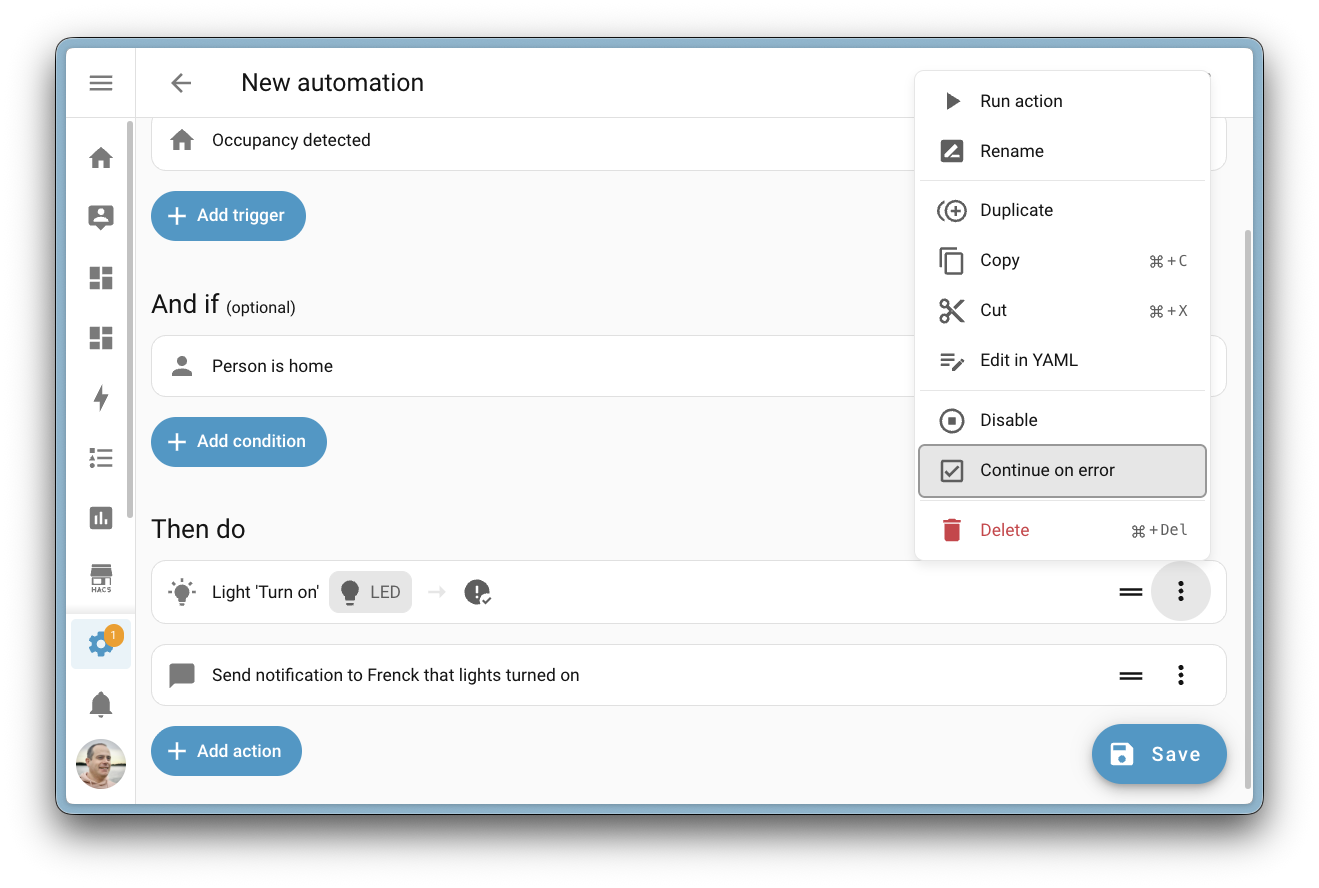
This is especially handy for automations where a single failing action shouldn’t stop the rest from running. For example, if one of several notification actions fails, the remaining ones will still be sent.
Thanks, @wendevlin! 🎉
Wake word detection on your Android phone (experimental)
Your phone just became a voice satellite! The Home Assistant Companion app for Android now supports on-device wake word detection, allowing you to open Assist from anywhere; even when your phone is locked.
Inspired from the great work from @brownard in Ava.
This feature uses microWakeWord, the same lightweight wake word engine that powers the Home Assistant Voice Preview Edition. All processing happens locally on your device, no audio is sent to the cloud, and no server-side processing is needed. Your voice stays on your phone.
You can choose between three wake words:
- Okay Nabu
- Hey Jarvis
- Hey Mycroft
To enable wake word detection, open your Android device’s Settings > Companion App > Assist for Android, and enable the Enable wake word detection toggle. Once enabled, simply say your chosen wake word and the Assist pipeline will open, ready to take your command.
Watch the video to see wake word detection in action on an Android device.
It already integrates with your voice equipment at home, and if another satellite is nearby, only the fastest one will respond. This also applies to multiple Android devices.
Battery usage
Because wake word detection requires continuous microphone access and CPU usage, this feature does have a noticeable impact on battery life. To help manage this, you can use automations to start and stop wake word detection based on your context, for example, only enabling it when you’re connected to your home Wi-Fi or within a specific zone. This way, you get hands-free voice control when it matters most, without draining your battery all day.
Note
Battery usage could be drastically reduced if Google opened their API for hardware hotword detection. Unfortunately, this is hidden behind a system API that only phone manufacturers have access to. Maybe one day they will open it up to improve the experience.
Thanks, @TimoPtr! 🎉
Integrations
Thanks to our community for keeping pace with the new integrationsIntegrations connect and integrate Home Assistant with your devices, services, and more. [Learn more] and improvements to existing ones! You’re all awesome 🥰
New integrations
We welcome the following new integrations in this release:
-
Ghost, added by @JohnONolan
Monitor your Ghost publication metrics, including member counts, revenue, post statistics, and email newsletter performance, right from your Home Assistant dashboard. -
Hegel Amplifier, added by @boazca - launching at 🥈 silver quality
Control your Hegel Music Systems amplifiers locally over your network. Manage power, volume, input selection, and mute with real-time push updates for instant feedback. -
Homevolt, added by @Danielhiversen - launching at 🥈 silver quality
Read local data from your Homevolt battery over your network, no cloud required. Monitor power, energy, voltage, temperature, and battery status. -
Hypontech Cloud, added by @jcisio
Monitor your Hypontech solar inverter system through the Hypontech Cloud platform. Track power production, energy yields, and system status. -
IDrive e2, added by @patrickvorgers
Back up your Home Assistant to an IDrive e2 bucket. IDrive e2 offers affordable S3-compatible cloud storage with flexible access controls for keeping your backups safe. -
Indevolt, added by @Xirt
Communicate directly with your Indevolt energy storage devices over the local network. Monitor energy production, consumption, and battery status. -
IntelliClima, added by @dvdinth
Integrate your Fantini Cosmi Ecocomfort 2.0 ventilation devices. Control fan modes and speeds of your mechanical ventilation with heat recovery system. -
Liebherr, added by @mettolen - launching at 🥈 silver quality
Control and monitor your Liebherr SmartDevice refrigerators and freezers via the cloud. Monitor temperatures, adjust cooling settings, and automate food safety alerts. -
MTA New York City Transit, added by @OnFreund - launching at 🥈 silver quality
Get real-time arrival predictions for all NYC subway and bus lines using data from the Metropolitan Transportation Authority (MTA). -
MyNeomitis, added by @l-pr
Connect your Axenco MyNeomitis heating and energy management devices, such as electric radiators, towel rails, and underfloor heating, to Home Assistant. -
OneDrive for Business, added by @zweckj - launching at 🏆 platinum quality
Use OneDrive for Business as a backup location for your Home Assistant backups. Great for users with a Microsoft 365 business subscription. -
Powerfox Local, added by @klaasnicolaas - launching at 🏆 platinum quality
Gather data from your Powerfox Poweropti device directly over your local network, offering faster updates with no cloud dependency. -
Redgtech, added by @Jonhsady
Connect your Redgtech smart switches to Home Assistant. Control and monitor your cloud-connected switches and relays from this Brazilian smart home brand. -
System Nexa 2, added by @konsulten - launching at 🥈 silver quality
Integrate your System Nexa 2 smart home devices locally. Control lights, switches, and smart plugs with support for dimmers and outdoor plugs. -
Teltonika, added by @karlbeecken - launching at 🥈 silver quality
Monitor your Teltonika Networks routers running RutOS. Track cellular signal quality, modem temperature, and network connectivity. -
Trane Local, added by @bdraco
Locally control Trane and American Standard thermostats over your network using a direct mTLS connection. No cloud required. -
Zinvolt, added by @joostlek
Monitor your Zinvolt batteries in Home Assistant, including state of charge and other battery metrics.
This release also has new virtual integrations. Virtual integrations are stubs that are handled by other (existing) integrations to help with findability. These ones are new:
Noteworthy improvements to existing integrations
It is not just new integrationsIntegrations connect and integrate Home Assistant with your devices, services, and more. [Learn more] that have been added; existing ones are also being constantly improved. Here are some of the noteworthy changes to existing integrations:
- Matter now supports carbon monoxide alarm states and TVOC air quality level sensors. If you have Matter-certified CO sensors or air quality devices, they now show up in Home Assistant. Thanks, @Leo2442926161 and @lboue!
- HomeKit Controller now exposes water level sensors, so devices like the Smartmi Humidifier Rainforest will show their current water level in Home Assistant. Thanks, @romanlytvyn!
- Reolink cameras gained five new diagonal and continuous rotation PTZ buttons, plus the PTZ patrol switch now correctly reports its real-time status. Thanks, @starkillerOG!
- SmartThings now supports dual-cavity Samsung ovens, with separate entities for each chamber. It also gained switch and select controls for Samsung dishwasher washing options like sanitize, heated dry, and speed booster. Thanks, @mik-laj and @edu-tsen!
- Roborock now fully supports Zeo washing and drying machines with program selection, temperature control, drying modes, and detergent status sensors. Thanks, @yangqian!
- OpenAI Conversation now supports the
gpt-image-1.5image generation model for AI Tasks, offering cheaper and faster image generation. Thanks, @Shulyaka! - UniFi Protect cameras now have PTZ support with a
ptz_goto_presetaction for triggering presets and a PTZ patrol select entity with live state updates. Thanks, @RaHehl! - SwitchBot now lets you add passwords to Keypad Vision devices programmatically. It also gained a slow mode setting for curtain devices, which can reduce noise and improve reliability with heavier curtains. Thanks, @zerzhang and @ljmerza!
- Alexa Devices now supports Amazon Air Quality Monitor devices, exposing sensors for air quality index, VOC index, humidity, temperature, and particulate matter. Thanks, @jamesonuk!
- VeSync humidifiers now have a switch to enable or disable auto-drying mode for humidifier pads. Thanks, @cdnninja!
- SwitchBot Cloud now supports the SwitchBot AI Art Frame with battery level, next/previous picture buttons, and a display image entity showing the current picture. Thanks, @XiaoLing-git!
- KNX now allows configuring number entities and sending the current time directly from the UI. Additionally, expose gained a new periodic send option to periodically re-send entity states to the bus. Thanks, @farmio!
- MELCloud air-to-water devices now have additional sensors for RSSI signal strength, condensing temperature, fan frequency, and estimated energy produced. Thanks, @ffourcot!
- Nanoleaf replaced its underlying library with
aionanoleaf2, fixing authorization errors that prevented newer Nanoleaf Essentials devices from connecting. Thanks, @loebi-ch! - Uptime Kuma monitors now have uptime ratio and average response time sensors for 1-day, 30-day, and 365-day periods. Thanks, @tr4nt0r!
- Radarr gained two new actions:
radarr.get_moviesandradarr.get_queue, returning detailed information about movies in your library and the current download queue. Thanks, @Liquidmasl! - Renault vehicles now have buttons to remotely sound the horn or flash the lights. Thanks, @sebastiaanspeck!
- Proxmox VE gained a sensor platform with CPU usage, memory usage, disk usage, and status sensors for nodes, virtual machines, and containers. Thanks, @erwindouna!
- Mealie now has a
get_shopping_list_itemsaction that returns structured shopping list data, useful for automations that need more detail than the to-do entity provides. Thanks, @andrew-codechimp! - Ambient Weather Station now exposes sensors for the AQIN indoor air quality monitor, including PM2.5, PM10, CO2, temperature, humidity, and AQI measurements. Thanks, @n-6!
- WeatherFlow Tempest stations now show battery level as a percentage for consistency with other integrations. Thanks, @pkolbus!
- SleepIQ now provides five new sleep health sensors per sleeper: sleep score, sleep duration, heart rate average, respiratory rate average, and heart rate variability. Thanks, @rhcp011235!
- Anthropic now supports the Claude Opus 4.6 model with adaptive thinking effort levels, and gained native structured outputs for more accurate tool calls on models 4.5 and newer. Thanks, @Shulyaka!
- Tessie received several enhancements: an energy remaining sensor for vehicles, battery health diagnostics, island and grid status sensors for energy sites, and full energy history support for the Home Assistant Energy Dashboard. Thanks, @jrhillery and @Bre77!
- Portainer now supports Docker stack monitoring and control with status sensors, container counts, and start/stop switches. It also gained a
prune_imagesaction to clean up unused Docker images. Thanks, @erwindouna! - Nintendo Parental Controls now has a bedtime end time entity, complementing the existing bedtime start time for a complete bedtime schedule. Thanks, @pantherale0!
- LG Soundbar now supports play/pause media control, shows track title, artist, and album art, and reports playing/paused state. Thanks, @alexmerkel!
- Velux now supports on/off switches connected to the KLF 200 gateway. Thanks, @wollew!
- Switcher now supports Switcher heater devices for monitoring and control. Thanks, @YogevBokobza!
- Cambridge Audio devices now have a room correction switch for compatible models. Thanks, @noahhusby!
- Vera metered switches now expose power and energy sensors, bringing energy monitoring to your Vera devices. Thanks, @jronnols!
- Control4 thermostats now support fan mode control with Auto, Circulate, and On modes. Thanks, @davidrecordon!
- BSB-Lan now shows the current HVAC action (heating, cooling, idle) on the climate entity and gained a button to synchronize your heating system’s clock. Thanks, @liudger!
- JVC Projector gained a wide range of new sensors and controls: source, color depth, HDR status, picture mode, installation mode, light power, and switches for E-Shift and Low Latency Mode. Thanks, @SteveEasley!
- NRGkick EV chargers now have a switch to enable or pause car charging directly from Home Assistant. Thanks, @andijakl!
- Green Planet Energy now shows timestamp sensors for the highest and lowest energy price times of the day, helping you time your energy usage. Thanks, @petschni!
- Compit expanded significantly with new water heater, number, and binary sensor platforms for controlling hot water, adjusting temperature settings, and monitoring device states across their HVAC product range. Thanks, @Przemko92!
- Saunum now has a
start_sessionaction, letting you start a sauna session with custom duration, target temperature, and fan duration in a single call. Thanks, @mettolen! - Watts Vision + now supports controlling smart switches alongside the existing thermostat support. Thanks, @theobld-ww!
- Sunricher DALI now tracks energy consumption for DALI light devices connected through a Sunricher gateway. Thanks, @niracler!
Integration quality scale achievements
One thing we are incredibly proud of in Home Assistant is our integration quality scale. This scale helps us and our contributors to ensure integrations are of high quality, maintainable, and provide the best possible user experience.
This release, we celebrate several integrationsIntegrations connect and integrate Home Assistant with your devices, services, and more. [Learn more] that have improved their quality scale:
-
9 integrations reached platinum 🏆
- GIOŚ, thanks to @mik-laj
- HDFury, thanks to @glenndehaan
- Immich, thanks to @mib1185
- Namecheap DynamicDNS, thanks to @tr4nt0r
- Portainer, thanks to @erwindouna
- Ubiquiti airOS, thanks to @CoMPaTech
- Watts Vision +, thanks to @theobld-ww
- WLED, thanks to @mik-laj
- Xbox, thanks to @tr4nt0r
-
1 integration reached gold 🥇
- UptimeRobot, thanks to @chemelli74
-
6 integrations reached silver 🥈
- BSB-Lan, thanks to @liudger
- devolo Home Control, thanks to @Shutgun
- Mastodon, thanks to @andrew-codechimp
- NRGkick, thanks to @andijakl
- Teslemetry, thanks to @Bre77
- Velux, thanks to @wollew
-
7 integrations reached bronze 🥉
- Aladdin Connect, thanks to @JamieMagee
- Anthropic, thanks to @Shulyaka
- OpenAI, thanks to @zweckj
- OpenEVSE, thanks to @c00w
- Prana, thanks to @prana-dev-official
- Splunk, thanks to @Bre77
- VeSync, thanks to @cdnninja
This is a huge achievement for these integrations and their maintainers. The effort and dedication required to reach these quality levels is significant, as it involves extensive testing, documentation, error handling, and often complete rewrites of parts of the integration.
A big thank you to all the contributors involved! 👏
Now available to set up from the UI
While most integrationsIntegrations connect and integrate Home Assistant with your devices, services, and more. [Learn more] can be set up directly from the Home Assistant user interface, some were only available using YAML configuration. We keep moving more integrations to the UI, making them more accessible for everyone to set up and use.
The following integrations are now available via the Home Assistant UI:
- InfluxDB, done by @RobBie1221
- Ness Alarm, done by @Poshy163
- Splunk, done by @Bre77
Other noteworthy changes
There are many more improvements in this release; here are some of the other noteworthy changes:
- The settings pages for Matter, Z-Wave, Zigbee, and Bluetooth have been reorganized for better clarity and discoverability. Thanks, @matthiasdebaat!
- You can now ask your Assist to remove items from a to-do list! The new remove item intent complements the existing complete item intent, so managing your lists by voice just got even easier. Thanks, @mistic100!
- The statistics graph card editor now offers “Year” as a selectable period, making it easy to view annual trends right from the UI. Thanks, @karwosts!
- The Security dashboard now also shows window-type covers (automated windows), so they appear alongside your other window and door sensors. Thanks, @jhenkens!
- The sections view now supports footer cards, giving you a sticky card at the bottom of the viewport, similar to the existing view header. Thanks, @MindFreeze!
Running on Python 3.14 🚀
This release ships running on Python 3.14! In case you are wondering what that means: Python is the programming language Home Assistant is built with.
So, why does it matter to you? Python 3.14 brings performance improvements to the foundation that Home Assistant is built on. The new version includes a faster interpreter, improved startup times, and better memory usage, all of which contribute to a snappier Home Assistant experience. 🚀
Don’t worry! We handle the upgrade to Python 3.14 automatically for you on all officially supported installation methods. Just upgrade Home Assistant as you normally would, and you are good to go! 😎
Patch releases
We will also release patch releases for Home Assistant 2026.3 in March. These patch releases only contain bug fixes. Our goal is to release a patch release once a week, aiming for Friday.
2026.3.1 - March 6
- Fix Rain Bird controllers updated by Rain Bird 2.x (@rblakemesser - #163915)
- Bump spotifyaio to 2.0.2 (@joostlek - #164114)
- Hunter Douglas Powerview: Fix missing class in hierarchy. (@gwww - #164264)
- Ensure Snapcast client has a valid current group before accessing group attributes. (@mill1000 - #164683)
- Fix button entity creation for devices with more than two radios (@tl-sl - #164699)
- Fix IntesisHome outdoor_temp not reported when value is 0.0 (@antonio-mello-ai - #164703)
- Update keyboard_remote dependencies (@lanrat - #164755)
- more programs for Miele steam ovens (@sean797 - #164768)
- Enforce SSRF redirect protection only for connector allowed_protocol_schema_set (@RaHehl - #164769)
- Remove caio from licenses exception list (@epenet - #164806)
- Add device class to active_liter_lpm sensor (@glenndehaan - #164809)
- Update ness_alarm scan interval to 5 secs (@Poshy163 - #164835)
- Fix Ghost config flow using wrong field name for site UUID (@JohnONolan - #164836)
- Fix KNX sensor default attributes for energy and volume DPTs (@farmio - #164838)
- Fix volvo test RuntimeWarning (@cdce8p - #164845)
- Fix ‘this’ variable in template options flow (@Petro31 - #164866)
- Bump onedrive-personal-sdk to 0.1.5 (@zweckj - #164880)
- Pass in Base Url during Roborock reauth (@Lash-L - #164903)
- Bump aiovodafone to 3.1.3 (@chemelli74 - #164955)
- Fix energy unit in Homevolt (@Danielhiversen - #164959)
- Bump python-bsblan to 5.1.1 (@liudger - #164591)
- Bump python-bsblan to 5.1.2 (@liudger - #164963)
- Change setpoint step size in IronOS integration (@tr4nt0r - #164979)
- Bump aioswitcher to 6.1.1 (@thecode - #164981)
- Bump teltasync to 0.2.0 (@karlbeecken - #164995)
2026.3.2 - March 16
- Fix wifi switch status and add 100% coverage for Fritz (@chemelli74 - #164696)
- Fix dnd switch status for Alexa Devices (@chemelli74 - #164953)
- Fix cover state updates for legacy Multilevel Switch based Z-Wave covers (@AlCalzone - #165003)
- Bump yalexs-ble to 3.2.8 (@bdraco - #165018)
- Update pychromecast to 14.0.10 (@elupus - #165069)
- Fix forced VERIFY_SSL in Portainer (@erwindouna - #165079)
- Bump pyportainer 1.0.32 (@erwindouna - #164803)
- Bump pyportainer to 1.0.33 (@erwindouna - #165080)
- Make restore state resilient to extra_restore_state_data errors (@arturpragacz - #165086)
- Bump pyanglianwater to 3.1.1 (@pantherale0 - #165097)
- Bump jvc_projector dependency to 2.0.2 (@SteveEasley - #165099)
- Add missing code for Miele dryer (@astrandb - #165122)
- Add reorder support to area selector (@bramkragten - #165211)
- Bump onedrive-personal-sdk to 0.1.6 (@zweckj - #165219)
- Fix switch set for Vodafone Station (@chemelli74 - #165273)
- Bump python-otbr-api to 2.9.0 (@TheJulianJES - #165298)
- Bump ohme to 1.7.0 (@dan-r - #165318)
- Bump pyjvcprojector to 2.0.3 (@SteveEasley - #165327)
- August oauth2 exception migration (@zachfeldman - #165397)
- Bump onedrive-personal-sdk to 0.1.7 (@zweckj - #165401)
- Remove stateclass from timestamp entity in Intellifire (@joostlek - #165403)
- Update govee local api to 2.4.0 (@Galorhallen - #165418)
- Update frontend to 20260312.0 (@bramkragten - #165420)
- Bump ZHA to 1.0.2 (@TheJulianJES - #165423)
- Handle OAuth token request exceptions in Yale setup (@bdraco - #165430)
- Bump orjson to 3.11.7 (@edenhaus - #165443)
- Bump pySmartThings to 3.7.0 (@joostlek - #165468)
- Bump aioamazondevices to 13.0.1 (@chemelli74 - #165476)
- Fix victron_ble warning sensor using duplicate alarm translation key (@rajlaud - #165502)
- Fix MQTT device tracker overrides via JSON state attributes without reset (@jbouwh - #165529)
- Upgrade ical dependency to 13.2.2. (@allenporter - #165642)
- Bump aiocomelit to 2.0.1 (@chemelli74 - #165663)
2026.3.3 - March 20
- Fix Tibber update token (@Danielhiversen - #164295)
- Add correct speed fan mapping for Z-Wave GE/Jasco Enbrighten ZWA4013 (@martinecker - #164500)
- Improve ProxmoxVE permissions validation (@CoMPaTech - #164770)
- Start orphaned entries in normal mode only (@erwindouna - #164815)
- Skip unmapped and watchdog event types in Hikvision NVR event injection (@ptarjan - #165009)
- Snapcast: Fix incorrect identifier extraction in
async_join_players(@mill1000 - #165020) - Hive: Fix bug in config flow for authentication and device registration (@KJonline - #165061)
- LG Soundbar: Fix incorrect state and outdated track information (@alexmerkel - #165148)
- Fix optional static values in bsblan (@liudger - #165488)
- Fix SmartLithium 8-cell support in victron_ble (@rajlaud - #165496)
- Fix Matter firmware update detection when version strings are identical (@lboue - #165509)
- Bump pyOpenSSL to 26.0.0 (@edenhaus - #165770)
- Bump pySmartThings to 3.7.2 (@joostlek - #165810)
- Bump axis to v67 (@Kane610 - #165840)
- Fix Abort exception caught by wrong handler in backup encrypt/decrypt (@agners - #165852)
- Proxmox fix restart/reboot action (@erwindouna - #165901)
- Do not use moving states for Multilevel Switch CC v1-3 Z-Wave covers (@AlCalzone - #165909)
- Fix unit when plant power is above 1000W in Hypontech (@jcisio - #165959)
- Bump hyponcloud from 0.3.0 to 0.9.0 (@jcisio - #166005)
- Don’t create fridge setpoint if no range in SmartThings (@joostlek - #166018)
- Fix enable/disable device tracking feature during setup of FRITZ!Box Tools (@mib1185 - #166027)
- Bump opower to 0.17.1 (@tronikos - #166044)
- Properly handle buttons of SMLIGHT SLZB-MRxU devices (@tl-sl - #166058)
- Bump Pysmlight to 0.3.0 (@tl-sl - #165658)
- Bump Pysmlight 0.3.1 (@tl-sl - #166060)
2026.3.4 - March 24
- Correct validation of scripts in template entities (@Petro31 - #165226)
- Update starlink-grpc-core to 1.2.4 (@boswelja - #165882)
- Bump python-google-weather-api to 0.0.6 (@tronikos - #166085)
- Bump xiaomi-ble to 1.10.0 (@xuejuhui - #166099)
- Add additional miele oven programs (@sean797 - #166100)
- Bump aiotedee to 0.2.27 (@zweckj - #166101)
- Fix reload of FRITZ!Box Tools in case of connection issues (@mib1185 - #166111)
- Bump wolf_comm to 0.0.48 (@EnjoyingM - #166144)
- Bump oralb-ble to 1.1.0 (@bdraco - #166165)
- Fix zwave_js fan speed mapping for GE/Jasco Enbrighten 55258 / ZW4002 (@airdrummingfool - #166169)
- Bump tplink-omada-client to fix breaking changes in Omada API (@MarkGodwin - #166206)
- Bump greenplanet-energy-api from 0.1.4 to 0.1.10 (@petschni - #166217)
- Bump yolink-api to 0.6.3 (@matrixd2 - #166232)
- Update frontend to 20260312.1 (@bramkragten - #166251)
- Update template light test framework (@Petro31 - #164688)
Need help? Join the community
Home Assistant has a great community of users who are all more than willing to help each other out. So, join us!
Our very active Discord chat server is an excellent place to be, and don’t forget to join our amazing forums.
Found a bug or issue? Please report it in our issue tracker to get it fixed! Or check our help page for guidance on more places you can go.
Are you more into email? Sign up for the Open Home Foundation Newsletter to get the latest news about features, things happening in our community, and other projects that support the Open Home straight into your inbox.
Backward-incompatible changes
We do our best to avoid making changes to existing functionality that might unexpectedly impact your Home Assistant installation. Unfortunately, sometimes it is inevitable.
We always make sure to document these changes to make the transition as easy as possible for you. This release has the following backward-incompatible changes:
BSB-Lan
The water heater operation mode state on has been changed to performance for the BSB-Lan water heater. If you use this state in your automations or scripts, you will need to update them to use the new state value.
Container image
Home Assistant container images are now compressed with zstd instead of gzip. This change is supported on Docker 23.0.0 and later, and containerd 1.5.0 and later, so it is not expected to break installations that meet these minimum versions. If your environment uses an older Docker or containerd version, make sure your container runtime supports zstd before updating.
LIFX
Passing the color_temp parameter (in mireds) to the lifx.effect_pulse action is no longer allowed. Use the color_temp_kelvin parameter instead.
Lights
Using color_temp (in mireds) to set a light’s color temperature is no longer supported. Use color_temp_kelvin instead.
Additionally, the color_temp, kelvin, min_mireds, and max_mireds light entity state attributes have been removed. Use color_temp_kelvin, min_color_temp_kelvin, and max_color_temp_kelvin instead.
Satel Integra
Binary sensors and switches now have an initial state of unknown while the alarm panel is still reporting all states during startup. Previously, the default state was off, which was incorrect, as no data had been received from the panel yet.
The chance that you are impacted is low, as most states are reported before Home Assistant fully finishes setup; but this might occur on larger installations and slower connections.
Snapcast
Media player entities for Snapcast groups have been removed. Additionally, the Snapcast-specific grouping actions have been removed. If you use these entities or actions in your automations or scripts, you will need to update them.
StarLine
The ignition and autostart state attributes of the engine switch have been removed. Two new binary sensors have been introduced to replace them. If you reference these attributes in your automations or scripts, update them to use the new binary sensor entities instead.
Tado
Mobile device tracking has been removed from the Tado integration. Mobile devices and their associated device tracker entities are no longer available. This change resolves re-authentication issues and reduces unnecessary load on the Tado API.
Template
The behavior of template fans has changed:
- A template fan’s state will be
unavailableif thestatetemplate encounters a syntax error. Previously, a template error would show the fan’s state asoff. - The
percentageattribute will beNoneif thepercentagetemplate encounters a syntax error. Previously, it would be0. - Template fans can now have the
unknownstate. Astatetemplate that returnsNonewill render the entity asunknowninstead ofoff.
Z-Wave
Percentage speeds reported by Z-Wave fans have been corrected to align with other integrations. As a result, values may differ slightly. For example, a value previously reported as 67% may now appear as 66%. If you have automations that trigger on exact percentage values, you may need to adjust them.
If you are a custom integration developer and want to learn about changes and new features available for your integration: Be sure to follow our developer blog. The following changes are the most notable for this release:
- async_listen in Labs is deprecated
- Changes in OAuth 2.0 helper error handling
- Custom integrations can now ship their own brand images
- Reconfiguration support for webhook helper
- Remove deprecated light features
All changes
Of course, there is a lot more in this release. You can find a list of all changes made here: Full changelog for Home Assistant Core 2026.3.
Proxmox expands enterprise ecosystem with native NAKIVO integration to simplify data center modernization
VIENNA, Austria – March 04, 2026 – Enterprise software developer Proxmox Server Solutions (henceforth "Proxmox"), today announced that NAKIVO is offering native, agentless backup support for Proxmox Virtual Environment (VE) and is now officially a Proxmox solution provider. This strategic partnership provides a seamless, enterprise-grade data protection path for organizations transitioning to open-source infrastructure.
NAKIVO Backup & Replication is a comprehensive data protection solution that provides backup, instant recovery, ransomware protection and disaster recovery for a wide range of physical, virtual, cloud, SaaS and hybrid environments via a single web-based interface. This all-in-one approach helps organizations centrally manage protection tasks, maintain visibility across platforms and quickly recover workloads during outages or ransomware incidents.
Short Quote NAKIVO:
“Our integration with Proxmox VE is a direct response to the community’s need for a reliable, enterprise-grade data protection solution that matches the flexibility of their hypervisor. Our focus, as always, remains on delivering a reliable backup solution that streamlines data protection and helps achieve robust cyber resilience and rapid recovery for all environments,” Bruce Talley, CEO of NAKIVO.
Short Quote Proxmox:
“Our goal is to provide a virtualization platform that is both powerful and inherently open,” said Tim Marx, COO of Proxmox. “By fostering native integrations with leaders like NAKIVO, we give our customers the flexibility to choose the best-in-class tools they need to secure their data. This collaboration reinforces Proxmox VE as a mature, enterprise-grade ecosystem that is ready for the most demanding environments.”
Availability
The NAKIVO Backup & Replication integration is available immediately for all Proxmox VE users. For more information, please visit https://www.nakivo.com/proxmox-backup/
###
About NAKIVO
NAKIVO is a US-based software vendor dedicated to delivering a reliable backup, ransomware protection and disaster recovery solution for virtual, physical, cloud, SaaS and mixed environments. Over 16,000 customers in 191 countries trust NAKIVO with protecting their data, including major companies like Coca-Cola, Honda, Siemens and Cisco. Learn more: https://www.nakivo.com
About Proxmox Server Solutions
Proxmox provides powerful and user-friendly open-source server software. Enterprises of all sizes and industries use the Proxmox solutions to deploy efficient and simplified IT infrastructures, minimize total cost of ownership, and avoid vendor lock-in. Proxmox also offers commercial support, training services, and an extensive partner ecosystem to ensure business continuity for its customers. Proxmox Server Solutions GmbH was established in 2005 and is headquartered in Vienna, Austria. Learn more: https://www.proxmox.com
Contact: Daniela Häsler, Proxmox Server Solutions GmbH, marketing@proxmox.com
QNAP brengt de ZFS-gebaseerde high-density All-Flash TS-h1077AFU SATA SSD NAS met 10 schijfhouders uit, aangedreven door AMD Ryzen™ PRO 7000 Series pr...
{
Taipei, Taiwan, 4 maart 2026– QNAP® Systems, Inc., een toonaangevende innovator op het gebied van computer-, netwerk- en opslagopl ...} More
Bitfocus Companion v4.2.5
📦 Downloads available at
💵 Donate to the project at
- open collective https://opencollective.com/companion
Companion v4.2.5 - Release Notes
- support stream deck + xl
- improve import resiliency/performance for large configs
- ux issues in the expression editor
- better respect collections when ordering connections
- incorrect urls into module docs
- suppress some unnecessary errors
- allow connection configs to use multiline input fields
Full Changelog: v4.2.4...v4.2.5


Extended Stable Updates for Desktop
The Extended Stable channel has been updated to 144.0.7559.236 for Windows and Mac which will roll out over the coming days/weeks.
A full list of changes in this build is available in the log. Interested in switching release channels? Find out how here. If you find a new issue, please let us know by filing a bug. The community help forum is also a great place to reach out for help or learn about common issues.
Srinivas Sista
Google Chrome
Stable Channel Update for Desktop
The Stable channel has been updated to 145.0.7632.159/160 for Windows/Mac and 145.0.7632.159 for Linux, which will roll out over the coming days/weeks. A full list of changes in this build is available in the Log
Security Fixes and Rewards
Note: Access to bug details and links may be kept restricted until a majority of users are updated with a fix. We will also retain restrictions if the bug exists in a third party library that other projects similarly depend on, but haven’t yet fixed.
This update includes 10 security fixes. Please see the Chrome Security Page for more information.
[$33,000][485622239] Critical CVE-2026-3536: Integer overflow in ANGLE. Reported by cinzinga on 2026-02-18
[$32,000][474266014] Critical CVE-2026-3537: Object lifecycle issue in PowerVR. Reported by Zhihua Yao of KunLun Lab on 2026-01-08
[TBD][484983991] Critical CVE-2026-3538: Integer overflow in Skia. Reported by Symeon Paraschoudis on 2026-02-17
[TBD][483853098] High CVE-2026-3539: Object lifecycle issue in DevTools. Reported by Zhenpeng (Leo) Lin at depthfirst on 2026-02-12
[TBD][484088917] High CVE-2026-3540: Inappropriate implementation in WebAudio. Reported by Davi Antônio Cruz on 2026-02-14
[TBD][484811719] High CVE-2026-3541: Inappropriate implementation in CSS. Reported by Syn4pse on 2026-02-16
[TBD][485152421] High CVE-2026-3542: Inappropriate implementation in WebAssembly. Reported by qymag1c on 2026-02-17
[TBD][485267831] High CVE-2026-3543: Inappropriate implementation in V8. Reported by qymag1c on 2026-02-18
[TBD][485683110] High CVE-2026-3544: Heap buffer overflow in WebCodecs. Reported by c6eed09fc8b174b0f3eebedcceb1e792 on 2026-02-19
[TBD][487383169] High CVE-2026-3545: Insufficient data validation in Navigation. Reported by Google on 2026-02-24
We would also like to thank all security researchers that worked with us during the development cycle to prevent security bugs from ever reaching the stable channel.
Many of our security bugs are detected using AddressSanitizer, MemorySanitizer, UndefinedBehaviorSanitizer, Control Flow Integrity, libFuzzer, or AFL.
Interested in switching release channels? Find out how here. If you find a new issue, please let us know by filing a bug. The community help forum is also a great place to reach out for help or learn about common issues.
Srinivas Sista
Google Chrome
NVIDIA Driver 595.71
Release Highlights:
Although GeForce Game Ready Drivers and NVIDIA Studio Drivers can be installed on supported notebook GPUs, the original equipment manufacturer (OEM) provides certified drivers for your specific notebook on their website. NVIDIA recommends that you check with your notebook OEM for recommended software updates for your notebook.
Game Ready for Resident Evil Requiem
This new Game Ready Driver provides the best gaming experience for the latest new games supporting DLSS 4 technology including Resident Evil Requiem. In addition, there is Game Ready support for Marathon which features DLSS Super Resolution and NVIDIA Reflex.
Fixed Gaming Bugs
Fixed General Bugs
Learn more in our Game Ready Driver article here.
Although GeForce Game Ready Drivers and NVIDIA Studio Drivers can be installed on supported notebook GPUs, the original equipment manufacturer (OEM) provides certified drivers for your specific notebook on their website. NVIDIA recommends that you check with your notebook OEM for recommended software updates for your notebook.
Game Ready for Resident Evil Requiem
This new Game Ready Driver provides the best gaming experience for the latest new games supporting DLSS 4 technology including Resident Evil Requiem. In addition, there is Game Ready support for Marathon which features DLSS Super Resolution and NVIDIA Reflex.
Fixed Gaming Bugs
- The Ascent: Intermittent black bar on top of screen on GeForce RTX 50 Series GPUs [5859818]
- Total War: THREE KINGDOMS: Green artifacts appear on GeForce RTX 50 series [5745647]
- FINAL FANTASY XII The Zodiac Age crashes with fatal error after driver update [5741199]
- Call of Duty Modern Warfare (2019) displays image corruption after driver update [5733427]
- Quantum Break: Performance drops significantly on Act 4 Part 1 [5607678]
Fixed General Bugs
- 595.59: HW monitoring utilities not detecting all fans on the GPU [5934264]
- 595.59: One or more fans not spinning on GPUs after driver update [5934333]
- Blackmagic Design: AV1 decode crash with multiple obu in one packet [5671098]
Learn more in our Game Ready Driver article here.

remove: Release 11.15.3 (#26663)
Co-authored-by: github-actions[bot] <41898282+github-actions[bot]@users.noreply.github.com>

list: Release 11.15.3 (#26663)
Co-authored-by: github-actions[bot] <41898282+github-actions[bot]@users.noreply.github.com>
delete: Release 11.15.3 (#26663)
Co-authored-by: github-actions[bot] <41898282+github-actions[bot]@users.noreply.github.com>
v25.12.0
Hi,
The OpenWrt community is proud to announce the first stable release of the OpenWrt 25.12 stable series.
Download firmware images using the OpenWrt Firmware Selector:
Download firmware images directly from our download servers:
Highlights in OpenWrt 25.12
OpenWrt 25.12.0 incorporates over 4700 commits since branching the previous OpenWrt 24.10 release and has been under development for over one year.
Only the main changes are listed below. See changelog-25.12.0 for the full changelog.
Honoring Dave Täht
OpenWrt 25.12 is named Dave's Guitar to honor Dave Täht, who sadly passed away on April 1, 2025.
Dave played a key role in reducing bufferbloat and improving network latency in OpenWrt and across the wider internet. His work made networks faster, more responsive, and more reliable for millions of users.
This release is dedicated to his memory and lasting impact on the networking community.
General changes
The hardware requirements did not change significantly. Most devices supported by OpenWrt 24.10 are also supported in OpenWrt 25.12.
Switch package manager from opkg to apk
OpenWrt has transitioned from the traditional opkg package manager to apk (Alpine Package Keeper).
This change brings several advantages:
- apk is still maintained; the OpenWrt opkg fork is no longer maintained.
apk supports most features of opkg. Only very few package names changed. The command line arguments of apk are different from the command line arguments of opkg.
For users migrating existing systems, an official opkg to apk cheatsheet is available to ease the transition and map common workflows.
Integration of attended sysupgrade
The attended sysupgrade LuCI application is now installed by default.
owut is included by default in images for devices with larger flash storage.
ASU allows devices to:
- Upgrade to new OpenWrt firmware versions
- Automatically rebuild firmware images with all currently installed packages
- Preserve system configuration during upgrades
- ASU allows integrating additional installed packages directly into the SquashFS filesystem, which stores packages more efficiently than the overlay filesystem.
This dramatically simplifies upgrades: with just a few clicks in LuCI and a short wait, a custom firmware image is built and installed without manual intervention.
Shell history is preserved
Shell command history is now preserved across sessions by storing it in a RAM-backed filesystem.
Benefits:
- Command history is no longer lost between logins
- No unnecessary writes to flash storage by default
For users who prefer persistent history storage, this behavior can be changed by editing: ''/etc/profile.d/busybox-history-file.sh''
⚠️ Note: Storing history on flash will increase write cycles and may impact flash endurance over time.
Integration of video feed
The OpenWrt video feed with Qt5 and UI applications is integrated by default.
Wi-Fi scripts in ucode
The Wi-Fi scripts were rewritten in ucode.
This is part of the rewrite of the management scripts from shell scripts to ucode.
uCode is used for system scripts because it is faster and safer than shell scripts, and integrates directly with ubus and UCI.
Wi-Fi and network management scripts rewritten in uCode run faster, have fewer errors, and are easier to maintain.
Target changes
- Extend the realtek target with support for more switch SoCs like 10G Ethernet switches.
- Extend the qualcommax target with support for ipq50xx and ipq60xx SoCs.
- Added the siflower target for Siflower SF21A6826/SF21H8898 SoCs
- Added the sunxi/arm926ejs subtarget for Allwinner F1C100/200s SoCs
- Added the microchipsw/lan969x target with support for Microchip LAN969x switches.
Many new devices added
OpenWrt 25.12 supports over 2200 devices. Support for over 180 new devices was added in addition to the devices already supported in OpenWrt 24.10.
Most devices already supported by OpenWrt 24.10 are still supported.
Core components update
Core components have the following versions in 25.12.0:
- Updated toolchain:
- musl libc 1.2.5
- glibc 2.41
- gcc 14.3.0
- binutils 2.44
- Updated Linux kernel
- 6.12.71 for all targets
- main packages:
- cfg80211/mac80211 from kernel 6.18.7
- hostapd master snapshot from August 2025
- dnsmasq 2.91
- dropbear 2025.89
- busybox 1.37.0
In addition to the listed applications, many others were also updated.
OpenWrt 24.10 end of life
With the release of OpenWrt 25.12 stable series, the OpenWrt 24.10 stable series will go end of life in 6 months. We will not provide security updates for OpenWrt 24.10 after September 2026. We encourage everyone to upgrade to OpenWrt 25.12 before September 2026.
Upgrading to 25.12
Upgrading from 24.10 to 25.12 should be transparent on most devices, as most configuration data has either remained the same or will be translated correctly on first boot by the package init scripts.
-
Sysupgrade from 23.05 to 25.12 is not officially supported.
-
Cron log level was fixed in busybox.
system.@system[0].cronloglevelshould be set to7for normal logging.7is the default now. If this option is not set, the default is used and no manual action is needed. -
Bananapi BPI-R4: Interfaces ''eth1'' was renamed to ''sfp-lan'' or ''lan4'', and interface ''eth2'' was renamed to ''sfp-wan'' to match the labels. You have to upgrade without saving the configuration.
Scratch installs/upgrades
If you wish to start from scratch (always the safest, but also the most work), simply download the pre-built image from the downloads site or from the Firmware Selector to your device. Make sure to create and save a backup, then install the image using sysupgrade -n /tmp/firmware.bin or the LuCI Backup/Flash Firmware, being sure to set "Keep settings and retain the current configuration" to its off position. Restore or reconstruct your configuration using the contents of the backup as a template.
Attended Sysupgrade options
Attended Sysupgrade (ASU) allows you to build a custom image that retains all of your installed packages and their configuration transparently. You need to use one of the three ASU clients that interface with the ASU server to produce this custom image:
- Firmware Selector - an online builder that requires you to manually supply it with the packages you wish to have installed. This package list is sent to the ASU server, and a new custom device image is created containing those packages. You may then download and install the image in LuCI Backup/Flash Firmware, but for this you would enable "Keep settings..."
- Luci Attended Sysupgrade - the web interface to the ASU server. This tool allows you to choose a new OpenWrt version, then collects the names of the packages on your device and sends them up to the ASU server. LuCI ASU then downloads the created image directly to your device and allows you to install it, without having to do any of the bookkeeping tasks involved with using the Firmware Selector.
- owut - a command line package that does the same job as LuCI ASU, but provides more diagnostics and better visibility into what's happening at the various steps before and during the build process.
Both the LuCI ASU app and owut are optional packages in 24.10, so if you have not installed them, they won't be there by default. Use either the LuCI Package Manager to install them, or you can do it from the command line with opkg:
$ opkg update
$ opkg install luci-app-attendedsysupgrade
$ opkg install owut
Note that you can install one or the other, or both together, they are completely independent packages.
Upgrades with Firmware Selector
The Firmware Selector does an excellent job of searching through the thousands of available device configurations and getting you to the right place. But, some devices have several variants and possibly different image formats, so if you're unsure about which one you need or which device you're dealing with or anything else, go to the |Firmware Selector support thread and ask away.
Upgrades with LuCI Attended Sysupgrade
The LuCI web interface is fairly self-explanatory. If anything is unclear, please refer to the LuCI Attended Sysupgrade support thread for guidance.
Upgrades with owut
If you choose to use owut, the fact that it's a command line program means you'll need a little more explanation regarding best practices. In any situation, it's always safe to do a check to see what's going on.
$ owut check --verbose --version-to 25.12
... a lot of output ...
This check should show you all the details of what this upgrade entails with regards to the packages available, and will point out any issues with package versions and so on.
Assuming the results of the check look good, you can simply do an upgrade next.
$ owut upgrade --verbose --version-to 25.12
... even more output ...
If you are unsure of anything you see in the check, during the upgrade, or simply have questions, jump on over to the owut support thread on the forum and ask.
Known issues
- Users of Zyxel EX5601-T0 devices need to check their WAN interfaces as the port was renamed from
eth1towan. - Pixel 10 phones have problems connecting to WPA3 protected WiFi 6 APs. #21486
- 802.11r Fast Transition (FT) causes problems with some WiFi clients when WPA3 is used. #22200
Full release notes and upgrade instructions are available at
https://openwrt.org/releases/25.12/notes-25.12.0
In particular, make sure to read the regressions and known issues before upgrading:
https://openwrt.org/releases/25.12/notes-25.12.0#known_issues
For a detailed list of all changes since branching of 24.10, refer to
https://openwrt.org/releases/25.12/changelog-25.12.0
To download the 25.12.0 images, navigate to:
https://downloads.openwrt.org/releases/25.12.0/targets/
Use OpenWrt Firmware Selector to download:
https://firmware-selector.openwrt.org?version=25.12.0
As always, a big thank you goes to all our active package maintainers, testers, documenters and supporters.
Have fun!
The OpenWrt Community
To stay informed of new OpenWrt releases and security advisories, there
are new channels available:
-
a low-volume mailing list for important announcements:
https://lists.openwrt.org/mailman/listinfo/openwrt-announce -
a dedicated "announcements" section in the forum:
https://forum.openwrt.org/c/announcements/14 -
other announcement channels (such as RSS feeds) might be added in the
future, they will be listed at https://openwrt.org/contact

QNAP behaalt Viettel Cyber Security Certificate of Completion
{
Taipei, Taiwan, 2 maart 2026— QNAP® Systems, Inc., een toonaangevende innovator op het gebied van opslag, netwerken en computeropl ...} More
Part-DB 2.8.0
Part-DB 2.8.0
Warning
After upgrade, you need to run php bin/console doctrine:migrations:migrate (or equivalent) as webserver user after upgrade.. If you are running a docker container, use sudo docker exec --user=www-data partdb php bin/console doctrine:migrations:migrate, or sudo -E inside the docker container, to ensure that the migrations are applied to the correct database.
Tip
If you like Part-DB, consider donating to support the development. Press the sponsor button on the main github page, for more info.
Important
If you are using Part-DB it would be helpful if you fill out this short survey on your usage of Part-DB (Google Forms): https://forms.gle/Q15twx3YYq3qCNfe8
New features
- Allow to add parts from barcode scans of LCSC, digikey and other vendor labels (thanks @swdee)
- Allow to scan LCSC labels
- Added Amazon info provider via Canopy API
- Added an optional HTML sandbox for attachments, allowing to view interactive BOM HTML files inside Part-DB (#1150)
- Add option to disable special character keybindings (#1251, thanks @MayNiklas)
- Improve working with an external barcode scanner, allow scanning barcodes from everywhere
- Make KiCad API better cachable (#1241, thanks @Sebbeben)
- Make parameters and order informations visible in KiCad (#1241, thanks @Sebbeben)
- Show EDA value and reference in part tables (#1266, thanks @hrueger)
Miscellaneous
- Updated dependencies
- Updated translations
- Updated KiCad library autocomplete lists
- Security hardening of attachments
New Contributors
Full Changelog: v2.7.1...v2.8.0

v0.4.32 - "It's only a model"
0.4.32 (2026-03-01)
- Feature: [#22704] Rides can be made invisible more easily.
- Improved: [#21753] Tracked rides with cheated powered launch mode can change powered launch speed without extra cheats.
- Improved: [#25526] When a shop item cannot be recoloured, show a preview of the building instead.
- Improved: [#25941] The command line sprite build command is now faster.
- Improved: [#26002] Rides with newer track elements (like the zero G roll or diagonal brakes) can now be saved as track designs.
- Improved: [#26026] Profiler is now thread safe and supports JSON export with call graph data.
- Improved: [#26050] Add Danish translation to Windows installer.
- Improved: [#26091] When all rides are closed, the marketing window will no longer show the ride advertisement campaign.
- Change: [#26011] Audio resampling no longer depends on the third-party library libspeexdsp.
- Change: [#26049] Guest generation now starts slowing down above 52000 guests instead of 7000.
- Fix: [#14686, #23996, #25981] Preview images from different windows overwrite each other when using OpenGL.
- Fix: [#15128, #15626, #16331, #17443, #18626, #21597, #24175, #24971, #25963] Crash when loading corrupted RCT2/RCT1 save files with duplicate entity indices.
- Fix: [#23519] Title sequence cannot open .sea scenarios from RCTC.
- Fix: [#25237] Wrong colours on the Knight costume (original bug).
- Fix: [#25712, #25727] Crash during startup from window list race condition.
- Fix: [#25763] Crash when opening the Footpath window in Multiplayer.
- Fix: [#25910] Folders starting with numbers are sorted incorrectly (e.g. 1, 10, 2 instead of 1, 2, 10).
- Fix: [#25954] Guests display hats, balloons, and umbrellas while puking.
- Fix: [#25961] Fix crash when rendering malformed vehicles in the ride window.
- Fix: [#25978] Frozen peeps start clapping when the scenario is won.
- Fix: [#25999] Scenery picker tool does not pick the tertiary colour of large scenery correctly.
- Fix: [#26037] Selecting elements in the tile inspector list and changing all tiles of a track piece does not redraw correctly.
- Fix: [#26057] In the scrolling intro, the Infogrames logo is taken off the screen before it reaches the bottom (original bug).
- Fix: [#26058] RCT Classic scenarios with packed objects missing from scenario index.
- Fix: [#26083] You can advertise for closed food & drink stalls.
Release created in https://github.com/OpenRCT2/OpenRCT2/actions/runs/22540214935
SHA256 checksums:
4812c3776cb260240991b1b46711219dbbb87d7b28ee7fd18c42f010d57d3425  ./OpenRCT2-v0.4.32-Linux-noble-x86_64.tar.gz
d6a7873c492894e558a946f2e9404219f6d6001cb286327f0243e511d779a4c3  ./OpenRCT2-v0.4.32-macos-universal.zip
356a8aab3dc4eb15b7542e7428ce1e0696ba4e6bed238fba74e0fea9e4aec1d5  ./OpenRCT2-v0.4.32-windows-installer-arm64.exe
c9b20bfb56e63cfba27eee67dff180097c346d59531f7cd7d1640636a55df17c  ./OpenRCT2-v0.4.32-windows-installer-win32.exe
a87431435e493163027d197326d076f7ff97b89f8ca3b26e58d4e41e3d17f780  ./OpenRCT2-v0.4.32-windows-symbols-x64.zip
1c75d678a9c64657e58970d7244f2723ab5d595ed3a9c4b4ca2624768fadc227  ./OpenRCT2-v0.4.32-Linux-trixie-x86_64.tar.gz
40f8fa38dd76949ab18ac01327b93ecd3115260a8923bd5840def26ed6c04bbe  ./OpenRCT2-v0.4.32-windows-symbols-arm64.zip
5c6313a7e8a117aea4c9727346e3ad5e1b0f9358ac643b9f97ae11fd01d1fded  ./OpenRCT2-v0.4.32-linux-x86_64.AppImage
65031a40855723dd49836d6a654f6d59e3537adc0262aeb9273bcef501417552  ./OpenRCT2-v0.4.32-windows-portable-arm64.zip
94b69bb522c38743bea9303b15b31d0b7974fb2b4d85ee7cecf58a85b458b6d8  ./OpenRCT2-v0.4.32-windows-installer-x64.exe
1a50a69fd4138cbaf5ed8fcb6d546b5435bcd2ec018b40318a126b1917e59e01  ./OpenRCT2-v0.4.32-windows-portable-x64.zip
43ecc546a662fab89c7d4c4991a977d36534f059d41d87527077a6b251d7091d  ./OpenRCT2-v0.4.32-Linux-resolute-x86_64.tar.gz
6f8c0c592b3d054c716f4d2cc547928a069bb3f32363a6ee8b0160206d4b1a27  ./OpenRCT2-v0.4.32-windows-symbols-win32.zip
f1eda724d3fb827437426bd0d8a12406e0ac50fb67bfef2d1ef9ec690515b10e  ./OpenRCT2-v0.4.32-android.apk
ea62c7092320b3ad900d6c78bd20a42678258871e658534fda3355251d0783cc  ./OpenRCT2-v0.4.32-windows-portable-win32.zip
7b2adc70ff6bcb5c252148913d71e6969c87f63e5e8ec4bb44a27656adadc4e3  ./OpenRCT2-v0.4.32-sha256sums.txt
009a2bcad0f1d2af01e3cff6b27de2d6604058b84daecaca49d52acb1ecdd8e8  ./OpenRCT2-v0.4.32-Linux-bookworm-x86_64.tar.gz
v0.4.31 - "Live from the Grill-O-Mat"
0.4.31 (2026-02-01)
- Feature: [#25844] The sprite builder now also supports adding JSON-based palettes.
- Improved: [#3788] Self-intersecting track designs can now be placed.
- Improved: [#25719] The weather change dropdown now shows icons next to the weather types for easier selection.
- Improved: [#25765] The ‘View options’ and ‘Special track elements’ dropdowns no longer need click-and-hold.
- Improved: [#25858] macOS now supports the onboarding menu.
- Improved: [#25882] Maze construction now auto-removes trees.
- Improved: [objects#421] The vehicle tab of some rides now shows more of the vehicle.
- Change: [#25018] Add upkeep cost to booster pieces.
- Fix: [#4643, #25167] Many metal supports draw with a filled in top when they didn’t in vanilla, causing some slight misalignment and glitching.
- Fix: [#15009] Landscaping tools do not display estimates when the game is paused (original bug).
- Fix: [#18441] Replacing footpaths sometimes results in a spurious “Footpath in the way” error (original bug).
- Fix: [#20620] In-game console caret does not update when pasting.
- Fix: [#20652] Twister Roller Coaster design ‘u(0241)’ has no preview and cannot be built (bug in track design).
- Fix: [#23859] Wrong banner text displayed after loading a different park.
- Fix: [#25221] When trying to cancel game file discovery, the prompt reappears.
- Fix: [#25703, #25889] Crash when scanning scenarios with packed objects in parallel.
- Fix: [#25739] Game freezes when a tab in the New Ride window contains more than 384 items.
- Fix: [#25745] Crash when a player connection is aborted early.
- Fix: [#25775] Network download sizes are in bytes instead of the listed kibibytes.
- Fix: [#25799] The animated options tab icon of the news window does not always redraw.
- Fix: [#25850] Guests do not have their happiness penalised by low energy, high hunger, high thirst, high toilet.
- Fix: [#25850] Ride nausea generation is different compared to vanilla.
- Fix: [#25854] When a guest is at 0 happiness or energy, the game draws too big of a bar in the guest stats window.
- Fix: [#25862] Diagonal and inclined brakes are not counted when calculating upkeep cost.
- Fix: [#25873] Repainting a banner in OpenRCT2-specific colours results in an error message.
- Fix: [#25879] Guest window viewport doesn’t follow vehicle when they board a ride.
- Fix: [#25908] Crash from use-after-free in banner text formatting during multithreaded rendering.
- Fix: [objects#419] Alignment of RCT2 red, yellow and green queue previews is off.
- Fix: [objects#424] Jet Aeroplane decor has a hole in it.
- Fix: [objects#425] Capacity of ‘Blob from outer space ride’ is incorrectly listed.
Release created in https://github.com/OpenRCT2/OpenRCT2/actions/runs/21565272977
SHA256 checksums:
c2ea8488e2252030583981a16ea5843d4ffe55dcfe0c0ca784d02c8d3c40da11  OpenRCT2-v0.4.31-Linux-bookworm-x86_64.tar.gz
448d9023988ff8e4b064c5f33483f1eec173ce3a306b92410f598d58c6db35c0  OpenRCT2-v0.4.31-Linux-noble-x86_64.tar.gz
1c14a7c92b3a1c67e2c9ceb84b347710ca2051f04337efdaf3f9cdfa6c07b970  OpenRCT2-v0.4.31-Linux-trixie-x86_64.tar.gz
6822ad10bd94518e28708b828211131ece4ee63200ccf2dd9b2ed1c516d691b8  OpenRCT2-v0.4.31-android-arm.apk
9cc4fd7387ee5ed4dac8a7c10c617a88c65f556f56b922ae6e29fc027bad8dfd  OpenRCT2-v0.4.31-linux-x86_64.AppImage
c7f7b42fe16e9b1a1ea39df32feea6ca11b16986ca997f5dbe3e87bca2afc171  OpenRCT2-v0.4.31-macos-universal.zip
c9d093fe793ed424bceef345bc57eeae1cd6cf1e74753f2be40417f7942bedc2  OpenRCT2-v0.4.31-windows-installer-arm64.exe
109a372778270b911ac4236190834b85740cdcd48bd8af526bc3e2af331a3587  OpenRCT2-v0.4.31-windows-installer-win32.exe
fc17d9019159b11889b7c26cf288a12e890b5d6b79ddb0a7b1c846266355320c  OpenRCT2-v0.4.31-windows-installer-x64.exe
2827a7c4bdc1a96c1a11ee6fc3cf2d453b172b1bc2fcce3c485bd2b8de0a03d0  OpenRCT2-v0.4.31-windows-portable-arm64.zip
b629d422b9a94fdd59f94e9b1e07305abbd8f41fedd3f7fed994bab6b394a6d5  OpenRCT2-v0.4.31-windows-portable-win32.zip
26dd33bf18ff439f838073102a4cccad8fa66ecc7bf1b5c34e82a6f974ae4c98  OpenRCT2-v0.4.31-windows-portable-x64.zip
b1671e22d5d0effe53e38bf50cc3e7a743b72da853089856892bcaa2763c0dd6  OpenRCT2-v0.4.31-windows-symbols-arm64.zip
19c6a10dabd9fcad49c10c0c7a01d54bcc0f2426f10e204858494572c9450434  OpenRCT2-v0.4.31-windows-symbols-win32.zip
3da491bd5c6a3953ca2ba34b5f134d8761c135adbc9f84e8b15ec8154cf6ae73  OpenRCT2-v0.4.31-windows-symbols-x64.zip
v0.4.30 - "Have you in fact got any cheese here at all?"
0.4.30 (2026-01-04)
- Improved: [#24912] Staff now use an appropriate standing animation while waiting at level crossings.
- Improved: [#25515] Path dragging can now be disabled via multiplayer group permissions.
- Improved: [#25529] The map selection grid no longer redraws every frame if it has not changed.
- Improved: [#25530] Wall dragging can now be cancelled without closing the Scenery window.
- Improved: [#25575] Updated the network protocol to a new format that supports larger packets, allowing clients to connect reliably to servers with many objects or large maps.
- Improved: [#25621] Added the Polish Złoty (PLN) to the list of available currencies.
- Improved: [#25625] Renewing and refurbishing rides now also resets the downtime.
- Improved: [#25662] The sprite build command is faster when building sprites from the same image file.
- Change: [#21912] Toilet income is now categorised as shop sales instead of ride tickets.
- Change: [#25403] Guests will not slide down the Spiral Slide if it's broken, even if they have already entered the ride structure.
- Change: [#25485] Make the enlarged pressed swatch sprite more pronounced.
- Change: [#25544] The default game window size is now 1280×720px instead of 640×480px.
- Fix: [#9895] Stand-up coaster gets wrong intensity boost from the synchronisation bonus.
- Fix: [#11617] Path corner connections are broken when hovering track design ghosts with paths over them in zero clearances.
- Fix: [#22484] Lingering ghost entrance after placing park entrance.
- Fix: [#24952] Duplicate track designs when running via Steam without having RCT1 linked.
- Fix: [#25187] On-ride photo platform does not render as ghost when placing track design.
- Fix: [#25229] Excessive logging of game actions, reduced to top-level game actions and filters ghost related ones.
- Fix: [#25469] Drawing in the ui.imageManager.draw callback causes an assertion.
- Fix: [#25524] The track construction arrow does not immediately change position when deleting track pieces.
- Fix: [#25552] Clear Scenery does not show an error message about insufficient money if cash is negative.
- Fix: [#25565] Chairlift station ends are missing tunnels at certain rotations.
- Fix: [#25569] Placing park entrances in multiplayer does not show for other players, causing desyncs.
- Fix: [#25571] Potential crash due to drawing a Crooked House ride.
- Fix: [#25588] When the master server becomes unreachable the server would not register again until a restart.
- Fix: [#25592] Log flume, river rapids, & splash boats can get control failure breakdown instead of brakes failure.
- Fix: [#25595] Invisible entrance is added to imported SV4 saves.
- Fix: [#25601] Inspection interval of a ride gets reset when opening the construction window.
- Fix: [#25628] Availability of AVX2 and SSE4.1 is not detected correctly.
- Fix: [#25639] Scenery window crashes when a no longer present object is still selected.
- Fix: [#25641] Desync because of mismatching inspection intervals.
- Fix: [#25642] The selection marker for purchasing land rights is not drawn with the correct colours.
- Fix: [#25646] It is possible to remove scenery and paths when setting staff patrol areas and purchasing land.
- Fix: [#25660] After saving a track design with scenery, that ride’s entrances and exits are visible in ‘Highlight path issues’ mode.
- Fix: [#25717] Umbrellas given to guests by means of cheats do not use the full (extended) range of colours.
Release created in https://github.com/OpenRCT2/OpenRCT2/actions/runs/20695466663
SHA256 checksums:
294c30c39dc1c629474f47fae3729edc74c59b73c0e2517e6b2d57551bd22a62  OpenRCT2-v0.4.30-Linux-bookworm-x86_64.tar.gz
53691b36f1759186ba6051028a587345964f40942b617888ccb3fc63130e90cd  OpenRCT2-v0.4.30-Linux-noble-x86_64.tar.gz
0b6edf1af66c2aed95270129517859f2e239d957d9f171f6f9a645b0a76c893c  OpenRCT2-v0.4.30-Linux-trixie-x86_64.tar.gz
7fc05459dcc836ee1bd1cc5a2bc18bf8718014e4ce2a8a09177e8dd6c8df20a9  OpenRCT2-v0.4.30-android-arm.apk
ecd25d44c552710b1ec9ab0432decf10b98dcebc445494850024aa81b52f2ae7  OpenRCT2-v0.4.30-linux-x86_64.AppImage
7f5b675e3b8d2f019f6d8630127b2aa8f07dca8c92b00892a7d38fa7f2a938d1  OpenRCT2-v0.4.30-macos-universal.zip
5673b31c7c98cdbaec84772857d4f2acc48801d0cedb020d83870b3c3ec59566  OpenRCT2-v0.4.30-windows-installer-arm64.exe
86564fddf3d22b9a3a1763153dfa7a01c46199f6ba89a44ab1b87cf8481816d9  OpenRCT2-v0.4.30-windows-installer-win32.exe
52ebdd0790c06758beeb7a970df00428bb8916530a5d89851880d162ea4957e5  OpenRCT2-v0.4.30-windows-installer-x64.exe
c4ba766a60b7d6d33895aa9314f290534e356c95ce0258a853594152829320bb  OpenRCT2-v0.4.30-windows-portable-arm64.zip
f3f0caa4061763f7e1c6d7b2864f116411345907cacb0a5117b4cddb80db52a3  OpenRCT2-v0.4.30-windows-portable-win32.zip
c7188b127c0c71c6ed8b14126edf3b17e078ce3e62af912b8179f7ce8be101a9  OpenRCT2-v0.4.30-windows-portable-x64.zip
77e8ae77e7c65044f2e418ca1efaefc58693ee1ff1aa4f3c0ac3fb35dbaa6c8c  OpenRCT2-v0.4.30-windows-symbols-arm64.zip
2699a3351df11d245a510ae81496a5f70ff4560fc63b8b5c5281e0566d7bb8d9  OpenRCT2-v0.4.30-windows-symbols-win32.zip
d9214e252d4839356fd10cec2d262ec8e55429eab1de6a3d0bf4f9faf45ff3a7  OpenRCT2-v0.4.30-windows-symbols-x64.zip
v0.4.29 - “A new bucket for monsieur!”
0.4.29 (2025-11-22)
- Feature: [#25459] Wall line dragging tool.
- Improved: [#25028] Stalls now support colour presets, just like regular rides.
- Improved: [#25426] Building the track designs index is now quicker.
- Improved: [#25490] The ‘New Ride’ window can now be resized.
- Fix: [#6228] The saved queue line path connections are not preserved when placing track designs (original bug).
- Fix: [#14365] Track designs with scenery below the lowest track piece do not preview correctly.
- Fix: [#25451] Dropdown item tooltips stay open if the mouse is moved over an empty space.
- Fix: [#25454] Opening the land tool while building a path bridge or tunnel closes the Footpaths window.
- Fix: [#25461] Path connections in raised track designs are sometimes broken when placed.
- Fix: [#25467] Paths are not connected together correctly in track design previews.
- Fix: [#25476] When both RCT2 and RCT1 are present, autodetection fails.
- Fix: [#25480] The mini track design preview and price are misaligned in Enlarged UI mode.
- Fix: [#25488] Crash in headless mode.
- Fix: [#25494] The Go-Karts steep to flat track does not draw correctly in the flat side tunnel.
- Fix: [#25518] The virtual floor does not draw correctly if expanded on the positive x and y axes.
- Fix: [#25519] Crackling audio when sampling frequencies do not match.
- Fix: [objects#401] Round tunnels on down slopes glitch.
- Fix: [objects#404] Wooden Wild Mine cars incorrectly allow setting a third remap colour.
- Fix: [objects#408] Australian fountain sets have confusing naming.
- Fix: [objects#409] LIM Launched Coaster trains incorrectly have a 10% intensity modifier set (original bug).
- Fix: [objects#410] Large scenery from the Wacky Worlds Africa theming have incorrect previews when using specific versions of the RCT2 base game.
- Fix: [objects#415] Penguin bobsleigh trains show incorrect sprites on the 12° down slope (original bug).
Release created in https://github.com/OpenRCT2/OpenRCT2/actions/runs/19598770655
SHA256 checksums:
1e96d5fd5b059ca728d7e94510a875ee60ce6029bc597d68ccea5e193bb07de3  OpenRCT2-v0.4.29-Linux-bookworm-x86_64.tar.gz
44e7ff226ae4f0d9c55c20ee33ba9d87a84e62ccaa0b557ddb183e34a3248c0c  OpenRCT2-v0.4.29-Linux-noble-x86_64.tar.gz
900118e5ff6660ecb38682bd93e0ac302bf36257fba9b9707e7dab5bb4ad1a16  OpenRCT2-v0.4.29-Linux-trixie-x86_64.tar.gz
057a91dada850ec5f2fe269aed800852be8eb47d1c8f2f6de0651181fda7e9b0  OpenRCT2-v0.4.29-android-arm.apk
90f48ef3d09e00ccd7309ac6bf3a07726448458b9f54a98608eac2c7caae070b  OpenRCT2-v0.4.29-linux-x86_64.AppImage
e1164b9e44e5841ee2ee8a1d24690090f47a7966be9f86c81552cae1d6287d14  OpenRCT2-v0.4.29-macos-universal.zip
5730debd05ae2d9ce5a731ca1b09b7870a72624bab1fff6d1bd989bb461a9dac  OpenRCT2-v0.4.29-windows-installer-arm64.exe
099806513c8e12a94f13bb647c2a7445737a0a69976a582488b79daf2aa8f515  OpenRCT2-v0.4.29-windows-installer-win32.exe
ce8fdafeb95bc4b33bb4966bd39e0dd5428f52f4bda5ca337d483e74b7df53ce  OpenRCT2-v0.4.29-windows-installer-x64.exe
92497dc4cfd5e1e8d3e55926c31eed9d91b3ac4d914afff7d956a174e78b8d28  OpenRCT2-v0.4.29-windows-portable-arm64.zip
571e119e28e0075029ea07439b062b4bb4fa3fdca9807060b0f625902fe3db59  OpenRCT2-v0.4.29-windows-portable-win32.zip
ce7fa84788029b3b800bbcbf0ecec18cb42ba99a711acf80f60b93ea845477c1  OpenRCT2-v0.4.29-windows-portable-x64.zip
9ce2a04fe450473dd13450d68a88e128320e96460b7c6653274f1024fa4a2e91  OpenRCT2-v0.4.29-windows-symbols-arm64.zip
c197f5a2825111a9c80e075784b3a99d797f0eaa1e6181ce549ad9a1ae57ac82  OpenRCT2-v0.4.29-windows-symbols-win32.zip
c6e5a8787834a04f19d8425618c1f45809b07126210fc1349415ff333ed5076d  OpenRCT2-v0.4.29-windows-symbols-x64.zip
v0.4.28 - "Mr. Creosote"
0.4.28 (2025-11-01)
- Feature: [#25286] Footpath area dragging tool.
- Feature: [#25379] Add an option to the command line screenshot function to draw debug segment heights.
- Improved: [#21375] The
load_objectconsole command now allows loading JSON objects. - Improved: [#25297] Paths on the ground in SV4/SC4 no longer block supports of the paths above.
- Improved: [#25349] ‘Recent Messages’ window can now be fully themed.
- Improved: [#25433] Colour dropdown now uses bigger images in Enlarged UI mode.
- Change: [#25089] Peep actions and animations that cause them to stop moving no longer trigger when they are on a level crossing.
- Change: [#25337] Placing track designs with scenery that is obstructed no longer disables all of the scenery.
- Fix: [#20198] Guest inventory from RCT1 base game saves is not imported.
- Fix: [#20486] Multiplayer desync when placing track designs without any scenery.
- Fix: [#22779, #25330] Incorrect queue paths in Nevermore Park and Six Flags Holland scenarios (bug in the original scenarios).
- Fix: [#24975] The Corkscrew and LIM Launched (original bug) roller coaster quarter loop tunnels are too high.
- Fix: [#25139] Steam locomotive and tram claxons can sound louder than normal when approaching crossings that span multiple tiles.
- Fix: [#25190] Inserting a block brake while a coaster is simulating will cause the simulation to behave strangely.
- Fix: [#25206] System file picker does not show up on the Steam Deck.
- Fix: [#25272] Text colour dropdown in the Banner window is too narrow, resulting in truncated labels.
- Fix: [#25299] The Mine Train Coaster left large helix draws incorrect sprites at certain angles (original bug).
- Fix: [#25328] Spiral Slide in Blackpool Pleasure Beach has its entrance and exit the wrong way round (bug in the original scenario).
- Fix: [#25342] The Go-Karts medium right gentle sloped turn does not have a tunnel at the end.
- Fix: [#25349] Items in Recent Messages are too narrow if there is no scrollbar visible.
- Fix: [#25350] The scrolling intro background switches colour halfway through (original bug).
- Fix: [#25350] When skipping the scrolling intro, the screen does not get cleared properly.
- Fix: [#25350] Scrolling intro cannot be skipped using a mouse click.
- Fix: [#25358] The Stand Up Roller Coaster left corkscrew does not block supports correctly.
- Fix: [#25363] The Mine Train Coaster flat-to-steep track pieces do not block all metal supports.
- Fix: [#25369] The Go-Karts medium turns and small flat and sloped turns do not block metal supports correctly.
- Fix: [#25370] The Hybrid Coaster diagonal brakes and block brakes do not block metal supports consistently.
- Fix: [#25371] The Wooden Roller Coaster small banked turns block too many metal supports.
- Fix: [#25378] The land tool sometimes allows land to be raised through a maze.
- Fix: [#25380] The Lay-down Roller Coaster left corkscrew supports are incorrect at one angle (original bug).
- Fix: [#25388] The Shortcut Keys window uses the wrong colours for separators, scrollbars and buttons.
- Fix: [#25401] Mazes can be built 2 units higher than their support limits.
- Fix: [#25404] Guests that have been removed with the remove all guests cheat will still be visible if they were sliding down the Spiral Slide.
- Fix: [#25410] Guest flags (e.g. tracking) not imported from RCT1.
Release created in https://github.com/OpenRCT2/OpenRCT2/actions/runs/18994946403
SHA256 checksums:
82b3ee0b0e73cf7a907113458d2e4b8dbbf40a165034fc30221dcbb1056a64c5  OpenRCT2-v0.4.28-Linux-bookworm-x86_64.tar.gz
de8776ee584c568d64468829c3a1fdbe9bbbb6870741e80735367cf12ed4a2ec  OpenRCT2-v0.4.28-Linux-noble-x86_64.tar.gz
f6bdb24d6c904439427592a5638c631bef2f57868e4244548480df242040fae4  OpenRCT2-v0.4.28-Linux-trixie-x86_64.tar.gz
74bb5cecddc53e12b89240abf343cb7963d48c64fe350f9de45cf9824ffda64a  OpenRCT2-v0.4.28-android-arm.apk
9be5cb39a10bbb2547b5e575c4d1e4a8687142ec8e9bdfec4d11eecd72839646  OpenRCT2-v0.4.28-linux-x86_64.AppImage
465349824751bf2e6a5c16985cc974e21ebac55e2ad06e36c851799ffecb9f17  OpenRCT2-v0.4.28-macos-universal.zip
d1b9239f38e84cb55e501afa37eb5196901eeb41459fb2c79da461fed628dd89  OpenRCT2-v0.4.28-windows-installer-arm64.exe
01d6fa583bb884abf01fa9b07b600f80806249aeab573444f20be7ea457ca152  OpenRCT2-v0.4.28-windows-installer-win32.exe
4c259b8b490bf2d71e6409046c091552c989a4457401435cd2f35e02a85fc20a  OpenRCT2-v0.4.28-windows-installer-x64.exe
60ea3745d5863fc962c12eeaa0e2fa49c466dc74d3f1a26da66364d348092209  OpenRCT2-v0.4.28-windows-portable-arm64.zip
c427c3bfbb35f0cc733772db17dcde6fab18313d14ffe43ae09690696def870e  OpenRCT2-v0.4.28-windows-portable-win32.zip
faa0e2fe68e7a4cba1ab7bdc763fe4b6571e528356f2e5d2b85d29465ab0c76e  OpenRCT2-v0.4.28-windows-portable-x64.zip
066be8430324d5a7a99e7ee71f09071dbfbd66ae8e38452bad7c5bebca0b4e2a  OpenRCT2-v0.4.28-windows-symbols-arm64.zip
f24b7c1de08d7dbaf88904caaaf830c9603675f2df65c11c3b8ab532075e1d33  OpenRCT2-v0.4.28-windows-symbols-win32.zip
517bec5ce44271b7a4b6296eebab84bd333ed319219940c9ea8b5763b44b687a  OpenRCT2-v0.4.28-windows-symbols-x64.zip
v0.4.27 - "We have a duck, a cat and a lizard"
0.4.27 (2025-10-04)
- Feature: [#25218]
sprite exportobjectcommand, which allows extracting images from an object. - Feature: [#25274] New title sequence (see https://github.com/OpenRCT2/title-sequences/releases/tag/v0.4.26 for credits).
- Improved: [#2296, #2307] The land tool now takes sloped track and paths into account when modifying land.
- Change: [#25111] Frozen guests no longer finish consuming any food or drink they are carrying.
- Change: [#25161] Revert to the ‘fair ride price’ calculation of vanilla RCT2.
- Change: [#25201] Ride List: put unknown popularity and satisfaction last when sorting.
- Change: [#25228] [Plugin] The available staff costumes array is now ordered alphabetically by name.
- Change: [#25240] The LIM Launched Coaster now defaults to powered launch without passing station again (as it did in vanilla RCT2).
- Change: [#25248] Revert Crooked House & Circus default prices to vanilla values.
- Change: [#25266] Lightning and thunder have less chance of occurring during blizzards.
- Removed: [#25225]
sprite exportalldat, replaced withsprite exportobject. - Fix: [#24513] Ride/track designs can now be shifted underground as well.
- Fix: [#24682] The scenery window isn't high enough to accommodate all tool buttons when there are multiple rows of groups/tabs.
- Fix: [#24882] Guests are shown with hats and umbrellas whilst clapping.
- Fix: [#24998] Some custom small scenery objects do not load.
- Fix: [#25131] The Reverse Freefall Coaster On-ride photo section track has incorrectly coloured ties.
- Fix: [#25132] Crash when trying to use simulate on incomplete ride.
- Fix: [#25134] Vehicles visually glitch on diagonal steep slopes.
- Fix: [#25146] The support clearance height of the diagonal brakes for the Junior, inverted Flying and inverted Lay-down Roller Coasters is too high.
- Fix: [#25147] The wooden support clearance heights for steep Log Flume track pieces are too low.
- Fix: [#25159] One of the tiles on the Hybrid Coaster diagonal flat track does not block metal or wooden supports correctly.
- Fix: [#25160] The Go-Karts steep to flat track piece has incorrect wooden support clearance heights.
- Fix: [#25163] Some of the Junior Roller Coaster flat to steep track wooden support clearance heights are different to RCT1.
- Fix: [#25173] Desync when placing a park entrance in multiplayer.
- Fix: [#25179] The LIM Launched Roller Coaster inline twists have incorrect wooden support clearance heights (original bug).
- Fix: [#25201] Ride list sort order can be unstable when sorted in descending order.
- Fix: [#25207] Building a block brake on an LIM coaster does not automatically switch it to powered launch block sectioned mode.
- Fix: [#25238] The chance of thunder and lightning effects happening is lower than vanilla.
- Fix: [#25288] Water ride “chain” sound does not loop.
Release created in https://github.com/OpenRCT2/OpenRCT2/actions/runs/18242150802
SHA256 checksums:
2e85c5aa1abc4b09dd5fa3f7c9e34a01030d837d3b9e710dbec356f0d2175272  OpenRCT2-v0.4.27-Linux-bookworm-x86_64.tar.gz
c46470b9cc60bf7148ca564b53172b30f98248fd5fcb8c84cac65a2ffe1feab4  OpenRCT2-v0.4.27-Linux-noble-x86_64.tar.gz
f2b2803702436596557128bfdd455bd83853749a3c20ff19e5874c210dcd1bd3  OpenRCT2-v0.4.27-Linux-trixie-x86_64.tar.gz
71f235036e6f51694ba02210c56ab07f6d9dd49c5a942fc6585f5f1997edde6a  OpenRCT2-v0.4.27-android-arm.apk
4b531b06d687c9fa1dfe7b191898e352ca107902225b891cabdf53794e9b1a76  OpenRCT2-v0.4.27-linux-x86_64.AppImage
ac28db92779a5d0ae8448a7b265b6deb20528a9647335f5288d813a1e4f8675f  OpenRCT2-v0.4.27-macos-universal.zip
a84a5c1d7c6f0cabe5cfc3093a44163871e176ae0374630ff054be375565af9f  OpenRCT2-v0.4.27-windows-installer-arm64.exe
bbd07083c0268ec1a17cf75e6c303d9154d9058d95b57426673c05e6d6950c0e  OpenRCT2-v0.4.27-windows-installer-win32.exe
7ff597501cf3998f2f64b99c3358aa30b3b9a5165b5a0ff7f1b588a477f7cc21  OpenRCT2-v0.4.27-windows-installer-x64.exe
7e115a9e2bb460b3146e5d0a98131da1699a52ab9b84a428f627f07c2b63a2a8  OpenRCT2-v0.4.27-windows-portable-arm64.zip
544ed1bfda2e93d2252bddf2453c8b6eafe3cc35a10b50fdc9ccb16e95a0be3f  OpenRCT2-v0.4.27-windows-portable-win32.zip
9e8329c865c1f2668363468fd3bb6f51e453338aeb5cb8768ce6b631e48eb3d0  OpenRCT2-v0.4.27-windows-portable-x64.zip
aeba0b9ee25a3907521218f0c01722c58aae0dfdcb44fcf47187d2c82c5add03  OpenRCT2-v0.4.27-windows-symbols-arm64.zip
9d300edce4692c2b2822fd9610034e63cf6124f6a4c8e1e908d9fe69d9107c32  OpenRCT2-v0.4.27-windows-symbols-win32.zip
e2a3024e3f723d5fcbaf98475fe623afd7487c051bfc7e55bfea7a93f001d700  OpenRCT2-v0.4.27-windows-symbols-x64.zip
v0.4.26 - "Climbing the North Face of the Uxbridge Road"
0.4.26 (2025-09-06)
- Feature: [#24949] Add an option to the command line screenshot function to draw debug bounding boxes.
- Improved: [#9890, #18714] Rides using block-sectioned operating modes can now enter simulating mode without having to complete the circuit first.
- Improved: [#24734] Save files now use Zstd compression for faster saving and smaller files.
- Improved: [#24890] The ride list is now searchable.
- Improved: [#24893] The ride list now has headers, and can be sorted in both directions.
- Improved: [#24921] The command line sprite build command now prints out the images table entry for the compiled sprite file.
- Improved: [#24953] Opening the Scenario Editor, Track Designer or Track Designs Manager now display the progress bar.
- Improved: [#25027] Land style dropdown now has tooltips with the name of the land types.
- Improved: [#25057] The progress window now has a Go Karts variant.
- Change: [#23351] Diagonal sloped Go-Kart track can no longer be built without cheats if the karts do not have sprites for them.
- Change: [#24606] Increase Misc Entity limit from 1600 to 3200.
- Change: [#24974] Raise the Go-Karts maximum support height to allow 2 large sloped turns to be built on flat ground.
- Change: [#25024] Guests in mazes no longer jump during heavy snow or blizzards, as they would when it rains.
- Fix: [#12831] Zooming to cursor on land edges sometimes causes the camera to move to the wrong position.
- Fix: [#16988] AppImage version does not show changelog.
- Fix: [#19137] Non-inverted left corkscrew supports are incorrect at one angle (original bug).
- Fix: [#23440] Quarter loops do not block metal supports correctly (original bug).
- Fix: [#24001] Sloped diagonal metal supports that are offset with a crossbeam draw incorrectly.
- Fix: [#24151] Sprites are cut off by 1 row of pixels when using OpenGL on Intel Macs.
- Fix: [#24173] Allow all game speeds between 1 and 8 when debugging tools are enabled.
- Fix: [#24745] Potential crash when lighting effects are enabled and loading a save or a new scenario.
- Fix: [#24835] Dive loop track pieces do not have tunnels.
- Fix: [#24884] Smooth map and add beaches functions use incorrect map size with height map image files.
- Fix: [#24915] LIM Launched (original bug), Corkscrew and Twister Roller Coaster inline twists have some incorrect tunnels.
- Fix: [#24916] LIM Launched inline twists can draw over land edges when built underground (original bug).
- Fix: [#24953] Crash when opening the Scenario Editor, Track Designer or Track Designs Manager.
- Fix: [#24955] Hybrid Zero G Rolls do not fully block metal supports.
- Fix: [#24958] Android: fix crash when device is offline.
- Fix: [#24961] Queues with corner connections set with the tile inspector draw incorrect sprites.
- Fix: [#24972] Fix crash when closing windows would open other windows.
- Fix: [#24986] LIM Launched Roller Coaster inline twists block metal supports on the wrong side (original bug).
- Fix: [#24989] Classic Wooden Roller Coaster small banked turns do not block metal supports correctly.
- Fix: [#24993] The Mine Train Coaster sloped left medium turn has an incorrectly rotated support at one angle.
- Fix: [#24994] The Alpine Coaster and Mine Ride left s-bends have an incorrectly rotated support at certain angles.
- Fix: [#25001] The Hybrid Coaster small banked sloped right turn and large sloped right turn to orthogonal have some incorrectly rotated supports.
- Fix: [#25002] The large right turn to diagonal on the Miniature Railway draws incorrectly at certain angles.
- Fix: [#25005] The Corkscrew Roller Coaster inline twist inverted supports draw below the track.
- Fix: [#25006] The Twister Roller Coaster inline twists do not draw in tunnels at some angles.
- Fix: [#25046] Zooming with the zoom buttons on the extra viewport is not focused on the centre of the viewport.
- Fix: [#25054] Panning a viewport in a window that is partially outside the game’s window can draw incorrectly or crash in software rendering.
- Fix: [#25062] Certain peep actions cannot be triggered if they are under or inside a track piece due to faulty verification of them being on a level crossing.
- Fix: [#25067] Progress bars can flicker when downloading maps in multiplayer mode.
- Fix: [#25075] The Hybrid Coaster quarter loops draw over land edges and walls directly next to them.
- Fix: [#25080] Water has missing land edges when opposite corners of the tile and adjacent tile are the same height and the others are lower.
Release created in https://github.com/OpenRCT2/OpenRCT2/actions/runs/17517611221
SHA256 checksums:
a79d2bd6276a8d78c593eee09a9a7fcf762794b8486d1d45efc6ceac9de0f85c  OpenRCT2-v0.4.26-Linux-bookworm-x86_64.tar.gz
7e20b25ae3364ef35e0e81d1b8e43b87c5e8ca782c48ca14cbea3e9c24333d4f  OpenRCT2-v0.4.26-Linux-noble-x86_64.tar.gz
023403ff00f4b67fdcfc52ee6c00c3214ce0ac6c0e19cb4f1d673977c83aa42a  OpenRCT2-v0.4.26-Linux-trixie-x86_64.tar.gz
73717ad7620865b3562ea9a5de8ce2b182060504ac8242c9ce5939fffbb93f68  OpenRCT2-v0.4.26-android-arm.apk
577ef49eba5d3b8883bcf30d24494e0f0c498d697e0e1acc8d74d1d2297f0298  OpenRCT2-v0.4.26-linux-x86_64.AppImage
159c2005aa93d18fcf8955002f3908bbcbf123b9b3d6b5531d211dcd632fd71c  OpenRCT2-v0.4.26-macos-universal.zip
02e5783f2579e222676e7776b484d72dd590e6cc48eac0a1a8899f8140c7a891  OpenRCT2-v0.4.26-windows-installer-arm64.exe
8320d3e282d1a504594f0c1c6e15f921bebe299151b59ace5cdd675ce20b6dc7  OpenRCT2-v0.4.26-windows-installer-win32.exe
b18417aa0f7650b5e027ae56be153f7f5371ef9231ab6b9a70f1679a24aac809  OpenRCT2-v0.4.26-windows-installer-x64.exe
f699c1430763ca10a94948181704d848f7a6d02752db6e285145791cc879702f  OpenRCT2-v0.4.26-windows-portable-arm64.zip
e8477deeedd7ab8346708717ec2449291d2e3a3ff4f97d3719e87a6eb86ca7e8  OpenRCT2-v0.4.26-windows-portable-win32.zip
9126bfe9913ebd85da69a46d082a6d66d2a30540294b61f87b3e5b4826e9dd5c  OpenRCT2-v0.4.26-windows-portable-x64.zip
4a068fb3640fa4df565d493f85ce698c254b5771c1183a7ed5e739324e7ce1e6  OpenRCT2-v0.4.26-windows-symbols-arm64.zip
05d048a823b3aa6226649f0ebabd44497cad8caff469fad614df5552404ddee9  OpenRCT2-v0.4.26-windows-symbols-win32.zip
7d034992f1c93762695f3d2fac67bfbb365b0c7b27e1be78858cbf5a1c088c37  OpenRCT2-v0.4.26-windows-symbols-x64.zip
v0.4.25 "Peeps Falling from Buildings"
0.4.25 (2025-08-03)
- Feature: [#24468] [Plugin] Add awards to plugin API.
- Feature: [#24702] [Plugin] Add bindings for missing cheats (forcedParkRating, ignoreRidePrice, makeAllDestructible).
- Feature: [#24794] The load/save browser can now optionally show mini map previews instead of screenshots.
- Improved: [#24812] Taiwan Park has been added to the Extras tab if it is present.
- Improved: [OpenSFX#12] Add Brake Fix, Buy and Dinghy Slide running sounds.
- Change: [#24730] Security guards now only walk slowly in crowded areas.
- Change: [#24843] Update android targetSDK to 36.
- Fix: [#24598] Cannot load .park files that use official legacy footpaths by accident.
- Fix: [#24611] The confirmation prompt for track file deletion is not vertically aligned.
- Fix: [#24711] The map smoothing function only partially works for custom height map image files.
- Fix: [#24761] The reliability bar in the ride window visually does not go below 10%.
- Fix: [#24773] The new ride window debug authors does not show the correct authors for non legacy ride objects.
- Fix: [#24775] The scenery and new ride windows do not filter by file name or identifier correctly for non legacy objects.
- Fix: [#24777] The stall item preview cycles between all possible colours when random checkbox is ticked.
- Fix: [#24794] The load/save browser does not resize cleanly when toggling the preview sidebar.
- Fix: [#24824] The Air Powered Vertical Coaster top section track piece has vertical tunnels (original bug).
- Fix: [#24825] The River Rapids flat-to-gentle track piece tunnels are incorrect on the gentle side.
- Fix: [#24826] The Junior Roller Coaster flat-to-steep track piece tunnels are incorrect.
- Fix: [#24829] The pattern of long grass across tiles is different to RCT1 and RCT2.
- Fix: [#24831] Park names are being overwritten for custom RCT1 scenarios that use competition id slots.
- Fix: [#24838] Not using localized word for conjunction when having multiple shortcuts for the same action.
- Fix: [#24841] Fullscreen options do not work correctly with Emscripten.
Release created in https://github.com/OpenRCT2/OpenRCT2/actions/runs/16703760042
SHA256 checksums:
8ec697e92896f57433d411894f81ab0a771859dc1c898ab5052ecd3e71dff120  OpenRCT2-v0.4.25-Linux-bookworm-x86_64.tar.gz
429ce876281f7888fcfa0b75e29a89126829cd75a3bf46090e36e2b4fd07c403  OpenRCT2-v0.4.25-Linux-noble-x86_64.tar.gz
df37790a5a28faf18cda6aa6cd42a5acfbd292a01ade616e114f916612d6fef2  OpenRCT2-v0.4.25-android-arm.apk
240608c53883611ff402500acbe10ebc2e1b51896bb847a36c98c36b531a6b79  OpenRCT2-v0.4.25-linux-x86_64.AppImage
40400126c95e7eec263b71e843d1b8043fd2071a82172ae2ba424bf3d01e0557  OpenRCT2-v0.4.25-macos-universal.zip
5cd6e6488a876baa3711d9c00a034ae87725d532ddea96bb557619a03be3af54  OpenRCT2-v0.4.25-windows-installer-arm64.exe
b022b6a007b9b7dfcf2946f377a175e878245386e823108602dd206eb798b045  OpenRCT2-v0.4.25-windows-installer-win32.exe
3bb8280c5989b1719f593bc7714de8c3a1cc4f5efc11020b1b17f9ddd15f1f11  OpenRCT2-v0.4.25-windows-installer-x64.exe
74c2dc234b08dfe3465b1ee5c3b35b54893af29a8fe6664515ac08cd510f16e9  OpenRCT2-v0.4.25-windows-portable-arm64.zip
72c4fde86e82fac0fa0b1f61660d9a3998959ef2e95c15e3d39663dc170ae320  OpenRCT2-v0.4.25-windows-portable-win32.zip
a0a23b25581c1bf27b74c8113b0e83cee3215ee7df676f1c5fde5af225689b2b  OpenRCT2-v0.4.25-windows-portable-x64.zip
dbb2b2fc2d4d7b1e4cdb5b1c021910b38266fc736cfcfd733518098697cd8202  OpenRCT2-v0.4.25-windows-symbols-arm64.zip
79ecafc5765cce33b5c61e8e99bb2740a7e93695f3e8083a384036754ee1e44f  OpenRCT2-v0.4.25-windows-symbols-win32.zip
d46b13c3c9e3ceebf5b6cbeccf9f0158c00f24abf018d7936bf4ccf182d8400c  OpenRCT2-v0.4.25-windows-symbols-x64.zip
v0.4.24 “Encyclopaedia Salesman”
0.4.24 (2025-07-05)
- Feature: [#24411] Vanilla scenarios now also have previews in the scenario selection window.
- Feature: [#24616] Add ability to scroll map with gamepad sticks.
- Feature: [#24662] Add optional screenshot argument for Z coord.
- Improved: [#22684] The limit of 2000 animated tile elements has been removed.
- Improved: [#23228] Landscape edge doors now animate opening and closing and play a sound.
- Improved: [#24026] Notification settings have been made into a tab of the Recent Messages window.
- Improved: [#24569, #24710] Add ten additional translations to the Windows installer.
- Change: [#24559] Scenario options are now disabled rather than hidden when disabling money makes them non-applicable.
- Change: [objects#383] Disable all base colours on non-remappable WWTT vehicles, change black to light_blue.
- Change: [objects#384] Remove erroneously enabled WWTT third remaps.
- Removed: [#24628] “Pause game when Steam overlay is open” feature (already broken for a long time).
- Removed: [#24640] Grouping by difficulty (instead of per campaign) in the scenario selector.
- Fix: [#15846] Rightclicking on track piece when there is construction below does not work.
- Fix: [#16176, #23113] Animated tile elements do not always redraw when there is over 2000.
- Fix: [#17365] The slope of new land surfaces is only correct on one side when shifting and resizing the map.
- Fix: [#18080] Obsolete official .DAT files can be loaded accidentally.
- Fix: [#21703] Scenery wall doors get stuck open if the game is saved and loaded whilst they are open.
- Fix: [#24456] Zoomed out vehicles on the ride window tab can sometimes draw incorrectly.
- Fix: [#24458] Vehicles in the ride window vehicle tab are offset differently than vanilla RCT2, and the sprites are cut off at the bottom.
- Fix: [#24576] It is possible to edit open rides in certain circumstances.
- Fix: [#24589] Music tab doesn’t fully render in multiplayer.
- Fix: [#24615] Blank strings in Windows installer.
- Fix: [#24617] ‘Divide by zero’ error when updating boat hire acceleration.
- Fix: [#24626] Viewports that only follow sprites (e.g. in the Ride and Guest windows) can be made to unfollow them.
- Fix: [#24661]
convertconsole command always crashes with a segmentation fault. - Fix: [#24666]
convertconsole command rejects files with an SV7 extension. - Fix: [objects#388] ‘Italian Police Ride’ has a non-functional first remap colour.
Release created in https://github.com/OpenRCT2/OpenRCT2/actions/runs/16089989812
SHA1 checksums:
75fc221885edae385063d68d758a899c1657d0c6  OpenRCT2-v0.4.24-Linux-bookworm-x86_64.tar.gz
075de1c4a7995c73c6945b89278706f350707eae  OpenRCT2-v0.4.24-Linux-noble-x86_64.tar.gz
4bfb4c8e0cdcd46c5900f940e7d3e76867099b65  OpenRCT2-v0.4.24-android-arm.apk
852d0cfac113b8f9f884bfbf235ec614ebaeeb0a  OpenRCT2-v0.4.24-linux-x86_64.AppImage
823d43e59c7ca78f96b44a6ad939a23b782d962a  OpenRCT2-v0.4.24-macos-universal.zip
630ad56f7c91b9a96d50a9c00038498aa01a4da9  OpenRCT2-v0.4.24-windows-installer-arm64.exe
410be2b6597d0b9eba2ddd5fd5a2778339823f10  OpenRCT2-v0.4.24-windows-installer-win32.exe
7d5ce0dfcb686a5b87f5f2ac729b4a9125958142  OpenRCT2-v0.4.24-windows-installer-x64.exe
7d10420a4daace225d098c4101675a280fbe0f54  OpenRCT2-v0.4.24-windows-portable-arm64.zip
966417380610e1d813a9fafd67111f4bebd81418  OpenRCT2-v0.4.24-windows-portable-win32.zip
1dcc8f3c4e3845f2cdf3202212f5017118ed321e  OpenRCT2-v0.4.24-windows-portable-x64.zip
743f88cc127bc6a50e57cc2931f827a18525fdf6  OpenRCT2-v0.4.24-windows-symbols-arm64.zip
a3095b008714092b501b2bad76fe8caa7c567891  OpenRCT2-v0.4.24-windows-symbols-win32.zip
3694b548ae4cccaaec60bd0a011df2248382ea19  OpenRCT2-v0.4.24-windows-symbols-x64.zip
v0.4.23 “Canned Salmon”
0.4.23 (2025-06-07)
- Feature: [#22476] “Time since last inspection” statistic is available in the rides window.
- Feature: [#24313] [Plugin] Add API for setting a ride vehicle’s sprite to a smoke plume.
- Improved: [#24345] Vehicle fallback sprites are less likely to glitch with the track.
- Improved: [#24362, #24491] The Windows installer is now translated as well.
- Improved: [#24364] Improve the fallback vehicle sprites for Zero G Rolls, and allow small ones to be built without cheats if the fallbacks are available.
- Improved: [#24368] Clicking the in-game update notication now leads to a more user-friendly download page.
- Improved: [#24400] Ride list in preservation window is now sorted alphabetically.
- Improved: [#24409] Steam installs of RCT Classic are now detected automatically.
- Improved: [#24413] Better performance when moving the viewport on Windows and Linux platforms.
- Improved: [#24417] Improve the fallback vehicle sprites for Dive Loops.
- Improved: [#24433] The ride, new ride, scenery, path, viewport, park and tool windows no longer redraw every frame if they have not changed.
- Improved: [#24467] Apply tweening only to on-screen entities when not zoomed out for better performance with uncapped FPS.
- Improved: [#24474] More efficiently search viewports when playing Audio.
- Improved: [#24479] More descriptive error messages for
setcommands in the in-game console. - Improved: [#24563] The Linux .desktop file will now request the more powerful dedicated GPU on hybrid graphics systems.
- Change: [#24342, #24484] g2.dat is now split into g2.dat, fonts.dat and tracks.dat.
- Change: [#24362] The Windows installer now prevents installing to the same folder as RollerCoaster Tycoon 2 or Classic.
- Change: [#24418] Small & Large Zero G Rolls can now be built on the LIM Launched RC without cheats if vehicle sprites are available.
- Fix: [#5269] Font bugs when using the Russian release of RCT2 as the base game.
- Fix: [#11071, #22958] The virtual floor does not always draw correctly.
- Fix: [#18220] Some custom RCT1 scenarios are detected as competition DLC scenarios.
- Fix: [#20095] UCES Halloween - Cemetery Ridge scenario has mismatched entrance/exit on haunted house.
- Fix: [#20158] Custom animated scenery .DATs with frame offsets draw a random sprite at the end of their animation.
- Fix: [#22628] Potential crash while rebuilding the scenario index.
- Fix: [#23289] Dodgems and Flying Saucer cars can spawn on top of each other when the ride is opened.
- Fix: [#24332] Banner font renders differently when using RCT Classic as the base game.
- Fix: [#24343] Large gently sloped turns are buildable without cheats when the vehicles do not have sprites for them.
- Fix: [#24346] Possible crash during line drawing in OpenGL mode.
- Fix: [#24353] ‘Show dirty visuals’ is off by one pixel and does not work correctly with higher framerates.
- Fix: [#24362] When upgrading from an older version on Windows, old versions of official objects are not always removed.
- Fix: [#24366] Zero G Rolls have some incorrect vehicle yaw rotations.
- Fix: [#24371] Fix divide by zero in the scenery window when there is no scenery.
- Fix: [#24378] Prevent ride and stall statistics from overflowing.
- Fix: [#24388] Shortcut keys are not localised based on the user’s language settings.
- Fix: [#24403] Park fences draw underneath and through opaque water.
- Fix: [#24406] The network status window uses an undefined string for its title.
- Fix: [#24444] In the object load error window, the guide text overlaps when the title bar is enlarged.
- Fix: [#24446] [Plugin] Fix regression breaking the track iterator on specific track pieces.
- Fix: [#24447] Shortcut list is not refreshed when changing language.
- Fix: [#24448] Shortcuts involving the Caps Lock key are wrongly localised to NumPad Dot.
- Fix: [#24464] Window and viewport visibility is not calculated correctly causing minor performance issues.
- Fix: [#24488] Objects are not always redrawn immediately when they are reloaded from the Object Selection window.
- Fix: [#24544] RCT1 Maze designs with wooden walls are not imported correctly.
- Fix: [#24567] Long flat-to-steep wooden mine support sprites don't connect to flat supports exactly.
Release created in https://github.com/OpenRCT2/OpenRCT2/actions/runs/15506208339
SHA1 checksums:
1a63ba7f776675862e34517259802614573db48b  OpenRCT2-v0.4.23-Linux-bookworm-x86_64.tar.gz
204ca845a476aae0bcd69ea6cf6b2c126a7b3fd1  OpenRCT2-v0.4.23-Linux-noble-x86_64.tar.gz
cd5481912832f5dd8629fba07a6452b8515009ed  OpenRCT2-v0.4.23-android-arm.apk
09b414e972e64cd0652b4d6172bade970ab91494  OpenRCT2-v0.4.23-linux-x86_64.AppImage
862cfc9ca029250bfb5783166a00c59f39696038  OpenRCT2-v0.4.23-macos-universal.zip
01457e88dafc732f7b26aa09e4020330f2c96a13  OpenRCT2-v0.4.23-windows-installer-arm64.exe
9aed09a54a82a883dd44e5134de381e40679b989  OpenRCT2-v0.4.23-windows-installer-win32.exe
ecba112b24fc939cb90c05bbadd65ef6fe49ddca  OpenRCT2-v0.4.23-windows-installer-x64.exe
f0d753eadc8c34e8a61e006dc51c2b9450c2f99c  OpenRCT2-v0.4.23-windows-portable-arm64.zip
95e5abd3ebf8fd49e07e54297393357f6f54531b  OpenRCT2-v0.4.23-windows-portable-win32.zip
7fcff94e4208b3c063e0d0e7cfb54a8351193425  OpenRCT2-v0.4.23-windows-portable-x64.zip
a420699a6edcc6c9e1e1d6f5af748bbdef3637e2  OpenRCT2-v0.4.23-windows-symbols-arm64.zip
4f3c42594762b765ec41613086b163b765fcb2ca  OpenRCT2-v0.4.23-windows-symbols-win32.zip
793ce14f12644c3fd6695d870c175859bdf5993e  OpenRCT2-v0.4.23-windows-symbols-x64.zip
