โŒ

Lees weergave

Early Stable Update for Desktop

The Stable channel has been updated to 146.0.7680.65/.66 for Windows and Mac as part of our early stable release to a small percentage of users. A full list of changes in this build is available in the log.

You can find more details about early Stable releases here.

Interested in switching release channels? ย Find out how here. If you find a new issue, please let us know by filing a bug. The community help forum is also a great place to reach out for help or learn about common issues.


Srinivas Sista

Google Chrome

  •  

Postfix stable release 3.11.0

Postfix stable release 3.11.0

[A hyperlinked version of this announcement will be available at https://www.postfix.org/announcements/postfix-3.11.0.html]

Postfix stable release 3.11.0 is available. Postfix 3.7 - 3.10 were updated a few weeks ago; after that, Postfix 3.7 will no longer be updated.

The main changes are below. See the RELEASE_NOTES file for further details.

Berkeley DB migration:

  • Some (Linux) distributions are removing support for BerkeleyDB databases (In Postfix, this means we lose support for the hash: and btree: lookup tables). See NON_BERKELEYDB_README for manual and partially automatic migration from btree: to lmdb:, and from hash: to lmdb: or cdb:.

  • The loss of BerkeleyDB affects Mailman versions that want to execute commands like "postmap hash:/path/to/file" when a mailing list is added or removed. Postfix provides a way to redirect such commands to a supported database type.

  • You don't have to wait until BerkeleyDB support is removed. It can make sense to migrate while BerkeleyDB support is still available (mainly, less downtime).

Changes in TLS support:

  • Default TLS security. The Postfix SMTP client smtp_tls_security_level default value is "may" if Postfix was built with TLS support, and the compatibility_level is 3.11 or higher.

  • Support for the RFC 8689 "REQUIRETLS" verb in ESMTP. This requires that every SMTP (and LMTP) server in the forward path is strongly authenticated with DANE, STS, or equivalent, and that every server announces REQUIRETLS support.

    See REQUIRETLS_README for suggestions to carefully enforce REQUIRETLS without causing massive mail delivery problems.

  • Logging the TLS security level. This shows the desired and actual TLS security level enforcement status and, if a message requests REQUIRETLS, the REQUIRETLS policy enforcement status. For a list of examples see smtp_log_tls_feature_status

  • Workaround for an interface mismatch between the Postfix SMTP client and MTA-STS policy plugins. This introduces a new parameter smtp_tls_enforce_sts_mx_patterns (default: "yes"). The MTA-STS plugin configuration needs to enable TLSRPT support, so that it forwards STS policy attributes to Postfix. Both postfix-tlspol and postfix-mta-sts-resolver have been updated accordingly.

    With this, the Postfix SMTP client will connect to an MX host only if its name matches any STS policy MX host pattern, and will match a server certificate against the MX hostname. Otherwise, the old behavior stays in effect: connect to any MX host listed in DNS, and match a server certificate against any STS policy MX host pattern.

  • Post-quantum cryptography support. With OpenSSL 3.5 and later, change the tls_eecdh_auto_curves default value to avoid problems with network infrastructure that mishandles TLS hello messages larger than one (Ethernet) TCP segment. This problem is more generally known as "protocol ossification".

Miscellaneous changes:

  • Deprecation of obsolete parameters. Postfix programs log a warning that these parameters will be removed. See DEPRECATION_README for a list of deprecated parameters.

  • JSON output support with "postconf -j|-jM|-jF|-jP", "postalias -jq|-js", "postmap -jq|-js", and "postmulti -jl". No support is planned for JSON input support.

  • Milter support: improved Milter error handling for messages that arrive over a long-lived SMTP connection, by changing the default milter_default_action from "tempfail" to the new "shutdown" action (i.e. disconnect the remote SMTP client). This was already back-ported to earlier stable releases.

There are more changes; see RELEASE_NOTES for those.

You can find the Postfix source code at the mirrors listed at https://www.postfix.org/.

  •  

Version 2.8.1

Part-DB 2.8.1

Tip

If you like Part-DB, consider donating to support the development. Press the sponsor button on the main github page, for more info.

Important

If you are using Part-DB it would be helpful if you fill out this short survey on your usage of Part-DB (Google Forms): https://forms.gle/Q15twx3YYq3qCNfe8

Bug fixes

  • Security hardening for some endpoints
  • Fixed minor unauthorized information leackage in IPN generation endpoint (#1283)
  • Fixed problem with creating digikey parts from barcode when it contained a CREF (#1283)
  • Use cache:pool:clear --all for more thorough cache clearing in update process
  • Moved settings cache to cache.system adapter, to ensure its cleared on cache:clear (prevents #1279)
  • Fixed problem that flash messages were not shown in admin pages

Miscellaneous

  • Updated dependencies
  • Updated kicad library files

Full Changelog: v2.8.0...v2.8.1

  •  

OBS Studio 32.1.0 Release Candidate 3

Release Candidate 3 Changes

  • Fixed an issue in obs-websocket where some sources (inputs) could not be updated [exeldro]

Release Candidate 2 Changes

  • Fixed a crash if some source data was null [Penwy]
  • Fixed a crash in Beta 1-2 and RC1 on Windows where OBS would crash on shutdown when started minimized to the system tray [Lordmau5]
  • Fixed a crash in Beta 1-2 and RC1 on Linux when renaming a source from the Audio Mixer [Warchamp7]
  • Fixed an issue in Beta 1-2 and RC1 where some buttons in the Audio Mixer were missing when using non-default font sizes [Warchamp7]
  • Fixed an issue in Beta 1-2 and RC1 where the Volume Controls in the Audio Mixer could render incorrectly with certain themes [Warchamp7]
  • Fixed an issue in Beta 1-2 and RC1 where sources with disabled audio would still appear in the Audio Mixer [Warchamp7]
  • Fixed an issue in Beta 1-2 and RC1 loading media files in Browser Sources [Warchamp7]
  • Improved plugin manager by allowing enabling/disabling missing plugins [Warchamp7]
  • Added partial support for Canvases to obs-websocket [exeldro/tt2468/Warchamp7]

Release Candidate 1 Changes

  • Removed new Add Source dialog [Warchamp7]
    • The Add Source dialog was deemed not ready for this release.
  • Fixed an issue in Beta 2 where an Image Slideshow could have its transition interrupted [Warchamp7]
  • Fixed an issue in Beta 1-2 where some strings were not translated [shiina424]
  • Fixed an issue in Beta 1-2 where full-height docks did not have the correct default setting [Warchamp7]
  • Fixed an issue in Beta 1-2 where the Audio Mixer menu would not be correct [Warchamp7]
  • Fixed an issue in Beta 1-2 where the Audio Mixer would not show the correct monitoring state [Warchamp7]
  • Fixed an issue in Beta 1-2 where Previewed sources weren't shown/hidden on enabling/disabling studio mode [Penwy]
  • Fixed an issue in Beta 1-2 where Previewed sources weren't added/removed to the mixer when adding/removing to the previewed scene [Penwy]
  • Fixed an issue in Beta 1-2 where changing the Peak Meter type would not be reflected correctly in the UI [Warchamp7]
  • Fixed an issue in Beta 1-2 where the Audio Mixer used more resources on macOS than previously [Warchamp7]
  • Fixed an issue in Beta 1-2 where the Audio Mixer did not use the correct colors for muted audio sources [Warchamp7]
  • Fixed an issue in Beta 1-2 where the rename dialog for the Audio Mixer and Transitions would unnecessarily ask for confirmation when closing without making changes [Warchamp7]
  • Fixed an issue in Beta 1-2 where visibility of items in the Audio Mixer could be incorrect [Warchamp7]
  • Fixed an issue in Beta 1-2 where the monitoring icon in the Audio Mixer would not update correctly [shiina424]
  • Fixed an issue in Beta 1-2 where some icons in the Audio Mixer were missing or not styled correctly [shiina424/Warchamp7]
  • Fixed an issue where PipeWire Camera framerates listed could be incorrect [tytan652]
  • Fixed an issue where HDR video playback in Media Source could be darker than expected [xtfo]
  • Fixed an issue on macOS where OBS Studio could crash on application shutdown if YouTube docks were active [PatTheMav]

Beta 2 Changes

  • Fixed an issue in Beta 1 causing buttons in the Audio Mixer to no longer display when changing font size [Warchamp7]
  • Fixed an issue in Beta 1 where some tooltips were missing from the Audio Mixer [Warchamp7]
  • Fixed an issue in Beta 1 where the dialogs spawned from the Audio Mixer on the Classic theme would be sized incorrectly [Warchamp7]
  • Fixed an issue in Beta 1 where changing themes would sometimes not update the Audio Mixer appearance [Warchamp7]
  • Fixed an issue in Beta 1 where the resolution and aspect ratio could be missing from the Video Format description for PipeWire Camera sources [pobrn]
  • Fixed an issue that could cause OBS to become unable to change profiles or video settings [exeldro]
  • Fixed an issue that could cause transitions to become locked [Warchamp7]

32.1 New Features

  • Added new Audio Mixer [Warchamp7]
  • Added new Add Source dialog [Warchamp7]
  • Added WebRTC Simulcast Support [Sean-Der]
  • Added missing undo/redo actions for scene items [cg2121]
    • Scale filtering, blending mode, blending method, deinterlacing mode and deinterlacing field order

32.1 Changes

  • Improved security of browser sources using local files [Warchamp7]
  • Removed "Source" from source names [Warchamp7]
  • Updated the Edit Transform dialog [Warchamp7]
  • Changed copying a scene item to copy all properties [cg2121/Warchamp7]
  • Disabled dock animations [Warchamp7]
  • Moved transition preview button to button box [exeldro]
  • Rearranged default dock positions [Warchamp7]
  • Increased media source playback slider update rate [Warchamp7]
  • Enabled palette for Light theme audio mixer [Warchamp7]
  • Changed default bitrates to 6000 kbps [mihawk90]

32.1 Bug Fixes

  • Fixed an issue where projector resolutions had decimals [Warchamp7]
  • Fixed sync of Preview/Program size and positioning [Warchamp7]
  • Refactored OBSBasic::Save to only save frontend canvas scenes/groups [dsaedtler]
  • Fixed NAL type for HEVC caption/BPM SEIs [dsaedtler]
  • Fixed an issue where video scaling could be incorrect in multivideo encoder scenarios [dsaedtler]
  • Fixed an issue with chapter markers having incorrect time when using file splitting [garyholmes]
  • Fixed an issue where some recordings could have black thumbnails [derrod]
  • Fixed an issue where the NVIDIA Blur and Background Blur could have banding or look splotchy [pkviet]
  • Fixed an issue where macOS Screen Capture would select an item for capture by default [jcm93]
  • Fixed an issue with PipeWire when capturing a device that does not require a framerate [tytan652]

Checksums

OBS-Studio-32.1.0-rc3-Sources.tar.gz: 1163e665e7c0a359c5f0ec0379ebb63f985450021dfaa0993c95bd89e2ae21f1
OBS-Studio-32.1.0-rc3-Ubuntu-24.04-x86_64-dbsym.ddeb: c94ae2c4e62c18c9f7b10abcbe0e1b0061d60c5cacf1b3629ac28cdd43734283
OBS-Studio-32.1.0-rc3-Ubuntu-24.04-x86_64.deb: 24660b39b13e6010b92f8bf16c5b0e616d1156318dc345d874f73959176b326f
OBS-Studio-32.1.0-rc3-Windows-arm64-PDBs.zip: f5922f1fdfaed3cb19d14217748882f502f12d4ab28ddfb92df7be51ad9538a8
OBS-Studio-32.1.0-rc3-Windows-arm64.zip: 0186c383511164264ee62114dc37f0e82b72303922574883126c8d8bfddfdc28
OBS-Studio-32.1.0-rc3-Windows-x64-Installer.exe: f3ac27783ebfa8dc827add30af2857abd11fedce1c812f8bfaf6f1558735f01c
OBS-Studio-32.1.0-rc3-Windows-x64-PDBs.zip: be932b16d384840b79cc7be7ef244ccdfb100e1c17d6f6249d7ce19aa1d93bb6
OBS-Studio-32.1.0-rc3-Windows-x64.zip: 2762d28c326bbe5627293f802ca02872d267698f08f955b1700275eeb6daa76b
OBS-Studio-32.1.0-rc3-macOS-Apple-dSYMs.tar.xz: ba6f5ccd86c737ea656230dfa144e5262071e51d273d9a870921c05ec8855b77
OBS-Studio-32.1.0-rc3-macOS-Apple.dmg: 1ba12f51674955ce86830f44eff30b83ac6a94fc88c6b11b440e81addca2d8c0
OBS-Studio-32.1.0-rc3-macOS-Intel-dSYMs.tar.xz: 47a57bfe7b8399ded54ad4dfe02917ac54b39b32c19b205e7a5533acd0a873b3
OBS-Studio-32.1.0-rc3-macOS-Intel.dmg: 2052d5db8decdf58e4e460266779e64053c04eabdd2de96875a2fd4b6a422bb3

  •  

Counter-Strike 2 Update

[p]\[ MISC ][/p]
  • [p]Starting today, items listed for sale on Steam Community Market will remain in your inventory for use while they are listed (e.g., your weapon can be equipped in your loadout while it is listed). While listed, items cannot be consumed or modified. You can cancel your listings at any time.[/p][/*]
  • [p]Added ability to set your max offer limit for items in the Terminal, and the Arms Dealer will only show offers up to that limit.[/p][/*]
  • [p]Fixed a slight tilt in the chicken running animation.[/p][/*]
[p][/p][p]\[ MAPS ][/p][p]Inferno[/p]
  • [p]Balcony at Bombsite A has been extended.[/p][/*]
  • [p]Graveyard at Bombsite A has been closed to the public.ย [/p][/*]
  • [p]Clipping adjusted at small window next to Second Mid Balcony.[/p][/*]
[p]Warden[/p]
  • [p]Updated to the latest version from the Community Workshop (Update Notes)[/p][/*]
[p]Sanctum[/p]
  • [p]Updated to the latest version from the Community Workshop (Update Notes)[/p][/*]
[p][/p][p]\[ MAP SCRIPTING ][/p]
  • [p]Added hitEntity to OnBulletImpact event data[/p][/*]
  • [p]Added Entity.GetAbsAngularVelocity()[/p][/*]
  • [p]Added Entity.GetLocalAngularVelocity()[/p][/*]
  • [p]Added angularVelocity to Entity.Teleport()[/p][/*]
  • [p]Added CSWeaponBase.GetClipAmmo()[/p][/*]
  • [p]Added CSWeaponBase.SetClipAmmo()[/p][/*]
  • [p]Added CSWeaponBase.GetReserveAmmo()[/p][/*]
  • [p]Added CSWeaponBase.SetReserveAmmo()[/p][/*]
  • [p]Added CSWeaponData.GetMaxClipAmmo()[/p][/*]
  • [p]Added CSWeaponData.GetMaxReserveAmmo()[/p][/*]
  • [p]Fixed missing CSPlayerPawn.IsDucking()[/p][/*]
  • [p]Fixed missing CSPlayerPawn.IsDucked()[/p][/*]
  • [p]Fixed a bug where JUMP wouldn't trigger for WasInputJustPressed() and WasInputJustReleased() if the press didn't cross a tick boundary.[/p][/*]
  • [p]Fixed a bug where Entity methods GetEyePosition(), GetEyeAngles(), GetHealth(), GetMaxHealth(), and SetMaxHealth() would only work on CSPlayerPawns.[/p][/*]
  •  

v11.16.0

โš ๏ธ Potential Breaking Changes

Added support for a global draft version that is automatically available for all items when versioning is enabled (#26772) Low Risk
Backward Compatibility: If you have an existing version with the key draft and a custom name other than โ€œDraftโ€, the display name will be standardized to โ€œDraftโ€ (i.e. transformed) to support the new global versioning feature. The version content and functionality remain unchanged.

Added field permission and version access checks to Visual Editor (#26772) Low Risk
The field access checks require an update of the @directus/visual-editing library to v2.0.0.

Fixed password reset sending emails to external auth provider users (#26627) Low Risk
requestPasswordReset now throws a Forbidden error for external auth provider users.

โœจ New Features & Improvements

  • @directus/app
    • Added support for a global draft version that is automatically available for all items when versioning is enabled (#26772 by @formfcw)
    • Persisted table column widths to localStorage (#26767 by @HZooly)
    • Implemented RBAC for deployment module (#26683 by @gaetansenn)
    • Added field permission and version access checks to Visual Editor (#26772 by @formfcw)
    • Added image and PDF upload support to Directus AI Assistant with a provider adapter pattern for 3 major providers (#26722 by @bryantgillespie)
      (OpenAI, Anthropic, Gemini).
    • Added version support for visual editing in live preview (#26772 by @formfcw)
    • Supported provider webhooks for deployment real-time updates (#26683 by @gaetansenn)
    • Added version support to Visual Editor (#26772 by @formfcw)
  • @directus/api
    • Implemented RBAC for deployment module (#26683 by @gaetansenn)
    • Added lower_case_table_names support for mysql (#26736 by @licitdev)
    • Added image and PDF upload support to Directus AI Assistant with a provider adapter pattern for 3 major providers (#26722 by @bryantgillespie)
      (OpenAI, Anthropic, Gemini).
    • Supported provider webhooks for deployment real-time updates (#26683 by @gaetansenn)
    • Added JSON field selection support (#26500 by @br41nslug)
  • @directus/system-data
  • @directus/types
  • @directus/sdk
  • @directus/ai
    • Added image and PDF upload support to Directus AI Assistant with a provider adapter pattern for 3 major providers (#26722 by @bryantgillespie)
      (OpenAI, Anthropic, Gemini).
  • @directus/utils
    • Added image and PDF upload support to Directus AI Assistant with a provider adapter pattern for 3 major providers (#26722 by @bryantgillespie)
      (OpenAI, Anthropic, Gemini).
    • Added JSON field selection support (#26500 by @br41nslug)
  • @directus/constants
  • @directus/env

๐Ÿ› Bug Fixes & Optimizations

  • @directus/app
    • Fixed v-select group click handler to respect item-level selectable property (#26650 by @alvarosabu)
    • Fixed license modal is not responsive on mobile screens (#26758 by @powerseed)
    • Fixed unsaved changes dialog showing collaborative variant when not in a collaborative session (#26713 by @formfcw)
    • Updated vue-split-panel dependency (#26709 by @HZooly)
    • Fixed datetime picker not closing after selecting a date (#26719 by @alvarosabu)
    • Added some missing translation keys for directus_settings and directus_roles. (#26744 by @powerseed)
    • Upgraded reka-ui to 2.8.2 for timefield two-digit hour fix (#26724 by @alvarosabu)
    • Fixed password reset sending emails to external auth provider users (#26627 by @dstockton)
    • Enabled โ€œNavigate to Itemโ€ button for non-editable relational fields (#26711 by @HZooly)
    • Fixed auto-refresh on mobile by preserving sidebar state via Teleport (#26731 by @HZooly)
    • Fixed an issue where duplicated fields kept validation rules referencing the original field name. (#26602 by @vizzv)
    • Fixed drawer not scrolling to top when validation errors occur (#26741 by @robluton)
    • Fixed reset confirm state after flow error (#26803 by @HZooly)
    • Fixed performance degradation when editing forms with large GeoJSON geometry fields by using selective shallow cloning for geometry values. (#26560 by @alvarosabu)
    • Fixed extra tab stop in AI assistant header caused by a focusable VIcon inside VButton. (#26796 by @Mugesh13102001)
    • Guarded nav-bar and sidebar size stores against non-finite values (#26695 by @HZooly)
    • Added lower_case_table_names support for mysql (#26736 by @licitdev)
    • Fixed batch editing translations creating duplicate junction rows (#26597 by @HZooly)
    • Fixed block editor deleting blocks on save-and-stay (#26808 by @formfcw)
    • Fixed MIME type restriction for URL uploads and ensure file/s interfaces respect restricted URL uploads (#26691 by @AlexGaillard)
    • Fixed decimal and bigInteger display formatting (#26637 by @HZooly)
    • Add MIME type restriction option to select file/s interfaces (#26647 by @AlexGaillard)
    • Migrated large field selection requests to use the SDK (#26605 by @ComfortablyCoding)
    • Fixed tags interface not resolving variable strings in raw editor mode (#26739 by @HZooly)
    • Fixed Header interface spacing issue (#26786 by @LZylstra)
    • Fixed insightsStore.saveChanges to send requests only when the corresponding action array is non-empty (#26753 by @deepDiverPaul)
    • Constrained display template images in header bar to text line-height (#26680 by @HZooly)
    • Added Ask User Tool to AI Assistant (#26633 by @bryantgillespie)
  • @directus/api
    • Fixed MIME type restriction for URL uploads and ensure file/s interfaces respect restricted URL uploads (#26691 by @AlexGaillard)
    • Fixed filter rule type mismatch causing database error instead of returning INVALID_QUERY (#26629 by @dstockton)
    • Fixed IPTC metadata key casing in getMetadata so that description, title, and tags are correctly populated from IPTC data. (#26672 by @danielbuechele)
    • Replaced ip-matching dependency with node blocklist (#26806 by @br41nslug)
    • Fixed AI tool schema to not allow null for trigger and accountability fields in flow input validation. (#26763 by @rijkvanzanten)
    • Returned 500 Internal server error for permanent filesystem write failures instead of 503 service unavailable (#26761 by @aryanrichhariya1234-lang)
    • Bumped axios, rollup, basic-ftp, fast-xml-parser, serialize-javascript,nodemailer, vite, tar, minimatch, qs, undici, (#26787 by @br41nslug)
      axios-cache-interceptor dependencies
    • Add auth audit hook for tracking login attempts (#26702 by @AlexGaillard)
    • Fixed GraphQL groupBy with function field (#26706 by @ComfortablyCoding)
    • Prevented encrypted field decryption failures from crashing settings reads when the SECRET has changed. Fields that can't be decrypted now return null and log a warning instead of throwing. (#26764 by @bryantgillespie)
  • @directus/specs
    • Fixed password reset sending emails to external auth provider users (#26627 by @dstockton)

      :::notice
      requestPasswordReset now throws a Forbidden error for external auth provider users.
      :::

  • @directus/env
  • @directus/utils
  • @directus/sdk
    • Updated ReadProviderOutput type to include the label field (#26645 by @kheiner)

๐Ÿ“ฆ Published Versions

  • @directus/app@15.5.0
  • @directus/api@34.0.0
  • @directus/ai@1.2.0
  • @directus/composables@11.2.14
  • @directus/constants@14.2.0
  • create-directus-extension@11.0.30
  • @directus/env@5.6.0
  • @directus/extensions@3.0.20
  • @directus/extensions-registry@3.0.20
  • @directus/extensions-sdk@17.0.10
  • @directus/memory@3.1.3
  • @directus/pressure@3.0.18
  • @directus/schema-builder@0.0.15
  • @directus/specs@12.0.1
  • @directus/storage-driver-azure@12.0.18
  • @directus/storage-driver-cloudinary@12.0.18
  • @directus/storage-driver-gcs@12.0.18
  • @directus/storage-driver-s3@12.1.4
  • @directus/storage-driver-supabase@3.0.18
  • @directus/system-data@4.2.0
  • @directus/themes@1.2.5
  • @directus/types@14.3.0
  • @directus/utils@13.3.0
  • @directus/validation@2.0.18
  • @directus/sdk@21.2.0

  •  

2026.3: A clean sweep

Home Assistant 2026.3! ๐ŸŽ‰

After last monthโ€™s massive release, this one is a nice and relaxed one. We took a step back from the big headline features and fully focused on something equally important: getting the amazing contributions from our community reviewed, polished, and merged. ๐Ÿ’š

And did our community deliver! This release is packed with tons of new integrationsIntegrations connect and integrate Home Assistant with your devices, services, and more. [Learn more], lots of noteworthy improvements to the ones you already use, boatloads of bug fixes, and a really nice list of integrations that climbed up the integration quality scale. ๐Ÿ“ˆ

Itโ€™s releases like these that really show the strength of our open-source community. Every single contribution matters, and this month that shows more than ever. Thank you all! ๐Ÿ™

My personal favorite this month? The automation editor change: Continue on error has finally landed in the UI. I actually wrote this feature years ago, but it was only available through YAML. Seeing it now land in the visual editor (making it accessible to everyone) is just awesome. Itโ€™s one of those small things that make a big difference in everyday use. ๐Ÿคฉ

Oh, and before I forget: have you seen our brand new merch store? The Open Home Foundation store is live! I have to be honest: the quality is really great. The hoodie is so darn comfy itโ€™s ridiculous. Iโ€™ve been wearing mine non-stop. Go check it out! ๐Ÿƒ

Also, mark your calendars: State of the Open Home 2026 is happening on April 8 in Utrecht, the Netherlands! Join us live in the audience for a celebration of everything weโ€™ve built together, a look at whatโ€™s ahead, and your chance to help shape the future of the Open Home. Tickets are limited, so grab yours while you can! ๐ŸŽŸ๏ธ

Enjoy the release!

../Frenck

A huge thank you to all the contributors who made this release possible! And a special shout-out to @TimoPtr, @arturpragacz, and @MindFreeze who helped write the release notes this release. Also, @CoMPaTech, @balloob, @OnFreund, and @silamon for putting effort into tweaking its contents. Thanks to them, these release notes are in great shape. โค๏ธ

Send your vacuum to clean specific areas

Got a robot vacuum? You can now tell it exactly which areas to clean! This release introduces the clean area action, which lets you send your vacuum to clean one or more specific areas on demand, right from Home Assistant. In this release, itโ€™s supported by Matter, Ecovacs, and Roborock.

The best part? The action uses your existing Home Assistant areas, not some obscure vendor-specific identifiers. You simply map the segments your vacuum knows about to the areas youโ€™ve already set up in Home Assistant, and thatโ€™s all there is to it.

Getting started

When your vacuum supports area cleaning, you can set up the mapping through the vacuumโ€™s entity settings. Open the vacuum entity, select the settings icon, and look for the Map vacuum segments to areas section. From there, you can match the segments your vacuum has detected to your Home Assistant areas.
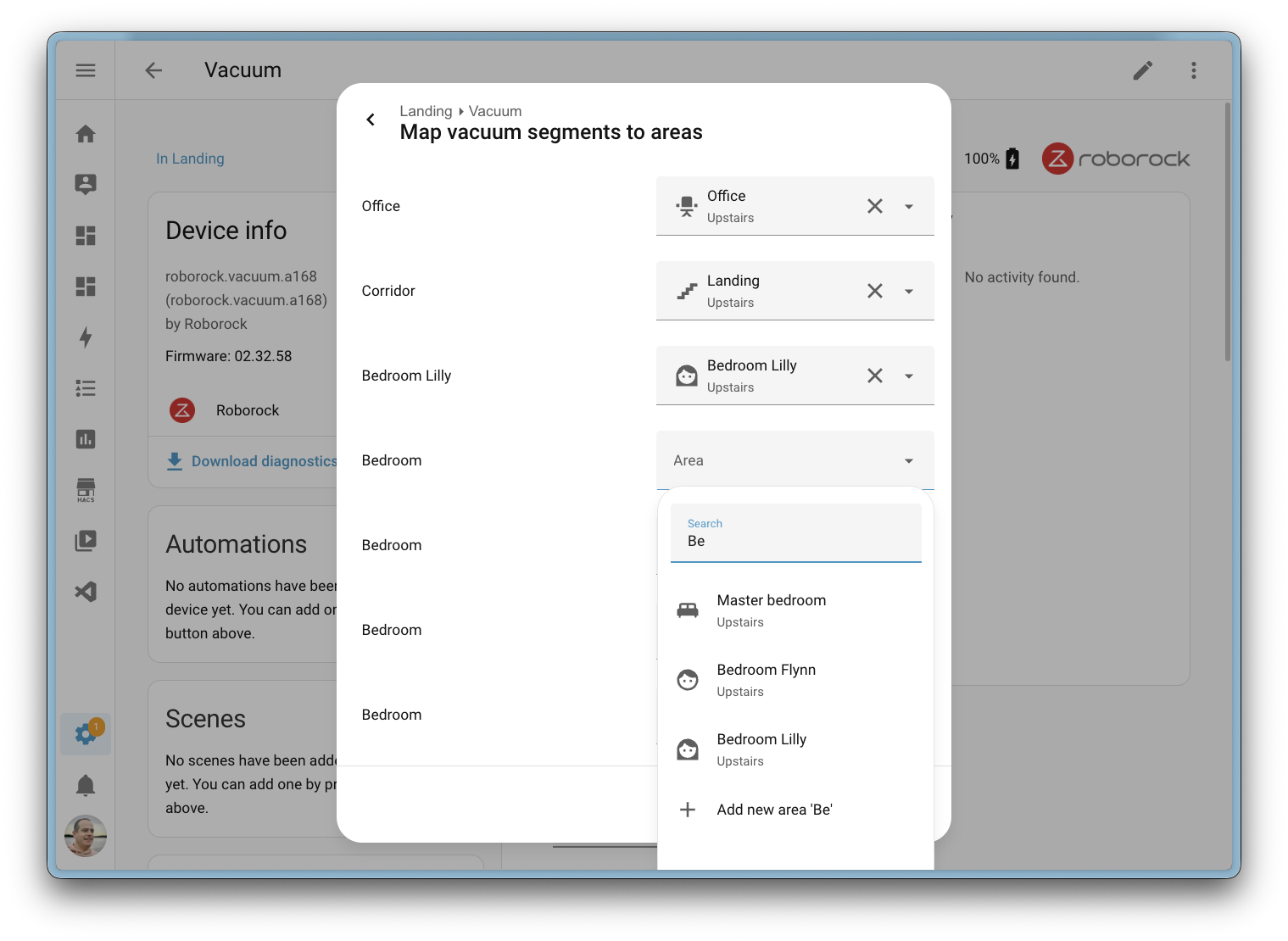
Screenshot of the vacuum area mapping dialog, allowing you to map vacuum segments to Home Assistant areas.

If your vacuumโ€™s internal segment layout ever changes (for example, after remapping in the manufacturerโ€™s app or the vacuum rediscovering its environment), Home Assistant will notice. A repair issue will alert you that the segments have changed, so you can update your mapping and make sure everything stays in sync.

Paving the way for voice

Because the mapping uses native Home Assistant areas, this feature lays the groundwork for future voice assistant support. Imagine simply saying โ€œclean the kitchenโ€ and having your vacuum head to the right area. Thatโ€™s not available just yet, but the foundation is now in place to make it happen.

Energy dashboard improvements

The Energy dashboard received a nice batch of improvements this release.

The Now view gained badges that show real-time power consumption, gas flow rate, and water flow rate at a glance. Water also gets its own Sankey chart in the Now view, giving you a visual breakdown of water usage across your home, just like the existing power Sankey chart.

Screenshot of the new badges in the Energy dashboard.

To reduce ambiguity, the second tab on the Energy dashboard has been renamed from Energy to Electricity, since the dashboard covers electricity, gas, and water. On the configuration side, the energy settings page is now split into three tabs: Electricity, Gas, and Water, making it easier to find and manage your energy sources.
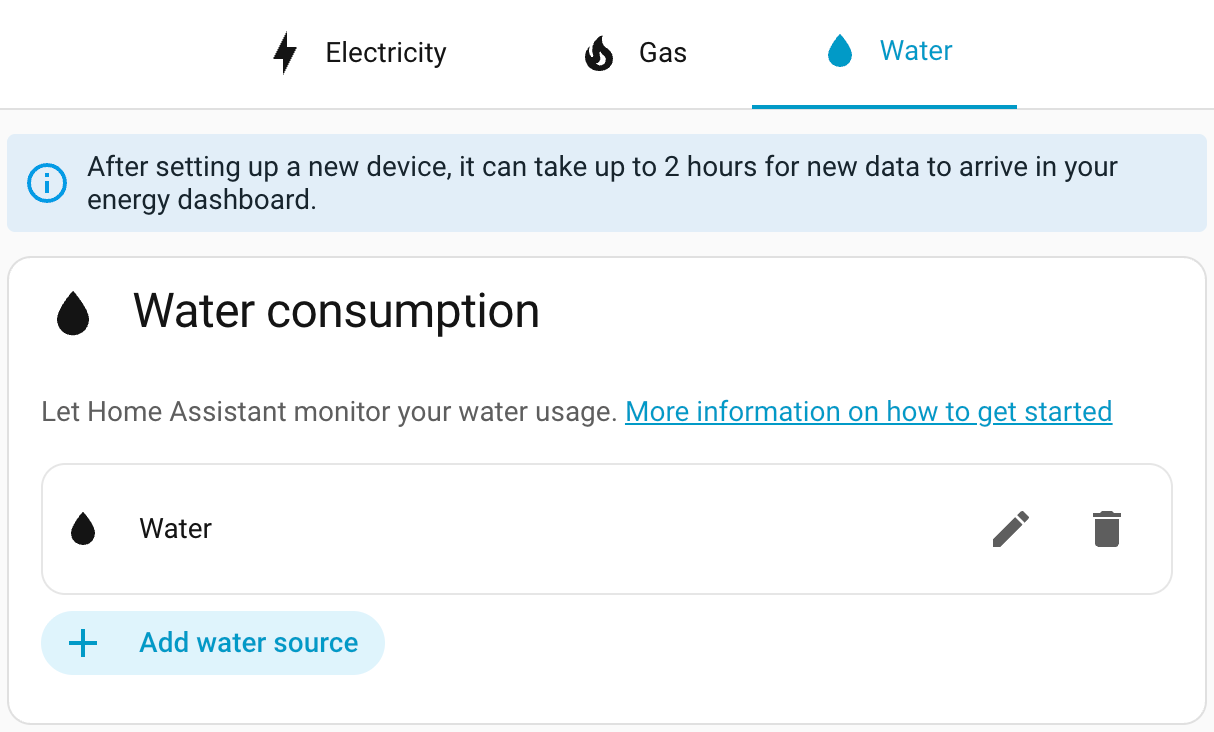
Screenshot of the new tabs in the Energy dashboard settings page.

Finally, energy bar chart tooltips now include the day of the week, helping you quickly spot usage patterns.

Thanks, @MindFreeze, @NoRi2909, and @gpoitch! ๐ŸŽ‰

Continue on error in the automation editor

The automation editor now has a Continue on error option for actions, directly accessible from the visual editor. Previously, this setting was only available through YAML.

You can find it in the three-dots menu of any action. When enabled, a visual indicator appears on the action row, so you can quickly see which actions will continue running even if they encounter an error.
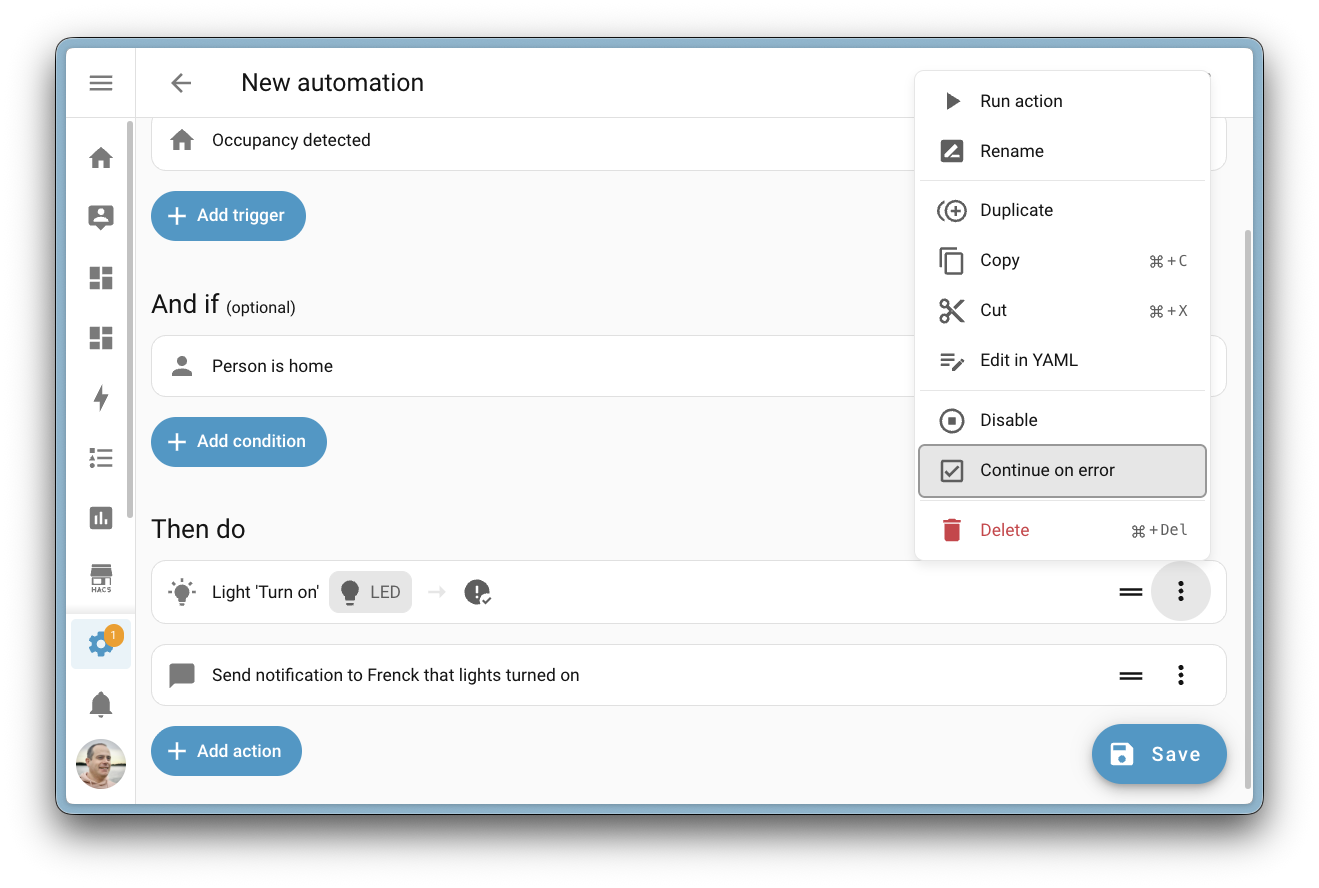
Screenshot of the automation editor showing the Continue on error option.

This is especially handy for automations where a single failing action shouldnโ€™t stop the rest from running. For example, if one of several notification actions fails, the remaining ones will still be sent.

Thanks, @wendevlin! ๐ŸŽ‰

Wake word detection on your Android phone (experimental)

Your phone just became a voice satellite! The Home Assistant Companion app for Android now supports on-device wake word detection, allowing you to open Assist from anywhere; even when your phone is locked.

Inspired from the great work from @brownard in Ava.

This feature uses microWakeWord, the same lightweight wake word engine that powers the Home Assistant Voice Preview Edition. All processing happens locally on your device, no audio is sent to the cloud, and no server-side processing is needed. Your voice stays on your phone.

You can choose between three wake words:

  • Okay Nabu
  • Hey Jarvis
  • Hey Mycroft

To enable wake word detection, open your Android deviceโ€™s Settings > Companion App > Assist for Android, and enable the Enable wake word detection toggle. Once enabled, simply say your chosen wake word and the Assist pipeline will open, ready to take your command.

Watch the video to see wake word detection in action on an Android device.

It already integrates with your voice equipment at home, and if another satellite is nearby, only the fastest one will respond. This also applies to multiple Android devices.

Battery usage

Because wake word detection requires continuous microphone access and CPU usage, this feature does have a noticeable impact on battery life. To help manage this, you can use automations to start and stop wake word detection based on your context, for example, only enabling it when youโ€™re connected to your home Wi-Fi or within a specific zone. This way, you get hands-free voice control when it matters most, without draining your battery all day.

Note

Battery usage could be drastically reduced if Google opened their API for hardware hotword detection. Unfortunately, this is hidden behind a system API that only phone manufacturers have access to. Maybe one day they will open it up to improve the experience.

Thanks, @TimoPtr! ๐ŸŽ‰

Integrations

Thanks to our community for keeping pace with the new integrationsIntegrations connect and integrate Home Assistant with your devices, services, and more. [Learn more] and improvements to existing ones! Youโ€™re all awesome ๐Ÿฅฐ

New integrations

We welcome the following new integrations in this release:

  • Ghost, added by @JohnONolan
    Monitor your Ghost publication metrics, including member counts, revenue, post statistics, and email newsletter performance, right from your Home Assistant dashboard.

  • Hegel Amplifier, added by @boazca - launching at ๐Ÿฅˆ silver quality
    Control your Hegel Music Systems amplifiers locally over your network. Manage power, volume, input selection, and mute with real-time push updates for instant feedback.

  • Homevolt, added by @Danielhiversen - launching at ๐Ÿฅˆ silver quality
    Read local data from your Homevolt battery over your network, no cloud required. Monitor power, energy, voltage, temperature, and battery status.

  • Hypontech Cloud, added by @jcisio
    Monitor your Hypontech solar inverter system through the Hypontech Cloud platform. Track power production, energy yields, and system status.

  • IDrive e2, added by @patrickvorgers
    Back up your Home Assistant to an IDrive e2 bucket. IDrive e2 offers affordable S3-compatible cloud storage with flexible access controls for keeping your backups safe.

  • Indevolt, added by @Xirt
    Communicate directly with your Indevolt energy storage devices over the local network. Monitor energy production, consumption, and battery status.

  • IntelliClima, added by @dvdinth
    Integrate your Fantini Cosmi Ecocomfort 2.0 ventilation devices. Control fan modes and speeds of your mechanical ventilation with heat recovery system.

  • Liebherr, added by @mettolen - launching at ๐Ÿฅˆ silver quality
    Control and monitor your Liebherr SmartDevice refrigerators and freezers via the cloud. Monitor temperatures, adjust cooling settings, and automate food safety alerts.

  • MTA New York City Transit, added by @OnFreund - launching at ๐Ÿฅˆ silver quality
    Get real-time arrival predictions for all NYC subway and bus lines using data from the Metropolitan Transportation Authority (MTA).

  • MyNeomitis, added by @l-pr
    Connect your Axenco MyNeomitis heating and energy management devices, such as electric radiators, towel rails, and underfloor heating, to Home Assistant.

  • OneDrive for Business, added by @zweckj - launching at ๐Ÿ† platinum quality
    Use OneDrive for Business as a backup location for your Home Assistant backups. Great for users with a Microsoft 365 business subscription.

  • Powerfox Local, added by @klaasnicolaas - launching at ๐Ÿ† platinum quality
    Gather data from your Powerfox Poweropti device directly over your local network, offering faster updates with no cloud dependency.

  • Redgtech, added by @Jonhsady
    Connect your Redgtech smart switches to Home Assistant. Control and monitor your cloud-connected switches and relays from this Brazilian smart home brand.

  • System Nexa 2, added by @konsulten - launching at ๐Ÿฅˆ silver quality
    Integrate your System Nexa 2 smart home devices locally. Control lights, switches, and smart plugs with support for dimmers and outdoor plugs.

  • Teltonika, added by @karlbeecken - launching at ๐Ÿฅˆ silver quality
    Monitor your Teltonika Networks routers running RutOS. Track cellular signal quality, modem temperature, and network connectivity.

  • Trane Local, added by @bdraco
    Locally control Trane and American Standard thermostats over your network using a direct mTLS connection. No cloud required.

  • Zinvolt, added by @joostlek
    Monitor your Zinvolt batteries in Home Assistant, including state of charge and other battery metrics.

This release also has new virtual integrations. Virtual integrations are stubs that are handled by other (existing) integrations to help with findability. These ones are new:

Noteworthy improvements to existing integrations

It is not just new integrationsIntegrations connect and integrate Home Assistant with your devices, services, and more. [Learn more] that have been added; existing ones are also being constantly improved. Here are some of the noteworthy changes to existing integrations:

  • Matter now supports carbon monoxide alarm states and TVOC air quality level sensors. If you have Matter-certified CO sensors or air quality devices, they now show up in Home Assistant. Thanks, @Leo2442926161 and @lboue!
  • HomeKit Controller now exposes water level sensors, so devices like the Smartmi Humidifier Rainforest will show their current water level in Home Assistant. Thanks, @romanlytvyn!
  • Reolink cameras gained five new diagonal and continuous rotation PTZ buttons, plus the PTZ patrol switch now correctly reports its real-time status. Thanks, @starkillerOG!
  • SmartThings now supports dual-cavity Samsung ovens, with separate entities for each chamber. It also gained switch and select controls for Samsung dishwasher washing options like sanitize, heated dry, and speed booster. Thanks, @mik-laj and @edu-tsen!
  • Roborock now fully supports Zeo washing and drying machines with program selection, temperature control, drying modes, and detergent status sensors. Thanks, @yangqian!
  • OpenAI Conversation now supports the gpt-image-1.5 image generation model for AI Tasks, offering cheaper and faster image generation. Thanks, @Shulyaka!
  • UniFi Protect cameras now have PTZ support with a ptz_goto_preset action for triggering presets and a PTZ patrol select entity with live state updates. Thanks, @RaHehl!
  • SwitchBot now lets you add passwords to Keypad Vision devices programmatically. It also gained a slow mode setting for curtain devices, which can reduce noise and improve reliability with heavier curtains. Thanks, @zerzhang and @ljmerza!
  • Alexa Devices now supports Amazon Air Quality Monitor devices, exposing sensors for air quality index, VOC index, humidity, temperature, and particulate matter. Thanks, @jamesonuk!
  • VeSync humidifiers now have a switch to enable or disable auto-drying mode for humidifier pads. Thanks, @cdnninja!
  • SwitchBot Cloud now supports the SwitchBot AI Art Frame with battery level, next/previous picture buttons, and a display image entity showing the current picture. Thanks, @XiaoLing-git!
  • KNX now allows configuring number entities and sending the current time directly from the UI. Additionally, expose gained a new periodic send option to periodically re-send entity states to the bus. Thanks, @farmio!
  • MELCloud air-to-water devices now have additional sensors for RSSI signal strength, condensing temperature, fan frequency, and estimated energy produced. Thanks, @ffourcot!
  • Nanoleaf replaced its underlying library with aionanoleaf2, fixing authorization errors that prevented newer Nanoleaf Essentials devices from connecting. Thanks, @loebi-ch!
  • Uptime Kuma monitors now have uptime ratio and average response time sensors for 1-day, 30-day, and 365-day periods. Thanks, @tr4nt0r!
  • Radarr gained two new actions: radarr.get_movies and radarr.get_queue, returning detailed information about movies in your library and the current download queue. Thanks, @Liquidmasl!
  • Renault vehicles now have buttons to remotely sound the horn or flash the lights. Thanks, @sebastiaanspeck!
  • Proxmox VE gained a sensor platform with CPU usage, memory usage, disk usage, and status sensors for nodes, virtual machines, and containers. Thanks, @erwindouna!
  • Mealie now has a get_shopping_list_items action that returns structured shopping list data, useful for automations that need more detail than the to-do entity provides. Thanks, @andrew-codechimp!
  • Ambient Weather Station now exposes sensors for the AQIN indoor air quality monitor, including PM2.5, PM10, CO2, temperature, humidity, and AQI measurements. Thanks, @n-6!
  • WeatherFlow Tempest stations now show battery level as a percentage for consistency with other integrations. Thanks, @pkolbus!
  • SleepIQ now provides five new sleep health sensors per sleeper: sleep score, sleep duration, heart rate average, respiratory rate average, and heart rate variability. Thanks, @rhcp011235!
  • Anthropic now supports the Claude Opus 4.6 model with adaptive thinking effort levels, and gained native structured outputs for more accurate tool calls on models 4.5 and newer. Thanks, @Shulyaka!
  • Tessie received several enhancements: an energy remaining sensor for vehicles, battery health diagnostics, island and grid status sensors for energy sites, and full energy history support for the Home Assistant Energy Dashboard. Thanks, @jrhillery and @Bre77!
  • Portainer now supports Docker stack monitoring and control with status sensors, container counts, and start/stop switches. It also gained a prune_images action to clean up unused Docker images. Thanks, @erwindouna!
  • Nintendo Parental Controls now has a bedtime end time entity, complementing the existing bedtime start time for a complete bedtime schedule. Thanks, @pantherale0!
  • LG Soundbar now supports play/pause media control, shows track title, artist, and album art, and reports playing/paused state. Thanks, @alexmerkel!
  • Velux now supports on/off switches connected to the KLF 200 gateway. Thanks, @wollew!
  • Switcher now supports Switcher heater devices for monitoring and control. Thanks, @YogevBokobza!
  • Cambridge Audio devices now have a room correction switch for compatible models. Thanks, @noahhusby!
  • Vera metered switches now expose power and energy sensors, bringing energy monitoring to your Vera devices. Thanks, @jronnols!
  • Control4 thermostats now support fan mode control with Auto, Circulate, and On modes. Thanks, @davidrecordon!
  • BSB-Lan now shows the current HVAC action (heating, cooling, idle) on the climate entity and gained a button to synchronize your heating systemโ€™s clock. Thanks, @liudger!
  • JVC Projector gained a wide range of new sensors and controls: source, color depth, HDR status, picture mode, installation mode, light power, and switches for E-Shift and Low Latency Mode. Thanks, @SteveEasley!
  • NRGkick EV chargers now have a switch to enable or pause car charging directly from Home Assistant. Thanks, @andijakl!
  • Green Planet Energy now shows timestamp sensors for the highest and lowest energy price times of the day, helping you time your energy usage. Thanks, @petschni!
  • Compit expanded significantly with new water heater, number, and binary sensor platforms for controlling hot water, adjusting temperature settings, and monitoring device states across their HVAC product range. Thanks, @Przemko92!
  • Saunum now has a start_session action, letting you start a sauna session with custom duration, target temperature, and fan duration in a single call. Thanks, @mettolen!
  • Watts Vision + now supports controlling smart switches alongside the existing thermostat support. Thanks, @theobld-ww!
  • Sunricher DALI now tracks energy consumption for DALI light devices connected through a Sunricher gateway. Thanks, @niracler!

Integration quality scale achievements

One thing we are incredibly proud of in Home Assistant is our integration quality scale. This scale helps us and our contributors to ensure integrations are of high quality, maintainable, and provide the best possible user experience.

This release, we celebrate several integrationsIntegrations connect and integrate Home Assistant with your devices, services, and more. [Learn more] that have improved their quality scale:

This is a huge achievement for these integrations and their maintainers. The effort and dedication required to reach these quality levels is significant, as it involves extensive testing, documentation, error handling, and often complete rewrites of parts of the integration.

A big thank you to all the contributors involved! ๐Ÿ‘

Now available to set up from the UI

While most integrationsIntegrations connect and integrate Home Assistant with your devices, services, and more. [Learn more] can be set up directly from the Home Assistant user interface, some were only available using YAML configuration. We keep moving more integrations to the UI, making them more accessible for everyone to set up and use.

The following integrations are now available via the Home Assistant UI:

Other noteworthy changes

There are many more improvements in this release; here are some of the other noteworthy changes:

  • The settings pages for Matter, Z-Wave, Zigbee, and Bluetooth have been reorganized for better clarity and discoverability. Thanks, @matthiasdebaat!
  • You can now ask your Assist to remove items from a to-do list! The new remove item intent complements the existing complete item intent, so managing your lists by voice just got even easier. Thanks, @mistic100!
  • The statistics graph card editor now offers โ€œYearโ€ as a selectable period, making it easy to view annual trends right from the UI. Thanks, @karwosts!
  • The Security dashboard now also shows window-type covers (automated windows), so they appear alongside your other window and door sensors. Thanks, @jhenkens!
  • The sections view now supports footer cards, giving you a sticky card at the bottom of the viewport, similar to the existing view header. Thanks, @MindFreeze!

Running on Python 3.14 ๐Ÿš€

This release ships running on Python 3.14! In case you are wondering what that means: Python is the programming language Home Assistant is built with.

So, why does it matter to you? Python 3.14 brings performance improvements to the foundation that Home Assistant is built on. The new version includes a faster interpreter, improved startup times, and better memory usage, all of which contribute to a snappier Home Assistant experience. ๐Ÿš€

Donโ€™t worry! We handle the upgrade to Python 3.14 automatically for you on all officially supported installation methods. Just upgrade Home Assistant as you normally would, and you are good to go! ๐Ÿ˜Ž

Patch releases

We will also release patch releases for Home Assistant 2026.3 in March. These patch releases only contain bug fixes. Our goal is to release a patch release once a week, aiming for Friday.

2026.3.1 - March 6

2026.3.2 - March 16

2026.3.3 - March 20

2026.3.4 - March 24

Need help? Join the community

Home Assistant has a great community of users who are all more than willing to help each other out. So, join us!

Our very active Discord chat server is an excellent place to be, and donโ€™t forget to join our amazing forums.

Found a bug or issue? Please report it in our issue tracker to get it fixed! Or check our help page for guidance on more places you can go.

Are you more into email? Sign up for the Open Home Foundation Newsletter to get the latest news about features, things happening in our community, and other projects that support the Open Home straight into your inbox.

Backward-incompatible changes

We do our best to avoid making changes to existing functionality that might unexpectedly impact your Home Assistant installation. Unfortunately, sometimes it is inevitable.

We always make sure to document these changes to make the transition as easy as possible for you. This release has the following backward-incompatible changes:

BSB-Lan

The water heater operation mode state on has been changed to performance for the BSB-Lan water heater. If you use this state in your automations or scripts, you will need to update them to use the new state value.

(@liudger - #160256) (BSB-Lan documentation)

Container image

Home Assistant container images are now compressed with zstd instead of gzip. This change is supported on Docker 23.0.0 and later, and containerd 1.5.0 and later, so it is not expected to break installations that meet these minimum versions. If your environment uses an older Docker or containerd version, make sure your container runtime supports zstd before updating.

(@duhow - #160665)

LIFX

Passing the color_temp parameter (in mireds) to the lifx.effect_pulse action is no longer allowed. Use the color_temp_kelvin parameter instead.

(@Djelibeybi - #161848) (LIFX documentation)

Lights

Using color_temp (in mireds) to set a lightโ€™s color temperature is no longer supported. Use color_temp_kelvin instead.

Additionally, the color_temp, kelvin, min_mireds, and max_mireds light entity state attributes have been removed. Use color_temp_kelvin, min_color_temp_kelvin, and max_color_temp_kelvin instead.

(@emontnemery - #161777) (light documentation)

Satel Integra

Binary sensors and switches now have an initial state of unknown while the alarm panel is still reporting all states during startup. Previously, the default state was off, which was incorrect, as no data had been received from the panel yet.

The chance that you are impacted is low, as most states are reported before Home Assistant fully finishes setup; but this might occur on larger installations and slower connections.

(@Tommatheussen - #158533) (Satel Integra documentation)

Snapcast

Media player entities for Snapcast groups have been removed. Additionally, the Snapcast-specific grouping actions have been removed. If you use these entities or actions in your automations or scripts, you will need to update them.

(@luar123 - #160945) (Snapcast documentation)

StarLine

The ignition and autostart state attributes of the engine switch have been removed. Two new binary sensors have been introduced to replace them. If you reference these attributes in your automations or scripts, update them to use the new binary sensor entities instead.

(@epenet - #163289) (StarLine documentation)

Tado

Mobile device tracking has been removed from the Tado integration. Mobile devices and their associated device tracker entities are no longer available. This change resolves re-authentication issues and reduces unnecessary load on the Tado API.

(@erwindouna - #160881) (Tado documentation)

Template

The behavior of template fans has changed:

  • A template fanโ€™s state will be unavailable if the state template encounters a syntax error. Previously, a template error would show the fanโ€™s state as off.
  • The percentage attribute will be None if the percentage template encounters a syntax error. Previously, it would be 0.
  • Template fans can now have the unknown state. A state template that returns None will render the entity as unknown instead of off.

(@Petro31 - #162328) (Template documentation)

Z-Wave

Percentage speeds reported by Z-Wave fans have been corrected to align with other integrations. As a result, values may differ slightly. For example, a value previously reported as 67% may now appear as 66%. If you have automations that trigger on exact percentage values, you may need to adjust them.

(@arturpragacz - #163093) (Z-Wave documentation)

If you are a custom integration developer and want to learn about changes and new features available for your integration: Be sure to follow our developer blog. The following changes are the most notable for this release:

All changes

Of course, there is a lot more in this release. You can find a list of all changes made here: Full changelog for Home Assistant Core 2026.3.

  •  

Proxmox expands enterprise ecosystem with native NAKIVO integration to simplify data center modernization

VIENNA, Austria โ€“ March 04, 2026 โ€“ Enterprise software developer Proxmox Server Solutions (henceforth "Proxmox"), today announced that NAKIVO is offering native, agentless backup support for Proxmox Virtual Environment (VE) and is now officially a Proxmox solution provider. This strategic partnership provides a seamless, enterprise-grade data protection path for organizations transitioning to open-source infrastructure.

NAKIVO Backup & Replication is a comprehensive data protection solution that provides backup, instant recovery, ransomware protection and disaster recovery for a wide range of physical, virtual, cloud, SaaS and hybrid environments via a single web-based interface. This all-in-one approach helps organizations centrally manage protection tasks, maintain visibility across platforms and quickly recover workloads during outages or ransomware incidents.

Short Quote NAKIVO:

โ€œOur integration with Proxmox VE is a direct response to the communityโ€™s need for a reliable, enterprise-grade data protection solution that matches the flexibility of their hypervisor. Our focus, as always, remains on delivering a reliable backup solution that streamlines data protection and helps achieve robust cyber resilience and rapid recovery for all environments,โ€ Bruce Talley, CEO of NAKIVO.

Short Quote Proxmox:

โ€œOur goal is to provide a virtualization platform that is both powerful and inherently open,โ€ said Tim Marx, COO of Proxmox. โ€œBy fostering native integrations with leaders like NAKIVO, we give our customers the flexibility to choose the best-in-class tools they need to secure their data. This collaboration reinforces Proxmox VE as a mature, enterprise-grade ecosystem that is ready for the most demanding environments.โ€

Availability

The NAKIVO Backup & Replication integration is available immediately for all Proxmox VE users. For more information, please visit https://www.nakivo.com/proxmox-backup/

###

About NAKIVO
NAKIVO is a US-based software vendor dedicated to delivering a reliable backup, ransomware protection and disaster recovery solution for virtual, physical, cloud, SaaS and mixed environments. Over 16,000 customers in 191 countries trust NAKIVO with protecting their data, including major companies like Coca-Cola, Honda, Siemens and Cisco. Learn more: https://www.nakivo.com

About Proxmox Server Solutions
Proxmox provides powerful and user-friendly open-source server software. Enterprises of all sizes and industries use the Proxmox solutions to deploy efficient and simplified IT infrastructures, minimize total cost of ownership, and avoid vendor lock-in. Proxmox also offers commercial support, training services, and an extensive partner ecosystem to ensure business continuity for its customers. Proxmox Server Solutions GmbH was established in 2005 and is headquartered in Vienna, Austria. Learn more: https://www.proxmox.com

Contact: Daniela Hรคsler, Proxmox Server Solutions GmbH, marketing@proxmox.com

  •  

Bitfocus Companion v4.2.5

๐Ÿ“ฆ Downloads available at

๐Ÿ’ต Donate to the project at

Companion v4.2.5 - Release Notes

  • support stream deck + xl
  • improve import resiliency/performance for large configs
  • ux issues in the expression editor
  • better respect collections when ordering connections
  • incorrect urls into module docs
  • suppress some unnecessary errors
  • allow connection configs to use multiline input fields

Full Changelog: v4.2.4...v4.2.5

  •  

2.6.3

Changes from 2.6.2 to 2.6.3:

Updates:

  • Updated LAV Filters to version 0.81-6-gb54d5

Changes:

  • In filter properties, the info of pin connections now shows a bit more details.

Fixes:

  • A few fixes for rare crashes.
  • Several small fixes and improvements.

  •  

Extended Stable Updates for Desktop

The Extended Stable channel has been updated to 144.0.7559.236ย for Windows and Mac which will roll out over the coming days/weeks.


A full list of changes in this build is available in the log. Interested in switching release channels? Find out how here. If you find a new issue, please let us know by filing a bug. The community help forum is also a great place to reach out for help or learn about common issues.

Srinivas Sista
Google Chrome
  •  

Stable Channel Update for Desktop

ย The Stable channel has been updated to 145.0.7632.159/160 for Windows/Macย  andย 145.0.7632.159 for Linux, which will roll out over the coming days/weeks. A full list of changes in this build is available in theย Log

Security Fixes and Rewards

Note: Access to bug details and links may be kept restricted until a majority of users are updated with a fix. We will also retain restrictions if the bug exists in a third party library that other projects similarly depend on, but havenโ€™t yet fixed.

This update includes 10 security fixes. Please see the Chrome Security Page for more information.

[$33,000][485622239] Critical CVE-2026-3536: Integer overflow in ANGLE. Reported by cinzinga on 2026-02-18

[$32,000][474266014] Critical CVE-2026-3537: Object lifecycle issue in PowerVR. Reported by Zhihua Yao of KunLun Lab on 2026-01-08

[TBD][484983991] Critical CVE-2026-3538: Integer overflow in Skia. Reported by Symeon Paraschoudis on 2026-02-17

[TBD][483853098] High CVE-2026-3539: Object lifecycle issue in DevTools. Reported by Zhenpeng (Leo) Lin at depthfirst on 2026-02-12

[TBD][484088917] High CVE-2026-3540: Inappropriate implementation in WebAudio. Reported by Davi Antรดnio Cruz on 2026-02-14

[TBD][484811719] High CVE-2026-3541: Inappropriate implementation in CSS. Reported by Syn4pse on 2026-02-16

[TBD][485152421] High CVE-2026-3542: Inappropriate implementation in WebAssembly. Reported by qymag1c on 2026-02-17

[TBD][485267831] High CVE-2026-3543: Inappropriate implementation in V8. Reported by qymag1c on 2026-02-18

[TBD][485683110] High CVE-2026-3544: Heap buffer overflow in WebCodecs. Reported by c6eed09fc8b174b0f3eebedcceb1e792 on 2026-02-19

[TBD][487383169] High CVE-2026-3545: Insufficient data validation in Navigation. Reported by Google on 2026-02-24

We would also like to thank all security researchers that worked with us during the development cycle to prevent security bugs from ever reaching the stable channel.

Many of our security bugs are detected using AddressSanitizer, MemorySanitizer, UndefinedBehaviorSanitizer, Control Flow Integrity, libFuzzer, or AFL.

Interested in switching release channels? Find out howย here. If you find a new issue, please let us know byย filing a bug. Theย community help forumย is also a great place to reach out for help or learn about common issues.


Srinivas Sista

Google Chrome
  •  

NVIDIA Driver 595.71

Release Highlights:
Although GeForce Game Ready Drivers and NVIDIA Studio Drivers can be installed on supported notebook GPUs, the original equipment manufacturer (OEM) provides certified drivers for your specific notebook on their website. NVIDIA recommends that you check with your notebook OEM for recommended software updates for your notebook.

Game Ready for Resident Evil Requiem

This new Game Ready Driver provides the best gaming experience for the latest new games supporting DLSS 4 technology including Resident Evil Requiem. In addition, there is Game Ready support for Marathon which features DLSS Super Resolution and NVIDIA Reflex.

Fixed Gaming Bugs
  • The Ascent: Intermittent black bar on top of screen on GeForce RTX 50 Series GPUs [5859818]
  • Total War: THREE KINGDOMS: Green artifacts appear on GeForce RTX 50 series [5745647]
  • FINAL FANTASY XII The Zodiac Age crashes with fatal error after driver update [5741199]
  • Call of Duty Modern Warfare (2019) displays image corruption after driver update [5733427]
  • Quantum Break: Performance drops significantly on Act 4 Part 1 [5607678]

Fixed General Bugs
  • 595.59: HW monitoring utilities not detecting all fans on the GPU [5934264]
  • 595.59: One or more fans not spinning on GPUs after driver update [5934333]
  • Blackmagic Design: AV1 decode crash with multiple obu in one packet [5671098]

Learn more in our Game Ready Driver article here.

Game Ready  Driver

  •  

v25.12.0

Hi,

The OpenWrt community is proud to announce the first stable release of the OpenWrt 25.12 stable series.

Download firmware images using the OpenWrt Firmware Selector:

Download firmware images directly from our download servers:

Highlights in OpenWrt 25.12

OpenWrt 25.12.0 incorporates over 4700 commits since branching the previous OpenWrt 24.10 release and has been under development for over one year.

Only the main changes are listed below. See changelog-25.12.0 for the full changelog.

Honoring Dave Tรคht

OpenWrt 25.12 is named Dave's Guitar to honor Dave Tรคht, who sadly passed away on April 1, 2025.

Dave played a key role in reducing bufferbloat and improving network latency in OpenWrt and across the wider internet. His work made networks faster, more responsive, and more reliable for millions of users.

This release is dedicated to his memory and lasting impact on the networking community.

General changes

The hardware requirements did not change significantly. Most devices supported by OpenWrt 24.10 are also supported in OpenWrt 25.12.

Switch package manager from opkg to apk

OpenWrt has transitioned from the traditional opkg package manager to apk (Alpine Package Keeper).

This change brings several advantages:

  • apk is still maintained; the OpenWrt opkg fork is no longer maintained.

apk supports most features of opkg. Only very few package names changed. The command line arguments of apk are different from the command line arguments of opkg.

For users migrating existing systems, an official opkg to apk cheatsheet is available to ease the transition and map common workflows.

Integration of attended sysupgrade

The attended sysupgrade LuCI application is now installed by default.
owut is included by default in images for devices with larger flash storage.

ASU allows devices to:

  • Upgrade to new OpenWrt firmware versions
  • Automatically rebuild firmware images with all currently installed packages
  • Preserve system configuration during upgrades
  • ASU allows integrating additional installed packages directly into the SquashFS filesystem, which stores packages more efficiently than the overlay filesystem.

This dramatically simplifies upgrades: with just a few clicks in LuCI and a short wait, a custom firmware image is built and installed without manual intervention.

Shell history is preserved

Shell command history is now preserved across sessions by storing it in a RAM-backed filesystem.

Benefits:

  • Command history is no longer lost between logins
  • No unnecessary writes to flash storage by default

For users who prefer persistent history storage, this behavior can be changed by editing: ''/etc/profile.d/busybox-history-file.sh''

โš ๏ธ Note: Storing history on flash will increase write cycles and may impact flash endurance over time.

Integration of video feed

The OpenWrt video feed with Qt5 and UI applications is integrated by default.

Wi-Fi scripts in ucode

The Wi-Fi scripts were rewritten in ucode.
This is part of the rewrite of the management scripts from shell scripts to ucode.

uCode is used for system scripts because it is faster and safer than shell scripts, and integrates directly with ubus and UCI.

Wi-Fi and network management scripts rewritten in uCode run faster, have fewer errors, and are easier to maintain.

Target changes

  • Extend the realtek target with support for more switch SoCs like 10G Ethernet switches.
  • Extend the qualcommax target with support for ipq50xx and ipq60xx SoCs.
  • Added the siflower target for Siflower SF21A6826/SF21H8898 SoCs
  • Added the sunxi/arm926ejs subtarget for Allwinner F1C100/200s SoCs
  • Added the microchipsw/lan969x target with support for Microchip LAN969x switches.

Many new devices added

OpenWrt 25.12 supports over 2200 devices. Support for over 180 new devices was added in addition to the devices already supported in OpenWrt 24.10.
Most devices already supported by OpenWrt 24.10 are still supported.

Core components update

Core components have the following versions in 25.12.0:

  • Updated toolchain:
    • musl libc 1.2.5
    • glibc 2.41
    • gcc 14.3.0
    • binutils 2.44
  • Updated Linux kernel
    • 6.12.71 for all targets
  • main packages:
    • cfg80211/mac80211 from kernel 6.18.7
    • hostapd master snapshot from August 2025
    • dnsmasq 2.91
    • dropbear 2025.89
    • busybox 1.37.0

In addition to the listed applications, many others were also updated.

OpenWrt 24.10 end of life

With the release of OpenWrt 25.12 stable series, the OpenWrt 24.10 stable series will go end of life in 6 months. We will not provide security updates for OpenWrt 24.10 after September 2026. We encourage everyone to upgrade to OpenWrt 25.12 before September 2026.

Upgrading to 25.12

Upgrading from 24.10 to 25.12 should be transparent on most devices, as most configuration data has either remained the same or will be translated correctly on first boot by the package init scripts.

  • Sysupgrade from 23.05 to 25.12 is not officially supported.

  • Cron log level was fixed in busybox. system.@system[0].cronloglevel should be set to 7 for normal logging. 7 is the default now. If this option is not set, the default is used and no manual action is needed.

  • Bananapi BPI-R4: Interfaces ''eth1'' was renamed to ''sfp-lan'' or ''lan4'', and interface ''eth2'' was renamed to ''sfp-wan'' to match the labels. You have to upgrade without saving the configuration.

Scratch installs/upgrades

If you wish to start from scratch (always the safest, but also the most work), simply download the pre-built image from the downloads site or from the Firmware Selector to your device. Make sure to create and save a backup, then install the image using sysupgrade -n /tmp/firmware.bin or the LuCI Backup/Flash Firmware, being sure to set "Keep settings and retain the current configuration" to its off position. Restore or reconstruct your configuration using the contents of the backup as a template.

Attended Sysupgrade options

Attended Sysupgrade (ASU) allows you to build a custom image that retains all of your installed packages and their configuration transparently. You need to use one of the three ASU clients that interface with the ASU server to produce this custom image:

  • Firmware Selector - an online builder that requires you to manually supply it with the packages you wish to have installed. This package list is sent to the ASU server, and a new custom device image is created containing those packages. You may then download and install the image in LuCI Backup/Flash Firmware, but for this you would enable "Keep settings..."
  • Luci Attended Sysupgrade - the web interface to the ASU server. This tool allows you to choose a new OpenWrt version, then collects the names of the packages on your device and sends them up to the ASU server. LuCI ASU then downloads the created image directly to your device and allows you to install it, without having to do any of the bookkeeping tasks involved with using the Firmware Selector.
  • owut - a command line package that does the same job as LuCI ASU, but provides more diagnostics and better visibility into what's happening at the various steps before and during the build process.

Both the LuCI ASU app and owut are optional packages in 24.10, so if you have not installed them, they won't be there by default. Use either the LuCI Package Manager to install them, or you can do it from the command line with opkg:

$ opkg update
$ opkg install luci-app-attendedsysupgrade
$ opkg install owut

Note that you can install one or the other, or both together, they are completely independent packages.

Upgrades with Firmware Selector

The Firmware Selector does an excellent job of searching through the thousands of available device configurations and getting you to the right place. But, some devices have several variants and possibly different image formats, so if you're unsure about which one you need or which device you're dealing with or anything else, go to the |Firmware Selector support thread and ask away.

Upgrades with LuCI Attended Sysupgrade

The LuCI web interface is fairly self-explanatory. If anything is unclear, please refer to the LuCI Attended Sysupgrade support thread for guidance.

Upgrades with owut

If you choose to use owut, the fact that it's a command line program means you'll need a little more explanation regarding best practices. In any situation, it's always safe to do a check to see what's going on.

$ owut check --verbose --version-to 25.12
... a lot of output ...

This check should show you all the details of what this upgrade entails with regards to the packages available, and will point out any issues with package versions and so on.

Assuming the results of the check look good, you can simply do an upgrade next.

$ owut upgrade --verbose --version-to 25.12
... even more output ...

If you are unsure of anything you see in the check, during the upgrade, or simply have questions, jump on over to the owut support thread on the forum and ask.

Known issues

  • Users of Zyxel EX5601-T0 devices need to check their WAN interfaces as the port was renamed from eth1 to wan.
  • Pixel 10 phones have problems connecting to WPA3 protected WiFi 6 APs. #21486
  • 802.11r Fast Transition (FT) causes problems with some WiFi clients when WPA3 is used. #22200

Full release notes and upgrade instructions are available at
https://openwrt.org/releases/25.12/notes-25.12.0

In particular, make sure to read the regressions and known issues before upgrading:
https://openwrt.org/releases/25.12/notes-25.12.0#known_issues

For a detailed list of all changes since branching of 24.10, refer to
https://openwrt.org/releases/25.12/changelog-25.12.0

To download the 25.12.0 images, navigate to:
https://downloads.openwrt.org/releases/25.12.0/targets/
Use OpenWrt Firmware Selector to download:
https://firmware-selector.openwrt.org?version=25.12.0

As always, a big thank you goes to all our active package maintainers, testers, documenters and supporters.

Have fun!

The OpenWrt Community


To stay informed of new OpenWrt releases and security advisories, there
are new channels available:

  •  

Part-DB 2.8.0

Part-DB 2.8.0

Warning

After upgrade, you need to run php bin/console doctrine:migrations:migrate (or equivalent) as webserver user after upgrade.. If you are running a docker container, use sudo docker exec --user=www-data partdb php bin/console doctrine:migrations:migrate, or sudo -E inside the docker container, to ensure that the migrations are applied to the correct database.

Tip

If you like Part-DB, consider donating to support the development. Press the sponsor button on the main github page, for more info.

Important

If you are using Part-DB it would be helpful if you fill out this short survey on your usage of Part-DB (Google Forms): https://forms.gle/Q15twx3YYq3qCNfe8

New features

  • Allow to add parts from barcode scans of LCSC, digikey and other vendor labels (thanks @swdee)
  • Allow to scan LCSC labels
  • Added Amazon info provider via Canopy API
  • Added an optional HTML sandbox for attachments, allowing to view interactive BOM HTML files inside Part-DB (#1150)
  • Add option to disable special character keybindings (#1251, thanks @MayNiklas)
  • Improve working with an external barcode scanner, allow scanning barcodes from everywhere
  • Make KiCad API better cachable (#1241, thanks @Sebbeben)
  • Make parameters and order informations visible in KiCad (#1241, thanks @Sebbeben)
  • Show EDA value and reference in part tables (#1266, thanks @hrueger)

Miscellaneous

  • Updated dependencies
  • Updated translations
  • Updated KiCad library autocomplete lists
  • Security hardening of attachments

New Contributors

Full Changelog: v2.7.1...v2.8.0

  •  

v0.4.32 - "It's only a model"

0.4.32 (2026-03-01)

  • Feature: [#22704] Rides can be made invisible more easily.
  • Improved: [#21753] Tracked rides with cheated powered launch mode can change powered launch speed without extra cheats.
  • Improved: [#25526] When a shop item cannot be recoloured, show a preview of the building instead.
  • Improved: [#25941] The command line sprite build command is now faster.
  • Improved: [#26002] Rides with newer track elements (like the zero G roll or diagonal brakes) can now be saved as track designs.
  • Improved: [#26026] Profiler is now thread safe and supports JSON export with call graph data.
  • Improved: [#26050] Add Danish translation to Windows installer.
  • Improved: [#26091] When all rides are closed, the marketing window will no longer show the ride advertisement campaign.
  • Change: [#26011] Audio resampling no longer depends on the third-party library libspeexdsp.
  • Change: [#26049] Guest generation now starts slowing down above 52000 guests instead of 7000.
  • Fix: [#14686, #23996, #25981] Preview images from different windows overwrite each other when using OpenGL.
  • Fix: [#15128, #15626, #16331, #17443, #18626, #21597, #24175, #24971, #25963] Crash when loading corrupted RCT2/RCT1 save files with duplicate entity indices.
  • Fix: [#23519] Title sequence cannot open .sea scenarios from RCTC.
  • Fix: [#25237] Wrong colours on the Knight costume (original bug).
  • Fix: [#25712, #25727] Crash during startup from window list race condition.
  • Fix: [#25763] Crash when opening the Footpath window in Multiplayer.
  • Fix: [#25910] Folders starting with numbers are sorted incorrectly (e.g. 1, 10, 2 instead of 1, 2, 10).
  • Fix: [#25954] Guests display hats, balloons, and umbrellas while puking.
  • Fix: [#25961] Fix crash when rendering malformed vehicles in the ride window.
  • Fix: [#25978] Frozen peeps start clapping when the scenario is won.
  • Fix: [#25999] Scenery picker tool does not pick the tertiary colour of large scenery correctly.
  • Fix: [#26037] Selecting elements in the tile inspector list and changing all tiles of a track piece does not redraw correctly.
  • Fix: [#26057] In the scrolling intro, the Infogrames logo is taken off the screen before it reaches the bottom (original bug).
  • Fix: [#26058] RCT Classic scenarios with packed objects missing from scenario index.
  • Fix: [#26083] You can advertise for closed food & drink stalls.

Release created in https://github.com/OpenRCT2/OpenRCT2/actions/runs/22540214935

SHA256 checksums:

4812c3776cb260240991b1b46711219dbbb87d7b28ee7fd18c42f010d57d3425  ./OpenRCT2-v0.4.32-Linux-noble-x86_64.tar.gz
d6a7873c492894e558a946f2e9404219f6d6001cb286327f0243e511d779a4c3  ./OpenRCT2-v0.4.32-macos-universal.zip
356a8aab3dc4eb15b7542e7428ce1e0696ba4e6bed238fba74e0fea9e4aec1d5  ./OpenRCT2-v0.4.32-windows-installer-arm64.exe
c9b20bfb56e63cfba27eee67dff180097c346d59531f7cd7d1640636a55df17c  ./OpenRCT2-v0.4.32-windows-installer-win32.exe
a87431435e493163027d197326d076f7ff97b89f8ca3b26e58d4e41e3d17f780  ./OpenRCT2-v0.4.32-windows-symbols-x64.zip
1c75d678a9c64657e58970d7244f2723ab5d595ed3a9c4b4ca2624768fadc227  ./OpenRCT2-v0.4.32-Linux-trixie-x86_64.tar.gz
40f8fa38dd76949ab18ac01327b93ecd3115260a8923bd5840def26ed6c04bbe  ./OpenRCT2-v0.4.32-windows-symbols-arm64.zip
5c6313a7e8a117aea4c9727346e3ad5e1b0f9358ac643b9f97ae11fd01d1fded  ./OpenRCT2-v0.4.32-linux-x86_64.AppImage
65031a40855723dd49836d6a654f6d59e3537adc0262aeb9273bcef501417552  ./OpenRCT2-v0.4.32-windows-portable-arm64.zip
94b69bb522c38743bea9303b15b31d0b7974fb2b4d85ee7cecf58a85b458b6d8  ./OpenRCT2-v0.4.32-windows-installer-x64.exe
1a50a69fd4138cbaf5ed8fcb6d546b5435bcd2ec018b40318a126b1917e59e01  ./OpenRCT2-v0.4.32-windows-portable-x64.zip
43ecc546a662fab89c7d4c4991a977d36534f059d41d87527077a6b251d7091d  ./OpenRCT2-v0.4.32-Linux-resolute-x86_64.tar.gz
6f8c0c592b3d054c716f4d2cc547928a069bb3f32363a6ee8b0160206d4b1a27  ./OpenRCT2-v0.4.32-windows-symbols-win32.zip
f1eda724d3fb827437426bd0d8a12406e0ac50fb67bfef2d1ef9ec690515b10e  ./OpenRCT2-v0.4.32-android.apk
ea62c7092320b3ad900d6c78bd20a42678258871e658534fda3355251d0783cc  ./OpenRCT2-v0.4.32-windows-portable-win32.zip
7b2adc70ff6bcb5c252148913d71e6969c87f63e5e8ec4bb44a27656adadc4e3  ./OpenRCT2-v0.4.32-sha256sums.txt
009a2bcad0f1d2af01e3cff6b27de2d6604058b84daecaca49d52acb1ecdd8e8  ./OpenRCT2-v0.4.32-Linux-bookworm-x86_64.tar.gz

  •  
โŒ