 Log in
uNmINeD 0.19.51-dev
New uNmINeD development snapshot is available for download!
Changes:
- (GUI) Added support for new savegame location in Bedrock 1.21.120+
- (GUI) Updated Avalonia to 11.3.8

New uNmINeD development snapshot is available for download!
Changes:
New uNmINeD development snapshot is available for download!
This is a hotfix only for the macOS releases.
Latest version for other platforms is still 0.19.49.
Changes:
New uNmINeD development snapshot is available for download!
Changes:
Known issues:
New uNmINeD development snapshot is available for download!
Changes:
New uNmINeD development snapshot is available for download!
Changes:
dimensions folder of the world saveThe new block finder feature of the CLI scans the world for a specified block and displays the coordinates or writes them to a CSV file. You can use the --area, --topy and --bottomy arguments to limit the search area in the same way as with mapping functions.
unmined-cli blockfind dump --world="path_to_my_world_folder" --block=minecraft:bell --output=results.csvWarning! The result file can grow extremely large if you search for a common block. If the file already exists, the results are appended instead of overwriting the file.
Result:
BLOCK;STATE;X;Z;Y
minecraft:bell;powered:false,attachment:floor,facing:south;68;2;62
minecraft:bell;powered:false,attachment:floor,facing:north;1079;1083;76
minecraft:bell;powered:false,attachment:floor,facing:north;1993;371;72
minecraft:bell;powered:false,attachment:floor,facing:north;29;-1495;71unmined-cli blockfind dump --world="path_to_my_world_folder" --block=minecraft:deepslate_*_ore --log-console=falseNote: the --log-console=false argument should be used to disable logging to the console when the output is also displayed on the console. You can use the --log-file argument if you still need the logs.
Result:
BLOCK;STATE;X;Z;Y
minecraft:deepslate_diamond_ore;;196;1220;-56
minecraft:deepslate_lapis_ore;;34;1710;-51
minecraft:deepslate_lapis_ore;;34;1710;-50
minecraft:deepslate_gold_ore;;34;1711;-55
minecraft:deepslate_diamond_ore;;176;1076;-56
minecraft:deepslate_diamond_ore;;176;100;-49
minecraft:deepslate_diamond_ore;;176;101;-49
minecraft:deepslate_redstone_ore;lit:false;176;104;-54
...unmined-cli blockfind dump --world="path_to_my_world_folder" --block=minecraft:bell --log-console=false --csv-header=false --csv-separator="|" --csv-fields=x,z--csv-header=false disables the CSV header--csv-separator="|" sets the | character as field separator--csv-fields=x,z sets the output format to contain only x and z coordinatesResult:
68|2
1079|1083
1993|371
29|-1495New uNmINeD development snapshot is available for download!
Changes:
Word border indicator:
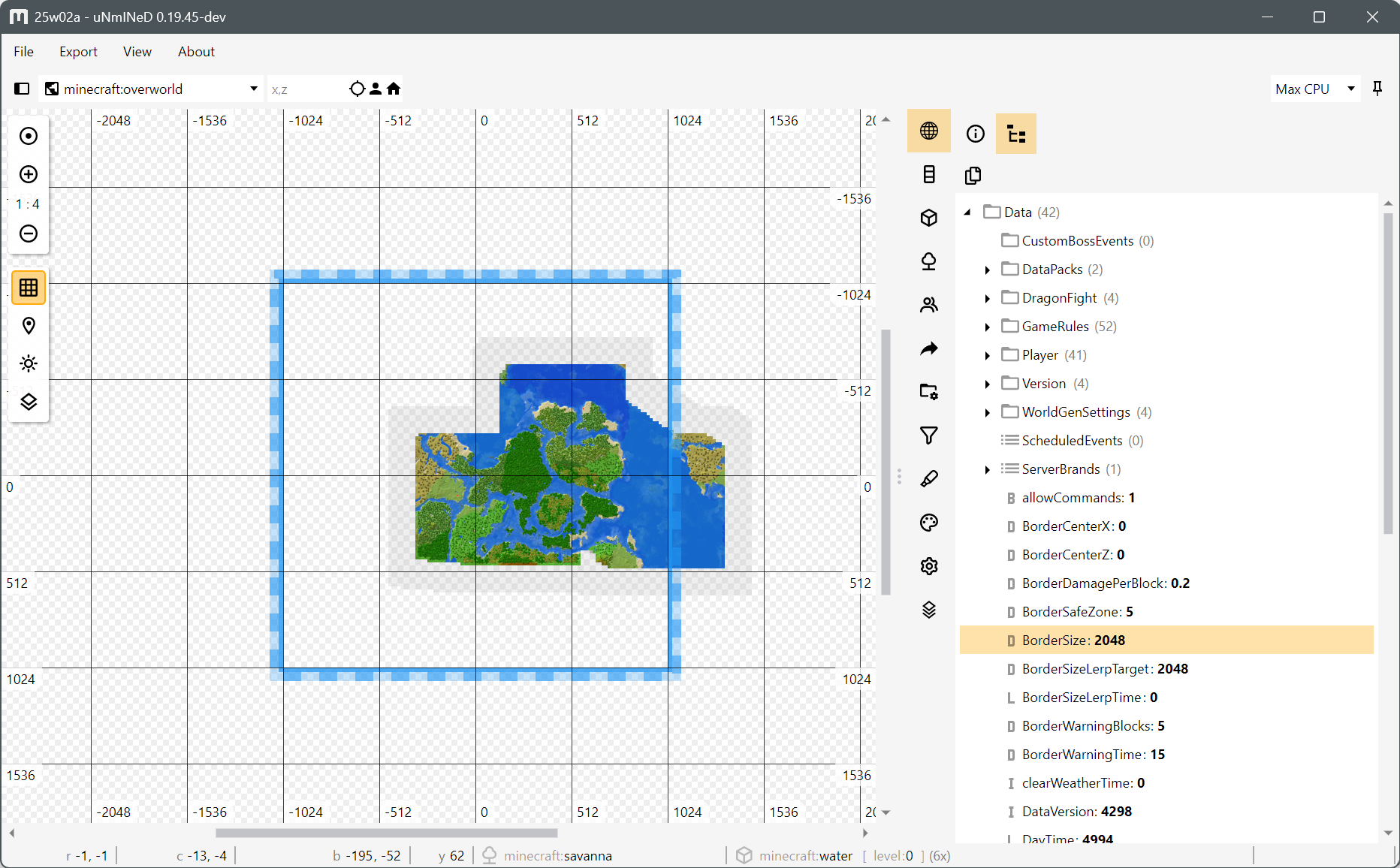
New uNmINeD development snapshot is available for download!
Changes:
New uNmINeD development snapshot is available for download!
Changes:
--showgrid=true/false--enablegrid=true/false--centerx=0--centerz=0
New uNmINeD development snapshot is available for download!
Changes:
../mods to mod search path
New uNmINeD development snapshot is available for download!
Changes:
unmined.index.html to index.htmlcopy /tp x ~ z functionThis release contains a preview version of an improved web map template. Any previous template can still be used if you do not want to switch.
New uNmINeD development snapshot is available for download!
Changes:
New uNmINeD development snapshot is available for download!
Changes:
--shadows command line parameter to accept the following values:
--shadows=false ⇒ no shadows (default)--shadows=true ⇒ heightmap shadows--shadows=2d ⇒ heightmap shadows--shadows=3d ⇒ 3D raycasting shadows--shadows=3do ⇒ 3D raycasting shadows with opacity
New uNmINeD development snapshot is available for download!
Changes:
New uNmINeD development snapshot is available for download!
Changes:
New uNmINeD development snapshot is available for download!
Changes:
--chunkprocessors=x option to limit CPU usage, where x is the number of chunks processed simultaneously. The default value is the number of your CPU threads.With these settings you can slow down uNmINeD and make it less CPU-hungry, preventing other running apps or games from lagging and overclocked/undercooled CPUs from “melting”.
Notes:
The number of CPU threads cannot be limited for a .NET application (however, you can use virtual machines or containers to limit the CPU usage of any application). The CPU limiter in uNmINeD only limits the number of chunks that can be processed simultaneously. The actual number of running threads can be higher than this.
New uNmINeD development snapshot is available for download!
Changes:
