❌

Lees weergave

uNmINeD 0.19.56-dev

New uNmINeD development snapshot is available for download!

Changes:

  • Improved Hytale map colors
  • Improved Hytale processing speed
  • Added grass tints for Hytale (read from chunk data)
  • Added water biome tints for Hytale (read from configuration)
  • Added player names for Hytale
  • Block name matcher now treats patterns ending in ** specially, the pattern foo** means foo or foo_*
  • (GUI) Fixed broken chunk inspector GUI
  • (GUI) Fixed broken web export GUI

The Hytale support is still experimental. There may be bugs, crashes, and the map colors are still unfinished.

!!! WARNING !!!

It has not yet been tested whether uNmINeD can be used safely while Hytale is running. Always close Hytale before using uNmINeD to prevent data corruption!

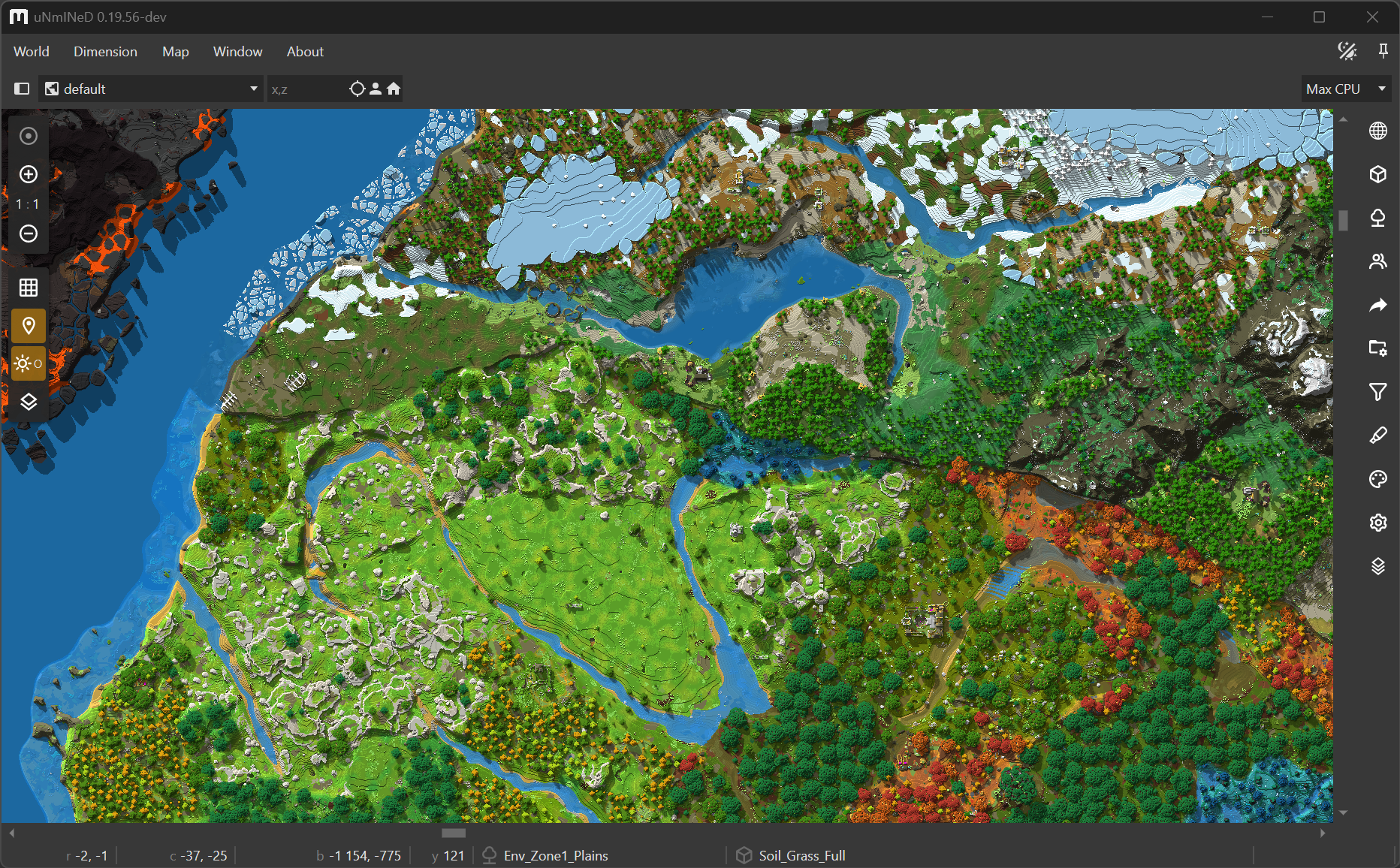
A Hytale world in uNmINeD:

  •  

uNmINeD 0.19.55-dev – Hytale

New uNmINeD development snapshot is available for download!

Changes:

  • Added support for Hytale (experimental)
  • Added support for Minecraft 26.1-snapshot-6 worlds
  • Added support for multiple asterixes in block name patterns
  • Fixed broken textured rendering for Java Edition

uNmINeD now can read Hytale worlds. This is an experimental feature under development. Map colors are far from finished, the code is slow, and there may be bugs and crashes.

!!! WARNING !!!

It has not yet been tested whether uNmINeD can be used safely while Hytale is running. Always close Hytale before using uNmINeD to prevent data corruption!

Check your Hytale world in uNmINeD and have fun!

  •  

uNmINeD 0.19.54-dev

New uNmINeD development snapshot is available for download!

Changes:

  • Fixed support for Bedrock worlds without a LevelDB log file
  • Updated to .NET 10
  • Updated to Avalonia 11.3.10
  •  

uNmINeD 0.19.53-dev

New uNmINeD development snapshot is available for download!

Changes:

  • (GUI) Fixed clipboard issues on Windows

This is a hotfix release for the Windows GUI builds.

Linux, macOS and CLI builds have not changed, they are still at version 0.19.52.

  •  

uNmINeD 0.19.52-dev

New uNmINeD development snapshot is available for download!

Changes:

  • Fixed color of artificial deepslate blocks (now it’s dark gray instead of light gray)
  • (CLI) Fixed broken --shadows parameter for image rendering
  •  

uNmINeD 0.19.51-dev

New uNmINeD development snapshot is available for download!

Changes:

  • (GUI) Added support for new savegame location in Bedrock 1.21.120+
  • (GUI) Updated Avalonia to 11.3.8

  •  

uNmINeD 0.19.50-dev (hotfix)

New uNmINeD development snapshot is available for download!

This is a hotfix only for the macOS releases.

Latest version for other platforms is still 0.19.49.

Changes:

  • Fixed crash on macOS with Apple Silicon
  •  

uNmINeD 0.19.49-dev

New uNmINeD development snapshot is available for download!

Changes:

  • (GUI) Fixed crash on macOS with Apple Silicon
  • (GUI) Fixed trackpad zoom (two-finger swipe up/down)
  • (GUI) Lot of minor fixes
  • (GUI) Added native menu bar on macOS
  • (GUI) Increased font size to 13pt on macOS
  • (GUI) Changed macOS package format from tar.gz to DMG
  • (CLI) Changed macOS package format from tar.gz to ZIP
  • Enabled libdeflate on macOS (faster chunk decompression)
  • macOS packages are now codesigned using my Developer ID Certificate and notarized (scanned for malicious code) by Apple, so they can be installed and used without any hassle in the same way as other trusted macOS applications.

Known issues:

  • The GUI still crashes on some macOS machines with Apple Silicon. If it happens to you, try the Intel version. (fixed in 0.19.50)
  •  

uNmINeD 0.19.46-dev

New uNmINeD development snapshot is available for download!

Changes:

  • Added support for modded dimensions located in the dimensions folder of the world save
  • Added support fot TIFF and PBM output image formats
  • (CLI) Added a block finder function
  • (CLI) Added arguments for logging:
    • –log-level=verbose|debug|information|warning|error|fatal
    • –log-console=true|false
    • –log-file=log_file_name
  • (GUI) Fixed local player looking direction

About the block finder

The new block finder feature of the CLI scans the world for a specified block and displays the coordinates or writes them to a CSV file. You can use the --area, --topy and --bottomy arguments to limit the search area in the same way as with mapping functions.

Usage examples:

1. Write coordinates of all bell blocks to a file:

unmined-cli blockfind dump --world="path_to_my_world_folder" --block=minecraft:bell --output=results.csv

Warning! The result file can grow extremely large if you search for a common block. If the file already exists, the results are appended instead of overwriting the file.

Result:

BLOCK;STATE;X;Z;Y
minecraft:bell;powered:false,attachment:floor,facing:south;68;2;62
minecraft:bell;powered:false,attachment:floor,facing:north;1079;1083;76
minecraft:bell;powered:false,attachment:floor,facing:north;1993;371;72
minecraft:bell;powered:false,attachment:floor,facing:north;29;-1495;71

2. List all deepslate ores to console:

unmined-cli blockfind dump --world="path_to_my_world_folder" --block=minecraft:deepslate_*_ore --log-console=false

Note: the --log-console=false argument should be used to disable logging to the console when the output is also displayed on the console. You can use the --log-file argument if you still need the logs.

Result:

BLOCK;STATE;X;Z;Y
minecraft:deepslate_diamond_ore;;196;1220;-56
minecraft:deepslate_lapis_ore;;34;1710;-51
minecraft:deepslate_lapis_ore;;34;1710;-50
minecraft:deepslate_gold_ore;;34;1711;-55
minecraft:deepslate_diamond_ore;;176;1076;-56
minecraft:deepslate_diamond_ore;;176;100;-49
minecraft:deepslate_diamond_ore;;176;101;-49
minecraft:deepslate_redstone_ore;lit:false;176;104;-54
...

3. Customizing output format:

unmined-cli blockfind dump --world="path_to_my_world_folder" --block=minecraft:bell --log-console=false --csv-header=false --csv-separator="|" --csv-fields=x,z
  • --csv-header=false disables the CSV header
  • --csv-separator="|" sets the | character as field separator
  • --csv-fields=x,z sets the output format to contain only x and z coordinates

Result:

68|2
1079|1083
1993|371
29|-1495

  •  

uNmINeD 0.19.45-dev

New uNmINeD development snapshot is available for download!

Changes:

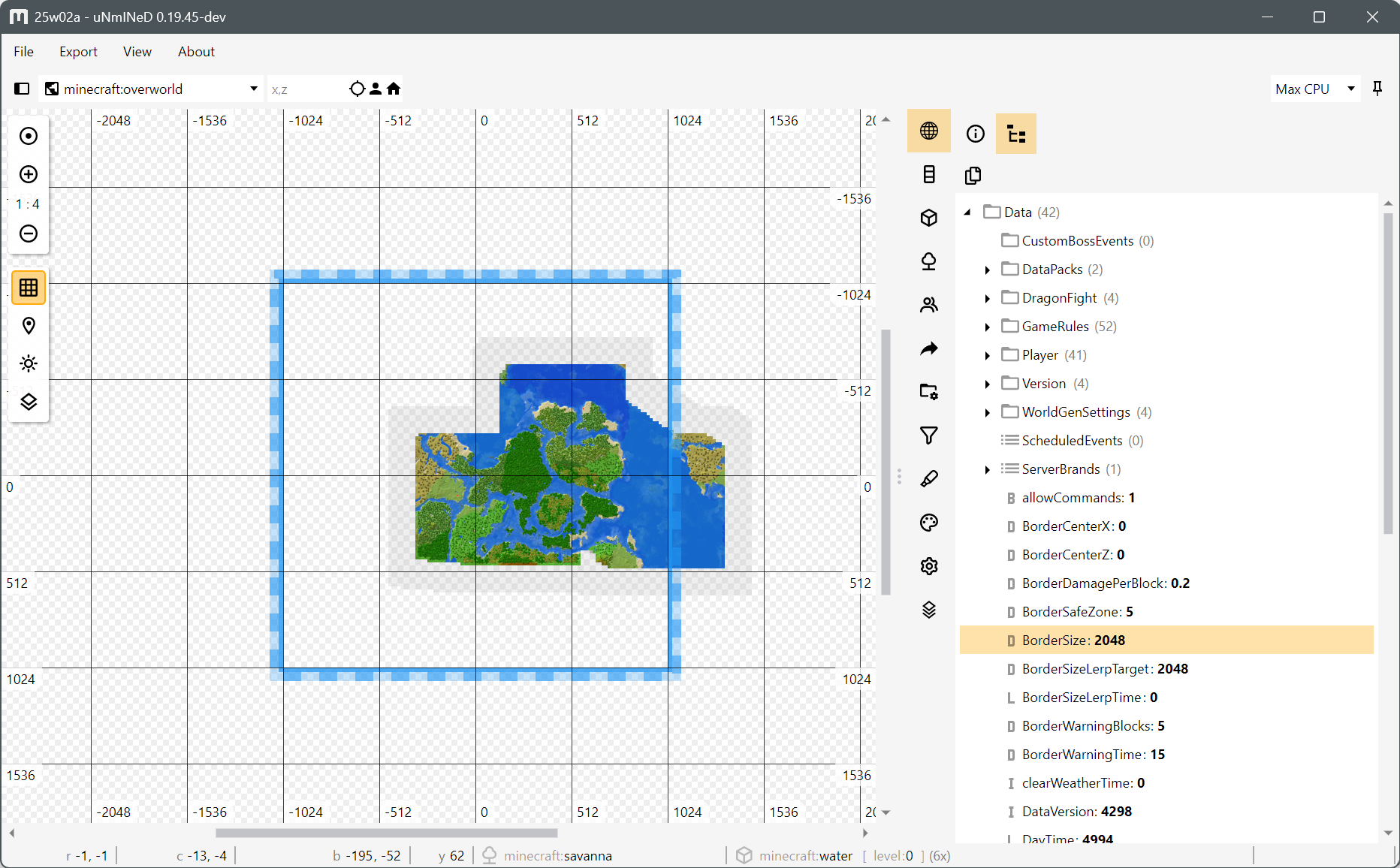
  • (GUI) Added world border indicator (read from level.dat)
  • (GUI) Made the color indicating chunk/region presence more distinct when zooming out very far
  • (GUI) Fixed animated zoom for selection rectangles
  • (GUI) Minor fixes

Word border indicator:

  •  

uNmINeD 0.19.44-dev

New uNmINeD development snapshot is available for download!

Changes:

  • Updated to .NET 9.0
  • Updated to Avalonia 11.2.3
  • Added Pale Oak and other new block colors
  • (GUI) Improved map control
    • New projection math
    • New zoom (animated)
    • New tile caching
    • New grid
  • (WEB) Added a red dot marker to the web map that visitors can place and link to
  •  

uNmINeD 0.19.42-dev

New uNmINeD development snapshot is available for download!

Changes:

  • (GUI) Added options to web export:
    • Enable grid
    • Show grid by default
    • Map center coordinates
  • (CLI) Added command line arguments to web export:
    • --showgrid=true/false
    • --enablegrid=true/false
    • --centerx=0
    • --centerz=0
  • (GUI) Fixed: some players did not appeared on the map
  • (GUI) Fixed: player list is empty
  • (GUI) Reverted Avalonia to 11.1.3 (this might fix crashes on macOS)

  •  

uNmINeD 0.19.40-dev

New uNmINeD development snapshot is available for download!

Changes:

  • (Web) Renamed unmined.index.html to index.html
  • (Web) Added a context menu
  • (Web) Added a copy /tp x ~ z function
  • (Web) Added a toggleable grid with decimal and binary coordinates
  • (Web) Added a toggleable scale bar
  • (Web) Player markers and other markers are now toggleable
  • (Web) User settings are persisted in the browser local storage
  • (Web) OpenLayers and other libraries are included instead of using a CDN
  • (GUI) Updated to Avalonia 11.1.1
  • Bedrock: Unnamed blocks are loaded as air instead of throwing an error
  • Bedrock: Corrupted data is skipped and a warning is displayed instead of an error

This release contains a preview version of an improved web map template. Any previous template can still be used if you do not want to switch.

  •  

uNmINeD 0.19.39-dev

New uNmINeD development snapshot is available for download!

Changes:

  • (GUI) Fixed crash when using the Cubiomes layer with Minecraft 1.21
  •  

uNmINeD 0.19.38-dev

New uNmINeD development snapshot is available for download!

Changes:

  • (CLI) Changed --shadows command line parameter to accept the following values:
    • --shadows=false β‡’ no shadows (default)
    • --shadows=true β‡’ heightmap shadows
    • --shadows=2d β‡’ heightmap shadows
    • --shadows=3d β‡’ 3D raycasting shadows
    • --shadows=3do β‡’ 3D raycasting shadows with opacity
  • (GUI) Fixed slime chunks layer
  • (GUI) Updated Avalonia to 11.1.0-beta2
  • (GUI) Updated SkiaSharp to 3.0.0-preview.3.1
  •  

uNmINeD 0.19.36-dev

New uNmINeD development snapshot is available for download!

Changes:

  • Added support for changed block IDs in Bedrock 1.20.70+ (this fixes the white/gray grass)
  •  

uNmINeD 0.19.35-dev

New uNmINeD development snapshot is available for download!

Changes:

  • (GUI) Updated Avalonia to 11.0.10
  • (GUI) Added a GUI control to limit CPU usage (located in the upper right corner after opening a world)
  • (CLI) Added --chunkprocessors=x option to limit CPU usage, where x is the number of chunks processed simultaneously. The default value is the number of your CPU threads.

With these settings you can slow down uNmINeD and make it less CPU-hungry, preventing other running apps or games from lagging and overclocked/undercooled CPUs from β€œmelting”.

Notes:
The number of CPU threads cannot be limited for a .NET application (however, you can use virtual machines or containers to limit the CPU usage of any application). The CPU limiter in uNmINeD only limits the number of chunks that can be processed simultaneously. The actual number of running threads can be higher than this.

  •  

uNmINeD 0.19.34-dev

New uNmINeD development snapshot is available for download!

Changes:

  • Added support for *.mcr region files used in the old times (JE beta 1.3+, release 1.0-1.1)
  • The highlighter now uses ImageSharp for saturation/lightness/contrast adjustments (faster, better looking results).
  •  
❌