Lees weergave

uNmINeD 0.19.59-dev

New uNmINeD development snapshot is available for download!

Changes:

  • (Hytale) Added texture average color calculation for vanilla blocks from the latest installed game assets
  • (Hytale) Added texture average color calculation for custom blocks added by mods
  • (Hytale) Updated vanilla stylesheet to version 2026-03-23
  • (Minecraft) Fixed an issue where the Bedrock vanilla resource pack would not load in some cases
  • (GUI) Fixed a zoom glitch when a map marker was under the mouse cursor
  •  

v4.0.0-beta.470

What's Changed

Security & Fixes

  • Fixed proxy config validation to ensure stored config matches the current proxy type (#9146, fixes #9127)
  • Fixed environment variables being incorrectly resolved in compose files instead of preserving ${VAR} references (#9147, fixes #9136)
  • Fixed deployment issues with shell argument escaping in nixpacks commands (#9122, fixes #9042)
  • Fixed GitHub webhook errors for unsupported event types (#9119, fixes #9090)
  • Fixed server limit checks when using API tokens (#9123, fixes #9116)
  • Fixed hostname validation to be case-insensitive and allow more characters (#9134, fixes #9131)
  • Fixed duplicate subscription creation
  • Fixed environment variable refresh when variables are missing or stale
  • Fixed Docker cleanup logging when server is unreachable

New Services & Templates

  • Added EspoCRM one-click service template (#8658)

Improvements

  • Improved mobile responsiveness for confirmation modals
  • Simplified Docker installation process
  • Added storage API endpoints with UUID support for databases and services
  • Added Nightwatch monitoring support
  • Disabled Booklore service template (#9105)
  • Bumped Sentinel and Traefik versions

What's Changed (Github)

New Contributors

Full Changelog: v4.0.0-beta.469...v4.0.0-beta.470

  •  
  •  

Minecraft 26.1 (stable) Released

26.1, the release of Tiny Takeover, is a game drop for Java Edition released on March 24, 2026, which adds new textures and models for every baby mob that did not already have a unique model, adds the golden dandelion, makes name tags craftable, and fixes bugs. Full changelog: https://minecraft.wiki/Java_Edition_26.1
  •  

Firefox

New

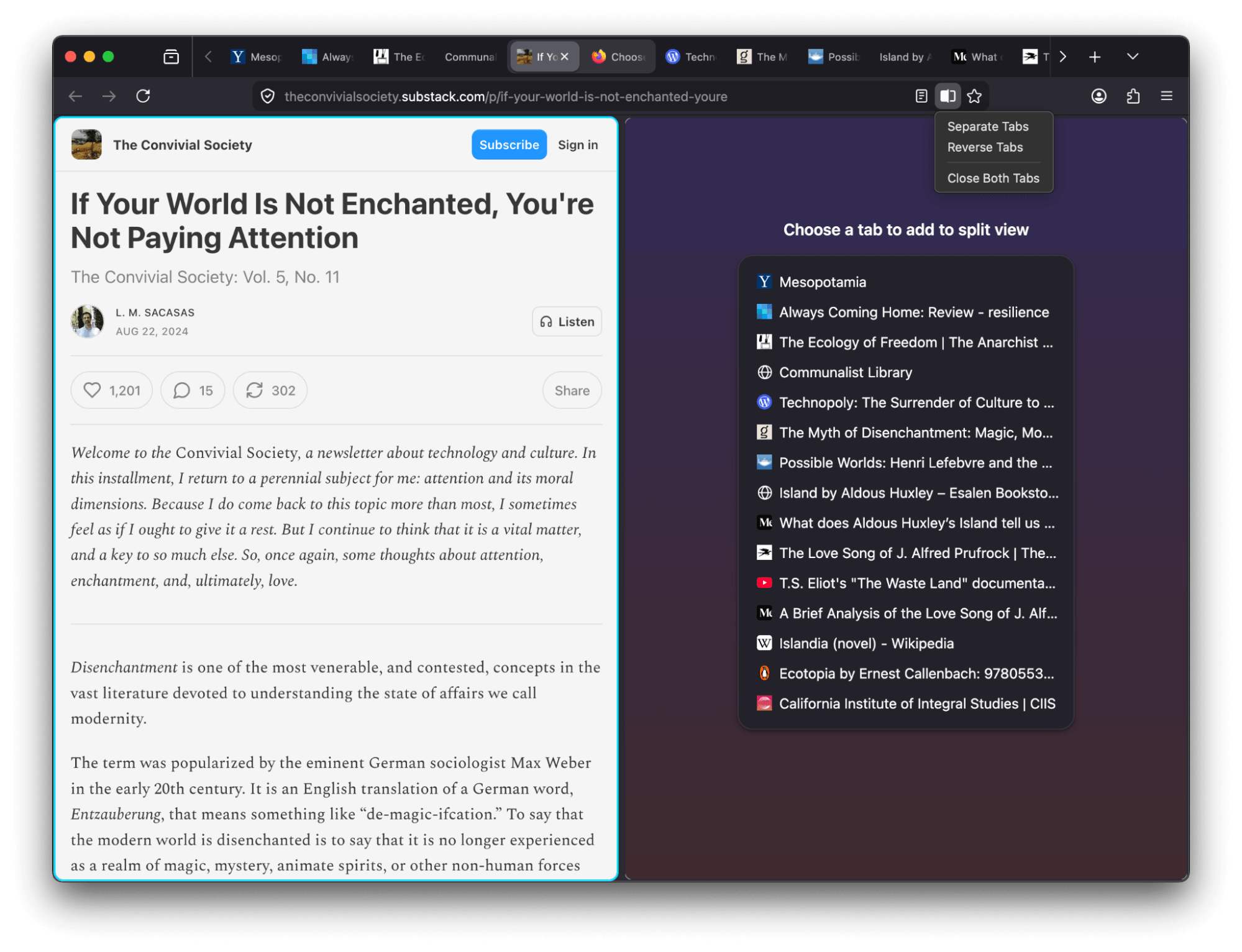
  • View two pages side-by-side in a single window with the new Split View feature that makes it easier to compare information, research topics or work across two pages at once. To create a split view, select one or two tabs and choose Add to Split View or Open in Split View.

    A screenshot of two pages side by side in split view

  • Firefox now offers a free built-in VPN. Whether you’re using public Wi-Fi while traveling, searching for sensitive health information, or shopping for something personal, this feature gives you a simple way to stay protected. Once you sign in and turn it on, you can hide your location and IP address by routing it through a secure proxy while you browse in Firefox. You will get 50 GB of protection every month, with the option to turn it on or off for specific websites. This feature is progressively rolling out in the US, UK, Germany and France starting today.

    Screenshot of the new VPN feature in use

    This feature is part of a progressive roll out.

    What is a progressive roll out?

    Certain new Firefox features are released gradually. This means some users will see the feature before everyone does. This approach helps to get early feedback to catch bugs and improve behavior quickly, meaning more Firefox users overall have a better experience.

  • Many PDF files will now load significantly faster thanks to hardware acceleration.

  • Firefox now automatically blocks notifications and permanently revokes permissions for any website flagged as malicious by SafeBrowsing. This prevents unsafe sites from sending background notifications to users, commonly used for ads, spam or phishing.

  • You can now add a Share button to your toolbar via Customize Toolbar, making it easy to share the current tab using your Windows or macOS system sharing options.

  • Address Autofill is enabled for users in Australia, India, Italy, Poland and Austria.

  • Explore more of the web with new on-device translation support for Bosnian, Norwegian Bokmål, Serbian and Thai — plus improved accuracy for Croatian.

Firefox Labs

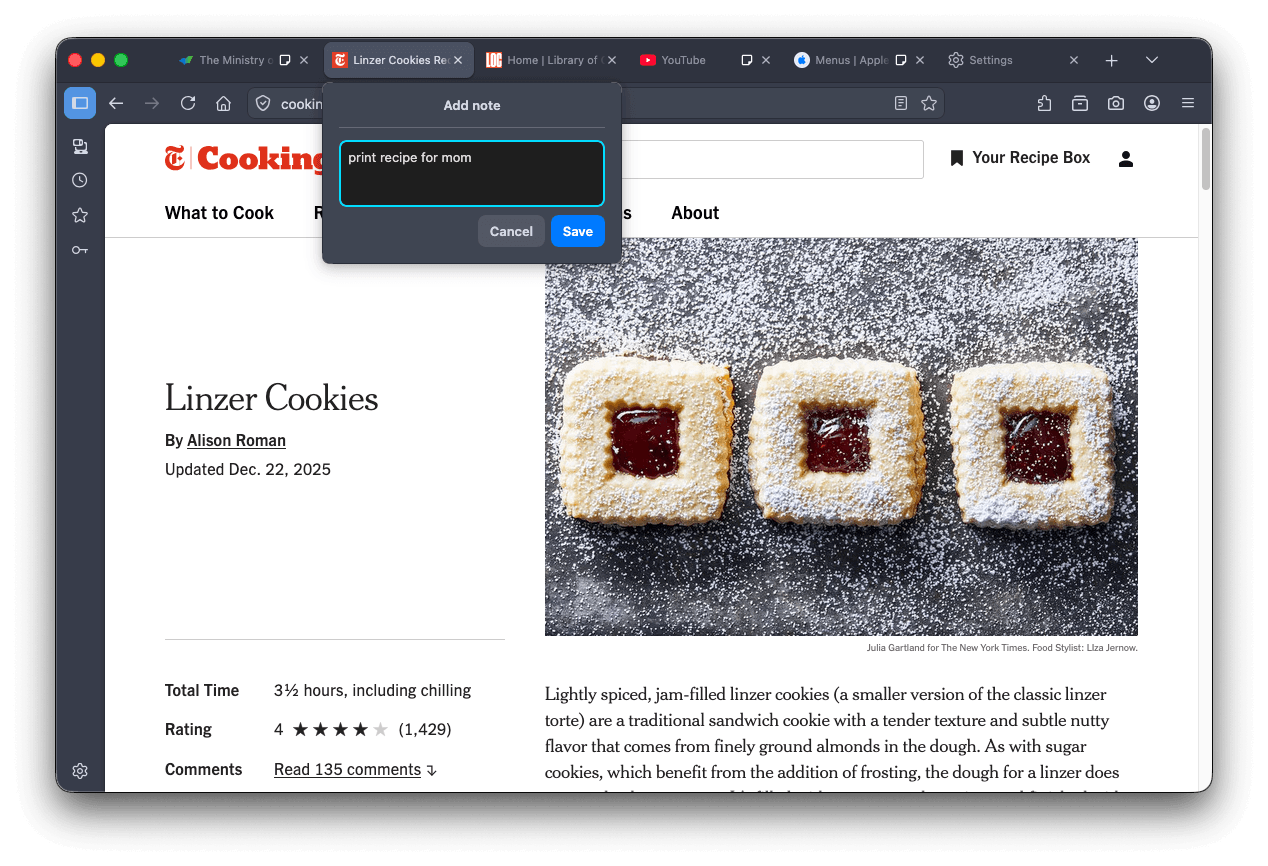
  • Tab notes feature that lets you attach a short note to a web page is now available in Firefox Labs. You can use notes to remember why you opened a page, what you planned to do next or any details you want to revisit later. Please give notes a try and share your feedback on what works well and what can be improved.

    A screenshot of the tab notes dialog open

Fixed

  • Increased robustness of HTTP/3 upload performance for unstable network conditions.

  • Various security fixes.

Changed

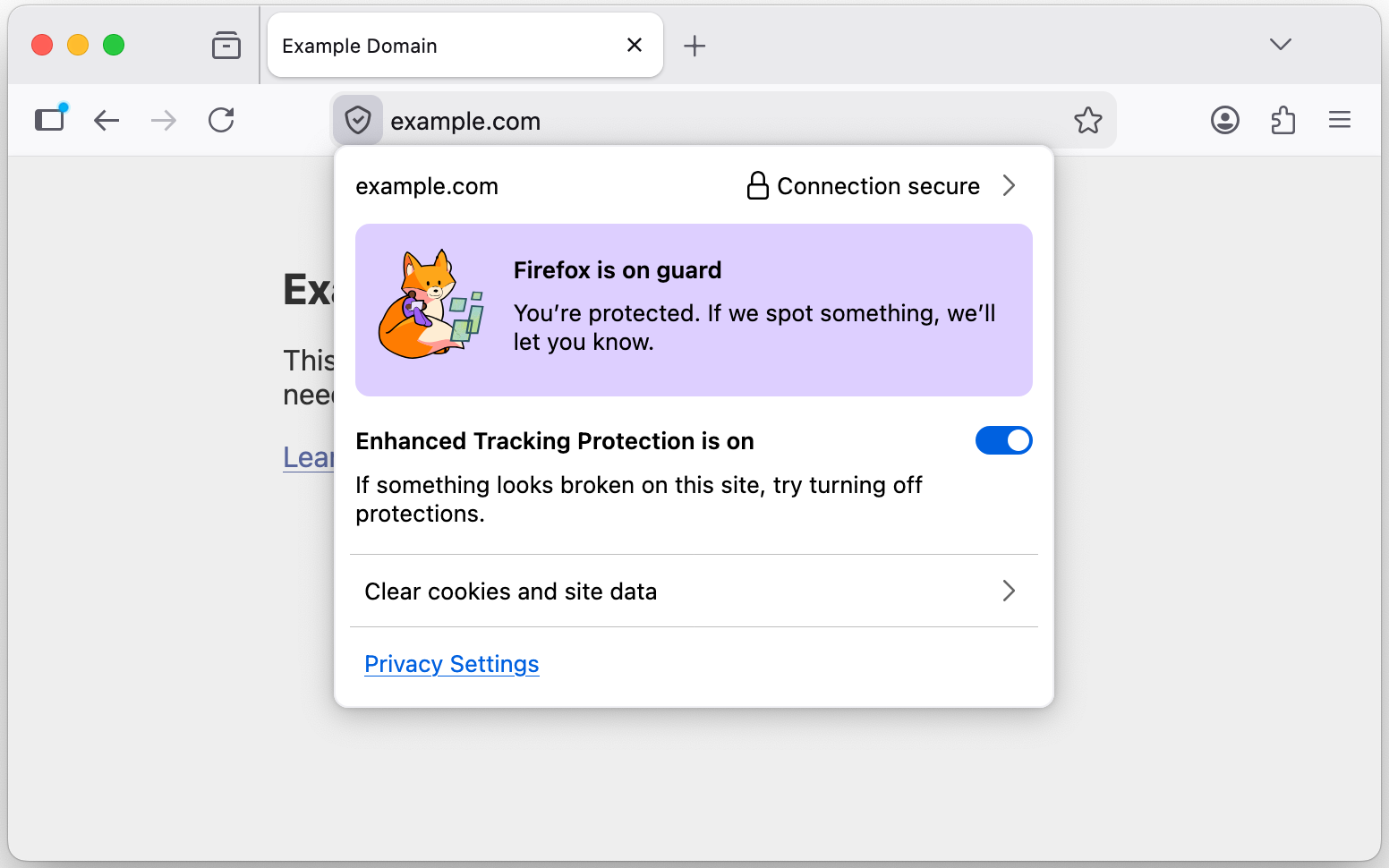
  • The TrustPanel combines the privacy and security panels accessed from the address bar to give the user one place to check the Privacy and Security settings of the current page. Learn more.

    TrusPanel Screenshot

  • Security has been strengthened by tightening the requirements for JavaScript files that can be loaded in the parent process, providing additional defense in depth against potential threats.

  • On Linux, Firefox will now default to the XDG portal file picker if available, rather than the GTK3 one, which is usually better integrated with the user's desktop environment, and more powerful.

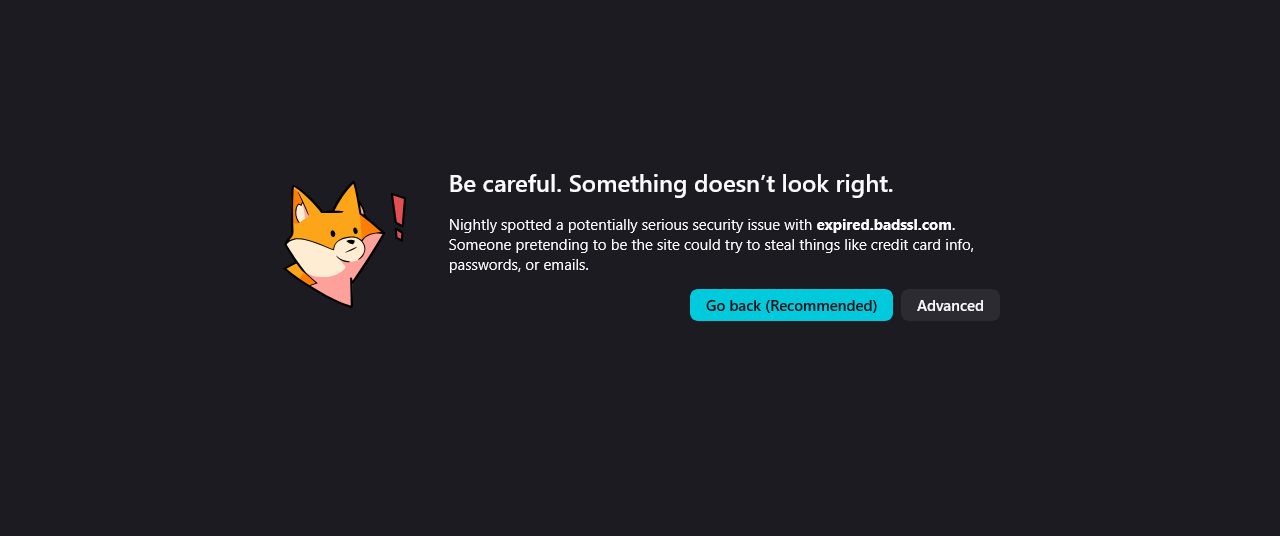
  • Firefox error pages have a fresh new look, with updated visuals that better match the overall feel of Firefox. The redesigned pages create a more cohesive experience while making it clearer what went wrong.

    A screenshot of the revamped error page

  • On Windows, Firefox will use the modern Windows.Devices.Geolocation API for geolocation instead of Windows 7 location API.

Developer

Web Platform

  • showPicker() now supports text-based <input> elements with an associated <datalist>, displaying the autofill dropdown. See documentation.

  • The functions xywh() and rect() were previously implemented for the clip-path and offset-path properties. They are now also available for the shape-outside property.

  • The math value of the CSS font-family is now supported and used by default for MathML's <math> element. It enables Web developers to indicate special fonts with advanced math features should be used. Firefox will rely on the serif font for mathematics defined in Firefox preferences.

  • Added support for the HTML attribute popover="hint".

  • Enabled media element pseudo-classes, such as :playing, :paused

  • Enabled the spec-compliant HTMLMediaElement.captureStream() API.

  • Added support for closing popovers & dialogs with the Android Back Button, and implemented the CloseWatcher API for handling this in script.

  • The new Reporting API provides a generic reporting mechanism for web applications to use to make reports available based on various platform features (for example Content Security Policy, Permissions-Policy or feature deprecation reports) in a consistent manner.

Community

  •  

MariaDB 13.0 Preview Now Available

We are pleased to announce the availability of a preview of the MariaDB 13.0 series. MariaDB 13.0 is a preview rolling release, published on 23 March 2026, and it continues the work started in 12.3 while adding a solid set of entirely new features. …

Continue reading \"MariaDB 13.0 Preview Now Available\"

The post MariaDB 13.0 Preview Now Available appeared first on MariaDB.org.

  •  

Heatit joins Works with Home Assistant

Heatit joins Works with Home Assistant

We’re thrilled to extend a very warm (ahem) Works with Home Assistant welcome to Heatit! As the name suggests, Heatit are all about keeping you, and your home, warm. They specialize in smart climate and heating control, which might have something to do with the fact they’re based in Norway, where energy management is a big reason people turn to Home Assistant, as winter temperatures can dip to below -20°C!

Home is where the heat is

Formerly known as Thermofloor, Heatit has spent more than 30 years building a rock-solid reputation across Scandinavia and Northern Europe for thermostats and controllers designed to handle harsh conditions, so they’re certainly robust enough for milder climes. But they don’t just stop at heating: the range extends to home safety, with the Heatit Z-Smoke 2 being the first Z-Wave smoke detector we’ve certified.

In fact, all of Heatit’s certified devices connect via Z-Wave, which is what makes them integrate so well with Home Assistant. Crucially, the Z-Smoke 2 will always function regardless of network status. The smart features are there when you need them, but the fundamentals never depend on them.

Z-Wave, and then some

If you’ve not heard of Z-Wave before, here’s a quick explainer: it’s a low-power wireless protocol built specifically for smart homes. Unlike WiFi, it operates on a dedicated frequency that means less interference and more reliable communication. It’s also a mesh network, where mains-powered devices help pass signals along to each other, strengthening the connection. Battery-powered devices can also benefit from this, since the mesh helps preserve their charge.

For heating and safety devices, those enhancements really count. Long battery life means a thermostat or smoke detector that should keep working without constant attention. Reliable range means your devices can stay connected even through thick walls or across a large home. And because everything runs locally, your heating responds quickly: no routing through a third-party server, no unnecessary delays.

Connecting with the community

Heatit are also serious about the impact they have beyond their products, with sustainability and reducing environmental impact being central to their company philosophy, which aligns with the Open Home Foundation’s principles of privacy, choice, and sustainability. What’s more, for Heatit, one of the most exciting things about joining the program is the chance to connect with the passionate, knowledgeable people who make up our community (yes, that’s you!).

"We're excited to join the Home Assistant program because of the strong community and the shared focus on open, local-first smart home solutions. This integration allows us to work more closely with both enthusiasts and professionals, and to deliver products that are flexible, reliable, and built for long-term use."

- Pål Aksel Forberg, CEO at Heatit

Devices

Works with Home Assistant isn’t just a badge: every certified product is rigorously tested by our in-house team to make sure it works seamlessly with Home Assistant out of the box. Brands joining the program also commit to long-term support and firmware updates, and to being an active, positive part of our community. Here’s what’s made the cut from Heatit:

Professionally built and designed to last, these devices cover both sides of a smart heating setup: the thermostats handle the actual temperature control, while the wall controller gives you a physical way to manage it all without reaching for your phone.

How to get started

It’s worth noting that in-wall devices will require installation by a qualified electrician in many regions, so if you’re not confident with electrics, it’s worth checking Heatit’s website for guidance and to find a local installer. The standalone devices are more straightforward to set up, and include SmartStart, making adding them to your Z-Wave network as simple as scanning a QR code.

To use Z-Wave with Home Assistant, you’ll need a Z-Wave adapter and the Z-Wave integration. This will help everything run locally, keeping your data private and your smart home responsive. Of course, if you want to turn the heat up before you get home, or check on things while you’re away, Home Assistant Cloud gives you secure remote access, and by subscribing you’ll help fund the Open Home Foundation’s work, including the Works with Home Assistant program!

Wrapping up warmly

We hope this is just the beginning of Heatit’s involvement with the program, and we’re excited to see where things go, both with these devices and whatever comes next. In the meantime, there’s plenty here to get started with. Time to turn up the heat.

Frequently asked questions

If I have a device that is not listed under Works with Home Assistant, does this mean it’s not supported?

No! It just means that it hasn’t gone through a testing schedule with our team, or doesn’t fit the requirements of the program. It might function perfectly well but be added to the testing schedule in the future, or it might work under a different connectivity type that we don’t currently test under the program.

OK, so what’s the point of the Works with program?

It highlights the devices we know work well with Home Assistant and the brands that make a long-term commitment to keeping support for these devices going. The certification agreement specifies that the devices must have full functionality within Home Assistant, operate locally without the need for cloud, and will continue to do so long-term.

How were these devices tested?

All devices in this list were tested using a standard Home Assistant Green with the Home Assistant Connect ZWA-2 as the Z-Wave adapter and with our Z-Wave integration. If you have another hub or setup, that’s not a problem, but we test against these as they are the most effective way for our team to certify within our ecosystem.

Will you be adding more Heatit devices to the program?

Why not! We’re thrilled to foster a close relationship with the team at Heatit to work together on any upcoming releases or add in further products that are not yet listed here. They have also been working on integrating their WiFi products further in Home Assistant, so we’re excited to see their progress.

  •  
❌