Normale weergave

v11.17.2

6 April 2026 om 19:37

✨ New Features & Improvements

  • @directus/app
    • Moved useShortcut and translateShortcut in @directus/composables (#26979 by @HZooly)
    • added timezone support to datetime display (#26184 by @u12206050)
    • Added comparison modal checkbox to allow viewing only modified fields (#27010 by @robluton)
  • @directus/composables
    • Moved useShortcut and translateShortcut in @directus/composables (#26979 by @HZooly)

🐛 Bug Fixes & Optimizations

  • @directus/app
    • Fixed alias fields being included when selecting all fields in export (#26775 by @tysoncung)
    • Fixed invite acceptance error to display correctly on the frontend and allow for error translation (#26971 by @faizkhairi)
    • Fixed relational field removals inside groups not persisting on draft items (#26917 by @HZooly)
    • Fixed search input not closing when focus changes on keyboard navigation (#26970 by @Zhey-on)
  • @directus/api
    • Fixed invite acceptance error to display correctly on the frontend and allow for error translation (#26971 by @faizkhairi)
    • Updated lodash, samlify and @xmldom/xmldom dependencies and add defu override (#27033 by @br41nslug)
    • Fixed coercion of stringified JSON in AI assistant tool arguments (#27005 by @bryantgillespie)
    • Added cleanup handlers for disconnected file streams (#26992 by @Champ-Goblem)
  • @directus/errors
    • Fixed invite acceptance error to display correctly on the frontend and allow for error translation (#26971 by @faizkhairi)

📦 Published Versions

  • @directus/app@15.8.0
  • @directus/api@35.0.2
  • @directus/composables@11.3.0
  • create-directus-extension@11.0.34
  • @directus/errors@2.3.1
  • @directus/extensions-registry@3.0.24
  • @directus/extensions-sdk@17.1.2
  • @directus/memory@3.1.7
  • @directus/validation@2.0.22

  •  

Development Release: NetBSD 11.0 RC3

6 April 2026 om 19:00
The DistroWatch news feed is brought to you by TUXEDO COMPUTERS. The NetBSD project has announced the availability of a new release candidate for the project's upcoming 11.0 release. "The NetBSD project is pleased to announce the third (and probably final) release candidate of the upcoming 11.0 release, please help testing! See the release announcement for details. The netbsd-11....
  •  

v1.8.0.1

Door: thornbill
6 April 2026 om 18:00

What's Changed

No notable changes in this release. Bumping versions for a new TestFlight build.

🔧 Additional changes

New Contributors

Full Changelog: v1.8.0.0...v1.8.0.1

  •  

Dopamine 3.0.4

Door: digimezzo
6 April 2026 om 12:37

[3.0.4] - 2026-04-06

Added

  • Added ability to enlarge the cover image on the Now playing screen
  • Clicking the visualization switches it between the available styles

Changed

  • Updated the Portuguese (brazilian) translation
  • Updated the Swedish translation

Fixed

  • Delete button is not visible when folder is not selected in "Manage collection" screen
  • Window size increases when dragging
  • Attempting to delete a song from a smart playlist, breaks the playlist.
  • Deleting of a song from a playlist while filtering via search, removes most of the files from the playlist.
  • Playback progress bar does not react to touch input
  • The cover image on the Now playing screen has glitches
  • Browsing folders on a NAS gets stuck in an infinite loop
  • Follow the system color does not work on Linux

P.S.: If you enjoy Dopamine, please consider donating via PayPal or buying me a coffee. Your support keeps the music going!

  •  

DistroWatch Weekly, Issue 1167

6 April 2026 om 02:16
The DistroWatch news feed is brought to you by TUXEDO COMPUTERS. This week in DistroWatch Weekly:
Review: Origami Linux 2026.03
News: Ubuntu MATE seeks new contributors, Ubuntu software centre expands deb support, FreeBSD fixes forum compromise, openSUSE 15 Leap reaches end of life
Questions and answers: New to Linux questions
Released last week: 4MLinux 51.0, Elive 3.8.50, CuerdOS 2.1, Netrunner 26, Artix....
  •  

10.11.8

5 April 2026 om 21:43

🚀 Jellyfin Web 10.11.8

We are pleased to announce the latest stable release of Jellyfin, version 10.11.8! This minor release brings several bugfixes to improve your Jellyfin experience. As always, please ensure you take a full backup before upgrading!

Note: This release fixes several regressions from 10.11.7, with the goal to get people onto an updated release due to the forthcoming (t-minus 9 days) release of the GHSAs/CVEs that were fixed in 10.11.7. Please upgrade to this release as soon as you can.

You can find more details about and discuss this release on our forums.

Changelog (1)

📈 General Changes

  •  

10.11.8

5 April 2026 om 21:43

🚀 Jellyfin Server 10.11.8

We are pleased to announce the latest stable release of Jellyfin, version 10.11.8! This minor release brings several bugfixes to improve your Jellyfin experience. As always, please ensure you take a full backup before upgrading!

Note: This release fixes several regressions from 10.11.7, with the goal to get people onto an updated release due to the forthcoming (t-minus 9 days) release of the GHSAs/CVEs that were fixed in 10.11.7. Please upgrade to this release as soon as you can.

You can find more details about and discuss this release on our forums.

Changelog (3)

📈 General Changes

  •  

Ventoy 1.1.11 release (6th Anniversary Ver.)

Door: ventoy
5 April 2026 om 18:06

6th Anniversary Ver.

  1. Fix the display issue when UEFI booting Windows/WinPE ISO.
  2. Add VT_WINDOWS_DISK_NONVTOY_CLOSEST_XXX, VT_LINUX_DISK_NONVTOY_CLOSEST_XXX options in AutoInstall plugin.
  3. Improvement for Ventoy2Disk.sh (#3537)
  4. Improvement for porteus-hook.sh (#3532)
  5. Improvement for booting T2SDE. (#3526 #3468)
  6. Add support for KylinSecOS

SHA-256

ddcbcbf3341225d0c5df43f1d7cc65de0b8b2131643184c1a3ea359107789faa  ventoy-1.1.11-linux.tar.gz
7509a24851f4b198268d868e085c2a016891adc758d2e0d2a554df35d5a23f32  ventoy-1.1.11-livecd.iso
1e56e02fc424c194fc4f33357cb949867854f386d67eaf9764f1c96264561493  ventoy-1.1.11-windows.zip

===============================================================================
Wana boot and install OS through network (PXE)? Welcome to my new project iVentoy.

About iVentoy https://www.iventoy.com/
iVentoy is an enhanced version of the PXE server.
Extremely easy to use
Many advanced features
x86 Legacy BIOS, IA32 UEFI, x86_64 UEFI and ARM64 UEFI mode supported
110+ common types of OS supported (Windows/WinPE/Linux/VMware)
......

Download Ventoy

  •  

2.7.0

Door: clsid2
6 April 2026 om 02:47

Donations are appreciated. There is now a PayPal option.

Changes from 2.6.4 to 2.7.0:

Updates:

  • Updated LAV Filters to version 0.81-8-ga9e68
  • Updated MPC Video Renderer to version 0.10.1.2531

Changes:

  • Improved resizing behavior of window zooming hotkeys.
  • Improved playlist performance with huge amount of entries.
  • Playlist can be searched (when it has focus) by simply typing text.

Fixes:

  • Fixed regression in previous version with setting startpos from command line.
  • Several small fixes and improvements.

OpenSubtitles download error 406

Subtitle downloads from OpenSubtitles may fail depending on time of day. This is due to our daily download quota being exceeded. Current amount of donations is barely enough to pay for the existing quota. So it is unlikely that quota can be increased and situation will get worse over time.
If you create an OpenSubtitles account and configure it in MPC-HC settings then you may be able to bypass the quota.
Options > Subtitles > Misc > Right-click on OpenSubtitles.com > Setup > Fill in username/password

Overview of features

A lot of people seem to be unaware of some of the awesome features that have been added to MPC-HC in the past years. Here is a list of useful options and features that everyone should know about:

  • Play HDR video
    This requires using either MPC Video Renderer (MPCVR) or madVR.
    These renderers can be selected here:
    Options > Playback > Output
    With other video renderers, the colors will be wrong!
    MPCVR is now included and is the recommended renderer for modern systems. MadVR needs to be installed separately. MPCVR also supports Dolby Vision. MadVR does not.
    For optimal performance you should change the hardware decoder to D3D11 in LAV Video Decoder settings when using MPCVR on Windows 10/11, because this renderer uses DirectX11.
    (Automatic detection of GPU and configuration of the above settings is high on my ToDo list, so MPC-HC will have better default out-of-the-box settings on modern systems in the future.)
  • The installer of MPC-HC is very basic (and that will not change).
    I therefore recommend using K-Lite Codec Pack. That includes MPC-HC and other essential components. It has a very advanced installation that can automatically create file associations, and helps you with easy configuration of important MPC-HC settings, such as preferred subtitle language. It also does automatic configuration of renderer and hardware decoding, for best performance and HDR support.
    The Standard version should be sufficient for most people. Use Full version of you like to use MadVR.
  • Modern GUI Theme (Dark or Light) or the old classic theme
    Options > Player > User Interface
    It is also possible to change the height of the seekbar and size of the toolbar buttons.
    Plus there are options to show audio/video details in the statusbar, such as codec and resolution.
  • Customizable toolbar buttons
    You can add/remove/re-order the player buttons.
    There are also several different toolbar designs to choose from.
  • Video preview on the seekbar
    Options > Player > User Interface > Hover type
  • Ability to search for subtitles
    Press D for manual search.
    Or enable automatic search in: Options > Subtitles > Misc
  • Adjust playback speed
    Menu > Play > Playback rate
    The buttons in the player that control playback rate take a 2x step by default. This can be customized to smaller values (like 10%):
    Options > Playback > Speed step
    Adjusting playback speed works best with the internal audio renderer. This also has automatic pitch correction.
    Options > Playback > Output > Audio Renderer
  • MPC-HC can remember recently played files and also their playback position, so you can resume playback from when you left
    Options > Player > History
  • You can quickly seek through a video with Ctrl + Mouse Scrollwheel.
  • You can jump to next/previous file in a folder by pressing PageUp/PageDown.
  • You can right-click on the framestep button to step backwards. Some other buttons also have right-click actions, such as closing file by right-clicking stop.
  • You can perform automatic actions at end of file. For example to go to next file or close player.
    Options > Playback > After Playback (permanent setting)
    Menu > Play > After Playback (for current file only)
  • A-B repeat
    You can loop a segment of a video. Press [ and ] to set start and stop markers.
  • You can rotate/flip/mirror/stretch/zoom the video
    Menu > View > Pan&Scan
    This is also easily done with hotkeys (see below).
  • There are lots of keyboard hotkeys and mouse actions to control the player. They can be customized as well.
    Options > Player > Keys
    Tip: there is a search box above the table.
  • You can seek inside the playlist by simply typing text (when playlist window has the mouse focus).
  • MPC-HC also supports Blu-ray playback.
    Only limitation is that you need to use a decrypting tool.
    And it also does not support Blu-ray menus, but you can use the navigate menu in the player to select the content to play.
  • You can stream videos directly from Youtube and many other video websites
    Put yt-dlp.exe in the MPC-HC installation folder.
    Then you can open website URLs in the player: Menu > File > Open File/URL
    You can even download those videos: Menu > File > Save a copy
    Tip: to be able to download in best quality with yt-dlp, it is recommended to also put ffmpeg.exe in the MPC-HC folder.
    Several YDL configuration options are found here: Options > Advanced
    This includes an option to specify the location of yt-dlp.exe in case you don't want to put it in MPC-HC folder.
    Note 1: You also need to install Microsoft Visual C++ 2010 SP1 Redistributable Package (x86)
    Note 2: For optimal Youtube support you may also need to put deno.exe in same folder as yt-dlp.
    Note 3: yt-dlp nightly build (very latest version made daily)
    Note 4: yt-dlp windows7 compatible build
  • Besides all these (new) features, there have also been many bugfixes and internal improvements in the player in the past years that give better performance and stability. It also has updated internal codecs. Support was added for CUE sheets, WebVTT subtitles, etc.
  • You should really take a few minutes to look through all the options pages if you are a new user or if you are upgrading from a very old version. Don't forget the advanced options page.

MPC Video Renderer

Frequently Asked Questions

  •  

Distribution Release: iDeal OS 2026.04.03

3 April 2026 om 23:41
The DistroWatch news feed is brought to you by TUXEDO COMPUTERS. iDeal OS is a Linux distribution based on MX Linux and featuring the KDE Plasma desktop. The project has published fresh media which brings the distribution up to date with packages from MX Linux 25.1 and Debian 13.4. The project's news page provides a release announcement that shares....
  •  

Mobile OS Release: Murena 3.6

3 April 2026 om 15:35
The DistroWatch news feed is brought to you by TUXEDO COMPUTERS. The Murena project has published an update to its /e/OS mobile platform. The project's latest version includes improvements to the software centre and search capabilities: "App Lounge - You can now sign in with your microG account directly from App Lounge, no need to configure it separately. This....
  •  

HWMonitor 1.63

3 April 2026 om 16:00
  • Intel Core Ultra 7 270K Plus and Ultra 5 250K Plus (Arrow Lake Refresh).
  • Intel Core 7 360 and 350 (Wildcat Lake).
  • Intel Core 5 330, 320 and 315 (Wildcat Lake).
  • Intel Core 3 304 (Wildcat Lake).
  • Intel Core 9 273PQE, 273PTE, 273PE (Bartlett Lake).
  • Intel Core 7 253PQE, 253PTE, 253PE, 251TE, 251E (Bartlett Lake).
  • Intel Core 5 223PQE, 223PTE, 223PE, 221TE, 221E, 213PTE, 213PE, 211TE, 211E (Bartlett Lake).
  • Intel Core 3 201TE, 201E (Bartlett Lake).
  • Intel Core i7-13645HX (Raptor Lake).
  • Preliminary support of Intel Nova Lake.
  • AMD Ryzen 9 9950X3D2 (Granite Ridge).
  • AMD Ryzen AI Max+ 392 (Strix Halo).
  • AMD Ryzen AI 7/PRO 450G/E, AI 5/PRO 440G/E & 435G/E (Kraken Point 2).
  • VR temperatures on Intel Arc B580/570.
  • Intel Arc Pro B70 and B65 (BMG-G31).
  • Intel Arc Pro B60 and B50 (BMG-G21).
  • CQDIMM (4-ranks CUDIMM) memory support.
  •  

Distribution Release: Artix Linux 20260402

3 April 2026 om 03:21
The DistroWatch news feed is brought to you by TUXEDO COMPUTERS. The Artix development team has announced the release of a new version of Artix Linux, a set of Arch-based, rolling-release distributions with a choice of four init systems (Dinit, OpenRC, runit and s6) and six desktops (Cinnamon, KDE Plasma, LXDE, LXQt, MATE and Xfce). Artix Linux 20260402 switches....
  •  

OBS Studio 32.1.1

2 April 2026 om 21:54

32.1.1 Hotfix Changes

  • Fixed missing audio mixer tooltips [Warchamp7]
  • Fixed audio mixer minimum width being too large [Warchamp7]
  • Fixed audio mixer sorting weight for global and pinned sources [Warchamp7]
  • Fixed disabled sources appearing in audio mixer [Warchamp7]
  • Fixed missing toolbar actions for audio mixer [Warchamp7]
  • Fixed incorrect colors in audio mixer [Warchamp7]
  • Fixed audio deduplication incorrectly applying when an audio output capture source is set to monitor only [pkviet]

32.1 New Features

  • Overhauled the Audio Mixer [Warchamp7]
    • Adjusted the horizontal layout
    • Adjusted the vertical layout
    • Added button to swap layouts to the toolbar
    • Changed the default layout to vertical
    • Added button to toggle audio monitoring
    • Sources in the preview are now shown while in Studio Mode
    • Added ability to pin audio sources
      • Pinned sources are always displayed
      • Global audio sources are always pinned
    • Added ability to display sources set to hide
    • Added ability to display sources that are not in the current scene
  • Added WebRTC Simulcast Support [Sean-Der]
  • Added missing undo/redo actions for scene items [cg2121]
    • Scale filtering, blending mode, blending method, deinterlacing mode and deinterlacing field order
  • Added partial support for Canvases to obs-websocket [exeldro/tt2468/Warchamp7]

32.1 Changes

  • Improved security of browser sources using local files [Warchamp7]
  • Improved plugin manager by allowing enabling/disabling missing plugins [Warchamp7]
  • Removed "Source" from source names [Warchamp7]
  • Updated the Edit Transform dialog [Warchamp7]
  • Changed copying a scene item to copy all properties [cg2121/Warchamp7]
  • Disabled dock animations [Warchamp7]
  • Moved transition preview button to button box [exeldro]
  • Rearranged default dock positions [Warchamp7]
  • Increased media source playback slider update rate [Warchamp7]
  • Enabled palette for Light theme audio mixer [Warchamp7]
  • Changed default bitrates to 6000 kbps [mihawk90]

32.1 Bug Fixes

  • Fixed a crash if some source data was null [Penwy]
  • Fixed a crash on Linux when changing profiles or on application shutdown [hoshinolina]
  • Fixed a possible crash on macOS during application shutdown if YouTube docks were active [PatTheMav]
  • Fixed an issue where projector resolutions had decimals [Warchamp7]
  • Fixed sync of Preview/Program size and positioning [Warchamp7]
  • Refactored OBSBasic::Save to only save frontend canvas scenes/groups [dsaedtler]
  • Fixed NAL type for HEVC caption/BPM SEIs [dsaedtler]
  • Fixed an issue where video scaling could be incorrect in multivideo encoder scenarios [dsaedtler]
  • Fixed an issue with chapter markers having incorrect time when using file splitting [garyholmes]
  • Fixed an issue where some recordings could have black thumbnails [derrod]
  • Fixed an issue where the NVIDIA Blur and Background Blur could have banding or look splotchy [pkviet]
  • Fixed an issue where macOS Screen Capture would select an item for capture by default [jcm93]
  • Fixed an issue with PipeWire when capturing a device that does not require a framerate [tytan652]
  • Fixed an issue where PipeWire Camera framerates listed could be incorrect [tytan652]
  • Fixed an issue where HDR video playback in Media Source could be darker than expected [xtfo]
  • Fixed an issue that could cause OBS to become unable to change profiles or video settings [exeldro]
  • Fixed an issue that could cause transitions to become locked [Warchamp7]

Checksums

OBS-Studio-32.1.1-Sources.tar.gz: f4c17e1aa2a00efd8729ed6cfef9308bc6a2b6c583c187d7959eaa72eb2e3676
OBS-Studio-32.1.1-Ubuntu-24.04-x86_64-dbsym.ddeb: 243b047753fd8c1753e379913e80ff5e8bb9ab5d804778666891653ba20c1a14
OBS-Studio-32.1.1-Ubuntu-24.04-x86_64.deb: c69b5846e2eef622e902beb3606d614592735b4aac3b2a3c07bb7a1a5f52b9c4
OBS-Studio-32.1.1-Windows-arm64-PDBs.zip: 2f44c1f96bb671c8cc6dbbc51a9d8c9736a1d32d1ac1969cf69a53acf1f4fe86
OBS-Studio-32.1.1-Windows-arm64.zip: f54a9224adb1fdd496476475235527965327e93f912b64af9debdd833335aee3
OBS-Studio-32.1.1-Windows-x64-Installer.exe: 9b4b643a44154ed8bee5229a4e0c85f6826f76b7e38b1d0d1d7e8b349dfa38e1
OBS-Studio-32.1.1-Windows-x64-PDBs.zip: ad88f71888c4bd089fa1f63209b19ca082765247a00a8e19aa16a5eecc74f7d8
OBS-Studio-32.1.1-Windows-x64.zip: a4cc40a06d5a5dc158c792631b596a04b02d8fe99644a0f0bc3b12199dbce011
OBS-Studio-32.1.1-macOS-Apple-dSYMs.tar.xz: b597e805d476713118d4c9146f34876aa15482caec90d4ce851ba408ef8a59bd
OBS-Studio-32.1.1-macOS-Apple.dmg: e62c2fbea6872b015d0e9cf11f8be1ce4c545a5ce39da32420f754f2b0461dcb
OBS-Studio-32.1.1-macOS-Intel-dSYMs.tar.xz: 1a2b2e83d84ab50fe864d636f343acb38876809b397de0d3ba8a46c72dfd1854
OBS-Studio-32.1.1-macOS-Intel.dmg: 0a444c9b9b63f6871a592f0517a3c5114a08a5d555155f84e447a686e936750a

  •  

Asterisk Release 23.3.0-rc2

2 April 2026 om 19:03

The Asterisk Development Team would like to announce
release candidate 2 of asterisk-23.3.0.

The release artifacts are available for immediate download at
https://github.com/asterisk/asterisk/releases/tag/23.3.0-rc2
and
https://downloads.asterisk.org/pub/telephony/asterisk

Repository: https://github.com/asterisk/asterisk
Tag: 23.3.0-rc2

This release resolves issues reported by the community
and would have not been possible without your participation.

Thank You!

Change Log for Release asterisk-23.3.0-rc2

Links:

Summary:

  • Commits: 2
  • Commit Authors: 2
  • Issues Resolved: 3
  • Security Advisories Resolved: 0

User Notes:

Upgrade Notes:

Developer Notes:

Commit Authors:

  • George Joseph: (1)
  • nappsoft: (1)

Issue and Commit Detail:

Closed Issues:

  • 1844: [bug]: cdrel_custom isn't respecting the default time format for CEL records
  • 1845: [bug]:res_cdrel_custom produces wrong float timestamps
  • 1852: [bug]: res_cdrel_custom: connection to the sqlite3 database closes from time to time

Commits By Author:

  • George Joseph (1):

    • res_cdrel_custom: Resolve several formatting issues.
  • nappsoft (1):

    • res_cdrel_custom: do not free config when no new config was loaded

Commit List:

  • res_cdrel_custom: do not free config when no new config was loaded
  • res_cdrel_custom: Resolve several formatting issues.

Commit Details:

res_cdrel_custom: do not free config when no new config was loaded

Author: nappsoft
Date: 2026-04-02

When the res_cdrel_custom modules is reloaded and the config has not been changed asterisk should not free the old config. Otherwise the connection to the database will be closed and no new connection will be opened.

Resolves: #1852

res_cdrel_custom: Resolve several formatting issues.

Author: George Joseph
Date: 2026-03-31

Several issues are resolved:

  • Internally, floats were used for timestamp values but this could result
    in wrapping so they've been changed to doubles.

  • Historically, the default CEL eventtime format is <seconds>.<microseconds>
    with <microseconds> always being 6 digits. This should have continued to be
    the case but res_cdrel_custom wasn't checking the dateformat setting in
    cel.conf and was defaulting to %F %T. res_cdrel_custom now gets the default
    date format from cel.conf, which will be whatever the dateformat parameter
    is set to or <seconds>.<microseconds> if not set.

  • The timeval field formatter for both CDR and CEL wasn't handling custom
    strftime format strings correctly. This is now fixed so you should be able
    to specifiy custom strftime format strings for the CEL eventtime and CDR
    start, answer and end fields. For example: eventtime(%FT%T%z).

Resolves: #1844
Resolves: #1845

  •  

Asterisk Release 22.9.0-rc2

2 April 2026 om 18:52

The Asterisk Development Team would like to announce
release candidate 2 of asterisk-22.9.0.

The release artifacts are available for immediate download at
https://github.com/asterisk/asterisk/releases/tag/22.9.0-rc2
and
https://downloads.asterisk.org/pub/telephony/asterisk

Repository: https://github.com/asterisk/asterisk
Tag: 22.9.0-rc2

This release resolves issues reported by the community
and would have not been possible without your participation.

Thank You!

Change Log for Release asterisk-22.9.0-rc2

Links:

Summary:

  • Commits: 2
  • Commit Authors: 2
  • Issues Resolved: 3
  • Security Advisories Resolved: 0

User Notes:

Upgrade Notes:

Developer Notes:

Commit Authors:

  • George Joseph: (1)
  • nappsoft: (1)

Issue and Commit Detail:

Closed Issues:

  • 1844: [bug]: cdrel_custom isn't respecting the default time format for CEL records
  • 1845: [bug]:res_cdrel_custom produces wrong float timestamps
  • 1852: [bug]: res_cdrel_custom: connection to the sqlite3 database closes from time to time

Commits By Author:

  • George Joseph (1):

    • res_cdrel_custom: Resolve several formatting issues.
  • nappsoft (1):

    • res_cdrel_custom: do not free config when no new config was loaded

Commit List:

  • res_cdrel_custom: do not free config when no new config was loaded
  • res_cdrel_custom: Resolve several formatting issues.

Commit Details:

res_cdrel_custom: do not free config when no new config was loaded

Author: nappsoft
Date: 2026-04-02

When the res_cdrel_custom modules is reloaded and the config has not been changed asterisk should not free the old config. Otherwise the connection to the database will be closed and no new connection will be opened.

Resolves: #1852

res_cdrel_custom: Resolve several formatting issues.

Author: George Joseph
Date: 2026-03-31

Several issues are resolved:

  • Internally, floats were used for timestamp values but this could result
    in wrapping so they've been changed to doubles.

  • Historically, the default CEL eventtime format is <seconds>.<microseconds>
    with <microseconds> always being 6 digits. This should have continued to be
    the case but res_cdrel_custom wasn't checking the dateformat setting in
    cel.conf and was defaulting to %F %T. res_cdrel_custom now gets the default
    date format from cel.conf, which will be whatever the dateformat parameter
    is set to or <seconds>.<microseconds> if not set.

  • The timeval field formatter for both CDR and CEL wasn't handling custom
    strftime format strings correctly. This is now fixed so you should be able
    to specifiy custom strftime format strings for the CEL eventtime and CDR
    start, answer and end fields. For example: eventtime(%FT%T%z).

Resolves: #1844
Resolves: #1845

  •  

Asterisk Release 20.19.0-rc2

2 April 2026 om 18:41

The Asterisk Development Team would like to announce
release candidate 2 of asterisk-20.19.0.

The release artifacts are available for immediate download at
https://github.com/asterisk/asterisk/releases/tag/20.19.0-rc2
and
https://downloads.asterisk.org/pub/telephony/asterisk

Repository: https://github.com/asterisk/asterisk
Tag: 20.19.0-rc2

This release resolves issues reported by the community
and would have not been possible without your participation.

Thank You!

Change Log for Release asterisk-20.19.0-rc2

Links:

Summary:

  • Commits: 2
  • Commit Authors: 2
  • Issues Resolved: 3
  • Security Advisories Resolved: 0

User Notes:

Upgrade Notes:

Developer Notes:

Commit Authors:

  • George Joseph: (1)
  • nappsoft: (1)

Issue and Commit Detail:

Closed Issues:

  • 1844: [bug]: cdrel_custom isn't respecting the default time format for CEL records
  • 1845: [bug]:res_cdrel_custom produces wrong float timestamps
  • 1852: [bug]: res_cdrel_custom: connection to the sqlite3 database closes from time to time

Commits By Author:

  • George Joseph (1):

    • res_cdrel_custom: Resolve several formatting issues.
  • nappsoft (1):

    • res_cdrel_custom: do not free config when no new config was loaded

Commit List:

  • res_cdrel_custom: do not free config when no new config was loaded
  • res_cdrel_custom: Resolve several formatting issues.

Commit Details:

res_cdrel_custom: do not free config when no new config was loaded

Author: nappsoft
Date: 2026-04-02

When the res_cdrel_custom modules is reloaded and the config has not been changed asterisk should not free the old config. Otherwise the connection to the database will be closed and no new connection will be opened.

Resolves: #1852

res_cdrel_custom: Resolve several formatting issues.

Author: George Joseph
Date: 2026-03-31

Several issues are resolved:

  • Internally, floats were used for timestamp values but this could result
    in wrapping so they've been changed to doubles.

  • Historically, the default CEL eventtime format is <seconds>.<microseconds>
    with <microseconds> always being 6 digits. This should have continued to be
    the case but res_cdrel_custom wasn't checking the dateformat setting in
    cel.conf and was defaulting to %F %T. res_cdrel_custom now gets the default
    date format from cel.conf, which will be whatever the dateformat parameter
    is set to or <seconds>.<microseconds> if not set.

  • The timeval field formatter for both CDR and CEL wasn't handling custom
    strftime format strings correctly. This is now fixed so you should be able
    to specifiy custom strftime format strings for the CEL eventtime and CDR
    start, answer and end fields. For example: eventtime(%FT%T%z).

Resolves: #1844
Resolves: #1845

  •  

v1.4.0

2 April 2026 om 19:05

Changelog

  • 0559807 Always write complete files in sidecar meta provider
  • d8f9275 Do not expose directories that can't be buckets
  • c32ddff Update stage constants for ongoing requests
  • 686f58c chart/README.md hostPath usage warning
  • 464a82d chore(deps): bump actions/checkout from 4 to 6
  • d4c0e6b chore(deps): bump docker/build-push-action from 6 to 7
  • a71e94f chore(deps): bump docker/login-action from 3 to 4
  • 8351970 chore(deps): bump docker/metadata-action from 5 to 6
  • 6c7b03c chore(deps): bump docker/setup-buildx-action from 3 to 4
  • b27e42b chore(deps): bump docker/setup-qemu-action from 3 to 4
  • d2152b0 chore(deps): bump sigstore/cosign-installer from 4.0.0 to 4.1.0
  • 1ec724b chore(deps): bump sigstore/cosign-installer from 4.1.0 to 4.1.1
  • fe61e30 chore(deps): bump the dev-dependencies group with 17 updates
  • 504fe99 chore(deps): bump the dev-dependencies group with 22 updates
  • 85b40a6 chore(deps): bump the dev-dependencies group with 25 updates
  • 3a8d658 chore(deps): bump the dev-dependencies group with 5 updates
  • 7f9c943 chore: add helm lint to pr tests
  • 3b76df1 chore: consistent comments
  • 2ed4d7d chore: remove the unnecessary AmazonS3.xsd from s3response.
  • 97cc6bf chore: run go modernize tool
  • baf5cbf feat(chart): add HTTPRoute configuration
  • b47ef4e feat(chart): enable persistence by default, discuss more in README
  • af1a99c feat: add Helm chart for versitygw
  • 285d130 feat: add browser-based POST object upload support
  • db956fb feat: add cosign signing to chart OCI artifact
  • 9a3ccf6 feat: add option to change webui path prefix
  • 56cb36d feat: add option to disable copy-file-range for multipart uploads
  • 755029d feat: add persistence.hostPath to Helm chart
  • 710003f feat: add unix domain socket listener support to port option
  • 59002b2 feat: implement integration tests for browser-based POST object
  • 33917ad feat: implement quicker backend/posix walk algorithm
  • 052f236 feat: implement x-amz-source-expected-bucket-owner for CopyObject and UploadPartCopy
  • 73730d9 feat: noop plugin for gateway load testing
  • a152f29 feat: option to host webui on s3 port
  • e023f00 feat: remove /api/gateways webserver endpoint
  • 8795c15 feat: s3proxy default to credential chain with optional anonymous access
  • 3b17f05 feat: support response header overrides in HeadObject
  • 604848b fix(chart): fix cosign-installer tag
  • b154707 fix(chart): fix multidoc separator when 2 routes are enabled
  • 47af907 fix(chart): replace buggy chart-releaser action
  • 53ce309 fix(chart): use docker login for helm and cosign
  • 495b38a fix: abort scoutfs multipart uploads on error after successful moveblocks
  • 21a636b fix: add request headers and metadata headers limit
  • 3d47e7f fix: add x-amz-bucket-region to ListObjects(V2) response headers.
  • b44952d fix: allow Helm chart users to use their own, existing PVC
  • ffe7383 fix: allow list buckets to use default aws region us-east-1
  • dc31696 fix: azure ListBuckets pagination to use client-side continuation tokens
  • 929048c fix: azure PresignedAuth_UploadPart test failure
  • 271313b fix: azure close download body in CopyObject to prevent resource leak
  • afbeb7c fix: azure modernize part number loop check
  • 8534d28 fix: bracket IPv6 addresses in auto-detected webui gateway URLs
  • 90e240d fix: change ErrMissingDateHeader http status code to 403
  • 97bb705 fix: change the way object metadata is stored in posix
  • 927d1d6 fix: cleanup file descriptor leaks with chown fails
  • 22f0431 fix: cleanup tempfiles when error prevents calling link
  • bbe246e fix: enforce 5gb copy source object size threshold.
  • 2ef6cc3 fix: fix admin cli update user --project-id retrieval
  • a25408c fix: remove POST object multipart boundary prefix trimming
  • c260129 fix: retry link on ENOENT caused by racing DeleteObject
  • 13b3dc5 fix: serialize concurrent CompleteMultipartUpload calls via rename
  • fbff3f6 fix: update deprecated StandardOutput/StandardError type
  • 17e5e20 fix: webui location of tailwind.js asset
  • e0275ba fix: webui move explorer styling to theme.css
  • 07c970e fix: webui pass correct arguments to request() in putBucketPolicy

  •  

Distribution Release: Netrunner 26

2 April 2026 om 13:34
The DistroWatch news feed is brought to you by TUXEDO COMPUTERS. The Netrunner project has published a new version of its Debian-based distribution. Netrunner 26 is based on Debian 13 and ships with improved security hardening, the /tmp directory is now stored in RAM, and the distribution runs the XLibre X11 implementation. "The Netrunner team is happy to announce....
  •  

Our commitment to Windows quality

20 Maart 2026 om 20:00
Hello Windows Insiders, I want to speak to you directly, as an engineer who has spent his career building technology that people depend on every day. Windows touches more people's lives than almost any technology on Earth. Every day, we hear from the community about how you experience Windows. And over the past several months, the team and I have spent a great deal of time analyzing your feedback. What came through was the voice of people who care deeply about Windows and want it to be better. Today, I’m sharing what we are doing in response. Here are some of the initial changes we will preview in builds with Windows Insiders this month and throughout April. [caption id="attachment_178764" align="aligncenter" width="1024"]Windows 11 desktops with the taskbar positioned vertically on the bottom, top, left and right side of the screen. Desktops showing the taskbar positioned on the bottom, top, left and right side of the screen[/caption]
  • More taskbar customization, including vertical and top positions: Repositioning the taskbar is one of the top asks we’ve heard from you. We are introducing the ability to reposition it to the top or sides of your screen, making it easier to personalize your workspace.
  • Integrating AI where it’s most meaningful, with craft and focus: You will see us be more intentional about how and where Copilot integrates across Windows, focusing on experiences that are genuinely useful and well‑crafted. As part of this, we are reducing unnecessary Copilot entry points, starting with apps like Snipping Tool, Photos, Widgets and Notepad.
  • Reducing disruption from Windows Updates: Receiving updates should be predictable and easy to plan around, so we’re giving you more control. This includes the ability to skip updates during device setup to get to the desktop faster, restart or shut down without installing updates and pause updates for longer when needed, all while reducing update noise with fewer automatic restarts and notifications.
  • Faster and more dependable File Explorer: File Explorer is one of the most used surfaces in Windows. Our first round of improvements will focus on a quicker launch experience, reduced flicker, smoother navigation and more reliable performance for everyday file tasks.
  • More control over widgets and feed experiences: Widgets should feel helpful and relevant, not distracting or overwhelming. We’re introducing quieter defaults, more control over when and how widgets appear, and improved personalization for the Discover feed.
  • A simpler, more transparent Windows Insider Program: The Windows Insider Program is how you help shape the future of Windows, and it should be easy to understand what to expect and how to participate. We are implementing changes to make it easier for you to navigate with clearer channel definitions, easier access to new features, higher quality builds, better visibility into how your feedback shapes Windows, and more opportunities to engage directly with us.
  • Improved Feedback Hub, available starting today: Your feedback is essential to improving Windows, and it should be easy to share and see what others are saying. Today, we’re rolling out the largest update to Feedback Hub yet to our Insiders, with a redesigned experience that makes it faster and easier to submit feedback and engage with the community.
[caption id="attachment_178765" align="aligncenter" width="1024"]Feedback Hub app in Windows 11 showing the redesigned home screen and new feedback form. The new Feedback Hub app showing the redesigned home screen and feedback form[/caption] Building on these changes, what follows below is our broader plan and areas of focus for the year to raise the bar on Windows 11 quality. The work is underway. You can expect to see tangible progress that you’ll be able to feel as you preview builds from us throughout the rest of the year. Last night I had the chance to sit down with a small group of Windows Insiders here in Seattle to listen, to answer questions, and to share more about where we're headed. The Seattle meetup was the first of several stops our team will be making to engage in person, in more cities around the world, to connect with the Windows community. Thank you for holding us to a high standard. Windows is as much yours as it is ours. We’re committed to strengthening its foundation and delivering innovation where it matters, for you. Please keep the feedback coming, to help us shape the future of Windows together. Best, Pavan EVP, Windows + Devices _______

Delivering on Performance, Reliability and Craft

What follows is our plan to raise the bar on Windows 11 quality this year, with a focus on performance, reliability and well-crafted experiences. These areas have meaningful impact on how you experience Windows: how fast it starts and responds, how stable it is under real workloads, and how consistent and thoughtful the experience feels. Graphic of Windows improvement areas across performance, reliability, and craft.

[Performance]

We are focusing on making Windows 11 more responsive and consistent, so performance feels smooth and reliable. Over the course of the year, we’re improving system performance, app responsiveness, File Explorer, and the Windows Subsystem for Linux, helping Windows stay fast as you move between apps and workloads. Improving system performance: Reducing resource usage by Windows to free up more performance for what you’re doing.
  • Faster and more responsive Windows experiences, with early improvements already delivering launch time reductions in apps like File Explorer
  • Improved memory efficiency, lowering the baseline memory footprint for Windows, freeing up more capacity for the apps you run
  • More consistent performance, even under load, so apps stay responsive throughout the day
More fluid and responsive app interactions: Reducing interaction latency by moving core Windows experiences to the WinUI3 framework.
  • Improving the shared UI infrastructure that Windows experiences rely on, reducing interaction latency and overhead at the platform level
  • Faster responsiveness in core Windows experiences like the Start menu, by moving more experiences to WinUI3
Improving File Explorer fundamentals: Reducing latency and improving reliability across search, navigation and file operations.
  • Substantially lower latency for search, navigation and context menus
  • Copying and moving large files will be faster and more reliable
  • Faster launch and responsiveness for common file tasks
Elevating the Windows Subsystem for Linux (WSL) experience: Improving performance, reliability and integration for developers using Linux tools and environments on Windows.
  • Faster file performance between Linux and Windows
  • Improved network compatibility and throughput
  • More streamlined first-time setup and onboarding experience
  • Better enterprise management with stronger policy control, security and governance

[Reliability]

Reliability is the bedrock of trust. You should trust that your PC is going to be there and function when you need it most. Across the operating system, we will focus on improving the baseline reliability of areas such as the Windows Insider Program, drivers and apps, updates and Windows Hello. Strengthening reliability and quality of the Windows Insider Program: Making it clearer what to expect from each Insider channel, raising the quality bar for builds and strengthening feedback signals to improve build quality before broad release.
  • Clearer visibility into what features are included in each Insider build, so you know what to expect
  • More control over which new features you try, with easier switching between Insider channels to match your desired level of stability or early access
  • Higher quality builds entering each channel, with more rigorous validation and feedback signals before release
  • Stronger feedback loops across Windows so issues are identified, prioritized and addressed faster
Increasing OS, driver and app reliability: Delivering a smoother, more dependable Windows 11 experience by strengthening system stability, driver quality and app reliability across our vibrant ecosystem of silicon, ISV and OEM partners. Our priorities include:
  • Strengthening the Windows foundation by reducing OS level crashes, improving driver quality and app stability across our ecosystem so PCs run smoothly and reliably every day
  • Creating easier, faster and stable connections with Bluetooth accessories, fewer USB related crashes and connection loss, and improved printer discoverability and connections
  • More reliable camera and audio connections to increase your productivity at work and play
  • More consistent device wake (including further wake consistency improvements for docking scenarios) so you can get back to your work faster
Improving the Windows Update experience: Faster, more predictable updates with clearer control over restarts and timing.
  • Less disruption from Windows Update, moving devices to a single monthly reboot, while organizations and users who wish to get new features and fixes faster remain able to do so
  • More direct control over updates, including the ability to pause updates for as long as you need and restart or shut down without being forced to install them
  • Faster, more reliable update experiences, with clearer progress during updates and built‑in recovery to help keep devices stable if something goes wrong
Improving Windows Hello biometric authentication: We’re strengthening Windows Hello sign‑in so it feels reliable, effortless and secure, reducing friction while increasing confidence that your device recognizes you correctly.
  • More reliable facial recognition, so you can trust sign‑in to work when you need it
  • Faster and more dependable fingerprint sign‑in, with fewer retries
  • Easier secure sign‑in on gaming handhelds like the ROG Xbox Ally X, with full gamepad support for creating a PIN during setup and in Settings.

[Craft]

To us, craft is the discipline that turns functional products into loved ones through usability, polish, coherence and refinement. This year, you will see us invest in raising the bar on the overall usability of the experience, with more opportunities for personalization, less noise, less distraction and more control across the OS. That includes being thoughtful about how and where we bring AI into Windows, leading with transparency, choice and control, so that new capabilities enhance the experience rather than complicate it. Improving the Start and Taskbar experience: Making these core Windows surfaces more reliable, flexible and personalized so you can navigate your PC in the way that works best for you.
  • Start and Taskbar deliver even more consistent, dependable access to apps and files, so moving between your content feels fluid throughout the day
  • Expanded taskbar personalization options, including alternate taskbar positions and a smaller taskbar, giving you greater control over how this core surface fits your workflow
  • A more relevant Recommended section in Start will surface apps and content you care about most, with clear controls to customize the experience or turn it off
More focused user experience with less distractions: Making the Windows experience quieter, to help you stay focused, minimize distractions and stay in your flow.
  • Device setup on new Windows PCs is quieter and more streamlined, with fewer pages and reboots so getting started is simpler
  • Widgets surface information more intentionally by default, keeping content glanceable and reducing unnecessary interruptions
  • Simpler settings make it easier to personalize, opt into or turn off Widgets and feed content based on your preferences
  • Reduced notifications so you can stay focused throughout the day
Enhancing Search: Delivering faster, more accurate results with consistent search experience across Windows surfaces.
  • Find what matters faster, with search that surfaces apps, files and settings clearly so you can get to the right result quickly
  • Clearer and more trustworthy results, with results from content on your device easy to understand and clearly distinct from web results
  • A more consistent search experience across the Taskbar, Start, File Explorer and Settings
As part of this effort, we are evolving how Windows is built behind the scenes to raise the quality bar and deliver innovation where it matters most, shaped by the feedback we are hearing from you. This includes deeper validation and broader testing across real-world hardware and usage scenarios before new experiences reach Windows Insiders, and a more intentional approach to where and how new capabilities are introduced. The result will be higher quality builds, more meaningful innovation and greater flexibility in choosing what you want to try. This is how we will continue to build and ship Windows 11, so we can deliver better experiences with greater confidence, month after month. In line with Microsoft's Secure Future Initiative, we will continue to make Windows more secure with every release, building in new capabilities and strengthening security by default to help protect users, devices and data. As we improve and innovate, we look forward to your continued feedback on where we can keep making Windows better.

  •  

Copilot App on Windows: Opening web links alongside your conversations begins rolling out to Windows Insiders

5 Maart 2026 om 00:01
Hello Windows Insiders,   In today's update, we are introducing a new way to get things done in the Copilot App on Windows. Now, when you click to open a link, Copilot opens the content in a sidepane next to your conversation instead of a separate browser window, so you don't lose context.    With your permission, Copilot will also have access to the context of the tabs you open in that conversation (and only in that conversation), so you can ask clarifying questions, summarize information across tabs, or ask Copilot's help in drafting exactly the right words needed for the task. Tabs you open will be saved with the conversation, so you can return to them when you come back to that conversation. Additionally, if you choose to enable it, you can sync passwords and form data so it's easier to work within Copilot.  [caption id="attachment_178674" align="alignnone" width="1024"]View web content in a sidepane next to your conversation without leaving the app. View content in a sidepane next to your conversation without leaving the app.[/caption] Today's release also comes with an update to the CopilotApp that makes it faster, more reliable, and packed with all of the latest Copilot features that make the PC experience even better.As part of this update, some features like Podcasts and Study and Learn mode from Copilot.com are getting added, while others may be pulled back while we iterate on the experience; we willadd priority features back in before the updated app is generally available.   These updates (Copilot app version 146.0.3856.39 and higher) are beginning to roll out to all Insider Channels. Availability may vary as we gradually expand the rollout to Insiders worldwide. We’re excited to preview these improvements with our Insider community and ensure we deliver a great Copilot experience for all Windows customers. With the power of the web, you'll be able to get even more things done with Copilot.    FEEDBACK: Please provide feedback directly within the Copilot app by clicking on your profile icon and choosing “Give feedback”.     Thanks,  Microsoft Copilot Team  
  •  

Announcing New Optional Windows 11 Insider Preview Build for Canary Channel 29531.1000

18 Februari 2026 om 23:04
Hello Windows Insiders, today we’re releasing a new optional update to the Windows 11 Insider Canary Channel, continuing our work to bring you early access to platform changes as they take shape. As part of this ongoing development, Canary Channel will move forward on two update paths. This will help us validate platform changes at different stages while continuing to deliver new features and experiences to Insiders in the Canary channel.

What this means for Canary Channel Insiders

Today, Windows Insiders in the Canary Channel already have available to preview Windows 11 Insider Preview Build 28020.1611. This build path will continue to focus on previewing new features and experiences in Canary for Windows 11, version 26H1, and moving forward will continue to be identified as a 28000 series build. Available starting today, Insiders can take an optional update under Settings > Windows Update > Advanced options > Optional updates which will move your device to a new active development Build 29531.1000. Once you opt in to this path, future builds will be identified as 29500 series builds and newer. Please note, because of the focus on platform development for this path, you may notice a temporary loss in some features that you have today. These features will return to this new active development build. Going forward, each Canary Channel build will be announced in its own blog post, so you’ll always know exactly what’s new—and what to expect—based on the build you’re receiving. You can always confirm which build you’re running by typing winver into the Windows search box and selecting About Windows. This will show your exact build number and version.

Choosing the right path for you

We generally recommend that Insiders continue on the update path they’re already on, as this helps maintain stability and predictability within each build population. That said, some Insiders—especially those who prefer getting the newest platform changes as early as possible—may choose to move to a newer development path when available. This flexibility allows us to experiment, learn quickly, and incorporate feedback before changes move further along in development. As a reminder - Insiders can’t switch to a channel that is receiving builds with lower build numbers without doing a clean installation of Windows 11 due to technical setup requirements. This means Insiders can’t go back to 28000 series builds after taking the optional update.

What’s new in Canary Build 29531.1000

Changes and Improvements

  • This update includes platform changes in moving to a new active development build.

Reminders for Windows Insiders in the Canary Channel

  • These builds can be unstable and may be released with limited documentation. Join Windows Insider – Get early access to Windows 11 features & updates
  • The builds we release to the Canary Channel represent the latest platform changes early in the development cycle and should not be seen as matched to any specific release of Windows. Features and experiences included in these builds may never get released as we try out different concepts and get feedback. Features may change over time, be removed, or replaced and never get released beyond Windows Insiders. Some of these features and experiences could show up in future Windows releases when they’re ready.
  • Many features in the Canary Channel are rolled out using Control Feature Rollout technology, starting with a subset of Insiders and ramping up over time as we monitor feedback to see how they land before pushing them out to everyone in this channel.
  • The desktop watermark shown at the lower right corner of the desktop is normal for Windows Insider pre-release builds.
  • Some features may show up in the Dev and Beta Channels first before showing up in the Canary Channel.
  • Some features in active development we preview with Windows Insiders may not be fully localized and localization will happen over time as features are finalized. As you see issues with localization in your language, please report those issues to us via Feedback Hub.
  • To get off the Canary Channel, a clean install of Windows 11 will be required.
  • Check out Flight Hub for a complete look at what build is in which Insider channel.
Thanks, Windows Insider Program Team
  •  

Notepad and Paint updates begin rolling out to Windows Insiders

21 Januari 2026 om 19:02
Hello Windows Insiders, today we are beginning to roll out updates for Notepad and Paint apps to Windows Insiders in the Canary and Dev Channels on Windows 11.

Notepad (version 11.2512.10.0)

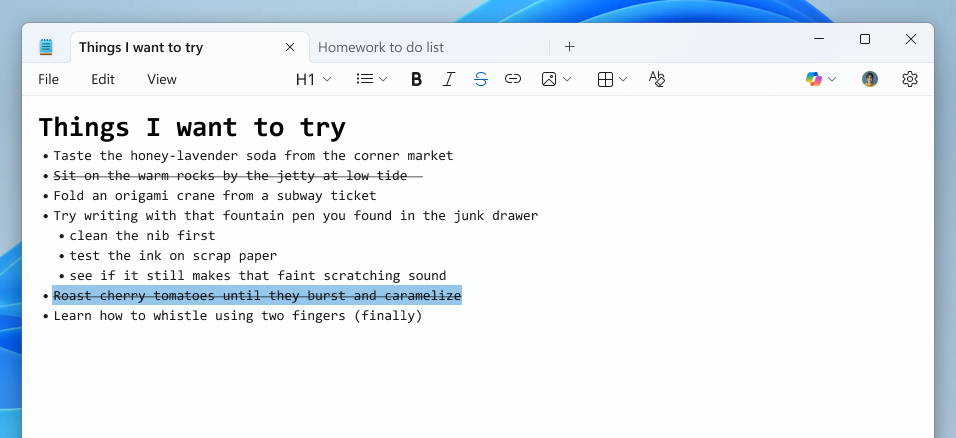
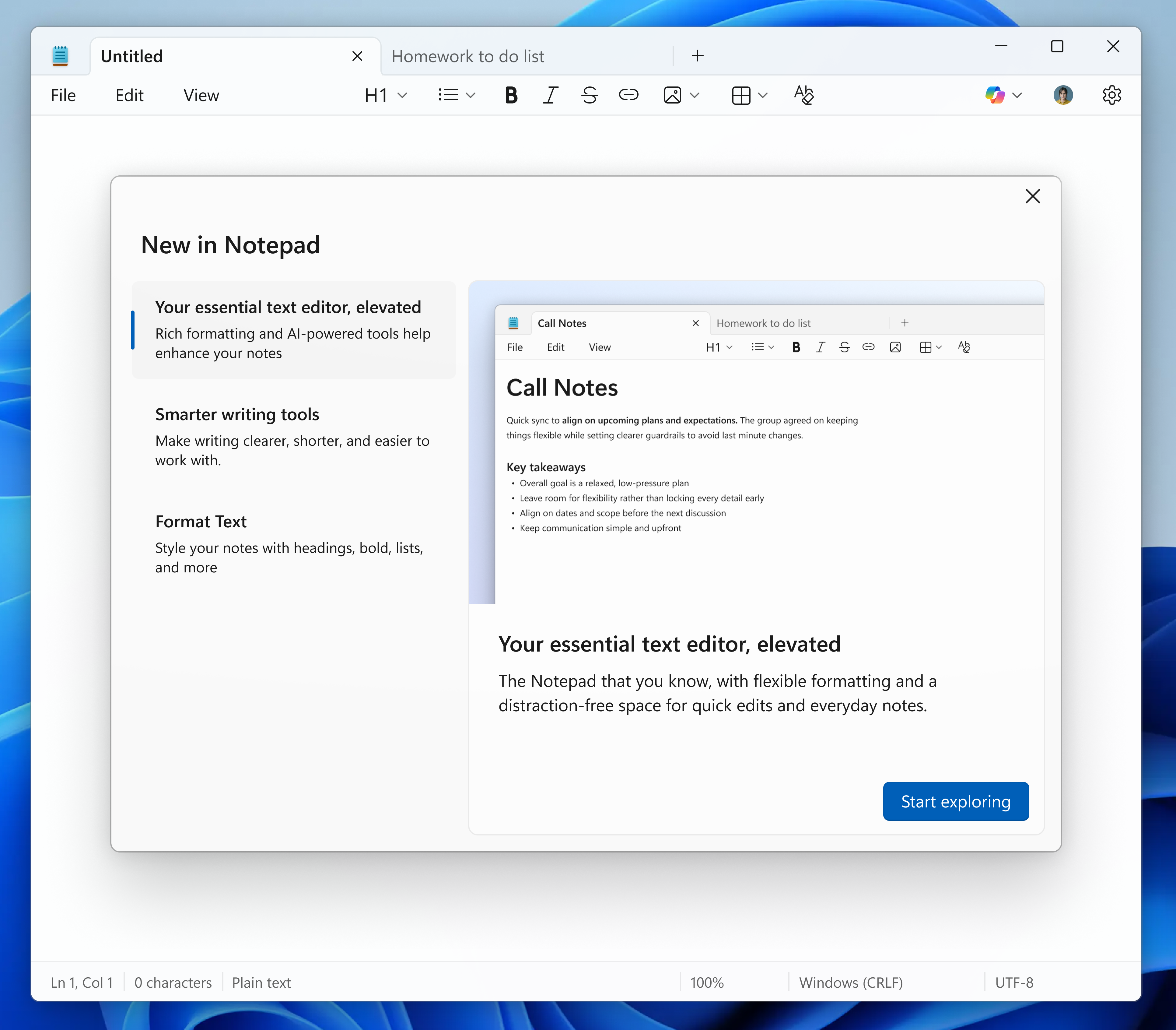
In this update, we’re introducing multiple improvements to Notepad. First, we are expanding support of lightweight formatting to include additional Markdown syntax features. This includes strikethrough formatting and nested lists. To get started, explore these new options in the formatting toolbar, keyboard shortcuts, or by editing the Markdown syntax directly. [caption id="attachment_178546" align="alignnone" width="956"]Notepad app screenshot of a nested list and strikethrough formatted created using the Increase indent command. Notepad app screenshot of a nested list and strikethrough formatted created using the Increase indent command.[/caption] We are also introducing a new welcome experience in Notepad designed to help users discover and learn about the app’s latest and most useful features. This dialog provides a quick overview of what’s possible in Notepad and serves as a helpful starting point for both new and returning users. You can close it anytime and revisit it later by clicking the megaphone icon in the top-right corner of the toolbar. [caption id="attachment_178547" align="alignnone" width="1024"]Notepad app screenshot of the updated “What’s New” first run experience. Notepad app screenshot of the updated “What’s New” first run experience.[/caption] Finally, we are expanding support for streaming results for AI text features. Whether generated locally or in the cloud, results for Write, Rewrite, and Summarize will start to appear quicker without the need to wait for the full response, providing a preview sooner that you can interact with. To use Write, Rewrite, and Summarize in Notepad, you will need to sign in with your Microsoft account. FEEDBACK: Please file feedback in Feedback Hub (WIN + F)under Apps > Notepad.

Paint (version 11.2512.191.0) 

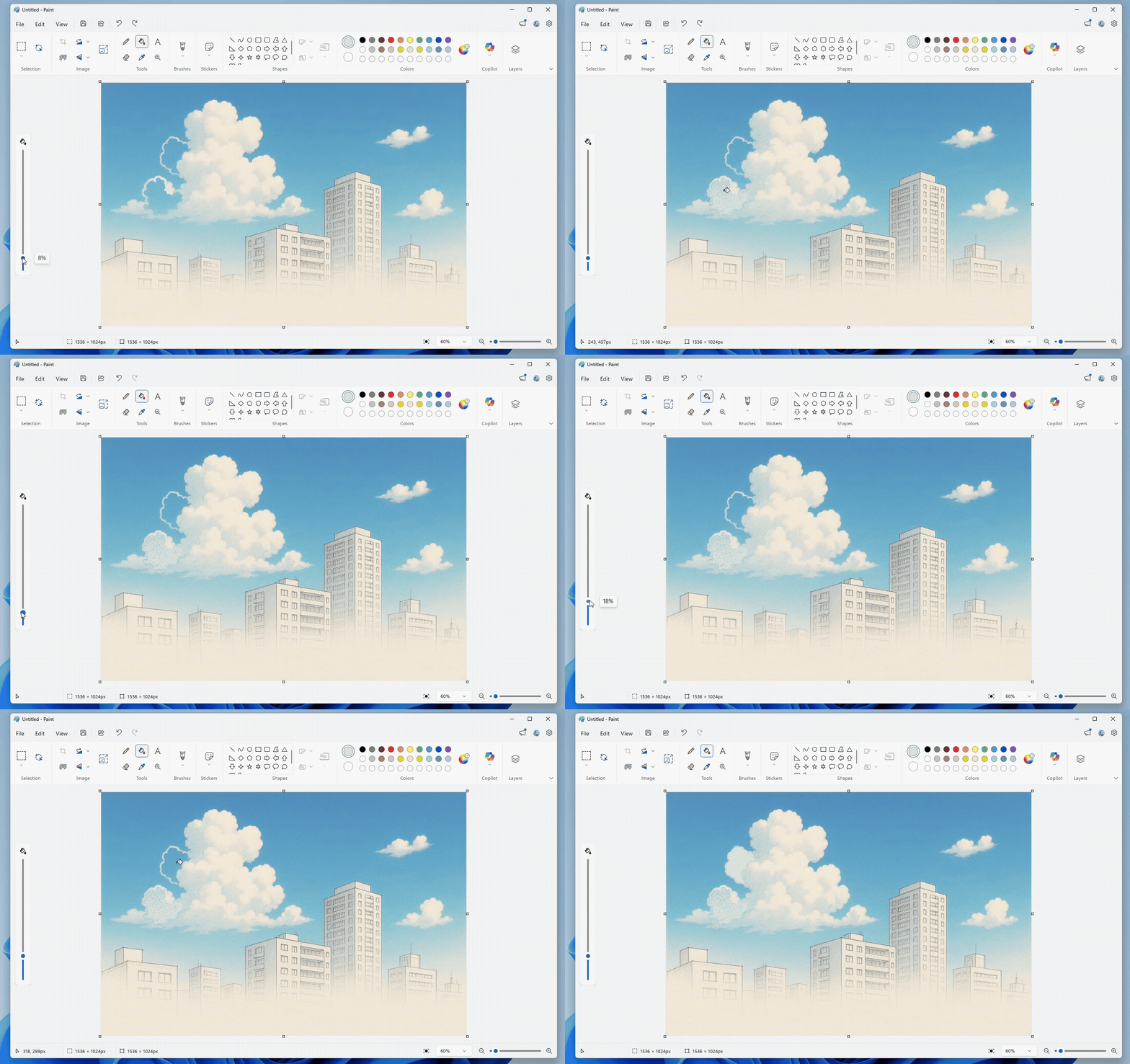
In this update, we’re introducing two new features to Paint, Coloring book and fill tolerance slider. Coloring book, an AI-powered feature that lets you create unique coloring book pages from a text prompt. To get started, open Paint and select the Coloring book option from the Copilot menu. Once the side panel is open, type in a description of the coloring book you want to create, like “a cute fluffy cat on a donut” or "a house with a garden and fence" and hit the Generate button. Paint will then generate a set of unique coloring book pages based on your prompt. Once the coloring book pages are generated, you can click on any one of them to Add to canvas, copy, or save it for later use. [caption id="attachment_178548" align="alignnone" width="1024"]Paint app showing a cat on a donut coloring book page. Paint app showing a cat on a donut coloring book page.[/caption] Coloring book will be available only on Copilot+ PCs. To use Coloring book, you will need to sign in with your Microsoft account. We’re also adding a fill tolerance slider, giving you control over how precisely the Fill tool applies color. To get started, select the Fill tool and use the slider on the left side of the canvas to adjust the tolerance to your desired level. Experiment with different tolerance settings to achieve clean fills or creative effects. [caption id="attachment_178553" align="alignnone" width="1426"]Paint app showing Fill tool with tolerance set to 8% versus 18%. Paint app showing Fill tool with tolerance set to 8% versus 18%.[/caption] FEEDBACK: Please file feedback in Feedback Hub (WIN + F)under Apps > Paint. As always, we love getting feedback from the community and we will be looking out for your thoughts and suggestions on these updates! Thanks, Dave Grochocki, Principal Group Product Manager – Windows Inbox Apps
  •  

Copilot on Windows: New text editing feature begins rolling out to Windows Insiders

19 December 2025 om 20:18
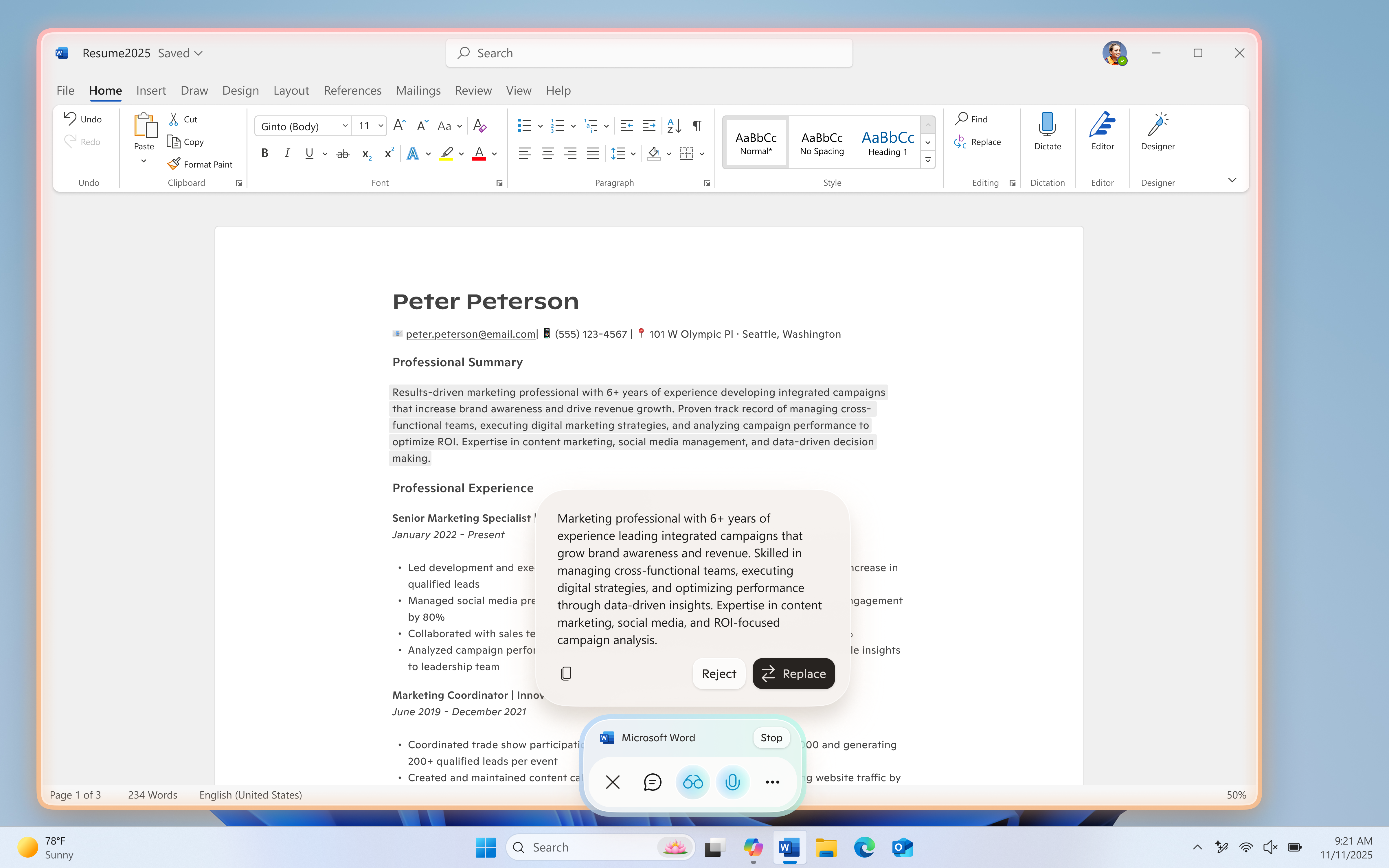
Hello Windows Insiders, we are excited to begin rolling out a new update for the Microsoft Copilot app on Windows that introduces the following changes and improvements: Copilot Actions for Text Editing: Windows Insiders can use Copilot to rewrite, refine, or edit text in real time during Copilot Vision sessions, enabling smooth, in‑flow collaboration and editing. To start a Vision session, open the Copilot app and select the glasses icon in the bottom right of the chat bar. Then choose the window you want to share that includes a doc or app you are editing in, and Copilot will begin analyzing what’s on your screen. Place your cursor in any text field, click into the text field, and speak naturally, using your own words. For example, you could say, “rewrite this to be more formal”, “make this clearer”, or “simplify this text”. Copilot will then suggest an edit directly in-flow. You’ll see a preview before any changes are made, so you can accept or refine the suggestion while staying focused on your task. Copilot Vision remains a fully opt-in feature and will only be activated when a user chooses to turn it on. Copilot Actions for text editing requires the Copilot Actions toggle to be enabled in Settings in the Copilot App. Users who enable this toggle will also have access to Copilot Actions for long-running tasks, a distinct feature in Copilot Labs which you can learn about here. We’re continuously exploring how Copilot can empower users to be more productive, craft high-quality content, and reduce the friction of getting started. We’re actively refining this feature based on feedback and real-world use to better support those goals. [caption id="attachment_178509" align="alignnone" width="1024"]UI showing Copilot Actions for text editing during a Copilot Vision session. UI showing Copilot Actions for text editing during a Copilot Vision session.[/caption] The latest Copilot app update (version 1.25121.60.0 and higher) is now beginning to roll out to all Insider Channels through the Microsoft Store. To use Copilot Actions for text editing, users will also need Windows version 26200.6899 or later. This feature is gradually rolling out to Windows Insiders worldwide, excluding the EEA, so availability may vary. We’re excited to preview these improvements with our Insider community and ensure we deliver a great Copilot experience for all Windows customers. FEEDBACK: Please provide feedback directly within the Copilot app by clicking on your profile icon and choosing “Give feedback”. Thanks, Microsoft Copilot Team
  •  

Notepad update begins rolling out to Windows Insiders

21 November 2025 om 19:06
Hello Windows Insiders, today we are beginning to roll out updates for Notepad to Windows Insiders in the Canary and Dev Channels on Windows 11.

Notepad (version 11.2510.6.0)

In this update, we are introducing two new features—expanded formatting support with tables and streaming results for AI text features.

Tables

We are expanding lightweight formatting in Notepad with support for tables! You can now easily insert tables in your document to help structure your notes. To get started, look for the new Table option in the formatting toolbar or by adding them using Markdown syntax directly. Once inserted, you can perform quick edits to add or remove rows and columns in the right-click context menu or from the Table menu in the toolbar. [caption id="attachment_178438" align="alignnone" width="1024"]Notepad open with table as part of formatted content with menu open to add new table in the formatting toolbar. Notepad open with table as part of formatted content with menu open to add new table in the formatting toolbar.[/caption]

Streaming Results for AI Text Features

We are also improving the experience for Write, Rewrite, and Summarize with streaming result responses. Results will start to appear quicker without the need to wait for the full response, providing a preview sooner that you can interact with. [caption id="attachment_178439" align="alignnone" width="1024"]Notepad displaying generated summary appearing word by word. Notepad displaying generated summary appearing word by word.[/caption] Streaming support for Rewrite is limited to results generated locally on Copilot+ PCs at this time. To use Write, Rewrite, and Summarize in Notepad, you will need to sign in with your Microsoft account. FEEDBACK: Please file feedback in Feedback Hub (WIN + F)under Apps > Notepad. As always, we love getting feedback from the community and we will be looking out for your thoughts and suggestions on these updates! Thanks, Dave Grochocki, Principal Group Product Manager – Windows Inbox Apps
  •  

Full screen experience expands to more Windows 11 PC form factors for Windows Insiders

21 November 2025 om 19:02
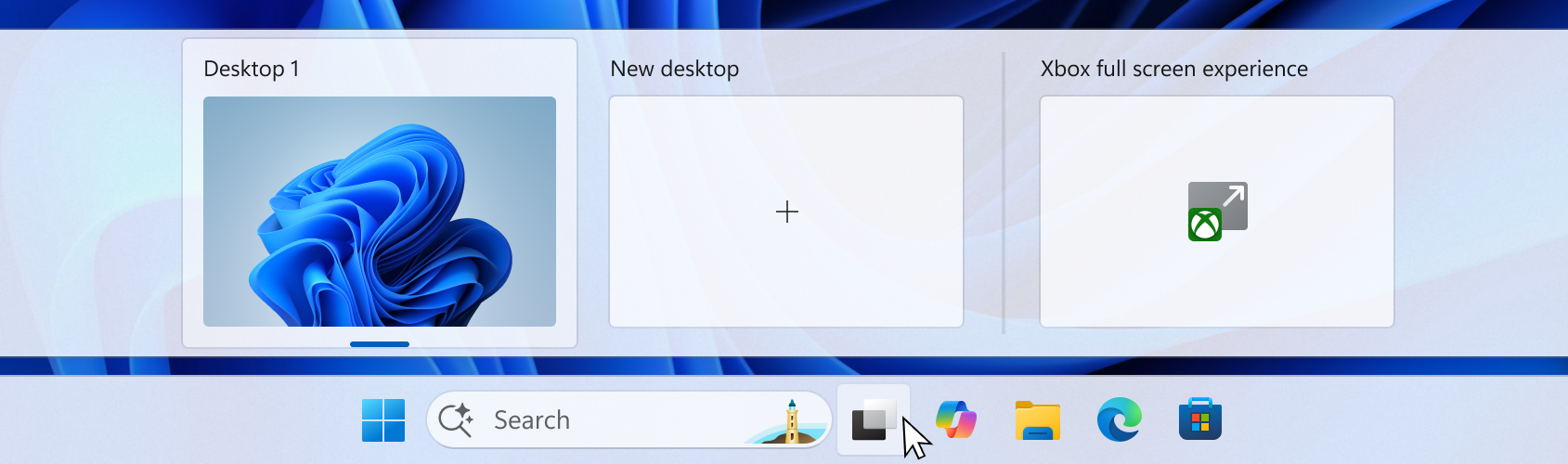
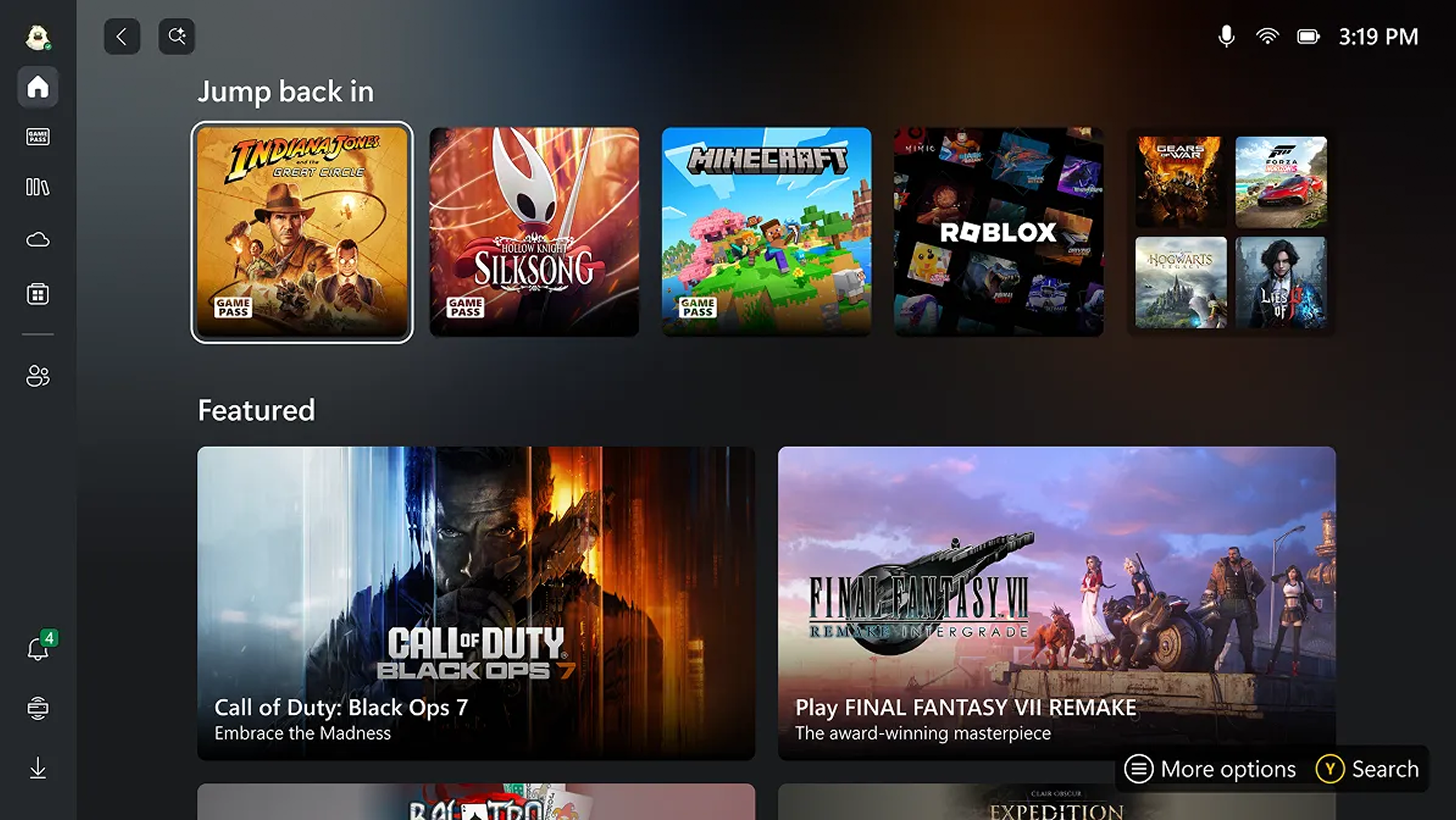
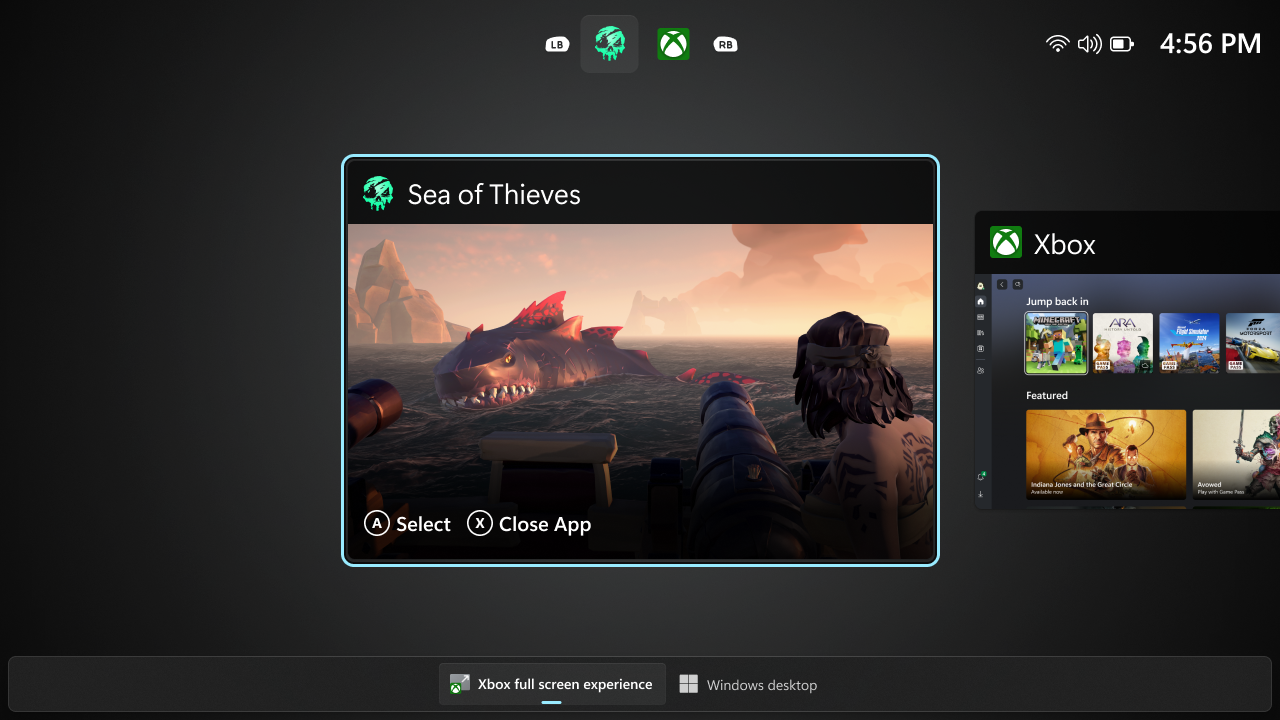
Hello Windows Insiders! We appreciate the excitement around the latest Windows handhelds and have heard feedback (and seen the creativity!) from those wanting this experience on more devices. Today, we’re excited to begin previewing a new experience for gaming on Windows 11 PCs. Alongside today’s general availability of full screen experience on more Windows handhelds currently in market, today’s Windows Insider Preview Build 26220.7271 offered to the Dev and Beta Channels expands the Xbox full screen experience to additional devices such as laptops, desktops, and tablets. Windows has long been the foundation for innovation with its open platform—one that has defined PC gaming. In partnership with Xbox, we’re creating experiences designed for when, where, and how, people play. Full screen experience is purpose-built for gaming and adds another way to enjoy games on your PC, delivering an immersive experience for players who want a console-like feel—while keeping the flexibility and choice that PC players value. Designed with console-style navigation in mind, the Xbox full screen experience offers a clean, distraction-free interface for controller-first gaming. When it’s time to take a break from, grab your controller and dive into the immersive, simplified Xbox full screen experience on your PC. When you’re done gaming, switch back to your desktop and pick up right where you left off. We’ve tailored the full screen experience for PCs to make switching in and out of the desktop as streamlined as possible. Xbox full screen experience, hover over the Task View icon on your taskbar and choose Xbox full screen experience. You can also open Task View by pressing Win + Tab. [caption id="attachment_178432" align="alignnone" width="1024"]UI of the task view interface showing the option to access Xbox full screen experience. UI of the task view interface showing the option to access Xbox full screen experience.[/caption] You can also open Xbox full screen experience in Game Bar > Settings or by pressing Win + F11 to toggle the experience.  These entry points can be managed in Windows Settings under Gaming > Full screen experience, where you can turn off the experience entirely if you prefer. Once you’ve entered the Xbox full screen experience, you’ll see the Xbox home screen and can access your games, including Xbox, Game Pass, Xbox Play Anywhere, and your installed games from other popular storefronts. [caption id="attachment_178434" align="alignnone" width="1024"]UI of the Xbox full screen experience home screen. UI of the Xbox full screen experience home screen.[/caption] It’s easy to switch between your open apps and games with just a long press on the Xbox button on your controller or on your keyboard. [caption id="attachment_178433" align="alignnone" width="1024"]UI showing the Task View in Xbox full screen experience on PC.  UI showing the Task View in Xbox full screen experience on PC.[/caption] Some keyboard shortcuts, like those that show desktop or search, intentionally behave differently in Xbox full screen experience than they do on the standard desktop to keep the experience focused on gaming. When you’re ready to switch back to your desktop, you can either choose the Windows desktop option from Task View, exit from Game Bar settings, , or simply hit the Windows key on your keyboard—no reboot required. Availability:  Starting today, the Xbox full screen experience is gradually rolling out with the Windows Insider Preview Build (26220.7271) to the Dev and Beta channels. This feature requires the Xbox app from the Microsoft Store. The rollout is phased, so not all Insiders will receive the update right away. To be among the first to try these new features on your Windows 11 PC, join the Xbox Insiders Program and opt into the PC Gaming preview through the Xbox Insiders Hub. We’ll continue adding new Xbox Insiders to the rollout over time. We are committed to delivering a seamless experience and look forward to hearing thoughts and suggestions from the Windows and Xbox Insider communities. FEEDBACK: Share your thoughts in Feedback Hub (WIN + F) under Gaming and Xbox > Gaming Full Screen Experience. Thanks, Ian LeGrow, CVP, Windows + Devices
  •  
❌