 Log in
iOS 26.5 beta 1 (v2) (23F5043k)
3 April 2026 om 19:00

OBS-Studio-32.1.1-Sources.tar.gz: f4c17e1aa2a00efd8729ed6cfef9308bc6a2b6c583c187d7959eaa72eb2e3676
OBS-Studio-32.1.1-Ubuntu-24.04-x86_64-dbsym.ddeb: 243b047753fd8c1753e379913e80ff5e8bb9ab5d804778666891653ba20c1a14
OBS-Studio-32.1.1-Ubuntu-24.04-x86_64.deb: c69b5846e2eef622e902beb3606d614592735b4aac3b2a3c07bb7a1a5f52b9c4
OBS-Studio-32.1.1-Windows-arm64-PDBs.zip: 2f44c1f96bb671c8cc6dbbc51a9d8c9736a1d32d1ac1969cf69a53acf1f4fe86
OBS-Studio-32.1.1-Windows-arm64.zip: f54a9224adb1fdd496476475235527965327e93f912b64af9debdd833335aee3
OBS-Studio-32.1.1-Windows-x64-Installer.exe: 9b4b643a44154ed8bee5229a4e0c85f6826f76b7e38b1d0d1d7e8b349dfa38e1
OBS-Studio-32.1.1-Windows-x64-PDBs.zip: ad88f71888c4bd089fa1f63209b19ca082765247a00a8e19aa16a5eecc74f7d8
OBS-Studio-32.1.1-Windows-x64.zip: a4cc40a06d5a5dc158c792631b596a04b02d8fe99644a0f0bc3b12199dbce011
OBS-Studio-32.1.1-macOS-Apple-dSYMs.tar.xz: b597e805d476713118d4c9146f34876aa15482caec90d4ce851ba408ef8a59bd
OBS-Studio-32.1.1-macOS-Apple.dmg: e62c2fbea6872b015d0e9cf11f8be1ce4c545a5ce39da32420f754f2b0461dcb
OBS-Studio-32.1.1-macOS-Intel-dSYMs.tar.xz: 1a2b2e83d84ab50fe864d636f343acb38876809b397de0d3ba8a46c72dfd1854
OBS-Studio-32.1.1-macOS-Intel.dmg: 0a444c9b9b63f6871a592f0517a3c5114a08a5d555155f84e447a686e936750a

The Asterisk Development Team would like to announce
release candidate 2 of asterisk-23.3.0.
The release artifacts are available for immediate download at
https://github.com/asterisk/asterisk/releases/tag/23.3.0-rc2
and
https://downloads.asterisk.org/pub/telephony/asterisk
Repository: https://github.com/asterisk/asterisk
Tag: 23.3.0-rc2
This release resolves issues reported by the community
and would have not been possible without your participation.
Thank You!
Author: nappsoft
Date: 2026-04-02
When the res_cdrel_custom modules is reloaded and the config has not been changed asterisk should not free the old config. Otherwise the connection to the database will be closed and no new connection will be opened.
Resolves: #1852
Author: George Joseph
Date: 2026-03-31
Several issues are resolved:
Internally, floats were used for timestamp values but this could result
in wrapping so they've been changed to doubles.
Historically, the default CEL eventtime format is <seconds>.<microseconds>
with <microseconds> always being 6 digits. This should have continued to be
the case but res_cdrel_custom wasn't checking the dateformat setting in
cel.conf and was defaulting to %F %T. res_cdrel_custom now gets the default
date format from cel.conf, which will be whatever the dateformat parameter
is set to or <seconds>.<microseconds> if not set.
The timeval field formatter for both CDR and CEL wasn't handling custom
strftime format strings correctly. This is now fixed so you should be able
to specifiy custom strftime format strings for the CEL eventtime and CDR
start, answer and end fields. For example: eventtime(%FT%T%z).
Resolves: #1844
Resolves: #1845
The Asterisk Development Team would like to announce
release candidate 2 of asterisk-22.9.0.
The release artifacts are available for immediate download at
https://github.com/asterisk/asterisk/releases/tag/22.9.0-rc2
and
https://downloads.asterisk.org/pub/telephony/asterisk
Repository: https://github.com/asterisk/asterisk
Tag: 22.9.0-rc2
This release resolves issues reported by the community
and would have not been possible without your participation.
Thank You!
Author: nappsoft
Date: 2026-04-02
When the res_cdrel_custom modules is reloaded and the config has not been changed asterisk should not free the old config. Otherwise the connection to the database will be closed and no new connection will be opened.
Resolves: #1852
Author: George Joseph
Date: 2026-03-31
Several issues are resolved:
Internally, floats were used for timestamp values but this could result
in wrapping so they've been changed to doubles.
Historically, the default CEL eventtime format is <seconds>.<microseconds>
with <microseconds> always being 6 digits. This should have continued to be
the case but res_cdrel_custom wasn't checking the dateformat setting in
cel.conf and was defaulting to %F %T. res_cdrel_custom now gets the default
date format from cel.conf, which will be whatever the dateformat parameter
is set to or <seconds>.<microseconds> if not set.
The timeval field formatter for both CDR and CEL wasn't handling custom
strftime format strings correctly. This is now fixed so you should be able
to specifiy custom strftime format strings for the CEL eventtime and CDR
start, answer and end fields. For example: eventtime(%FT%T%z).
Resolves: #1844
Resolves: #1845
The Asterisk Development Team would like to announce
release candidate 2 of asterisk-20.19.0.
The release artifacts are available for immediate download at
https://github.com/asterisk/asterisk/releases/tag/20.19.0-rc2
and
https://downloads.asterisk.org/pub/telephony/asterisk
Repository: https://github.com/asterisk/asterisk
Tag: 20.19.0-rc2
This release resolves issues reported by the community
and would have not been possible without your participation.
Thank You!
Author: nappsoft
Date: 2026-04-02
When the res_cdrel_custom modules is reloaded and the config has not been changed asterisk should not free the old config. Otherwise the connection to the database will be closed and no new connection will be opened.
Resolves: #1852
Author: George Joseph
Date: 2026-03-31
Several issues are resolved:
Internally, floats were used for timestamp values but this could result
in wrapping so they've been changed to doubles.
Historically, the default CEL eventtime format is <seconds>.<microseconds>
with <microseconds> always being 6 digits. This should have continued to be
the case but res_cdrel_custom wasn't checking the dateformat setting in
cel.conf and was defaulting to %F %T. res_cdrel_custom now gets the default
date format from cel.conf, which will be whatever the dateformat parameter
is set to or <seconds>.<microseconds> if not set.
The timeval field formatter for both CDR and CEL wasn't handling custom
strftime format strings correctly. This is now fixed so you should be able
to specifiy custom strftime format strings for the CEL eventtime and CDR
start, answer and end fields. For example: eventtime(%FT%T%z).
Resolves: #1844
Resolves: #1845
Desktops showing the taskbar positioned on the bottom, top, left and right side of the screen[/caption]
The new Feedback Hub app showing the redesigned home screen and feedback form[/caption]
Building on these changes, what follows below is our broader plan and areas of focus for the year to raise the bar on Windows 11 quality. The work is underway. You can expect to see tangible progress that you’ll be able to feel as you preview builds from us throughout the rest of the year.
Last night I had the chance to sit down with a small group of Windows Insiders here in Seattle to listen, to answer questions, and to share more about where we're headed. The Seattle meetup was the first of several stops our team will be making to engage in person, in more cities around the world, to connect with the Windows community.
Thank you for holding us to a high standard. Windows is as much yours as it is ours. We’re committed to strengthening its foundation and delivering innovation where it matters, for you.
Please keep the feedback coming, to help us shape the future of Windows together.
Best,
Pavan
EVP, Windows + Devices
_______
 View content in a sidepane next to your conversation without leaving the app.[/caption]
Today's release also comes with an update to the Copilot App that makes it faster, more reliable, and packed with all of the latest Copilot features that make the PC experience even better. As part of this update, some features like Podcasts and Study and Learn mode from Copilot.com are getting added, while others may be pulled back while we iterate on the experience; we will add priority features back in before the updated app is generally available.
These updates (Copilot app version 146.0.3856.39 and higher) are beginning to roll out to all Insider Channels. Availability may vary as we gradually expand the rollout to Insiders worldwide. We’re excited to preview these improvements with our Insider community and ensure we deliver a great Copilot experience for all Windows customers. With the power of the web, you'll be able to get even more things done with Copilot.
FEEDBACK: Please provide feedback directly within the Copilot app by clicking on your profile icon and choosing “Give feedback”.
Thanks,
Microsoft Copilot Team
View content in a sidepane next to your conversation without leaving the app.[/caption]
Today's release also comes with an update to the Copilot App that makes it faster, more reliable, and packed with all of the latest Copilot features that make the PC experience even better. As part of this update, some features like Podcasts and Study and Learn mode from Copilot.com are getting added, while others may be pulled back while we iterate on the experience; we will add priority features back in before the updated app is generally available.
These updates (Copilot app version 146.0.3856.39 and higher) are beginning to roll out to all Insider Channels. Availability may vary as we gradually expand the rollout to Insiders worldwide. We’re excited to preview these improvements with our Insider community and ensure we deliver a great Copilot experience for all Windows customers. With the power of the web, you'll be able to get even more things done with Copilot.
FEEDBACK: Please provide feedback directly within the Copilot app by clicking on your profile icon and choosing “Give feedback”.
Thanks,
Microsoft Copilot Team 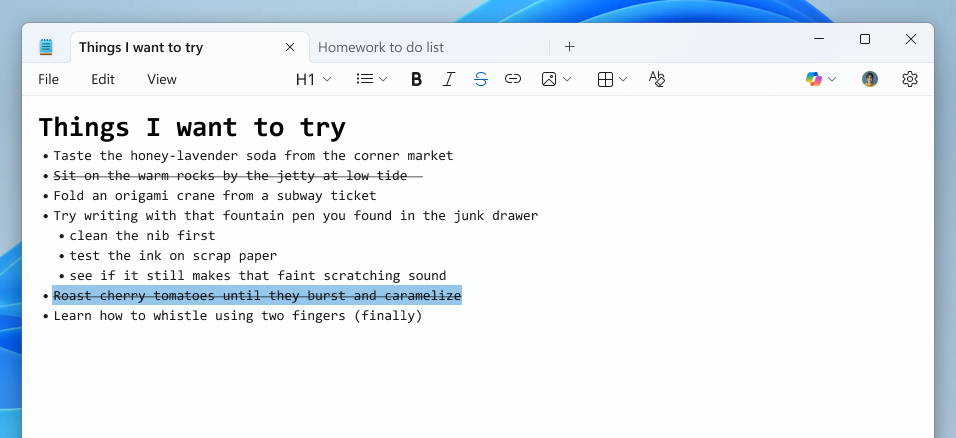 Notepad app screenshot of a nested list and strikethrough formatted created using the Increase indent command.[/caption]
We are also introducing a new welcome experience in Notepad designed to help users discover and learn about the app’s latest and most useful features. This dialog provides a quick overview of what’s possible in Notepad and serves as a helpful starting point for both new and returning users. You can close it anytime and revisit it later by clicking the megaphone icon in the top-right corner of the toolbar.
[caption id="attachment_178547" align="alignnone" width="1024"]
Notepad app screenshot of a nested list and strikethrough formatted created using the Increase indent command.[/caption]
We are also introducing a new welcome experience in Notepad designed to help users discover and learn about the app’s latest and most useful features. This dialog provides a quick overview of what’s possible in Notepad and serves as a helpful starting point for both new and returning users. You can close it anytime and revisit it later by clicking the megaphone icon in the top-right corner of the toolbar.
[caption id="attachment_178547" align="alignnone" width="1024"]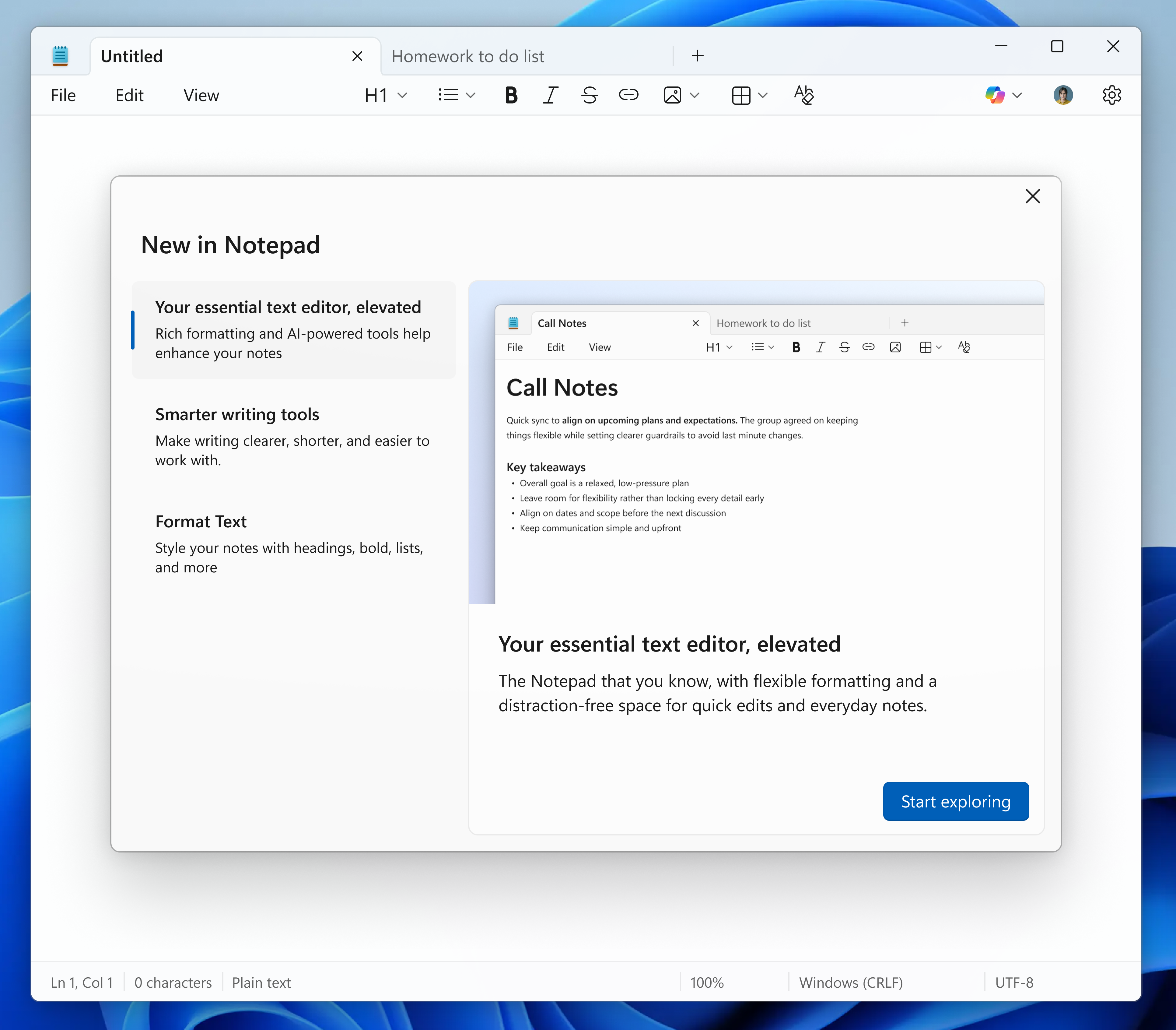 Notepad app screenshot of the updated “What’s New” first run experience.[/caption]
Finally, we are expanding support for streaming results for AI text features. Whether generated locally or in the cloud, results for Write, Rewrite, and Summarize will start to appear quicker without the need to wait for the full response, providing a preview sooner that you can interact with. To use Write, Rewrite, and Summarize in Notepad, you will need to sign in with your Microsoft account.
FEEDBACK: Please file feedback in Feedback Hub (WIN + F) under Apps > Notepad.
Notepad app screenshot of the updated “What’s New” first run experience.[/caption]
Finally, we are expanding support for streaming results for AI text features. Whether generated locally or in the cloud, results for Write, Rewrite, and Summarize will start to appear quicker without the need to wait for the full response, providing a preview sooner that you can interact with. To use Write, Rewrite, and Summarize in Notepad, you will need to sign in with your Microsoft account.
FEEDBACK: Please file feedback in Feedback Hub (WIN + F) under Apps > Notepad.
 Paint app showing a cat on a donut coloring book page.[/caption]
Coloring book will be available only on Copilot+ PCs. To use Coloring book, you will need to sign in with your Microsoft account.
We’re also adding a fill tolerance slider, giving you control over how precisely the Fill tool applies color. To get started, select the Fill tool and use the slider on the left side of the canvas to adjust the tolerance to your desired level. Experiment with different tolerance settings to achieve clean fills or creative effects.
[caption id="attachment_178553" align="alignnone" width="1426"]
Paint app showing a cat on a donut coloring book page.[/caption]
Coloring book will be available only on Copilot+ PCs. To use Coloring book, you will need to sign in with your Microsoft account.
We’re also adding a fill tolerance slider, giving you control over how precisely the Fill tool applies color. To get started, select the Fill tool and use the slider on the left side of the canvas to adjust the tolerance to your desired level. Experiment with different tolerance settings to achieve clean fills or creative effects.
[caption id="attachment_178553" align="alignnone" width="1426"]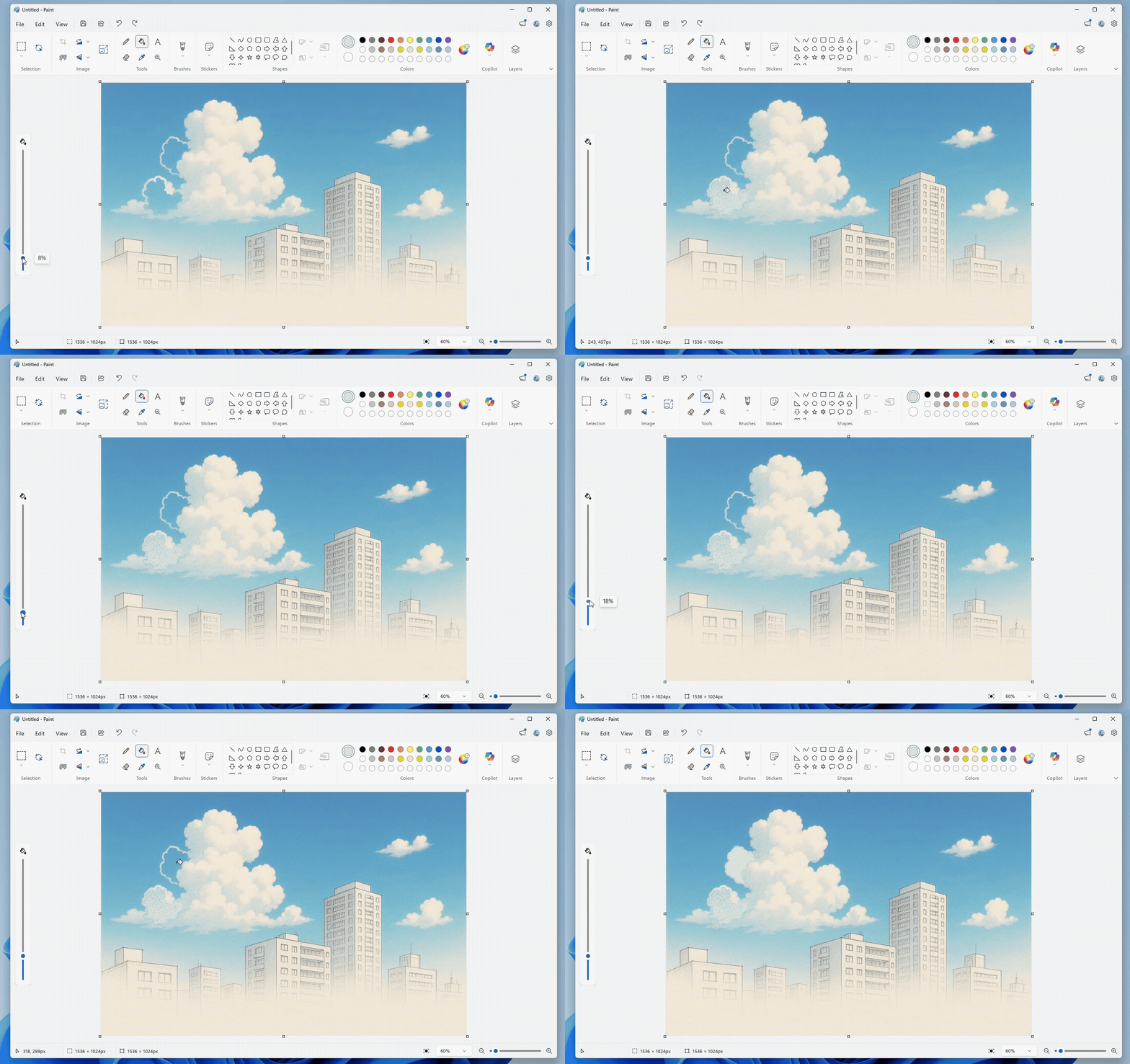 Paint app showing Fill tool with tolerance set to 8% versus 18%.[/caption]
FEEDBACK: Please file feedback in Feedback Hub (WIN + F) under Apps > Paint.
As always, we love getting feedback from the community and we will be looking out for your thoughts and suggestions on these updates!
Thanks,
Dave Grochocki, Principal Group Product Manager – Windows Inbox Apps
Paint app showing Fill tool with tolerance set to 8% versus 18%.[/caption]
FEEDBACK: Please file feedback in Feedback Hub (WIN + F) under Apps > Paint.
As always, we love getting feedback from the community and we will be looking out for your thoughts and suggestions on these updates!
Thanks,
Dave Grochocki, Principal Group Product Manager – Windows Inbox Apps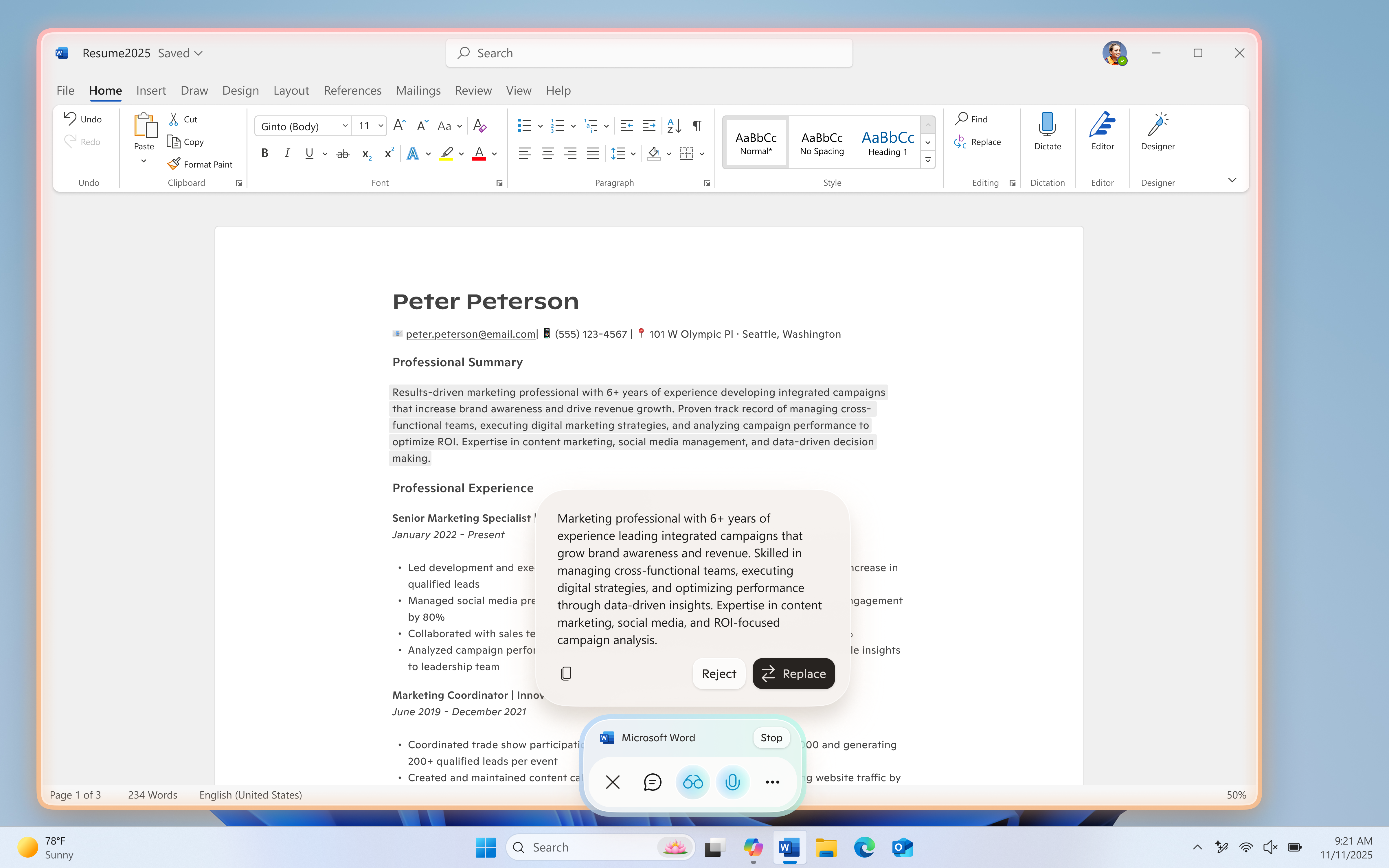 UI showing Copilot Actions for text editing during a Copilot Vision session.[/caption]
The latest Copilot app update (version 1.25121.60.0 and higher) is now beginning to roll out to all Insider Channels through the Microsoft Store. To use Copilot Actions for text editing, users will also need Windows version 26200.6899 or later. This feature is gradually rolling out to Windows Insiders worldwide, excluding the EEA, so availability may vary. We’re excited to preview these improvements with our Insider community and ensure we deliver a great Copilot experience for all Windows customers.
FEEDBACK: Please provide feedback directly within the Copilot app by clicking on your profile icon and choosing “Give feedback”.
Thanks,
Microsoft Copilot Team
UI showing Copilot Actions for text editing during a Copilot Vision session.[/caption]
The latest Copilot app update (version 1.25121.60.0 and higher) is now beginning to roll out to all Insider Channels through the Microsoft Store. To use Copilot Actions for text editing, users will also need Windows version 26200.6899 or later. This feature is gradually rolling out to Windows Insiders worldwide, excluding the EEA, so availability may vary. We’re excited to preview these improvements with our Insider community and ensure we deliver a great Copilot experience for all Windows customers.
FEEDBACK: Please provide feedback directly within the Copilot app by clicking on your profile icon and choosing “Give feedback”.
Thanks,
Microsoft Copilot Team Notepad open with table as part of formatted content with menu open to add new table in the formatting toolbar.[/caption]
 Notepad displaying generated summary appearing word by word.[/caption]
Streaming support for Rewrite is limited to results generated locally on Copilot+ PCs at this time. To use Write, Rewrite, and Summarize in Notepad, you will need to sign in with your Microsoft account.
FEEDBACK: Please file feedback in Feedback Hub (WIN + F) under Apps > Notepad.
As always, we love getting feedback from the community and we will be looking out for your thoughts and suggestions on these updates!
Thanks,
Dave Grochocki, Principal Group Product Manager – Windows Inbox Apps
Notepad displaying generated summary appearing word by word.[/caption]
Streaming support for Rewrite is limited to results generated locally on Copilot+ PCs at this time. To use Write, Rewrite, and Summarize in Notepad, you will need to sign in with your Microsoft account.
FEEDBACK: Please file feedback in Feedback Hub (WIN + F) under Apps > Notepad.
As always, we love getting feedback from the community and we will be looking out for your thoughts and suggestions on these updates!
Thanks,
Dave Grochocki, Principal Group Product Manager – Windows Inbox Apps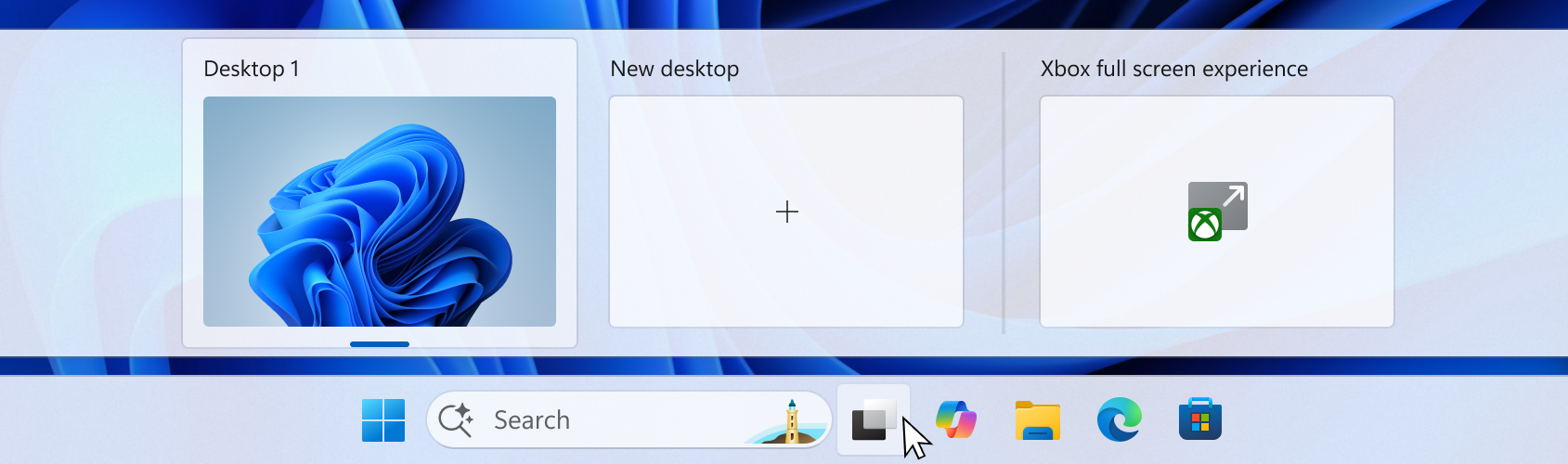 UI of the task view interface showing the option to access Xbox full screen experience.[/caption]
You can also open Xbox full screen experience in Game Bar > Settings or by pressing Win + F11 to toggle the experience. These entry points can be managed in Windows Settings under Gaming > Full screen experience, where you can turn off the experience entirely if you prefer.
Once you’ve entered the Xbox full screen experience, you’ll see the Xbox home screen and can access your games, including Xbox, Game Pass, Xbox Play Anywhere, and your installed games from other popular storefronts.
[caption id="attachment_178434" align="alignnone" width="1024"]
UI of the task view interface showing the option to access Xbox full screen experience.[/caption]
You can also open Xbox full screen experience in Game Bar > Settings or by pressing Win + F11 to toggle the experience. These entry points can be managed in Windows Settings under Gaming > Full screen experience, where you can turn off the experience entirely if you prefer.
Once you’ve entered the Xbox full screen experience, you’ll see the Xbox home screen and can access your games, including Xbox, Game Pass, Xbox Play Anywhere, and your installed games from other popular storefronts.
[caption id="attachment_178434" align="alignnone" width="1024"]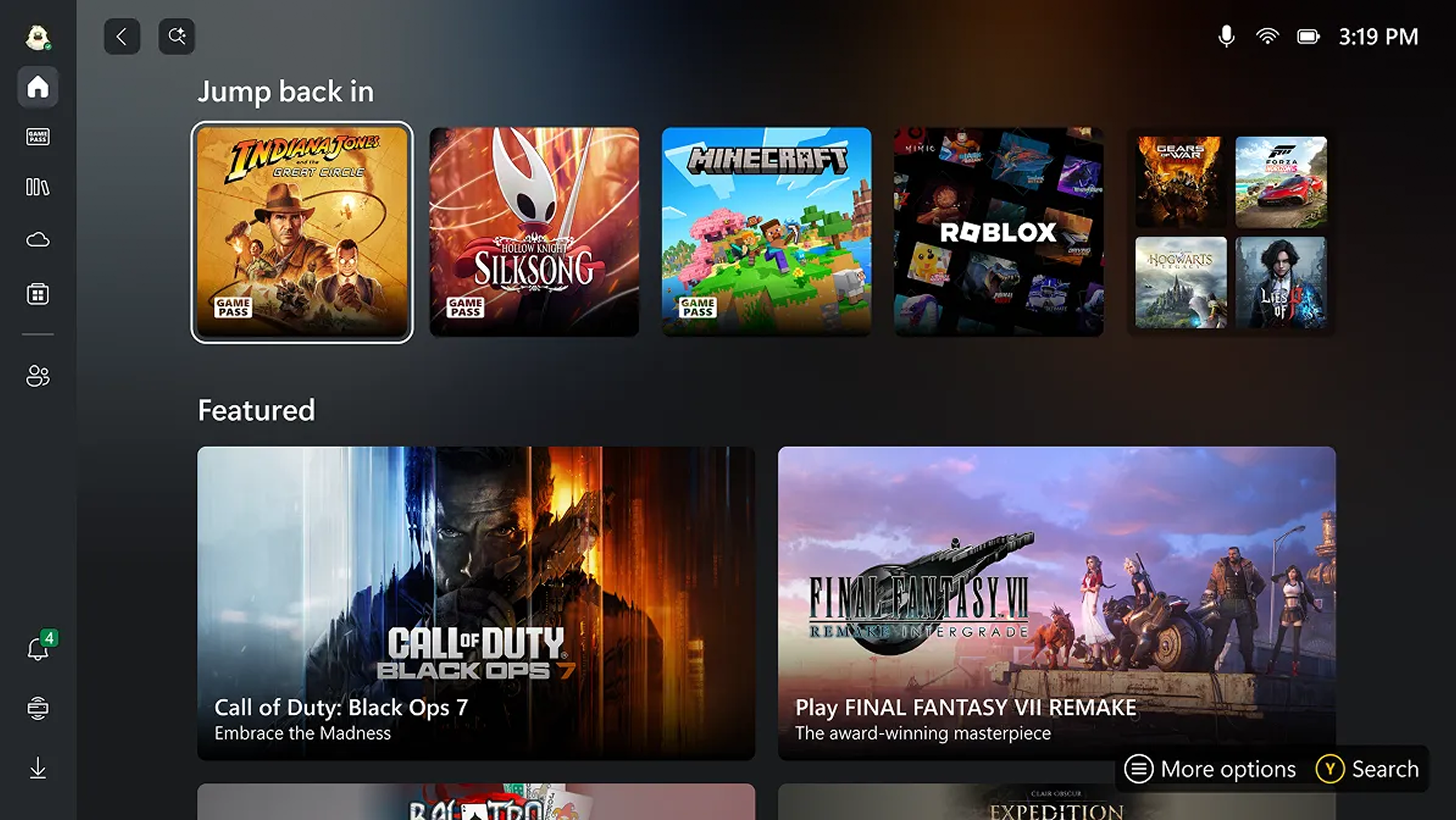 UI of the Xbox full screen experience home screen.[/caption]
It’s easy to switch between your open apps and games with just a long press on the Xbox button on your controller or on your keyboard.
[caption id="attachment_178433" align="alignnone" width="1024"]
UI of the Xbox full screen experience home screen.[/caption]
It’s easy to switch between your open apps and games with just a long press on the Xbox button on your controller or on your keyboard.
[caption id="attachment_178433" align="alignnone" width="1024"]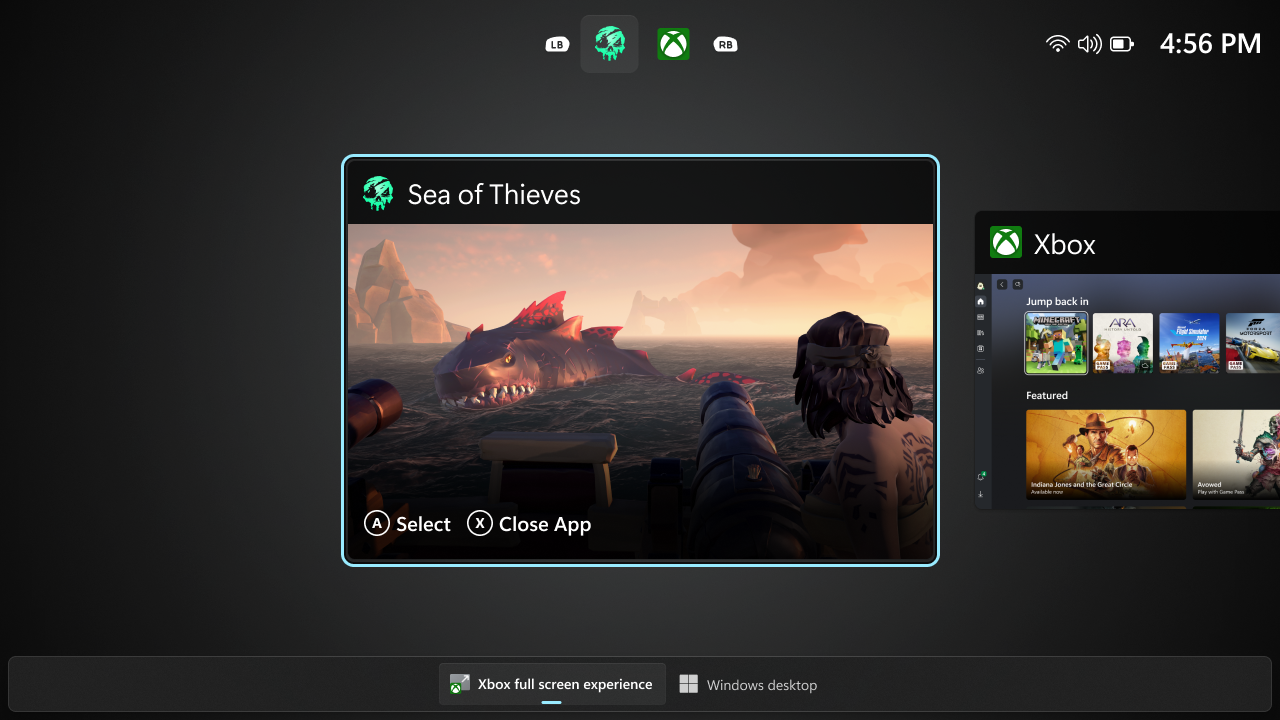 UI showing the Task View in Xbox full screen experience on PC.[/caption]
Some keyboard shortcuts, like those that show desktop or search, intentionally behave differently in Xbox full screen experience than they do on the standard desktop to keep the experience focused on gaming. When you’re ready to switch back to your desktop, you can either choose the Windows desktop option from Task View, exit from Game Bar settings, , or simply hit the Windows key on your keyboard—no reboot required.
Availability:
Starting today, the Xbox full screen experience is gradually rolling out with the Windows Insider Preview Build (26220.7271) to the Dev and Beta channels. This feature requires the Xbox app from the Microsoft Store.
The rollout is phased, so not all Insiders will receive the update right away. To be among the first to try these new features on your Windows 11 PC, join the Xbox Insiders Program and opt into the PC Gaming preview through the Xbox Insiders Hub. We’ll continue adding new Xbox Insiders to the rollout over time.
We are committed to delivering a seamless experience and look forward to hearing thoughts and suggestions from the Windows and Xbox Insider communities.
FEEDBACK: Share your thoughts in Feedback Hub (WIN + F) under Gaming and Xbox > Gaming Full Screen Experience.
Thanks,
Ian LeGrow, CVP, Windows + Devices
UI showing the Task View in Xbox full screen experience on PC.[/caption]
Some keyboard shortcuts, like those that show desktop or search, intentionally behave differently in Xbox full screen experience than they do on the standard desktop to keep the experience focused on gaming. When you’re ready to switch back to your desktop, you can either choose the Windows desktop option from Task View, exit from Game Bar settings, , or simply hit the Windows key on your keyboard—no reboot required.
Availability:
Starting today, the Xbox full screen experience is gradually rolling out with the Windows Insider Preview Build (26220.7271) to the Dev and Beta channels. This feature requires the Xbox app from the Microsoft Store.
The rollout is phased, so not all Insiders will receive the update right away. To be among the first to try these new features on your Windows 11 PC, join the Xbox Insiders Program and opt into the PC Gaming preview through the Xbox Insiders Hub. We’ll continue adding new Xbox Insiders to the rollout over time.
We are committed to delivering a seamless experience and look forward to hearing thoughts and suggestions from the Windows and Xbox Insider communities.
FEEDBACK: Share your thoughts in Feedback Hub (WIN + F) under Gaming and Xbox > Gaming Full Screen Experience.
Thanks,
Ian LeGrow, CVP, Windows + Devices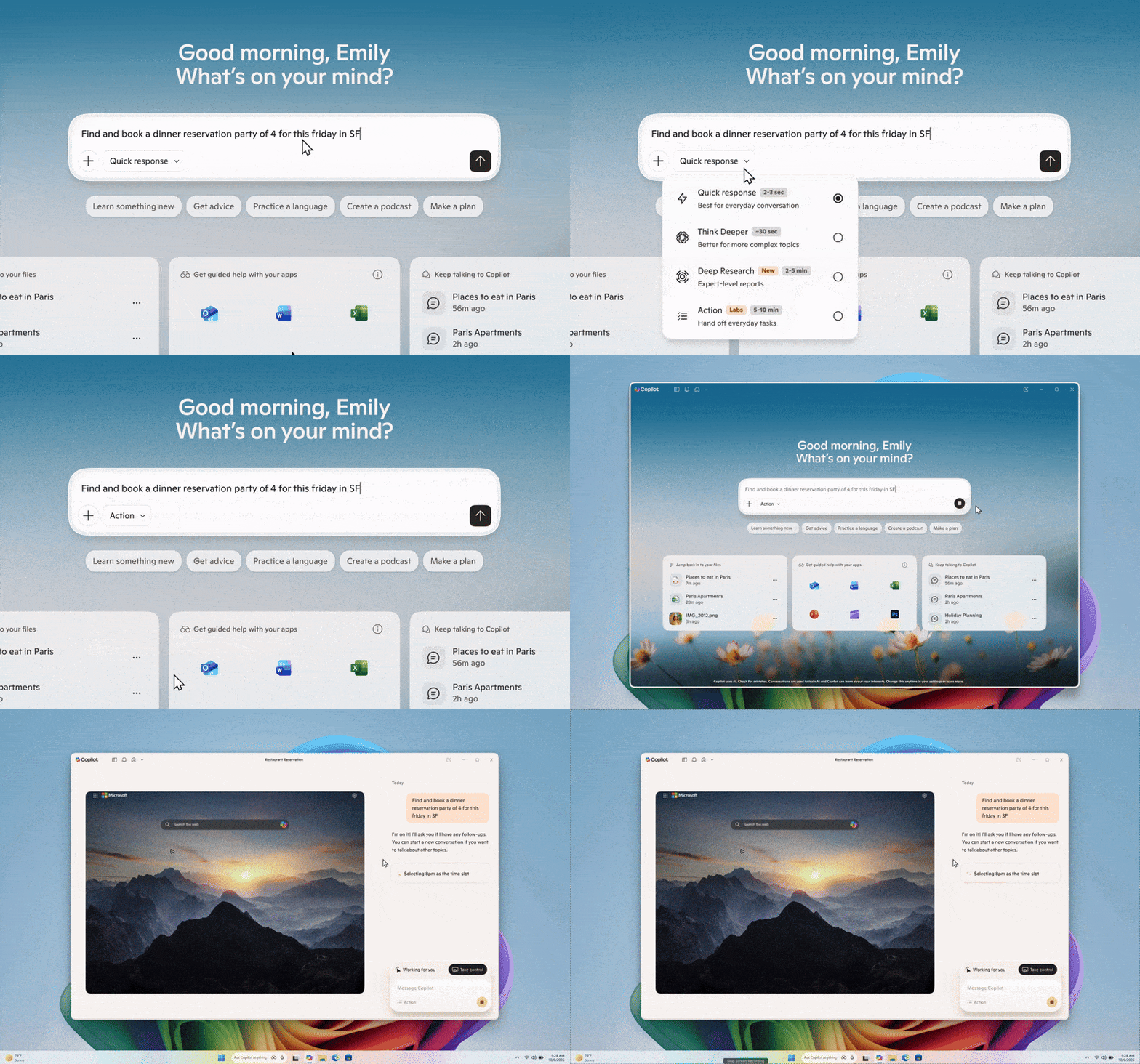 UI showing how Copilot Actions performs tasks directly on local files in Windows in an Agent Workspace.[/caption]
This Copilot app update (version 1.25112.74 and higher) is beginning to roll out across all Insider Channels via the Microsoft Store. The above-mentioned feature is gradually rolling out to Insiders worldwide, excluding EEA, so not all Insiders will get the update right away. We are excited to be previewing improvements with our Insiders to ensure all our customers have a great Copilot experience on Windows.
FEEDBACK: Please provide feedback directly within the Copilot app by clicking on your profile icon and choosing “Give feedback”.
Thanks,
Microsoft Copilot and Windows Team
UI showing how Copilot Actions performs tasks directly on local files in Windows in an Agent Workspace.[/caption]
This Copilot app update (version 1.25112.74 and higher) is beginning to roll out across all Insider Channels via the Microsoft Store. The above-mentioned feature is gradually rolling out to Insiders worldwide, excluding EEA, so not all Insiders will get the update right away. We are excited to be previewing improvements with our Insiders to ensure all our customers have a great Copilot experience on Windows.
FEEDBACK: Please provide feedback directly within the Copilot app by clicking on your profile icon and choosing “Give feedback”.
Thanks,
Microsoft Copilot and Windows Team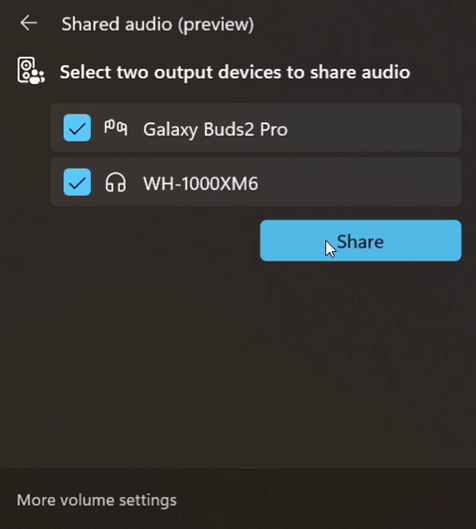 Shared audio (preview) settings showing two connected devices and the Share button to get started using the experience.[/caption]
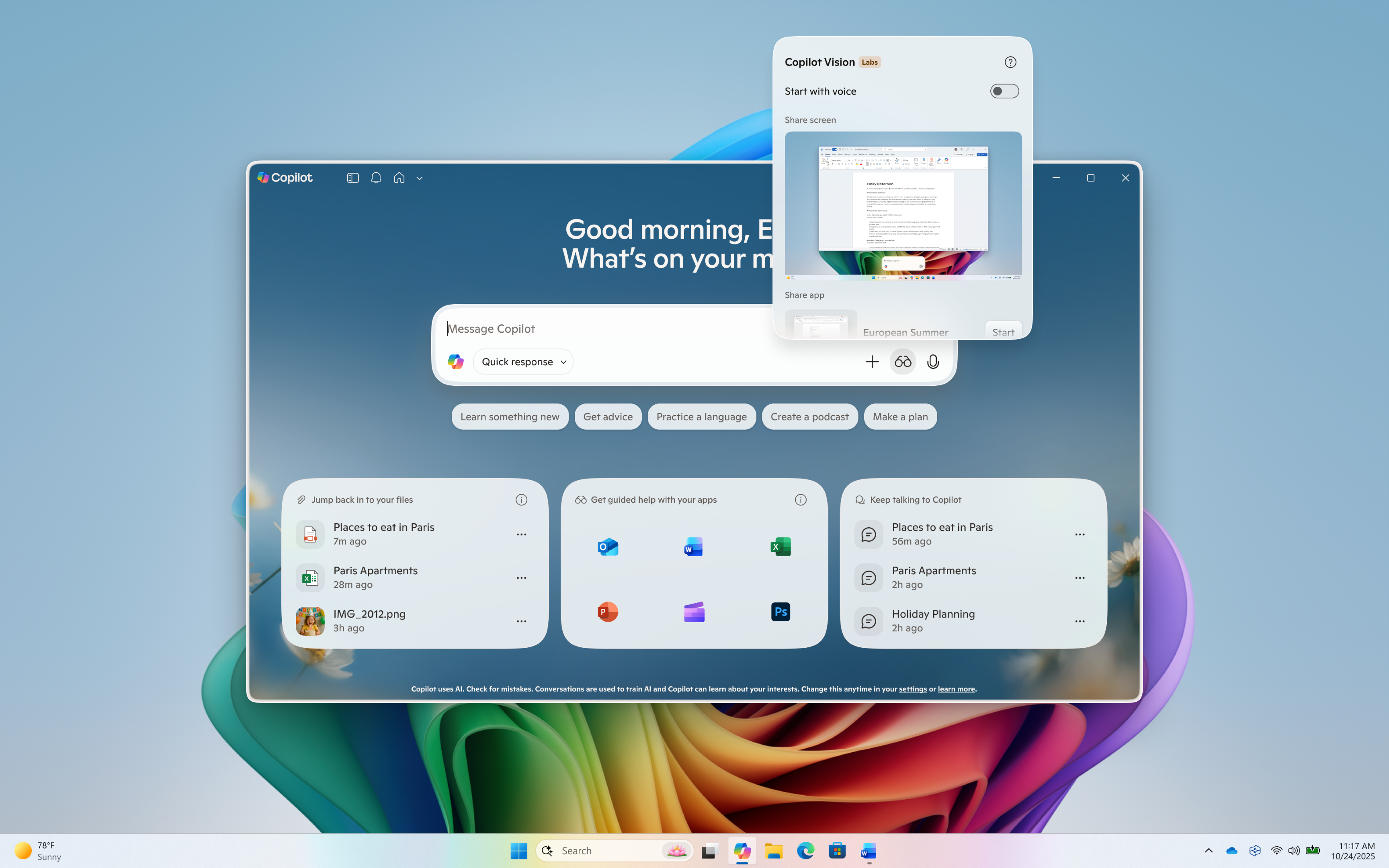 Click on the glasses icon, toggle off ‘Start with voice’, and share your screen to start Vision with text.[/caption]
[caption id="attachment_178351" align="alignnone" width="1024"]
Click on the glasses icon, toggle off ‘Start with voice’, and share your screen to start Vision with text.[/caption]
[caption id="attachment_178351" align="alignnone" width="1024"]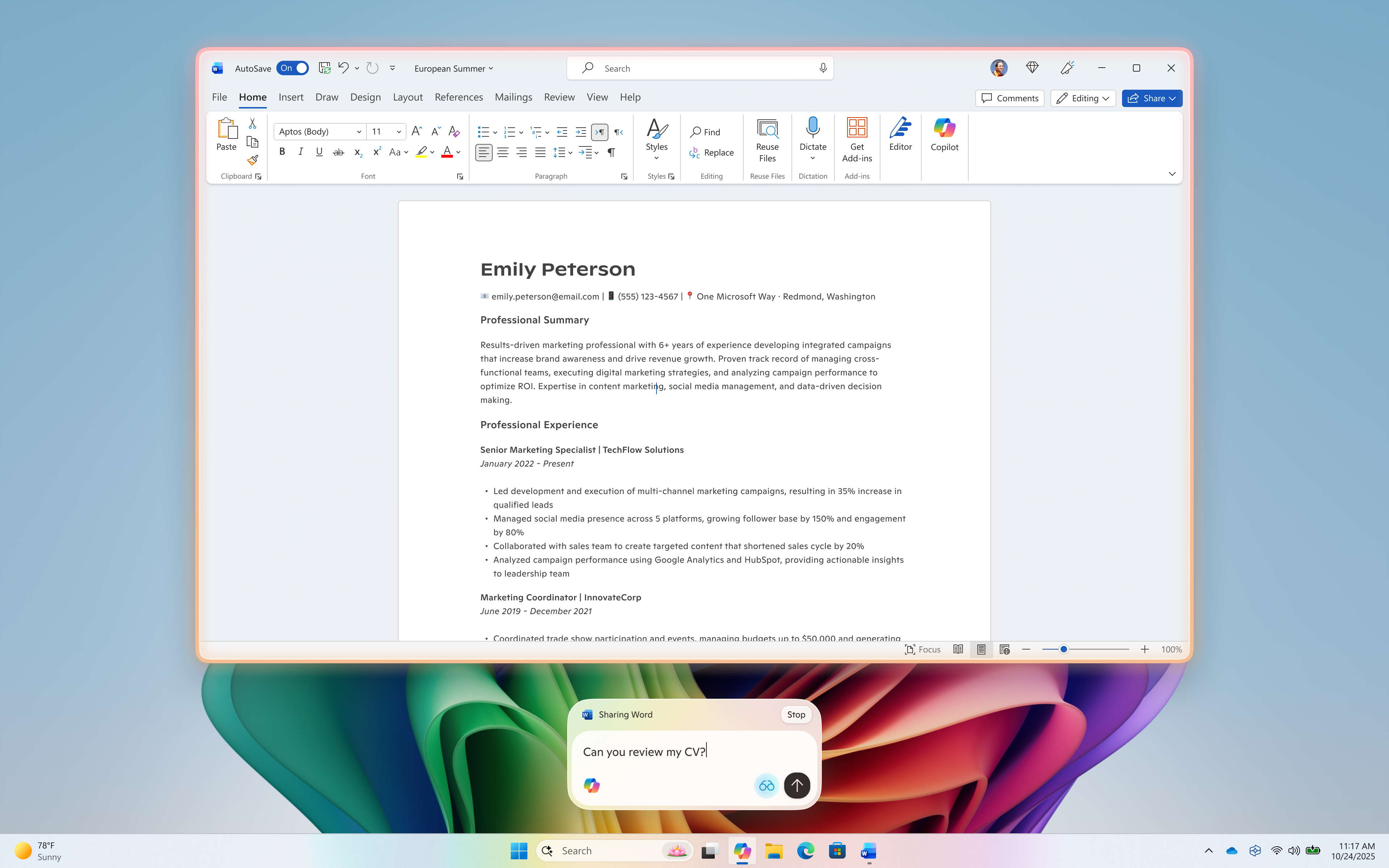 Type your questions or chat about what you’re sharing[/caption]
[caption id="attachment_178350" align="alignnone" width="1024"]
Type your questions or chat about what you’re sharing[/caption]
[caption id="attachment_178350" align="alignnone" width="1024"]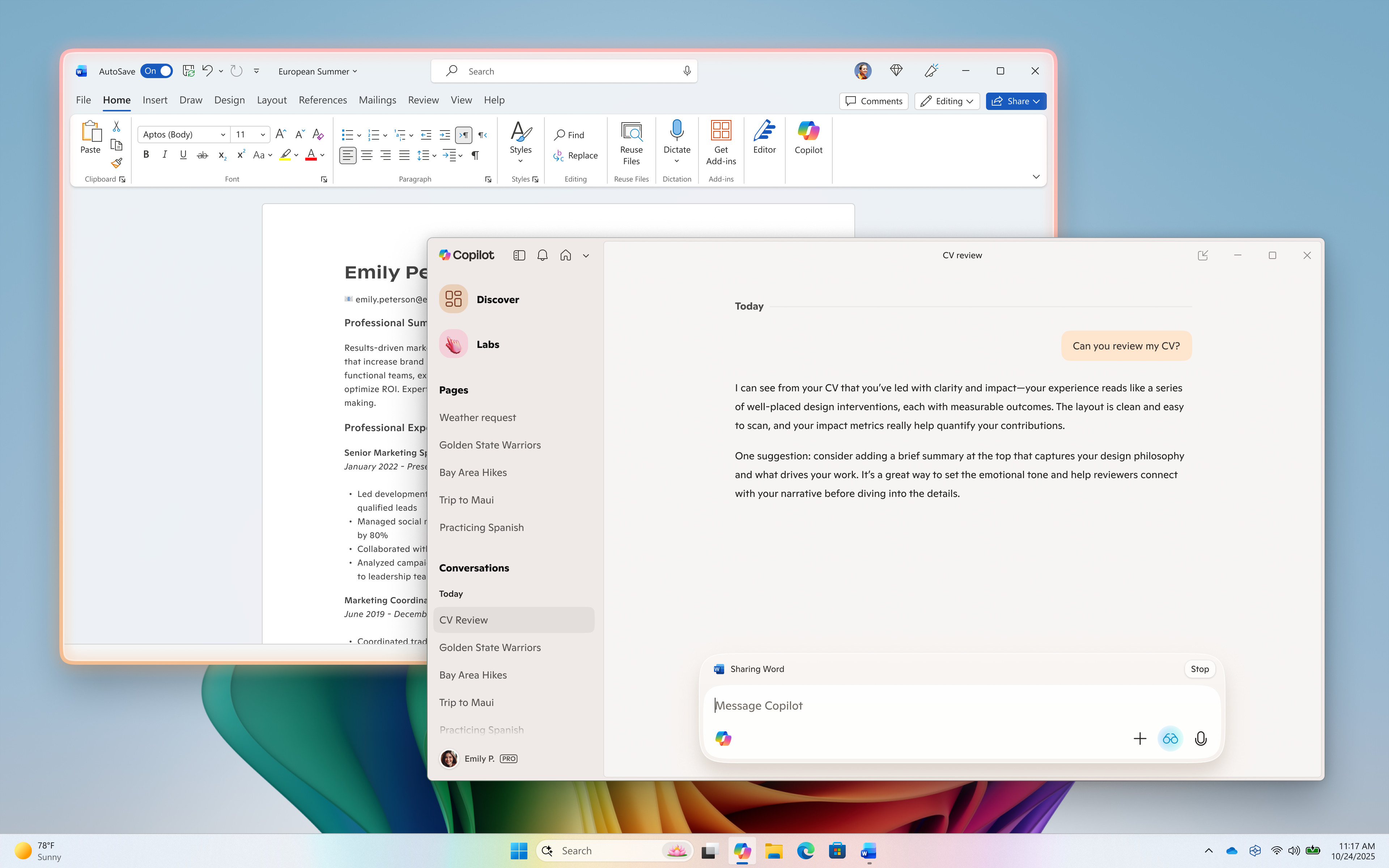 Copilot responds in text[/caption]
This Copilot app update (version 1.25103.107 and higher) is beginning to roll out across all Insider Channels via the Microsoft Store. The above-mentioned features are gradually rolling out so not all Insiders will get the update right away. We are excited to be previewing improvements with our Insiders to ensure all our customers have a great Copilot experience on Windows.
FEEDBACK: Please provide feedback directly within the Copilot app by clicking on your profile icon and choosing “Give feedback”.
Thanks,
Microsoft Copilot Team
Copilot responds in text[/caption]
This Copilot app update (version 1.25103.107 and higher) is beginning to roll out across all Insider Channels via the Microsoft Store. The above-mentioned features are gradually rolling out so not all Insiders will get the update right away. We are excited to be previewing improvements with our Insiders to ensure all our customers have a great Copilot experience on Windows.
FEEDBACK: Please provide feedback directly within the Copilot app by clicking on your profile icon and choosing “Give feedback”.
Thanks,
Microsoft Copilot Team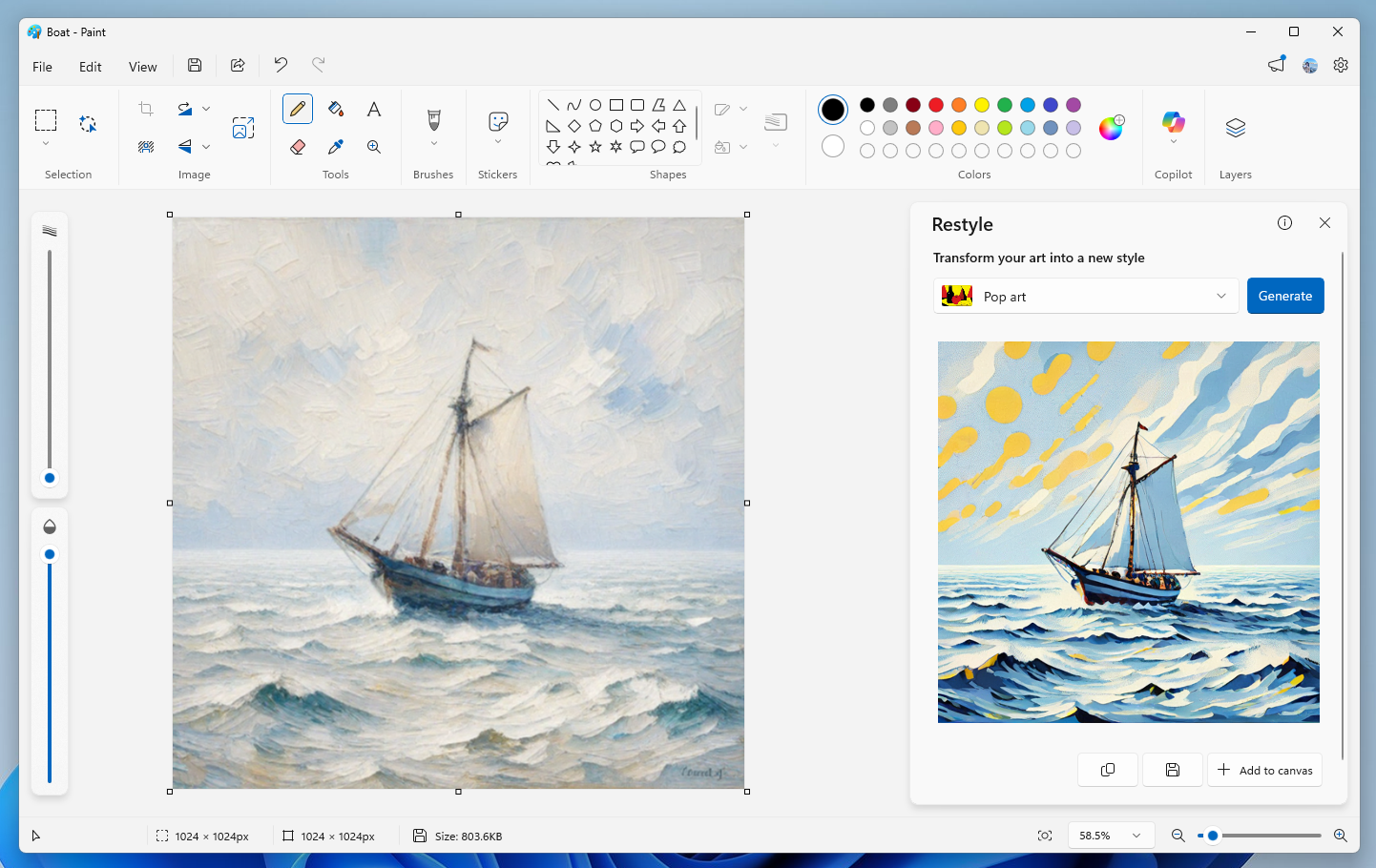 Paint showing a sailboat styled into Pop art.[/caption]
Restyle will be available on Snapdragon-powered Copilot+ PCs. To use Restyle, you will need to sign in with your Microsoft account.
FEEDBACK: Please file feedback in Feedback Hub (WIN + F) under Apps > Paint. As always, we love getting feedback from the community and we will be looking out for your thoughts and suggestions on these updates! Thanks, Dave Grochocki, Principal Group Product Manager – Windows Inbox Apps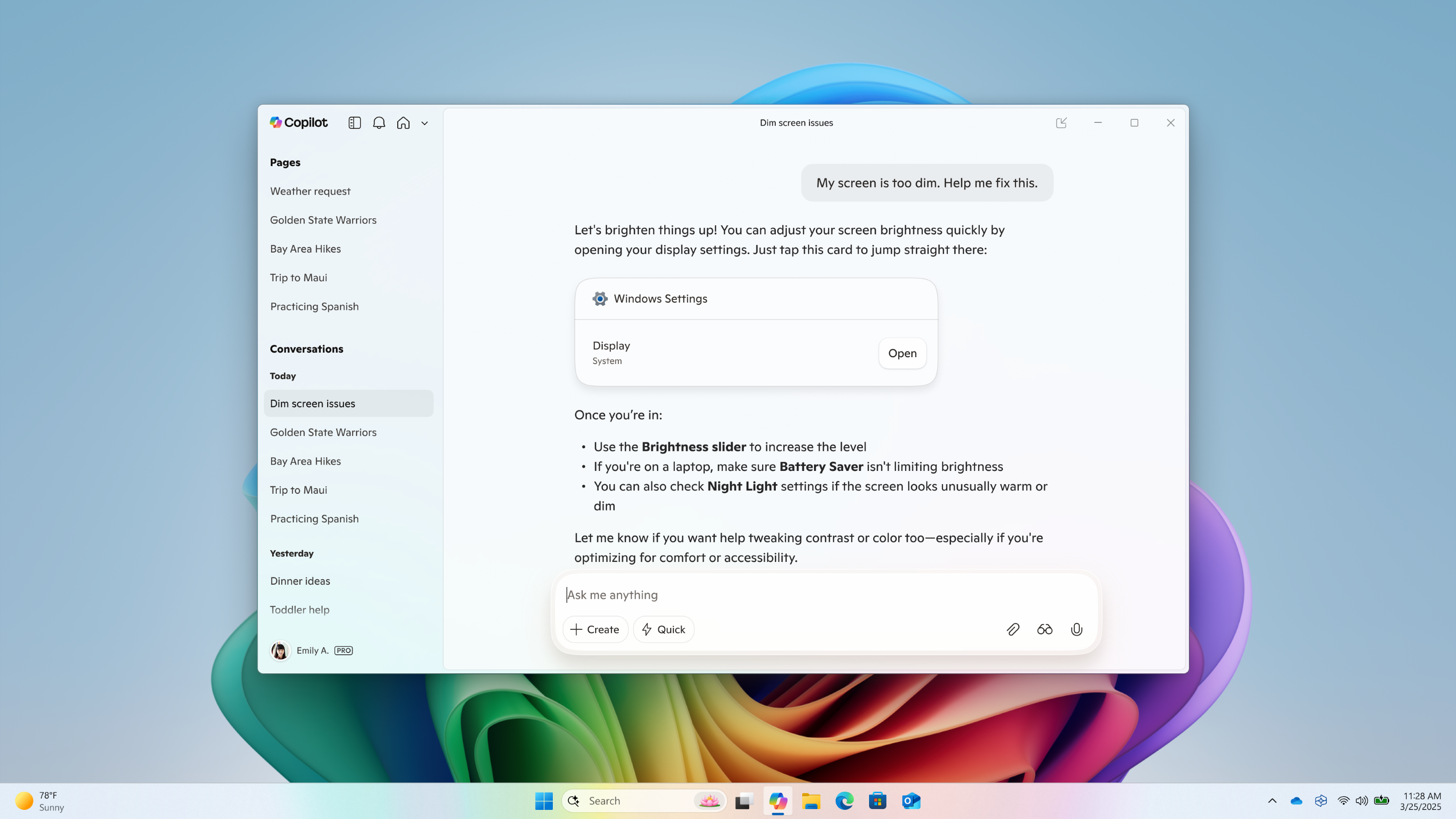 Direct Settings access in Copilot on Windows[/caption]
This Copilot app update (version 1.25095.161 and higher) is beginning to roll out across all Insider Channels via the Microsoft Store. The above-mentioned features are gradually rolling out so not all Insiders will get the update right away. We are excited to be previewing improvements with our Insiders to ensure all our customers have a great Copilot experience on Windows.
FEEDBACK: Please provide feedback directly within the Copilot app by clicking on your profile icon and choosing “Give feedback”.
Thanks,
Microsoft Copilot Team
Direct Settings access in Copilot on Windows[/caption]
This Copilot app update (version 1.25095.161 and higher) is beginning to roll out across all Insider Channels via the Microsoft Store. The above-mentioned features are gradually rolling out so not all Insiders will get the update right away. We are excited to be previewing improvements with our Insiders to ensure all our customers have a great Copilot experience on Windows.
FEEDBACK: Please provide feedback directly within the Copilot app by clicking on your profile icon and choosing “Give feedback”.
Thanks,
Microsoft Copilot Team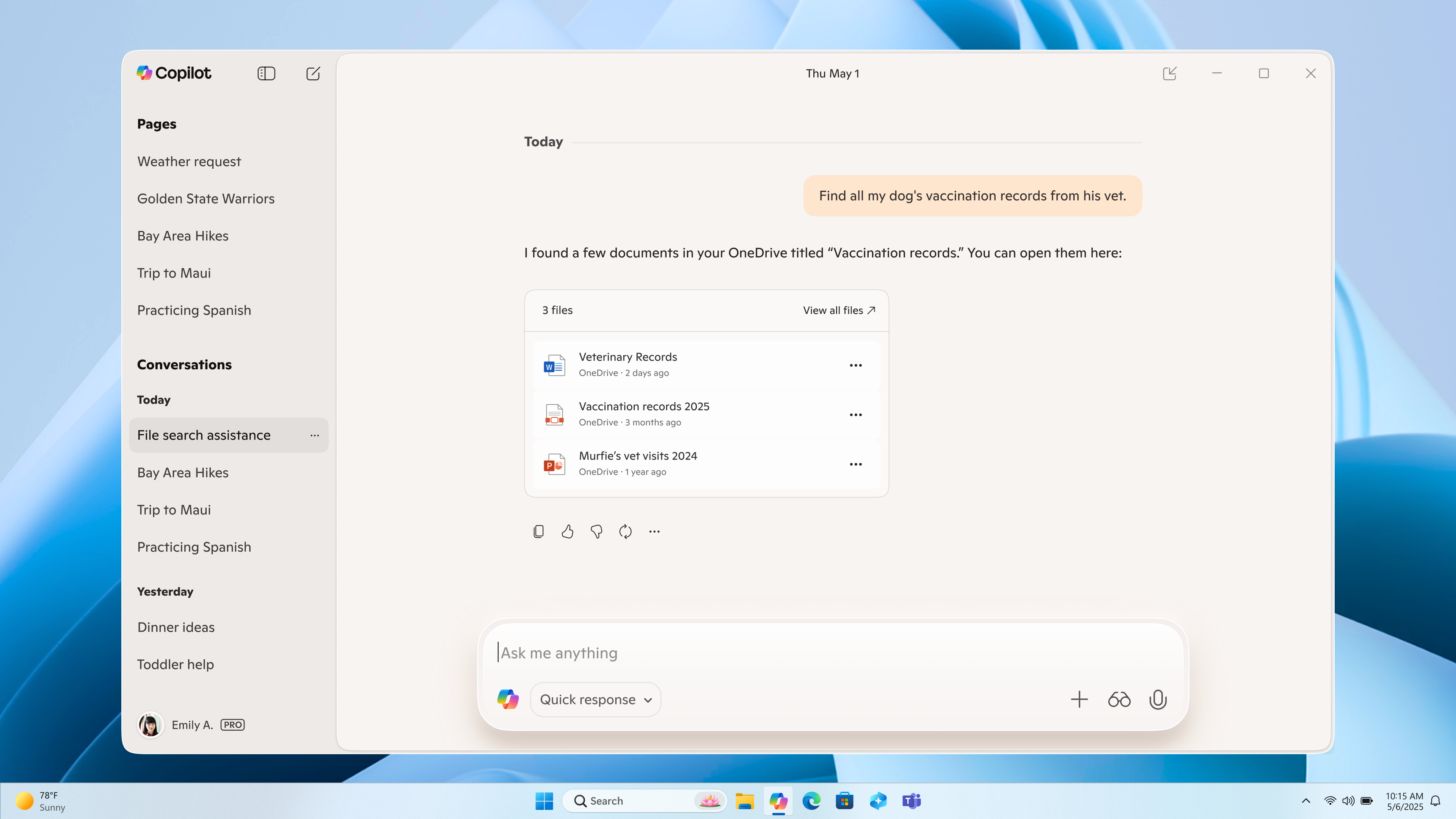 Connectors – OneDrive file search in Copilot on Windows[/caption]
Document Creation and Export: Copilot on Windows now supports creating and exporting content into multiple file formats with a simple prompt. Users can generate Word documents, Excel spreadsheets, PDFs, or PowerPoint presentations and more directly from their Copilot session. Just ask Copilot, “Export this text to a Word document” or “Create an Excel file from this table,” and Copilot will create the file for you. With just a prompt, you can instantly turn ideas, notes, and data into shareable and editable documents with no extra steps or tools required. And for responses with 600 characters or more, Copilot also includes a default export button that lets you send text directly to Word, PowerPoint, Excel, or PDF.
[caption id="attachment_178298" align="alignnone" width="1024"]
Connectors – OneDrive file search in Copilot on Windows[/caption]
Document Creation and Export: Copilot on Windows now supports creating and exporting content into multiple file formats with a simple prompt. Users can generate Word documents, Excel spreadsheets, PDFs, or PowerPoint presentations and more directly from their Copilot session. Just ask Copilot, “Export this text to a Word document” or “Create an Excel file from this table,” and Copilot will create the file for you. With just a prompt, you can instantly turn ideas, notes, and data into shareable and editable documents with no extra steps or tools required. And for responses with 600 characters or more, Copilot also includes a default export button that lets you send text directly to Word, PowerPoint, Excel, or PDF.
[caption id="attachment_178298" align="alignnone" width="1024"]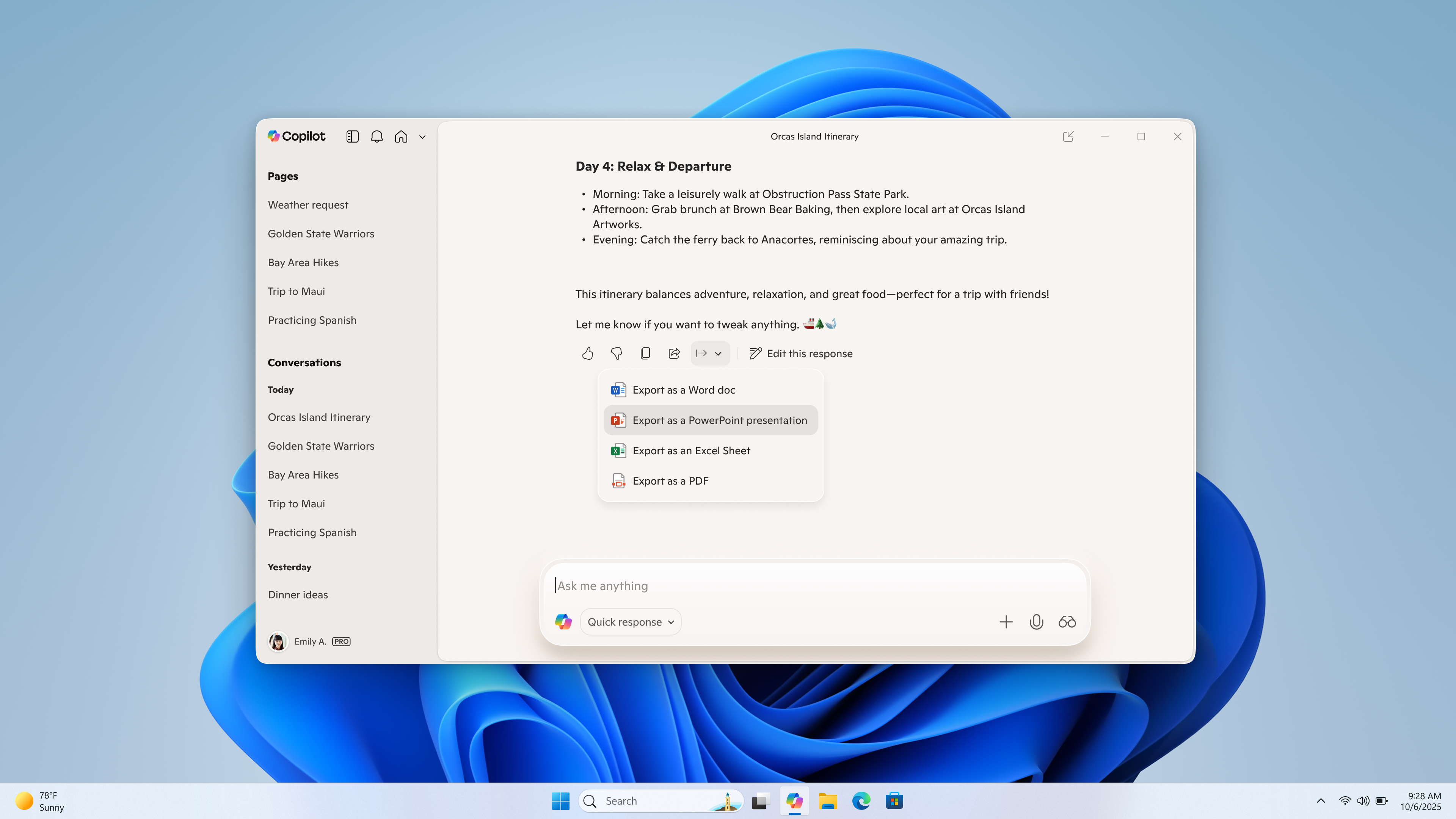 Document creation and export in Copilot on Windows[/caption]
This Copilot app update (version 1.25095.161.0 and higher) is beginning to roll out across all Insider Channels via the Microsoft Store. The above-mentioned features are gradually rolling out so not all Insiders will get the update right away. We are excited to be previewing improvements with our Insiders to ensure all our customers have a great Copilot experience on Windows.
FEEDBACK: Please provide feedback directly within the Copilot app by clicking on your profile icon and choosing “Give feedback”.
Thanks,
Microsoft Copilot Team
Document creation and export in Copilot on Windows[/caption]
This Copilot app update (version 1.25095.161.0 and higher) is beginning to roll out across all Insider Channels via the Microsoft Store. The above-mentioned features are gradually rolling out so not all Insiders will get the update right away. We are excited to be previewing improvements with our Insiders to ensure all our customers have a great Copilot experience on Windows.
FEEDBACK: Please provide feedback directly within the Copilot app by clicking on your profile icon and choosing “Give feedback”.
Thanks,
Microsoft Copilot Team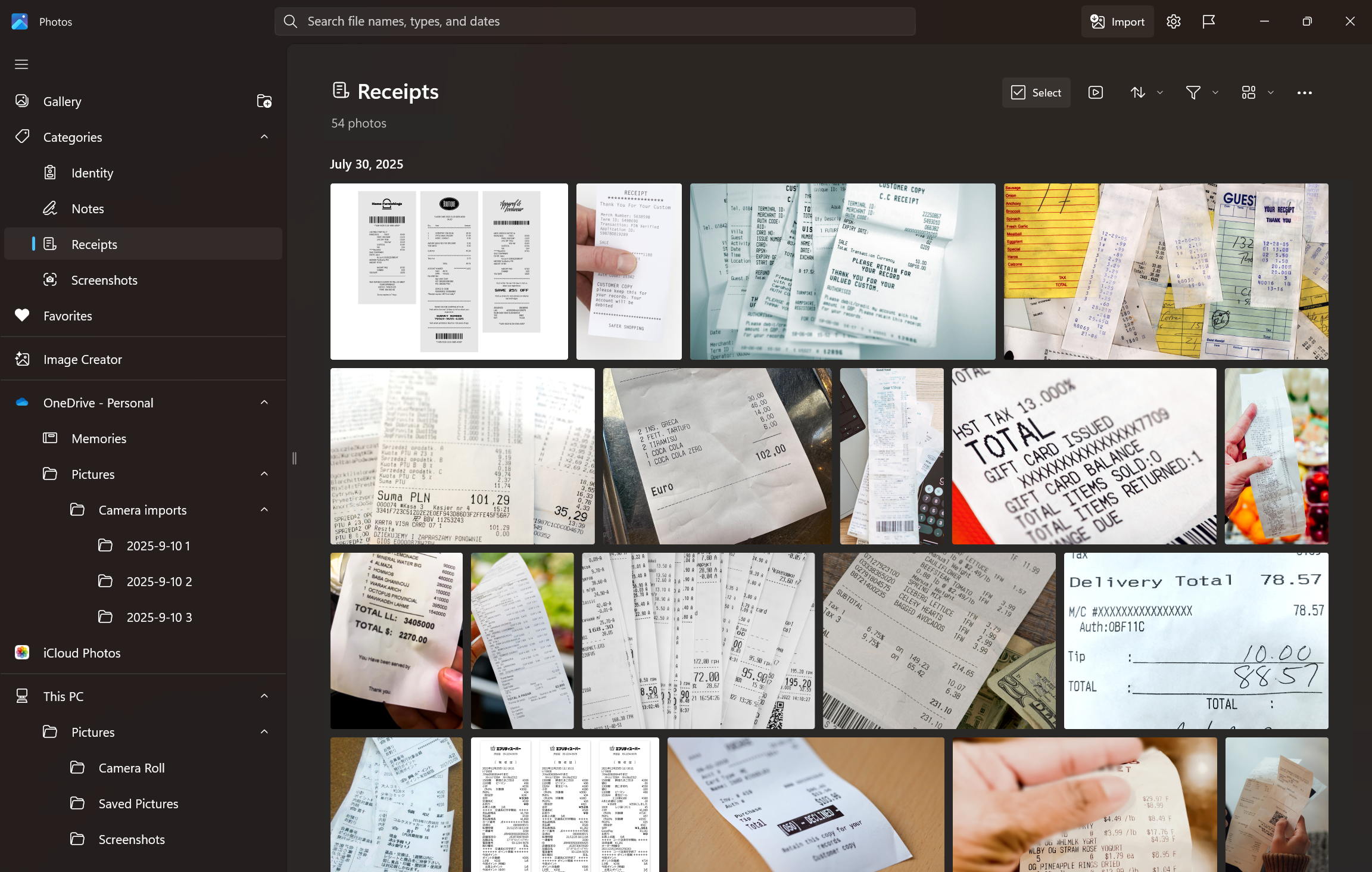 A photo showing Windows Photos app categorizing images of Receipts using the AI powered Auto-categorization feature.[/caption]
How Auto-Categorization works:
A photo showing Windows Photos app categorizing images of Receipts using the AI powered Auto-categorization feature.[/caption]
How Auto-Categorization works:
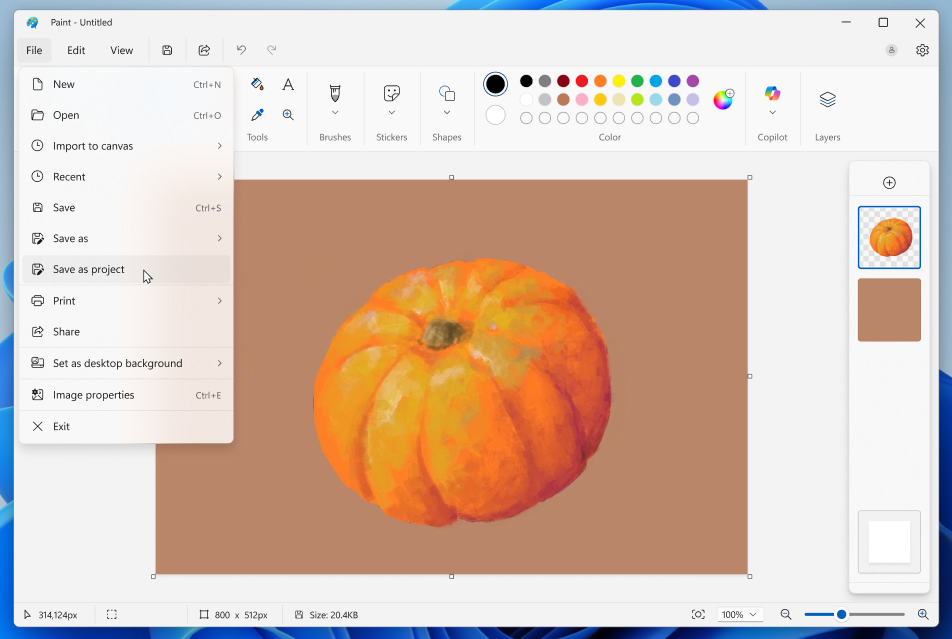 Paint app screenshot of pumpkin and saving as a project file.[/caption]
We’re also adding an opacity slider, giving you control over the transparency of your strokes with the Pencil and Brush tools. To get started, select either tool and use the slider on the left side of the canvas to adjust the opacity to your desired level. Try experimenting with both the size and opacity sliders to create smooth blends and layered effects that bring your artwork to life.
[caption id="attachment_178247" align="alignnone" width="907"]
Paint app screenshot of pumpkin and saving as a project file.[/caption]
We’re also adding an opacity slider, giving you control over the transparency of your strokes with the Pencil and Brush tools. To get started, select either tool and use the slider on the left side of the canvas to adjust the opacity to your desired level. Try experimenting with both the size and opacity sliders to create smooth blends and layered effects that bring your artwork to life.
[caption id="attachment_178247" align="alignnone" width="907"]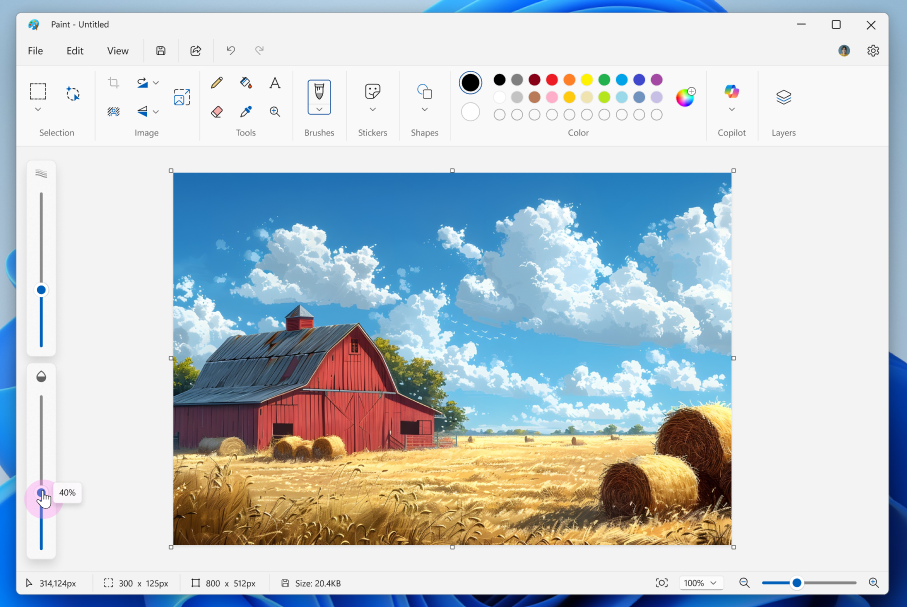 Paint app screenshot of barn with opacity adjusting to 40%.[/caption]
FEEDBACK: Please file feedback in Feedback Hub (WIN + F) under Apps > Paint.
Paint app screenshot of barn with opacity adjusting to 40%.[/caption]
FEEDBACK: Please file feedback in Feedback Hub (WIN + F) under Apps > Paint.
 Snipping Tool Capture Toolbar with the cursor hovering over the new Quick markup tool.[/caption]
To get started, open Snipping Tool via Win + Shift + S or launch the app directly. Before capturing your selection area, you’ll now see a Quick markup button in the top toolbar. Click on this button to toggle the feature on, or use the keyboard shortcut Ctrl + E. Once the button is on, go ahead and select your selection region. You’ll notice after this, you’ll be able to markup and make edits to your image right in Snipping Tool’s selection area before finalizing your screenshot!
[caption id="attachment_178249" align="alignnone" width="1024"]
Snipping Tool Capture Toolbar with the cursor hovering over the new Quick markup tool.[/caption]
To get started, open Snipping Tool via Win + Shift + S or launch the app directly. Before capturing your selection area, you’ll now see a Quick markup button in the top toolbar. Click on this button to toggle the feature on, or use the keyboard shortcut Ctrl + E. Once the button is on, go ahead and select your selection region. You’ll notice after this, you’ll be able to markup and make edits to your image right in Snipping Tool’s selection area before finalizing your screenshot!
[caption id="attachment_178249" align="alignnone" width="1024"]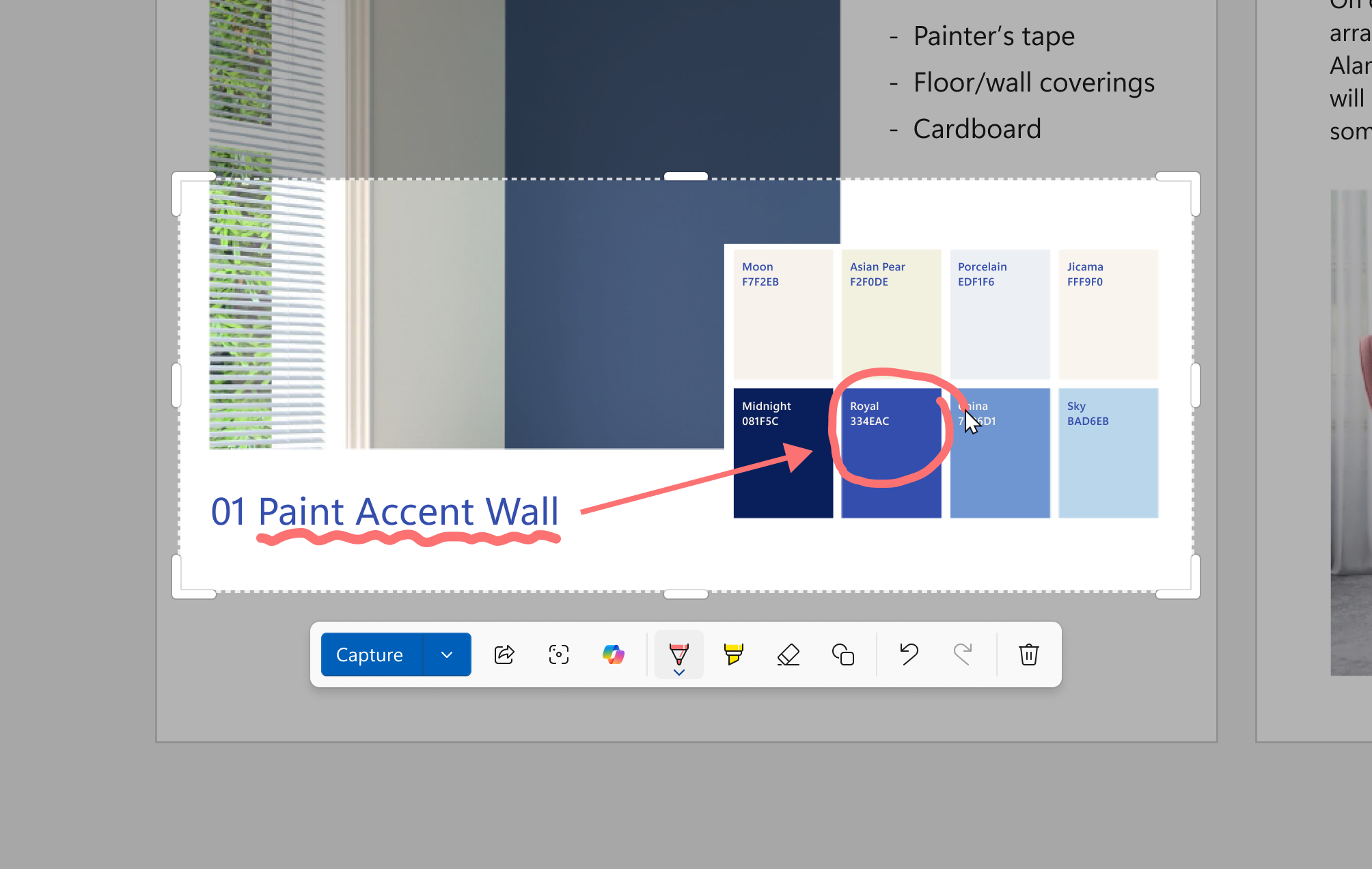 Snipping Tool Quick markup toolbar with a screenshot of color swatches. A single color is circled with the pen tool using Quick markup to bring attention to it.[/caption]
In the Quick markup toolbar, you’ll find the classic pen, highlighter, and eraser tools, along with shapes and emojis to make quick edits to your image. Re-cropping the selection area can be done with the grabbers around the perimeter.
You’ll also be able to streamline your workflows by clicking on the Share, Visual Search with Bing, or Ask Copilot buttons. Please note that for these options, the image will not be copied to your clipboard or autosaved.
FEEDBACK: Please file feedback in Feedback Hub (WIN + F) under Apps > Snipping Tool.
Snipping Tool Quick markup toolbar with a screenshot of color swatches. A single color is circled with the pen tool using Quick markup to bring attention to it.[/caption]
In the Quick markup toolbar, you’ll find the classic pen, highlighter, and eraser tools, along with shapes and emojis to make quick edits to your image. Re-cropping the selection area can be done with the grabbers around the perimeter.
You’ll also be able to streamline your workflows by clicking on the Share, Visual Search with Bing, or Ask Copilot buttons. Please note that for these options, the image will not be copied to your clipboard or autosaved.
FEEDBACK: Please file feedback in Feedback Hub (WIN + F) under Apps > Snipping Tool.
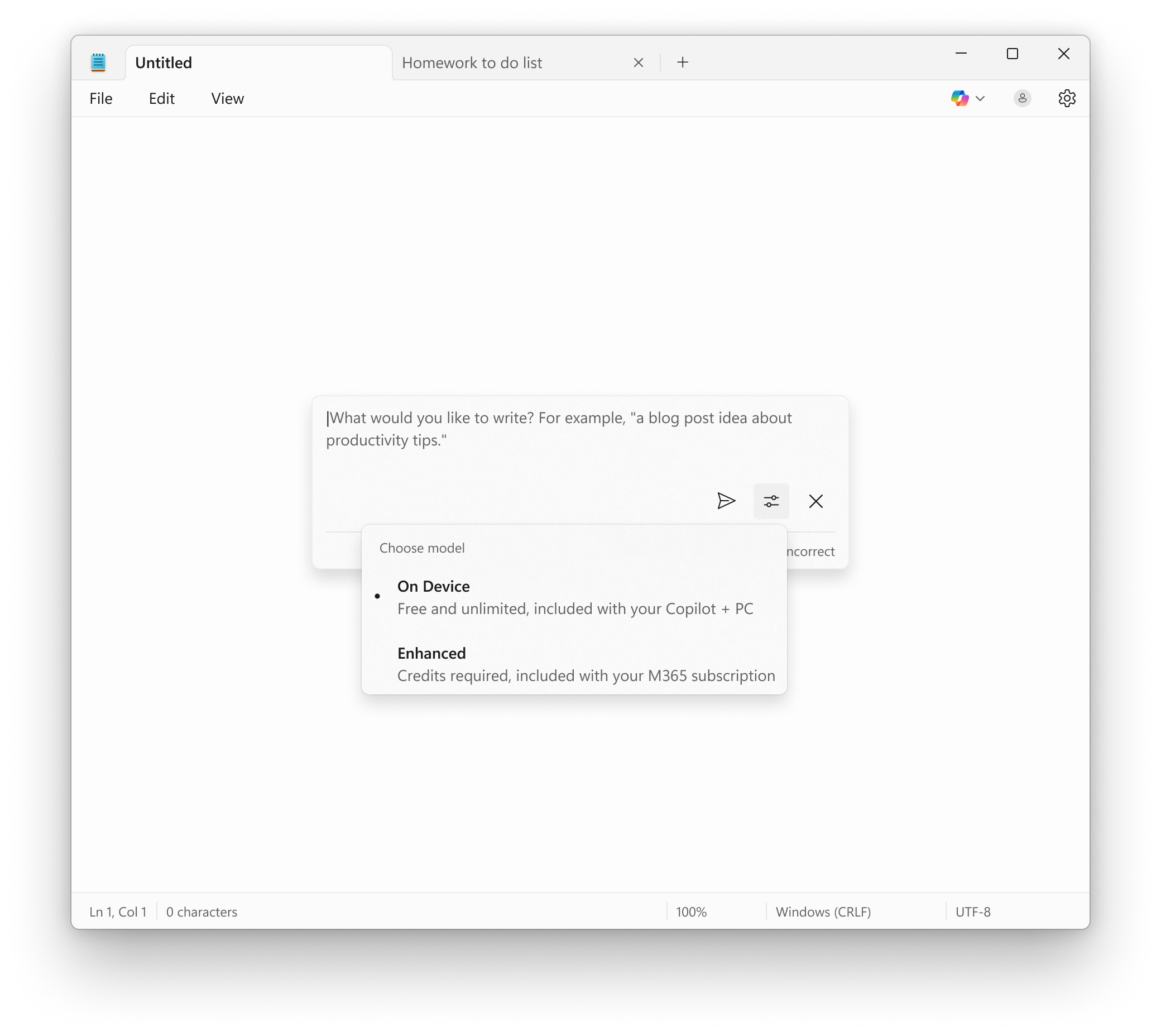 Notepad showing Write prompt with the ability to use the local model on your Copilot+ PC without a subscription.[/caption]
FEEDBACK: Please share your feedback in Feedback Hub (WIN + F) under Apps > Notepad.
As always, we love getting feedback from the community and we will be looking out for your thoughts and suggestions on these updates!
Thanks,
Dave Grochocki, Principal Group Product Manager – Windows Inbox Apps
Notepad showing Write prompt with the ability to use the local model on your Copilot+ PC without a subscription.[/caption]
FEEDBACK: Please share your feedback in Feedback Hub (WIN + F) under Apps > Notepad.
As always, we love getting feedback from the community and we will be looking out for your thoughts and suggestions on these updates!
Thanks,
Dave Grochocki, Principal Group Product Manager – Windows Inbox Apps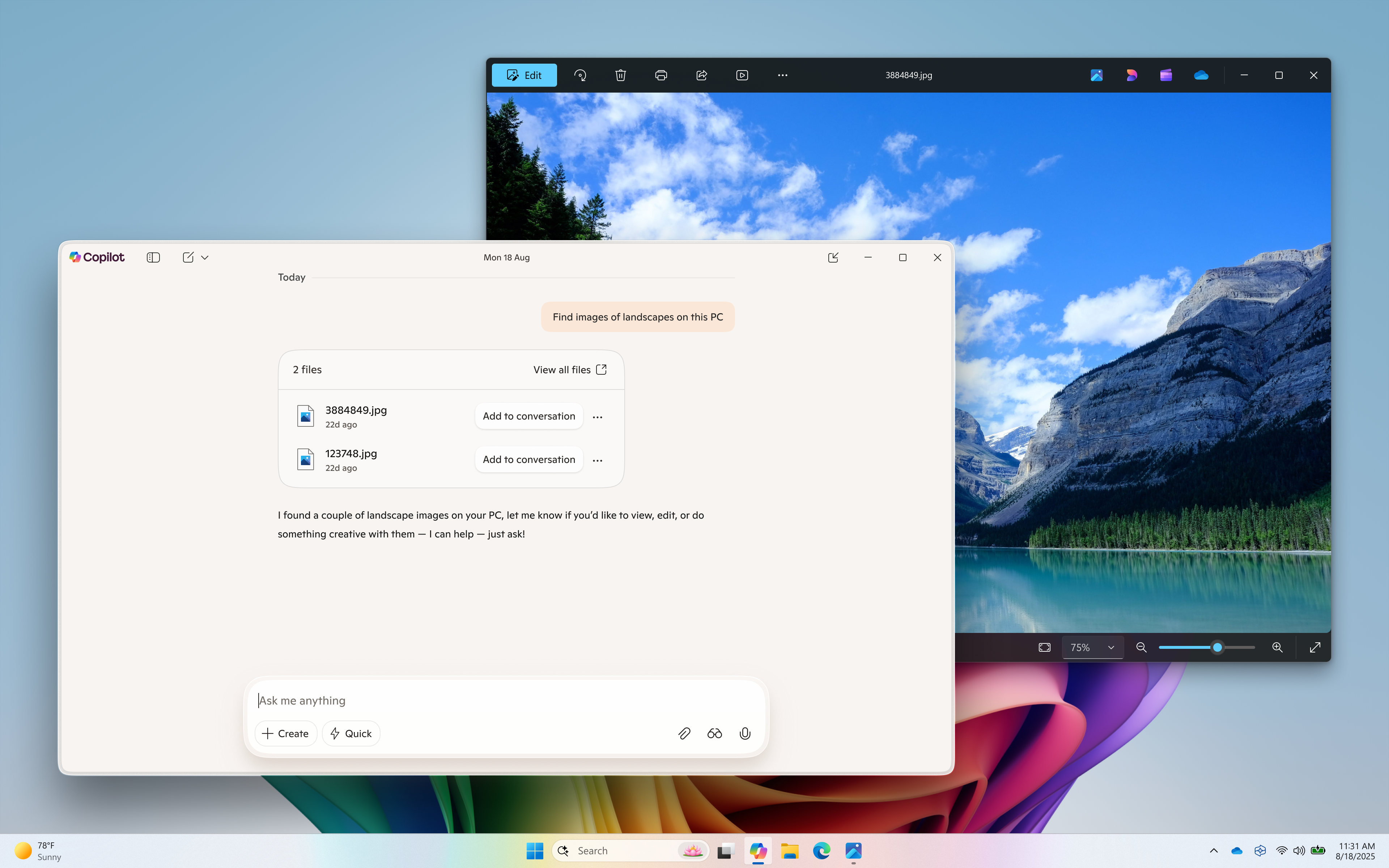 Semantic file search (available on Copilot+ PC) helps find images of a landscape.[/caption]
The new Copilot home experience brings your recent apps, files and conversations into Copilot and at your fingertips.
Now it’s easier to get guided help: when you click on a recent application in the “get guided help with your apps” section, a Vision session will begin to help you get started. Or you can have Copilot take action on a recent document or photo – click the file of choice in the left pane and it’s uploaded to the Copilot chat window. From there you can have Copilot summarize the content, identify objects in an image, or just chat about it.
How does Copilot know what files I have?
Copilot shows you files you've recently opened on your device by referencing the standard Windows "Recent" folder. Like any application on Windows, Copilot can show those recent files used by apps like Word or Photos to help you quickly find your work. These are local files stored on your computer, and Copilot doesn’t scan your entire system or upload anything automatically.
Only files that are compatible with Copilot** and have been recently accessed will appear in the list. If you choose to attach a file and send it to Copilot, that action gives Copilot permission to process it — nothing is shared unless you explicitly do so.
[caption id="attachment_178159" align="alignnone" width="1024"]
Semantic file search (available on Copilot+ PC) helps find images of a landscape.[/caption]
The new Copilot home experience brings your recent apps, files and conversations into Copilot and at your fingertips.
Now it’s easier to get guided help: when you click on a recent application in the “get guided help with your apps” section, a Vision session will begin to help you get started. Or you can have Copilot take action on a recent document or photo – click the file of choice in the left pane and it’s uploaded to the Copilot chat window. From there you can have Copilot summarize the content, identify objects in an image, or just chat about it.
How does Copilot know what files I have?
Copilot shows you files you've recently opened on your device by referencing the standard Windows "Recent" folder. Like any application on Windows, Copilot can show those recent files used by apps like Word or Photos to help you quickly find your work. These are local files stored on your computer, and Copilot doesn’t scan your entire system or upload anything automatically.
Only files that are compatible with Copilot** and have been recently accessed will appear in the list. If you choose to attach a file and send it to Copilot, that action gives Copilot permission to process it — nothing is shared unless you explicitly do so.
[caption id="attachment_178159" align="alignnone" width="1024"]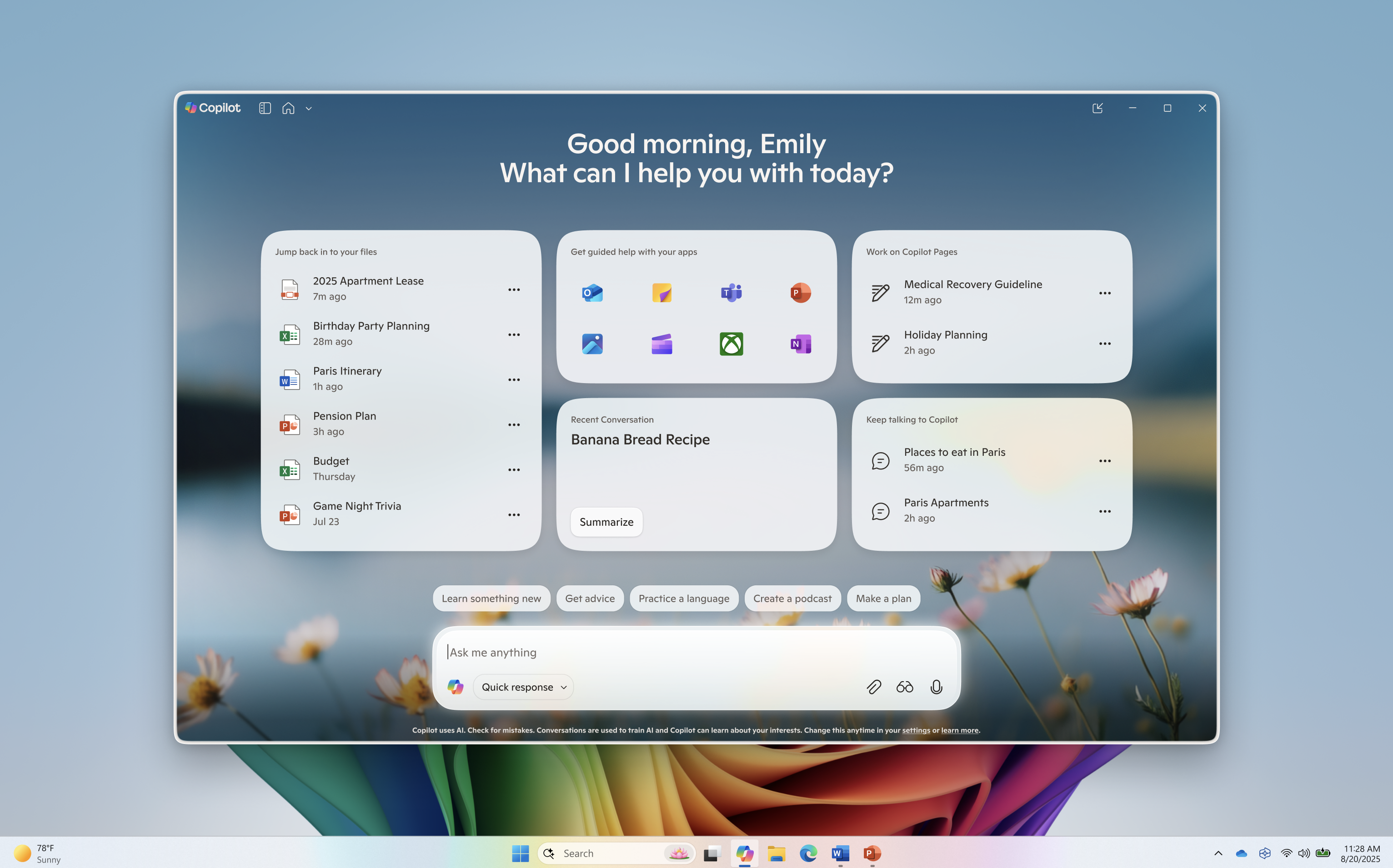 Redesigned Copilot on Windows home.[/caption]
Use Vision to get real-time guidance on what’s on your screen or attach a file to your Copilot conversation for summaries, insights, and helpful pointers. Whether you're planning, creating, or catching up, Copilot is ready to help you.
This Copilot app update (version 1.25082.132.0 and higher) is beginning to roll out across all Insider Channels via the Microsoft Store. The above-mentioned features are gradually rolling out so not all Insiders will get the update right away. We are excited to be previewing improvements with our Insiders to ensure all our customers have a great Copilot experience on Windows.
FEEDBACK: Please provide feedback directly within the Copilot app by clicking on your profile icon and choosing “Give feedback”.
Thanks,
Microsoft Copilot Team
*Works with specific text, image, and document formats only; optimized for select languages (English, Chinese (Simplified), French, German, Japanese, and Spanish). See aka.ms/copilotpluspcs.
**File types currently supported for file upload include .png, .jpeg, .svg, .pdf, .docx, .xlsx, .csv, .json, and .txt.
Join the PC Gaming Preview on your Arm®-based Windows 11 PC![/caption]
This update (version 2508.1001.27.0 and higher) is available to Windows Insiders who are also Xbox Insiders enrolled in the PC Gaming Preview on their Arm®-based Windows 11 PCs, located in the Xbox Insider Hub.
If you’re not enrolled in the PC Gaming Preview, here’s how to get started:
Redesigned Copilot on Windows home.[/caption]
Use Vision to get real-time guidance on what’s on your screen or attach a file to your Copilot conversation for summaries, insights, and helpful pointers. Whether you're planning, creating, or catching up, Copilot is ready to help you.
This Copilot app update (version 1.25082.132.0 and higher) is beginning to roll out across all Insider Channels via the Microsoft Store. The above-mentioned features are gradually rolling out so not all Insiders will get the update right away. We are excited to be previewing improvements with our Insiders to ensure all our customers have a great Copilot experience on Windows.
FEEDBACK: Please provide feedback directly within the Copilot app by clicking on your profile icon and choosing “Give feedback”.
Thanks,
Microsoft Copilot Team
*Works with specific text, image, and document formats only; optimized for select languages (English, Chinese (Simplified), French, German, Japanese, and Spanish). See aka.ms/copilotpluspcs.
**File types currently supported for file upload include .png, .jpeg, .svg, .pdf, .docx, .xlsx, .csv, .json, and .txt.
Join the PC Gaming Preview on your Arm®-based Windows 11 PC![/caption]
This update (version 2508.1001.27.0 and higher) is available to Windows Insiders who are also Xbox Insiders enrolled in the PC Gaming Preview on their Arm®-based Windows 11 PCs, located in the Xbox Insider Hub.
If you’re not enrolled in the PC Gaming Preview, here’s how to get started:
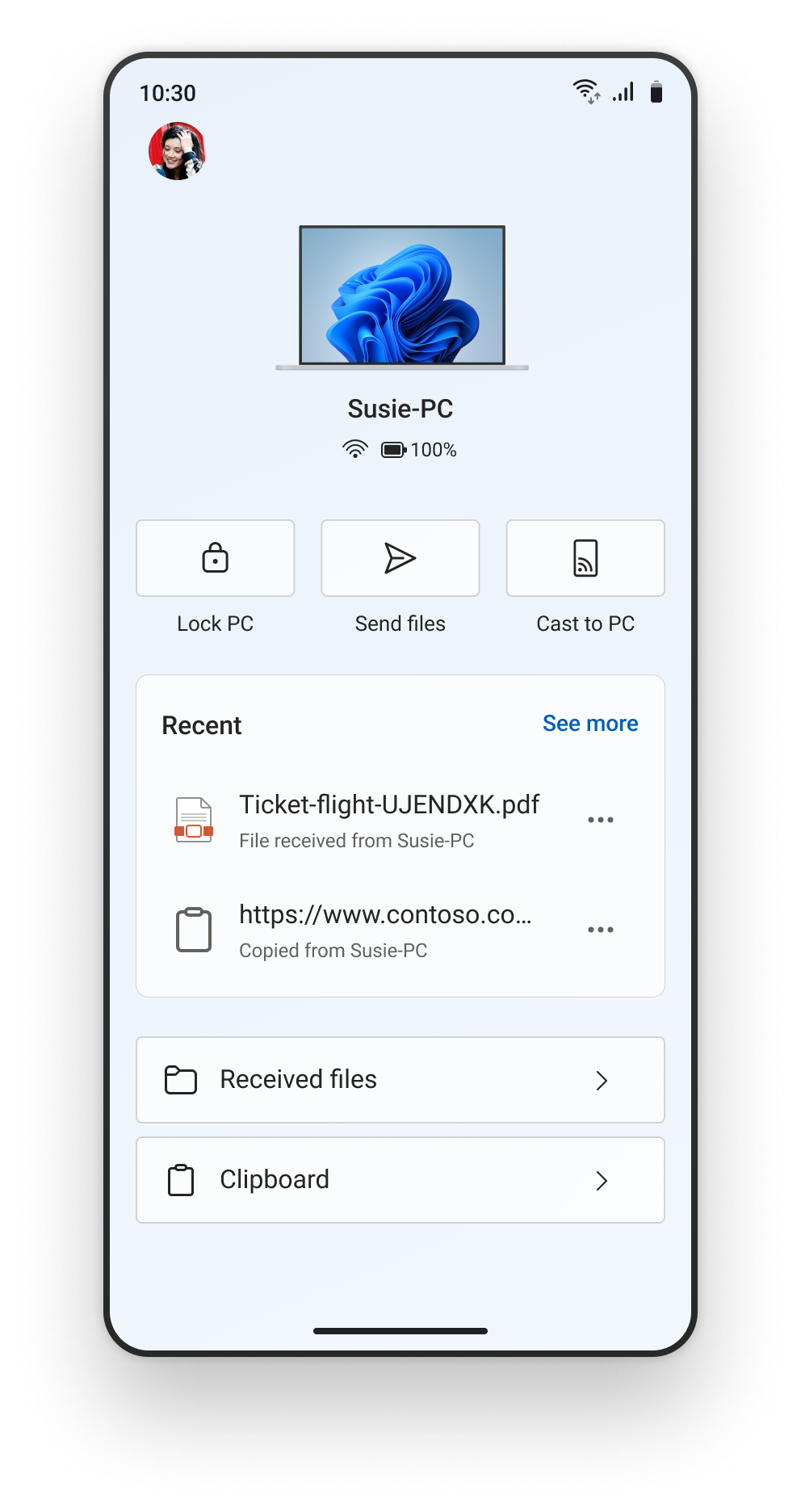 The refreshed Link to Windows experience on an Android phone.[/caption]
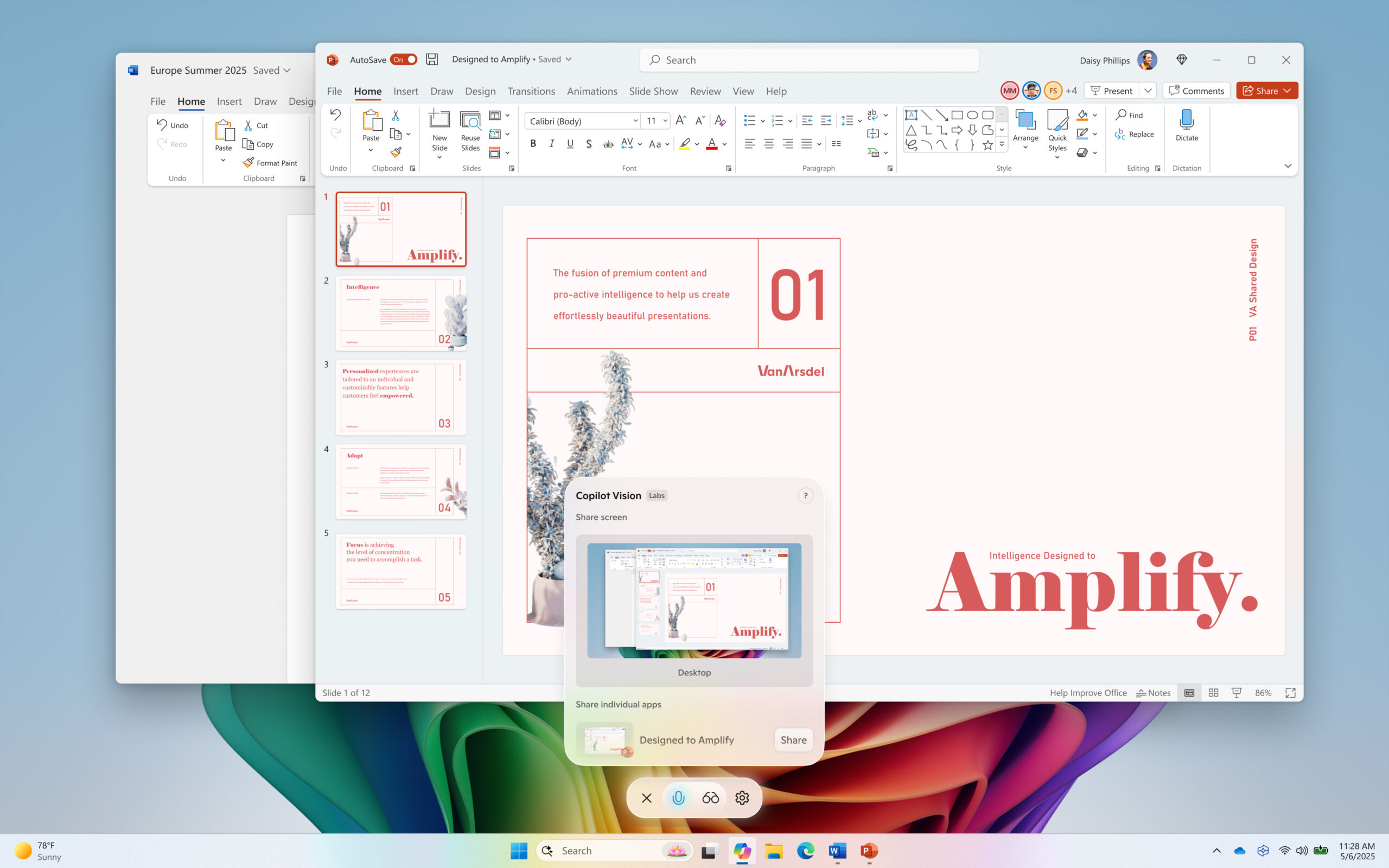 Copilot Vision on Windows with desktop share.[/caption]
Access Vision from your Voice conversation: Now you can turn on Vision from a Voice conversation. When you're talking with Copilot and want to provide additional context on whatever you’re working on, simply click on the glasses icon and share your screen.
This Copilot app update (version 1.25071.125 and higher) is beginning to roll out across all Insider Channels via the Microsoft Store. These updates will first roll out to Insiders in markets where Windows Vision is enabled. The above-mentioned features are gradually rolling out so not all Insiders will get the update right away. We are excited to be previewing improvements with our Insiders to ensure all our customers have a great Copilot experience on Windows.
FEEDBACK: Please provide feedback directly within the Copilot app by clicking on your profile icon and choosing “Give feedback”.
Thanks,
Microsoft Copilot Team
Copilot Vision on Windows with desktop share.[/caption]
Access Vision from your Voice conversation: Now you can turn on Vision from a Voice conversation. When you're talking with Copilot and want to provide additional context on whatever you’re working on, simply click on the glasses icon and share your screen.
This Copilot app update (version 1.25071.125 and higher) is beginning to roll out across all Insider Channels via the Microsoft Store. These updates will first roll out to Insiders in markets where Windows Vision is enabled. The above-mentioned features are gradually rolling out so not all Insiders will get the update right away. We are excited to be previewing improvements with our Insiders to ensure all our customers have a great Copilot experience on Windows.
FEEDBACK: Please provide feedback directly within the Copilot app by clicking on your profile icon and choosing “Give feedback”.
Thanks,
Microsoft Copilot Team