Normale weergave

  •  

Minecraft 25w44a (snapshot) Released

28 Oktober 2025 om 15:02
25w44a is the fourth snapshot for Java Edition 1.21.11, released on October 28, 2025, which adds camel husks and parched. Full changelog: https://minecraft.wiki/Java_Edition_25w44a
  •  

Firefox 144.0.2

28 Oktober 2025 om 17:03

Fixed

  • Fixed an issue where the list of available locales in about:settings contained more locales than were downloaded or currently supported. (Bug 1994642)

  • Fixed an issue where using the keyboard to open the Unified Search dropdown was inconsistent. The dropdown now expands properly, allowing users to select a search engine using the keyboard. (Bug 1979826)

  • Fixed an issue where curated photo collections on Microsoft OneDrive's Photos “For You” page failed to load, showing a gray screen instead of content. Collections now display as expected. (Bug 1986533)

  • Fixed a startup crash affecting Windows users with Avast or other security software installed. (Bug 1992678)

  • Fixed an issue on macOS where the emoji picker shortcut and menu entry stopped working after switching between apps. (Bug 1980815)

  • Fixed an issue on macOS where dragging images from Firefox into third-party apps like Preview could fail or behave unexpectedly. (Bug 1995345)

  • Fixed performance and video playback issues on macOS 26 (Tahoe) that occurred when the system was under heavy load. (Bug 1995638)

  • Fixed a browser hang on macOS 26 (Tahoe) that could occur when bookmark folders contained loops or repeated references to themselves. (Bug 1995621)

  •  

v0.19.0

28 Oktober 2025 om 13:47

From refreshed user interface elements to playback improvements, there are many changes across the board in this update of Jellyfin for Android TV. Read about all the highlights on our blog post or have a look through the full changelog below.

If you appreciate my work, you can show your support with a donation through Buy Me a Coffee or GitHub sponsors. Your support helps me continue improving and growing the app. Thank you!

🌟 Highlights

🏗️ Enhancements

💥 Crash fixes

🔧 Bugfixes

🔃 Refactoring

📈 Dependency updates

  • Update aboutlibraries by renovate[bot] v12.2.4 #4766, v12.2.3 #4717, v12.2.1 #4707, v12.2.0 #4693, v12.1.2 #4642, v12.1.1 #4641, v12.1.0 #4637, v12.0.1 #4620, v12 (major) #4602, v11.6.3 #4469, v11.6.2 #4419, v11.4.0 #4374
  • Update com.android.tools.build:gradle by renovate[bot] v8.13.0 #4896, v8.12.2 #4888, v8.12.1 #4870, v8.12.0 #4830, v8.11.1 #4746, v8.10.1 #4689, v8.10.0 - autoclosed #4609, v8.9.1 #4542, v8.9.0 #4499, v8.8.2 - autoclosed #4485, v8.8.1 #4456, v8.8.0 #4392
  • Update io.mockk:mockk by renovate[bot] v1.14.6 #4979, v1.14.5 #4793, v1.14.4 #4742, v1.14.2 #4629, v1.14.0 #4573, v1.13.17 #4490, v1.13.16 #4395
  • Update androidx.activity:activity by renovate[bot] v1.10.1 #4484, v1.10.0 #4406
  • Update dependency androidx.recyclerview:recyclerview to v1.4.0 #4407, by renovate[bot]
  • Update koin by renovate[bot] v4.1.1 #4900, v4.1.0 #4712, v4.0.4 #4557, v4.0.3 #4546, v4.0.2 #4414
  • Update gradle by renovate[bot] v9 #4831, v8.14.3 #4769, v8.14.2 #4708, v8.14.1 #4678, v8.14 #4622, v8.13 #4478, v8.12.1 #4418
  • Update androidx.compose.foundation:foundation by renovate[bot] v1.8.3 #4732, v1.8.2 #4676, v1.7.8 #4452, v1.7.7 #4429
  • Update androidx.compose.ui:ui-tooling by renovate[bot] v1.8.3 #4730, v1.8.2 #4670, v1.7.8 #4453, v1.7.7 #4430
  • Update androidx.fragment by renovate[bot] v1.8.8 #4700, v1.8.7 #4669, v1.8.6 #4451
  • Update appleboy/ssh-action action to v1.2.1 #4468, by renovate[bot]
  • Update dependency io.gitlab.arturbosch.detekt to v1.23.8 #4473, by renovate[bot]
  • Update dependency com.android.tools:desugar_jdk_libs to v2.1.5 #4479, by renovate[bot]
  • Update dependency androidx.constraintlayout:constraintlayout to v2.2.1 #4486, by renovate[bot]
  • Update org.jellyfin.sdk:jellyfin-core by renovate[bot] v1.7.1 #4993, v1.7.0 #4968, v1.7.0-beta.6 #4901, v1.7.0-beta.5 #4863, v1.7.0-beta.4 #4858, v1.6.7 #4556
  • Update androidx.tvprovider:tvprovider by renovate[bot] v1.1.0 #4645, v1.1.0-beta01 #4575
  • Update androidx.core:core-ktx by renovate[bot] v1.17.0 #4857, v1.16.0 #4576
  • Update github/codeql-action action by renovate[bot] v4.31.0 #5024, v4.30.8 #5009, v4 #5000, v3.30.6 #4974, v3.30.5 #4967, v3.30.3 #4928, v3.30.1 #4904, v3.30.0 #4895, v3.29.11 #4874, v3.29.10 #4868, v3.29.9 #4845, v3.29.8 #4842, v3.29.5 #4824, v3.29.4 #4813, v3.29.3 #4809, v3.29.2 #4764, v3.29.1 #4753, v3.28.19 #4699, v3.28.17 #4639, v3.28.16 #4611
  • Update androidx.leanback to v1.2.0 #4613, by renovate[bot]
  • Update androidx.work:work-runtime by renovate[bot] v2.10.5 - autoclosed #4964, v2.10.4 #4926, v2.10.3 #4826, v2.10.2 #4733, v2.10.1 #4616
  • Update androidx.compose by renovate[bot] v1.9.4 #5042, v1.9.3 #5004, v1.9.2 #4963, v1.9.1 #4925, v1.9.0 #4854, v1.8.1 #4644, v1.8.0 #4618
  • Update androidx.lifecycle by renovate[bot] v2.9.4 #4943, v2.9.3 #4887, v2.9.2 #4795, v2.9.1 #4701, v2.9.0 #4646
  • Update coil by renovate[bot] v3.3.0 #4810, v3.2.0 #4657
  • Update dependency androidx.window:window to v1.4.0 #4671, by renovate[bot]
  • Update dependency androidx.appcompat:appcompat to v1.7.1 #4702, by renovate[bot]
  • Update Kotlin by renovate[bot] v2.2.21 #5044, v2.2.20 #4923, v2.2.10 #4856, v2.2.0 #4744
  • Update dependency org.jetbrains.kotlinx:kotlinx-serialization-json to v1.9.0 #4754, by renovate[bot]
  • Update gradle/actions action by renovate[bot] v5 #4980, v4.4.2 #4840
  • Update actions/checkout action to v5 #4846, by renovate[bot]
  • Update dependency androidx.fragment:fragment-ktx to v1.8.9 #4853, by renovate[bot]
  • Update dependency io.github.peerless2012:ass-media to v0.3.0-rc03 - autoclosed #4855, by renovate[bot]
  • Update kotest by renovate[bot] v6.0.4 #5020, v6.0.3 #4916, v6.0.2 #4898, v6.0.1 #4879, v6 (major) #4867
  • Update actions/setup-java action to v5 #4873, by renovate[bot]
  • Update actions/stale action by renovate[bot] v10.1.0 #4992, v10 #4902
  • Update androidx.activity to v1.11.0 #4929, by renovate[bot]
  • Update Gradle to v9.1.0 #4945, by renovate[bot]
  • Update acra to v5.13.1 #4971, by renovate[bot]
  • Update actions/upload-artifact action to v5 #5048, by renovate[bot]
  • Update Kotlin #4250, by renovate[bot]
  • Update CI dependencies #4386, by renovate[bot]
  • Update CI dependencies #4413, by renovate[bot]
  • Update CI dependencies #4425, by renovate[bot]
  • Update CI dependencies #4431, by renovate[bot]
  • Update CI dependencies #4474, by renovate[bot]
  • Update CI dependencies #4506, by renovate[bot]
  • Update CI dependencies #4529, by renovate[bot]
  • Update CI dependencies #4541, by renovate[bot]
  • Update CI dependencies #4570, by renovate[bot]
  • Update CI dependencies #4661, by renovate[bot]
  • Update CI dependencies #4719, by renovate[bot]
  • Update androidx.media3 #4817, by renovate[bot]
  • Update CI dependencies #4917, by renovate[bot]

Contributors

  •  

vMix 29 is available now!

27 Oktober 2025 om 05:40

vMix 29 is now available for download via the vMix.com download page! Good news for those who purchased vMix after January 2023, as it’s a free update! vMix Max users can also update today for free to get all of the new vMix 29 features. If you like what you see and want to update to vMix 29 from an older version, it’s just $60 USD for an additional 12 months of updates. To get up to date with the new vMix 29 features, here’s a short video from current vMix CEO Martin “Spud” Sinclair.

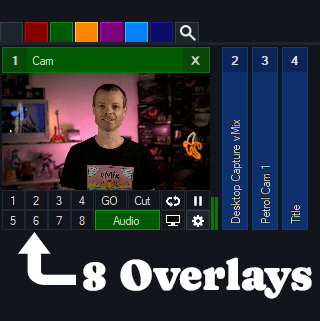
8 Overlays and 8 Stingers

vMix 29 will now have double the amount of Overlays and Stingers as previous versions! Now you’ll be able to overlay to your heart’s content. With the Overlay support for Mixes in vMix 28, the extra 4 Overlays will give you plenty of options!

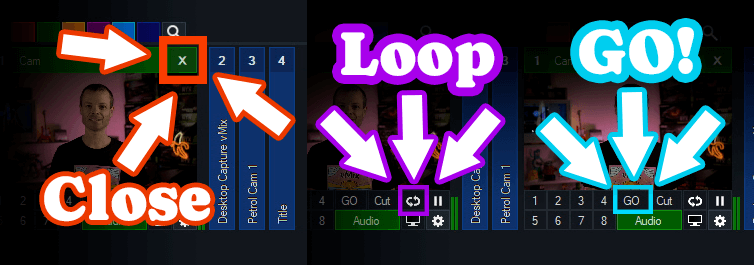
There has also been a few interface changes on inputs with some new icons, positions and functions.

Close– To close an input now you just need to click the X in the top right.

Loop– To loop a video click the loop icon.

GO– The GO button replaces Quick Play. By default it functions the same as the Quick Play transition but also adds full shortcut functionality for each GO button on every input!

Open Media Transport

vMix 29 has full support for input and output of Open Media Transport (OMT). OMT is an open-source protocol for high-quality and low latency local network video. For more information head to openmediatransport.org.

Replay Updates

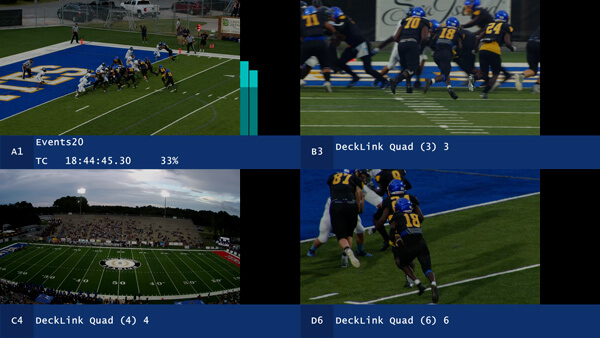
Quad View mode has been added to Replay that allows viewing four separate camera angles on screen at a time in high quality (via Replay MultiView). This provides a simple way to review and compare content on one screen from multiple angles. Adding multiple tags to events is also available in vMix 29, along with dragging and dropping events to list folders.

New Replay performance updates have been added such as-

  • CPU usage for both recording and playback substantially reduced by up to 50%
  • New Configure Storage option allows selecting separate drives for individual camera recordings.

Audio

  • Five new audio bus configurations available: AB, CD, DE, ABCD and DEFG
  • All audio bus options now selectable for MultiCorder in addition to Master

Triggers

New OnCountdownTime and OnCountdownRemaining, allow triggers on Title countdowns.

Try vMix for free!

For a Free 60-Day Trial of vMix Pro, just head to the download page on vMix.com. You just need to download, install and enter your email address where it says Register for a fully functional 60 day trial.

vMix 29 will be a free update for those that have purchased after January 1st 2023 or if you’ve purchased a 12 month upgrade…in the last 12 months. vMix Max users can update for free.

If you’re outside of this window and would like to update, you can do so via our Upgrades Page. It’s $60 USD for an additional 12 months of updates. If you don’t want to, you can continue to use your current vMix version.

For more information about vMix, just head to vMix.com!

Follow Us!

vMixDan

If you’d like to keep up to date with new updates, live streams, trade shows and tutorial videos check us out on-

YouTube
Facebook
Instagram

Here’s a full list of all the updates for vMix 29…take a look, you might find something you like!

Open Media Transport (OMT) support

  • New open source protocol for sending and receiving high quality audio and video over a gigabit LAN
  • Full 4K and high frame rate support (120fps+)
  • Supports direct recording to Instant Replay and MultiCorder (vMix AVI) without re-encoding, saving on CPU
  • Support for Low, Medium and High quality presets, providing options for both lower and higher bandwidth and quality than competing protocols
  • Built in fault tolerance, handles corrupt video data gracefully.
  • More information and free tools for both Mac and PC available at https://www.openmediatransport.org/

Instant Replay

  • CPU usage for both recording and playback substantially reduced by up to 50%
  • New Configure Storage option allows selecting separate drives for individual camera recordings
  • Add multiple tags to events
  • Drag and drop events to list folders
  • New Quad View mode allows viewing four separate camera angles on screen at a time in high quality (via Replay MultiView)
  • New Activators: ReplayLive, ReplayChannelAB, ReplayChannelA, ReplayChannelB, ReplayQuadMode
  • New Shortcuts: ReplayToggleQuadMode, ReplayQuadModeOn, ReplayQuadModeOff, ReplayAppendLastEventText, ReplayAppendLastEventTextCamera, ReplayAppendSelectedEventText, ReplayAppendSelectedEventTextCamera
  • Added configurable audio source option when exporting clips

New Overlay Channels

  • Increased number of overlays to 8 up from 4 (in HD and higher editions)
  • Also increased number of stingers to 8
  • Updated input buttons layout to support new overlays
  • New shortcuts and activators added to support additional overlays

Remember vMix GO? It’s back, in POG form (Programmable option gateway)!

  • Replaces QuickPlay button under each input with a new customisable action called GO
  • Defaults to QuickPlay but also supports transitions or a fully customisable shortcut
  • Hovering mouse over GO button will reveal the currently assigned action

Zoom

  • Added support for connecting directly to Zoom Events / Sessions

Audio

  • Five new audio bus configurations available: AB, CD, DE, ABCD and DEFG
  • All audio bus options now selectable for MultiCorder in addition to Master

Search

  • Added participant search to the Zoom Manager
  • Added search to the List input editor

Triggers

  • New OnCountdownTime and OnCountdownRemaining, allow triggers on Title countdowns

Other Features

  • New AlphaFade transition effect. Similar to Fade but works better with alpha to alpha blending
  • Thumbnail generation can now be disabled on Photos inputs to reduce load times of very large sets of images
  • Photos Slideshow Settings will now show filenames where thumbnails are not available
  •  

10.11.1

27 Oktober 2025 om 03:20

🚀 Jellyfin Server 10.11.1

We are pleased to announce the latest stable release of Jellyfin, version 10.11.1!

This minor release brings several bugfixes to improve your Jellyfin experience.

As always, please ensure you stop your Jellyfin server and take a full backup before upgrading!

You can find more details about and discuss this release on our forums.

Changelog (26)

📈 General Changes

  •  

copyparty.eu マークII

Door: 9001
2 November 2025 om 02:59

there is a discord server with an @everyone in case of future important updates, such as vulnerabilities (most recently 2025-09-07)

recent important news

🩹 bugfixes

  • fix building the archlinux package e3524d8

⚠️ not the latest version!

  •  

copyparty.eu

Door: 9001
25 Oktober 2025 om 21:40

there is a discord server with an @everyone in case of future important updates, such as vulnerabilities (most recently 2025-09-07)

recent important news

🧪 new features

  • #949 when all uploads have finished, the client (both the browser and u2c) sends a message to the server saying it's done db87ea5
  • #941 copyparty-en.pyz, yet another copyparty variant, with enterprise-friendly tweaks:
    • does not include the smb-server, so antivirus doesn't think it's malware 7f5810f
    • english-only, because antivirus apparently hates certain translations too 7f5810f
    • renamed the webdav-config .bat to .txt because clearly only one of those are "dangerous" b624a38
  • show volumes with permssion h in the navpane fff7291
  • #937 global-option --notooltips to default-disable tooltips a325353

🩹 bugfixes

  • #948 fix the u2c --dr option when the server is running on windows d3dd345
  • fix crash on startup when using volflags unlistc* and the parent folder is not a volume cdd5e78
  • og / opengraph / discord-embed fixes:
    • using the h permission could result in unexpected 404 c9e45c1
    • a single-file volume could make filenames in its parent volume unintentionally visible 36ab77e
      • this would only happen when combined with --og
  • fix some harmless warnings from single-file volumes b1efc00
  • fix filesize-colors in selected rows 1c17b63

🔧 other changes


⚠️ not the latest version!

  •  

Bitfocus Companion v4.1.4

Door: Julusian
24 Oktober 2025 om 21:41

📦 Downloads available at

💵 Donate to the project at

Companion v4.1.4 - Release Notes

🐞 BUG FIXES

  • Expression variables not getting value immediately following import
  • Import page not scrolling correctly
  • Import single page unable to create new page
  • Unable to select any file to import on iOs #3676
  • Surfaces not remembering state when using lockout all
  • Failures when installing modules not being displayed
  • Missing tooltips in module versions table
  • Surfaces table upgrade icon position
  • Allow larger module archives
  • Fix some links within the getting started docs #3720
  • Performance improvements for module entity events

Full Changelog: v4.1.3...v4.1.4

  •  

Counter-Strike 2 Update

24 Oktober 2025 om 00:32
[p]\[ GAMEPLAY ][/p]
  • [p]Increased matchmaking party size for Retakes to allow 4 players in a party.[/p][/*]
  • [p]Fixed a case where players joining Retakes round during freeze time could spawn at a wrong spawn point.[/p][/*]
  • [p]Fixed bot manager logic to make room for players by first kicking dead bots and bots who are not controlled by a human.[/p][/*]
[p]\[ MISC ][/p]
  • [p]Stability improvements.[/p][/*]
  •  

OBS Studio 32.0.2

29 Oktober 2025 om 02:26

32.0.2 Hotfix Changes

  • Fixed a crash on macOS when attempting to login with service integrations [PatTheMav]
  • Fixed an issue on macOS where Syphon Client sources could be blank/transparent [gxalpha]

32.0.1 Hotfix Changes

  • Fixed a possible crash in 32.0.0 on Windows when opening source properties [wanhongqing123]
  • Fixed an issue in 32.0.0 where browser sources would break after switching scenes [tytan652]
    • This issue may also have caused increased resource usage.
  • Fixed an issue in 32.0.0 with the audio deduplication logic when an Audio Capture Source device is also used for monitoring [pkviet]
  • Fixed an issue in 32.0.0 where Multitrack Video settings were unavailable to Custom Services [PatTheMav]

32.0 New Features

  • Added a basic plugin manager [FiniteSingularity/PatTheMav/Warchamp7]
  • Added opt-in automatic crash log upload for Windows and macOS [PatTheMav/Warchamp7]
  • Added Voice Activity Detection (VAD) to NVIDIA RTX Audio Effects, which improves noise suppression for speech, as well as several optimizations to NVIDIA Effects [pkviet]
  • Added chair removal option for NVIDIA RTX Background Removal, allowing removal of chairs [pkviet]
  • Added experimental Metal renderer for Apple Silicon Macs [PatTheMav]
  • Added Hybrid MOV support [derrod]
    • Brings ProRes support on macOS and a more widely supported HEVC/H.264 + PCM audio option to all platforms

32.0 Changes

  • OBS Studio will no longer load plugins built for a newer release of OBS to prevent future compatibility issues [norihiro]
  • Added custom OBS widgets in preparation for larger UI updates [derrod/gxalpha/Warchamp7]
  • Added preparations for Metal renderer (stay tuned!) [PatTheMav]
  • Changed default bitrate from 2500 to 6000 Kbps [notr1ch]
  • Changed the crash sentinel file location to its own subdirectory [PatTheMav]
  • Improved audio deduplication logic to cover more cases of nested scenes, groups, and multiple canvases [pkviet]
  • Prevent audio duplication when sources are set to "Monitor and Output" while the monitoring device is also being captured [pkviet]
  • Updated the default settings for AMD encoders [rhutsAMD]
  • Improved accuracy of chapter markers in Hybrid MP4/MOV [derrod]
  • Re-hid the cursor in edit fields on macOS [gxalpha]
  • Improved format selection for PipeWire video capture [tytan652]
  • Removed workarounds to prevent loading Qt 5 based plugins [RytoEX]
  • Removed the --disable-shutdown-check launch flag [PatTheMav]
  • Hybrid MP4/MOV is now out of beta and has been made the default output format for new profiles [derrod]

32.0 Bug Fixes

  • Potentially fixed a rare crash on macOS when moving or resizing the OBS window [PatTheMav]
  • Fixed a crash with SRT when using an invalid URL [pkviet]
  • Fixed a crash when setting non-default pkt_size with SRT [pkviet]
  • Fixed a crash in Media Source when playback starts with certain video files [howellrl]
  • Fixed a UI deadlock when opening source properties from the Sources list when the Windows setting 'Snap mouse to default button in dialog boxes' was enabled by adding a 200ms delay before creating the properties window [Warchamp7]
  • Fixed a memory leak when trying to output Hybrid MP4 to a non-writeable location [norihiro]
  • Fixed rare occurrence of multiview becoming blank [norihiro]
  • Fixed SRT reconnection failures [pkviet]
  • Fixed overflow texture rendering sRGB-awareness [PatTheMav]
  • Fixed incorrect color range property setting for AMD AV1 encoder [rhutsAMD]
  • Fixed Hybrid MP4 file splitting not working correctly in some cases [derrod]
  • Fixed not being able to capture higher than 60fps with macOS Screen Capture [jcm93]
  • Fixed focus not displaying properly in hotkey settings on macOS [gxalpha]
  • Fixed the scrollbar appearing invisible in Light and Rachni themes [shiina424]
  • Fixed HEVC frame priority not being set correctly in some cases, potentially causing playback errors when dropping frames [dsaedtler]
  • Fixed an issue that could result in increases to output latency after temporary encoder stalls [dsaedtler]
  • Fixed an issue where Multitrack Video could still be enabled after switching from a service that supports it to one that does not [Penwy]
  • Fixed an issue where GetGroupList with obs-websocket would return nothing [gxalpha]
  • Removed a workaround for older Qt versions that prevented docks from loading correctly while OBS is maximized [RytoEX]

Checksums

OBS-Studio-32.0.2-Sources.tar.gz: 48d744037c553eea8f9b76bf46f6dcac753e52871f49b2c1a2580757f723a1b7
OBS-Studio-32.0.2-Ubuntu-24.04-x86_64-dbsym.ddeb: b7ef41ca56c072194a2b819108a92f0e71830eae4d6265b4f3cf62359b546d52
OBS-Studio-32.0.2-Ubuntu-24.04-x86_64.deb: ab1ba6582fcc5eaf051f28fafc01becec5d8edabfe4775626d5a1c94ef6340bb
OBS-Studio-32.0.2-Windows-arm64-PDBs.zip: 0a1b87d0a7e535876366cc45ca3aae769c6380223bcde40a9cc40852ace79a9e
OBS-Studio-32.0.2-Windows-arm64.zip: 73a2958c4e5bf07f1479b5997ffcae6955848e160d61044d9e0f45d826cfb678
OBS-Studio-32.0.2-Windows-x64-Installer.exe: da31c224edcb9520afa6a0df89c0cc32eac07b5d8e8bc2816c3e55764738a117
OBS-Studio-32.0.2-Windows-x64-PDBs.zip: 1b3e913564866ea67db711ab4bb4e9ecd3225fb4bad478cf71b09ddaf98fe5ef
OBS-Studio-32.0.2-Windows-x64.zip: 60b4510590140bd83625cc694d4ccd56b34fb499fc41d18c9558636a53ceabfa
OBS-Studio-32.0.2-macOS-Apple-dSYMs.tar.xz: 260fd560655ff7351710351f8d08555ea52b7c9a95b188924f29676d1ffc592c
OBS-Studio-32.0.2-macOS-Apple.dmg: 5c8f0e2349e45b57512e32312b053688e0b2bb9f0e8de8e7e24ee392e77a7cb3
OBS-Studio-32.0.2-macOS-Intel-dSYMs.tar.xz: 6cd38a3013bae8b99c43f7edca5051b8d9639b30a1a7c70e7fe20ac5bbf39923
OBS-Studio-32.0.2-macOS-Intel.dmg: ad5613bf36d95f8917fe56b127359b48595671e7341dc997202bb15242a53466

  •  

Early Stable Update for Desktop

23 Oktober 2025 om 02:06

 The Stable channel has been updated to 142.0.7390.52 for Windows and 142.0.7390.53 for Mac as part of our early stable release to a small percentage of users. A full list of changes in this build is available in the log.

You can find more details about early Stable releases here.

Interested in switching release channels?  Find out how here. If you find a new issue, please let us know by filing a bug. The community help forum is also a great place to reach out for help or learn about common issues.


Srinivas Sista

Google Chrome

  •  

Counter-Strike 2 Update

23 Oktober 2025 om 01:00
[p]\[ GAMEPLAY ][/p]
  • [p]Adding Retakes as official game mode supporting Defusal Group Alpha and Defusal Group Delta maps on official matchmaking servers.[/p][/*]
  • [p]Fixed Molotov and Smoke interaction logic in cases when multiple smokes are active in the map.[/p][/*]
[p]\[ MAPS ][/p]
  • [p]Updated Golden to the latest version from Steam Community Workshop (Update Notes)[/p][/*]
  • [p]Updated Palacio to the latest version from Steam Community Workshop (Update Notes)[/p][/*]
  • [p]Updated Rooftop to the latest version from Steam Community Workshop (Update Notes)[/p][/*]
[p]Inferno[/p]
  • [p]Adjustments to top of Quad and under Balcony to improve visibility.[/p][/*]
  • [p]Various optimizations.[/p][/*]
[p]\[ CONTRACTS ][/p]
  • [p]Extended functionality of the "Trade Up Contract" to allow exchanging 5 items of Covert quality as follows:[/p]
    • [p]5 StatTrak™ Covert items can be exchanged for one StatTrak™ Knife from a collection of one of the items provided[/p][/*]
    • [p]5 regular Covert items can be exchanged for one regular Knife item or one regular Gloves item from a collection of one of the items provided[/p][/*]
    [/*][p]\[ MISC ][/p]
    • [p]Performance optimizations when the game is in the main menu and item inspect UI[/p][/*]
    • [p]Fixed inventory item icons sometimes rendering in blurry state or not rendering[/p][/*]
    • [p]Fixed several server-only sound events to not start multiple times[/p][/*]
    • [p]Stability improvements[/p][/*]
    •  

    Voice Chapter 11: multilingual assistants are here

    22 Oktober 2025 om 02:00
    Voice Chapter 11: multilingual assistants are here

    Welcome to Voice Chapter 11 🎉, our long-running series where we share all the key developments in Open Voice. In this chapter, we will tell you how our assistant can now control more things in the home, in multiple languages at the same time, all while not talking your ear off. What’s more, our list of supported languages has grown again with several languages that big tech’s voice assistants won’t support. Join us for a deeper look at this voice chapter in our livestream on Wednesday, October 29. It’s been a couple of months, we’ve been building up our voice, and now have a lot to say, so let’s get to it!

    Multilingual assistants

    Our original goal for the Year of Voice back in 2023 was to “let users control Home Assistant in their own language”. We’ve come a long way towards that goal, and really broadened our language support. We’ve also provided options that allow users to customize voice assistant pipelines with the services that best support their language, whether run locally or in the cloud of their choice. But what if you speak two languages within your home?

    For some time, users have been able to create Assist voice assistant pipelines for different languages in Home Assistant, but interacting with the different pipelines has either required multiple voice satellite devices (one per language) or some kind of automation trigger to switch languages.

    Since even the tiniest voice satellite hardware we support is capable of running multiple wake words now, we’ve added support in 2025.10 for configuring up to two wake words and voice assistant pipelines on each Assist satellite! This makes it straightforward to support dual language households by assigning different wake words to different languages. For example, “Okay Nabu” could run an English voice assistant pipeline while “Hey Jarvis” is used for French.

    Multiple wake words and pipelines can be used for other purposes as well. Want to keep your local and cloud-based voice assistants separate? Easy! Assign a wake word like “Okay Nabu” to a fully local pipeline using our own Speech-to-Phrase and Piper. This pipeline would be limited to basic voice commands, but would not require anything to run outside of your Home Assistant server. Alongside this, “Hey Jarvis” could be assigned to a different pipeline that uses external services like Home Assistant Cloud and an LLM to answer questions or perform complex actions.

    We’d love to hear feedback on how you plan to use multiple wake words and voice assistants in your home!

    Voice without AI

    The whole world is engulfed in hype about AI and adding it to all the things — we’re not exactly quiet about the cool stuff we’re doing with AI. While powering your voice assistants with AI/LLMs makes them much more flexible and powerful, it comes at a cost: paying to use cloud-based services like OpenAI and Google, or pricey hardware and energy to run local models via systems like Ollama. We started building our voice assistant before AI was a thing, and thus it was designed without requiring it. We continue to make great progress towards delivering a solid voice experience to users who want to keep their home AI free — keeping AI opt-in only and not required are guidelines we follow.

    Assist, our built-in voice assistant, can do a lot of cool things without the need for AI! This includes a ton of voice commands in dozens of languages for:

    • Turning lights and other devices on/off
    • Opening/closing and locking/unlocking doors, windows, shades, etc
    • Adjusting the brightness and color of lights
    • Running scripts and activating scenes
    • Controlling media players and adjusting their volume
    • Playing music on supported media players via Music Assistant
    • Starting/stopping/pausing multiple timers, optionally with names
    • Adding/completing items on to-do lists
    • Delaying a command for later (“turn off lights in 5 minutes”)…
    • …and more!

    Want to include your own voice commands? You can quickly add custom sentences to an automation, allowing you to take any action and tailor the response.

    The easiest way to get started is with Home Assistant Voice Preview Edition, our small and easy-to-start with Voice Assistant hardware. This, combined with a Home Assistant Cloud subscription, allows any Home Assistant system to quickly handle voice commands, as our privacy-focused cloud processes the speech-to-text (turning your voice into text for Home Assistant) and text-to-speech (turning Home Assistant’s response back into voice). This is all without the use of LLMs, and supports the development of Home Assistant 😎.

    For users wanting to keep all voice processing local, we offer add-ons for both speech-to-text and text-to-speech:

    All of this together shows just how much can be done without needing to include AI, even though it can do some pretty amazing things. And we’re continuing to close the gap with the features highlighted in this blog post, including multilingual assistants, improved sentence matching, and the ability to ask questions from automations.

    More intents

    Intents are what connect a voice command to the right actions in Home Assistant to get something done. While the end result is often simple, such as turning on a light, intents are designed as a “do what I mean” layer above the level of basic actions. In the previous section, we listed the sorts of voice commands that intents enable, from turning on lights to adding items to your to-do list. Over the last three years, we’ve been progressively adding new and more complex intents.

    Recently, we’ve added three new intents to make Assist even better. To control media players, you can now set the relative volume with voice commands like “turn up the volume” or “decrease TV volume by 25%”. This adds to the existing volume intent, which allows you to set the absolute volume level like “set TV volume to 50%”.

    Next, it’s now possible to set the speed of a fan by percentage. For example, “set desk fan speed to 50%” or even “set fans to 50%” to target all fans in the current area. Make sure you expose the fans you want Assist to be able to control.

    Lastly, you can now tell the kids to “get off your lawn” because your robot is going to mow it! Making use of the lawn_mower integration, your voice assistant can now understand commands like “mow the lawn” and “stop the mower”. Paired with the existing smart vacuum commands, you may never need to lift a finger again to keep things clean and tidy.

    Ask question

    Picture this: you come home from work and, as you enter the living room, your voice assistant asks what type of music you’d like to hear while preparing dinner. As the music starts to play, it mentions you left the garage door open and wants to know if you’d like it closed. After dinner, as you’re hanging out on the couch, your voice assistant informs you that the temperature outside is lower than your AC setting and asks for confirmation to turn it off and open the windows.

    Surely you’d need a powerful LLM to perform such wizardry, right? With the Ask Question action, this can all be done locally using Assist and a few automations!

    Ask Question LLM in action

    Within an automation, the Ask Question action allows you to announce a message on a voice satellite, match the response against a list of possible answers, and take an action depending on the user’s answer. While answers can be open-ended, such as a musical artist or genre, limiting the possible answers allows you to use the fully local Speech-to-Phrase for recognizing speech without an internet connection.

    Improved sentence matching

    Assist was designed to run fast and fully offline on hardware like the Raspberry Pi 4 for many different languages. It works by matching the text of your voice commands against sentence templates, such as “turn on the {name}” or “turn off lights in the {area}”. While this is very fast and straightforward to translate to many languages, it can also be inflexible, resulting in the dreaded “Sorry, I couldn’t understand that” or other errors.

    Conversation with sentence matching

    Starting in Home Assistant 2025.9, we’ve included an improved “fuzzy matcher” that is much better at handling extra words or alternative phrasings of our supported voice commands.

    Conversation with fuzzy matcher

    The fuzzy matcher is pre-trained on the existing sentence templates, so we will be able to use it for all of our supported languages. However, this is initially only available for the English language and we’re working to determine the best way to enable this for other languages.

    Non-verbal confirmations

    After a voice command, Assist responds with a short confirmation like “Turned on the lights” or “Brightness set”. This lets you know it understood your command and took the appropriate actions. However, if you’re in the same room as the voice assistant, this confirmation is redundant; you can see or hear that appropriate actions were taken.

    Starting with Home Assistant 2025.10, Assist will detect if the voice command’s actions all took place within the same area as the satellite device. If so, a short confirmation “beep” will be played instead of the full verbal response. Besides being less verbose, this also serves as a reminder that your voice command only affected the current area.

    Non-verbal confirmations will not be used in voice assistant pipelines with LLMs, since the user may have specific instructions in their prompt, such as “respond like a pirate”, and we wouldn’t want to deprive you of a fun response, me mateys 🏴‍☠️.

    Text-to-speech streaming

    Large language models (LLMs) can be especially verbose in their responses, and we quickly realized that this exposed a weakness in Home Assistant’s text-to-speech (TTS) implementation. For most of its life, TTS in Home Assistant has required the full response to be generated before any audio can be played. This meant a lot of waiting for multi-paragraph LLM responses, especially with local TTS systems like Piper.

    Fixing this required an overhaul of the TTS architecture to allow for streaming. Instead of waiting for the entire audio message to be synthesized before playing, we enabled TTS services within Home Assistant to work with chunks of text (input) and audio (output). As chunks of text are streamed in from an LLM, the TTS service can synthesize audio chunks and send them out to be played immediately.

    To demonstrate the benefit of streaming, we asked an LLM to “tell me a long story about a frog” and timed how long it took to start speaking the (multi-paragraph) response. Without streaming, both Home Assistant Cloud and Piper took more than five seconds to respond! This is long enough to make you wonder if your voice assistant heard you 😄 With streaming enabled, both TTS services took about half a second to start talking back. A 10x improvement in latency!

    New Piper voices

    Piper, our homegrown text-to-speech tool, continues to grow with support for several new languages! These new voices were trained from publicly available voice datasets, and are available now in the Piper add-on:

    • Daniela (Argentinian Spanish)
    • Pratham, Priyamvada, Rohan (Hindi)
    • News TTS (Indonesian)
    • Maya, Padmavathi, Venkatesh (Telugu)

    Want to know what the new voices sound like? You can listen to samples of every available Piper voice or even run Piper entirely within your web browser for free.

    If your language is missing from Piper, or you don’t like the existing voices for your language, we’re always looking for volunteers to contribute their voices! Please contact us at voice@openhomefoundation.org

    Conclusion

    In the past three years, we’ve made great strides with Home Assistant Voice on both the hardware and software fronts. Users today have a wide variety of choices when it comes to voice: from fully local to using the latest and greatest AI to power their smart homes. The great thing about our experimentation with AI is that there are no investors looking for returns, fake money, or “rug-pulls”. We do everything for you, our community. We’re in this for the long haul, and want this all to be your choice, keeping you in full control of whether you want to use this technology or avoid the hype completely.

    Much of the advanced work done on voice is only possible with the support of our community, especially those who subscribe to Home Assistant Cloud or anyone who has purchased our Home Assistant Voice Preview Edition (both great ways to get started with voice).

    •  
    ❌