It’s only been a little over 2 weeks since we released elementary OS 8, but we’re already back with updates just in time for the holidays!
Terminal
The headliner this month is Terminal which comes with a bunch of fixes and new features thanks to Jeremy. It now uses the more modern tab bar widget you’re used to from Web, Files, and Code. There’s an overlay bar that shows the current zoom level when it changes. We do a better job of handling URIs which contain spaces. And we now show unsafe paste warnings for Drag n Drop operations. Plus, we now show the unsafe paste warning for more commands like doas thanks to Elsie and there’s a new option in the gear menu to toggle unsafe paste alerts thanks to Stella and Charlie. Michal upped the contrast for gray in our default style and Igor made sure we focus the relevant tab when notifications are clicked. Plus, we now replace notifications from the same tab and withdraw notifications when a tab is focused, so your notification center should be a lot less noisy. This release was really a group effort with several new contributors, so major shoutouts to everyone who worked on it!
AppCenter
AppCenter will use Dark Mode screenshots when available
Thanks to Italo, AppCenter will now use provided dark mode screenshots and brand colors when developers provide them. Plus, he addressed a visual bug with release notes. And Juan added support for the latest Appstream Developer tag, so we’re staying up on standards.
Window Manager & Dock
In the Window Manager, Leo fixed an issue where the dock could sometimes still be clicked when hidden in the Classic session, while Leonhard contributed some performance improvements.
In the Dock, Leonhard made sure launcher bounces don’t run too long for apps that don’t notify on startup. Leo fixed an issue where launchers with large icons could become clipped while they bounce and made sure running indicators have a bit more room to breath. Plus the dock now also respects the “Panel Translucency” setting, making it completely solid when requested for added contrast.
System Settings
Alain added some visual polish to the System view as well as a new progress bar that represents how close we are to meeting our monthly sponsorship goal. Plus Leonhard made sure automatic updates won’t download on metered networks, and we avoid checking for system updates altogether in Demo Mode.
We now show monthly funding goal progress right in System Settings
You can now prevent Apps from sending notifications from Applications → Permissions, even for apps that don’t report their notification usage in Notification settings. and the check mark next to the current language in Language & Region settings will now follow your accent color thanks to Leo.
Installation & Onboarding
David fixed a crash with certain partitioning schemes in the Installer’s custom install view, and the encrypt view was simplified. Onboarding will now always stay centered on the screen, even when resized.
Icon Browser
A new version of the Icon Browser for app developers is available in AppCenter that includes the latest icons for Platform 8 as well as a quick button for copying code snippets thanks to Ryo. And we now focus the search automatically when you start typing, thanks to Alain.
And More
You can now close the captive network assistant with the keyboard shortcut Ctrl + Q, thanks to Stanisław. Alain fixed copying screenshots to the clipboard. And there a ton of translation updates, especially including traditional Chinese thanks to Kisaragi.
Sponsors
At the moment we’re at 22% of our monthly funding goal and 430 Sponsors on GitHub! Shoutouts to everyone helping us reach our goals here. Your monthly sponsorship funds development and makes sure we have the resources we need to give you the best version of elementary OS we can!
Monthly release candidate builds and daily Early Access builds are available to GitHub Sponsors from any tier! Beware that Early Access builds are not considered stable and you will encounter fresh issues when you run them. We’d really appreciate reporting any problems you encounter with the Feedback app or directly on GitHub.
Today, we’re proud to announce that elementary OS 8 is available to download now and shipping on several high-quality computers!
With OS 8, we’ve focused in on:
Creating a new Secure Session that ensures applications respect your privacy and require your consent
A brand new Dock with productive multitasking and window management features
Empowering our diverse community through Inclusive Design
To get elementary OS 8 now, head to elementary.io for the download—or read on for an overview of what’s new.
Privacy, Security & Consent
Over the past several years we’ve been building features to improve the trust relationship with your computer by requiring your explicit informed consent and disallowing untrustworthy behavior on a technical level. We’ve done that by embracing Flatpak as the way to install apps on elementary OS and Portals for confining them to a safer sandbox. Now we’re extending that story with both new settings to put you in control of the system features apps can access and a new Secure Session powered by Wayland.
In the Secure Session apps need your explicit permission for more things
On the lock screen, you’ll now see a gear menu next to the password field that gives you the option of Classic or Secure sessions. If you select the Secure Session, elementary OS will use Wayland, a modern and secure method for apps to draw themselves and accept your input. In the Secure Session, apps will be more restricted and will require your consent for access to system features. When an app wants to listen in the background for your keystrokes, take a screenshot, record the screen, or even pick up the color from a single pixel, you will be asked first to make sure that it’s okay. The Secure Session also comes with other modern features like support for Mixed DPI modes—A hotly requested feature for folks using a HiDPI notebook or tablet with a LoDPI external display—and improved support for multi-touch gestures on touch screens and tablets. You might also experience improved performance and smoothness, especially on low-powered hardware.
Portals are the standardized system interfaces that apps use to access features in a way that respects your privacy and requires your explicit consent. Four new Portals are now supported in OS 8: Color Picker, Screenshot, Screencast, and Wallpaper. These Portals are essential for enabling modern apps to work in the Secure Session when they don’t have direct access to the pixels on your display. Since some apps haven’t yet made use of the Portals required to operate under the Secure Session, OS 8 will continue to use the Classic Session by default. Apps will work and behave as they always have there, with the same level of system access you’re used to from OS 7 and before. If you rely on certain accessibility features, you may find that those are not yet available under the new Secure Session as well. However, we highly encourage you to give the Secure Session a try and you might be surprised to find that the apps and features you use are already compatible.
System Settings → Applications has expanded options
Application settings has an all-new design that expands your control over permissions. We now support adjusting the run-time permissions in Flatpak’s Permissions Store—these are set when an app explicitly asks for your permission to access a feature while it’s running. So if you’ve previously denied an app access to run in the background or granted an app permission to set the wallpaper, you can change your mind at any time and adjust permissions here. We’ve also adjusted the language of install-time permissions—aka sandbox holes—to be more clear that these represent advanced system access and the implications of adjusting them. Plus the descriptions of several individual items were changed based on your feedback to use less technical language. And app permission pages now show the app’s icon and description.
Getting Apps You Need & Staying Up to Date
In 2017 we shipped AppCenter, the Open Source pay-what-you-can app store and in 2021 we revamped that store to use Flatpak, an app distribution technology that is decentralized by design and makes cross-platform app distribution on Linux-based operating systems a breeze. Since the move to Flatpak, you’ve always had the option to easily sideload apps directly from developers or use entire alternative app stores. In OS 8 we’re expanding your access to apps even further by including the most popular app store for Linux out of the box: Flathub.
This means you’ll be able to access apps made specifically for elementary OS, apps made for Linux, and popular cross-platform apps like Discord and Spotify all directly from AppCenter without having to manually sideload or configure an alt store.
To support this change, we’ve made a few changes to App info pages in AppCenter. We’ve removed the “non-curated” badge based on your feedback and instead show a “Made for elementary OS” badge when appropriate. The links section has also been redesigned, featuring colorful iconography. We now show a Sponsor link for app developers that fund the development of their app using third-party platforms like GitHub or Patreon and we show a link directly to the app’s source code for apps that provide it.
App info pages show “Made for elementary OS” badges and more links
With the introduction of the Secure Session and new Portals to support it, expanded permissions settings, and sandbox warnings in AppCenter we feel much more confident in providing this expanded app access out of the box while upholding the expectation that the apps you get from AppCenter are reasonably safe, will ask for your consent, and respect your privacy.
In elementary OS there are two different kinds of updates. Updates to the operating system itself are installed offline, when your computer restarts, to make sure services are restarted correctly and to prevent issues. Updates to apps, on the other hand, are quickly installed while your computer is running. In OS 7, both of these types of updates appear side-by-side in AppCenter, but in OS 8 operating system updates will now appear in System Settings.
Operating system updates now appear in System Settings
Splitting apart these two update systems makes it faster to check for updates, more reliable to install them, and clearer which updates will require a restart: updates in AppCenter will never require a restart, while updates in System Settings will always require a restart.
The new system updates mechanism is super fast and includes the option to download updates automatically—which you can now opt-in to during Onboarding. It will also let you know if the updates package contains security updates and has improved error handling if things go wrong. Plus there are new options in the system shutdown dialog so you can install updates before shutting down or choose to skip a pending update, even when automatic updates are enabled.
Multitasking & Window Management
When planning for the Secure Session we realized that our Dock would need to be completely rewritten. So we took the opportunity a few years ago to run a survey and get better insights into the way you multitask on elementary OS and other operating systems. We then combined those new insights with the feedback we’ve received in GitHub over the years and carefully reconsidered the role of the Dock in our desktop alongside other desktop features which have appeared over the years. This has resulted in a Dock that retains the features you love from OS 7 and before and introduces whole new features to improve your multitasking workflow.
In particular, we’ve revisited the way we handle multi-window apps and made the behavior of clicking app icons more predictable. When an app isn’t open yet, a single-click of its icon will still launch it. When an app has a single window open, a single-click will always focus that window, even switching workspaces if necessary. And, when an app has multiple windows open, a single-click will show a window spread so you can quickly select the right window, even outside of the Multitasking View. In this way, a single-click always takes you to an app window instead of sometimes opening a new window or even hiding windows.
When an app has multiple windows, clicking shows a window spread
For apps that support multiple windows, we’ve implemented a new system that is aware of the FreeDesktop.org standard for hinting this feature, so we can now reliably open new windows when middle-clicking an app’s icon. Plus you can still scroll over an app icon to cycle through open windows. And, you can now launch pinned apps with ⌘ + 1—9, a hotly requested feature.
We’ve also added several new optional multitasking features including the ability to switch between windows with a horizontal swipe gesture, the ability to disable hotcorners when on a workspace that contains a fullscreen app, and the ability to switch between workspaces by scrolling over the panel
Designing for Inclusivity
We sat down this summer with self-described fully-blind cybersecurity enthusiast Florian Beijers to evaluate our experience for blind folks and identify areas of improvement. A particular showstopper we noticed was keyboard navigation and screen reader support during Onboarding, which has now been completely rewritten. We also took a second look at keyboard navigation and screen reader support during Installation and Initial Setup and the entire first run experience has been much improved for blind folks in OS 8. We also now have screen reader support in the Alt + Tab window switcher and we’ve made sure that there’s audio—or visual depending on your settings—feedback when we’re unable to complete window management tasks like cycling workspaces in response to the keyboard shortcut.
Navigation has been rewritten in Onboarding
System Settings has been refreshed with a modern space-saving dual-pane design that is more responsive for small and large displays. We’ve also vastly improved support for text scaling, screen readers, keyboard navigation, right-to-left language layouts, and improved contrast in illustrations. Plus search now returns more relevant results and the titles of those results now reflect both the exact setting name they’re matching and the path to that setting.
Many System Settings pages feature modern redesigns
Instead of removing features during this redesign, we’ve added new ones. For example, if you’re not a fan of overlaid scrollbars or have a motor disability that makes them difficult to use, there’s a new setting to always show scrollbars in Desktop → Appearance. Language & Region settings has a new option to automatically select the temperature unit based on locale. And there are new keyboard shortcut options for switching between keyboard layouts or using features like emoji or unicode typing.
Settings that use dropdowns are now frequently searchable. We’ve also improved setting descriptions, added new ones based on your feedback, and made sure help text is less frequently hidden behind a mouse hover. Plus, System got a redesign of external links similar to the one in AppCenter, with clearer help and documentation links as well as a better call for contributions.
Quick Settings improves access to features while reducing clutter
OS 8 also brings a new Quick Settings menu that improves access to features while reducing clutter in the panel. We’ve started by combining the accessibility and session menus which contain useful controls, but don’t indicate a change in status. We’ve also added hotly requested controls like Dark Mode and Rotation Lock. Features like the Screen Reader and Onscreen Keyboard are now available from the Quick Settings menu by default, but you can still choose to hide them in System Settings → Desktop → Dock & Panel.
By popular demand, we’re making a major change to our default keyboard shortcuts: pressing ⌘ will now open the Applications menu instead of the Shortcuts overlay and ⌘ + Space will now switch keyboard layouts by default. This brings us more in line with the defaults from other desktops and operating systems and will hopefully be more comfortable for folks who rely on these shortcuts to get around. Of course you can always change the ⌘ key behavior and keyboard shortcuts in general in System Settings → Keyboard.
Visual design plays a huge role in the appeal of our operating system and elementary has always had a strong identity in using colorful and playful design to convey a sense of friendliness and fun. In OS 8 we’ve maintained our careful balance of learning and evolving while avoiding chasing design trends to retain our unique personality.
Pointers are more consistent and make better use of color
A perfect example of this is our new pointers. Pointers were completely redrawn to be more consistent, make better use of color, and be more precise. The new design is more fun and playful with softer edges and rounder corners while maintaining high contrast and legibility. The new design feels extremely familiar but also more modern.
Multitasking View now features a blurred version of your wallpaper
Instead of a plain dark gray background, Multitasking View now features a blurred version of your wallpaper that is adjusted for light and dark modes. Workspace cards now have rounded corners and the switcher at the bottom of the screen has been updated for light and dark modes as well.
The Login & Lock Screen also features a blurred background similar to the Multitasking View as well as a larger and bolder clock
Several applications have a noticeably more modern design as well. Notably, Videos has a completely redesigned player page and now follows the system light and dark style preference. The new Fonts looks fantastic and has much better performance. And Web 46 brings its own set of performance improvements along with a more minimal appearance.
Several apps have a noticeably more modern design
Hardware Support
OS 8 includes the latest long-term support Hardware Enablement stack from Ubuntu, including Linux 6.8. We’re also shipping with Pipewire which improves latency and bluetooth audio quality while being architected for the world of sandboxed Flatpak apps running in the Secure Session. This is an especially big deal for folks doing audio production tasks on elementary OS.
Drivers moved to System Settings → System
Driver management has moved from AppCenter to System Settings → System. The new design for drivers is more in line with how drivers are managed on other operating systems and is easier to work with, especially for hardware that has multiple driver options like NVIDIA® graphics.
Power Settings now shows battery charging levels
Power settings now shows the charging level and status for both internal batteries and connected battery devices like mice and keyboards. You can also choose to automatically set different power profiles based on whether your device is plugged in or on battery power, and power modes can be quickly changed from the power menu in the panel. Plus the battery icon in the panel will now show much more accurate battery levels for mobile computers.
Power modes can be changed from the power menu
Get elementary OS 8
elementary OS 8 is available as a pay-what-you-can purchase at elementary.io today. Localized direct downloads and a torrent magnet link are provided.
OS 8 will receive additional feature and bug fix updates on a monthly schedule that will be reported on here on our blog, so stay tuned for even more updates in the future!
Get A New Computer
Our hardware retailers Laptop with Linux, Star Labs, and Slimbook are offering elementary OS 8 out of the box starting today! Visit retailers’ individual sites for more information.
I want to give special thanks to all of our volunteer contributors for working hard over the last 13 months to make this an incredible release. We set some really ambitious goals and have made major architectural changes to accomplish them that required a lot of planning and coordination. Some of the features landed in this cycle have been years in the making. Our monthly blog posts highlight more of our individual contributors and it’s worth reading through them to admire their passion and dedication.
I’m also eternally grateful to our individual Early Access sponsors for providing consistent funding to keep producing our operating system and distributing it under our pay-what-you-can model. We’re funded almost entirely by the good will of individuals without any VC funding or major corporate backing. The only partnerships we have is with our indie hardware vendors. Choosing to support an operating system made by a community like ours is an act of protest in the world we currently find ourselves in and your solidarity means everything.
This month’s update is fairly brief since a lot of what we did last month was minor bug fixes, regression testing, updating metadata, taking screenshots, and releasing packages. We’re getting down to the last few items before we can release elementary OS 8. Read ahead to find out more!
OS 7 Updates
Just a couple of small OS 7 updates this month! Ryan backported a fix for an issue in AppCenter where the updates page would continue to show the loading screen after it was finished loading. And the latest Network Indicator was released and now shows cellular modems as toggle buttons like it does with other devices.
Cellular modems now show as toggle buttons
OS 8 Updates
Continuing on with our work to vastly improve screen reader support this cycle, Leo implemented the accessibility interface in the Alt + Tab window switcher! Leonhard added a new option to the system shutdown dialog so you can choose to skip a pending update, even when automatic updates are enabled.
You can choose to skip updates when shutting down or restarting
If you have a mixed-dpi setup—like a HiDPI laptop or tablet and a LoDPI external monitor—You can now set per-display scaling in the Secure Session thanks to Leonhard. And power modes can also now be quickly changed from the power indicator thanks to Subhadeep.
Power modes now appear in the power indicator
Release Planning
Last month we finished releasing nearly every component that makes up elementary OS—over 80 packages. The only thing left is the Login & Lock Screen which is blocked by two small issues. We also have just two more OS patches to complete. Once these issues are resolved and the Login & Lock Screen has a package release, we can build release-candidate images of elementary OS 8 from the stable updates channel—and these builds will be available to Sponsors in Early Access right away. There’s still a couple more issues we want to try to solve before the final public OS 8 release, but we’re very close! As always you can follow along with our progress towards the release of OS 8 in this GitHub project. When this project board is empty, it’s public release time!
Sponsors
At the moment we’re at 20% of our monthly funding goal and 385 Sponsors on GitHub! Shoutouts to everyone helping us reach our goals here. Your monthly sponsorship funds development and makes sure we have the resources we need to give you the best version of elementary OS we can!
Monthly release candidate builds and daily Early Access builds are available to GitHub Sponsors from any tier! Beware that Early Access builds are not considered stable and you will encounter fresh issues when you run them. We’d really appreciate reporting any problems you encounter with the Feedback app or directly on GitHub.
This month we have a bunch of surprise updates for OS 7 and as always a progress update on OS 8. We’re getting very close to releasing the latest version of our operating system and that means releasing new versions of all of the projects we maintain! That means big new versions of apps and new platform features, some of which we’re also able to release as an update for OS 7.
Community
Just a little follow up on our Discord community: we’re now just over 550 members! It’s quickly becoming a great place to ask questions and get help, share ideas, and generally hang out and chat with other people who use elementary OS or run Pantheon on other Linux distributions. It’s been really fun to watch this server grow and I’m really excited to participate more in a much less formal way with our community.
While most of the releases going out at the moment are exclusive to OS 8, there were still a number of significant updates that we were able to release for OS 7! This is in large part due to shipping many of our apps as Flatpak packages, but it also includes a sneaky platform update that you might not even know you needed.
Videos
Videos has a new modern and minimalist design
Videos now sports a more modern and minimal design which is especially apparent on the player page. On the library page it uses larger landscape format thumbnails and the app now follows the system light and dark style preference. The upgrade to GTK4 also brings performance improvements. Major shoutouts to Leonhard for his work modernizing this code base.
Videos—like all of our Flatpak apps—is of course also available to download as a Flatpak for folks running Linux distros other than elementary OS:
Code now uses the LibHandy tab bar widget which brings improved animations and drag-n-drop behavior. The Terminal pane can now open to your preference of project subdirectory by default. The preferences dialog was slightly redesigned to fit more modern platform conventions and improve screen reader compatibility. And we fixed a dozen reported issues!
There’s a new setting in Terminal for event alerts on invalid input and we now do a better job saving tab state. Plus man page documentation has been improved.
Restoring tabs from last time is now optional in Files and it now supports hiding files and folders via a .hidden file, a feature you may be familiar with from other file manager apps.
Special thanks go to Colin, Gustavo, and Jeremy for working on our developer tools.
Portals
Portals are special API that apps can use to access system features in a way that respects your privacy and requires your explicit consent. Three new Portals are now supported in OS 7: Color Picker, Screenshot, and Screencast. These portals are essential for maintaining compatibility with modern apps which are written to work in a Wayland world and don’t have direct access to the pixels on your display. If you’ve previously experienced trouble using modern color picker or screen recording apps from alt stores like Flathub on elementary OS 7, this update should fix that for you! Thanks to Davidand Leonhard for their work here!
And More
Music can now open individual audio files from within the app instead of requiring you to open them from within Files and it gains the now-familiar sticky toolbar style when scrolling in the queue. Camera has been updated to use GTK4 which for now simply means improved performance. And a new Tasks release fixes an issue where it would crash when the system style was changed from light to dark.
OS 8 Updates
We’ve landed a rename of the session options on the Lock Screen to hopefully improve clarity for folks that aren’t sure if they should be using a Wayland or X11 session. The X11 session is now called the “Compatibility Session” since it offers improved compatibility with legacy apps and some accessibility tools. The Wayland session is now called the “Secure Session” since it requires apps to use modern APIs that improve your security and respect your privacy. There was a lot of back-and-forth discussion about the best way to concisely describe these sessions in a non-technical way—we’re aware these descriptions are not perfect—and we think that for now this the best way to sum up the trade offs when selecting a session. In the future this may change as new features may rely on Wayland and the performance benefits of Wayland become more distinct. But for now we want to make sure that folks who rely on the X11 session for certain workflows aren’t being discouraged by a word choice that doesn’t reflect their reality.
And speaking of the compatibility session—pending approval of a new window manager protocol—we will be able to ship the new Dock in both the Secure and Compatibility sessions in OS 8. This is particularly great news since the new Dock offers a much better multitasking workflow based on the feedback we gathered in our survey; For those times you may need to switch back to the Compatibility session for certain apps you won’t need to manage disparate dock settings.
Navigation in Onboarding has been rewritten for improved accessibility and with a neat progress bar
On the heels of some of our recent accessibility work, I’m proud to say that navigation in Onboarding has been rewritten for much improved keyboard navigation and screen reader compatibility. This was a show stopper when Florian took a look at OS 8 in June. Onboarding is such an important part of introducing a new operating system and making sure people new to elementary OS have a great time, so I’m particularly glad to improve this first impression for folks with vision-related disabilities.
The Bluetooth Daemon was previously shipped in the same package as the Bluetooth Indicator and it now lives in its own separate package and has its own project. This should both make it clearer which components are responsible for which parts of Bluetooth features on elementary OS and make things a bit easier to maintain. For now features remain completely unchanged and this is purely organizational.
We’re also now shipping Font Viewer as a Flatpak app. Previously we had packaged it and released it to AppCenter, but it is now pulled into OS 8 daily by default. This means we can continually ship the latest GNOME Font Viewer in elementary OS built against our Flatpak runtime so that it fits in stylistically.
Release Planning
Nearly everything is now released in the OS 8 stable repository, which means we’re very close to building stable release candidate quality builds for OS 8 in Early Access. At the moment we’re mainly waiting on the new Window Manager protocol for the Dock in the compatibility session which will unblock releases for the Dock and Panel.
As always you can follow along with our progress towards the release of OS 8 in this GitHub project. At this rate we may be looking at a September release of OS 8 if everything goes smoothly; keep your fingers crossed!
Sponsors
At the moment we’re just above 21% of our monthly funding goal and we’re at 382 Sponsors on GitHub! Shoutouts to everyone helping us reach our goals here. Your monthly sponsorship funds development and makes sure we have the resources we need to give you the best version of elementary OS we can!
Monthly release candidate builds and daily Early Access builds are available to GitHub Sponsors from any tier! Beware that Early Access builds are not considered stable and you will encounter fresh issues when you run them. We’d really appreciate reporting any problems you encounter with the Feedback app or directly on GitHub.
This month we have several community updates, a couple of Flatpak releases available on OS 7, and plenty of OS 8 news.
Disability Pride Month
It’s disability pride month, which means making space to talk about how we can build communities and systems that better accommodate people with disabilities. Last year for disability pride month we announced color deficiency assistance filters and a new feature that reads out the keyboard shortcut for the screen reader during Installation & Initial Setup. You might also be familiar with our Curb Cuts initiative that was started a few years ago and how we completed it in OS 7.1. We also expanded the number of places affected by the Reduce Motion setting, increased the upper intensity limit for Night Light, and made sure accommodations were present on the Lock Screen.
This year we had the pleasure of being introduced to Florian Beijers who describes himself as a fully blind cybersecurity enthusiast. You may have heard him recently on Linux After Dark talking about accessibility on Linux desktops generally. A couple weeks ago, he took some time to take a look at the state of OS 8 with regards to accessibility for someone who has no vision at all, and I’ll be honest we were definitely humbled by his experience. We took notes, filed issue reports, and I’m proud to say we’ve already taken meaningful steps towards addressing his feedback with fixes across the desktop and in our platform libraries, but there’s clearly a long way for us to go! If you want to follow along or help us address accessibility issues in elementary OS, we’d love your help! We’re tracking issues in this GitHub project. If you discover a new issue—accessibility related or otherwise—we’d love to get your feedback and we have a handy contributor guide to help you file a report here.
Community
We’ve moved our recommended community chat from Slack to Discord! You may know that we’ve had quite a bit of trouble keeping the invite link for Slack active which has really prevented that community from growing and staying vibrant. There’s also been issues with the policies for Slack’s free tier around keeping/deleting messages and generally we recognize that at its core Slack is a product for workplaces, not for building communities. So after a bit of poking around and discussion, we’re now recommending folks join the community Discord server instead. So far we’re already at over 330 members and it’s been a much more active and lively place than the Slack was. Plus, we have dedicated moderators besides the core team of developers. Thanks to Tiana and Tony for creating this community and being our mods!
Fedora is asking for contributors to join the Pantheon special interest group. If you’re interested in running our desktop environment on Fedora or contributing to maintaining it on Fedora, they’d love to hear from you!
OS 7 Updates
Photos 8 has been released to AppCenter as a Flatpak app. This means you can continue to receive updates to Photos by installing the Flatpak version from AppCenter even on older versions of elementary OS, and Photos is now easily available to folks running Linux distributions other than elementary OS. This new version of Photos is largely a maintenance release so don’t expect any major design changes or new features, but it now uses the Wallpaper and Open Directory portals improving cross-platform compatibility.
The Captive Network Assistant was also updated to version 8. This release contains the update to GTK4 and the latest WebKit which improves its performance and web compatibility as well as a couple of bug fixes.
AppCenter
Another couple of big design updates landed in AppCenter in June! Pages now draw their own individual headers, which means we can show more contextual controls and have more design freedom. You’ll notice that options related to updates have now moved to the Updates & Installed Apps page, for example. On App info pages, main action buttons like Install and Open are now always available from the headerbar, and when you scroll past an app’s banner a smaller icon and app title will appear.
AppCenter has a flatter design where each page has unique headerbar contents
The links section of App Info pages has also been redesigned, featuring colorful iconography and an expanded set of supported links. We now show a Sponsor link for apps who monetize outside of AppCenter and we show a link directly to the app’s source code for apps that provide it.
Plus we’ve made a ton of cleanups, bug fixes, and performance improvements, especially around updates. And AppCenter now starts much faster thanks to Leonhard.
System Settings
Locale settings saw the biggest improvements with a new setting for automatically selecting the temperature unit based on locale, fixed freezing while getting advanced permissions, and it will no longer prompt system administrators for a password unnecessarily for setting the system language. Plus we made some improvements to error handling and other feedback.
Operating System settings has a redesigned links section
System got a redesign of external links similar to the one in AppCenter, with clearer help and documentation links as well as a better call for contributions. Plus, network settings now shows the name of connected wireless networks in the sidebar and we fixed a missing icon for some wireless headphones in Bluetooth settings.
And More
The Screencast portal landed this past month, meaning screen recording applications are now able to capture the screen in the Wayland session, thanks again to Leonhard.
Code now uses the TabBar widget from LibHandy instead of the deprecated widget from Granite, an important step in porting to GTK 4. There’s also been a lot of progress towards using GLib.Action and modernizing menus thanks to Colin.
At this point OS 8 is almost finished! We’re currently making releases for every single one of the nearly 150 repositories that make up Pantheon and elementary OS. This involves things like writing release notes, taking screenshots, checking for regressions and merging last minute fixes etc. Some of these releases will trickle back to OS 7, but many of them will be OS 8 exclusive as they rely on big under-the-hood changes that can’t easily be backported.
We’re also putting the finishing touches on our Wayland session and fixing the last few major bugs and regressions there. We’re nearly at parity with the X11 session and I’ve personally been using it every day with only minor issues! But don’t worry the X11 session will be sticking around if you need it. One small concession we’ve needed to make is that we’ll almost certainly be shipping our fork of Plank for use in the X11 session. So the dock experience between Wayland and X11 will be slightly different in this release and you’ll only get the features of the new dock when running under Wayland.
As always you can follow along with our progress towards the release of OS 8 in this GitHub project. Hang tight, we’re almost there!
Sponsors
At the moment we’re just above 21% of our monthly funding goal and we’re at 365 Sponsors on GitHub! Shoutouts to everyone helping us reach our goals here. Your monthly sponsorship funds development and makes sure we have the resources we need to give you the best version of elementary OS we can!
We’re also now automatically building monthly release candidate quality stable builds! These builds are created on the 1st of every month and include all stable updates for the current stable OS series. They have not been reviewed by a human, but should usually be of high quality. Monthly release candidate builds and daily Early Access builds are available to GitHub Sponsors from any tier!
Beware that Early Access builds are not considered stable and you will encounter fresh issues when you run them. We’d really appreciate reporting any problems you encounter with the Feedback app or directly on GitHub.
This month we have some surprise updates for OS 7, including new releases of GNOME apps and a big update for Mail. Plus Wayland is here, there’s a new way to manage Drivers, and we’re shipping Flathub by default! And don’t forget Platform 8 is now ready for developers. Read ahead for all of the details of the work we accomplished during the month of May.
Updated Flatpak apps for OS 7
Thanks to Flatpak, OS 7 continues to receive updates for several apps, including the GNOME apps that we ship with elementary OS. Web 46 brings a new flatter design and tons of bug fixes. Document Viewer gets the latest bug fixes while Archive Manager now uses GTK 4.
The updated Fonts app is available from AppCenter
Plus, Fonts is now available to install as a Flatpak from AppCenter. The new Fonts looks fantastic and has much better performance, and it will continue to receive updates just like our other apps shipped as Flatpak, so we highly recommend switching to it.
Mail
Email aliases have arrived in Mail! You can now secondary click on an account in the sidebar and select “Edit Aliases…” to configure them. Plus Mail now also handles replying and forwarding to the correct address for senders who use aliases. And bugs related to certain emails blanking or certain attachments not downloading have been fixed. Shoutouts to Leonhard for his work here.
Monthly Stable Builds
We’re now automatically building monthly release candidate quality stable builds on our Builds website. These builds are created on the 1st of every month and include all stable updates for the current stable OS series. They have not been reviewed by a human, but should usually be of high quality. These monthly release candidates and daily unstable builds are available to GitHub Sponsors from any tier!
Wayland & Dock
You can now choose between a Wayland or X11 session on the lock screen of the latest OS 8 Early Access builds via the gear menu on your login card. Thanks to the work of Corentin and Leonhard, our window manager now contains fresh APIs for positioning panels and docks, including handling hide modes. Currently the new Dock is only positioned correctly in the Wayland session. Speaking of the Dock, you can now launch pinned apps with Super + 1—9, a hotly requested feature.
System Settings
Continuing our big redesign of System Settings, a new paned design has landed for Desktop settings. This also includes wallpaper previews on the “Appearance” page. You’ll notice that the “Dim Wallpaper With Dark Style” option has also moved to the Appearance page where you can see a preview of its effect.
Desktop settings have been redesigned
Another new feature from Leonhard, Driver management has moved to System Settings → System. The new design for drivers should be more in line with how drivers are managed on other operating systems and be easier to work with. We’re definitely looking forward to your feedback here to make sure we’re providing a better experience for folks who rely on additional drivers.
Drivers are now managed from System Settings
AppCenter
Now that System Updates and Drivers have moved to System Settings, AppCenter has become Flatpak only! This greatly reduces code complexity and improves stability and performance. Plus it will make it easier for us to introduce new features in the future. And as a bonus, we’re now shipping Flathub as an available Flatpak remote. This means you will be able to access both apps made for elementary OS and cross-platform apps for Linux out of the box.
And More
The Lock Screen now features a larger and bolder clock and it looks really great with our new default wallpaper for OS 8!
The elementary Flatpak Platform 8 has been released and is available now in the AppCenter Flatpak remote. If you’re an app developer, that means you can update your app to the latest Platform today! We recommend doing so as soon as possible so that your app doesn’t have an “Outdated” badge next to it in AppCenter on release day.
Platform 8 is based on the GNOME 46 platform and includes all of the same library updates as well as the latest Granite, elementary Stylesheet, and elementary Icons. Plus we’re now including LibPortal, a library that makes it easy to use platform APIs for things like background & autostart, taking screenshots, and setting wallpapers. Platform 8 includes the latest LibAdwaita with Adw.ToolbarView and the elementary stylesheet now supports it as well. Plus Granite.Toast now includes a new dismissed () signal with dismissal reasons, a new STYLE_CLASS_SUCCESS constant, and you can now use markup in Granite.HeaderLabel. We now also load widget fallback styles when using Granite.init () that should improve your apps’ cross-platform compatibility.
Sponsors
At the moment we’re just above 20% of our monthly funding goal and we’re almost at 350 Sponsors on GitHub! Shoutouts to everyone helping us reach our goals here. Your monthly sponsorship funds development and makes sure we have the resources we need to give you the best version of elementary OS we can!
If you’re not already in Early Access, you can be among the first to try the next release of elementary OS and give us your feedback by sponsoring elementary for as little as $1/mo. Beware that Early Access builds are not considered stable and you will encounter fresh issues when you run them. We’d really appreciate reporting any problems you encounter with the Feedback app or directly on GitHub.
First things first, congratulations to Ubuntu on releasing version 24.04! If you’re not already aware, we build elementary OS releases from the Ubuntu software repositories, so we now have a stable upstream to work from. That means it’s time for us to focus in on finishing up elementary OS 8! Read ahead to find out what we accomplished towards that end over the last month.
Release Planning
The OS 8 Project Board has been scoped down to only include things that are essential for release. This is the place to watch to estimate how far out we are from a stable OS 8. When this board is empty, we’re ready to release! We want to ship OS 8 as soon as possible, so we may find ways to further trim this list down if we aren’t able to address everything in a timely manner.
Design
We saw some great changes to Icons this month thanks to new and old contributors. William gave attention to cursors and introduced more color into their design. This resulted in an almost complete redraw of our cursors and closed several old issue reports. We also got new, colorful “Find” icons thanks to Newhoa as well as a new design for the “Save As” icon.
Cursors have been almost completely redesigned with more color
Our System Settings redesign work continues, and this month we merged in the redesign of Applications settings. The new split-paned design brings it in line with other settings pages and makes navigating much faster by exposing the list of installed apps at the top level of navigation.
Applications Settings has a new split-paned design
Desktop
A small visual change, when switching workspaces docks and panels will no longer move with the switch thanks to Leonhard. Meanwhile Leo fixed an incorrect default keyboard shortcut for moving windows to the last workspace, and made sure that there’s audio (or visual depending on your settings) feedback when we’re unable to cycle workspaces in response to the keyboard shortcut.
Quick Settings joins the panel
Quick Settings has also made it into the default package selection, replacing the Session and Accessibility indicators. It also currently provides toggles for Dark Mode and, when running on a device with an accelerometer, Screen Rotation Lock. This sets the foundation for including more quick toggle features as well as helps us clean up extra panel indicators.
Upstream Library Updates
Early Access builds were disrupted for just over a month as a few migrations occured. The first being Ubuntu’s move to 64 Bit time which fixes the year 2038 problem. We lost a bit of time to this as we encountered situations with incompatible packages and failing builds etc. The second was adapting to API changes in Mutter 46 and required rebuilds of our window manager, the panel, and the login & lock screen. Mixed in was a secret third thing: the session managers migration to SystemD. We were already ahead of this in our regular session thanks to Pantheon’s NixOS maintainer, Bobby, but David discerned and provided the fix for our Installer session just 3 days ago. I’m happy to report that we’ve succesfully survived these migrations and Early Access builds are building and bootable again!
With the stabilization of upstream packages this is also the time for us to start building our OS specific patches, and that work is almost completed. These patches are minimally invasive and do things like set LSB information and make sure that we’re compatible with things like DKMS and certain functions of the Apt package manager.
Developer Platform
Another thing that we need to prepare in order to release is the elementary OS Flatpak platform and SDK. Platform 8 is based on the same libraries as included in the GNOME 46 platform with the addition of elementary-specific goodies like Granite, our stylesheet, and icons, plus we’re now including LibPortal. LibPortal is a convenient way for developers to add desktop integration features using secure portals such as the Screenshot and Wallpaper portals, as well as handling things like Backgrounding. When Platform 8 is published, we’ll need to rebuild of all our Flatpak apps against it and we’ll be able to ship GNOME Web 46, which includes a flatter UI design.
And More
Two new portals landed in OS 8: the Screenshot and Color Picker portals. Additionally Photos has been updated to use the Wallpaper portal. And another app will soon be shipped as a Flatpak in OS 8! We recently packaged up Font Viewer against the elementary Flatpak Platform, fixing a styling regression, ensuring we can continually ship the latest version of Font Viewer throughout the OS 8 life cycle, and that it can be automatically updated without requiring a system restart.
Sponsors
At the moment we’re just above 21% of our monthly funding goal and we’ve crossed 300 Sponsors on GitHub! Shoutouts to everyone helping us reach our goals here. Your monthly sponsorship funds development and makes sure we have the resources we need to give you the best version of elementary OS we can!
If you’re not already in Early Access, you can be among the first to try the next release of elementary OS and give us your feedback by sponsoring elementary for as little as $1/mo. Beware that Early Access builds are not considered stable and you will encounter fresh issues when you run them. We’d really appreciate reporting any problems you encounter with the Feedback app or directly on GitHub.
This month the biggest story is System Settings, but we also have some great progress on the new Dock and Wayland. Plus a small change to default keyboard shortcuts that you might appreciate. Read ahead to find out the new developments you have to look forward to in the upcoming elementary OS 8!
System Settings
The System Settings port for GTK 4 is now completed! And not only that, we’ve landed the first step in a major redesign. Settings panes are now in charge of drawing their own window controls, which means several settings have already been updated to use a more modern paned design and others are able to use space more efficiently in their own way. You can expect further design refinements to continue to land throughout the OS 8.x cycle
System Settings has a new modern design
The headliner this month is definitely Application settings. We now have support for adjusting the runtime permissions stored in Flatpak’s PermissionsStore—these are set when an app explicitly asks for your permission to access a specific feature while it’s running. So if you’ve previous denied an app access to run in the background or granted an app permission to set the wallpaper, you can change your mind at any time and adjust permissions here.
System Settings → Applications has expanded options
We’ve also adjusted the language of install time permissions—aka sandbox holes—to be more clear that these represent advanced system access and the implications of adjusting them. Plus the descriptions of several individual items were changed based on feedback to use less technical language. And app permission pages now show the app’s icon and description.
Do Not Disturb no longer blocks Notification settings
Language & Region settings now has searchable dropdowns. We’ve also received some feedback from some folks that indicates they were looking here for Keyboard Layout or Date & Time settings, so we more clearly link to both of those locations to help you find what you’re looking for. If you’re not a fan of overlaid scrollbars that disappear when not in use, there’s a new setting to always show scrollbars in Desktop → Appearance. The Do Not Disturb setting in Notifications settings no longer blocks the whole view and we’ve updated the design of this pane to better reflect modern design patterns and support RTL language layouts. And Housekeeping is now completely handled by elementary’s Settings Daemon which uses SystemD timers under the hood.
Desktop
We’re closing in on a much better multitasking story for the new Dock. This month Leonhard implemented scrolling over an app’s icon to switch between its open windows and focusing a single open window of an app on click instead of opening new windows. We’ve also implemented a middle-click system that is aware of the FreeDesktop.org SingleMainWindow app launcher hint, so we can more reliably open new app windows when middle-clicking an app’s icon; This closes a 3-year-old feature request! This is in addition to the window spread feature that was implemented in January. The end result is a much more predictable experience that is centered on bringing you to the app you’ve clicked and an improved workflow for multi-window apps.
We’re also making a major change to our default keyboard shortcuts. Pressing ⌘ will now open the Applications menu instead of the Shortcuts overlay and ⌘ + Space will now switch keyboard layouts by default. This brings us more in line with the defaults from other desktops and operating systems and will hopefully be more comfortable for folks who rely on these shortcuts. Of course you can always change the ⌘ key behavior and keyboard shortcuts in general in System Settings → Keyboard.
Wayland
Our progress towards Wayland continues this month with several fixes in our window manager. Notifications are now launched as a client of the window manager thanks to Leonhard, meaning they are no longer in the center of the screen in the Wayland session. He also did some refactoring that ensures the Wayland session launches just as quickly as the X11 session, fixed an issue with the Alt + Tab window switcher blocking mouse input, and fixed drag and drop icons not appearing.
Security
A quick note about security in elementary OS 7! If you’ve heard about the recent xz vulnerability, rest assured that elementary OS was not affected. We’re very fortunate to benefit from the hard work of Canonical’s security team and Ubuntu LTS. If you’re ever curious about the status of vulnerabilities you can check the Ubuntu Security Notices website. You can find the Ubuntu version that system packages come from in System Settings → System on the Operating System Tab, just below the name of the current elementary OS release. As always, be sure to run your updates and avoid third party system software repositories. Choosing Flatpak for apps also keeps your computer secure and your information private with its built-in sandboxing.
Sponsors
At the moment we’re just above 21% of our monthly funding goal and we’re very close to 300 Sponsors on GitHub! Shoutouts to everyone helping us reach our goals here. Your monthly sponsorship funds development and makes sure we have the resources we need to give you the best version of elementary OS we can!
If you’re not already in Early Access, you can be among the first to try the next release of elementary OS and give us your feedback by sponsoring elementary for as little as $1/mo. Beware that Early Access builds are not considered stable and you will encounter fresh issues when you run them. We’d really appreciate reporting any problems you encounter with the Feedback app or directly on GitHub.
A quick note about currently daily elementary OS 8 builds, there’s a big migration happening upstream to fix the year 2038 problem so until that calms down we might have a disruption in builds. You can always access previous daily builds by scrolling down the bottom of the Builds page where you’ll find the most recent succesful builds of elementary OS 8 and more.
I want to start off this post by saying, “Thank you!” to our now over 250 sponsors on GitHub for helping us reach 20% of our monthly funding goal! I’ve been seeing a ton of demand for Early Access which is super exciting. If you’re not already in Early Access, you can be among the first to try the next release of elementary OS and give us your feedback by sponsoring elementary for as little as $1/mo. Beware that Early Access builds are not considered stable and you will encounter fresh issues when you run them. We’d really appreciate reporting any problems you encounter with the Feedback app or directly on GitHub. With that, let’s talk about what we accomplished in the last month!
System Settings
The GTK 4 port of System Settings is now almost complete! We merged ports for Display, Network, and Printer settings during the last month. Display settings received a big update to the way we do arranging and snapping which should be much smoother and more reliable with 3 displays thanks to Jeremy. Leonhard made sure that the colored display labels you see in the corner while arranging displays are now created in a Wayland-compitable way. Plus we’ve improved CSS styling here for higher contrast.
System Settings → Power has new options and shows battery charge status
Power settings now shows charging level and status for internal batteries and theoretically supports multiple internal batteries—though I’m not sure that’s been tested so please send feedback if you have a device with multiple internal batteries. You can also now choose to automatically set different power profiles based on whether your device is plugged in or on battery power thanks to Leo. We’ve cleaned up some old code here quite a bit along the way and solved some issues with system hangs while getting permission for lid close settings. I’m excited to continue iterating here and hopefully have more new features to announce to you next month!
I want to give a special thanks to Micah for donating a Wacom tablet so that I can do the port of Wacom settings. I received it near the end of the month so I’ve only made a preliminary port so far, but I’m feeling confident about being able to finish it quickly! We’re also closing in on a much larger redesign of System Settings in general, so hang tight for news on that. The new GTK 4 System Settings is almost ready to go!
The Desktop
The Login & Lock Screen now features a blurred background similar to the Multitasking View, thanks to Leo. A number of improvements have landed for our Window Manager when running under Wayland as well as keeping up with the latest changes in the upstream Mutter library that it uses. And we’ve landed basic support for the Wallpaper Portal which means you can grant access to apps to change your wallpaper in a platform agnostic way as opposed to the platform-specific way we had implemented before.
The Login & Lock Screen now shows a blurred version of your wallpaper in the background
We also landed launcher animations in the new Dock. It’s worth mentioning again that this is a fully GTK 4 application and not custom drawing! Animations are done with GTK transforms and timed with Adwaita.Animation
Launcher animations in the new Dock
And More
The GTK 4 port of AppCenter has landed which brings with it a number of small fixes and performance improvements. Since OS Updates are now handled in System Settings, we’ve also removed that functionality from AppCenter which greatly improves performance and has enabled us to really simplify some of the backend code here. Plus, you can now opt-in to automatic OS updates during Onboarding and automatic App updates are now opt-out.
Updates for OS 7
Some minor bug fix updates for GNOME Web and Document viewer were released upstream and those are available to you now.
We’re also tracking an issue where some folks are not seeing any content appearing in Web. We’re working on a proper solution for this, but if you’re experiencing this issue it can be solved by manually installing the latest version of the Freedesktop GL Platform. We normally would not recommend copying and pasting Terminal commands you read on the internet, but the only way to do this manually is via Terminal with the following commands:
The first command installs the missing Freedesktop GL Platform in the required version. The next two commands make sure that when this platform is no longer being used, it will be automatically uninstalled. If you’re not experiencing this issue, you don’t need to do anything and the above commands will have no effect. Apologies for the inconvenience!
Get These Updates
As always, pop open AppCenter on elementary OS 7 and hit “Update All” to get your regular security, bug fix, and translation updates.
I’m super excited to let you know that OS 8 builds are available in Early Access and they are now installable! While we highly recommend you don’t run these experimental builds in production, they’re perfect for trying in a virtual machine or a spare computer. Early Access is a great way to help us test new features and find bugs before they roll out to everyone. If you’re not already in early access, you can be among the first to try it and give your feedback by joining Early Access for as little as a $1/mo sponsorship. Again beware that Early Access builds are not considered stable and you will encounter fresh issues when you run them. We’d really appreciate reporting any problems you encounter with the Feedback app or directly on GitHub.
System Updates
The headlining feature this month is the brand new mechanism for operating system updates. Instead of being a part of updates in AppCenter, system updates now live in the System page of System Settings. The new updates mechanism is super fast and includes an option to download updates automatically. It will also let you know explicity if security updates are part of the updates package. Shoutouts to Leonhard for his work here.
System updates now live in System Settings and can be updated automatically
There’s a few reasons why we would want two separate update mechanisms in elementary OS. Under the hood, apps in elementary OS are Flatpak packages and system packages are managed by PackageKit. Flatpak apps are sandboxed from the system and can be reliably updated while your computer is running. System packages are best installed offline, when your computer restarts, to make sure services are restarted correctly and to prevent issues. By splitting apart the updates experience, it is much clearer which updates will require you to restart your computer: app updates in AppCenter will never require a restart, while system updates in System Settings will always require a restart. It also makes the underlining code much less complex and speeds up processes like checking for new updates. It also means an error in one system won’t cause updates in the other system to fail. Overall the updates experience in OS 8 will be faster, more reliable, and easier to understand, as well as being easier to automate.
System Settings
Search in System Settings has been improved to return more relevant results and the titles of those results now reflect both the exact setting name they are matching and the path to that setting.
Search in System Settings now ranks results better
Shortcuts settings now include a new “Keyboard Layouts” section where you can set a custom shortcut to change keyboard layouts as well as change the shortcuts for emoji and unicode typing modes. And some cleanup was done in Mouse & Touchpad settings to make layouts more responsive, provide additional explanation text, and improve screen reader support.
System Settings has a new app icon
Plus we’re using a new SettingsPage widget to improve consistency between settings views, and System Settings got an icon redesign. Finally, we’ve almost wrapped up porting System Settings to GTK 4; Network and Printer settings are in review, and Display settings is partially ported, with only Wacom settings having not been started.
Window Manager
The Multitasking View has seen a number of design updates, the most noticeable of which is that instead of a plain dark grey background, it now features a blurred version of your wallpaper that is either lightened or darkened for light and dark modes respectively. You’ll also notice that the workspace cards now have rounded corners and the switcher UI at the bottom of the screen has been updated for light and dark modes as well. Thanks to Leo for working on this design update!
Multitasking View now features a blurred background and an updated switcher UI design
Plus, the Dock has a new multitasking feature: when multiple windows of the same app are opened, selecting that app’s icon in the dock will open a window spread instead of hiding those windows.
And More
The Login & Lock screen now has a smoother fade in animation and will respect your orientation lock settings thanks to Leo. And we’ve improved screen reader support in Initial Setup & Onboarding. Meanwhile, Jeremy has been hard at work on porting Files to GTK 4. And there are plenty of other improvements and new features that are still currently in review.
Updates for OS 7
This month we have just one update for OS 7: a new version of Code. This new release brings a new optional “Fuzzy Finder” plugin which can be launched with the keyboard shortcut Alt + F and can be used to search the files of all opened projects in the sidebar. Plus improvements for dark mode, better save and restore of pane positions, new commandline features, as well as various bug fixes.
Get These Updates
As always, pop open AppCenter on elementary OS 7 and hit “Update All” to get the new version of Code plus your regular security, bug fix, and translation updates.
This is a small update that contains fixes for some bugs and that were discovered in 5.1, as well as a new Fill option in the Image -> Canvas Size dialog. It also has workarounds for some bugs in Sentinel One (antivirus) that were causing crashes in the installer and hangs during app startup.
Get the Update
There are two releases of Paint.NET:
Microsoft Store release (recommended)
You can purchase it here. This helps fund development and is an alternative or supplement to sending in a donation. In addition, updates happen automatically in the background when you’re not using the app.
If you already have it installed, the update should happen automatically once Microsoft certifies the update, usually within the next day or so. To get the update immediately (once it’s certified), you can follow the instructions listed here.
If you already have it installed, you should be offered the update automatically within the next few days, but you can also get it immediately by going to Settings -> Updates -> Check Now.
Added the ability to choose the fill color when expanding the image with Image->Canvas Size
Fixed the ability to paste images with transparency from Firefox
Fixed the ability to paste certain types of images with transparency from Microsoft Office applications
Changed Edit->Cut and Edit->Crop to Selection to completely zero out pixels outside of the selected area, which could otherwise be a privacy issue.
Fixed the inability to load an image with a bad ICC color profile. The color profile will now be ignored and the image will be treated as if it had an sRGB color profile.
Fixed the titlebar text being drawn in the active text color when the window is not active when using Light or Blue themes
Reverted the removal of the Settings checkbox that lets you disable overscroll
Fixed a crash in the Levels adjustment UI due to a rounding error
Fixed a race condition in resource loading that sometimes caused the zoom level in the status bar to display as “ScaleFactor.Percentage.Format”
Fixed some graphical corruption, hang, or crash issues caused by Nahimic A-Volute malware
Worked around a crash (“0xc000007b”) in the installer caused by Sentinel One antivirus.
Worked around a hang at app startup if Sentinel One antivirus.
Fixed many cases of screen blanking, rendering glitches, and crashes on systems with certain NVIDIA GeForce GPUs, and certain displays with support for overlays and/or VRR (FreeSync, GSYNC). This appears to be a bug in NVIDIA’s driver.
Fixed effects calling Dispose() on the IServiceProvider when they shouldn’t have been. This affected plugins like CodeLab and Plugin Browser.
Updated the bundled AVIF FileType to version 3.11.0.0 (thanks @null54!)
This fix will hopefully further soothe the issues some have been reporting with blanking screens and GPU crashes.
After a multi-day investigation involving performance profiling and discussions with some subject matter experts (DirectX Discord Server), I believe what’s happening is a result of multi-plane outputs (MPOs, aka overlays) intersecting with VRR (variable refresh rate, FreeSync, GSYNC) and PDN’s use of multiple on-screen flip-model swapchains. Each swapchain was rendering unthrottled, and they were not synchronized.
The solution, I’m hoping, is that I’ve applied VSync to everything except the canvas. Only the canvas is latency sensitive enough to warrant using an unthrottled framerate (akin to NVIDIA’s “Fast VSync”).
The screen blanking issue appears to be a bug in NVIDIA’s GPU driver, but may also be a bug in the firmware of some displays. I have not yet been able to test this on an AMD GPU to see if it happens there, but I’m planning to do that next.
Improved (hopefully fixed) the screen blanking issue that is happening mostly on systems with NVIDIA GeForce GPUs on displays with high refresh rates and/or VRR support (GSYNC/FreeSync)
Download and Install
This build is available via the built-in updater as long as you have opted-in to pre-release updates. From within Settings -> Updates, enable “Also check for pre-release (beta) versions of paint.net” and then click on the Check Now button. You can also use the links below to download an offline installer or portable ZIP.
You can also download the installer here (for any supported CPU and OS), which is also where you can find downloads for offline installers, portable ZIPs, and deployable MSIs.
Fixed Edit->Cut and Edit->Crop to Selection not zeroing out transparent pixels, which could be a privacy issue.
Fixed swapchain valid rect propagation, which may fix some cases of flickering or trails that have been reported.
Fixed some crashes and blanking screen issues related to GSYNC/FreeSync/VRR on some NVIDIA GPUs. The NVAPI profile was not being created which caused VRR to still be active for the app. This also appears to be a bug in NVIDIA’s GPU driver.
Download and Install
This build is available via the built-in updater as long as you have opted-in to pre-release updates. From within Settings -> Updates, enable “Also check for pre-release (beta) versions of paint.net” and then click on the Check Now button. You can also use the links below to download an offline installer or portable ZIP.
You can also download the installer here (for any supported CPU and OS), which is also where you can find downloads for offline installers, portable ZIPs, and deployable MSIs.
Fixed the inability to load an image with a bad ICC color profile. The color profile will now be ignored and the image will be treated as if it had an sRGB color profile.
Fixed the crash in the “anycpu” installer if Sentinel One is installed (“0xc000007b”).
Fixed the hang at app startup if Sentinel One is installed. If S1 is detected then Async Present will be disabled, which negatively affects input latency/lag (it won’t be worse than PDN 5.0). This is temporary until Sentinel One itself is fixed.
Fixed (maybe/hopefully) some rendering glitches on some systems. Symptoms include mouse trails and a flickering canvas. This was done by disabling swapchain valid rect propagation, which did not seem to be working anyway. The /disableSwapChainValidRectPropagation command-line parameter has been removed as a result.
Added the /disableSwapChainPresent1 command-line parameter for troubleshooting purposes (will be removed in a future version).
Download and Install
This build is available via the built-in updater as long as you have opted-in to pre-release updates. From within Settings -> Updates, enable “Also check for pre-release (beta) versions of paint.net” and then click on the Check Now button. You can also use the links below to download an offline installer or portable ZIP.
You can also download the installer here (for any supported CPU and OS), which is also where you can find downloads for offline installers, portable ZIPs, and deployable MSIs.
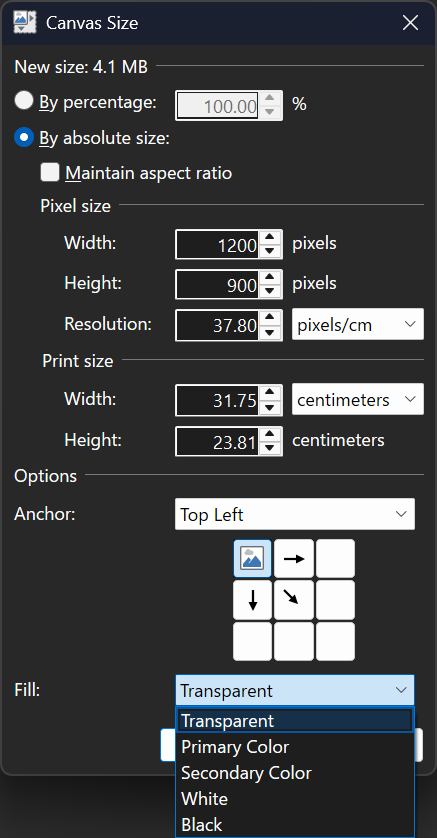
This is a small update that contains fixes for some bugs that were discovered in 5.1, as well as a new Fill option in the Image->Canvas Size dialog. It also adds back the Settings checkbox that allows for disabling overscroll.
Here’s what the updated Canvas Size dialog looks like:
Added the ability to choose the fill color when expanding the image with Image->Canvas Size
Fixed the ability to paste images with transparency from Firefox
Fixed the ability to paste certain types of images with transparency from Microsoft Office applications
Fixed a crash in the Levels adjustment UI due to a rounding error
Fixed some graphical corruption, hang, or crash issues caused by Nahimic A-Volute malware
Reverted the removal of the Settings checkbox that lets you disable overscroll
Fixed effects calling Dispose() on the IServiceProvider when they shouldn’t have been. This affected plugins like CodeLab and Plugin Browser.
Updated the bundled AVIF FileType to version 3.11.0.0 (thanks @null54!)
Download and Install
This build is available via the built-in updater as long as you have opted-in to pre-release updates. From within Settings -> Updates, enable “Also check for pre-release (beta) versions of paint.net” and then click on the Check Now button. You can also use the links below to download an offline installer or portable ZIP.
You can also download the installer here (for any supported CPU and OS), which is also where you can find downloads for offline installers, portable ZIPs, and deployable MSIs.
This is a major update to Paint.NET that includes a raft of technology upgrades including full color management, support for HDR and Wide Color Gamut displays, major improvements to input latency and memory usage, and new and revamped blur effects. In addition, the migration of effects and adjustments to the GPU has been completed, further improving their performance and quality. There are also some new canvas customization settings.
Color Management
Paint.NET finally has full color management support, a feature commonly found in more expensive or complicated imaging software. This ensures that images with embedded color profiles look the way they’re supposed to, as originally captured by a camera or as intended by the author. Most cellphone cameras nowadays will take photos in a wide gamut color space like Display P3, and now those photos will have correct colors, brightness, and saturation when opened in Paint.NET.
Here’s an example using a NASA photograph of the Cosmic Cliffs nebula taken by the James Webb telescope (source). It was captured in infrared and then shifted to the visible light spectrum, and the final result uses the ProPhoto RGB color space so as to utilize a very large spectrum of colors.
(Note that this screenshot’s color is clamped to sRGB. The real image looks even better on an actual HDR or WCG display!)
On the left is how the image looks if the color profile is ignored, as you’d see in Paint.NET 5.0 and earlier. On the right, however, the color profile is being applied in real-time to ensure that everything looks exactly as NASA intended it to.
Color Management is configured in Settings, but there isn’t much that needs to be configured. Windows Advanced Color, enabled by default, is used to provide one-click color management support for your display. When the display is configured for High Dynamic Range (HDR) or Wide Color Gamut (WCG) mode, this enables high bit-depth output (e.g. 10-bits or more) and use of the display’s full color gamut. Windows then ensures accurate and consistent color reproduction, based on what the display itself tells the system via EDID.
Displays configured for Standard Dynamic Range (SDR) do not support Windows Advanced Color, so Paint.NET will run in sRGB mode which ensures consistent color reproduction. Color accuracy is then dependent on the display itself being configured for sRGB color output.
There are instructions to guide you through enabling HDR or WCG for your display over in Windows Display Settings. A status section gives clear information about the state of color management and the display:
Wide Color Gamut mode is new for Windows 11 v24H2, and is essentially an upgraded SDR mode with high bit-depth output support, automatic color management, desktop composition in linear gamma and at FP16 precision, and none of the fussiness of HDR mode. Your monitor does not transition to HDR mode when this is enabled — it is still operating in SDR mode. I highly recommend checking this out if it is available on your system!
The new Image -> Color Profile dialog replaces the Image -> Apply Embedded Color Profile command introduced in 5.0, which was a one-way “destructive” process that converted the image to the sRGB color space and then removed the embedded color profile.
Here you can select from the image’s current color profile, as well as sRGB, Adobe RGB, Display P3, and ProPhoto RGB. Or, you can import a color profile from any *.icc/*.icm file. You can also export the current image’s color profile to a file. I’m planning to revise and expand this dialog as I received feedback about it from the community.
The Convert button will transform the image from its current color profile to the newly selected one. It will still appear the same on-screen, modulo any precision or gamut limitations. You will then be able to edit the image in the new color space defined by the new color profile.
The Assign button will change the color profile but not transform the colors of the image, usually resulting in it looking very different. This is useful when you have an image that has the wrong color profile embedded in it, or where the color profile was removed (such as when using “image crushers” that remove all metadata). Another possible use of this is to assign the Display P3 profile to an image to increase its saturation in a way that many people like (some feel that sRGB is undersaturated when displayed correctly).
GPU effects and plugins will automatically participate in color management unless they opt-out of it. The default WorkingSpaceLinear color context will convert the image to linear gamma in a way that is correct for the image’s color profile. The linearized image is then fed into the effect, which will do its rendering, and then the output of that effect will be converted back to the (non-linearized) color space defined by the image’s color profile. There are also many new APIs for working with colors and color profiles, for both GPU and CPU effects.
I’d like to give a special mention and big thanks to Clinton Ingram (aka @saucecontrol), not only for his PhotoSauce library, but for the hours and hours and hours of time he patiently discussed color management with me on Discord. This dialogue spanned several months, during which I slowly learned to crawl and then eventually walk in this extremely complicated, highly technical, and difficult problem space. This feature would not have been possible without his guidance!
New and Updated Effects
There are two new blur effects, some updates to existing effects, and all* built-in adjustments and effects have now been fully migrated to run on the GPU.
Sketch Blur is a new blur effect unique to Paint.NET. It was adapted from Andrey Akinshin’s (website, twitter) implementation of the P² Quantile Estimator algorithm, which is used to calculate an approximation of the median for a stream of values. You can read more about this effect over here, where I released it as a plugin for 5.0 under the name Median Sketch. It has been further optimized since the release of the plugin, with respect to both performance and quality.
Square Blur is a very simple blur effect that computes the average color of the surrounding square area around each pixel. It could even be considered a very high-performance, but very inaccurate approximation, of the Bokeh Blur effect (which averages out the surrounding circular area).
Median Blur is a rewrite of the old Noise->Median effect. It accomplishes the same thing but uses the GPU for rendering. It is based on @_koh_‘s “Hi-Lo” algorithm which cleverly uses a binary search approach to calculating the median at a specific precision. You can fine-tune the precision (quality) for the result you want to achieve; lower values produce an interesting posterized look. This effect is also Paint.NET’s first foray into the realm of compute shaders, the use of which unlocked more than a 3x performance improvement over the original pixel shader implementation!
Auto-Level, Curves, Levels, Oil Painting, Reduce Noise, Surface Blur, and Outline have also been converted to run on the GPU. This completes the transition to a fully GPU-enabled effect system that was started with last year’s 5.0 release.
ALL of the built-in GPU effects are available for use by GPU effect plugins, where you can use them as part of a larger Direct2D effect graph to do all sorts of sophisticated and creative image processing. I highly recommend checking out CodeLab, which has been updated to support GPU effect development. @BoltBait‘s GPU Accelerated Plugin Pack is also a rich source of useful and interesting GPU effects (and some non-GPU effects!), and has always been an essential addition to Paint.NET. There is also source code (on GitHub) for a set of sample effects that I wrote to illustrate how to work with the GPU effect system, which has now been updated for 5.1. Lastly, there is API documentation for both the built-in GPU effects and the set of built-in and extended Direct2D effects.
In addition, plugins can now make use of the HistogramEffect2 analysis effect. Compared to Direct2D’s built-in HistogramEffect, it is more precise, can calculate up to 4096 bins (vs. 256), and works on any image size (vs. a max of 4096×4096).
* There are actually 2 effects that still do not run on the GPU. The first is Colors->Quantize, whose algorithm isn’t amenable to running on the GPU. The second is Photo->Red Eye Removal, which is actually just a wrapper for a GDI+ effect.
Canvas Customization
The new Canvas settings section has two new settings to let you customize the canvas to your liking. The first is a simple toggle for the drop shadow, and the second is the ability to change the border color (sometimes called the “background” color). In addition, the Transparency Checkerboard Brightness setting has found a new home here.
You might be wondering … why? Well, there are 3 big reasons for adding these, and I’ll list them in decreasing order of importance:
Accessibility. Being able to customize the color of the canvas border is important for some people who are using high-contrast themes. Paint.NET doesn’t really know what to do with these for some of its theme colors, and this allows folks to set a color that is comfortable for their eyes and lighting conditions.
Contrast. Sometimes when you’re editing an image, the drop shadow can trick your eyes into thinking the image is a slightly different size than it actually is. In addition, it can be important to have the ability to change the canvas border color because light bleeds. Whether you realize it or not, the color of the canvas border can slightly and subtly affect your perception of the colors in the image. Changing that allows you to choose a color that is neutral for the images you are working on.
Fun. Some people just want a purple canvas ¯\_(ツ)_/¯ This is a bonus/corollary feature and was not the primary motivation for developing it.
Memory Usage and Input Latency
Last but not least, let’s talk about two important fundamentals: memory usage and input latency (or “lag”). I’ve been chipping away at these little by little over the years, but in 5.1 there have been breakthrough improvements for both of them.
With regard to memory usage, there are two big optimizations that have came through. The first changes the canvas tile cache so that it now moves tiles to the GPU instead of copying them, which saves quite a lot of CPU memory. The second optimization changes how swapchains are handled: instead of 1 per image tab, there are only 2 that are shared between all of the them: one for the visible tab, and a spare to help prevent flickering when switching tabs. The more images you open, the more GPU memory is saved — sometimes several gigabytes! More information on these two optimizations can be found in the release notes for a beta build released back in August.
With regard to input latency, there are two upgrades that greatly improve things here. The first is the adoption of DXGI Flip Model, which is the presentation technology designed by Microsoft to reduce input latency and power consumption for DirectX games and applications. The second is something I call Async Present, which moves the call to IDXGISwapChain::Present() (or IDXGISwapChain1::Present1()) to a dedicated, high-priority background thread. In simple terms, this means that the CPU and GPU work are better parallelized: while the GPU is busy finalizing and pushing pixels over to the display, the CPU (specifically the UI thread) can continue receiving and processing input. This has produced very noticeable improvements to input latency and smoothness on most systems.
Further Reading
If you’d like to learn more about DXGI Flip Model, Windows Advanced Color, Automatic Color Management, etc. then here are some links:
You can purchase it here. This helps fund development and is an alternative or supplement to sending in a donation. In addition, updates happen automatically in the background when you’re not using the app.
If you already have it installed, the update should happen automatically once Microsoft certifies the update, usually within the next day or so. To get the update immediately (once it’s certified), you can follow the instructions listed here.
If you already have it installed, you should be offered the update automatically within the next few days, but you can also get it immediately by going to Settings -> Updates -> Check Now.
Images with embedded color profiles will now be displayed correctly using real-time color conversion built on PhotoSauce and Direct2D.
On HDR and WCG (Wide Color Gamut) displays, Paint.NET will make use of Windows Advanced Color which then enables high bit-depth output and use of the display’s full color gamut. Windows ensures color consistency and accuracy for the whole desktop.
On SDR displays, Paint.NET will operate in sRGB mode and provide consistent color reproduction. If the display is configured for sRGB then colors will also be accurate.
New: Image->Color Profile replaces Image->Apply Embedded Color Profile, and provides the ability to change the image’s color profile via Assign and Convert actions.
New: Fully modernized canvas presentation engine that utilizes DXGI Flip Model, Advanced Color, and Windows.UI.Composition.
Improved: Input latency has been significantly reduced by using DXGI Flip Model and Async Present.
New: Canvas section in Settings provides the ability to customize the canvas brightness, border color, and shadow
Improved the canvas rendering quality by using linear gamma. This improves overall performance and also improves the appearance of selection handles and other canvas UI elements.
Updated: All remaining effects and adjustments have been ported to use the GPU
Newly converted in 5.1 are: Auto-Level, Curves, Levels, Oil Painting, Surface Blur, Reduce Noise, and Outline.
The two exceptions to this are Effects->Color->Quantize and Effects->Photo->Red Eye Removal. The first is not amenable to running on the GPU, and the second is actually a wrapper around an old GDI+ effect.
New:Effects->Blur->Sketch Blur is a new blur effect that gives the appearance of a painting drawn with a coarse brush.
New: Effects->Blur->Median Blur replaces Effects->Noise->Median, and now runs on the GPU with much higher quality.
New:Effects->Blur->Square Blur
Changed: Gaussian Blur and Bokeh Blur now have a “Gamma Boost” slider instead of a “Gamma” property. This is now used to configure the change in gamma rather than specifying the gamma that the image should be assumed to have. The intent is still to provide something of a brightness/highlights amplifier for creative purposes.
Changed: Effects -> Blur -> Motion Blur now uses a Gaussian kernel.
New: Effects->Render->Clouds now has a Colors tab for configuring the colors that are used
Changed: Image->Canvas Size will no longer use the secondary color to fill in new areas for the “background” layer. It will always fill with transparent black (#00000000).
Improved dithering quality when saving an image at 8-bit or lower color depth, and when using Effects->Color->Quantize
New: Updated to use Mica effects in the title bar on Windows 11
Fixed some more scrollbars to respect dark theme (thanks @toe_head2001!)
Fixed: The Move Selected Pixels tool will no longer finish (commit) when toggling layer visibility. This was a workaround for a bug during an early beta of 4.0 that does not seem to be necessary anymore.
Improved: Greatly reduced CPU memory usage by maintaining the tile cache only on the GPU instead of having a copy on the CPU-side as well.
Improved: Significantly reduced GPU memory usage by consolidating down to 2 swapchains that are shared among image tabs, instead of each image tab having its own private swapchain.
Improved: GPU effects now use a smaller tile size on GPUs with less RAM, which should enable faster updates and cancellation response on older GPUs. This also significantly lowers the probability of TDR events, particularly for expensive effects like Median Blur.
Fixed: The Save Configuration dialog sometimes looked like it was having a seizure when panning after zooming (w/ Ctrl + Mouse Wheel)
Fixed: The Line/Curve and Shapes tools would cancel instead of commit (Finish) when pressing ESC too soon after using the arrow keys to move the shape
Improved the performance of the portable release by reducing how often the JSON settings file is flushed.
New: CMYK64 images can now be loaded. Note that CMYK images are always transformed to Adobe RGB.
New: Added the ExponentialScale double property for IndirectUI. The default value is 2.0. It goes along with the UseExponentialScale boolean property.
New: GPU effect plugins can now use compute shaders. Note that this is “raw” support by providing access to the necessary Direct2D interfaces (e.g. ID2D1ComputeInfo).
Deprecated: The classic/legacy effect system has been marked as [Obsolete]. Compiling a classic/legacy effect will produce a compile-time warning along with a message about migrating to the new GpuEffect or BitmapEffect systems. This will be changed to a compile-time error in a future update (either v5.2 or v6.0, whichever is next).
Removed: Settings -> UI -> Show image previews in the Windows taskbar.
Removed: Settings -> UI -> Enable scrolling past the edge of the canvas (overscroll). This is now always enabled.
Updated to use .NET 9.0 (previously this was .NET 7.0)
Updated the minimum OS requirement to Windows 10 v21H2 (previously this was Windows 10 v1809)
Updated the bundled AVIF FileType to version 3.10.0.0. Thanks @null54!
Updated the bundled DDS FileType Plus to version 1.12.11.0. Thanks @null54!
Updated the bundled WebP FileType to version 1.4.0.0. Thanks @null54!
Fixed a few more cases where tool shortcuts and tooltips were not working after certain actions.
Fixed: PNGs are now correctly saved with the “Software” tEXt metadata indicating they were created with Paint.NET.
Improved performance in various parts of the rendering and effects engines: CPU usage has been reduced which permits higher GPU utilization.
Download and Install
This build is available via the built-in updater as long as you have opted-in to pre-release updates. From within Settings -> Updates, enable “Also check for pre-release (beta) versions of paint.net” and then click on the Check Now button. You can also use the links below to download an offline installer or portable ZIP.
You can also download the installer here (for any supported CPU and OS), which is also where you can find downloads for offline installers, portable ZIPs, and deployable MSIs.
This update fixes a few longstanding issues with copy/paste, tool shortcut keys, and tooltips in the Tools window. I’ve also changed the capitalization of “paint.net” to be “Paint.NET.”
Fixed: Copy/Paste has been hardened against short-term intermittent errors and should no longer show spurious error dialogs (e.g. ERROR_ACCESS_DENIED) except in legitimate cases.
Fixed: Certain shortcut keys, especially for switching tools, will no longer stop functioning if a floating window (e.g. Tools) is hidden and then shown by clicking on the button at the top right of the main window.
Fixed: Tooltips in the Tools window will no longer stop functioning if a floating window (e.g. Tools) is hidden and then shown by clicking on the button at the top right of the main window.
Removed the “Scrolling past the edge of the image (overscroll)” checkbox from Settings. This was enabled by default, and now it is always enabled.
Fixed: The installer was occasionally showing an error about an InvalidGraphConfigurationException on some systems
Added a KnownColorSpace API for plugins so they can create IColorContexts and IDeviceColorContexts for the Display P3 and ProPhoto RGB color spaces
Download and Install
This build is available via the built-in updater as long as you have opted-in to pre-release updates. From within Settings -> Updates, enable “Also check for pre-release (beta) versions of paint.net” and then click on the Check Now button. You can also use the links below to download an offline installer or portable ZIP.
You can also download the installer here (for any supported CPU and OS), which is also where you can find downloads for offline installers, portable ZIPs, and deployable MSIs.
Fixed:@BoltBait‘s TextFunFactory plugin was not working on Windows 10 due to the lack of support for IDWriteFontFace6 (despite what Microsoft’s documentation states)
Download and Install
This build is available via the built-in updater as long as you have opted-in to pre-release updates. From within Settings -> Updates, enable “Also check for pre-release (beta) versions of paint.net” and then click on the Check Now button. You can also use the links below to download an offline installer or portable ZIP.
You can also download the installer here (for any supported CPU and OS), which is also where you can find downloads for offline installers, portable ZIPs, and deployable MSIs.
Fixed: Clicking in the color wheel was not setting the active color
Fixed: Retrieving an 8-bit bitmap from the clipboard with IClipboardService.TryGetImageBgra32() was not working
Download and Install
This build is available via the built-in updater as long as you have opted-in to pre-release updates. From within Settings -> Updates, enable “Also check for pre-release (beta) versions of paint.net” and then click on the Check Now button. You can also use the links below to download an offline installer or portable ZIP.
You can also download the installer here (for any supported CPU and OS), which is also where you can find downloads for offline installers, portable ZIPs, and deployable MSIs.
+ Windows: Windows Explorer context menu and tooltip on Windows 11 (thanks to cjee21)
+ Windows: native ARM64 library for an overall improved performance (thanks to cjee21)
+ Windows: implement signing of uninstaller (thanks to cjee21)
+ Windows: add legacy stream display option (thanks to cjee21)
+ Windows: ARM64X DLL is available separately
+ AVC: Chroma Subsampling Position
+ PNG: adapt cLLi/mdCv letter case due to spec draft update
+ Windows: enforce more security compilation flags (thanks to cjee21)
x Windows: text output is editable again (thanks to cjee21)
x RIFF: fix bad seek in big chunks e.g. aXML with odd size
x ADM: fix buffer over-read
x FFV1: MaxSliceCount was not in XML or JSON report

 Log in