 Log in
Srinivas Sista
Google Chrome

The Stable channel has been updated to 141.0.7390.122/.123 for Windows and Mac and 141.0.7390.122 for Linux, which will roll out over the coming days/weeks. A full list of changes in this build is available in the Log.
This update does not include any security fixes.
Note that a previous version of these notes incorrectly indicated that V8 Bug 452296415 with CVE-2025-12036 had been fixed in this release. It will be included in Chrome 142
Interested in switching release channels? Find out how here. If you find a new issue, please let us know by filing a bug. The community help forum is also a great place to reach out for help or learn about common issues.
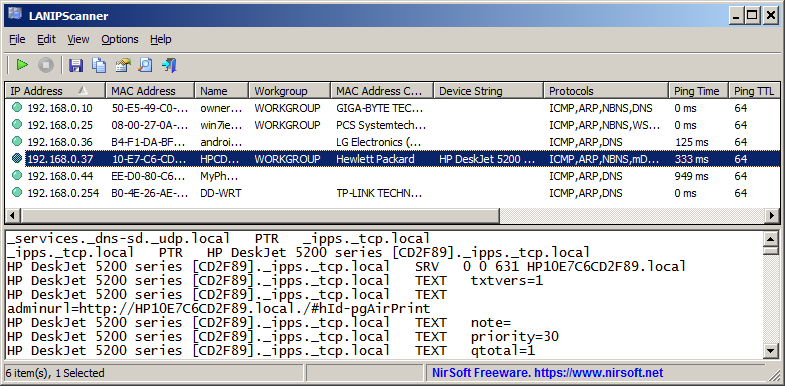
LANIPScanner is a new tool for Windows that scans your network and displays the list of all computers and devices that are currently connected to your network. LANIPScanner uses multiple network protocols to scan your network, including ICMP (ping), ARP, mDNS, DNS, NBNS, SSDP.
For every computer or device that is connected to your network, the following information is displayed (Only if it’s available): IP Address, MAC Address, MAC Address Company, Device Name, Workgroup, Device String, Ping Time, Ping TTL, Device Type, Protocols List, IPv6 Address, IPv6 Link Local Address.
When a device responses to SSDP or mDNS protocol, you can also view the raw data received from the device in the lower pane, by selecting the device in the upper pane.
The LANIPScanner tool works on any version of Windows starting from Windows XP and up to Windows 11. Both 32-bit and 64-bit systems are supported.
You can download the new LANIPScanner tool from this Web page.
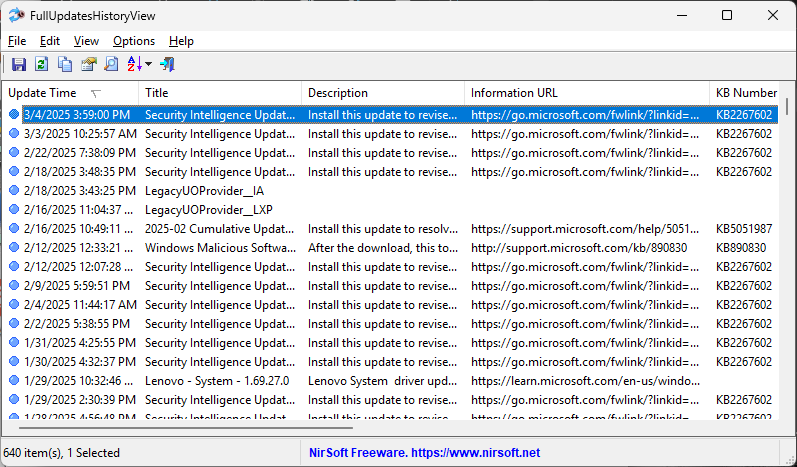
FullUpdatesHistoryView is a new tool for Windows 11 that displays the history of Windows updates on your system. For every Windows update history record, the following information is displayed: Update Time, Title, Description, Information URL, Category, KB Number, Update ID, Provider ID, and more…
This tool uses a new database available only on Windows 11 and the latest versions of Windows 10 ( C:\ProgramData\USOPrivate\UpdateStore\store.db ), so you cannot use it for previous versions of Windows.
For viewing the Windows updates history on older versions of Windows you can use this tool: Windows Updates History Viewer.
The previous tool for viewing the Windows updates history ( Windows Updates History Viewer ) reads the updates by using Windows API or by reading the database file directly from C:\Windows\SoftwareDistribution\DataStore\DataStore.edb, depending on what you choose in the ‘Advanced Options’ window.
However, every time that a major update of Windows 11 is installed (e.g: 23H2, 24H2), all previous updates are deleted from the database by Windows operating system, so the previous tool cannot display the updates installed on your system before the last major update of Windows.
The FullUpdatesHistoryView tool uses the new updates history database (C:\ProgramData\USOPrivate\UpdateStore\store.db ) which keeps all updates history records, without deleting the history on every major update.
You can download the FullUpdatesHistoryView tool from this Web page.
The new version of MultiMonitorTool (version 2.20) allows you to easily set the display scaling of specific monitor from command-line, by using the /SetScale command.
The first parameter of the /SetScale command is the name of the monitor (For example: \\.\DISPLAY1). Like in other commands of MultiMonitorTool, you can also specify the monitor ID or the serial number of the monitor, or ‘Primary’ string for the primary monitor.
The second parameter specifies the scaling value. You can specify the absolute scale value in percent, for example: 100,125,150,175,200,225, and so on…
You can also specify a relative value. In this case – you have to specify ‘0’ to set the recommended display scaling, a positive number (1, 2, 3, …) to set display scaling larger than recommended, or a negative number (-1, -2, -3, …) to set display scaling smaller than recommended.
Here’s some examples for the /SetScale command:
MultiMonitorTool.exe /SetScale “\\.\DISPLAY2” 150
MultiMonitorTool.exe /SetScale “Primary” 125
MultiMonitorTool.exe /SetScale “GSM5B54” 1
You can download the new version of MultiMonitorTool from this Web page.
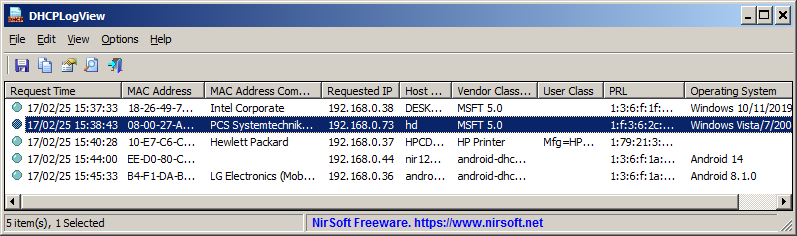
DHCPLogView is a new tool for Windows that monitors the DHCP requests sent by every device connects to your network and displays the information on the main window.
For every device that connects your network the following information is displayed:
MAC Address, MAC Address Company, DHCP Request Time, Requested IP Address, Host Name, Vendor Class ID, Parameter Request List,
and the operating system of the device (For common versions of Windows and Android)
You can also use DHCPLogView in system tray mode and get notification every time that a device sends a DHCP request to connect your network.
You can get more information about the new DHCPLogView tool in this Web page.
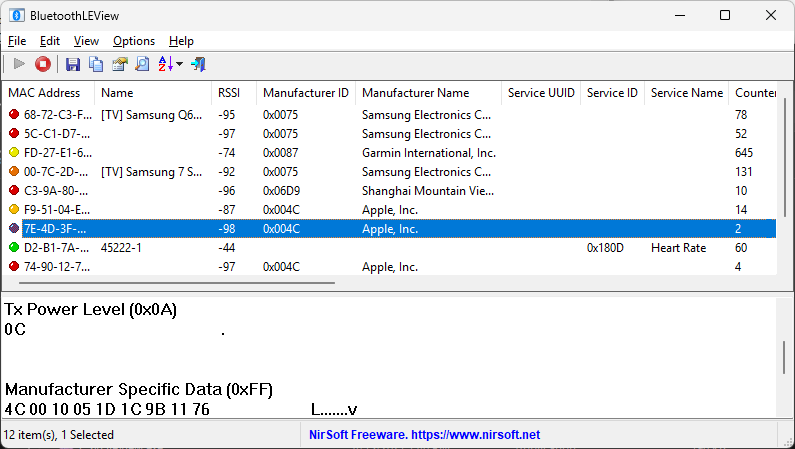
BluetoothLEView is a new tool for Windows 10 and Windows 11 that monitors and displays the activity of Bluetooth Low Energy devices around you.
For every device detected by BluetoothLEView, the following information is displayed (if it’s available): MAC Address, Device Name, Signal Strength In dBm (RSSI), Manufacturer ID, Manufacturer Name, Service ID, Service Name, first and last time that the device was detected, number of times that the device was detected, and more…
In order to run and use the BluetoothLEView tool, you need a computer with Windows 10 or Windows 11, and a Bluetooth dongle or internal Bluetooth adapter that supports Bluetooth Low Energy.
You can download the BluetoothLEView tool from this Web page.
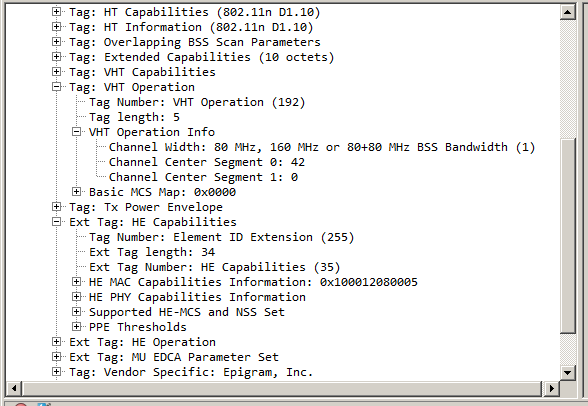
The new version of WifiInfoView (v2.90) allows you to easily export the information of one or more access points into a .pcap capture file.
For every access point that you select, a single beacon frame with all information elements is added to the .pcap file.
After generating the .pcap with WifiInfoView, you can open and analyze the access point information by using the Wireshark software.
Here’s an example for .pcap file generated by WifiInfoView, and then opened in Wireshark:
You can download the new version of WifiInfoView from this Web page.
The new version of NirLauncher package (1.30) allows you to easily add tools into your favorites list, and then view only your favorite tools instead of the entire tools collection.
In order to use this feature, simply select one or more tools in the main window of NirLauncher, and then from the right-click context menu choose ‘Add To Favorites’ to add the selected tools into your favorites list, or ‘Remove From Favorites’ to remove the selected tools from your favorites list.
When you want to view only your favorite tools, go to View -> Show Only Favorites or simply press F2.
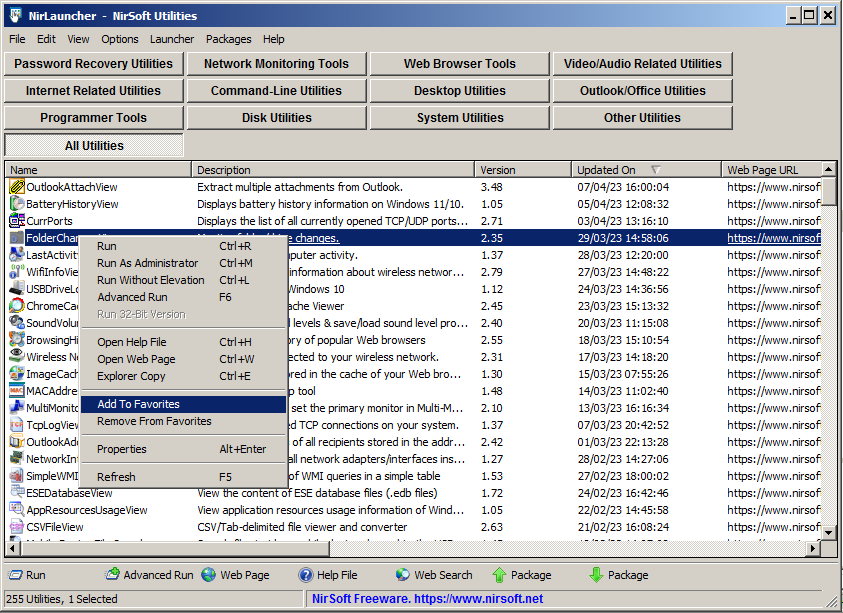
There are also a few more new features in version 1.30 of NirLauncher package. You can find more information about them in the About Window (Help -> About).
BatteryHistoryView is a new tool for Windows 11 and Windows 10 that extracts and displays the battery history information stored in the SRUDB.dat database of Windows.
The battery history includes the following information: Timestamp, Cycle Count, Designed Capacity, Full Charged Capacity, Charge Level, Charge Percent, Active AC Time, CS AC Time, Active DC Time, CS DC Time, Active Discharge Time, CS Discharge Time, Active Energy, CS Energy.
You can extract the battery history from your local computer, from remote computer on your network, and from external drive plugged to your computer.
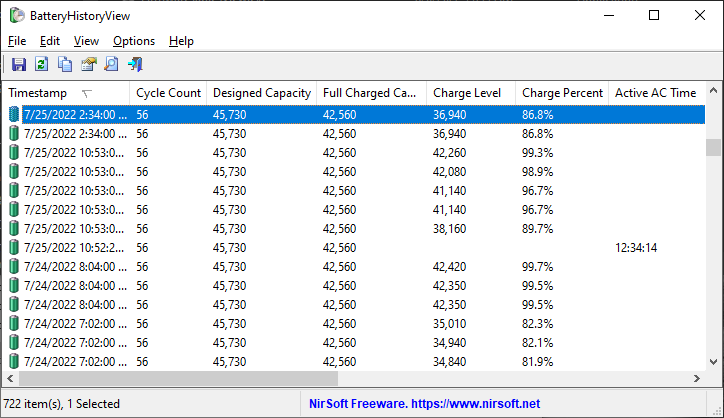
The BatteryHistoryView tool is available to download from this Web page.
AppResourcesUsageView is a new tool that extracts and displays the application resources usage information stored in the SRUDB.dat database of Windows 10 and Windows 11.
For every record of application resources usage, the following information is displayed: Record ID, Timestamp, Application, User, Face Time, Cycle Time (Foreground/Background), Context Switches (Foreground/Background), Bytes Read/Written (Foreground/Background), Read/Write Operations Count (Foreground/Background).
You can extract the application resources usage records from your local computer, from remote computer on your network, and from external drive plugged to your computer.
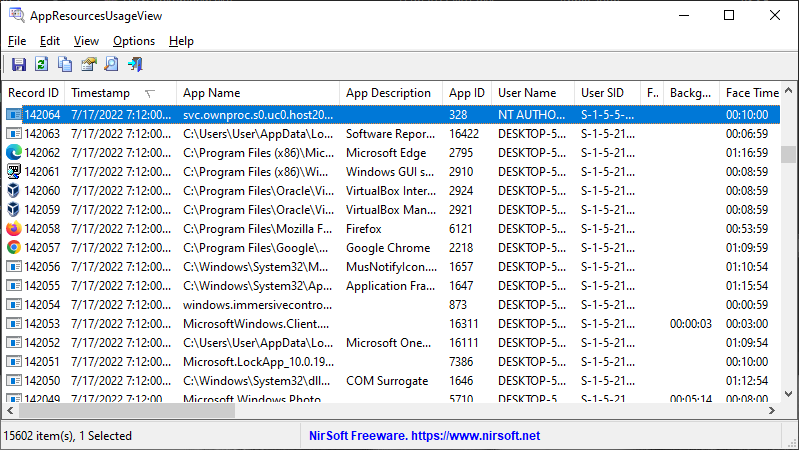
The AppResourcesUsageView tool is available to download from this Web page.
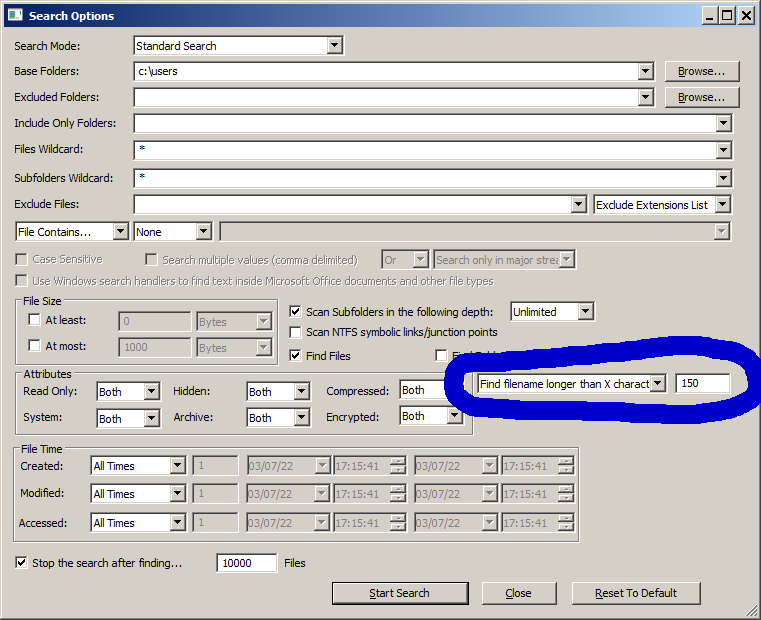
The new version of SearchMyFiles tool (3.20) allows you to easily search files that their filename length or path length is longer than the specified number of characters.
In order to use this feature, simply open the Search Options window, choose one of the following option in the filename length filter combo-box:
‘Find filename longer than X characters’ or ‘Find path longer than X characters’, and then type the desired length value.
After starting the search, SearchMyFiles will display all filenames/paths with length longer than the number you specified.
You can download the SearchMyFiles tool from this Web page.
The Stable channel has been updated to 141.0.7390.107/.108 for Windows and Mac and 141.0.7390.107 for Linux, which will roll out over the coming days/weeks. A full list of changes in this build is available in the Log.
Security Fixes and Rewards
Note: Access to bug details and links may be kept restricted until a majority of users are updated with a fix. We will also retain restrictions if the bug exists in a third party library that other projects similarly depend on, but haven’t yet fixed.
This update includes 1 security fix. Below, we highlight fixes that were contributed by external researchers. Please see the Chrome Security Page for more information.
Interested in switching release channels? Find out how here. If you find a new issue, please let us know by filing a bug. The community help forum is also a great place to reach out for help or learn about common issues.
The Extended Stable channel has been updated to 140.0.7339.249 for Windows and Mac which will roll out over the coming days/weeks.
The Stable channel has been updated to 141.0.7390.76/.77 for Windows and Mac and 141.0.7390.76 for Linux, which will roll out over the coming days/weeks. A full list of changes in this build is available in the Log.
Interested in switching release channels? Find out how here. If you find a new issue, please let us know by filing a bug. The community help forum is also a great place to reach out for help or learn about common issues.
The Stable channel has been updated to 141.0.7390.65/.66 for Windows and Mac and 141.0.7390.65 for Linux, which will roll out over the coming days/weeks. A full list of changes in this build is available in the Log.
Security Fixes and Rewards
Note: Access to bug details and links may be kept restricted until a majority of users are updated with a fix. We will also retain restrictions if the bug exists in a third party library that other projects similarly depend on, but haven’t yet fixed.
Interested in switching release channels? Find out how here. If you find a new issue, please let us know by filing a bug. The community help forum is also a great place to reach out for help or learn about common issues.
The Extended Stable channel has been updated to 140.0.7339.240 for Windows and Mac which will roll out over the coming days/weeks.

We are pleased to announce the latest stable release of Jellyfin, version 10.11.0!
This major release brings many new features, improvements, and bugfixes to improve your Jellyfin experience.
As always, please ensure you stop your Jellyfin server and take a full backup before upgrading!
WARNING: There are very important release notes to review before upgrading! Please find all the details in our blog post on the release.
You can find more details about and discuss this release on our forums.

Note
If someone is asking you to pay money for access to UpSnap binaries, source code, or licenses, you are being scammed.
The official and only trusted source for UpSnap is this repository (and its linked releases).
Do not pay third parties for something that is provided here for free.
Important
If you are using Part-DB it would be helpful if you fill out this short survey on your usage of Part-DB (Google Forms): https://forms.gle/Q15twx3YYq3qCNfe8
Tip
You can help to translate Part-DB to other languages. See this post for more info.
% (#1075)Full Changelog: v2.2.0...v2.2.1

there is a discord server with an @everyone in case of future important updates, such as vulnerabilities (most recently 2025-09-07)
*,-@acct hides a volume from everyone who's logged inxm hooks can see the selected files (thx @carson-coder!) 6c024db 3364448?doc= suffix with just the g permission dbb7870nodupem to prevent dupes from being moved into a volume; the stronger alternative to nodupe which only prevents uploads f55d834?stack 677fd8e
This is the final beta before the stable release of v0.19.0. The main change in this beta is, once again, handling of HDR/DoVi formats.
If you appreciate my work, you can show your support with a donation through Buy Me a Coffee or GitHub sponsors. Your support helps me continue improving and growing the app. Thank you!
Beta versions are not guaranteed to work as expected. We encourage users to create detailed bug reports if any problems arise. Read our blog post for more information about our Android beta programs.
Today, we’re announcing that we will no longer be producing Home Assistant Yellow. Rest assured, it will continue to receive software support far into the future.
I’m Carl, Vice President of Commercial at Nabu Casa, the organization that builds and sells official hardware for the Open Home Foundation. I couldn’t be more proud of our hardware achievements over the past 12 months, including Voice Preview Edition and Connect ZWA-2 (including its cool new Wi-Fi and PoE experimental firmware).
Home Assistant Yellow was similarly groundbreaking at launch and helped fund Home Assistant’s development. However, for reasons I’ll explain below, the time has come to end production. This means that if you were considering buying a Home Assistant Yellow, you’ll need to act fast, as stock will not be replenished (check the Order Now button on the Home Assistant Yellow page to see if your local retailer still has stock).
Nabu Casa is now exploring what hardware could replace Home Assistant Yellow, so if you have any suggestions on what we should do next, please tell us in the comments! In the meantime, the good news is that there are already plenty of other great ways to run Home Assistant. For example, if you’re looking for hardware that’s both easy to start with and supports the Open Home Foundation, we’d recommend the Home Assistant Green.
There is a long yellow brick road that brought us to today. All the way back in 2021, we announced Home Assistant Yellow (originally called Amber). It included some pretty unique features, including its built-in Zigbee or Thread adapter, optional PoE, and overall expandable approach. As it used the Raspberry Pi Compute Module platform, included GPIO, and had an NVMe slot, there were a lot of different ways you could upgrade it over time (including people being able to upgrade from CM4 to CM5, which was quite the speed bump 🏎️).
It wasn’t all smooth sailing with Home Assistant Yellow. We essentially launched the device in the middle of the great Pi shortage. It definitely complicated things for a time, but it all eventually stabilized. In late 2023, we launched Home Assistant Green, which became the easiest way to get started with Home Assistant. This new product led us to end the sale of Home Assistant Yellow devices that shipped with a CM4 already installed (called the Home Assistant Yellow Standard), which allowed us to focus the product line on the kit versions.
Small, but so much room for activities
Home Assistant Green continues to have strong sales, but Home Assistant Yellow sales have been naturally slowing down, as happens a couple of years into any product’s life. This month, it finally reached the point where it no longer made sense to have another production run, which ultimately pushed us to discontinue Home Assistant Yellow.
Technology changes, and small-form-factor computing has always moved fast. For instance, in the early days of Home Assistant, the community’s de facto recommendation was always the most recent Raspberry Pi device, but we’re seeing more people gravitate towards Mini PCs. We’re now exploring what we could build next for our power users, but we’re still some way off, so don’t wait if you need something today.
As long as it’s possible to run Home Assistant on Yellow, we will continue to provide builds. If you want living proof of this commitment, take our first hardware device: Home Assistant Blue. It ended production in 2022, but still receives new builds of Home Assistant, something that shows no signs of changing for a long time. We continue to streamline and make Home Assistant more efficient, as it’s our goal for you to run it on the hardware you have.
I’d just like to take a moment to thank everyone who bought a Home Assistant Yellow over the years, and for all the great feedback you shared with us. We’re sad to say goodbye to our trusty little expandable powerhouse, but it’s had a good run and we’re super proud of how far we’ve come. Also, we’ll soon be announcing the date of our next hardware product (not a computing device… but something very cool nonetheless), so stay tuned!
