+ MXF: crosscheck of ADM profiles
+ MXF: experimental ARRI UL support, more video streams detected
+ TTML: better support files with SMPTE timecode and ticks instead of frame rate
+ MXF: update UL names from the MXF registry (details view)
x AC-4: Add Bitstream level and Presentation level, fix
x MXF: Fix infinite loop in some ARRI files
x ADM: fix tagList related false positive conformance errors
x WAV: fix buggy non word aligned files check with 4 GB+ files
x I2452, PAC: skip '\0' prefix in content
x I2451, TTML: change timecode output "format" from TTML style to classic timecode
The Stable channel has been updated to 142.0.7444.134/.135 for Windows and 142.0.7444.135 for Mac and 142.0.7444.134 for Linux, which will roll out over the coming days/weeks. A full list of changes in this build is available in theLog.
Security Fixes and Rewards
Note: Access to bug details and links may be kept restricted until a majority of users are updated with a fix. We will also retain restrictions if the bug exists in a third party library that other projects similarly depend on, but haven’t yet fixed.
This update includes 5 security fixes. Below, we highlight fixes that were contributed by external researchers. Please see the Chrome Security Page for more information.
[TBD][443906252] High CVE-2025-12725: Out of bounds write in WebGPU. Reported by Anonymous on 2025-09-09
[TBD][447172715] High CVE-2025-12726: Inappropriate implementation in Views. Reported by Alesandro Ortiz on 2025-09-25
[TBD][454485895] High CVE-2025-12727: Inappropriate implementation in V8. Reported by 303f06e3 on 2025-10-23
[TBD][452392032] Medium CVE-2025-12728: Inappropriate implementation in Omnibox. Reported by Hafiizh on 2025-10-16
[TBD][454354281] Medium CVE-2025-12729: Inappropriate implementation in Omnibox. Reported by Khalil Zhani on 2025-10-23
We would also like to thank all security researchers that worked with us during the development cycle to prevent security bugs from ever reaching the stable channel.
Interested in switching release channels? Find out how here. If you find a new issue, please let us know by filing a bug. The community help forum is also a great place to reach out for help or learn about common issues.
Hiding of capture settings panel is now remembered.
Automatic subtitle search now only uses OpenSubtitles if you have configured an account for it. Because we have a limited daily download quota, this choice was made to reduce unnecessary downloads.
Added two new toolbar skins.
Fixes:
Improved long path support for loading external subtitles.
The Chrome team is delighted to announce the promotion of Chrome 142 to the stable channel for Windows, Mac and Linux. This will roll out over the coming days/weeks.
Chrome 142.0.7444.59 (Linux) 142.0.7444.59/60 Windows and 142.0.7444.60 Mac contains a number of fixes and improvements -- a list of changes is available in the log. Watch out for upcomingChromeand Chromium blog posts about new features and big efforts delivered in 142.
Security Fixes and Rewards
Note: Access to bug details and links may be kept restricted until a majority of users are updated with a fix. We will also retain restrictions if the bug exists in a third party library that other projects similarly depend on, but haven’t yet fixed.
This update includes 20 security fixes. Below, we highlight fixes that were contributed by external researchers. Please see the Chrome Security Page for more information.
[$50000][447613211] High CVE-2025-12428: Type Confusion in V8. Reported by Man Yue Mo of GitHub Security Lab on 2025-09-26
[$50000][450618029] High CVE-2025-12429: Inappropriate implementation in V8. Reported by Aorui Zhang on 2025-10-10
[$10000][442860743] High CVE-2025-12430: Object lifecycle issue in Media. Reported by round.about on 2025-09-04
[$4000][436887350] High CVE-2025-12431: Inappropriate implementation in Extensions. Reported by Alesandro Ortiz on 2025-08-06
[N/A][439522866] High CVE-2025-12432: Race in V8. Reported by Google Big Sleep on 2025-08-18
[N/A][449760249] High CVE-2025-12433: Inappropriate implementation in V8. Reported by Google Big Sleep on 2025-10-07
[N/A][452296415] High CVE-2025-12036: Inappropriate implementation in V8. Reported by Google Big Sleep on 2025-10-15
[$3000][337356054] Medium CVE-2025-12434: Race in Storage. Reported by Lijo A.T on 2024-04-27
[$3000][446463993] Medium CVE-2025-12435: Incorrect security UI in Omnibox. Reported by Hafiizh on 2025-09-21
[$2000][40054742] Medium CVE-2025-12436: Policy bypass in Extensions. Reported by Luan Herrera (@lbherrera_) on 2021-02-08
[$2000][446294487] Medium CVE-2025-12437: Use after free in PageInfo. Reported by Umar Farooq on 2025-09-20
[$1000][433027577] Medium CVE-2025-12438: Use after free in Ozone. Reported by Wei Yuan of MoyunSec VLab on 2025-07-20
[TBD][382234536] Medium CVE-2025-12439: Inappropriate implementation in App-Bound Encryption. Reported by Ari Novick on 2024-12-04
[N/A][430555440] Low CVE-2025-12440: Inappropriate implementation in Autofill. Reported by Khalil Zhani on 2025-07-09
[N/A][444049512] Medium CVE-2025-12441: Out of bounds read in V8. Reported by Google Big Sleep on 2025-09-10
[TBD][452071845] Medium CVE-2025-12443: Out of bounds read in WebXR. Reported by Aisle Research on 2025-10-15
[$3000][390571618] Low CVE-2025-12444: Incorrect security UI in Fullscreen UI. Reported by syrf on 2025-01-18
[$1000][428397712] Low CVE-2025-12445: Policy bypass in Extensions. Reported by Thomas Greiner on 2025-06-29
[$1000][444932667] Low CVE-2025-12446: Incorrect security UI in SplitView. Reported by Hafiizh on 2025-09-14
[TBD][442636157] Low CVE-2025-12447: Incorrect security UI in Omnibox. Reported by Khalil Zhani on 2025-09-03
We would also like to thank all security researchers that worked with us during the development cycle to prevent security bugs from ever reaching the stable channel.
As usual, our ongoing internal security work was responsible for a wide range of fixes:
[455996292]Various fixes from internal audits, fuzzing and other initiatives
Interested in switching release channels? Find out how here. If you find a new issue, please let us know by filing a bug. The community help forum is also a great place to reach out for help or learn about common issues.
Fixed an issue where the list of available locales in about:settings contained more locales than were downloaded or currently supported. (Bug 1994642)
Fixed an issue where using the keyboard to open the Unified Search dropdown was inconsistent. The dropdown now expands properly, allowing users to select a search engine using the keyboard. (Bug 1979826)
Fixed an issue where curated photo collections on Microsoft OneDrive's Photos “For You” page failed to load, showing a gray screen instead of content. Collections now display as expected. (Bug 1986533)
Fixed a startup crash affecting Windows users with Avast or other security software installed. (Bug 1992678)
Fixed an issue on macOS where the emoji picker shortcut and menu entry stopped working after switching between apps. (Bug 1980815)
Fixed an issue on macOS where dragging images from Firefox into third-party apps like Preview could fail or behave unexpectedly. (Bug 1995345)
Fixed performance and video playback issues on macOS 26 (Tahoe) that occurred when the system was under heavy load. (Bug 1995638)
Fixed a browser hang on macOS 26 (Tahoe) that could occur when bookmark folders contained loops or repeated references to themselves. (Bug 1995621)
vMix 29 is now available for download via the vMix.com download page! Good news for those who purchased vMix after January 2023, as it’s a free update! vMix Max users can also update today for free to get all of the new vMix 29 features. If you like what you see and want to update to vMix 29 from an older version, it’s just $60 USD for an additional 12 months of updates. To get up to date with the new vMix 29 features, here’s a short video from current vMix CEO Martin “Spud” Sinclair.
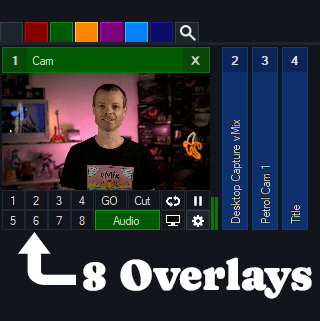
8 Overlays and 8 Stingers
vMix 29 will now have double the amount of Overlays and Stingers as previous versions! Now you’ll be able to overlay to your heart’s content. With the Overlay support for Mixes in vMix 28, the extra 4 Overlays will give you plenty of options!
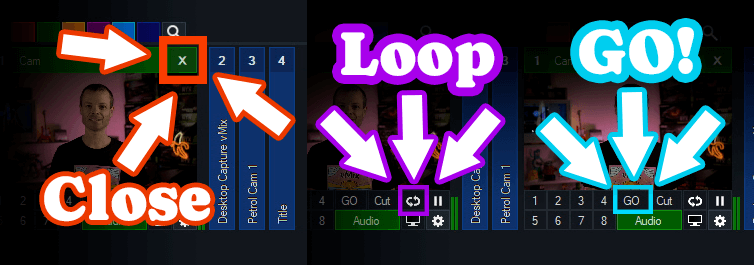
There has also been a few interface changes on inputs with some new icons, positions and functions.
Close– To close an input now you just need to click the X in the top right.
Loop– To loop a video click the loop icon.
GO– The GO button replaces Quick Play. By default it functions the same as the Quick Play transition but also adds full shortcut functionality for each GO button on every input!
Open Media Transport
vMix 29 has full support for input and output of Open Media Transport (OMT). OMT is an open-source protocol for high-quality and low latency local network video. For more information head to openmediatransport.org.
Replay Updates
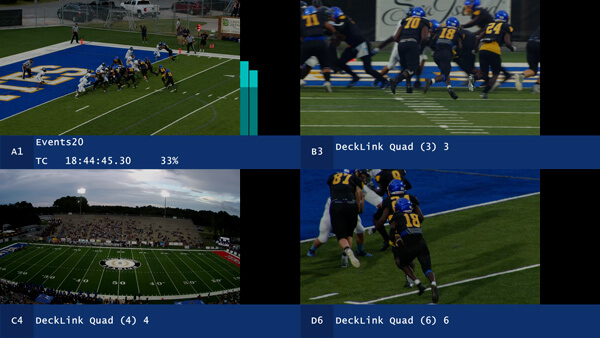
Quad View mode has been added to Replay that allows viewing four separate camera angles on screen at a time in high quality (via Replay MultiView). This provides a simple way to review and compare content on one screen from multiple angles. Adding multiple tags to events is also available in vMix 29, along with dragging and dropping events to list folders.
New Replay performance updates have been added such as-
CPU usage for both recording and playback substantially reduced by up to 50%
New Configure Storage option allows selecting separate drives for individual camera recordings.
Audio
Five new audio bus configurations available: AB, CD, DE, ABCD and DEFG
All audio bus options now selectable for MultiCorder in addition to Master
Triggers
New OnCountdownTime and OnCountdownRemaining, allow triggers on Title countdowns.
Try vMix for free!
For a Free 60-Day Trial of vMix Pro, just head to the download page on vMix.com. You just need to download, install and enter your email address where it says Register for a fully functional 60 day trial.
vMix 29 will be a free update for those that have purchased after January 1st 2023 or if you’ve purchased a 12 month upgrade…in the last 12 months. vMix Max users can update for free.
If you’re outside of this window and would like to update, you can do so via our Upgrades Page. It’s $60 USD for an additional 12 months of updates. If you don’t want to, you can continue to use your current vMix version.
For more information about vMix, just head to vMix.com!
Follow Us!
If you’d like to keep up to date with new updates, live streams, trade shows and tutorial videos check us out on-
Fixed a crash on macOS when attempting to login with service integrations [PatTheMav]
Fixed an issue on macOS where Syphon Client sources could be blank/transparent [gxalpha]
32.0.1 Hotfix Changes
Fixed a possible crash in 32.0.0 on Windows when opening source properties [wanhongqing123]
Fixed an issue in 32.0.0 where browser sources would break after switching scenes [tytan652]
This issue may also have caused increased resource usage.
Fixed an issue in 32.0.0 with the audio deduplication logic when an Audio Capture Source device is also used for monitoring [pkviet]
Fixed an issue in 32.0.0 where Multitrack Video settings were unavailable to Custom Services [PatTheMav]
32.0 New Features
Added a basic plugin manager [FiniteSingularity/PatTheMav/Warchamp7]
Added opt-in automatic crash log upload for Windows and macOS [PatTheMav/Warchamp7]
Added Voice Activity Detection (VAD) to NVIDIA RTX Audio Effects, which improves noise suppression for speech, as well as several optimizations to NVIDIA Effects [pkviet]
Added chair removal option for NVIDIA RTX Background Removal, allowing removal of chairs [pkviet]
Added experimental Metal renderer for Apple Silicon Macs [PatTheMav]
Added Hybrid MOV support [derrod]
Brings ProRes support on macOS and a more widely supported HEVC/H.264 + PCM audio option to all platforms
32.0 Changes
OBS Studio will no longer load plugins built for a newer release of OBS to prevent future compatibility issues [norihiro]
Added custom OBS widgets in preparation for larger UI updates [derrod/gxalpha/Warchamp7]
Added preparations for Metal renderer (stay tuned!) [PatTheMav]
Changed default bitrate from 2500 to 6000 Kbps [notr1ch]
Changed the crash sentinel file location to its own subdirectory [PatTheMav]
Improved audio deduplication logic to cover more cases of nested scenes, groups, and multiple canvases [pkviet]
Prevent audio duplication when sources are set to "Monitor and Output" while the monitoring device is also being captured [pkviet]
Updated the default settings for AMD encoders [rhutsAMD]
Improved accuracy of chapter markers in Hybrid MP4/MOV [derrod]
Re-hid the cursor in edit fields on macOS [gxalpha]
Improved format selection for PipeWire video capture [tytan652]
Removed workarounds to prevent loading Qt 5 based plugins [RytoEX]
Removed the --disable-shutdown-check launch flag [PatTheMav]
Hybrid MP4/MOV is now out of beta and has been made the default output format for new profiles [derrod]
32.0 Bug Fixes
Potentially fixed a rare crash on macOS when moving or resizing the OBS window [PatTheMav]
Fixed a crash with SRT when using an invalid URL [pkviet]
Fixed a crash when setting non-default pkt_size with SRT [pkviet]
Fixed a crash in Media Source when playback starts with certain video files [howellrl]
Fixed a UI deadlock when opening source properties from the Sources list when the Windows setting 'Snap mouse to default button in dialog boxes' was enabled by adding a 200ms delay before creating the properties window [Warchamp7]
Fixed a memory leak when trying to output Hybrid MP4 to a non-writeable location [norihiro]
Fixed rare occurrence of multiview becoming blank [norihiro]
The Stable channel has been updated to 142.0.7390.52 for Windows and 142.0.7390.53 for Mac as part of our early stable release to a small percentage of users. A full list of changes in this build is available in thelog.
You can find more details about early Stable releases here.
Interested in switching release channels? Find out how here. If you find a new issue, please let us know by filing a bug. The community help forum is also a great place to reach out for help or learn about common issues.
The Stable channel has been updated to 141.0.7390.122/.123 for Windows and Mac and 141.0.7390.122 for Linux, which will roll out over the coming days/weeks. A full list of changes in this build is available in theLog.
2025-10-24: Updated to correct the security bugs included in the release
Security Fixes and Rewards
Note: Access to bug details and links may be kept restricted until a majority of users are updated with a fix. We will also retain restrictions if the bug exists in a third party library that other projects similarly depend on, but haven’t yet fixed.
This update does not include any security fixes.
Note that a previous version of these notes incorrectly indicated that V8 Bug 452296415with CVE-2025-12036 had been fixed in this release. It will be included in Chrome 142
Interested in switching release channels? Find out how here. If you find a new issue, please let us know by filing a bug. The community help forum is also a great place to reach out for help or learn about common issues.
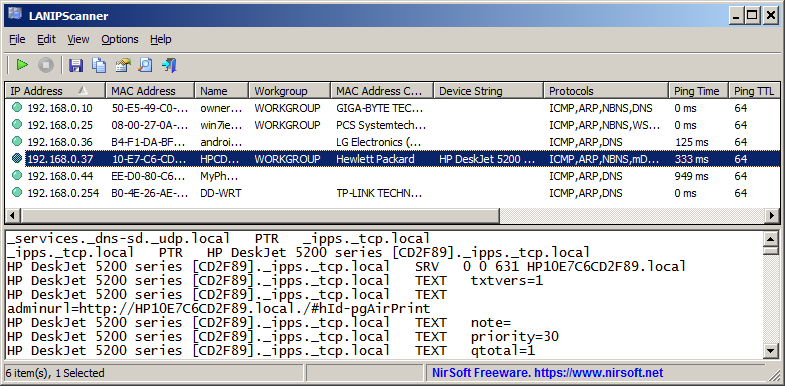
LANIPScanner is a new tool for Windows that scans your network and displays the list of all computers and devices that are currently connected to your network. LANIPScanner uses multiple network protocols to scan your network, including ICMP (ping), ARP, mDNS, DNS, NBNS, SSDP.
For every computer or device that is connected to your network, the following information is displayed (Only if it’s available): IP Address, MAC Address, MAC Address Company, Device Name, Workgroup, Device String, Ping Time, Ping TTL, Device Type, Protocols List, IPv6 Address, IPv6 Link Local Address.
When a device responses to SSDP or mDNS protocol, you can also view the raw data received from the device in the lower pane, by selecting the device in the upper pane.
The LANIPScanner tool works on any version of Windows starting from Windows XP and up to Windows 11. Both 32-bit and 64-bit systems are supported.
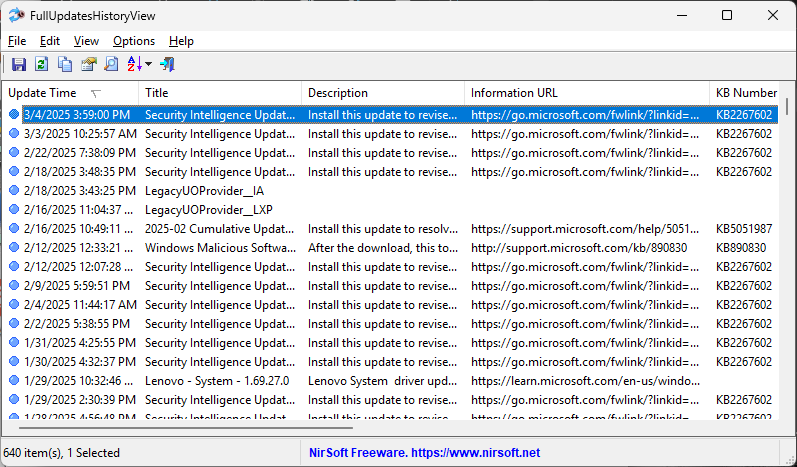
FullUpdatesHistoryView is a new tool for Windows 11 that displays the history of Windows updates on your system. For every Windows update history record, the following information is displayed: Update Time, Title, Description, Information URL, Category, KB Number, Update ID, Provider ID, and more…
This tool uses a new database available only on Windows 11 and the latest versions of Windows 10 ( C:\ProgramData\USOPrivate\UpdateStore\store.db ), so you cannot use it for previous versions of Windows.
For viewing the Windows updates history on older versions of Windows you can use this tool: Windows Updates History Viewer.
FullUpdatesHistoryView vs Previous Tool
The previous tool for viewing the Windows updates history ( Windows Updates History Viewer ) reads the updates by using Windows API or by reading the database file directly from C:\Windows\SoftwareDistribution\DataStore\DataStore.edb, depending on what you choose in the ‘Advanced Options’ window.
However, every time that a major update of Windows 11 is installed (e.g: 23H2, 24H2), all previous updates are deleted from the database by Windows operating system, so the previous tool cannot display the updates installed on your system before the last major update of Windows.
The FullUpdatesHistoryView tool uses the new updates history database (C:\ProgramData\USOPrivate\UpdateStore\store.db ) which keeps all updates history records, without deleting the history on every major update.
The new version of MultiMonitorTool (version 2.20) allows you to easily set the display scaling of specific monitor from command-line, by using the /SetScale command.
The first parameter of the /SetScale command is the name of the monitor (For example: \\.\DISPLAY1). Like in other commands of MultiMonitorTool, you can also specify the monitor ID or the serial number of the monitor, or ‘Primary’ string for the primary monitor.
The second parameter specifies the scaling value. You can specify the absolute scale value in percent, for example: 100,125,150,175,200,225, and so on…
You can also specify a relative value. In this case – you have to specify ‘0’ to set the recommended display scaling, a positive number (1, 2, 3, …) to set display scaling larger than recommended, or a negative number (-1, -2, -3, …) to set display scaling smaller than recommended.
Here’s some examples for the /SetScale command:
MultiMonitorTool.exe /SetScale “\\.\DISPLAY2” 150
MultiMonitorTool.exe /SetScale “Primary” 125
MultiMonitorTool.exe /SetScale “GSM5B54” 1
You can download the new version of MultiMonitorTool from this Web page.
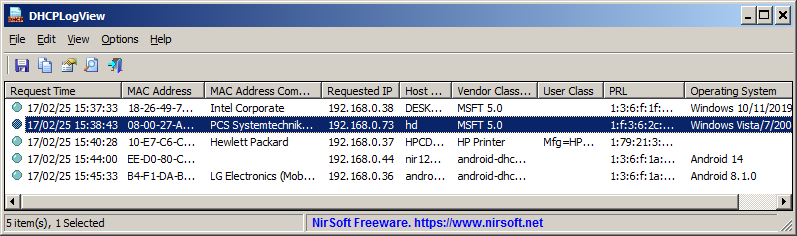
DHCPLogView is a new tool for Windows that monitors the DHCP requests sent by every device connects to your network and displays the information on the main window.
For every device that connects your network the following information is displayed:
MAC Address, MAC Address Company, DHCP Request Time, Requested IP Address, Host Name, Vendor Class ID, Parameter Request List,
and the operating system of the device (For common versions of Windows and Android)
You can also use DHCPLogView in system tray mode and get notification every time that a device sends a DHCP request to connect your network.
You can get more information about the new DHCPLogView tool in this Web page.
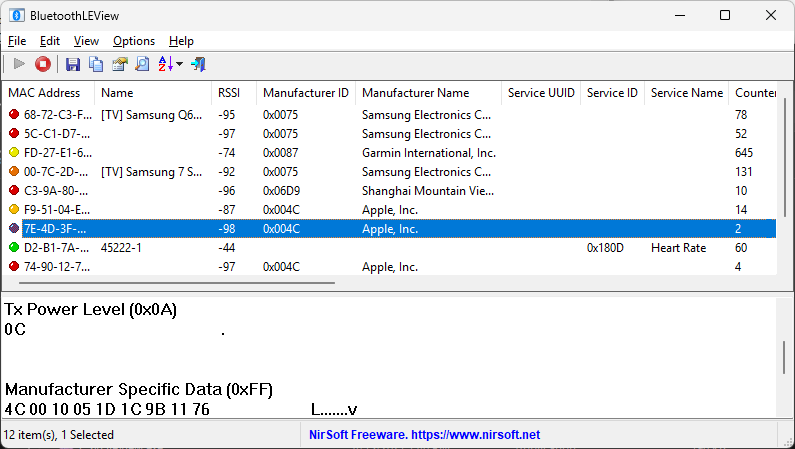
BluetoothLEView is a new tool for Windows 10 and Windows 11 that monitors and displays the activity of Bluetooth Low Energy devices around you.
For every device detected by BluetoothLEView, the following information is displayed (if it’s available): MAC Address, Device Name, Signal Strength In dBm (RSSI), Manufacturer ID, Manufacturer Name, Service ID, Service Name, first and last time that the device was detected, number of times that the device was detected, and more…
In order to run and use the BluetoothLEView tool, you need a computer with Windows 10 or Windows 11, and a Bluetooth dongle or internal Bluetooth adapter that supports Bluetooth Low Energy.
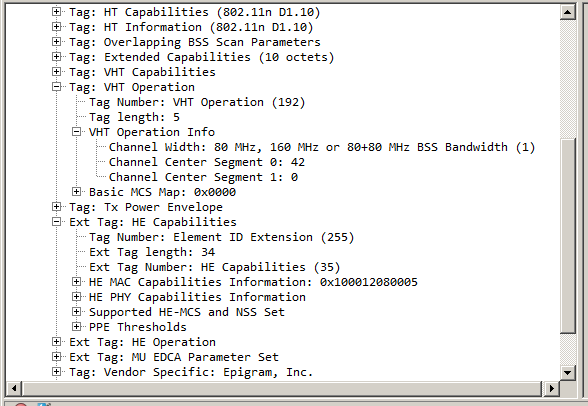
The new version of WifiInfoView (v2.90) allows you to easily export the information of one or more access points into a .pcap capture file.
For every access point that you select, a single beacon frame with all information elements is added to the .pcap file.
After generating the .pcap with WifiInfoView, you can open and analyze the access point information by using the Wireshark software.
Here’s an example for .pcap file generated by WifiInfoView, and then opened in Wireshark:
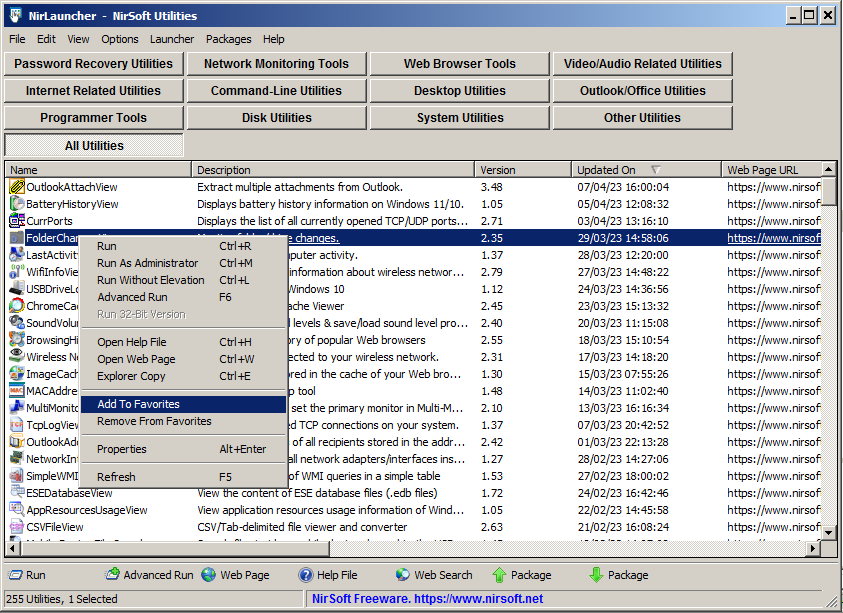
The new version of NirLauncher package (1.30) allows you to easily add tools into your favorites list, and then view only your favorite tools instead of the entire tools collection.
In order to use this feature, simply select one or more tools in the main window of NirLauncher, and then from the right-click context menu choose ‘Add To Favorites’ to add the selected tools into your favorites list, or ‘Remove From Favorites’ to remove the selected tools from your favorites list.
When you want to view only your favorite tools, go to View -> Show Only Favorites or simply press F2.
There are also a few more new features in version 1.30 of NirLauncher package. You can find more information about them in the About Window (Help -> About).
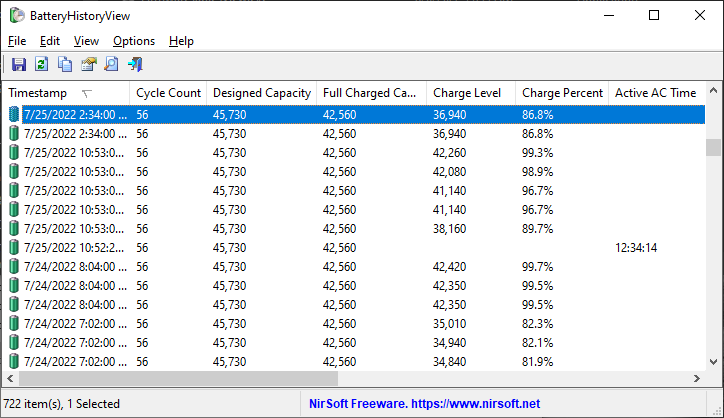
BatteryHistoryView is a new tool for Windows 11 and Windows 10 that extracts and displays the battery history information stored in the SRUDB.dat database of Windows.
The battery history includes the following information: Timestamp, Cycle Count, Designed Capacity, Full Charged Capacity, Charge Level, Charge Percent, Active AC Time, CS AC Time, Active DC Time, CS DC Time, Active Discharge Time, CS Discharge Time, Active Energy, CS Energy.
You can extract the battery history from your local computer, from remote computer on your network, and from external drive plugged to your computer.
The BatteryHistoryView tool is available to download from this Web page.
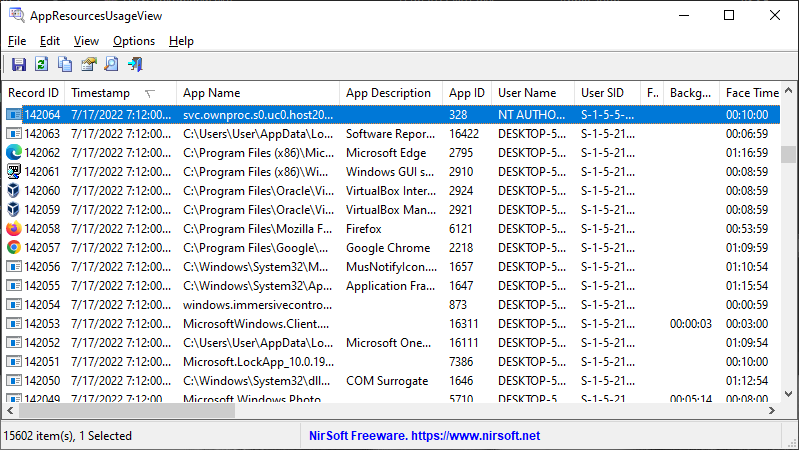
AppResourcesUsageView is a new tool that extracts and displays the application resources usage information stored in the SRUDB.dat database of Windows 10 and Windows 11.
For every record of application resources usage, the following information is displayed: Record ID, Timestamp, Application, User, Face Time, Cycle Time (Foreground/Background), Context Switches (Foreground/Background), Bytes Read/Written (Foreground/Background), Read/Write Operations Count (Foreground/Background).
You can extract the application resources usage records from your local computer, from remote computer on your network, and from external drive plugged to your computer.
The AppResourcesUsageView tool is available to download from this Web page.
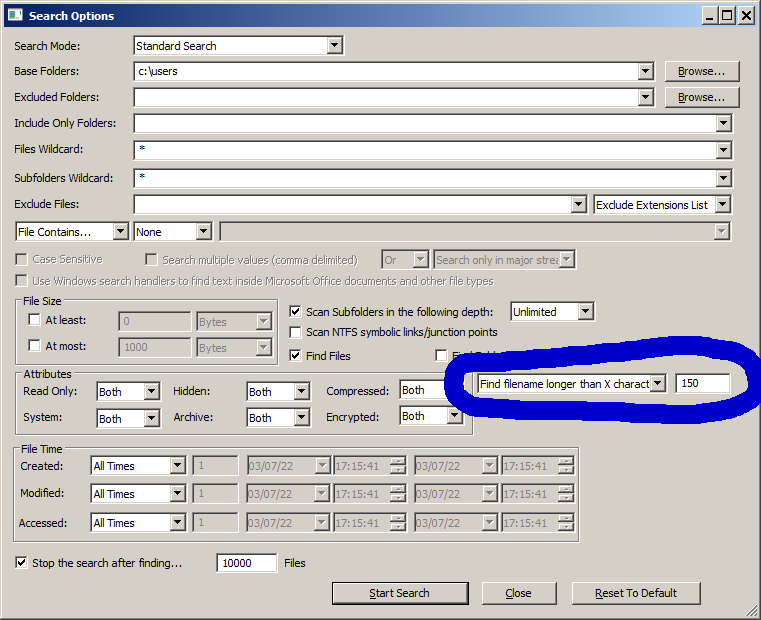
The new version of SearchMyFiles tool (3.20) allows you to easily search files that their filename length or path length is longer than the specified number of characters.
In order to use this feature, simply open the Search Options window, choose one of the following option in the filename length filter combo-box:
‘Find filename longer than X characters’ or ‘Find path longer than X characters’, and then type the desired length value.
After starting the search, SearchMyFiles will display all filenames/paths with length longer than the number you specified.
The Stable channel has been updated to 141.0.7390.107/.108 for Windows and Mac and 141.0.7390.107 for Linux, which will roll out over the coming days/weeks. A full list of changes in this build is available in theLog.
Security Fixes and Rewards
Note: Access to bug details and links may be kept restricted until a majority of users are updated with a fix. We will also retain restrictions if the bug exists in a third party library that other projects similarly depend on, but haven’t yet fixed.
This update includes 1 security fix. Below, we highlight fixes that were contributed by external researchers. Please see the Chrome Security Page for more information.
[$7000][447192722] High CVE-2025-11756: Use after free in Safe Browsing. Reported by asnine on 2025-09-25
We would also like to thank all security researchers that worked with us during the development cycle to prevent security bugs from ever reaching the stable channel.
Interested in switching release channels? Find out how here. If you find a new issue, please let us know by filing a bug. The community help forum is also a great place to reach out for help or learn about common issues.
The Extended Stable channel has been updated to 140.0.7339.249for Windows and Mac which will roll out over the coming days/weeks.
A full list of changes in this build is available in the log. Interested in switching release channels? Find out how here. If you find a new issue, please let us know by filing a bug. The community help forum is also a great place to reach out for help or learn about common issues.
The Stable channel has been updated to 141.0.7390.76/.77 for Windows and Mac and 141.0.7390.76 for Linux, which will roll out over the coming days/weeks. A full list of changes in this build is available in theLog.
Interested in switching release channels? Find out how here. If you find a new issue, please let us know by filing a bug. The community help forum is also a great place to reach out for help or learn about common issues.
The Stable channel has been updated to 141.0.7390.65/.66 for Windows and Mac and 141.0.7390.65 for Linux, which will roll out over the coming days/weeks. A full list of changes in this build is available in theLog.
Security Fixes and Rewards
Note: Access to bug details and links may be kept restricted until a majority of users are updated with a fix. We will also retain restrictions if the bug exists in a third party library that other projects similarly depend on, but haven’t yet fixed.
This update includes 3 security fixes. Below, we highlight fixes that were contributed by external researchers. Please see the Chrome Security Page for more information.
[$5000][443196747] High CVE-2025-11458: Heap buffer overflow in Sync. Reported by raven at KunLun lab on 2025-09-05
[TBD][446722008] High CVE-2025-11460: Use after free in Storage. Reported by Sombra on 2025-09-23
[$3000][441917796] Medium CVE-2025-11211: Out of bounds read in WebCodecs. Reported by Jakob Košir on 2025-08-29
We would also like to thank all security researchers that worked with us during the development cycle to prevent security bugs from ever reaching the stable channel.
Interested in switching release channels? Find out how here. If you find a new issue, please let us know by filing a bug. The community help forum is also a great place to reach out for help or learn about common issues.
The Extended Stable channel has been updated to 140.0.7339.240for Windows and Mac which will roll out over the coming days/weeks.
A full list of changes in this build is available in the log. Interested in switching release channels? Find out how here. If you find a new issue, please let us know by filing a bug. The community help forum is also a great place to reach out for help or learn about common issues.
Focus on just one tab in a group without the clutter. Your active tab now stays in view, keeping things tidy even with the group collapsed.
We’re excited to share another tab groups update that addresses a top request from our community! You can now drag a tab into a collapsed group without automatically expanding it. It’s a quick way to stay organized while minimizing visual distractions.
Profile management, now rolling out gradually to users globally over the next few weeks, helps you protect your privacy and stay focused by separating your online life into distinct profiles for work, school, vacation planning, or whatever you choose. You can name your profiles and customize them with avatars and color themes for easy recognition, then quickly switch between them while keeping bookmarks, tabs, and browsing history completely separate. The new Profiles feature is available for Windows 11, Mac, and Linux users, with Windows 10 support coming soon.
This feature is part of a progressive roll out.
What is a progressive roll out?
Certain new Firefox features are released gradually. This means some users will see the feature before everyone does. This approach helps to get early feedback to catch bugs and improve behavior quickly, meaning more Firefox users overall have a better experience.
You can now close a Picture-in-Picture window without pausing the video. Press Shift + Click on the close button or use Shift + Esc to exit while keeping playback uninterrupted.
Logins stored in the Firefox Password Manager are now encrypted on disk using a modern encryption scheme (AES-256-CBC), replacing the older 3DES-CBC. This change improves local data protection. Logins synced through Firefox Sync remain end-to-end encrypted and already use AES-256-GCM.
Visual search powered by Google Lens
With just a right-click on any image, you can now: ✨ Find similar products, places, or objects ✨ Copy, translate, or search text from images ✨ Get inspiration for learning, travel, or shopping
Look for the new “Search Image with Google Lens” option in your right-click menu (highlighted with a NEW badge at first). This is a desktop-only feature, rolling out worldwide. Your default search engine must be set to Google in order to use it.
This feature is part of a progressive roll out.
What is a progressive roll out?
Certain new Firefox features are released gradually. This means some users will see the feature before everyone does. This approach helps to get early feedback to catch bugs and improve behavior quickly, meaning more Firefox users overall have a better experience.
Perplexity AI Search in Firefox
On desktop, Firefox now includes Perplexity, an AI-powered answer engine built into the browser. Perplexity delivers direct, conversational answers to complex questions, helping you get quick summaries, accurate references, or creative inspiration without digging through multiple sources. It’s rolling out worldwide from the address bar via the unified search button.
This feature is part of a progressive roll out.
What is a progressive roll out?
Certain new Firefox features are released gradually. This means some users will see the feature before everyone does. This approach helps to get early feedback to catch bugs and improve behavior quickly, meaning more Firefox users overall have a better experience.
The following languages are now available for translation:
The following languages have improved translation quality:
Arabic
Bulgarian
Catalan
Chinese (Simplified)
Czech
Dutch
Estonian
Finnish
French
German
Hungarian
Italian
Japanese
Portuguese
Persian
Spanish
Ukrainian
Changed
On Windows, when opening a link from another application, Firefox will only use a window on the current virtual desktop or open a new window if needed.
Firefox now supports the command and commandfor attributes.
Firefox now supports the View Transitions API Level 1. The View Transitions API provides a mechanism for easily creating animated transitions between different website views.
Firefox now supports the upsert proposal. This adds getOrInsert and getOrInsertComputed methods to Map and WeakMap. These methods either return the value associated with a key, or insert a default value, and then return that value, simplifying handling of cases where it's not known if a key is already present in the Map or WeakMap.
Firefox now supports the lock() and unlock() methods of ScreenOrientation interface on Windows tablets and Android devices.
Firefox now supports the resizeModegetUserMedia constraint, allowing developers to crop and downscale video captured from a camera to any resolution they choose.
WebCodecs on Windows now has a batch-encoding path for VideoEncoder, improving performance with higher throughput and lower submission latency due to a larger default batch size.
Gecko-specific CSS2Properties was renamed to CSSStyleProperties, to align with the latest web standard and for better interoperability with other browser engines.
Community Contributions
With the release of Firefox 144, we are pleased to welcome the developers who contributed their first code change to Firefox in this release, 12 of whom were brand new volunteers! Please join us in thanking each of these diligent and enthusiastic individuals, and take a look at their contributions:
Donations are appreciated. There is now a PayPal option.
Changes from 2.5.3 to 2.5.4:
Updates:
Updated LAV Filters to version 0.80-9-gb2240
Updated MPC Video Renderer to version 0.9.15.2463
Updated MediaInfo DLL to version 25.09
Fixes:
A few small fixes and improvements.
OpenSubtitles download error 406
Subtitle downloads from OpenSubtitles may fail depending on time of day. This is due to our daily download quota being exceeded. Current amount of donations is barely enough to pay for the existing quota. So it is unlikely that quota can be increased and situation will get worse over time.
If you create an OpenSubtitles account and configure it in MPC-HC settings then you may be able to bypass the quota.
Options > Subtitles > Misc > Right-click on OpenSubtitles.com > Setup > Fill in username/password
Toolbars
If you want to create you own toolbar design, read this.
Translations
You can help improve and complete translations. See this topic for more info. There are several languages where recently added options have not yet been translated.
Overview of features
A lot of people seem to be unaware of some of the awesome features that have been added to MPC-HC in the past years. Here is a list of useful options and features that everyone should know about:
Play HDR video
This requires using either MPC Video Renderer (MPCVR) or madVR.
These renderers can be selected here:
Options > Playback > Output
With other video renderers, the colors will be wrong!
MPCVR is now included and is the recommended renderer for modern systems. MadVR needs to be installed separately. MPCVR also supports Dolby Vision. MadVR does not.
For optimal performance you should change the hardware decoder to D3D11 in LAV Video Decoder settings when using MPCVR on Windows 10/11, because this renderer uses DirectX11.
The installer of MPC-HC is very basic (and that will not change).
I therefore recommend using K-Lite Codec Pack. That includes MPC-HC and other essential components. It has a very advanced installation that can automatically create file associations, and helps you with easy configuration of important MPC-HC settings.
The Standard version should be sufficient for most people. Use Full version of you like to use MadVR.
Modern GUI Theme (Dark or Light)
Options > Player > User Interface
It is also possible to change the height of the seekbar and size of the toolbar buttons.
Video preview on the seekbar
Options > Player > User Interface > Hover type
Ability to search for subtitles
Press D for manual search.
Or enable automatic search in: Options > Subtitles > Misc
Adjust playback speed
Menu > Play > Playback rate
The buttons in the player that control playback rate take a 2x step by default. This can be customized to smaller values (like 10%):
Options > Playback > Speed step
Adjusting playback speed works best with the internal audio renderer. This also has automatic pitch correction.
Options > Playback > Output > Audio Renderer
MPC-HC can remember playback position, so you can resume from that point later
Options > Player > History
You can quickly seek through a video with Ctrl + Mouse Scrollwheel.
You can jump to next/previous file in a folder by pressing PageUp/PageDown.
You can perform automatic actions at end of file. For example to go to next file or close player.
Options > Playback > After Playback (permanent setting)
Menu > Play > After Playback (for current file only)
A-B repeat
You can loop a segment of a video. Press [ and ] to set start and stop markers.
You can rotate/flip/mirror/stretch/zoom the video
Menu > View > Pan&Scan
This is also easily done with hotkeys (see below).
There are lots of keyboard hotkeys and mouse actions to control the player. They can be customized as well.
Options > Player > Keys
Tip: there is a search box above the table.
You can stream videos directly from Youtube and many other video websites
Put yt-dlp.exe in the MPC-HC installation folder.
Then you can open website URLs in the player: Menu > File > Open File/URL
You can even download those videos: Menu > File > Save a copy
Tip: to be able to download in best quality with yt-dlp, it is recommended to also put ffmpeg.exe in the MPC-HC folder.
Several YDL configuration options are found here: Options > Advanced
This includes an option to specify the location of yt-dlp.exe in case you don't want to put it in MPC-HC folder.
Note 1: You also need to install Microsoft Visual C++ 2010 SP1 Redistributable Package (x86)
Note 2: yt-dlp nightly build (very latest version made daily)
Note 3: yt-dlp win7 compatible build
Besides all these (new) features, there have also been many bugfixes and internal improvements in the player in the past years that give better performance and stability. It also has updated internal codecs. Support was added for CUE sheets, WebVTT subtitles, etc.
Adjusted the timing of the new drag-to-pin interaction cue for better reliability. (Bug 1989344)
Fixed an issue that prevented some extensions from updating via the Add-ons Manager. (Bug 1984724)
Fixed a regression that prevented Firefox View sections from collapsing/expanding as expected. (Bug 1989200)
Addressed a WebExtensions storage issue that could cause Firefox to crash on startup with certain extensions installed. (Bug 1989840)
Fixed an issue where opening an add-on's "Extension settings" from the post-install prompt could break the Customize tab and some keyboard shortcuts until restart. (Bug 1983869)
Reduced long delays when loading certain websites while connected to networks that block UDP connections. (Bug 1980812)
+ Italian, Russian translations update
+ Windows: tweak the ads height for avoiding too big ads in when the window is maximized
+ Android: Migrate to Material Design 3 (thanks to cjee21)
+ ADM: Dolby E profile for emission conformance checker
+ AAC: show when PNS is ued
+ MPEG-TS: map message_id code to the stored message character string
+ AC-4: Enhancement to Presentation Role display
+ AC-4: Add Bitstream level and Presentation level
+ MXF: support of experimental ARRI ULs
+ WavPack: fix duration for long duration
+ WAV: detection of C2PA + display of thumbnails characteristics
+ MasteringDisplay_Luminance: split Min and Max
+ Dolby Vision: Fill colour, transfer & matrix for profile 5 (thanks to cjee21)
+ JPEG: Detect lossless (thanks to cjee21)
+ MPEG-TS: update DVB descriptors and service types for NGVC and NGA (thanks to paulhiggs)
+ Reset MXF status based on footer partition (thanks to ammonriley)
+ VP9: VP9 in MP4 support (thanks to cjee21)
+ SphericalVideo: use StereoMode instead of of SourceCount
+ I2400, Fix crashes with some malformed files
x Android GUI: fix some display issues with the billing and preference windows
x MaxCLL/MaxFALL: value without unit in the XML/JSON output
x Fix infinite loop in UTF8 (e.g. JavaScript) build
x HDR: fix random crash with multiple HDR formats
x PAC: Fix duration/timestamps
x Spherical Video 2 support, fix BF4 support with 0.32 readout, update
Fixed a possible crash in 32.0.0 on Windows when opening source properties [wanhongqing123]
Fixed an issue in 32.0.0 where browser sources would break after switching scenes [tytan652]
This issue may also have caused increased resource usage.
Fixed an issue in 32.0.0 with the audio deduplication logic when an Audio Capture Source device is also used for monitoring [pkviet]
Fixed an issue in 32.0.0 where Multitrack Video settings were unavailable to Custom Services [PatTheMav]
32.0 New Features
Added a basic plugin manager [FiniteSingularity/PatTheMav/Warchamp7]
Added opt-in automatic crash log upload for Windows and macOS [PatTheMav/Warchamp7]
Added Voice Activity Detection (VAD) to NVIDIA RTX Audio Effects, which improves noise suppression for speech, as well as several optimizations to NVIDIA Effects [pkviet]
Added chair removal option for NVIDIA RTX Background Removal, allowing removal of chairs [pkviet]
Added experimental Metal renderer for Apple Silicon Macs [PatTheMav]
Added Hybrid MOV support [derrod]
Brings ProRes support on macOS and a more widely supported HEVC/H.264 + PCM audio option to all platforms
32.0 Changes
OBS Studio will no longer load plugins built for a newer release of OBS to prevent future compatibility issues [norihiro]
Added custom OBS widgets in preparation for larger UI updates [derrod/gxalpha/Warchamp7]
Added preparations for Metal renderer (stay tuned!) [PatTheMav]
Changed default bitrate from 2500 to 6000 Kbps [notr1ch]
Changed the crash sentinel file location to its own subdirectory [PatTheMav]
Improved audio deduplication logic to cover more cases of nested scenes, groups, and multiple canvases [pkviet]
Prevent audio duplication when sources are set to "Monitor and Output" while the monitoring device is also being captured [pkviet]
Updated the default settings for AMD encoders [rhutsAMD]
Improved accuracy of chapter markers in Hybrid MP4/MOV [derrod]
Re-hid the cursor in edit fields on macOS [gxalpha]
Improved format selection for PipeWire video capture [tytan652]
Removed workarounds to prevent loading Qt 5 based plugins [RytoEX]
Removed the --disable-shutdown-check launch flag [PatTheMav]
Hybrid MP4/MOV is now out of beta and has been made the default output format for new profiles [derrod]
32.0 Bug Fixes
Potentially fixed a rare crash on macOS when moving or resizing the OBS window [PatTheMav]
Fixed a crash with SRT when using an invalid URL [pkviet]
Fixed a crash when setting non-default pkt_size with SRT [pkviet]
Fixed a crash in Media Source when playback starts with certain video files [howellrl]
Fixed a UI deadlock when opening source properties from the Sources list when the Windows setting 'Snap mouse to default button in dialog boxes' was enabled by adding a 200ms delay before creating the properties window [Warchamp7]
Fixed a memory leak when trying to output Hybrid MP4 to a non-writeable location [norihiro]
Fixed rare occurrence of multiview becoming blank [norihiro]

 Log in