Adjusted clipping behavior for floating point audio when using volume boost. Should fix quality issues in some cases.
Added warning prompt to boost that informs users about a better solution for the common issue of "voices are too quiet", which is to enable mixing in the audio decoder (and adjust center mix level).
Improved support of .cue files that contain links to multiple audio files.
Fixes:
Fixed a dragging issue with the exclusive mode seekbar.
Fixed an issue with DRM video playback on some sites caused by the general availability rollout of Microsoft's PlayReady hardware decryption DRM support in Firefox 137. PlayReady support is now limited to specific sites while broader compatibility continues to be tested. (Bug 1959827)
Due to recent changes in Chrome on Windows, some users might find that the Firefox migration wizard no longer successfully imports passwords from Chrome or Chrome-based browsers. As a workaround, you can export your passwords as a CSV file from Chrome and then import them into Firefox using either the migration wizard or the Firefox password manager.
Fixed an issue where folder shortcuts on Windows were incorrectly treated as files during file uploads, preventing selecting files within the target folder. (Bug 1958222)
Fixed a crash experienced by Windows users when downloading files with Qihoo 360 Total Security Antivirus software installed. (Bug 1958112)
Due to recent changes in Chrome on Windows, some users might find that the Firefox migration wizard no longer successfully imports passwords from Chrome or Chrome-based browsers. As a workaround, you can export your passwords as a CSV file from Chrome and then import them into Firefox using either the migration wizard or the Firefox password manager.
Tab groups begin rolling out today! Stay productive and organized with less effort by grouping related tabs together. One simple way to create a group is to drag a tab onto another, pause until you see a highlight, then drop to create the group. Groups can be named, color-coded, and are always saved. You can close a group and reopen it later.
This feature is part of a progressive roll out.
What is a progressive roll out?
Certain new Firefox features are released gradually. This means some users will see the feature before everyone does. This approach helps to get early feedback to catch bugs and improve behavior quickly, meaning more Firefox users overall have a better experience.
Firefox Address Bar Refresh 2025 - new ways to search for things new, previously viewed, and more - all from the address bar:
Features
Unified Search Button: A new, easy-to-access button in the address bar helps you switch between search engines and search modes with ease. This feature brings the simplicity of mobile Firefox to your desktop experience.
Search Term Persistence: Now when you refine a search in the address bar, the original term sticks around, making it easier to adjust your queries and find exactly what you're looking for.
Secondary Action Buttons: Suggestions for common Firefox features.
Contextual Search Mode: Firefox detects if you are on a page that has search capability and offers that option for you to directly search with the page engine from the address bar. Use this option at least 2 times and Firefox will suggest adding the search engine to your Firefox.
Contextual Search Engine Options: Use a Contextual Search mode option at least 2 times and Firefox will suggest adding the search engine to your Firefox so that it’s always available to you.
Intuitive Search Keywords: You can access various address bar search modes with convenient and descriptive keywords (e.g. @bookmarks,@tabs,@history, @actions).
This feature is part of a progressive roll out.
What is a progressive roll out?
Certain new Firefox features are released gradually. This means some users will see the feature before everyone does. This approach helps to get early feedback to catch bugs and improve behavior quickly, meaning more Firefox users overall have a better experience.
Firefox now identifies all links in PDFs and turns them into hyperlinks.
Support HEVC playback on Linux.
Now you can sign PDFs without leaving Firefox. Save your signatures to re-use later.
This feature is part of a progressive roll out.
What is a progressive roll out?
Certain new Firefox features are released gradually. This means some users will see the feature before everyone does. This approach helps to get early feedback to catch bugs and improve behavior quickly, meaning more Firefox users overall have a better experience.
You can now use the Firefox address bar as a calculator. Simply type an arithmetic expression and view the result in the address bar drop-down. Clicking on this result will copy it to your clipboard.
This feature is part of a progressive roll out.
What is a progressive roll out?
Certain new Firefox features are released gradually. This means some users will see the feature before everyone does. This approach helps to get early feedback to catch bugs and improve behavior quickly, meaning more Firefox users overall have a better experience.
Support for the hyphenate-limit-chars property is now available. This property enables authors to have greater control over the use of automatic hyphenation.
Unresolved
We are investigating an increase in crashes for Windows users with Qihoo 360 security software. (Fixed in 137.0.1)
Due to recent changes in Chrome on Windows, some users might find that the Firefox migration wizard no longer successfully imports passwords from Chrome or Chrome-based browsers. As a workaround, you can export your passwords as a CSV file from Chrome and then import them into Firefox using either the migration wizard or the Firefox password manager.
Community Contributions
With the release of Firefox 137, we are pleased to welcome the developers who contributed their first code change to Firefox in this release, 17 of whom were brand new volunteers! Please join us in thanking each of these diligent and enthusiastic individuals, and take a look at their contributions:
As a content creator, there’s nothing worse than going live and hearing the sound of silence. It’s disheartening when you’re putting all your effort into a stream, only to find that your audience isn’t engaging as you hoped. Enter AIffirmatron, the ultimate solution to this common live streaming dilemma!
What is AIffirmatron?
AIffirmatron is a revolutionary new tool that uses AI-generated comments to boost engagement during your live streams. It’s the perfect way to make sure your stream never feels lonely again. Whether you’re streaming on Twitch, YouTube, or another platform, AIffirmatron generates positive comments to create an active, lively atmosphere that attracts real viewers to join in on the fun.
How Does AIffirmatron Work?
AIffirmatron integrates seamlessly with vMix Social, providing an easy way to kickstart the interaction during your live broadcasts. The tool offers thousands of AI-generated comments, and you can choose to curate a steady flow or let them roll in continuously. These comments are designed to create the impression that you have an engaged, buzzing audience—encouraging others to comment and join the conversation.
While the comments are mostly positive, the best part about AIffirmatron is its variety. Not only does it include well-crafted, friendly comments, but it also features quirky, unhinged personas for a touch of unpredictability! After all, variety is the spice of life, and AIffirmatron delivers just the right balance of fun and engagement to keep your stream interesting.
Why Should You Use AIffirmatron?
Instant Engagement: Never deal with silence again! AIffirmatron helps create an active, engaging environment from the start.
Curated Comments: Easily manage the comments coming in with a customizable queue. Choose when and how the comments show up to fit your stream’s vibe.
Realistic AI Personas: These aren’t generic bots. AIffirmatron uses intelligent AI personas to keep things real and lively.
Seamless Integration: Fully compatible with vMix Social, making it simple to add to your existing setup.
Is AIffirmatron Right for You?
Whether you’re a professional streamer or just starting, AIffirmatron is the perfect tool to increase your engagement and create a more dynamic live stream. Don’t let your streams fall flat—let AIffirmatron bring the energy and interaction you’ve been craving.
Ready to see your engagement soar? Try AIffirmatron today and watch your live stream transform!
NVIDIA Kepler (600 and 700 series) GPUs are no longer supported for NVENC.
Note
NVIDIA users may need to update their GPU drivers to 551.76 (Windows) / 550.54.14 (Linux) or newer.
Important
The code signing certificate for OBS has been updated. This may impact game capture compatibility with some anti-cheat solutions with this OBS update. If you are a game or anti-cheat developer please see https://obsproject.com/kb/capture-hook-certificate-update for more information.
31.0.3 Hotfix Changes
Fixed a crash in OBS Studio 31.0.2 when attempting to log info about a browser source crash [WizardCM]
Fixed a crash on macOS if OBS used more than 8GB of memory [PatTheMav/jcm93]
Fixed a possible crash if OBS Studio was opened in Studio Mode [PatTheMav/tt2468]
Fixed a potential deadlock with browser sources on OBS shutdown [tt2468]
Fixed an issue with streams not reconnecting correctly after a disconnect [dsaedtler]
Fixed several issues with NVIDIA Background Blur [pkviet]
Fixed an issue where Video Capture Devices on macOS could be unintentionally flipped upside down [jcm93]
Fixed an issue where the Program View resolution would not update correctly [exeldro]
31.0.2 Hotfix Changes
Fixed a crash on Windows when initializing a Video Capture Device source that does not provide a valid frame size [RytoEX]
Fixed a crash on Windows when using NVIDIA Audio Effects filters with certain SDK versions [pkviet]
Fixed a crash on Windows when using obs-websocket with a config path that contained Unicode characters [PatTheMav/tt2468]
Fixed a crash on macOS when initializing a Video Capture Device source in a corrupt state [jcm93]
Fixed an issue on macOS where Python scripting would not work if Python was installed via Homebrew [jcm93]
Fixed an issue on Windows where browser sources would not recognize gamepad input if OBS Studio was not in focus [WizardCM]
Fixed an issue with browser sources where they would occasionally stutter for 250ms [reitowo/WizardCM/PatTheMav/tytan652/pkviet]
Fixed an issue on Linux where browser sources used more CPU than previous versions [tytan652]
Fixed the setting value range for NVENC target quality for AV1 [Bleuzen]
Fixed logging for NVENC lookahead values [DeeDeeG]
Added additional logging for browser sources [WizardCM/tt2468]
31.0.1 Hotfix Changes
Fixed a crash on macOS caused by hand gesture reactions [gxalpha]
Fixed a crash caused by malformed scene collection files [PatTheMav]
Fixed a possible crash on Linux when initializing PipeWire screen sharing [tytan652]
Fixed a possible deadlock and freeze on macOS while exiting OBS [izwb003]
Fixed an issue with inhibiting screensaver on Linux [tytan652]
Fixed an issue where migrated NVIDIA Audio Effects filters would not retain their position in the filter order [pkviet]
Fixed an issue where Scene Collections could have an incorrect base resolution [derrod]
Fixed an issue on Linux with Portable Mode causing the config directory to be in the wrong location [Penwy]
Fixed an issue where an Image Slideshow Source set to Random Playback Mode would stop on the last image [derrod]
Fixed a missing string for an NVENC error message [derrod]
Changed NVENC to not permit invalid custom options [derrod]
31.0 New Features
Added NVIDIA Blur Filter and Background Blur [pkviet]
Added preview scrollbars and zoom/scale indicator [cg2121/Warchamp7]
Added v210 format support for AJA device capture [paulh-aja]
Added Amazon IVS service integration [palana]
Added QSV AV1 Screen Content Coding [thyintel]
Enabled first-party YouTube Chat features [msuman-google]
31.0 Changes
Updated the browser source/docks CEF (Chromium) to version 127 (6533) on all platforms [reitowo/WizardCM/PatTheMav/tytan652/pkviet/kkartaltepe/Lain-B]
Changed scene items to use relative coordinates [derrod]
Existing scene collections will be automatically converted to use relative coordinates if the scene collection has a known output resolution set.
Split NVIDIA Audio Effects from Noise Suppression [pkviet]
Existing filters will be automatically migrated.
Changed the Image Slideshow's Playback Mode property from radio buttons to a dropdown [derrod]
Disabled the (currently unsupported) built-in Automatic Scene Switcher when using Wayland on Linux [tytan652]
Improved error messages for macOS Virtual Camera [jcm93]
Changed Display and Window capture on Windows to not capture the first found display or window [Lain-B]
Changed display and window capture on Linux to not capture implicitly [Lain-B]
Added a warning to Window Capture when trying to capture WinUI 3 applications with BitBlt [qhy040404]
Refactored the NVENC implementation with various improvements [derrod]
SDK 12.2 features, such as split encoding, are now supported.
Additional features from old SDKs are supported:
B-Frames as reference
Target Quality VBR mode (CQVBR)
A custom options field has been added to allow setting more options that don't warrant their own UI elements.
Improved screensaver inhibit functions on Linux in Flatpak [tytan652]
Changed scripts to correctly pass settings to modified callbacks on reload [Penwy]
Removed legacy QSV code for old devices (Haswell or older) [RytoEX]
Removed legacy QSV code for Windows 7 [RytoEX]
Removed default desktop audio device on macOS 13+ [jcm93]
Removed NVIDIA Kepler GPU support for NVENC [derrod]
Removed FTL support [derrod]
Removed legacy migrations from OBS Studio 28.1 and earlier [derrod]
If updating from these older versions, you may wish to update to OBS Studio 30.2 first, and then update to OBS Studio 31.
Removed support for Ubuntu 22.04 [derrod]
Removed legacy YouTube chat [gxalpha]
Blocked TikTok Virtual Camera from loading in OBS due to known issues [notr1ch]
Application settings have been split into "app" configuration and "user" configuration, rather than storing everything in global.ini [PatTheMav]
31.0 Bug Fixes
Fixed two crashes with the QSV encoder on Linux [kkartaltepe]
Fixed a crash with a race condition involving multitrack video output reconnect [dsaedtler]
Fixed two potential crashes in Linux Window Capture [Lain-B]
Fixed a crash on macOS that could occur if an audio device was disconnected [jcm93]
Fixed a crash on Windows when capturing D3D12 games [confusionattack/Lain-B]
Fixed a crash on Linux when importing a scene collection created on Windows [SarenDev]
Fixed a crash on Windows when capturing a Vulkan application [Charlese2]
Fixed a deadlock in MP4 muxer [derrod/notr1ch]
Fixed a deadlock when shutting down muxer [exeldro]
Fixed a potential deadlock when stopping an encoder [derrod]
Fixed a potential memory error and crash in text parser [fzwoch]
Fixed a couple minor memory leaks [pkviet]
Fixed a memory leak in PipeWire plugin [dimtpap]
Fixed a memory leak when playing an HDR media file [tt2468]
Fixed an issue on FreeBSD with handling SSL certificates [emaste]
Fixed an issue with pressed button color in the Rachni theme [shiina424]
Fixed an issue with some missing icons in the System theme [shiina424]
Fixed an SRT listener bug where the socket was not closed properly [pkviet]
Fixed an issue where the current scene collection could be erased to default when trying to switch to a different scene collection that's corrupted or invalid [derrod]
Fixed a buffer overrun in UTF-8 text conversion [derrod]
Fixed an issue that could cause bitrate spikes in QSV CBR [thyintel]
Note: This fix only applies to Lunar Lake or newer except Alder Lake N.
Fixed an issue where the Auto Configuration Wizard could unintentionally enable Enhanced Broadcasting [lexano-ivs]
Fixed issues with the audio clipping indicators displaying incorrectly on volume meters [norihiro]
Fixed an issue causing hotkeys to register inconsistently on macOS [jcm93]
Fixed an issue causing multitrack video output to fail if color format was set to I444 [dsaedtler]
Fixed an issue where Custom CSS in browser sources no longer worked with certain websites (namely YouTube chat) [vvto33]
This is a hotfix for brush rendering to not occasionally have segments that are drawn twice.
The 5.1.6 update was a hotfix for a memory leak, and also updated the bundled JPEG XL plugin to fix a crash on ARM64.
The 5.1.5 update added JPEG XL (*.jxl) support, improved quantization color quality, updated AVIF loading to better handle mapping HDR images to SDR, and fixed some bugs.
Get the Update
There are two releases of Paint.NET:
Microsoft Store release (recommended)
You can purchase it here. This helps fund development and is an alternative or supplement to sending in a donation. In addition, updates happen automatically in the background when you’re not using the app.
If you already have it installed, the update should happen automatically once Microsoft certifies the update, usually within the next day or so. To get the update immediately (once it’s certified), you can follow the instructions listed here.
If you already have it installed, you should be offered the update automatically within the next few days, but you can also get it immediately by going to Settings -> Updates -> Check Now.
New: JPEG XL (*.jxl) images are now supported by way of bundling @null54‘s JpegXLFileType plugin
Fixed the Levels adjustment not honoring the active selection.
Fixed some more mouse cursor issues when completing certain actions with certain tools.
Fixed some keyboard shortcuts in the Adjustments menu not working reliably.
Fixed most cases of tooltips blinking on/off when drawn near the bottom of the screen (thanks @toe_head2001!).
Fixed some new high-DPI scaling issues in toolbar dropdowns.
Improved quantization quality for Effects->Color-Quantize and when saving an image at 8-bit depth and below. This was done by merging octree node colors in linear gamma space.
Fixed some incorrect background text color rendering in the status bar.
Updated the bundled AvifFileType plugin to v3.12.1, which improves conversion from HDR images utilizing the Rec. 2020 PQ color space (thanks @null54).
Updated the bundled WebpFileType plugin to v1.5.0 (thanks @null54!).
+ Italian translation update
+ Windows shell extension: Handle .url files, thanks to cjee21
+ Windows shell extension: Option for separate instance, thanks to cjee21
+ I2218, TTML: detect IMSC Rosetta
+ MXF: support of HDR Vivid Metadata
+ AVS3 Video: support for AVS3 Video according to T/AI 109.2
+ MP4: Display of operating system and hardware e.g. Android or iOS
+ MP4: Handle loci and @xyz metadata
+ MP4: Handle more metadata
+ DAT: recording date & misc
+ 3D Audio: Enable graph also on Linux
x macOS GUI: Fix HTML background color on macOS 11 and earlier
x macOS GUI: Update macOS app icon to match new UI guidelines
x iOS: prevent crash when receiving invalid event
x iOS: Update iOS icon to match new UI guidelines
x iOS: Open from media gallery
x iOS: Prevent out-of-memory when parsing large file
x Android: Fix square adaptive icon
x Android: Update AppIcon
x Qt GUI: several improvements for matching the current windows version, thanks to cjee21
x I1042, Windows GUI: Fix menubar/toolbar visibility
x I2199, MP4: fix moov meta support
x I2213, MXF: better handling of bad LinkedTrackID in descriptors
x I2191, PAC: fix crash with some W16 blocs
x I2223, DVD-Video: fix crash
x AVC: fix GOP computing sometimes half of actual GOP
x AC3: Fix wrong read of mixlevel
x MPEG-4: Handle correctly mett track format
x Fix alignment of text output for CJK languages
Fixed a bug where "Cookies and site data" and "Temporary cached files and pages" were unexpectedly enabled after updating to Firefox 136 for users with "History" and/or "Site settings" set to clear on shutdown in previous versions. (Bug 1952564)
Affected users already on Firefox 136 can disable these settings in "Privacy & Security".
Fixed an issue where the Primary Password prompt appeared in unexpected situations. (Bug 1946121)
Fixed visibility issues with radio buttons on dark backgrounds. (Bug 1951930)
Fixed high CPU usage on Windows when the screen was locked or the laptop lid was closed. (Bug 1924932)
Web Platform
Disabled support for the CookieStore API due to compatibility concerns. The API will be enabled later once the compatibility issues have been addressed.
This is a hotfix for 5.1.5 that fixes a memory leak, and also updates the bundled JPEG XL plugin to fix a crash on ARM64.
The 5.1.5 update added JPEG XL (*.jxl) support, improved quantization color quality, updatesdAVIF loading to better handle mapping HDR images to SDR, and fixed some bugs.
Get the Update
There are two releases of Paint.NET:
Microsoft Store release (recommended)
You can purchase it here. This helps fund development and is an alternative or supplement to sending in a donation. In addition, updates happen automatically in the background when you’re not using the app.
If you already have it installed, the update should happen automatically once Microsoft certifies the update, usually within the next day or so. To get the update immediately (once it’s certified), you can follow the instructions listed here.
If you already have it installed, you should be offered the update automatically within the next few days, but you can also get it immediately by going to Settings -> Updates -> Check Now.
New: JPEG XL (*.jxl) images are now supported by way of bundling @null54‘s JpegXLFileType plugin
Fixed the Levels adjustment not honoring the active selection.
Fixed some more mouse cursor issues when completing certain actions with certain tools.
Fixed some keyboard shortcuts in the Adjustments menu not working reliably.
Fixed most cases of tooltips blinking on/off when drawn near the bottom of the screen (thanks @toe_head2001!).
Fixed some new high-DPI scaling issues in toolbar dropdowns.
Improved quantization quality for Effects->Color-Quantize and when saving an image at 8-bit depth and below. This was done by merging octree node colors in linear gamma space.
Fixed some incorrect background text color rendering in the status bar.
Updated the bundled AvifFileType plugin to v3.12.1, which improves conversion from HDR images utilizing the Rec. 2020 PQ color space (thanks @null54).
Updated the bundled WebpFileType plugin to v1.5.0 (thanks @null54!).
Fixed an issue where a cookie size limit caused problems with website cookie management when using the CookieStore API. This could cause login and other state-related issues. (Bug 1950565)
Fixed an issue where Control/Command+L did not focus the address bar in new windows. (Bug 1947723)
Users clearing "History" and/or "Site settings" on shutdown on previous versions will also have clearing "Cookies and site data" and "Temporary cached files and pages" enabled after updating to Fx136 even if they previously haven't checked these settings. Affected users can go to "Privacy & Security" settings directly after the upgrade and uncheck both boxes to avoid getting logged out. (Bug 1952564)
This update adds JPEG XL (*.jxl) support, improves quantization color quality, updates AVIF loading to better handle mapping HDR images to SDR, and fixes some bugs.
Get the Update
There are two releases of Paint.NET:
Microsoft Store release (recommended)
You can purchase it here. This helps fund development and is an alternative or supplement to sending in a donation. In addition, updates happen automatically in the background when you’re not using the app.
If you already have it installed, the update should happen automatically once Microsoft certifies the update, usually within the next day or so. To get the update immediately (once it’s certified), you can follow the instructions listed here.
If you already have it installed, you should be offered the update automatically within the next few days, but you can also get it immediately by going to Settings -> Updates -> Check Now.
New: JPEG XL (*.jxl) images are now supported by way of bundling @null54‘s JpegXLFileType plugin
Fixed the Levels adjustment not honoring the active selection.
Fixed some more mouse cursor issues when completing certain actions with certain tools.
Fixed some keyboard shortcuts in the Adjustments menu not working reliably.
Fixed most cases of tooltips blinking on/off when drawn near the bottom of the screen (thanks @toe_head2001!).
Fixed some new high-DPI scaling issues in toolbar dropdowns.
Improved quantization quality for Effects->Color-Quantize and when saving an image at 8-bit depth and below. This was done by merging octree node colors in linear gamma space.
Fixed some incorrect background text color rendering in the status bar.
Updated the bundled AvifFileType plugin to v3.12.1, which improves conversion from HDR images utilizing the Rec. 2020 PQ color space (thanks @null54).
Updated the bundled WebpFileType plugin to v1.5.0 (thanks @null54!).
NVIDIA Kepler (600 and 700 series) GPUs are no longer supported for NVENC.
Note
NVIDIA users may need to update their GPU drivers to 551.76 (Windows) / 550.54.14 (Linux) or newer.
Important
The code signing certificate for OBS has been updated. This may impact game capture compatibility with some anti-cheat solutions with this OBS update. If you are a game or anti-cheat developer please see https://obsproject.com/kb/capture-hook-certificate-update for more information.
31.0.2 Hotfix Changes
Fixed a crash on Windows when initializing a Video Capture Device source that does not provide a valid frame size [RytoEX]
Fixed a crash on Windows when using NVIDIA Audio Effects filters with certain SDK versions [pkviet]
Fixed a crash on Windows when using obs-websocket with a config path that contained Unicode characters [PatTheMav/tt2468]
Fixed a crash on macOS when initializing a Video Capture Device source in a corrupt state [jcm93]
Fixed an issue on macOS where Python scripting would not work if Python was installed via Homebrew [jcm93]
Fixed an issue on Windows where browser sources would not recognize gamepad input if OBS Studio was not in focus [WizardCM]
Fixed an issue with browser sources where they would occasionally stutter for 250ms [reitowo/WizardCM/PatTheMav/tytan652/pkviet]
Fixed an issue on Linux where browser sources used more CPU than previous versions [tytan652]
Fixed the setting value range for NVENC target quality for AV1 [Bleuzen]
Fixed logging for NVENC lookahead values [DeeDeeG]
Added additional logging for browser sources [WizardCM/tt2468]
31.0.1 Hotfix Changes
Fixed a crash on macOS caused by hand gesture reactions [gxalpha]
Fixed a crash caused by malformed scene collection files [PatTheMav]
Fixed a possible crash on Linux when initializing PipeWire screen sharing [tytan652]
Fixed a possible deadlock and freeze on macOS while exiting OBS [izwb003]
Fixed an issue with inhibiting screensaver on Linux [tytan652]
Fixed an issue where migrated NVIDIA Audio Effects filters would not retain their position in the filter order [pkviet]
Fixed an issue where Scene Collections could have an incorrect base resolution [derrod]
Fixed an issue on Linux with Portable Mode causing the config directory to be in the wrong location [Penwy]
Fixed an issue where an Image Slideshow Source set to Random Playback Mode would stop on the last image [derrod]
Fixed a missing string for an NVENC error message [derrod]
Changed NVENC to not permit invalid custom options [derrod]
31.0 New Features
Added NVIDIA Blur Filter and Background Blur [pkviet]
Added preview scrollbars and zoom/scale indicator [cg2121/Warchamp7]
Added v210 format support for AJA device capture [paulh-aja]
Added Amazon IVS service integration [palana]
Added QSV AV1 Screen Content Coding [thyintel]
Enabled first-party YouTube Chat features [msuman-google]
31.0 Changes
Updated the browser source/docks CEF (Chromium) to version 127 (6533) on all platforms [reitowo/WizardCM/PatTheMav/tytan652/pkviet/kkartaltepe/Lain-B]
Changed scene items to use relative coordinates [derrod]
Existing scene collections will be automatically converted to use relative coordinates if the scene collection has a known output resolution set.
Split NVIDIA Audio Effects from Noise Suppression [pkviet]
Existing filters will be automatically migrated.
Changed the Image Slideshow's Playback Mode property from radio buttons to a dropdown [derrod]
Disabled the (currently unsupported) built-in Automatic Scene Switcher when using Wayland on Linux [tytan652]
Improved error messages for macOS Virtual Camera [jcm93]
Changed Display and Window capture on Windows to not capture the first found display or window [Lain-B]
Changed display and window capture on Linux to not capture implicitly [Lain-B]
Added a warning to Window Capture when trying to capture WinUI 3 applications with BitBlt [qhy040404]
Refactored the NVENC implementation with various improvements [derrod]
SDK 12.2 features, such as split encoding, are now supported.
Additional features from old SDKs are supported:
B-Frames as reference
Target Quality VBR mode (CQVBR)
A custom options field has been added to allow setting more options that don't warrant their own UI elements.
Improved screensaver inhibit functions on Linux in Flatpak [tytan652]
Changed scripts to correctly pass settings to modified callbacks on reload [Penwy]
Removed legacy QSV code for old devices (Haswell or older) [RytoEX]
Removed legacy QSV code for Windows 7 [RytoEX]
Removed default desktop audio device on macOS 13+ [jcm93]
Removed NVIDIA Kepler GPU support for NVENC [derrod]
Removed FTL support [derrod]
Removed legacy migrations from OBS Studio 28.1 and earlier [derrod]
If updating from these older versions, you may wish to update to OBS Studio 30.2 first, and then update to OBS Studio 31.
Removed support for Ubuntu 22.04 [derrod]
Removed legacy YouTube chat [gxalpha]
Blocked TikTok Virtual Camera from loading in OBS due to known issues [notr1ch]
Application settings have been split into "app" configuration and "user" configuration, rather than storing everything in global.ini [PatTheMav]
31.0 Bug Fixes
Fixed two crashes with the QSV encoder on Linux [kkartaltepe]
Fixed a crash with a race condition involving multitrack video output reconnect [dsaedtler]
Fixed two potential crashes in Linux Window Capture [Lain-B]
Fixed a crash on macOS that could occur if an audio device was disconnected [jcm93]
Fixed a crash on Windows when capturing D3D12 games [confusionattack/Lain-B]
Fixed a crash on Linux when importing a scene collection created on Windows [SarenDev]
Fixed a crash on Windows when capturing a Vulkan application [Charlese2]
Fixed a deadlock in MP4 muxer [derrod/notr1ch]
Fixed a deadlock when shutting down muxer [exeldro]
Fixed a potential deadlock when stopping an encoder [derrod]
Fixed a potential memory error and crash in text parser [fzwoch]
Fixed a couple minor memory leaks [pkviet]
Fixed a memory leak in PipeWire plugin [dimtpap]
Fixed a memory leak when playing an HDR media file [tt2468]
Fixed an issue on FreeBSD with handling SSL certificates [emaste]
Fixed an issue with pressed button color in the Rachni theme [shiina424]
Fixed an issue with some missing icons in the System theme [shiina424]
Fixed an SRT listener bug where the socket was not closed properly [pkviet]
Fixed an issue where the current scene collection could be erased to default when trying to switch to a different scene collection that's corrupted or invalid [derrod]
Fixed a buffer overrun in UTF-8 text conversion [derrod]
Fixed an issue that could cause bitrate spikes in QSV CBR [thyintel]
Note: This fix only applies to Lunar Lake or newer except Alder Lake N.
Fixed an issue where the Auto Configuration Wizard could unintentionally enable Enhanced Broadcasting [lexano-ivs]
Fixed issues with the audio clipping indicators displaying incorrectly on volume meters [norihiro]
Fixed an issue causing hotkeys to register inconsistently on macOS [jcm93]
Fixed an issue causing multitrack video output to fail if color format was set to I444 [dsaedtler]
Fixed an issue where Custom CSS in browser sources no longer worked with certain websites (namely YouTube chat) [vvto33]
vMix 28 is now available for download via the vMix.com download page! If you’re a vMix Max user or purchased vMix from January 2023 then you can update right now for free. Prior to this date, it’s a $60 fee for 12 months of updates if you’d like to experience the new vMix 28 features! For a quick overview of vMix 28, check out this 2-3 minute video brought to you by current vMix CEO, Martin ‘McStreamy’ Sinclair.
Telestrator
A Telestrator has been added to the vMix Web Controller! Easily add illustrations, shapes, and images to a production from any modern web browser. The Web Controller will provide a new low latency video feed that can used to telestrate on! Just add a Telestrator as an overlay or layer on your production for excellent success!
10 shortcuts can also be added to the Telestrator screen so the talent can not only telestrate but control the production as well!!
5 streaming destinations and encoder statistics!
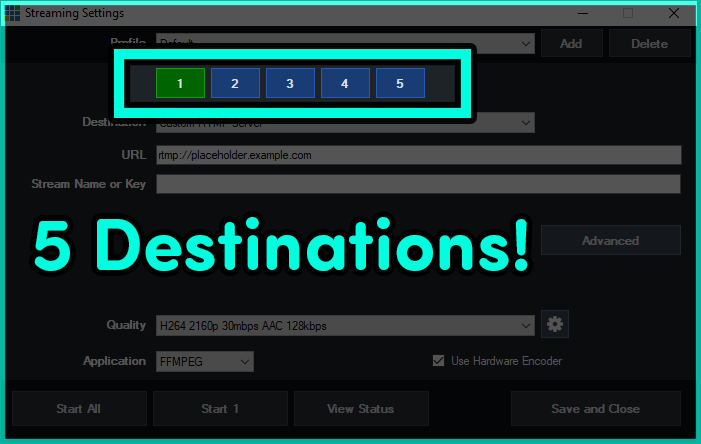
Now that you can use 8 hardware encodes with an NVIDIA GeForce card, vMix has opened up the number of streaming destinations to 5! This leaves another 3 free for other encodes like records! Having trouble keeping up with how many hardware encoders you’re doing? Well vMix now has an Encoder tab in the Statistics section, where you can manage the number of encoders you’re currently using.
New playback triggers!
vMix 28 now features 2 triggers for inputs that have a playback time. For example someone could now perform a function at a particular time during a video playout.
OnPlaybackTime
OnPlaybackTimeRemaining
New MultiView Options!
MultiView2 has been added to vMix, alongside some additional configuration options. This will include the ability to remove preview/output, choose the preview/output mix, select the audio being displayed and the ability to click on the MultiView to move an input to Preview.
Audio Updates
Some exciting new audio updates to make productions a little easier.
New System/Application Audio Input for vMix 28.
Display and interact with all of your buses directly from the Audio Mixer.
The Audio Bus Manager will update live, so you can drive all of your buses with confidence and aplomb.
New option to disable the scrollwheel from adjusting the audio faders.
Mix Inputs can now have their own Overlays and Stingers!
Creating additional Mixes just got taken to a whole new level with vMix 28. You can now create shortcuts to display overlays in a Mix Input and also transition using Stingers!
New Anchor Option in the GT Designer
You can now scale titles using different anchoring options, it doesn’t have to be just Left-Top anymore!
Try vMix for free!
For a Free 60-Day Trial of vMix Pro, just head to the download page on vMix.com. You just need to download, install and enter your email address where it says Register for a fully functional 60 day trial.
vMix 28 will be a free update for those that have purchased after January 1st 2023 or if you’ve purchased a 12 month upgrade…in the last 12 months. vMix Max users can update for free.
If you’re outside of this window and would like to update, you can do so via our Upgrades Page. It’s $60 USD for an additional 12 months of updates. If you don’t want to, you can continue to use your current vMix version.
For more information about vMix, just head to vMix.com!
Follow Us!
If you’d like to keep up to date with new updates, live streams, trade shows and tutorial videos check us out on-
Here’s a full list of all the updates for vMix 28…take a look, you might find something you like!
Web Telestrator and Monitor
Turn any modern browser into a Telestrator device and low latency video monitor!
Supports iPad, iPhone, Android tablets and most devices and computers that can run the latest Safari, Chrome, FireFox or Edge browsers.
Telestrator allows drawing on screen in real-time across multiple devices with basic pen, shape, image and laser pointer tools.
Includes a low latency video preview and up to 10 dedicated shortcut buttons for remote control.
When video preview is assigned to MultiView, touch screen can be used to select inputs when enabled in MultiView settings.
MultiView 2 and MultiView Output enhancements.
A second MultiView Output is now available with its own unique configuration.
MultiView outputs can now just show Inputs, or only a single Input to use as a confidence monitor with audio meters.
MultiView sources can now be configured to select Mix inputs directly.
MultiView audio meter can now be changed from the default Master.
Touchscreen support added via checkbox in settings, also works with Web Telestrator.
Mix Input support for Overlays and Stingers
Overlay and Stinger shortcuts can now be configured to display in one or more Mix inputs instead of or in addition to the Output.
Stingers can also be directly started for a Mix input from its built in transition button.
Mix inputs can now also be assigned directly to an Output.
System and Application Audio Inputs
Capture the audio from Windows, automatically excluding the audio in vMix (auto mix minus).
Additionally, capture the audio from a single Windows application.
Playback Time Triggers
OnPlaybackTime and OnPlaybackRemaining triggers allow configuring actions a few seconds before a video completes, or at multiple key moments throughout playback.
Flatten Layers
Added Flatten Layers checkbox to each input. This combines all the layers together as a single “flat” input when used as a source in other inputs. This is useful for cropping all layers at once for example.
GT Anchor Setting
Control the animation direction and sizing of text objects with the new Anchor setting in GT.
Allows expansion of auto-width text elements from the right instead of the left for example.
Audio Bus/Mixer Enhancements
Right click menu to show all buses on an audio mixer as smaller buttons.
Settings – Audio Outputs checkbox added to Always show all Bus buttons in Audio Mixers
Audio Bus Manager will now update in realtime in response to shortcuts or mouse clicks in main mixer
Settings – Audio checkbox to disable scrollwheel adjusting audio faders
5 Streaming Destinations
Streaming destinations increased from a maximum of 3 to 5.
SRT Updated to version 1.5.4, added IPv6 support and improved reliability and resiliency for bad encoders.
Added initial BlueSky support to vMix Social (Beta)
Support for high frame rates in Decklink cards
Added AJA support for Kona X
Web Browser input custom CSS support
New Encoder tab added to Statistics, provides an overview of all the encoders currently in use. Handy to determine how many NVENC are remaining on GeForce cards.
Added Recording Buffer option to Replay, to provide additional storage buffering to compensate for sustained performance issues on some SSDs
Outputs information added to API XML
Removed the following streaming destinations, due to being discontinued or no longer adequately supported: StreamSpot, TikiLIVE, Twitter If you are using these streaming destinations, refer to the provider’s documentation on using the RTMP streaming option in vMix instead.
Optimised API XML to improve performance during rapid polling.
New OnReplayEventsCompleted trigger
vMix will now indicate if Resizable Bar (ReBAR) is enabled in Settings – Performance. If detected GPU Mem indicator will no longer be limited to just the GPU cache memory.

 Log in